



















- Lo que aprenderás
- Qué es Kadence y para qué está diseñado: ayudar a los equipos a
- Las características principales que hacen que Kadence destaque (y en qué aspectos se queda corto)
- Ventajas y desventajas reales basadas en las opiniones de los usuarios
- Cómo se compara Kadence con otras herramientas de gestión del lugar de trabajo
- Por qué Archie es la mejor alternativa a Kadence
Kadence is a workspace planning and management tool, a popular name in the space. Teams with a fixed office footprint that need to accommodate their workforce will most likely find Kadence on their shortlist.
It has long been known for its ease of use and intuitive features that clearly understand your needs. But over time, their pricing model has changed substantially, and what made them special has turned into a nightmare for teams dealing with a growing headcount and a budget that doesn’t keep up.
Considering alternatives is a wise move in that case.
Five contenders that offer what Kadence offers, but differ in other features, are:
- Archie: A solid alternative for scaling teams, with quick deployment and an easily learnable interface. Starting with a minimum entry cost of $159, independent of headcount, unlike Kadence’s undisclosed pricing
- Tactic: Goes beyond Kadence’s simple utilization tracking by focusing on why people come to the office, with engagement tools aimed at lifting attendance. Tessa AI Assistant works inside Slack and Teams, and desks, rooms, and visitors sit on one platform
- deskbird: Has predictable, transparent, monthly per-user pricing, unlike Kadence’s annual contracts. You can bolt on workplace ticketing, HRIS auto-provisioning, and it accommodates several check-in options.
- OfficeSpace: Goes head-to-head with Kadence on enterprise depth, including asset tracking, work orders, move management, and cost-per-seat analytics. Floor plan uploads are included in the plan you choose, unlike Kadence
- YAROOMS: You get everything in one desk/room booking subscription, unlike Kadence’s WorkOps/SpaceOps split, including room panels, digital signage, parking booking, visitor management, and an MCP server for connecting AI agents.
- Disclosure
Archie is included in this list. We’ve used product information and user feedback to make the comparison thorough, transparent, and fair to every tool.
Before you sit in on demos, mull over the following questions:
- What are some features of Kadence you’d absolutely want in the next office management platform you opt for?
- What pricing model and billing method (per-seat, or minimum base, monthly or annual) can you afford for the next few years?
- Do you have a smart, tech-savvy team that uses AI agents and bots frequently and would prefer booking from the tools themselves?
- How deep do you need your workplace analytics to go, and how frequently will you use them?
If you have your priorities clearly defined, choosing the right Kadence alternative should be fairly easy.
1. Archie
🔶 4.9/5 G2 rating
Archie is a complete workspace management platform and the best alternative to Kadence. It takes a straightforward approach and rolls desk booking, room booking, visitor management, attendance tracking, and analytics into one, reducing the need for multiple subscriptions, integrations and workplace apps.
Archie’s platform is used by 1,000+ organizations across 46 countries.
If you’re a fast-growing team, Archie is a good fit for mid-sized to large hybrid offices and flex spaces with 50–1,000 employees that want to manage desk and room bookings without juggling multiple subscriptions or disrupting collaboration time.
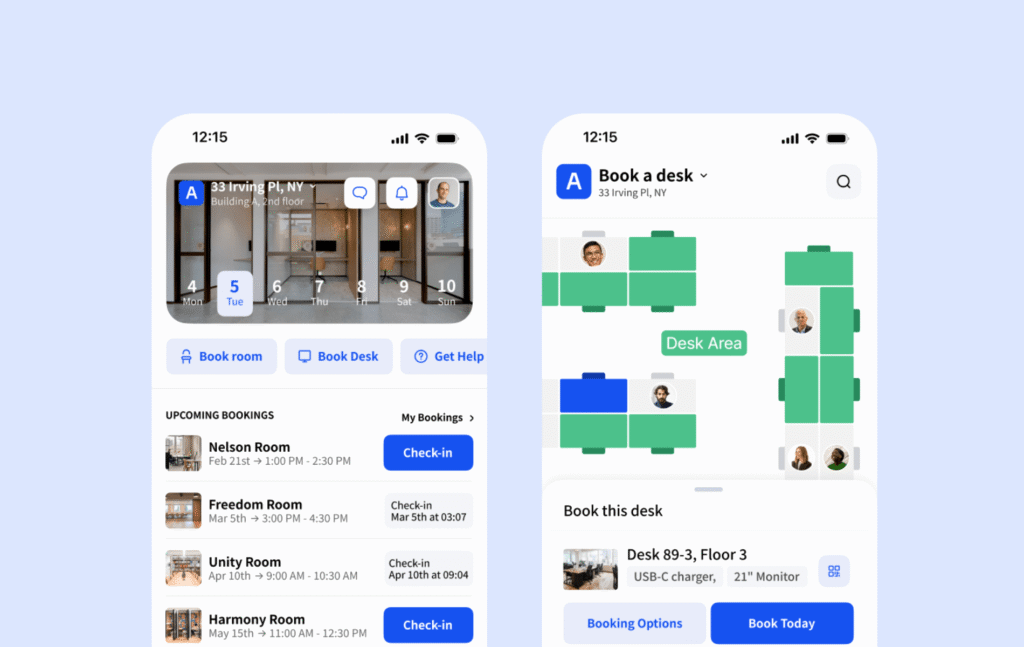
What are the key features of Archie?
- reserva de mesa: Espacios de trabajo compartidos con planos interactivos, escritorios asignados y zonas personalizables.
- Meeting room scheduling: Book rooms with calendar sync from your Google Calendar, or Outlook, or if you’re at office, from kiosks and mobile apps, similar to what Kadence offers.
- Visitor management: Track every visitor with pre-registration, and have them check in by tablet, or QR code. Get hosts notified of guest check-in. Track package or mail sent up to employees.
- Neighborhood zoning: Create team-specific zones for collaboration to maintain focused work days while ensuring org-wide flexibility.
- Interactive floor plans: Visual office maps (included in any plan you choose) showing who’s in and where they’re sitting, unlike Kadence’s separate charge for floor plan setup.
- Búsqueda de empleados: Consulte cuándo acudirán sus compañeros de equipo a la oficina para una mejor coordinación.
- Análisis del lugar de trabajo: Seguimiento de la ocupación, informes sobre la utilización del espacio e información sobre el lugar de trabajo.
- Integrations: Archie connects with 30+ tools including Microsoft Teams, Slack, Zoom, and Zapier, plus an open API.
¿Cuánto cuesta Archie?
Archie’s pricing is resource-based.
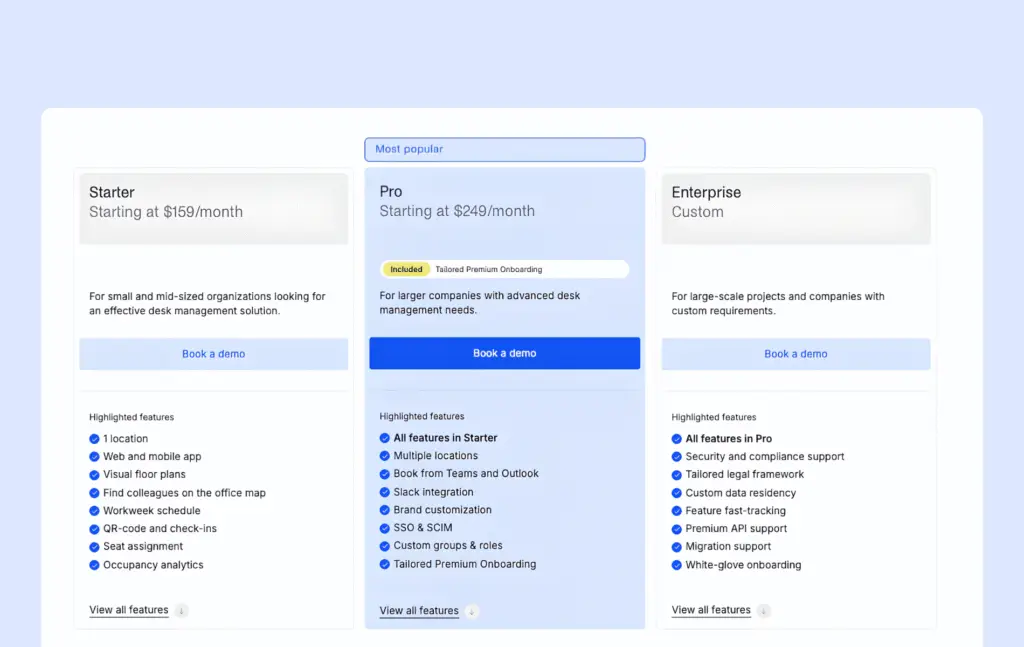
Starter: Minimum of $159/month for the starter plan at one location.
Pro: Starts at $249/month with everything you get in the starter plan + custom announcements, ability to book directly from Slack, Outlook and Teams, with custom branding, and workplace issue reporting.
La gestión de visitantes es un módulo adicional que se cobra por separado.
You don’t get this upfront, transparent pricing at Kadence, and you’re also locked into a one-year contract minimum.
After a demo with the Archie team, you get a 14-day test environment to see how the platform works for you, with no strings attached.
What are the pros and cons of Archie?
On paper, Archie checks plenty of boxes. But, how does it hold up in practice? Here are its biggest pros and cons.
Pros
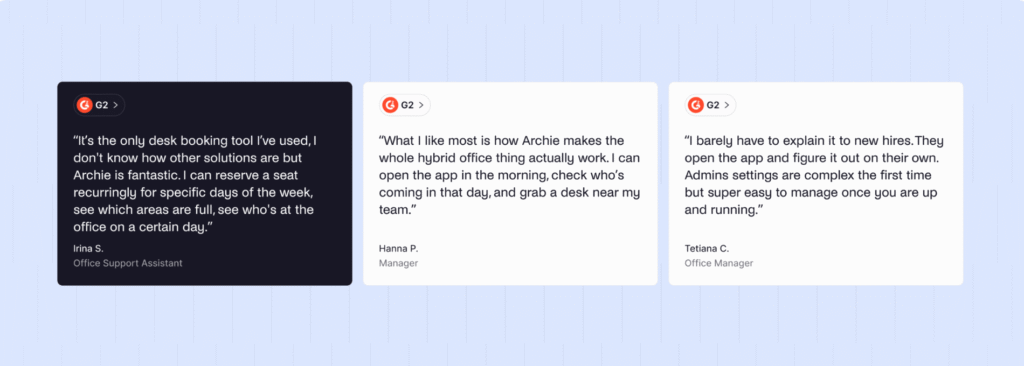
- All essential workspace management features are covered, so organizations can retire several separate tools.
- G2 reviewers consistently report going live and having the implementation complete in a few days.
- Easy for admins and users to navigate the app, with no training.
- The pricing isn’t based on how many employees you have, rather on the resources and the location. So your budget isn’t affected by your rising headcount.
- Archie gives you the advanced tools you’d expect from a serious workplace platform, from SSO and SCIM to access control integrations, API access, and deeper analytics without making you jump straight to an enterprise-tier solution.
Cons
- Unlike Kadence, Archie has no AI feature. But if you want to connect an AI agent, you can only do so with Archie’s open API.
- Visitor management costs extra on top of your plan.
2. Tactic
🔶 4.6/5 G2 rating
Tactic started as a hybrid workplace solution focused on “workplace experience”, and now it provides all the solutions you need for your workplace, such as room booking, desk booking, visitor management in the same tool, different modules.
The platform also recently introduced “Tessa AI,” an AI assistant that helps employees find and book spaces through natural conversation.
If you’re a hybrid workplace with assigned seating, hoteling or a mix of the two, or an organization with multiple offices and distributed teams, Tactic would be a good fit.
Teams that need complex recurring bookings, deep workflow customization or advanced analytics should check those areas carefully before choosing it.
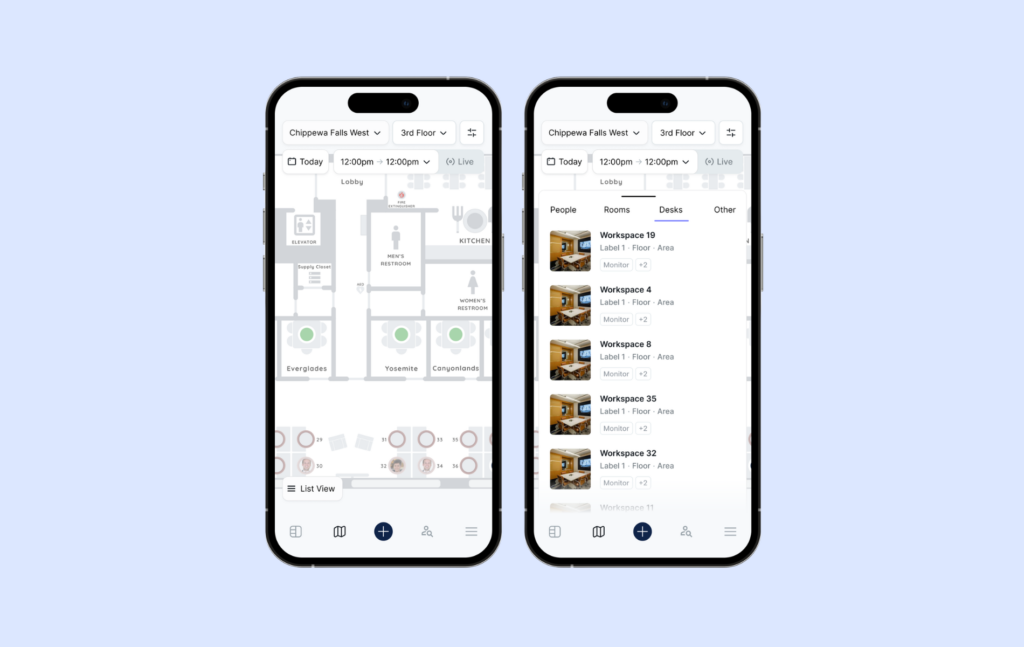
What are the key features of Tactic?
- Desk booking with neighborhoods: Supports hot desks, assigned desks, and team neighborhoods, with recurring bookings, and a sit-near-team mates filter, so teams can run set-day policies without reshuffling desks.
- Meeting room reservations: Book rooms with two-way calendar sync, and room panels that show live occupancy outside each door.
- Tessa AI: Use the AI assistant for booking desks and rooms and reporting issues via chat. Kadence offers AI suggestions through an MCP integration but Tessa is built into Tactic’s own interface.
- Visitor management: Guest check-in, badge printing, and security tracking. You can set separate flows for guests, vendors, candidates and contractors. Kadence doesn’t host visitor-type workflows.
- Workplace requests: Submit catering, AV setup, and custom workspace needs.
- Space management: Track peak days, department usage, and booking trends.
- Move management: Coordinate office relocations and seating transitions. Kadence has AI-assisted scenario planning, but it doesn’t offer unique move management.
- Team coordination: See who’s in the office and book near teammates.
- Office insights: Analytics dashboards for occupancy and space optimization.
¿Cuánto cuesta Tactic?
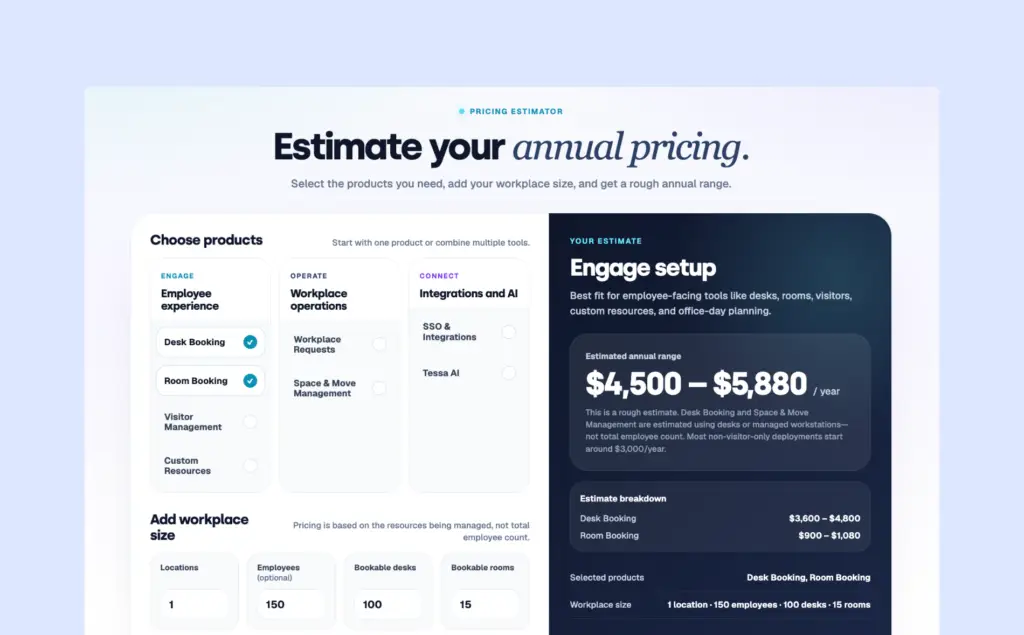
💡July 2026 Update: Tactic’s pricing is more flexible — but also a bit more complex and expensive — than it used to be. You can start with a single product or combine several, and the final price depends on the size of your workplace and the features you need.
Tactic follows a resource-based pricing model for rooms and desks booking.
To help you estimate the cost, Tactic includes an online pricing calculator. Most deployments start at around $3,000 per year, while managing 100 desks costs roughly $3,600–4,800 per year before adding products like Room Booking or Visitor Management.
The final price can vary depending on the amenities included, the products, resources, location, floor plans, security requirements etc.
Since every setup is different, you’ll need to contact sales for an exact quote.
Pros and cons of Tactic
With Tactic’s key features in mind, let’s weigh its strengths and limitations.
Pros
- Super easy to use, so teams can start using immediately with little to no training
- Desk and room reservations are quick, with real time availability that cuts down on double-bookings and hunting for a free desk
- Multiple reviewers single out Tactic’s responsive support team for resolving issues quickly and following through on feature requests
- Helps streamline shifts with detailed insights, and is particularly useful for shift-based or frontline workplace teams, not just knowledge workers
Cons
- Only allows for limited customization for persona-based profiles, and on dashboards
- Compared to other platforms on this list, the mobile app can feel basic
- Syncing issues for resource calendars in Outlook that come up after the booking gets over
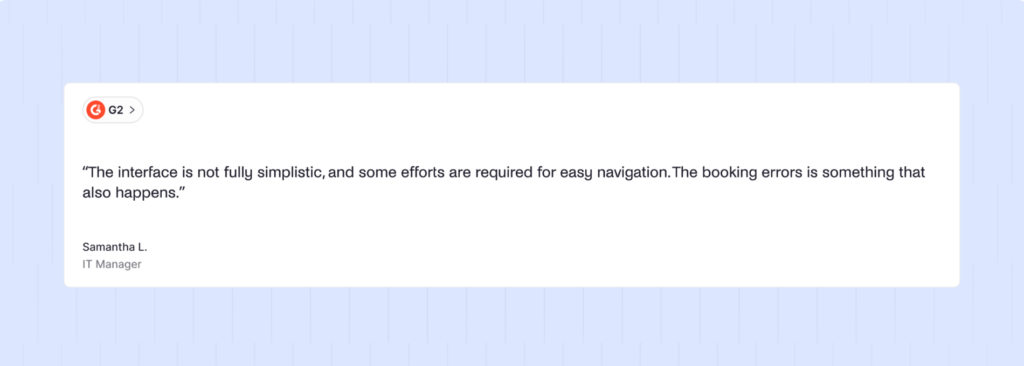
A few users noted that there are some issues and glitches with the platform: “I didn’t like that some availability displays weren’t always accurate, and we had a few misbookings. A couple of mobile interface bits felt a little clunky compared to desktop.”
3. deskbird
🔶 4.5/5 G2 rating
deskbird es una plataforma de gestión del lugar de trabajo diseñada para facilitar el uso de la oficina a los empleados, jefes de equipo y responsables de oficina. La plataforma se está convirtiendo rápidamente en uno de los principales competidores en la gestión del lugar de trabajo, con una reciente financiación de 23 millones de dólares que ya se ha invertido en inteligencia artificial y en ofrecer más funciones.
deskbird es ideal para empresas que buscan una plataforma de gestión del lugar de trabajo intuitiva, con numerosas funciones y amplias integraciones. Se adapta a equipos de cualquier tamaño, ya que ofrece un plan gratuito y precios competitivos por usuario.
Características principales de deskbird
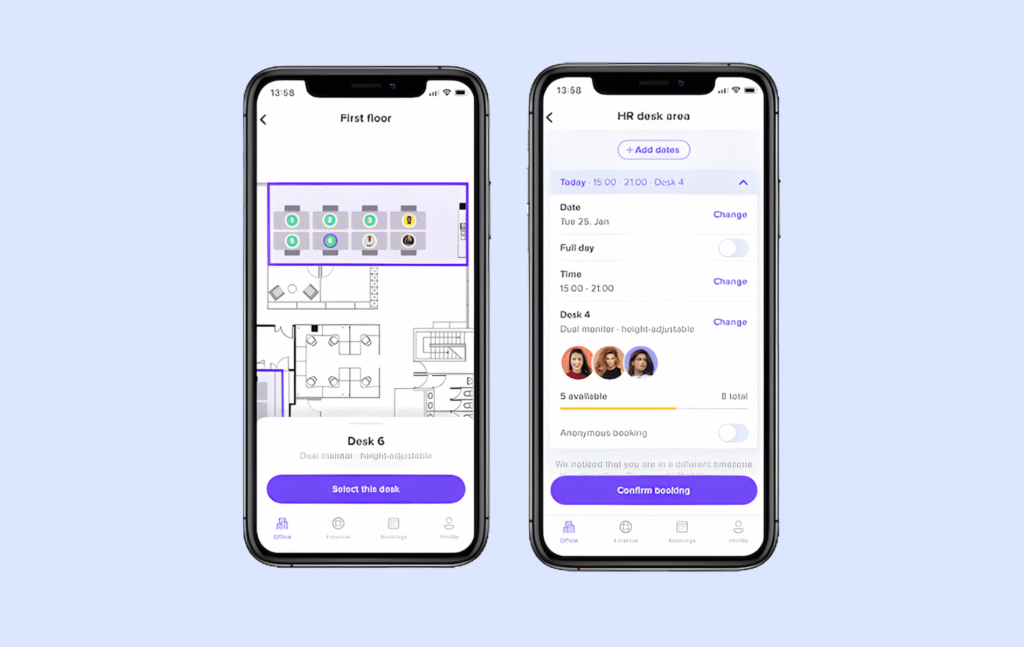
- Desk booking: Combine hot desks and assigned seating on the same floor plan, with filters for equipment, accessibility and zones. Compared to Kadence, deskbird gets you similar results through filters and mixed seating floor plans rather than a dedicated neighborhood layer.
- Room scheduling: Two-way sync with Outlook, Teams and Google Calendar, and walkup booking from any tablet at the room door, similar to what Kadence offers.
- Visitor management: Guest pre-registration, self check-in, and host notifications.
- Hybrid scheduling: Plan office attendance and manage hybrid work policies.
- Interactive floor plans: Visual workspace layouts with real-time availability.
- AI recommendations: AI-based recommendations for desks and rooms based on team, calendar, and past booking habits. Kadence’s AI suggests the best in-office days rather than specific desks or rooms.
- Workplace ticketing: Centralizes facility requests like maintenance or equipment issues into one system, which Kadence doesn’t offer.
- Agentic AI: deskbird’s ‘Agentic Workplace’ connects with Microsoft Copilot to bring workplace actions into tools employees already use. Kadence offers its own AI assistant through an MCP integration
- 200+ integrations: Works with MS Teams, Outlook, Slack, Google Workspace, BambooHR, and more.
¿Cuánto cuesta Deskbird?
💡 Actualización de abril de 2026: deskbird ha actualizado sus tarifas y ha eliminado su plan gratuito. Sigue utilizando un modelo de precios por usuario, por lo que tus costes aumentan a medida que crece tu equipo, independientemente del espacio de oficina que utilices realmente.
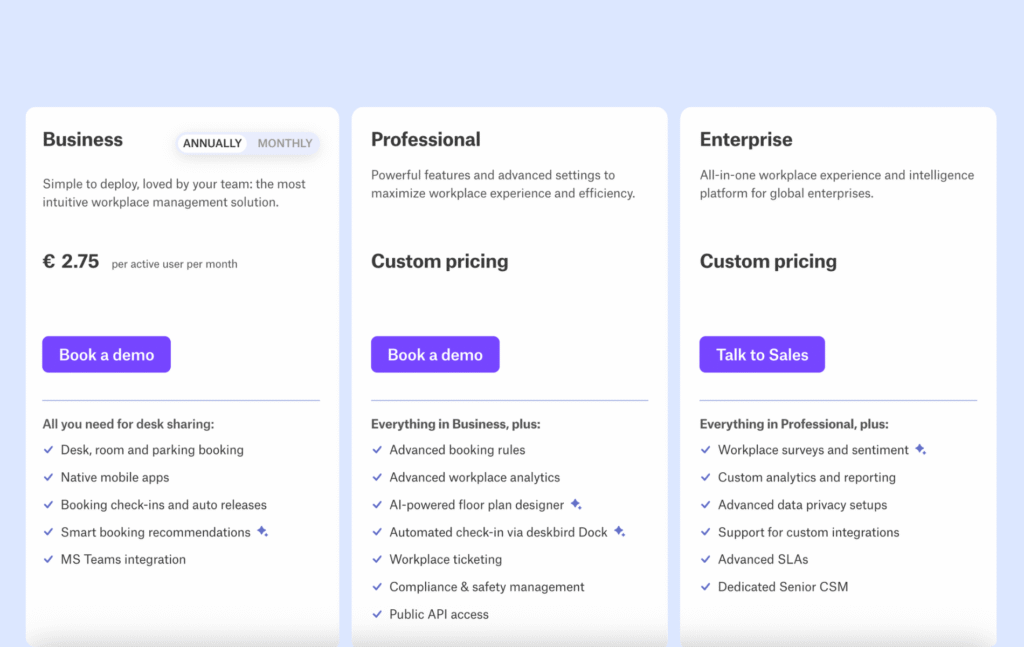
- Business plan: starts at €2.75 (~$3.75) per user/month (annual billing) and includes the core features most teams need, like desk booking and mobile access.
- Professional: Custom pricing, with everything in Business, plus advanced booking rules, workplace analytics, an AI floor plan designer, automated check-in via the deskbird Dock, workplace ticketing, compliance management and public API access
- Enterprise: Custom pricing, with everything in Professional, plus workplace surveys, custom analytics, advanced data privacy controls, custom integrations, advanced SLAs, and a dedicated customer success manager.
Algunas funciones, como la gestión de visitantes y sala de reuniones, se ofrecen como complementos de pago.
El plan Business es más asequible que los precios históricos de Kadence, al tiempo que ofrece funcionalidad de IA y características básicas similares. Si desea análisis potentes, integraciones completas y una interfaz que requiera una formación mínima, deskbird le ofrece justo eso.
Pros and cons of deskbird
Pros
- No-show desks release themselves and no admin cleanup is needed
- deskbird handles parking reservations, not just desks and rooms, which Kadence doesn’t offer, and is very convenient if you have limited spaces
- Employees get to pick a desk from a real photo of the space rather than an abstract grid of icons, which reviewers on G2 say makes remote, and hybrid staff feel more oriented.
- You’re not locked into deskbird’s own floor plan templates, and you can upload your own, which matters for office with a layout tool already in place.
Cons
- The HRIS integration has gaps for some systems like HiBob
- Attendance and utilization reporting can be confusing to interpret as voiced by a G2 reviewer
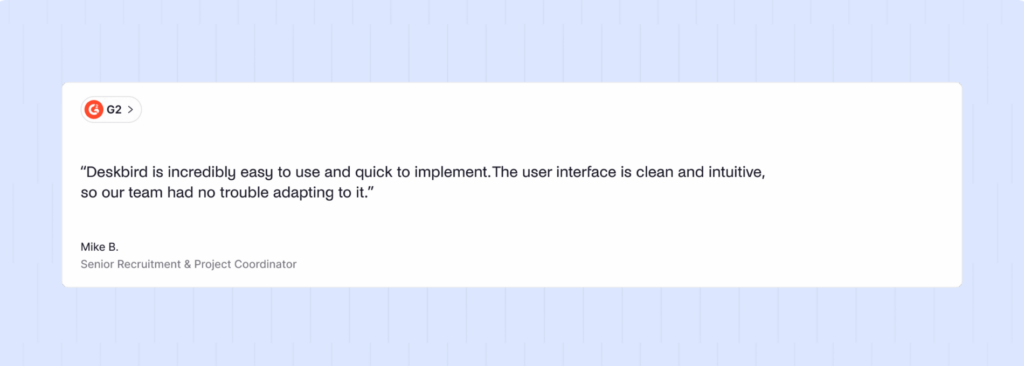
While deskbird’s pricing is competitive, it might not be the best option for mid-sized or larger teams that have one desk for every 2-3 employees. This is echoed by some reviews, as well: “The only real con is around the pricing model; while the service is great, the accessibility is limited to companies with a larger bottom line.”
Además, Deskbird tiene opciones de personalización limitadas, lo que puede afectar a su funcionalidad. Como señaló un crítico: «Lo único que me pareció incómodo fue que es un poco difícil personalizar la configuración».
For larger teams, companies that need lots of customization, or teams watching their budget, per-user pricing may be less cost-effective than some deskbird alternatives.
4. OfficeSpace
🔶 4.7/5 G2 rating
OfficeSpace is an enterprise-level workspace management platform with more advanced features available than most other Kadence alternatives. The platform is designed to handle complicated office setups and works well for companies with many locations and lots of moving parts.
With its scenario-building features and move management, it helps large enterprises scale faster, while making moves and reorganization effortless.
If you need enterprise-grade space planning with detailed control over multiple facilities and can invest in a comprehensive implementation, OfficeSpace delivers that experience.
What are the key features of OfficeSpace?
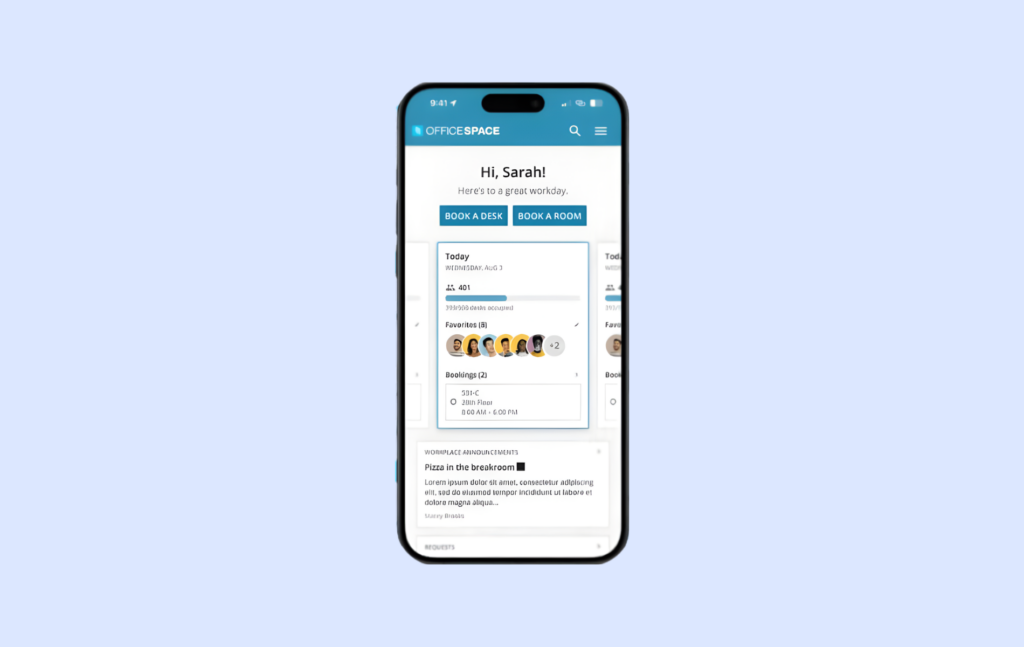
- Desk and room booking with neighborhood captains: Create zones by team, department, project or role with a Neighborhood Captain who manages that area and can grant early booking access to their group before it opens to everyone else.
- Move management: Manage frequent office moves and reorganizations. Kadence doesn’t offer this feature in any plan.
- Sensor-based auto release: Connects to badges, cameras, infrared or desk-light sensors to release a desk automatically if nobody checks in, beyond Kadence’s badge and Wi-Fi check-in.
- Interactive floor plans: Detailed floor plans with visual layouts.
- AI-driven nudges: The Workplace Experience Agent suggests in-office days, recommends specific desks and sends reminders.
- Analytics and reporting: Deep insights into space utilization and planning.
- Asset management: Tracks physical assets and inventory with barcode/QR scanning and adds preventative maintenance an work orders on the Pro asset tier. This is a category Kadence doesn’t compete in at all.
¿Cuánto cuesta OfficeSpace?
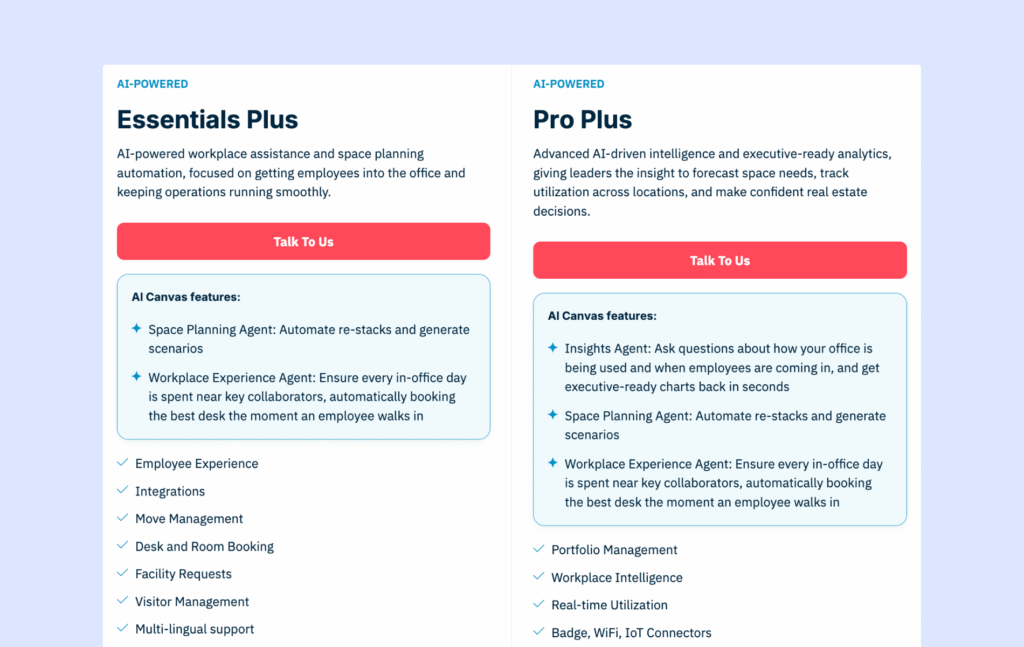
OfficeSpace offers two separate products, with separate pricing plans: Workplace and Asset Management. Workplace includes tools for desk booking, visitor management, space planning, and workplace analytics, while Asset Management focuses on tracking assets, maintenance, warranties, and work orders.
OfficeSpace does not publish pricing, so you’ll need to contact the sales team for a custom quote. Pricing is based on factors like features, employee count, and add-ons.
Pricing model is a fixed platform fee per plan which includes a set number of synced employees, plus per-employee charges once you exceed that count. Some features on lower tiers are available as paid add-ons. Doesn’t offer a free trial.
Pros and cons of OfficeSpace
Pros
- Centralizes facilities management into a single platform
- Offers a strong ROI for seat management
- Compared to enterprise-focused workspace management platforms, OfficeSpace does offer reliable support and a smooth implementation process
Cons
- Reviewers report frequent glitches and feature gaps in the tool which comes in the way of running workflows
- Editing user information requires a roundabout method, and not very intuitive
- The OfficeSpace team takes a long time to implement requested features
- Because of its enterprise focus, smaller teams might find pricing and implementation too much.
- The implementation timeline can feel too long for mid-sized and small offices that want to get started right away.
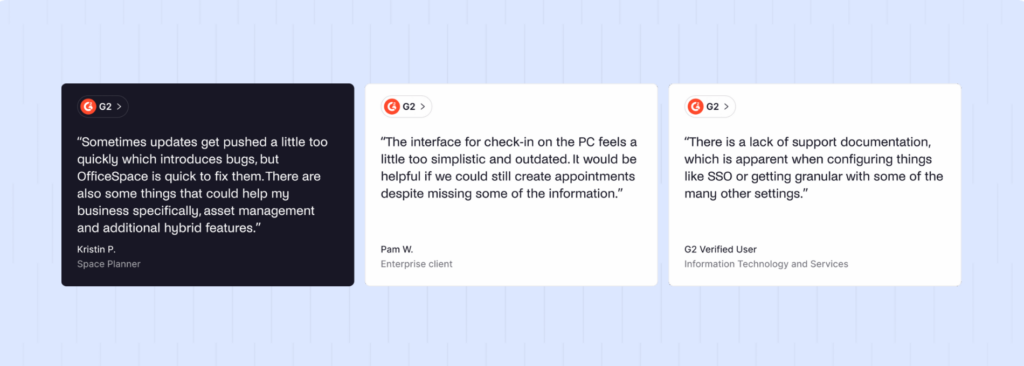
La interfaz de OfficeSpace puede parecer complicada y pesada. Aunque la empresa se ha labrado su reputación gracias al diseño, varios críticos señalan que «la interfaz puede resultar un poco incómoda», «podría ser más atractiva» y «la interfaz de usuario y la selección de asientos en la versión móvil para Android son un poco torpes y pesadas en cuanto al rendimiento».
5. YAROOMS
🔶 4.3/5 G2 rating
YAROOMS started in Romania in 2010 as a simple tool for booking meeting rooms. Over time, the team kept improving and adding features, eventually turning it into a full workplace management platform. Now, YAROOMS offers a wide mix of tools to help companies run modern offices.
YAROOMS works for small to mid-sized companies and growing organizations that need straightforward desk and room booking with strong Microsoft Teams integration. The tiered pricing makes it accessible for teams just starting out while offering AI features usually found in more expensive tools, like Kadence.
Si necesitas una gestión intuitiva del espacio de trabajo con niveles de precios flexibles, YAROOMS te ofrece esa experiencia equilibrada.
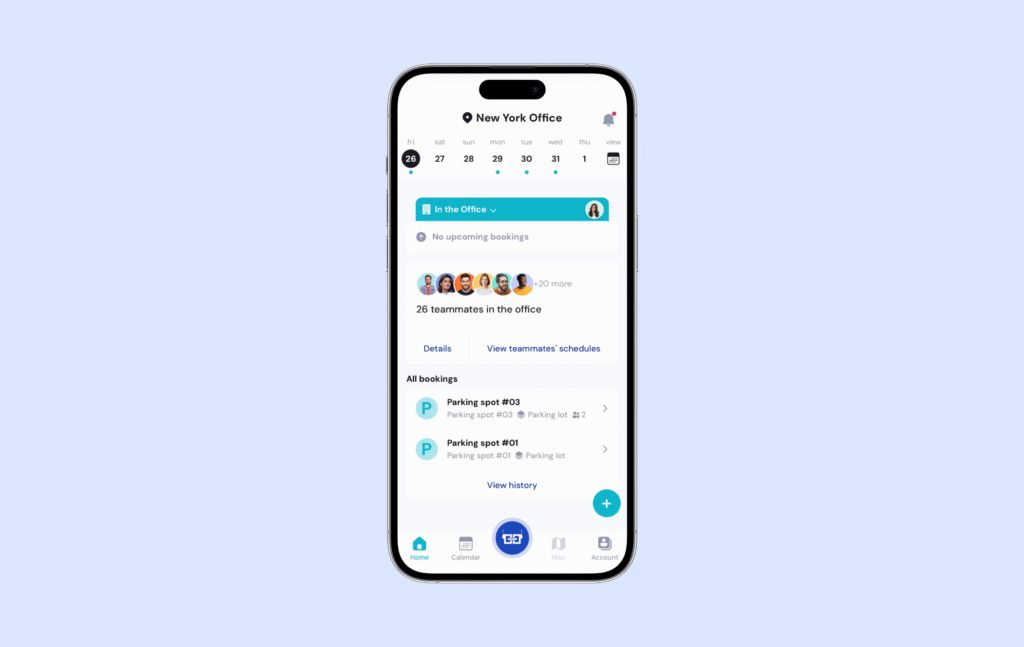
Key features of YAROOMS
- Per-area occupancy limits for desk booking: Admins can set occupancy caps and distinct booking rules for each area, floor, or building, and mix assigned desks with hot desking on the same floor. YAROOMS leans towards capacity control per area, unlike Kadence’s neighborhood and team-day assignment.
- Meeting room scheduling: Book conference rooms with calendar integrations.
- Hybrid work planning: Manage office attendance and hybrid schedules.
- Visitor management: Guest registration and check-in ($99/month/location add-on).
- Digital signage: Wayfinding displays to guide people around the building.
- Yarvis AI assistant: Employees can book desks, find colleagues and manage recurring bookings through natural-language chat commands.
- Room booking and service requests bunded together: A single reservation can combine the room, catering, equipment and cleaning requests plus auto-attach a Teams, Zoom, or Google Meet link. Kadence offers calendar-sync, but not service requests.
¿Cuánto cuesta YAROOMS?
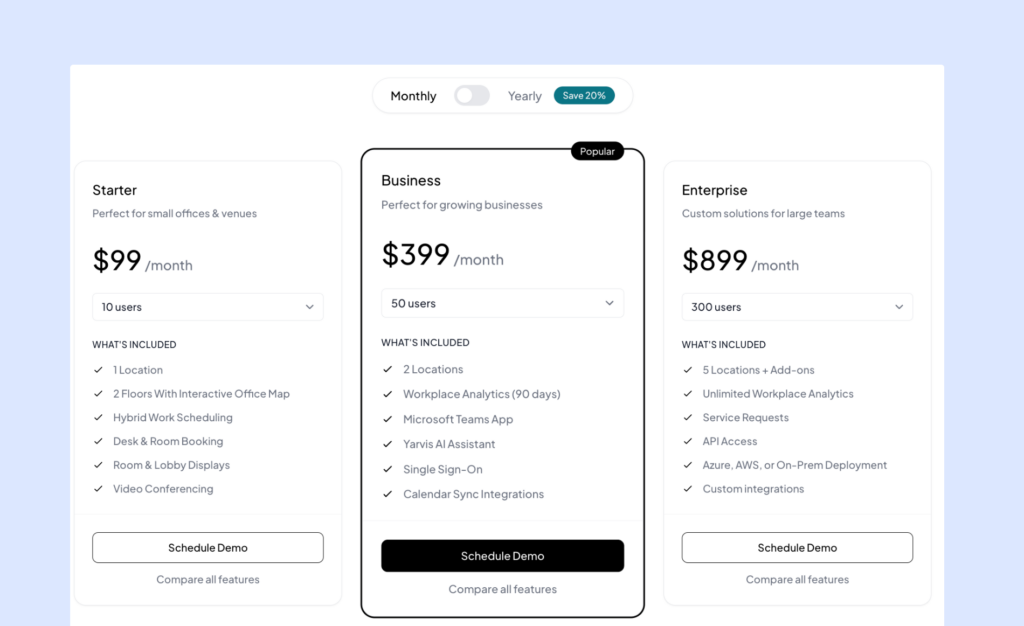
YAROOMS utiliza un modelo de precios basado en suscripciones con tres niveles principales:
- Starter: $99/month for up to 10 users, $199/month for up to 20 users. Includes essential desk and room booking for single-location offices.
- Business: $399/month for up to 50 users, $499/month for up to 100 users, $699/month for up to 200 users. Supports up to 2 locations, adds enhanced analytics and the Yarvis AI assistant.
- Enterprise: $899/month for up to 300 users, custom pricing beyond 300. Supports unlimited locations, full workplace analytics, and custom integrations.
La gestión de visitantes se ofrece como un complemento opcional por 99 $ al mes por ubicación.
Unlike Kadence’s per-active-user billing which skyrockets spend, YAROOMS charges a flat platform fee per tier with a user cap, so cost doesn’t scale per seat within a tier.
Pros and cons of YAROOMS
Pros
- IT teams find it easy to deploy and maintain
- Responsive and active support and account teams
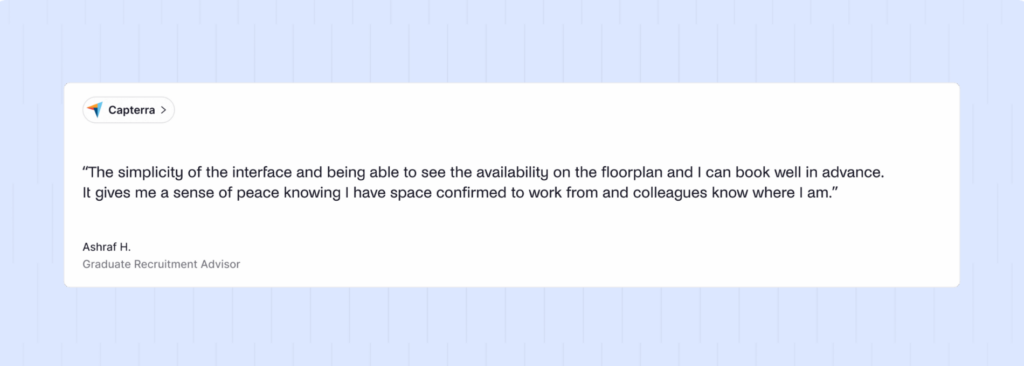
- Concrete UI capabilities, including toggling easily between a map and a timeline view
- Users use YAROOMS to schedule specific pieces of physical equipment, a use case not provided for by Kadence.
Cons
- While YAROOMS’ pricing model works, it can get expensive fast for mid-sized teams, as it is based on employee count rather than resources.
- Replacing a floor plan forces you to redo desk assignments from scratch
- Tier-based user caps create pricing cliffs
La experiencia móvil ha recibido opiniones dispares. Las versiones anteriores de la aplicación para iOS carecían de todas las funciones y la visualización del mapa no era tan fluida como podría ser. Aunque YAROOMS ha lanzado actualizaciones, algunos críticos siguen señalando que algunas tareas podrían ser más fáciles en el móvil.
Otras alternativas a Kadence
- Robin: Plataforma empresarial para más de 500 empleados con herramientas de experiencia de los empleados, como encuestas y seguimiento de la satisfacción.
- Skedda: Plataforma de gestión de oficinas con reserva flexibles y análisis de espacios.
- Joan:sala de reuniones basada en elegantes pantallas de tinta electrónica.
Head-to-head comparison of Kadence alternatives
Kadence | Archie | Tactic | pájaro de escritorio | OfficeSpace | YAROOMS | |
|---|---|---|---|---|---|---|
Rating | 4.5 | 4.9 | 4.6 | 4.5 | 4.7 | 4.3 |
Ideal para | Corporate hybrid offices | Corporate hybrid offices | Mid–large, multi-office | SMB–mid, fast adoption | Large enterprise, multi-site | SMB–mid, Microsoft users |
Standout feature | Neighborhoods | All-in-one at resource-based pricing | Tessa AI assistant | Parking + Copilot AI | Move & asset management | Bundled service requests |
Visitor Management | Incluido | Complemento | Incluido | Incluido | Incluido | Complemento |
Modelo de precios | Per-user | By resource | By resource | Per-user | Flat fee + coverage | Flat fee, tiered |
Precio inicial | Not published | Starts at $159/mo | Starts at ~$250/mo | Starts at ~$3.75/user | Not published | Starts at $99/mo |
¿Qué es Kadence?
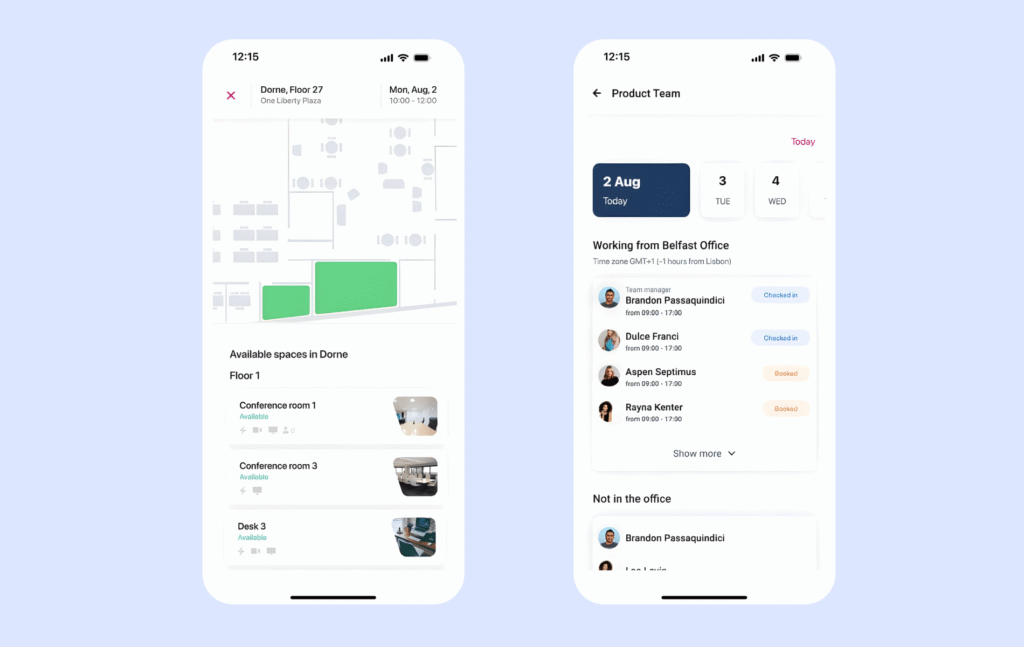
Kadence.co has been around for a few years, but the current AI-focused product dates back to 2023. The founders behind Kadence saw how chaotic hybrid workplaces can be and wanted to build an all-in-one tool, focusing on organization and connection within teams.
Ahora, con más de 10 000 equipos en más de 40 países, Kadence se está convirtiendo en una opción imprescindible para la gestión del lugar de trabajo, tanto para equipos pequeños como para grandes empresas.
Why do companies look for Kadence alternatives?
Over time, the effort to maintain the tool or sidestep it becomes greater than the real benefit derived from using the tool. That’s where users start getting curious about alternatives. That is the case with Kadence too.
1. Pricing model
Price is now quote-only, and instead of being positioned as a hybrid/desk-booking product, it’s now split into WorkOps and SpaceOps. There’s still a $250 per floor for floor plan set up.
2. Reporting is split and shallow, not a single source of truth
Users want unified reports rather than the current split-view setup. The insights section isn’t as detailed and helpful as one might hope. For teams that need to report utilization trends to leadership, that’s manual reconciliation work every time.
3. Weak first-time wayfinding
New or infrequent office visitors report difficulty finding their booked desk or room once they arrive, with limited in-app guidance to the physical location.
4. Booking edits are rigid
For a sophisticated tool, Kadence’s booking workflows are rigid. If you’re running an organization with frontline staff, and you have booked a time block, of which you need to cancel one hour, you can’t do that. You’ll have to cancel the whole block. This is a basic, practical difficulty users face.
5. Routine admin changes require emailing support instead of self-service
Any small changes in floor plan, room, and configuration changes that should be a two-minute admin task becomes a support ticket with a wait time attached.
How do you choose the right Kadence alternative?
Selecting a Kadence alternative should start from how your workspace actually operates. The following criteria should drive your shortlist, roughly in the order they tend to matter most:
- Pricing model fit: This addresses whether costs scale the way your headcount does, in terms of per-user pricing (Kadence, deskbird, YAROOMS), or resource-based pricing (Archie) ties cost to a physical space instead.
Verify by asking each vendor for a written cost projection against your actual employee-to-desk ratio.
- Pricing transparency: This addresses how much negotiating leverage and budget certainty you have going into a decision. Archie publishes its rates, while Kadence and OfficeSpace mandate a custom quote.
Double check by requesting a full written quote before a live demo.
- AI powered booking: Kadence, Tactic, deskbird, YAROOMS all offer some kind of automated booking suggestions.
To be certain of what would work for you, ask for a live demo against your own floor plan and booking patterns.
- Implementation timeline: Archie’s G2 reviewers describe implementation in a few days as opposed to OfficeSpace’s one-month-long timeline.
Confirm timelines by asking for G2’s Time to Implement data, but more importantly, find out how much assistance will be provided during onboarding.
- Team size and scale fit: Some vendors here fit smaller offices, others large enterprises, and some in between.
Ask for references of customers close to your own headcount and location, and cross check with them.

Which is the best Kadence alternative for hybrid corporate teams?
For most workplace operations and hybrid corporate teams, Archie is the strongest Kadence alternative. Archie pricing tracks the desks and rooms in your office rather than per-user headcount, admins can update floor plans and room settings directly without opening a support ticket, and it holds the highest review score of any platform in this comparison, at 4.9/5 on G2 versus Kadence’s 4.5/5.
- Transparent, resource-based pricing that scales with your office
- Self-service admin configurations for floor plans, zones and room details
- Strong room booking engine, and flexible to suit any workflow
- Unified desk-and-room booking with consolidated utilization reporting
Archie is rated the highest of any platform in this comparison on G2, across 245 verified reviews.
Why do companies choose Archie as a Kadence alternative?
Customers who move to Archie can typically find they pick up where they left off at Kadence. Kadence customers describe needing two separate reports to see past and future bookings and finding the Insights module not very comprehensive, while Archie consolidates desk and room booking with utilization reporting in one view.
Unlike having to email support for every tiny admin task, Archie’s admin console is self-sufficient by default.
Where Kadence’s booking system is rigid and requires you deleting and resubmitting an entire time block to change a single hour, Archie’s booking engine is flexible to make room for any workflow, for your organization.
Coupled with resource-based pricing that only grows as your physical space grows, Archie directly addresses the pain points Kadence’s customers are aggravated by.
Archie | Kadence | |
|---|---|---|
Capacidades | Unified desk and room booking with consolidated utilization reporting | Desk and room booking available but reporting is split across multiple views |
Pricing approach | Resource based pricing | Per-user pricing |
Usability | 4.9/5 on G2 | 4.5/5 on G2 |
Integraciones | Native integrations including Slack, Microsoft Teams, Outlook, SSO/SCIM, add-on and custom tiers for door access and HRIS | Calendar MS 365, Google, Teams, SSO integrations available |
Scalability | Tiered from single-location to multi-location enterprises | Serves SMB through enterprise |
Support | Tailored onboarding from Pro tier up, excellent customer support for all plans | Support via account managers and a long ticketing process |
Ideal Customer Profile | Growing and large hybrid workplaces, including coworking/flex operators | Built for large enterprises |
In practice, this means admins spend less time dealing with scattered data or waiting on support for routine changes. Hybrid teams can also see how the office is being used, making it easier to plan when people need to come in.
Reviews can give you a useful sense of how a product performs, but they’re not the whole picture. The specific feedback behind those scores is worth considering, too.
Archie | Kadence | |
|---|---|---|
Overall G2 rating | 4,9/5 | 4,5/5 |
Recurring positive theme | All-in-one platform for room and desk booking, attendance visibility | Easy to use, simple day-to-day booking |
Onboarding/support sentiment | Hands-on onboarding team praised | Even tiny changes are routed through support |
How do you migrate from Kadence to Archie?
Migrating from Kadence to Archie runs through three phases: planning and data export, a phased parallel-run implementation, and post-launch validation before Kadence is retired.
- Export Kadence data: Pull user lists, desk/room inventory, floor plans, and booking history before setup starts
- Build Archie in parallel: Set up floor plans, zones and booking rules while Kadence stays live. This avoids a hard cutover.
- Reconnect integrations: Relink calendar, SSO and IoT/sensor hardware and test before rollout
- Over-communicate the cutover: Give employees a clear switch date and check-in instructions
We’ll make this transition as smooth for you as possible, so you hit the ground running!
- Resumen rápido
Common failure points while migrating off Kadence
- Teams migrate current bookings, but skip historical reporting data. Once Kadence is retired, that data is gone.
- Under-communicating the cutover leads to employees figuring it out on their own, and falling back to old habits
- Fuentes principales
Preguntas frecuentes
¿Cuál es la mejor alternativa a Kadence?
Archie is the strongest overall alternative. Tactic, deskbird, OfficeSpace and YAROOMS are worth shortlisting too, depending on team size and whether you need AI-assisted booking or enterprise asset management.
What are the disadvantages of using Kadence?
The most commonly cited issues are fragmented reporting, rigid booking edits, weak first-time wayfinding for new office visitors and routine admin changes that require emailing support.
Is Archie cheaper than Kadence?
It depends on your employee-to-desk ratio. Archie charges by desk, room and location, starting at $159/month, while Kadence charges per user regardless of desk count. For offices with more employees than desks, Archie’s model is typically more cost effective.
Which Kadence alternative is best for hybrid teams?
For hybrid corporate and facilities/IT admin teams specifically, Archie tends to be the stronger fit. Less back and forth, and manual reconciliation. Kadence still works for larger companies with dedicated IT support who don’t need frequent self-service changes.