




















- Lo que aprenderás
- What an Excel desk booking tool is and how it works
- How to set up a simple hot desk booking system step by step
- The main limitations of manual desk booking templates
- The pros and cons of Excel, custom-built tools, and third-party software
¿Buscas una forma sencilla de gestionar las reservas de escritorios compartidos?
reserva de Archie reserva puestos de trabajo compartidos en Excel es una opción económica perfecta para equipos pequeños (menos de 10 personas) que trabajan en el mismo espacio de oficina.
La plantilla se puede descargar de forma totalmente gratuita.
¿Qué es una reserva de mesas en Excel?
An Excel desk booking tool is one of the simplest ways to manage desk reservations in an office. Instead of using dedicated desk booking software, teams use a spreadsheet to track which desks are available and who has booked them.
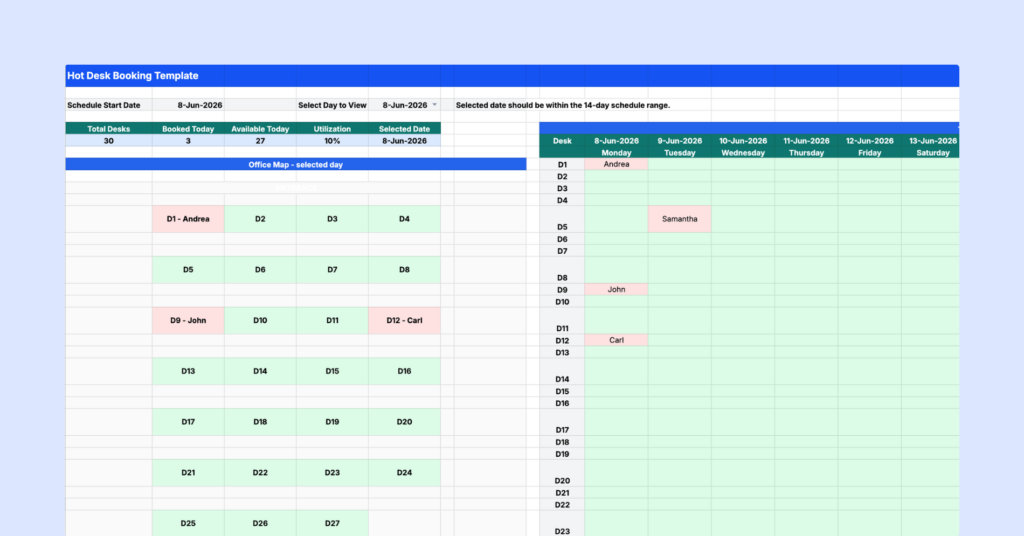
Typically, each desk is listed in a row and each date appears in a column. Employees can then mark desks as booked, available, or pending. Some teams also use dropdown menus and color coding to make the spreadsheet easier to manage.
For small offices, this can be a practical and low-cost solution. Most people already know how to use Excel, and there are no additional software costs. However, as teams grow and office schedules become more flexible, spreadsheets can become difficult to maintain and are more prone to mistakes.
Cómo configurar un reserva de mesas en Excel
Configurar una reserva de mesas en Excel es sencillo, pero crearla desde cero puede llevar tiempo y esfuerzo. Por eso te lo hemos puesto más fácil con una reserva gratuita y lista para usar reserva puedes descargar y empezar a utilizar de inmediato. Accede a la reserva de mesas de forma gratuita.
Step 1: Set the schedule start date
Once you download the desk booking spreadsheet, start on the Hot Desk Booking sheet. At the top of the sheet, enter your Schedule Start Date. This is the first day you want the booking schedule to show. Once you add the start date, the template will display a 14-day booking period. This helps you plan desk bookings for the next two weeks in one place.
Step 2: Choose the day you want to view
Next, choose the specific day you want to view in the office map. The office map is there to give you a more visual view of your workspace. Instead of only looking at rows and columns, you can quickly see which desks are booked on that selected day. This is useful when someone asks, “Where will I sit today?” or “Who is sitting near me?”
Step 3: Use the 14-day grid to assign desks
The main booking grid shows desks on the left and dates across the top. To book a desk, find the correct desk row and the correct date column, then enter the person’s name in that cell. For example, if Andrea books D1 on Monday, enter Andrea in the cell where D1 and that date meet.
Blank cells mean the desk is still available. You do not need to type “Available” into every empty cell. Keeping available desks blank makes the sheet cleaner and easier to scan.
Step 4: Use the Booking Requests sheet for approvals
If you do not want employees editing the main booking grid directly, use the Booking Requests sheet. This sheet can be used to collect desk booking requests before they are approved. For example, employees can enter:
- Their name
- Requested date
- Preferred desk
- Notes or special requirements
- Booking status
This is helpful if you want more control over who gets which desk, especially on busy office days. You can use the status dropdowns to track each request: Pending when a request still needs review, Booked once the desk has been approved and added to the main booking grid, or Blocked if the desk should not be used that day (because it is reserved for a team, under maintenance, or unavailable for another reason).
Paso 5: Comparte con tu equipo la plantilla reserva de puestos de trabajo compartidos
Una vez que hayas configurado tu reserva de mesas en Excel, compártela con tu equipo. Puedes enviar el archivo por correo electrónico o subirlo a una plataforma compartida como Google Drive o SharePoint. Asegúrate de establecer los permisos de edición adecuados para que solo los miembros autorizados del equipo puedan realizar cambios.
Step 6: Keep one person in charge of the desk booking system
To avoid duplicate or confusing bookings, assign someone to act as the desk booking system administrator. This could be an office manager, workplace coordinator, admin, or team lead. That person should be responsible for updating the desk booking spreadsheet:
- Review new booking requests
- Approve or reject requests
- Add approved bookings to the 14-day grid
- Keep the office map accurate
- Remove outdated or incorrect bookings
This keeps the template organized and helps everyone trust the schedule.
Cómo utilizar la reserva de puestos de trabajo compartidos en Google Sheets
Google Sheets es una excelente alternativa a reserva Excel reserva de mesas, especialmente para equipos que necesitan un acceso sencillo y la posibilidad de colaborar en tiempo real. Trasladar tu plantilla reserva Excel reserva a Google Sheets permite a tu equipo trabajar en equipo sin problemas, desde cualquier lugar y en cualquier dispositivo con conexión a Internet.
Importe y comparta con facilidad
You can quickly upload your hot desk booking system from Excel into Google Sheets without losing important formatting or dropdown menus. Once it’s uploaded, you can share the file with your team across departments or locations. Everyone with access can view and update the sheet at the same time, making it easier to coordinate bookings.
Colaboración en tiempo real
Unlike the Excel desk booking tool, where updates need to be manually saved and shared, Google Sheets automatically saves every change as it happens. Everyone always has the latest version, reducing errors or outdated information. Team members can book desks simultaneously without worrying about conflicts or overwriting someone else’s work. Google Sheets webhook integrations can also trigger automated alerts when bookings are made.
Limitaciones reserva gratuito reserva de puestos de trabajo compartidos en Excel
Setting up a manual hot desk booking system in Excel or Google Sheets is relatively easy, but the challenges start when more people begin using it:
- They don’t scale well: What works for five people can quickly become frustrating for fifty. Someone usually ends up spending time answering questions, fixing booking mistakes, and keeping the spreadsheet organized.
- Double bookings become more common: When multiple people edit the same file, mistakes happen. Employees may accidentally reserve the same desk or book a space that was already taken.
- Visibility is limited: A spreadsheet tells you whether a desk is booked. It doesn’t tell you who is planning to be in the office, where teammates are sitting, or how office space is actually being used.
- There’s no automation: Reminders, recurring bookings, check-ins, workplace analytics, and calendar integrations typically require manual work or additional tools.
¿Deberías utilizar una reserva de puestos de trabajo compartidos?
In my opinion, the answer depends mostly on the size of your office and how often people need to book desks.
A hot desk booking template is a great option for smaller teams or businesses that need a simple way to manage shared desks. So, if you’re running a small office, startup, or coworking space with only a few shared desks, a using a spreadsheet in Excel or Google Sheets can be a perfectly reasonable solution. It’s free, familiar, and quick to set up.
But once desk reservations become a daily activity, an Excel desk booking template start showing their limitations.
Employees may not know whether information is up to date. Booking conflicts become more common. Managers spend more time maintaining the system. And getting useful insights about office usage becomes almost impossible.
For growing teams, dedicated desk booking software often ends up saving time and reducing frustration, even though it comes with an additional cost.
Which desk booking system is right for you?
When managing desks in a hybrid workplace or a coworking space, there are three main options: using a hot desk booking system in Excel or Google Sheets, building your own desk booking system, or investing in third-party desk booking software.
1. Plantilla reserva de puestos de trabajo compartidos
I’ve already mentioned that using Excel or Google Sheets is the simplest and cheapest option, especially for smaller teams that work in the same office and don’t need to book meeting rooms. If that’s the case, go ahead and try out our free hot desk booking template.
Al mismo tiempo, rellenar filas y columnas puede resultar tedioso rápidamente, especialmente en oficinas y equipos grandes. Es fácil cometer errores, como reservas duplicadas y confusiones, ya que no hay actualizaciones en tiempo real sobre la disponibilidad.
Ventajas:
- Familiar y fácil de usar.
- Accesible en cualquier momento, sin necesidad de aprender a utilizar un nuevo software.
- Perfecto para configuraciones pequeñas y sencillas.
Contras:
- Alguien debe encargarse de supervisar y mantener la reserva de escritorios, responder a las preguntas y resolver cualquier problema.
- Seguimiento políticas de escritorios compartidos o los horarios híbridos puede convertirse en un caos.
- No hay actualizaciones en tiempo real ni datos fiables para indicadores clave de rendimiento (KPI) como la productividad o la colaboración.
- No permite gestionar configuraciones complejas, como reserva , escritorios y zonas de concentración, todo en un mismo lugar.
Managing desks shouldn’t feel like extra work. Desk booking software takes the stress out of shared seating and makes it easier for your team to find, book, and use office space.
2. Crear su propio sistema de reserva de escritorios
Desarrollar reserva de mesas a medida es la solución más personalizada, pero también la más cara y compleja. Aunque te ofrece un control total para diseñar un sistema que se adapte exactamente a tus necesidades, los costes y el esfuerzo que conlleva pueden dispararse rápidamente.
Ventajas:
- Totalmente personalizado según las necesidades de su negocio.
- Gestionado por su equipo interno, por lo que los problemas se pueden resolver rápidamente.
Contras:
- Caro de desarrollar, alojar y mantener.
- Requiere contratar desarrolladores o dedicar recursos existentes.
- Lleva mucho tiempo crear, probar y añadir nuevas funciones.
Si estás considerando esta opción, asegúrate de sopesar los costes a largo plazo y el esfuerzo que requiere.
3. reserva de gestión reserva de terceros
Dedicated desk booking systems help you reserve and manage desks easily, either in advance or on the spot. These systems prevent double bookings with instant updates and sync with calendars to keep schedules organized, which makes it perfect for growing teams.
Ventajas:
- Advanced desk booking features include live availability, workplace analytics, floor plans, and filters.
- Crece con las necesidades de tu equipo y tu oficina.
- Se conecta con herramientas como Google Workspace, Microsoft 365 y Slack.
Contras:
- Más caro que reserva básicas de gestión reserva como Excel.
- La configuración inicial y la formación pueden llevar tiempo.
¿Por qué sustituir su sistema de reservas de Excel por una aplicación de reservas de escritorio?
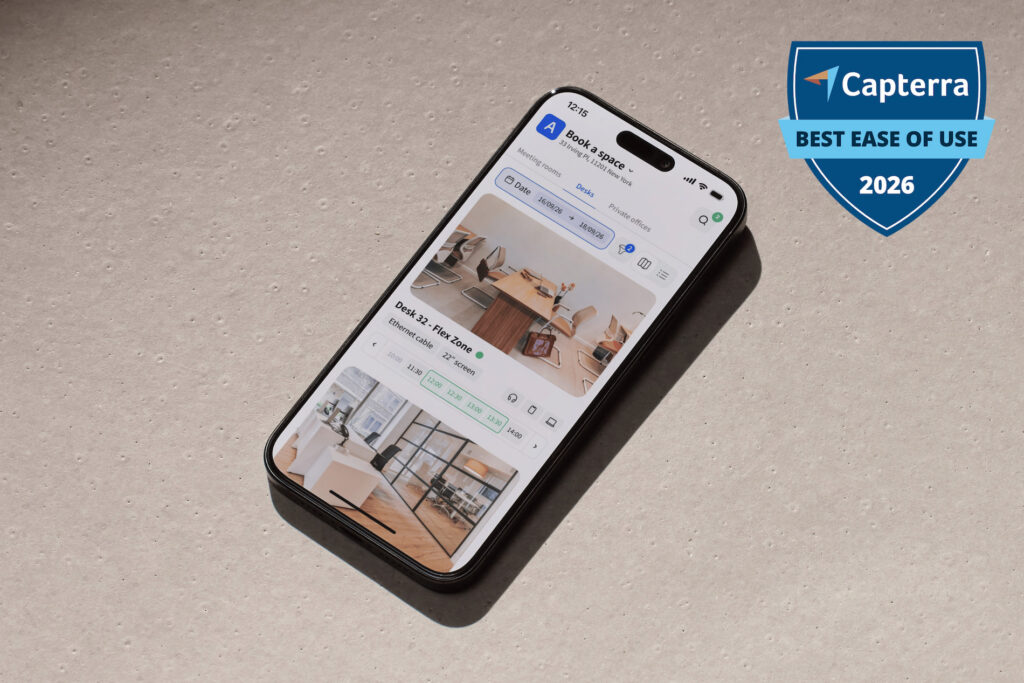
CEn comparación con una reserva de escritorios de Excel, reserva de escritorios como Archie ofrece:
- Opciones de programación flexibles: reserva de escritorios se reserva realizar a través de una aplicación web, una aplicación móvil, los calendarios de Google o Outlook, Microsoft Teamsy Slack. ¿Quién necesita reserva escritorios si hay tantas opciones entre las que elegir?
- Reservas recurrentes de escritorios: Los usuarios pueden reservar los mismos escritorios para días de oficina habituales, lo que elimina la necesidad de reservar un escritorio a diario.
- Planos interactivos: Los mapas visuales facilitan la selección de escritorios y la visualización de la distribución de la oficina.
- Disponibilidad en tiempo real:reserva de mesas ofrecen información actualizada en tiempo real sobre la disponibilidad de mesas para evitar reservas duplicadas o confusiones.
- Encontrar compañeros de trabajo fácilmente: Funciones como la búsqueda de empleados permiten a los usuarios reservar escritorios cerca de sus compañeros de equipo o socios comerciales para facilitar la colaboración. Algunos sistemas incluso envían alertas cuando los compañeros están en la oficina.
- Información útil:reserva de puestos de trabajo registran las tendencias de uso, las horas punta y la ocupación de los puestos, lo que ayuda a los responsables de oficina a planificar mejor y aprovechar al máximo los recursos del espacio de trabajo.
- Integraciones fluidas: El mejor reserva de mesas se integra con las herramientas que ya se utilizan, como calendarios y aplicaciones de comunicación, lo que facilita a los equipos la gestión fluida de las reservas.
Esto significa que ya no habrá que apresurarse por la mañana para conseguir el escritorio favorito ni conformarse con un sitio que no sea el ideal. Basta con entrar en la oficina (o reservar un escritorio con antelación), abrir la aplicación y elegir el lugar donde se quiera trabajar. Si buscas una forma más eficaz de gestionar los escritorios, esta es una solución mejor que la reserva de Excel reserva escritorios compartidos.
Qué hay que tener en cuenta antes de elegir el reserva de mesas adecuado
A continuación te presentamos algunas preguntas importantes que debes plantearte antes de elegir un reserva de mesas (ya sea en Excel, Google Sheets o una solución específica):
👩🏼💼 How many desks and employees?
If you only have a small team and a few shared desks, an Excel or Google Sheets template might be enough. But once more people start booking desks, manual tracking can get messy. A proper desk booking solution makes it easier to see what’s available and avoid mix-ups.
💻 Does it support hybrid work?
If people come into the office on different days, your booking system should support flexible workspace scheduling. Some employees may need the same desk often, while others may only come in once or twice a week. A good system makes it easy for everyone to find and book the right space.
📊 Can it track office usage?
A basic template can show who booked which desk, but it won’t give you much insight into how your office is actually used. Desk booking software can help you see busy days, popular desks, unused areas, and overall space demand.
Si tienes un equipo pequeño y una configuración sencilla, una reserva de puestos compartidos podría ser suficiente. Pero si buscas algo que te ahorre tiempo, evite confusiones en la programación y crezca al ritmo de tu equipo, lo mejor es optar por un reserva de puestos. Antes de tomar una decisión, piensa en cómo trabaja tu equipo actualmente y en lo que tu oficina podría necesitar en el futuro.