




















- What you’ll learn
- What an Excel desk booking tool is and how it works
- How to set up a simple hot desk booking system step by step
- The main limitations of manual desk booking templates
- The pros and cons of Excel, custom-built tools, and third-party software
Looking for a simple way to manage hot desk bookings?
Archie’s hot desk booking template in Excel is a budget-friendly option perfect for small teams (fewer than 10 people) working in the same office space.
The template is completely free to download.
What is an Excel desk booking tool?
An Excel desk booking tool is one of the simplest ways to manage desk reservations in an office. Instead of using dedicated desk booking software, teams use a spreadsheet to track which desks are available and who has booked them.
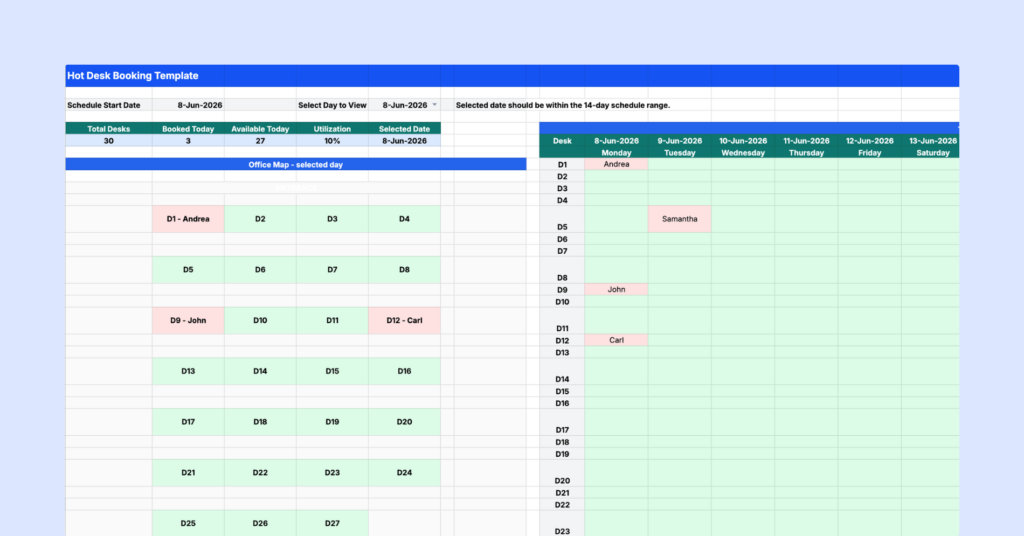
Typically, each desk is listed in a row and each date appears in a column. Employees can then mark desks as booked, available, or pending. Some teams also use dropdown menus and color coding to make the spreadsheet easier to manage.
For small offices, this can be a practical and low-cost solution. Most people already know how to use Excel, and there are no additional software costs. However, as teams grow and office schedules become more flexible, spreadsheets can become difficult to maintain and are more prone to mistakes.
How to set up a desk booking system in Excel
Setting up an Excel desk booking tool is simple, but it can take time and effort to create it from scratch. That’s why we’ve made things easier with a ready-to-use, free desk booking template you can download and use immediately. Access the desk booking template for free.
Step 1: Set the schedule start date
Once you download the desk booking spreadsheet, start on the Hot Desk Booking sheet. At the top of the sheet, enter your Schedule Start Date. This is the first day you want the booking schedule to show. Once you add the start date, the template will display a 14-day booking period. This helps you plan desk bookings for the next two weeks in one place.
Step 2: Choose the day you want to view
Next, choose the specific day you want to view in the office map. The office map is there to give you a more visual view of your workspace. Instead of only looking at rows and columns, you can quickly see which desks are booked on that selected day. This is useful when someone asks, “Where will I sit today?” or “Who is sitting near me?”
Step 3: Use the 14-day grid to assign desks
The main booking grid shows desks on the left and dates across the top. To book a desk, find the correct desk row and the correct date column, then enter the person’s name in that cell. For example, if Andrea books D1 on Monday, enter Andrea in the cell where D1 and that date meet.
Blank cells mean the desk is still available. You do not need to type “Available” into every empty cell. Keeping available desks blank makes the sheet cleaner and easier to scan.
Step 4: Use the Booking Requests sheet for approvals
If you do not want employees editing the main booking grid directly, use the Booking Requests sheet. This sheet can be used to collect desk booking requests before they are approved. For example, employees can enter:
- Their name
- Requested date
- Preferred desk
- Notes or special requirements
- Booking status
This is helpful if you want more control over who gets which desk, especially on busy office days. You can use the status dropdowns to track each request: Pending when a request still needs review, Booked once the desk has been approved and added to the main booking grid, or Blocked if the desk should not be used that day (because it is reserved for a team, under maintenance, or unavailable for another reason).
Step 5: Share the hot desk booking Excel template with your team
Once your Excel desk booking tool is set up, share it with your team. You can email the file or upload it to a shared platform like Google Drive or SharePoint. Make sure to set appropriate editing permissions so only authorized team members can make changes.
Step 6: Keep one person in charge of the desk booking system
To avoid duplicate or confusing bookings, assign someone to act as the desk booking system administrator. This could be an office manager, workplace coordinator, admin, or team lead. That person should be responsible for updating the desk booking spreadsheet:
- Review new booking requests
- Approve or reject requests
- Add approved bookings to the 14-day grid
- Keep the office map accurate
- Remove outdated or incorrect bookings
This keeps the template organized and helps everyone trust the schedule.
Using the hot desk booking template in Google Sheets
Google Sheets is a great alternative to an Excel desk booking tool, especially for teams that need easy access and real-time collaboration. Moving your desk booking system Excel template to Google Sheets allows your team to work together seamlessly, from anywhere, on any device with an internet connection.
Import and share with ease
You can quickly upload your hot desk booking system from Excel into Google Sheets without losing important formatting or dropdown menus. Once it’s uploaded, you can share the file with your team across departments or locations. Everyone with access can view and update the sheet at the same time, making it easier to coordinate bookings.
Real-time collaboration
Unlike the Excel desk booking tool, where updates need to be manually saved and shared, Google Sheets automatically saves every change as it happens. Everyone always has the latest version, reducing errors or outdated information. Team members can book desks simultaneously without worrying about conflicts or overwriting someone else’s work. Google Sheets webhook integrations can also trigger automated alerts when bookings are made.
Free hot desk booking system Excel limitations
Setting up a manual hot desk booking system in Excel or Google Sheets is relatively easy, but the challenges start when more people begin using it:
- They don’t scale well: What works for five people can quickly become frustrating for fifty. Someone usually ends up spending time answering questions, fixing booking mistakes, and keeping the spreadsheet organized.
- Double bookings become more common: When multiple people edit the same file, mistakes happen. Employees may accidentally reserve the same desk or book a space that was already taken.
- Visibility is limited: A spreadsheet tells you whether a desk is booked. It doesn’t tell you who is planning to be in the office, where teammates are sitting, or how office space is actually being used.
- There’s no automation: Reminders, recurring bookings, check-ins, workplace analytics, and calendar integrations typically require manual work or additional tools.
Should you use a hot desk booking template?
In my opinion, the answer depends mostly on the size of your office and how often people need to book desks.
A hot desk booking template is a great option for smaller teams or businesses that need a simple way to manage shared desks. So, if you’re running a small office, startup, or coworking space with only a few shared desks, a using a spreadsheet in Excel or Google Sheets can be a perfectly reasonable solution. It’s free, familiar, and quick to set up.
But once desk reservations become a daily activity, an Excel desk booking template start showing their limitations.
Employees may not know whether information is up to date. Booking conflicts become more common. Managers spend more time maintaining the system. And getting useful insights about office usage becomes almost impossible.
For growing teams, dedicated desk booking software often ends up saving time and reducing frustration, even though it comes with an additional cost.
Which desk booking system is right for you?
When managing desks in a hybrid workplace or a coworking space, there are three main options: using a hot desk booking system in Excel or Google Sheets, building your own desk booking system, or investing in third-party desk booking software.
1. Hot desk booking Excel template
I’ve already mentioned that using Excel or Google Sheets is the simplest and cheapest option, especially for smaller teams that work in the same office and don’t need to book meeting rooms. If that’s the case, go ahead and try out our free hot desk booking template.
At the same time, filling out rows and columns can get tedious fast, especially for larger offices and teams. Mistakes like double bookings and mix-ups can easily happen since there are no real-time updates on availability.
Pros:
- Familiar and easy to use.
- Accessible anytime, with no need to learn new software.
- Perfect for small, simple setups.
Cons:
- Someone must oversee and maintain the desk booking spreadsheet, answer questions, and fix any issues.
- Tracking hot desking policies or hybrid schedules can become a mess.
- No real-time updates or reliable data for KPIs like productivity or collaboration.
- Can’t handle complex setups like booking rooms, desks, and focus areas in one place.
Managing desks shouldn’t feel like extra work. Desk booking software takes the stress out of shared seating and makes it easier for your team to find, book, and use office space.
2. Building your own desk booking system
Creating custom desk booking software is the most tailored solution, but it’s also the most expensive and complex. While it gives you full control to design a system that meets your exact needs, the costs and effort involved can add up quickly.
Pros:
- Fully customized to your business requirements.
- Managed by your in-house team, so issues can be resolved quickly.
Cons:
- Expensive to develop, host, and maintain.
- Requires hiring developers or dedicating existing resources.
- Time-consuming to build, test, and add new features.
If you’re considering this route, be sure to weigh the long-term costs and effort required.
3. Third-party desk booking software
Dedicated desk booking systems help you reserve and manage desks easily, either in advance or on the spot. These systems prevent double bookings with instant updates and sync with calendars to keep schedules organized, which makes it perfect for growing teams.
Pros:
- Advanced desk booking features include live availability, workplace analytics, floor plans, and filters.
- Grows with your team and office needs.
- Connects with tools like Google Workspace, Microsoft 365, and Slack.
Cons:
- More expensive than basic desk booking solutions like Excel.
- Initial configuration and training may take time.
Why replace your Excel booking system with a desk booking app
Compared to an Excel desk booking tool, desk booking software like Archie offers:
- Flexible scheduling options: Desk booking can be done via a web app, mobile app, Google or Outlook calendars, Microsoft Teams, and Slack. Who needs desk booking spreadsheets if you have so many options to choose from?
- Recurring desk bookings: Users can reserve the same desks for regular office days, eliminating the need to book a desk daily.
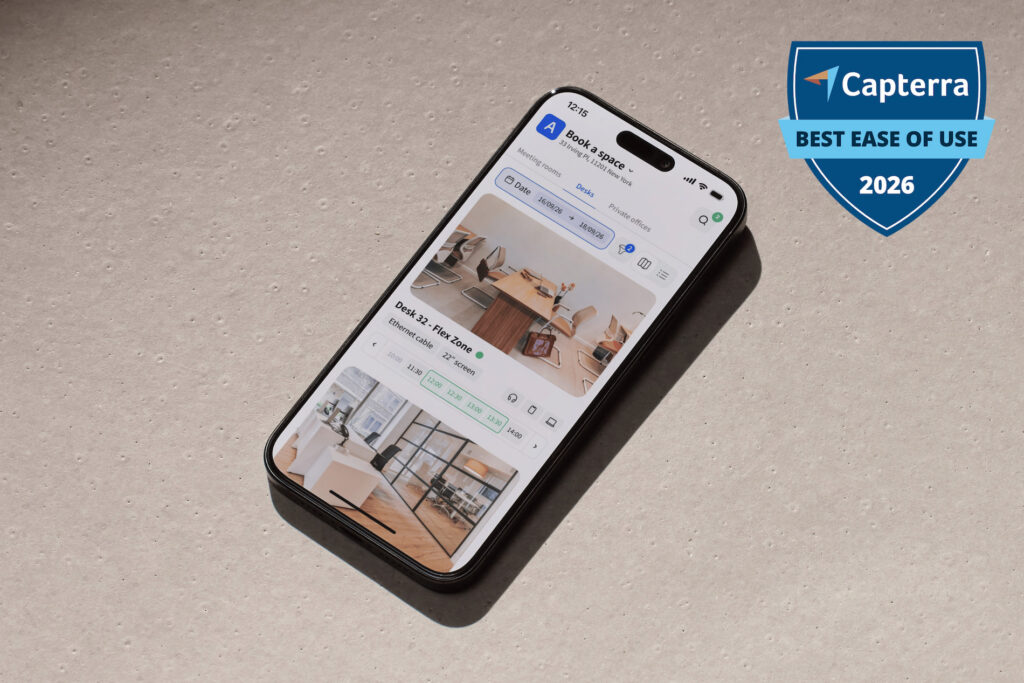
- Interactive floor plans: Visual maps make selecting desks and viewing the office layout easy.
- Real-time availability: Desk booking systems provide live updates on desk availability to avoid double bookings or confusion.
- Finding coworkers easily: Features like employee lookup allow users to book desks near their teammates or business partners for easier collaboration. Some systems even send alerts when colleagues are in the office.
- Useful data insights: Desk booking tools track usage trends, peak times, and desk occupancy, helping office managers plan better and make the most of workspace resources.
- Smooth integrations: The best desk booking software connects with tools already in use, like calendars and communication apps, making it easier for teams to manage reservations seamlessly.
This means no more scrambling in the morning to grab a favorite desk or settling for a less-than-ideal spot. People can just walk into the office (or reserve a desk in advance), open the app, and pick a desired place to work. If you’re looking for a more efficient way to manage desks, this is a better solution than the hot desk booking template in Excel.
What to consider before choosing the right desk booking system
Here are a few important questions to ask yourself before choosing a desk booking system (be it in Excel, Google Sheets, or as a dedicated solution):
👩🏼💼 How many desks and employees?
If you only have a small team and a few shared desks, an Excel or Google Sheets template might be enough. But once more people start booking desks, manual tracking can get messy. A proper desk booking solution makes it easier to see what’s available and avoid mix-ups.
💻 Does it support hybrid work?
If people come into the office on different days, your booking system should support flexible workspace scheduling. Some employees may need the same desk often, while others may only come in once or twice a week. A good system makes it easy for everyone to find and book the right space.
📊 Can it track office usage?
A basic template can show who booked which desk, but it won’t give you much insight into how your office is actually used. Desk booking software can help you see busy days, popular desks, unused areas, and overall space demand.
If you have a small team and a simple setup, a hot desk booking template might work just fine. But if you’re looking for something that saves time, avoids scheduling mix-ups, and grows with your team, a desk booking system is the way to go. Think about how your team works now and what your office might need in the future before making your choice.