



















- Lo que aprenderás
- What Archie Rooms actually does and how its features work in practice
- Where Archie genuinely stands out, and where it falls short, based on real user feedback and product reviews
- Whether or not Archie is the right fit for you and why
The most important thing you need from room booking software is a smooth system. You want people to find and reserve the exact right space they need, with as little oversight as possible from you (or preferably none at all!). You also want to make sure your space is being used – no rooms sitting continuously vacant, and also none constantly overbooked and causing schedule havoc.
This review covers how well Archie Rooms fulfills all of the above, and maybe a little bit more. Archie room booking software is easy to use, and with minimal setup you’ll find it simple to keep room bookings fair and organized.
Here, I’ll show you its key features, pricing, and how it stacks up to the competition. Full disclaimer: I am writing for Archie, but this review is based on real user feedback and product demos to rid it of bias as much as possible. The aim is to aid your research so that when it comes down to choosing between room booking software, you’ll see that Archie deserves a place at the top of the list.
What is Archie Rooms?
Archie is a workspace management platform that offers a range of products that organizations use to manage their space, people, and resources. This review focuses on Archie Rooms: meeting room booking software that helps companies make the most of their office, so that people can easily find and reserve the space they need.
Since 2016, Archie has served offices and coworking spaces worldwide. It is now used by over 1,000 organizations across 46 countries, including CBS News, Impact Hub and University of Calgary. Archie is also currently rated #1 out of 152 space management platforms on G2 – so you don’t even have to rely on me to tell you that Archie is trustworthy, hundreds of reviews can back me up!
Pros (based on user feedback)
- Multiple ways to reserve a room. It’s easy to see at a glance what’s available, so nobody wastes time hunting for a free space.
- You can use filters to find the right room, e.g. depending on capacity, equipment, and location. I like this feature a lot for big offices, where you have people coming in who might not know the space perfectly.
- Competitive pricing – I’ll give you more details on this, but as it’s based on your space and not amount of users, you’ll find it very fair.
- Preventing no-shows and double bookings is automatic, with check-in reminders, instant release of unclaimed rooms, and buffer time between meetings.
- It’s clear to see how your spaces are actually being used with clear occupancy reports and room utilization data.
- You don’t need to buy anything ‘Archie’ specific, i.e. it’s compatible with Android and iOS hardware for meeting room display and booking.
- Reserving rooms is also possible through Outlook, Google Calendar, or Microsoft Teams.
Cons (based on user feedback)
- Your users have fewer capabilities if they’re only accessing Archie through integrations. Reviewers comment that features are a bit easier in the Archie app itself.
- Pricing is not ideal for small teams, especially if you’re using Rooms as a standalone tool and aren’t using any of Archie’s other products.
Let’s get into details: Archie Rooms key features
1. Offers multiple ways to book a meeting room
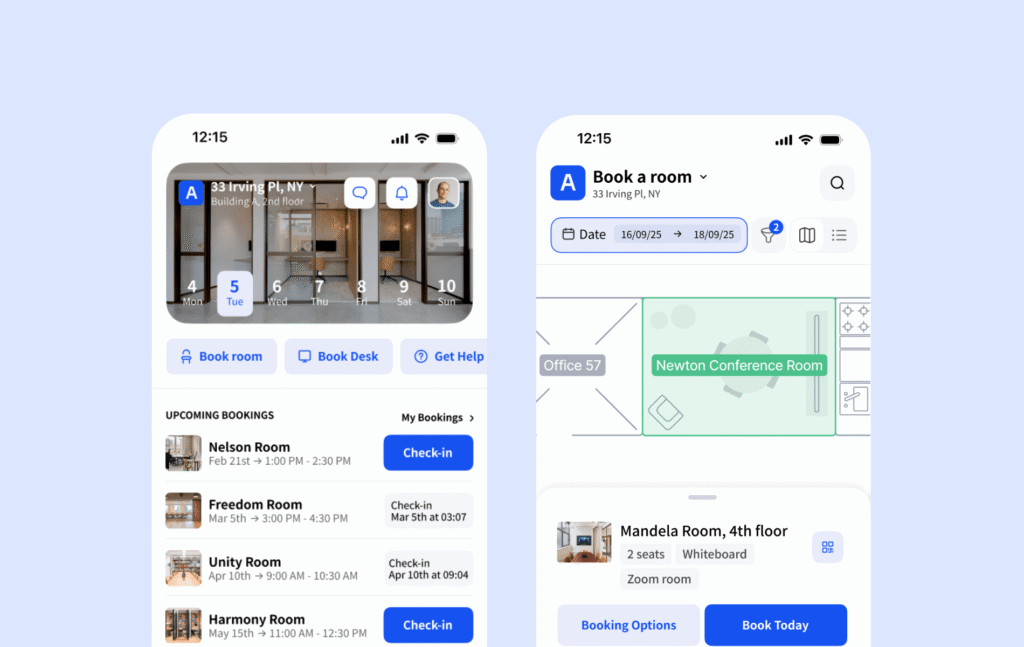
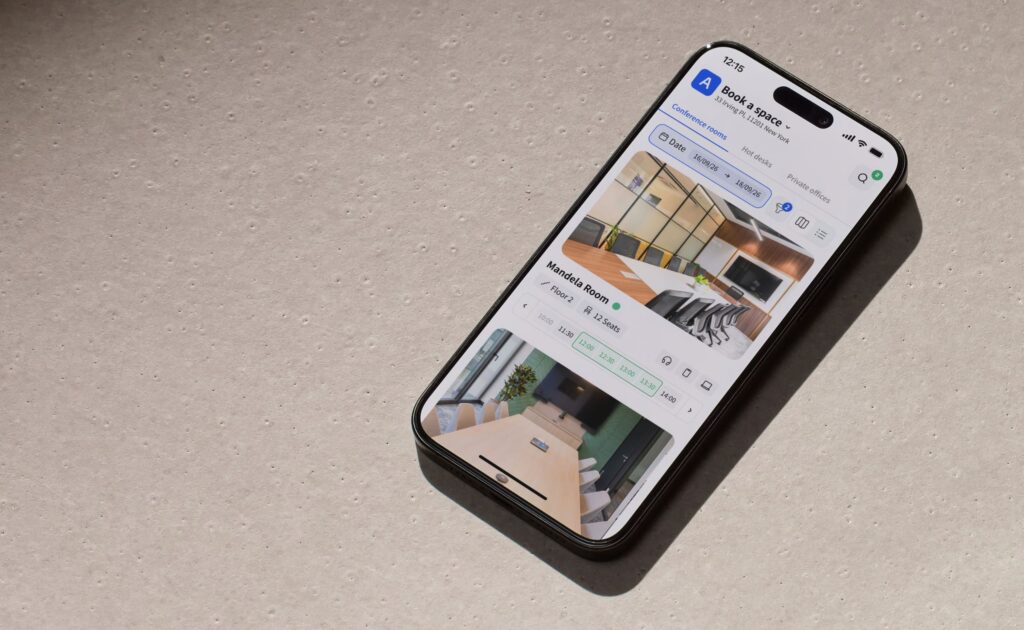
People can reserve a room at any time with the Archie mobile app. The interactive floor plan shows the layout and availability for fast, easy booking. It’s also possible to filter conference rooms by size, availability, location, etc.
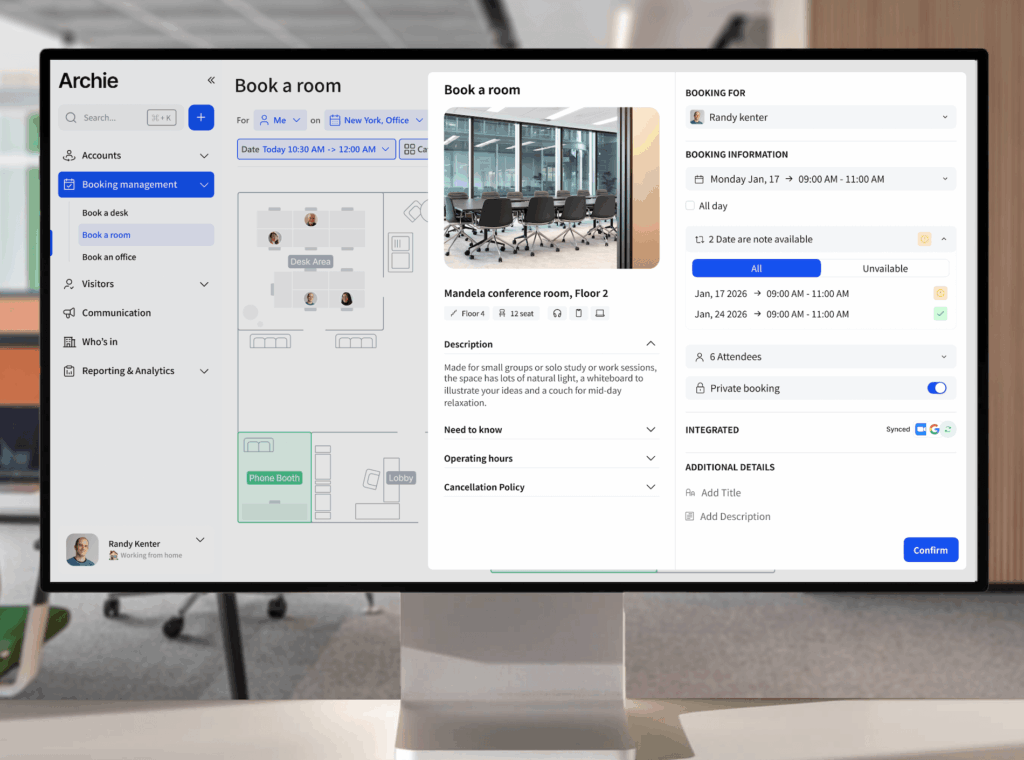
Booking is also simple on a web browser. The web app can be customized with your own branding, for a smoother customer experience if you’re also opening up your space for outside bookings. If your company uses Teams, Outlook, or Google Calendar, employees don’t have to leave their digital workspace to reserve their meeting room.
Adoption is going to be one of the biggest indicators of success, and Archie makes it easy for your users.
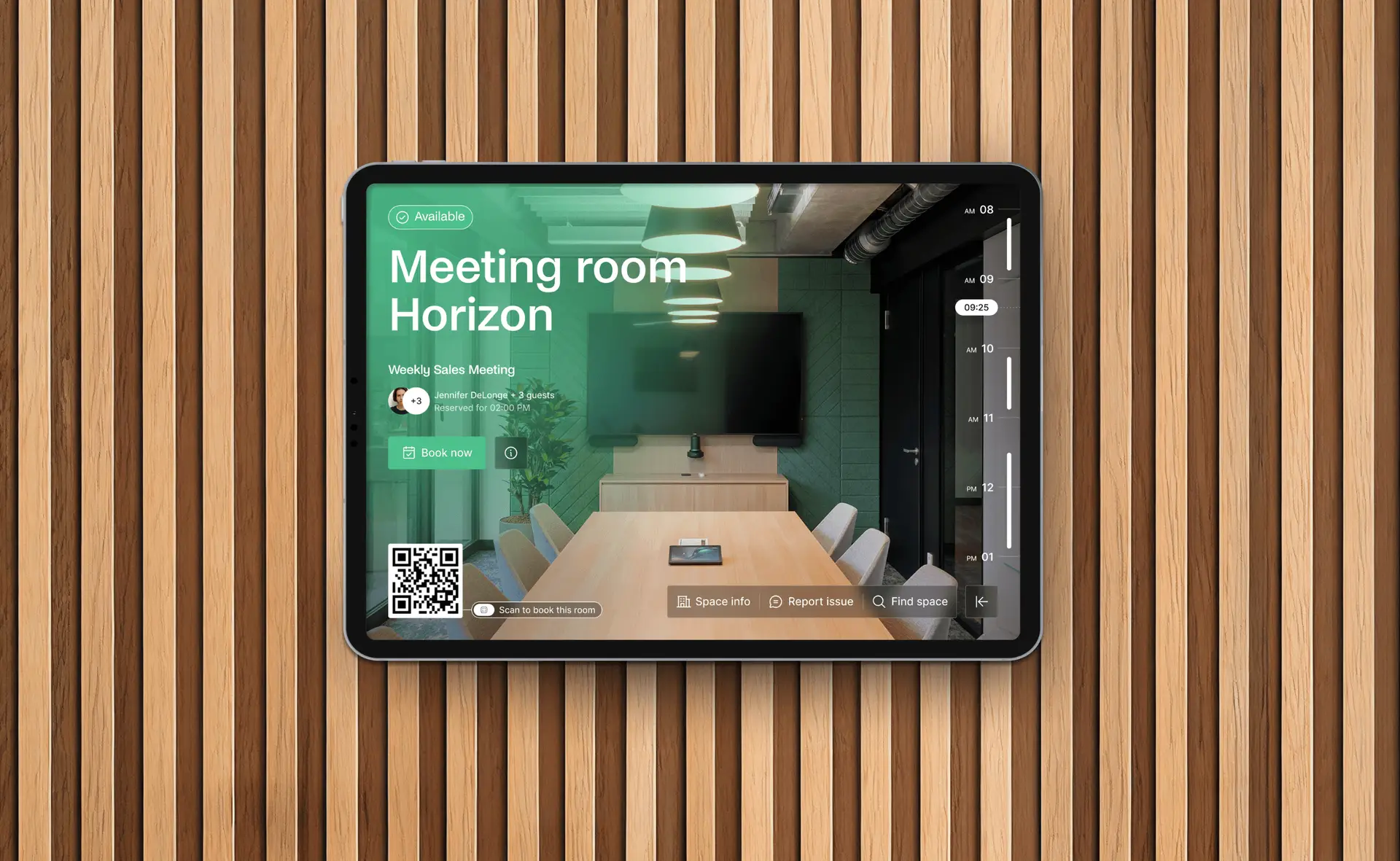
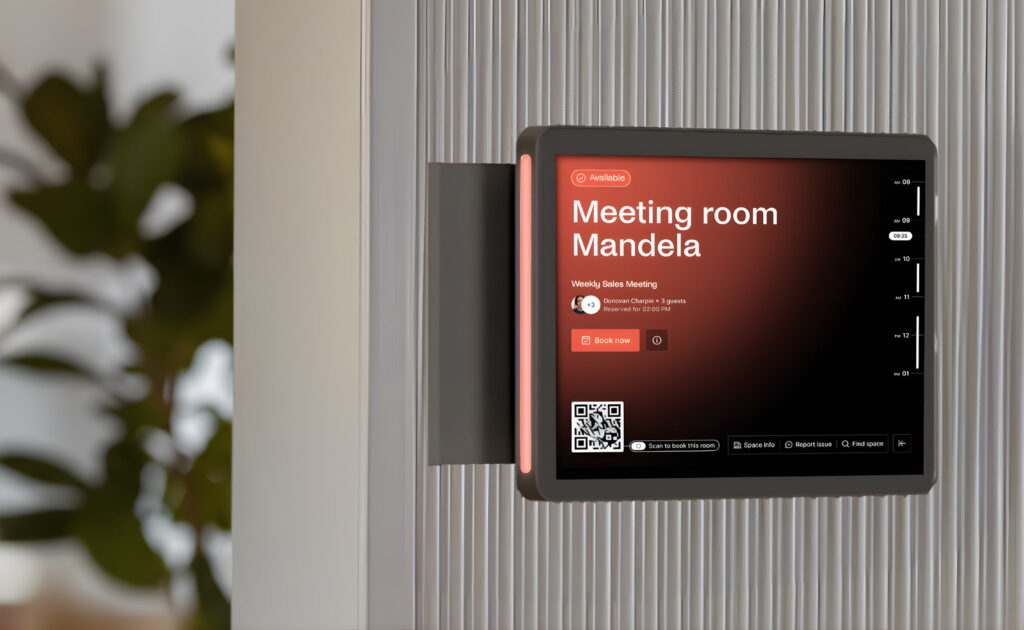
If you also want a room display in your office itself, using Archie’s tablet app lets you display availability on a tablet or kiosk. Pop this outside the room itself or on a touchscreen in your office lobby (for example) to support physical reservation and QR code check-in.
When searching for a space, users can filter rooms by amenities, such as a display screen, whiteboard, or video conferencing equipment, so people book a room that actually fits their needs. Attendees (including external visitors) can be added directly in the booking itself.
Modifying an existing reservation is easy with drag-and-drop meeting room booking features; there’s no need to start from scratch. Ease-of-use is really baked into many aspects of Archie Rooms.
2. Eliminates wasted space and scheduling conflicts
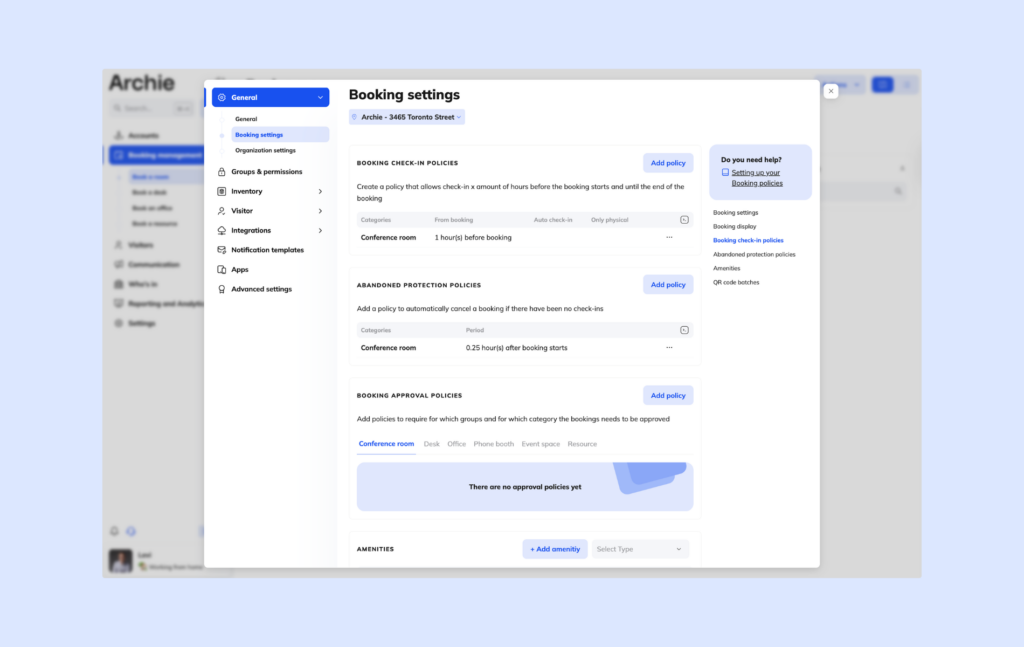
Wishing to avoid meeting clashes is reason enough to need room booking software! With adjustable booking rule settings, you can prioritize certain people or groups who need meeting room access most.
Nobody likes micromanagement, which is why the custom booking rules give you control without having to actually manually interfere:
- Decide how far in advance and how often people can reserve;
- Approval flows can mean spaces require sign-off before confirming;
- Booking reminders to prevent forgotten reservations;
- Buffers between meetings prevent overruns from disrupting the next group;
- You can also set limits on booking duration or frequency to keep access fair across the office.
For those who don’t want spaces blocked unnecessarily, no-shows will no longer hold the space. An automatic release can be configured if the person who reserved hasn’t checked in, so the room is free to anyone else who wants to jump in.
If you’re managing a large office with high-demand meeting rooms, this is the ideal solution. Archie’s room booking software automatically frees up unused spaces, ensuring rooms are always available when needed. If you expect this to become a recurring headache for your office manager, let Archie take care of it.
3. Gets up and running fast, without a complicated setup
One of the more consistent things you’ll hear from users is how quickly their company was up and running with Archie Rooms.
A big part of that is how Archie handles floor plan configuration. You can upload your own office layout and build out an interactive floor plan directly in the platform, mapping rooms to their physical location in the space. From there, rooms can be labeled with their capacity, available amenities, any booking rules you want applied, and even catering services you wish to offer.
If your office layout changes, updating it doesn’t require outside help: admins can make changes directly.
Beyond the physical setup, Archie room booking software is built to be customized without complexity. Booking rules, approval flows, buffer times, and user permissions are all set through a straightforward admin interface.
4. See exactly how your space is being used
Archie gives you a clear picture of how many of your meeting rooms are being booked. Track occupancy rates, peak booking periods, no-show rates, and which rooms are most (and least) popular.
This data is useful at both the room and office levels. If a room is regularly sitting empty, the analytics will surface it. For teams managing multiple locations, usage can be viewed across sites in one place, making it straightforward to spot patterns and make informed decisions about your space.
“We didn’t realize how underused some of our meeting rooms were until we started tracking them with Archie. Now we can see usage patterns and actually make decisions based on that.”
- Mia T.
- G2 review
What makes Archie software stand out?
By now, you have a pretty good grasp of how you can manage room bookings with Archie software. But you likely came to this review for a little more than that – if you’re researching room booking software, there are probably other room booking tools on your radar already. So, let’s see how they stack up.
Users can find and book a room in seconds, and you have full control and visibility over how it’s all working (without all the admin). What stands out in the reviews is consistent:
- teams appreciate that it’s straightforward to use without sacrificing depth,
- fast to get running without compromising on setup,
- and supported by a team that’s quick to respond.
Where competitors like Officely prioritize a lightweight, Slack-native experience, Archie brings more out of the box:
- Interactive floor plans,
- Multiple ways to book and check in,
- Amenity-based filtering with booking rules, approvals, and buffers,
- Auto-release and no-show protection.
Platforms like Joan lead with hardware, their e-paper displays are beautiful and well regarded, but device costs and installation requirements add up. Archie’s approach is software-first, which means teams get:
- A straightforward management interface with real-time occupancy data,
- Fair, consistent pricing with no extra necessary purchases,
- Broad integration with calendars and collaboration tools.
The clearest difference is how much Archie packs in without making things complicated. Tools like Officely keep things intentionally simple, which works for smaller teams, but limits you as your needs grow. Platforms like Robin and OfficeSpace go in the other direction: enterprise-grade depth, but with a more complex onboarding and less flexibility. Admin is heavier, whereas with Archie the aim is to take the burden off your shoulders.
Archie sits in the middle in the best possible way: a booking experience employees will actually use, admin controls that give teams real oversight, and analytics that make it straightforward to act on how your space is being used.
What else does Archie offer?
It’s worth noting, before going deeper into the details of Archie Rooms, that there are other products Archie offers that could complement your setup:
- Archie Desks: the most logical counterpart to Archie Rooms and often purchased together. Offices use our desk booking software to support hot desking or hotel desking for their teams. The pricing structure is similar too, so you can combine your plan and only pay for the desks or conference rooms you want to open for booking.
- Archie Visitors: a smooth system to welcome visitors to your office. If you’re looking for a more secure, professional visitor management setup, Archie can handle things from pre-registration to check-in.
- Archie Coworking: this is a multi-faceted solution for coworking spaces to manage, automate, and monetize their coworking businesses.
Archie Rooms plans, pricing, and onboarding
Archie charges per room per month across all plans.
Its room booking software pricing is designed to be predictable for companies: no matter how many team members or users you have, the price will not fluctuate. Only if you plan to expand your space or include more rooms will your Archie Rooms cost increase.
Plan | Minimum | Ideal para |
|---|---|---|
Starter | Min $159/month | For small and mid-sized organizations looking for a meeting room solution |
Pro | Min. $249/month | Larger companies with multi-location or advanced needs |
Enterprise | Personalizado | Large-scale deployments with compliance or custom requirements |
The Starter plan covers the essentials for effective room/desk management: web and mobile booking, visual floor plans, QR check-ins, and occupancy analytics for a single location are all included.
The Pro plan has all of the above plus some extras that give Archie a real edge: multi-location support, Microsoft Teams/Outlook/Slack integrations, SSO & SCIM, brand customization, and tailored premium onboarding. Insider knowledge: this is the most popular tier!
The Enterprise plan gives you a lot more customization and control. This is for large-scale deployments with specific requirements, like security and compliance support, custom data residency, a tailored legal framework, premium API support, and white-glove onboarding.
- Summary
If you’re a medium or large team, you’ll find this a very favorable cost in comparison to many Archie alternatives. However, if you’re a smaller setup only looking to use Archie for managing several rooms, you may be affected by minimum pricing. If that’s the case, I recommend calculating your usage and weighing up your budget before making a decision.
How Archie room booking software integrates with your existing tech
Archie likely integrates with your current tech stack, meeting your users where they already are for smooth adoption and better productivity:
- Microsoft Teams: Surface room availability and make bookings without ever switching tabs
- Microsoft Outlook & 365: Calendars stay in perfect sync both ways
- Google Calendar & Workspace: Room schedules reflect live availability throughout Google’s ecosystem automatically
- Slack: Booking confirmations and reminders
- Zoom: Video links get attached to room reservations automatically
- Zapier: Opens the door to thousands of additional tools for custom workflows
- Identity & Access Management (the stuff IT actually loses sleep over):
- SSO / SAML: Plug straight into whichever identity provider you’re already running
- SCIM: Permissions stay current automatically by pulling directly from directories like Entra ID
- Door access: Works with Kisi, Salto, Brivo, Tapkey, DoorFlow, and Welcomr
- Open API: When something isn’t covered out of the box, Archie’s fully documented open API gives your engineering team everything they need to close the gap.
My honest take: should you pick Archie?
Archie is a very strong room booking product, but this question really boils down to your company. After going through the features, the pricing, and the user reviews, here’s where I land.
✅ If you’re a mid-sized to large organization needing a reliable, complete room booking solution, Archie will likely deliver everything you need at a very competitive price. Archie gives you a lot out of the box: easy for users, custom booking rules, automatic no-show handling, and useful analytics. There’s no lengthy rollout or admin burden.
➕ Some icing on the cake: If you’re already embedded in Microsoft or Google ecosystems, Archie will fit right into where your users already sit. If you’re also looking to combine desk booking and potentially visitor management software, reviewers consistently praise Archie across the board.
❌ Archie isn’t the right call for everyone. If you’re a small team booking just a handful of rooms and not planning to scale, the minimum pricing will sting. You’ll be paying for capacity you don’t need.
Archie Rooms FAQs
How does Archie prevent double bookings?
Once a room is booked, it’s impossible for another reservation to be made on top of it. Archie’s interactive floor plans and room filtering also show real-time availability at a glance, so anyone searching for a space can immediately see what’s free and what isn’t before they even get to the booking stage.
Can I add booking buffers between meetings?
Yes. Admins can configure buffer times between reservations, so there’s always a gap between one meeting ending and the next beginning. This prevents overruns from disrupting the next group and gives teams time to clear the room.
How can employees book a meeting room?
Archie offers several ways to reserve a room: the web app, the mobile app, or tablet app (e.g. for kiosk display). Integrations extend that further, so if your team use Google Calendar, Teams or Outlook, they can book directly there. The goal is to make booking fit naturally into however your team already works.
Does Archie support meeting room displays?
Yes. Archie runs on any Android or iOS device, so you can turn any tablet into a room display without being locked into specific hardware. Placed outside a conference room, it shows real-time availability, upcoming bookings, and allows instant on-the-spot reservations.
Does Archie charge per user or per room?
Archie charges per room, not per user. This makes costs easier to predict, since pricing is tied to the number of spaces you manage rather than any headcount fluctuations.
Does Archie automatically release rooms if nobody shows up?
Yes. If the person who booked a room hasn’t checked in, Archie can be configured to release it automatically. This keeps availability accurate and ensures space doesn’t sit blocked when it could be used by someone else.
What analytics does Archie provide for meeting rooms?
Archie tracks occupancy rates, peak booking periods, no-show rates, and which rooms are most and least used. For teams managing multiple locations, usage data can be viewed across sites in one place, making it straightforward to spot patterns and make informed decisions about your space.