




















- Lo que aprenderás
- What Archie Coworking is and who it's for
- Pricing, key features, and integrations, so you can make a well-informed decision
- How Archie stacks up against alternatives
- An honest take on where Archie shines and where it has limitations
Running a coworking space means wearing a lot of hats at once: sales person, office manager, community builder, administrator. No matter the strength of your team, there’s a point at which the right software is necessary to alleviate the burden.
Which brings me to Archie Coworking. This is an in-depth review of Archie’s dedicated coworking management software, ideal for those starting up, already running, or expanding a coworking space.
If you’re concerned about bias, because you’re reading a review on Archie’s own website, that’s completely fair. But fair is actually what this review aims for. Instead of just a flattering list of Archie’s capabilities, I’ll get to the bones of Archie’s strengths & limitations and include comparisons to alternatives.
What is Archie Coworking?
Archie is a workspace management platform with several products. My focus here is Archie’s dedicated platform for coworking space operators, but our separate products also include desk booking, room scheduling, and visitor management for workplaces.
- Archie in numbers
Archie has been operating since 2016 and is used by over 1,000 organizations across 46 countries. On the coworking side specifically, it’s rated #1 out of 152 space management platforms on G2, with a 4.9/5 on both G2 and Capterra.
Archie Coworking is built for both the people running the space and the members using it. This is really fundamental to our software.
You need the full operational picture: attracting and signing new members, managing their plans and access, billing them automatically, etc.
Your members need a polished, easy-to-use system by which to book desks, look up resources, find out what’s going on in the community, connect with other members, etc.
There’s a lot to unpack in those et ceteras, but first, a quick reference list of Archie’s strengths and limitations.
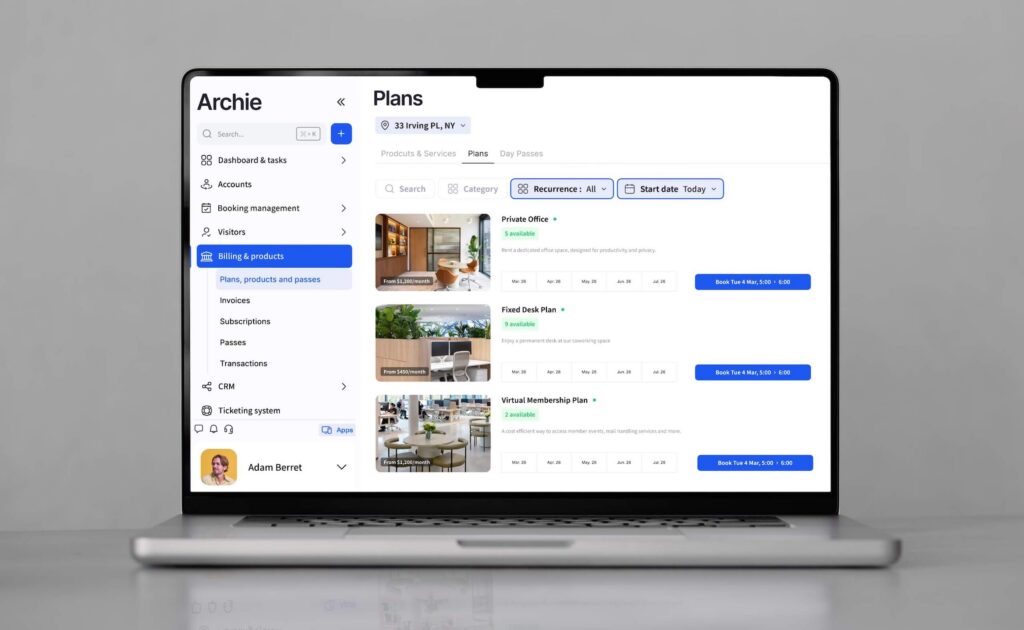
Pros and cons of Archie Coworking software
Pros (based on user feedback)
- An all-encompassing coworking platform, supporting automation across the whole member lifecycle, from signup to billing, to genuinely reduce manual work
- Very positive member experience, with users given everything they need to enjoy the space and explore the community
- Branded member portal and intuitive app for a consistent, modern experience
- Rated highly for usability: both operators and members pick it up quickly
- Built-in e-signatures mean you don’t need a separate DocuSign or Dropbox Sign subscription
- Integrations are comprehensive and well-maintained: accounting, access control, WiFi, printing, calendars
- Archie is consistently improving (proof that what you’re signing up for isn’t static, our team is committed to making sure Archie only gets better!)
Cons (based on user feedback)
- Archie Coworking software is better suited to medium-large and growing organizations; lighter options exist if you’re managing a small, simple space.
- That said, if you want very granular reporting and customizable analytics, enterprise options give you more depth.
Archie Coworking software pricing
If you’re weighing up different coworking software options, cost is always going to be one of the deciding factors. A quick overview:
Plan | Price (annual) | Ideal para |
|---|---|---|
Starter | From $165/location/month | Smaller coworking spaces that need clean member management and automated billing |
Pro | From $257/location/month | Growing spaces that need advanced features, white-label domain, visitor management |
Enterprise | Personalizado | Multi-location operators with specific compliance or customization requirements |
I can tell you that the Pro plan is the most popular with Archie, as it offers strong value for the price. The ROI is significant when you consider that many advanced features are included with no add-ons to pad out the cost: e-signatures, visitor management, coworking CRM, for example, are all things that usually cost extra with other platforms.
This is where Archie holds its own as a complete coworking solution. It doesn’t just save time to have everything in one platform, it also benefits your financial costs.
For a full breakdown, see Archie’s pricing page.
Key features of Archie Coworking software
1. Sales and growth made easier
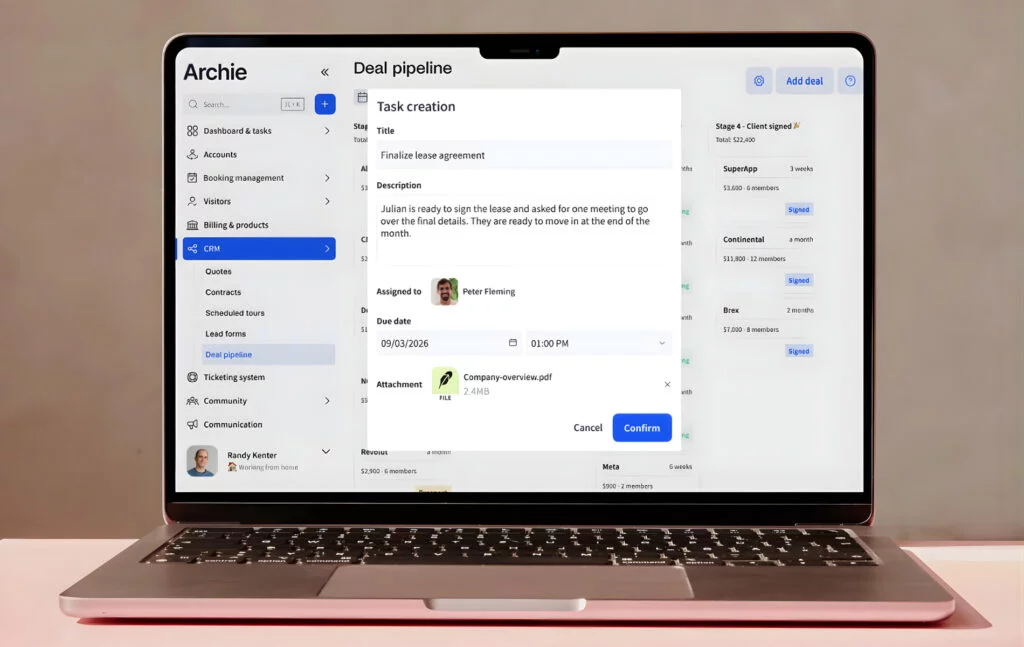
Archie gives you a CRM built specifically for coworking sales:
- Lead capture forms,
- A pipeline for tracking prospects,
- Tour scheduling,
- Quotes and contract templates with built-in e-signatures.
Once a lead is ready to sign, they can do it directly from the contract you send them: no printing, no DocuSign account, no separate workflow necessary. Your automations live right in Archie.
Most coworking tools bolt on e-signatures as an add-on or integration, which means an extra cost and an extra step. Having it native to the platform keeps the process clean for you and the new member.
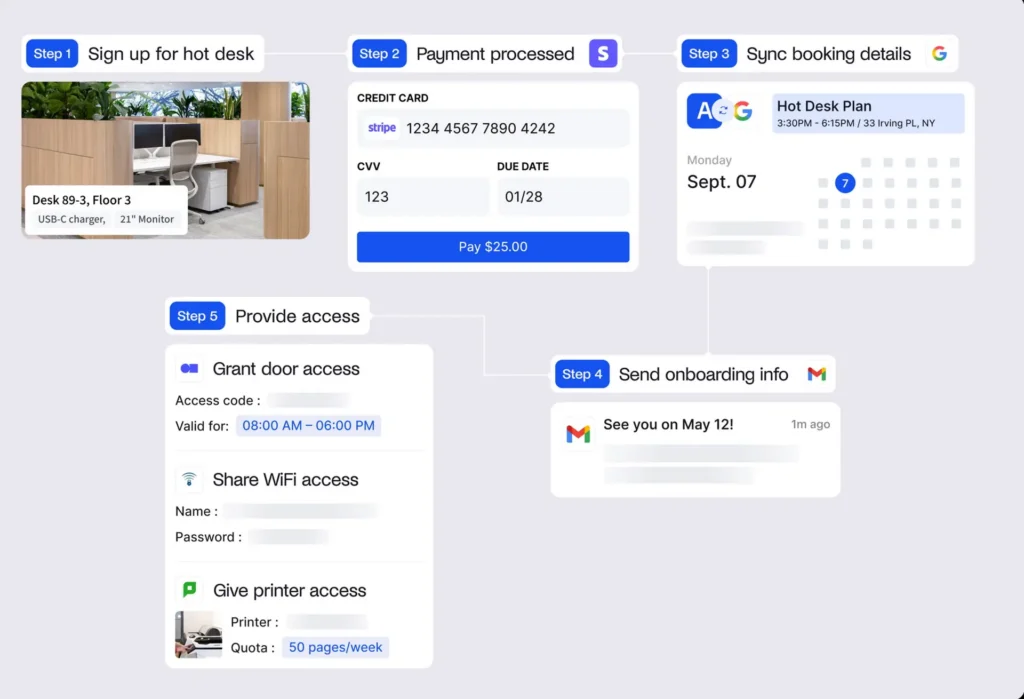
How this looks in practice: a prospective member fills out your form, gets added to your pipeline, and books a tour all without you lifting a finger. When they arrive, you (or any host) are notified automatically. They love the space, so you select the plan they’re interested in and send a quote directly from Archie. They sign from their phone, payment is collected, and their membership activates with a welcome email. No chasing, no waiting, no copy-pasting between tools.
As your organization grows, Archie’s built-in reporting and occupancy analytics shows you usage over time, peak times, resource popularity, and more.
2. Billing and payments
Automated invoicing is one of the areas where Archie invests the most, and for good reason, it can be one of the most painful parts of running a coworking space in terms of admin heft.
Archie automatically generates and sends invoices based on each coworking member’s plan, supporting:
- Recurring membership billing,
- One-time purchases (day passes, credits, meeting room fees),
- Deposit management.
Payment can be collected via Stripe or GoCardless and everything syncs with QuickBooks and Xero, so your books don’t require consolidation. If you’re currently doing things manually, or are using siloed tools, you know the time this saves.
Things can also be majorly simplified in Archie by a credit system. If you set this up, it allocates a certain number of room booking hours, desk booking hours, or resource allowance per month to a plan, tracks usage, and bills for overages automatically. This can be custom figured depending on different accounts and manually adjusted if you want to create some one-off offers.
Day passes and drop-in bookings can be sold directly through your public-facing booking page, if you want to open the doors to as many as possible!
Which brings us to how they book…
3. Desk, meeting, and resource booking made simple
Members can book desks, meeting rooms, and other resources through:
- The Archie mobile app,
- The web portal,
- A desk booking kiosk or a tablet screen mounted outside a room,
- Or directly from Google Calendar, Microsoft Teams, or Outlook.
A user who lives in their calendar can book from there and have it sync to Archie automatically; another who prefers browsing a floor plan on their phone can do that instead. Interactive floor maps show real-time availability across your space, so members can see at a glance what’s free, where it is, and what it has. I really like that it’s also possible to filter by capacity, equipment, etc, so everyone can make sure they have what they need.
The flexibility is ideal – you’re hopefully managing plenty of members, so being able to meet them where they’re at is a big plus.
Check-in is possible remotely or in-person via QR code. You also have no-show protection: if a member books a room and doesn’t check in within a defined window, the space can be automatically released and available for another. If you want to be careful about back-to-back bookings, you can build in buffer times between reservations.
Many coworking spaces benefit from having certain zones, offices, or rooms carved out. For example, you might have different tiers which have priority or exclusive access. Or you have a few company accounts who need their own spaces. Create custom groups in Archie and then configure zones and coworking space rules – users will only see what is available to them.
You can add whatever resources and amenities you like: coworking cloud printing, lockers, parking spots, phone booths, any custom tech, etc.

4. Automations
Let’s talk what you can automate, because the automation layer is where Archie earns a lot of its operator fans.
- When a member signs up, Archie can automatically: generate and send the contract, collect payment, grant door and WiFi access, add them to the relevant groups and notification flows, and trigger a welcome email.
- When a membership changes or ends, access is updated or revoked automatically. Billing adjustments happen without manual intervention. Reminders go out before invoices are due.
- There’s 30+ Archie integrations that aid with all of the above.
The short version: most of the repetitive daily tasks that eat up your time (or your receptionist’s time, or your IT specialist’s time) can be set to handle themselves. Check out how to automate your coworking operations for a detailed look at what’s configurable.
5. Branded portal
Members see Archie through web portal and mobile app. It’s clean, modern, and functions more like a consumer app than an enterprise management tool. That matters for customer satisfaction and retention: you want to give your members a clean, intuitive experience. Their dashboard shows their upcoming bookings, available credits, event listings, and announcements all in one place.
You can apply your branding with logo and custom color options so that your identity is consistent for customers. A white-label domain is included in the Pro or Enterprise plans but be aware that the white-label iOS or Android mobile app is an add-on.
6. Community features
Archie includes a community layer: a company newsfeed, event management, and searchable member profiles. I love this, and I think a strong community can be an underrated aspect of coworking spaces, it taps into what makes a space more than just an office rental.
You can post announcements and run events like networking sessions and yoga classes for members (or even non-members) to RSVP and attend.
Within Archie, members are also given a built-in directory so they can find each other, check out their skills and interests, and send messages. Features like this will help your coworking space stand out.
7. Visitor management and deliveries
On the Pro plan, Archie Coworking includes visitor management directly. Guests can check in via tablet kiosk or QR code, hosts are notified automatically, and your visitor log is maintained digitally. Delivery management is also included: members can be notified when a package arrives, with no paper log or verbal relay required.
Many coworking operators have to use a separate visitor management tool (or worse, a paper book). This gives Archie a keen advantage, not just cost-wise. Having it in the same platform keeps everything unified.
“We use Archie at 2 locations and will soon expand to a 3rd one. It’s been great from day one and the main difference I see compared to solutions I used in the past is how easy it is to manage the platform. Once the initial setup is done, all further customizations are very straightforward and we can do everything ourselves. Also it just feels like a more modern alternative from a design perspective.”
- Jennifer M.
- G2 Review
What makes Archie stand out?
The coworking software space is a crowded one, so if you’re fighting through lists of features and are a little lost about what differentiates one from the other, I get it. It’s not a fun task. The differences are real but they can be subtle.
Here, I’ve tried to make it easy by highlighting what truly makes Archie stand apart. If these things strike a chord with you, then it’s certainly worth having a full Archie demo.
Pricing with no hidden add-ons. Archie has baked a lot of ‘extras’ into the product itself which makes pricing very transparent and your software is complete from the get-go. E-signatures, visitor management, and native integrations are considered essential with Archie.
I advise you to factor this in when budgeting. Of note, OfficeRnD only provides custom quotes, and Optix’s pricing structure requires tacking on these ‘extras’, which really increases the cost.
Automation depth. From the signup flow through to billing reconciliation, Archie automates more of the member lifecycle than most alternatives. Reviews consistently cite this as the biggest time saver. One user on G2 noted that they were able to “automate different aspects of the space, including payments and accounting.” Another said it “significantly reduced manual work.” Cobot and Coworks, for example, will feel very light in comparison.
Modern UI that people actually use. Usability is Archie Coworking’s most-cited strength in reviews. In contrast, reviewers note that for Nexudus and Spacebring, the design and interface lack a modern or polished touch. Archie’s advantage shows up on both sides: operators find the admin interface intuitive, and members engage with the portal.
Fast to get running. Archie is positioned around days-to-live, not months. For operators switching from a legacy platform or setting up a coworking space for the first time, implementation speed is a real consideration. Enterprise coworking tools like Nexudus and Essenys can take significant time and professional services to deploy.
“The set up was easier than I expected, also thanks to the support of their team, and the usability is great. Like other coworking apps it covers everything from payments, events, community feed and so on, so I guess what makes it a better alternative for us is the user interface and how well its various integrations work. But at the end of the day ease of setup and ease of use is why we chose it.”
- Shama R
- G2 Review
Archie Coworking integrations
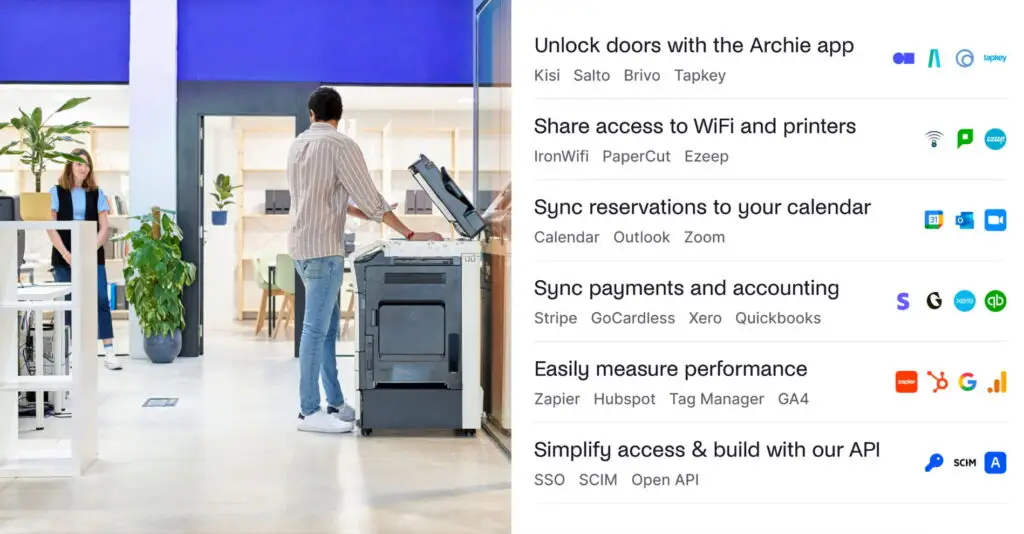
Archie connects to most of the tools that coworking operators already rely on. How it integrates with your current coworking tech stack:
- Payments and accounting: Stripe, GoCardless, QuickBooks, Xero
- Door access: Kisi, Salto, Brivo, Tapkey — with automatic provisioning and revocation tied to membership status
- Printing: ezeep and PaperCut — assign print credits, define pricing by print type, automate billing
- WiFi: IronWifi, Cisco Meraki, Ubiquiti, HPE Aruba — members and visitors get credentials automatically based on their access level, no manual sharing required
- Calendars: Google Calendar and Outlook, with two-way sync
- Productivity: Slack, Microsoft Teams, Zoom
- Authentication: SSO/SAML, SCIM for automated user provisioning
- Custom integrations: Zapier and an open API for anything not covered natively
My honest take: should you use Archie Coworking?
✅ If you’re a coworking operator who wants to reduce manual admin, run a professional member experience, and have your billing all in one place, Archie is a strong choice. You’ll be able to automate the majority of your tasklist, the integrations are solid, and the pricing is transparent. Above all, your members will get a polished, complete experience without months of set up.
❌ If you’re managing a small, simple space, there are lighter tools that’ll get the job done. Archie is built to scale, and that means some complexity you might not need at the very beginning.
💡 If budget is top of mind (as is usually the case!) then do factor in add-ons when comparing Archie coworking with alternative coworking software. Others aren’t so transparent about pricing.
Archie Coworking software FAQs
Can Archie manage multiple coworking locations?
Absolutely, Archie Coworking supports multi-location management from a single dashboard. Member plans, access control, billing, and analytics all operate across locations. If you’re running more than one site, everything is visible and manageable from one admin account.
Can Archie manage private offices and shared spaces?
Yes. Archie handles hot desks, dedicated desks, private offices, meeting rooms, and custom resource types. Each can have its own booking rules, pricing, and availability settings. You can also configure dependency bookings for resources that need to be reserved together (like a room plus its AV equipment).
Can Archie provide a branded member experience?
Yes. Members interact with a portal and mobile app that reflect your branding — your logo, your colors, your space identity. It doesn’t look like generic coworking software. You can see the member experience in action here.
Does Archie support coworking community features and events?
Yes. Archie includes a community newsfeed, event management with RSVP, and searchable member profiles. You can post announcements, run member events, and give members visibility into each other — the baseline community infrastructure most operators need.
Can Archie automate coworking operations?
Yes, and this is one of its strongest points. The member lifecycle from signup to offboarding can be largely automated: contract generation and e-signing, payment collection, access provisioning, billing, reminders, and access revocation when a membership ends. See the full automation overview for details.
Does Archie integrate with access control systems?
Yes. Archie Coworking software integrates with Kisi, Salto, Brivo, and Tapkey. Access permissions are provisioned and revoked automatically based on membership status — no manual updates required when someone joins or leaves.
Can Archie automate WiFi access for members?
Yes. Through integrations with IronWifi, Cisco Meraki, Ubiquiti, and HPE Aruba, Archie can automatically grant WiFi credentials to members and visitors based on their access level. No password-sharing or manual setup needed.
Does Archie support coworking printing integrations?
Yes. Archie integrates with Ezeep and PaperCut. You can assign print credits by membership plan, define pricing by print type, track usage, and bill for overages automatically — all without tokens or manual tracking.
Can Archie help manage visitors and deliveries?
Yes, on the Pro plan. Archie Visitors is built into the platform and handles guest check-ins via tablet kiosk or QR code, with automatic host notifications. Delivery management is also included so members are notified when packages arrive.
Does Archie have a CRM for managing coworking leads?
Yes. Archie Coworking includes a coworking CRM with lead pipeline, tour scheduling, quotes, and contract templates with built-in e-signatures. The sales-to-onboarding handoff is built in, so a signed contract flows directly into an active member account without manual steps.