




















- Summary
- Most paid visitor management systems cost around $30 to $350+ per location per month.
- There are different pricing structures, e.g. per location pricing and per visitor pricing.
- Generally, ROI should be realized in about 3 months (we'll help you calculate!).
Visitor management systems come at many different price points, from free basic plans to more advanced tools for larger teams. The final cost usually depends on your company size, number of locations, the features you need, and any hardware you want to add, like tablets or badge printers.
Still, comparing all the options can feel a bit overwhelming. I’ll walk through the pricing plans of top visitor management systems and help you find the best fit, whether you need something simple and budget-friendly or a more advanced solution.
Para facilitar las cosas, esta guía desglosa los principales planes de precios de los sistemas de gestión de visitantes para ayudarle a encontrar el que mejor se adapte a sus necesidades, tanto si busca una solución económica como algo más avanzado.
¿Cuánto cuesta un sistema de gestión de visitantes?
Some visitor management systems offer free plans, but most paid visitor management systems cost around $30 to $350+ per location per month.
I usually see them sold in two ways: as standalone visitor management tools or as add-ons inside broader space management platforms. The right option depends on the visitor management features you need, like visitor check-in, badges, host notifications, custom forms, or security workflows.
Aquí tienes un breve resumen para que te hagas una idea de lo que puedes esperar:
Plan type | Price range | Ideal para | Common features |
|---|---|---|---|
Free | $0 | Small offices with a few visitors per day | Visitor sign-ins, basic visitor logs, limited monthly check-ins |
Básico | $30–$100 per location/month | Small businesses with simple visitor needs | Standard check-ins, visitor logs |
Mid-tier | $100–$300 per location/month | Medium-sized teams that need more control | Badge printing, branded check-ins, visitor approvals, integrations |
Premium / Enterprise | $300+ per location/month | Larger companies with security or compliance needs | Access control, emergency alerts, SSO, custom workflows |
Sistemas gratuitos de gestión de visitantes
- Precio: 0 $
- Ideal para: Oficinas pequeñas con pocos visitantes al día que no necesitan muchas funciones.
- Características: La mayoría de los planes gratuitos cubren aspectos esenciales como el registro de visitantes, los registros básicos de visitantes y las notificaciones al anfitrión. Sin embargo, estos planes suelen limitar el número de visitantes o registros que se pueden gestionar cada mes.
A free plan can be a great place to start if you want to test a visitor management system before committing to a paid solution. As your organization grows or you need features like integrations, analytics, badge printing, or stronger security controls, you’ll likely need to upgrade.
Planes de precios básicos del sistema de gestión de visitantes
- Precio: Entre 30 y 100 dólares al mes por ubicación.
- Ideal para: Pequeñas empresas con necesidades sencillas, como realizar un seguimiento de los visitantes y enviar notificaciones básicas.
- Características: registros de entrada estándar, registros de visitantes, alertas para anfitriones y opciones de registro sin contacto.
These plans typically include core visitor management features such as visitor registration, digital logs, host notifications, and contactless check-ins. For many small offices, this is all that’s needed to replace a paper sign-in book and create a more professional visitor experience.
Planes de precios del sistema de gestión de visitantes de nivel medio
- Precio: Entre 100 y 300 dólares al mes por ubicación.
- Ideal para: Empresas medianas que buscan un mayor control y personalización.
- Características: Por lo general, incluyen impresión de tarjetas de identificación, registros con la marca, aprobaciones de visitantes e integraciones de software más avanzadas.
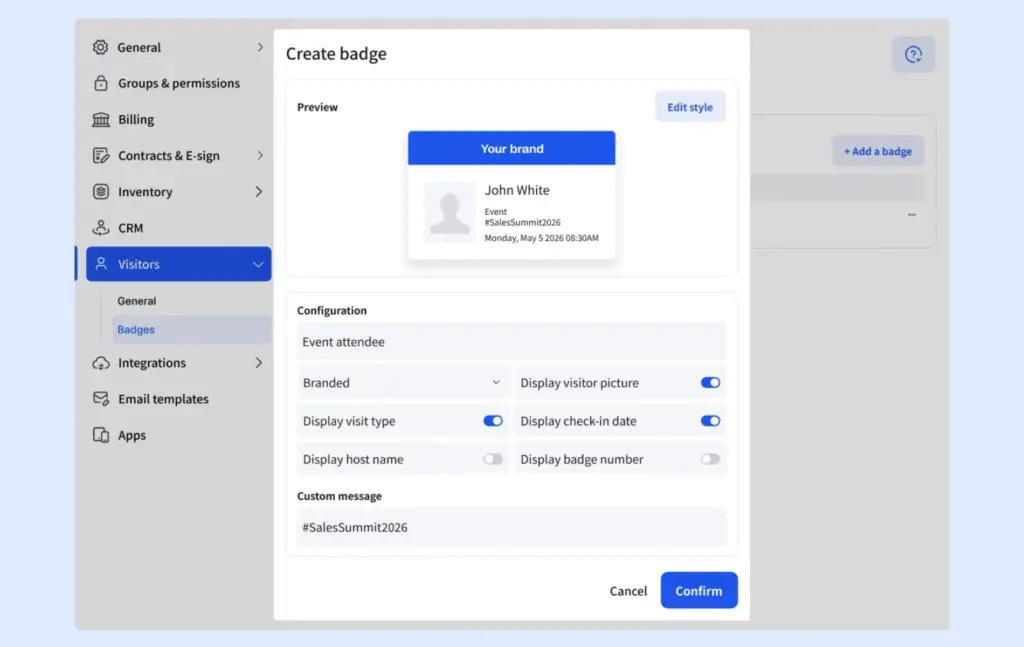
At this level, you’ll usually get features like visitor badge printing, custom branding, visitor approvals, custom forms, and integrations with workplace tools. These plans are often a good fit for organizations that regularly welcome clients, contractors, job candidates, or other external visitors.
Planes de precios del sistema de gestión de visitantes Premium o Enterprise
- Precio: 300 $+/mes por ubicación o precios personalizados para grandes empresas.
- Ideal para: Empresas que necesitan herramientas avanzadas de seguridad y cumplimiento normativo.
- Features: Includes options like access control, emergency alerts, SSO, and custom workflows.
Enterprise plans typically include advanced features such as access control integrations, single sign-on (SSO), emergency notifications, evacuation management, detailed audit logs, and custom visitor workflows. Many vendors also offer dedicated onboarding, support, and security options as part of their enterprise packages.
Hardware para la gestión de visitantes
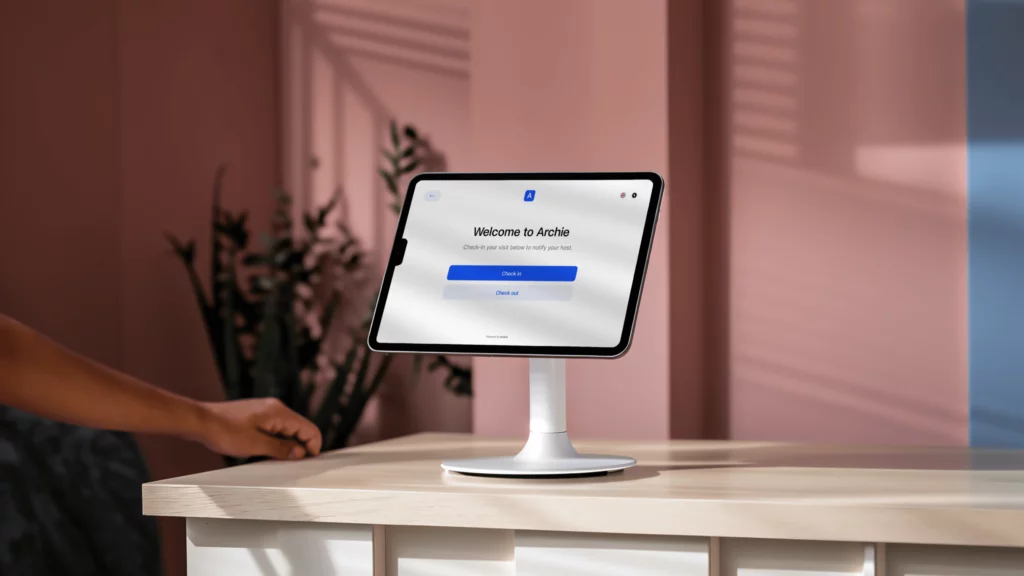
To set up a visitor management system, you’ll usually need a few basics: a tablet or touchscreen for guest check-ins, a computer to manage digital visitor logs and settings, and a reliable Wi-Fi connection if you’re using a cloud-based system.
Pay attention, though: Some visitor management systems like Envoy or The Receptionist run only on iPad. Archie supports both iPad and Android, so you have more flexibility when choosing your devices.
You can also add extra visitor management hardware to make the process smoother, such as badge printers, QR code scanners, cameras, kiosk stands, or access control devices. These can improve the visitor experience, but they also add to the total cost.
Here’s a rough idea of what visitor management hardware can cost:
- Tablets or touchscreen devices: $200 to $800 each
- Badge printers: $100 to $500+
- QR code or ID scanners: $50 to $300
- Kiosk stands or mounts: $100 to $300+
- Cameras for ID verification: $50 to $200+
- Access control devices: $500 to $2,000+
💰 The total cost of a visitor management system depends on:
- El número de ubicaciones que gestionas,
- El número de visitantes que esperas,
- Las funciones y el hardware que necesitas.
Algunas empresas cobran un suplemento por la configuración, la personalización de la marca o complementos como aplicaciones móviles e impresoras de tarjetas identificativas. Otras pueden incluir hardware en sus planes para facilitar la configuración. ¡Ten cuidado con las funciones que solo están disponibles en los planes más caros!
Common visitor management pricing models
One thing I noticed while researching visitor management software is that pricing can vary quite a bit from one vendor to another. Even when two products offer similar features, they may charge in completely different ways.
Here are the most common pricing models you’ll come across:
Per location pricing
This is the most common approach. You pay a fixed monthly fee for each office, building, or location where the visitor management system is installed.
Examples include Archie, Envoy, Eden, and many enterprise-focused platforms.
The biggest advantage is predictability. Whether you have 50 employees or 500 employees at a location, your cost usually stays the same.
Per visitor or check-in limits
Some vendors include a set number of monthly visitors or check-ins in each plan. Once you exceed those limits, you’ll need to upgrade to a higher tier.
Vizitor is a good example of this model, with plans that increase visitor and employee limits as you move up.
This pricing can work well for smaller offices but may become expensive if visitor volume grows unexpectedly.
Per device pricing
Some systems limit the number of kiosks, tablets, or check-in devices included in the subscription. If you need multiple entrances or reception areas, you’ll often need to purchase additional licenses.
This model is common among solutions that focus heavily on kiosk-based check-in experiences.
Feature-based tiers
Many vendors offer several pricing tiers that unlock additional functionality as you move up.
For example, a basic plan may include visitor registration and host notifications, while higher tiers add badge printing, visitor analytics, emergency management, SSO, integrations, and advanced security features.
This approach makes it easy to start small, but it’s worth checking whether the features you need are included in the base plan or hidden behind a more expensive tier.
Custom enterprise pricing
Enterprise-focused visitor management platforms often don’t publish pricing at all. Instead, you’ll need to contact sales for a custom quote.
Pricing is usually based on factors like the number of locations, security requirements, integrations, compliance needs, and implementation complexity.
Eptura Visitor and many large enterprise platforms follow this model.
Visitor management as an add-on
Some workplace management platforms sell visitor management as an add-on rather than a standalone product.
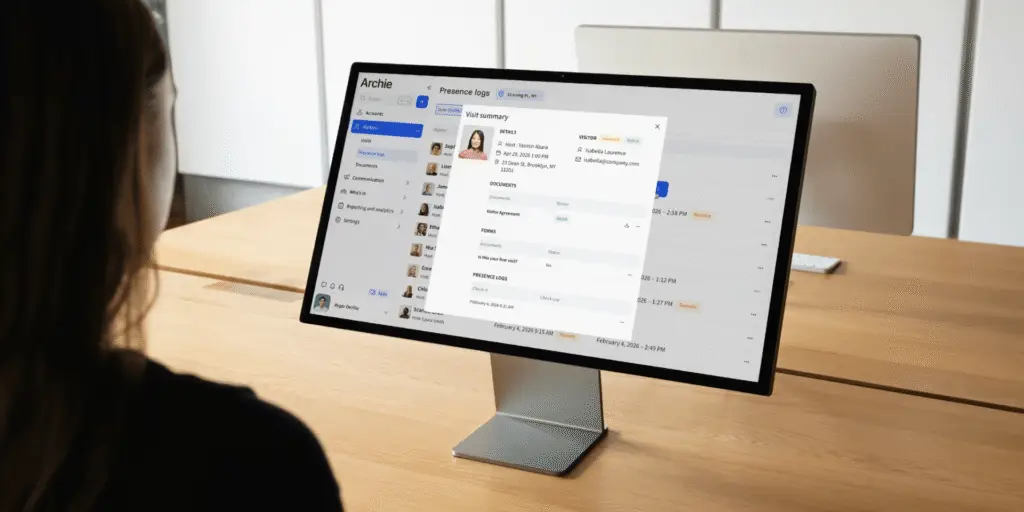
For example, Skedda offers visitor management as an additional module that complements its desk and room booking software.
This can be a good option if you’re already using the platform for workplace management, but less attractive if visitor management is the only feature you need.
Hardware-inclusive pricing
A few vendors bundle hardware into the subscription price. Instead of purchasing tablets, mounts, or kiosks separately, the equipment is included as part of the package.
VisitorOS is one example, including an iPad and mounting hardware with its plans.
While the monthly price may look higher, it can reduce upfront setup costs and simplify deployment.
- Resumen rápido
In my experience, per-location pricing is often the easiest model to budget for because costs remain predictable as your employee count changes. However, the best pricing model depends on how many locations you manage, how many visitors you receive, and whether you need advanced security, compliance, or workplace management features.
Comparación de precios de software de gestión de visitantes
¿Cuánto cuesta Vizitor?
Los planes de precios de Vizitor se adaptan a equipos pequeños que desean lo básico, y puedes ampliarlos a medida que creces:
- Starter plan, from $45/month, is good for very small offices or single locations. You get 1 device, up to 50 employees, and 300 check-ins each month. Core features are included: QR code check-in, visitor photos, digital agreements, e-badges, pre-registration, and a live visitor dashboard.
- For $90/month, you get 2 devices, up to 200 employees, and 1,000 check-ins each month. This plan adds physical badge printing, custom badge designs, Slack alerts for hosts, and multi-location management. For most midsize teams, this plan has the right balance of features and price.
- Custom pricing is available for larger organizations. Limits are removed for devices, employees, and check-ins. You also get advanced security like evacuation alerts, blacklisting, and overstay alerts, plus API and webhooks for custom integrations and priority support.
¿Cuánto cuesta Eden?
Eden ofrece diferentes planes de precios para la gestión de visitantes que se adaptan a empresas de todos los tamaños:
- El plan Accelerate, con un precio de 89 dólares al mes por ubicación (facturado anualmente), cubre todos los elementos esenciales, incluyendo el registro de empleados, la personalización de la marca en los quioscos, la integración con Slack y Teams, la gestión de acuerdos de confidencialidad, la impresión de tarjetas de identificación y el registro sin contacto.
- Para necesidades más avanzadas, el plan Scale cuesta 179 $ al mes por ubicación (facturado anualmente) e incluye funciones como fotos de visitantes, formularios personalizados, integraciones de almacenamiento de archivos, sincronización del directorio de empleados y inicio de sesión único (SSO).
- El Plan Enterprise incluye todo lo que ofrece Scale, además de integraciones personalizadas para empresas con requisitos específicos, con precios adaptados a tus necesidades.
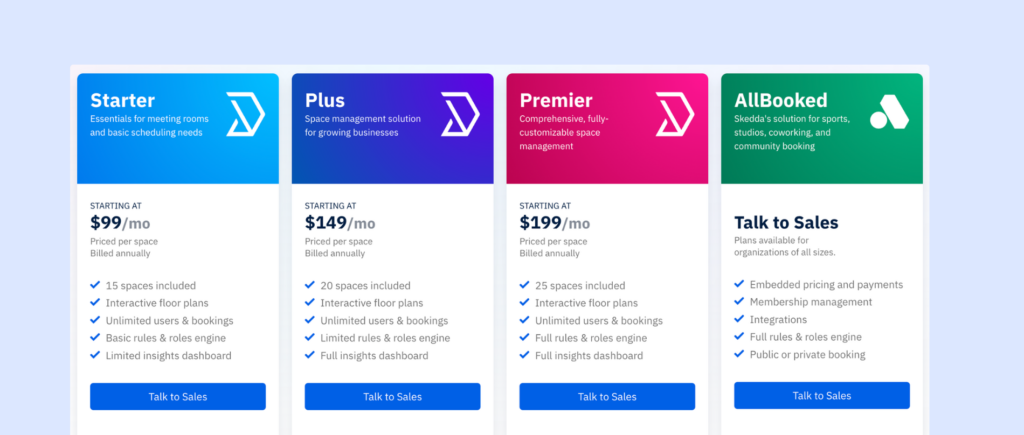
¿Cuánto cuesta Skedda?
La gestión de visitantes es un complemento de Skedda que se integra a la perfección con el resto de funciones, lo que lo convierte en una buena opción para oficinas híbridas. El módulo de gestión de visitantes cuesta 99 $ al mes, pero no se puede adquirir por separado.También hay una prueba gratuita para explorar sus funciones antes de comprometerse.
Cómo calcular el retorno de la inversión de un sistema automatizado de gestión de visitantes para una oficina de tamaño medio
For a mid-sized office, the biggest return on investment usually comes from saving time at the front desk, notifying hosts faster, and reducing manual admin work.
Teams often spend more time than they realize on paper sign-ins, calling hosts, collecting signatures, and finding visitor logs for audits or reports. A visitor management system automates most of that work, so reception teams can focus less on repetitive tasks and more on creating a smooth, professional welcome for every guest.
Puedes usar esta fórmula:
ROI (%) = ((Beneficios anuales – Costes anuales) / Costes anuales) × 100
Paso 1: Calcule los beneficios anuales (lo que ahorra)
Por ejemplo:
- Tiempo ahorrado durante el check-in: Esto incluye el tiempo ahorrado por el personal de recepción o de oficina, y a veces también el tiempo del anfitrión (porque el sistema envía notificaciones automáticas en lugar de llamadas/mensajes manuales).
- Ahorro de tiempo en tareas administrativas y de elaboración de informes: los sistemas de gestión de visitantes también reducen el tiempo dedicado a tareas como buscar registros antiguos de visitantes, preparar registros de auditoría, realizar un seguimiento de las visitas de contratistas o comprobar quién se encontraba en las instalaciones durante un simulacro o un incidente.
- Reducción de retrasos y atascos en recepción: si su recepción se satura en determinados momentos (los lunes por la mañana, entrevistas, entregas, visitas de proveedores), un registro más rápido puede reducir las interrupciones y las horas extras. No siempre es mucho, pero al cabo de un año se nota.
Paso 2: Calcular los costes anuales (lo que gastas)
- Costes de software: suscripción mensual × 12, junto con cualquier complemento (alertas por SMS, integraciones avanzadas, asistencia premium, etc.).
- Costes de hardware: como ya sabéis, el hardware típico puede incluir tabletas/iPad, soportes o monturas para quioscos, impresoras de tarjetas de identificación y rollos de etiquetas/suministros. Si el hardware es una compra única, podéis repartir su coste entre 2 o 3 años para obtener un coste anual razonable.
- Configuración y formación: Incluye la incorporación, el tiempo de configuración interna y cualquier tarifa de implementación.
- Tiempo dedicado a tareas administrativas o informáticas: incluso los sistemas más sencillos requieren cierto mantenimiento (actualizaciones de usuarios, flujos de trabajo, resolución de problemas con impresoras, etc.), por lo que conviene añadir una pequeña estimación mensual.
Paso 3: Calcular el retorno de la inversión (ROI) de un sistema automatizado de gestión de visitantes.
Utilicemos un ejemplo realista para una oficina de tamaño medio:
- 350 empleados
- 150 visitantes al mes
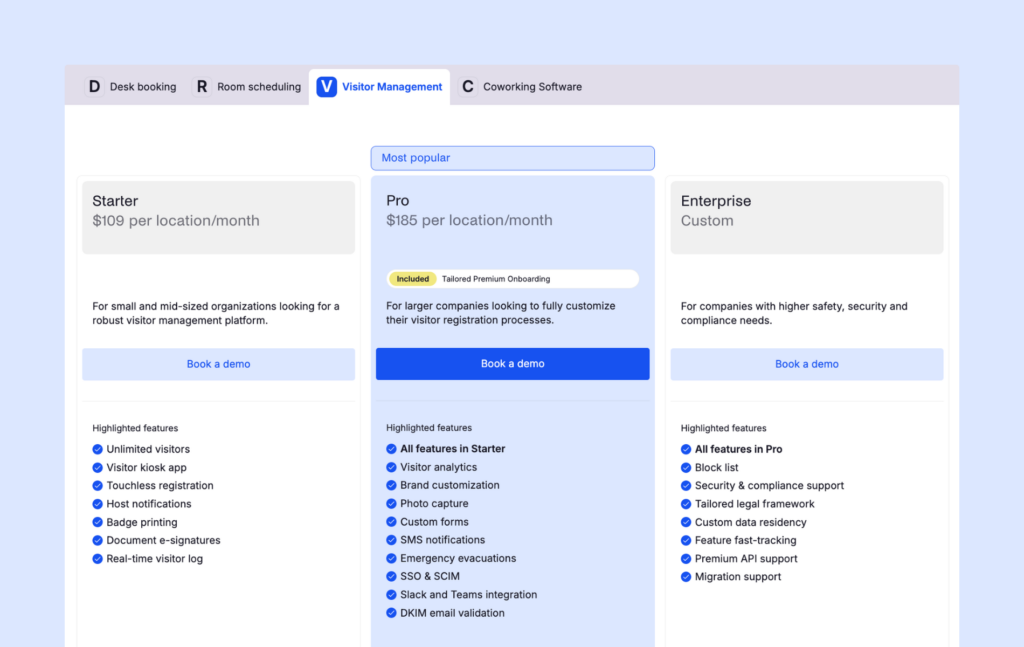
- PlanArchie Visitors : 185 $ al mes
- Configuración básica del hardware (tableta + soporte + impresora de tarjetas de identificación): 950 $ en total.
Beneficios anuales estimados (ejemplo conservador)
Ahorro de tiempo en el registro y la notificación al anfitrión
- 150 visitas al mes
- 4 minutos ahorrados por visita (tiempo combinado de recepción + anfitrión)
- 150 × 4 = 600 minutos/mes = 10 horas/mes
- 10 horas × 35 $ de tarifa por hora = 350 $ al mes
- Valor anual: 4200 dólares
Ahorros en administración/informes
- 3 horas al mes ahorradas
- 3 × 40 $ = 120 $ al mes
- Valor anual: 1440 dólares
Reducción de los retrasos en recepción / horas extras
- 2 horas/mes ahorradas
- 2 × 35 $ = 70 $ al mes
- Valor anual: 840 dólares
Beneficios anuales totales = 6480 $
Costes anuales estimados
Software
- 185 $ al mes × 12 = 2220 $ al año
Hardware (anualizado a lo largo de 3 años)
- 950 $ ÷ 3 = 316,67 $ al año
Tiempo dedicado a tareas administrativas/informáticas
- 40 $ al mes × 12 = 480 $ al año
Suministros (etiquetas, consumibles para impresoras)
- 120 $ al año
Costes anuales totales
2220 $ + 316,67 $ + 480 $ + 120 $ = 3136,67 $
Beneficio neto anual
6480 $ − 3136,67 $ = 3343,33 $
retorno de la inversión
(3343,33 $ ÷ 3136,67 $) × 100 ≈ 106,6 %
En este ejemplo, el sistema de gestión de visitantes ofrece un retorno de la inversión anual estimado 107 % de retorno de la inversión anual.
Es un resultado muy bueno para una oficina de tamaño medio, sobre todo porque esta estimación no incluye en su totalidad beneficios más difíciles de cuantificar, como la mejora de la seguridad, la mejora de la experiencia de los visitantes y la mayor rapidez en la respuesta ante emergencias.
Paso 4: Comprueba el periodo de amortización.
El periodo de recuperación es útil cuando los directivos quieren saber cuánto tardará la inversión en empezar a generar valor.
Si consideramos el hardware de gestión de visitantes como el principal coste inicial:
- Costos iniciales = 950 dólares
- Beneficios mensuales = 6480 $ ÷ 12 = 540 $
- Costes mensuales recurrentes = 185 $ + 40 $ + 10 $ = 235 $
- Ahorro neto mensual = 305 $
Período de recuperación = 950 $ ÷ 305 $ ≈ 3,1 meses
Así que, en este ejemplo, la oficina recupera el coste inicial en unos 3 meses.
ROI duro frente a ROI blando de un sistema de gestión de visitantes
When I build a business case for visitor management software, I like to split the benefits into two groups: hard ROI and soft ROI. Both matter, but they tell different parts of the story.
Hard ROI is the measurable side. This includes time saved during check-ins, fewer interruptions for hosts, less admin work when pulling reports, less pressure on front desk teams, and fewer manual mistakes to fix later.
These are the numbers you can put into a spreadsheet. For example, you can estimate how much time your team saves each week, multiply it by a realistic hourly rate, and show the financial value of that time back. This is usually the part finance teams look at first.
Soft ROI is harder to measure, but it can be just as important. A smoother visitor check-in process creates a better first impression. Shorter lobby lines make busy periods less stressful. Stronger security and compliance workflows reduce risk. Searchable visitor records make audits easier. Faster emergency roll calls improve safety. And less manual work helps the front desk run more smoothly every day.
These benefits may not always show up neatly in a cost calculation, but they still matter when leadership is deciding whether the software is worth it. In many cases, the hard ROI helps justify the investment, while the soft ROI makes the decision feel much easier.
Consejos para elaborar una estimación realista del retorno de la inversión
When estimating ROI, I’d always stay conservative. For example, if you think automated check-ins save six minutes per visitor, model three or four minutes instead. If you expect to save five hours of admin work each week, test the numbers with three hours first. It’s better to show a cautious estimate that still delivers a strong return than to overpromise and lose trust.
I’d also watch out for a few common mistakes:
- Contar dos veces el mismo ahorro de tiempo
- Utilizar el salario base en lugar del coste total por hora.
- Forgetting hardware, badge, or supply costs
- Leaving out add-ons like SMS alerts or integrations
- Using an unusually busy or quiet month as your baseline
A simple way to make your ROI case stronger is to show three scenarios: a conservative case, an expected case, and a high-volume case.
This gives decision-makers a realistic range instead of one fixed number. It also shows that the system can pay for itself even with cautious assumptions, while the value grows even more during busier periods.
Visitor management system price FAQ
What is the most affordable visitor management software for small businesses?
The most affordable visitor management software depends on your needs, but tools like Archie, Vizitor, and Greetly are often popular choices for small and growing businesses. Some vendors also offer free plans, although these typically come with visitor limits or reduced functionality.
What is a good, affordable, and easy-to-use visitor management system?
If you’re looking for a balance of affordability, ease of use, and features, Archie is a strong visitor management system. It offers a modern visitor check-in experience, straightforward setup, and pricing that is generally easier to understand than many enterprise-focused platforms.
How much should I expect to pay for visitor management software?
Most visitor management systems cost between $30 and $350 per location per month. Small businesses can often find suitable solutions for under $100 per month, while larger organizations with advanced security and compliance requirements may pay significantly more.
Are free visitor management systems worth it?
Free plans can work well for small offices with a low volume of visitors. They usually include basic visitor sign-in and visitor logs. However, you’ll often need a paid plan if you require badge printing, integrations, analytics, custom workflows, or support for multiple locations.
Do visitor management systems charge per user or per location?
Most visitor management platforms charge per location rather than per employee. However, some vendors use different pricing models based on visitor volume, devices, features, or enterprise requirements. It’s always worth checking what is included before comparing prices.
Are there any hidden costs with visitor management software?
Sometimes. Additional costs can include hardware such as tablets and kiosk stands, badge printers and badge supplies, SMS notifications, advanced integrations, implementation or onboarding fees, and premium support.
Is visitor management software worth the investment?
For many organizations, yes. Visitor management software can reduce front desk workload, speed up check-ins, improve security, simplify audits, and create a more professional visitor experience. Many companies find that the time savings alone justify the cost.