




















- Summary
- Most paid visitor management systems cost around $30 to $350+ per location per month.
- There are different pricing structures, e.g. per location pricing and per visitor pricing.
- Generally, ROI should be realized in about 3 months (we'll help you calculate!).
Visitor management systems come at many different price points, from free basic plans to more advanced tools for larger teams. The final cost usually depends on your company size, number of locations, the features you need, and any hardware you want to add, like tablets or badge printers.
Still, comparing all the options can feel a bit overwhelming. I’ll walk through the pricing plans of top visitor management systems and help you find the best fit, whether you need something simple and budget-friendly or a more advanced solution.
To make things easier, this guide breaks down the top visitor management system pricing plans to help you find the perfect fit, whether you’re after a budget-friendly solution or something more advanced.
How much does a visitor management system cost?
Some visitor management systems offer free plans, but most paid visitor management systems cost around $30 to $350+ per location per month.
I usually see them sold in two ways: as standalone visitor management tools or as add-ons inside broader space management platforms. The right option depends on the visitor management features you need, like visitor check-in, badges, host notifications, custom forms, or security workflows.
Here’s a quick breakdown to give you an idea of what to expect:
Plan type | Price range | Best for | Common features |
|---|---|---|---|
Free | $0 | Small offices with a few visitors per day | Visitor sign-ins, basic visitor logs, limited monthly check-ins |
Basic | $30–$100 per location/month | Small businesses with simple visitor needs | Standard check-ins, visitor logs |
Mid-tier | $100–$300 per location/month | Medium-sized teams that need more control | Badge printing, branded check-ins, visitor approvals, integrations |
Premium / Enterprise | $300+ per location/month | Larger companies with security or compliance needs | Access control, emergency alerts, SSO, custom workflows |
Free visitor management systems
- Price: $0
- Good for: Smaller offices with a few visitors a day that don’t need many features.
- Features: Most free plans cover essentials like visitor sign-ins, basic visitor logs, and host notifications. These plans often cap the number of visitors or check-ins you can manage each month, though.
A free plan can be a great place to start if you want to test a visitor management system before committing to a paid solution. As your organization grows or you need features like integrations, analytics, badge printing, or stronger security controls, you’ll likely need to upgrade.
Basic visitor management system pricing plans
- Price: Around $30–$100/month per location.
- Good for: Small businesses with simple needs, like tracking visitors and sending basic notifications.
- Features: Standard check-ins, visitor logs, host alerts, and touchless sign-in options.
These plans typically include core visitor management features such as visitor registration, digital logs, host notifications, and contactless check-ins. For many small offices, this is all that’s needed to replace a paper sign-in book and create a more professional visitor experience.
Mid-tier visitor management system pricing plans
- Price: About $100–$300/month per location.
- Good for: Medium-sized businesses looking for more control and customization.
- Features: Usually include badge printing, branded check-ins, visitor approvals, and more advanced software integrations.
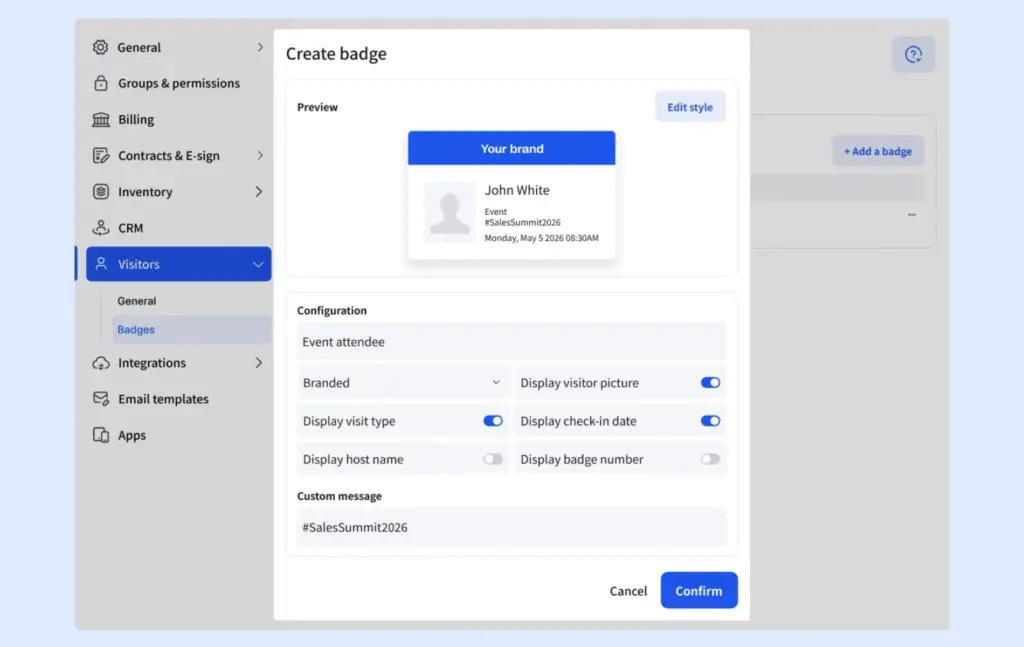
At this level, you’ll usually get features like visitor badge printing, custom branding, visitor approvals, custom forms, and integrations with workplace tools. These plans are often a good fit for organizations that regularly welcome clients, contractors, job candidates, or other external visitors.
Premium or enterprise visitor management system pricing plans
- Price: $300+/month per location or custom pricing for big businesses.
- Good for: Companies that need advanced security and compliance tools.
- Features: Includes options like access control, emergency alerts, SSO, and custom workflows.
Enterprise plans typically include advanced features such as access control integrations, single sign-on (SSO), emergency notifications, evacuation management, detailed audit logs, and custom visitor workflows. Many vendors also offer dedicated onboarding, support, and security options as part of their enterprise packages.
Visitor management hardware
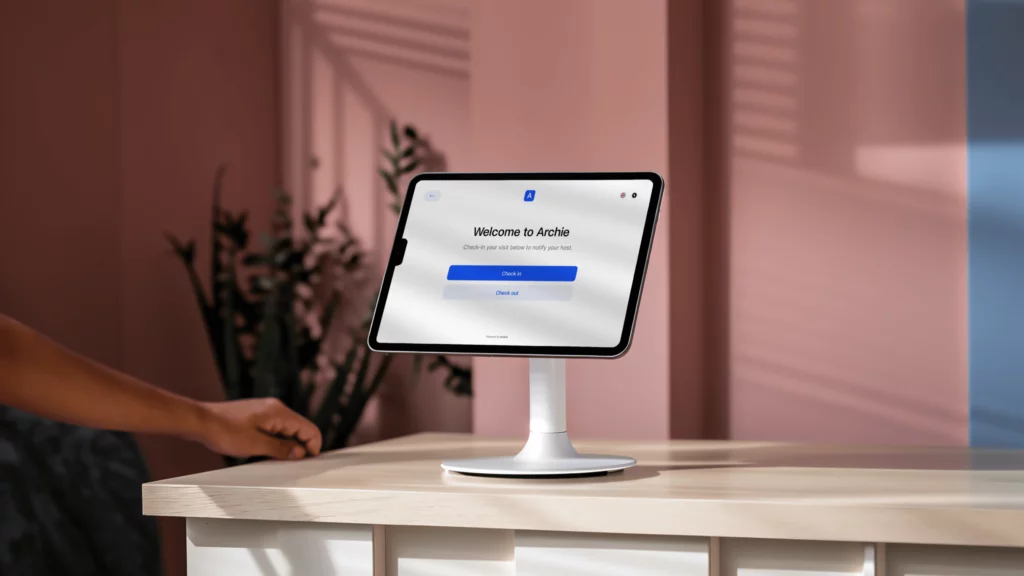
To set up a visitor management system, you’ll usually need a few basics: a tablet or touchscreen for guest check-ins, a computer to manage digital visitor logs and settings, and a reliable Wi-Fi connection if you’re using a cloud-based system.
Pay attention, though: Some visitor management systems like Envoy or The Receptionist run only on iPad. Archie supports both iPad and Android, so you have more flexibility when choosing your devices.
You can also add extra visitor management hardware to make the process smoother, such as badge printers, QR code scanners, cameras, kiosk stands, or access control devices. These can improve the visitor experience, but they also add to the total cost.
Here’s a rough idea of what visitor management hardware can cost:
- Tablets or touchscreen devices: $200 to $800 each
- Badge printers: $100 to $500+
- QR code or ID scanners: $50 to $300
- Kiosk stands or mounts: $100 to $300+
- Cameras for ID verification: $50 to $200+
- Access control devices: $500 to $2,000+
💰 The total cost of a visitor management system depends on:
- The number of locations you manage,
- The number of visitors you expect,
- The features and hardware you need.
Some companies charge extra for setup, custom branding, or add-ons like mobile apps and badge printers. Others might include hardware in their plans to make setup easier. Watch out for features that are only available in more expensive plans!
Common visitor management pricing models
One thing I noticed while researching visitor management software is that pricing can vary quite a bit from one vendor to another. Even when two products offer similar features, they may charge in completely different ways.
Here are the most common pricing models you’ll come across:
Per location pricing
This is the most common approach. You pay a fixed monthly fee for each office, building, or location where the visitor management system is installed.
Examples include Archie, Envoy, Eden, and many enterprise-focused platforms.
The biggest advantage is predictability. Whether you have 50 employees or 500 employees at a location, your cost usually stays the same.
Per visitor or check-in limits
Some vendors include a set number of monthly visitors or check-ins in each plan. Once you exceed those limits, you’ll need to upgrade to a higher tier.
Vizitor is a good example of this model, with plans that increase visitor and employee limits as you move up.
This pricing can work well for smaller offices but may become expensive if visitor volume grows unexpectedly.
Per device pricing
Some systems limit the number of kiosks, tablets, or check-in devices included in the subscription. If you need multiple entrances or reception areas, you’ll often need to purchase additional licenses.
This model is common among solutions that focus heavily on kiosk-based check-in experiences.
Feature-based tiers
Many vendors offer several pricing tiers that unlock additional functionality as you move up.
For example, a basic plan may include visitor registration and host notifications, while higher tiers add badge printing, visitor analytics, emergency management, SSO, integrations, and advanced security features.
This approach makes it easy to start small, but it’s worth checking whether the features you need are included in the base plan or hidden behind a more expensive tier.
Custom enterprise pricing
Enterprise-focused visitor management platforms often don’t publish pricing at all. Instead, you’ll need to contact sales for a custom quote.
Pricing is usually based on factors like the number of locations, security requirements, integrations, compliance needs, and implementation complexity.
Eptura Visitor and many large enterprise platforms follow this model.
Visitor management as an add-on
Some workplace management platforms sell visitor management as an add-on rather than a standalone product.
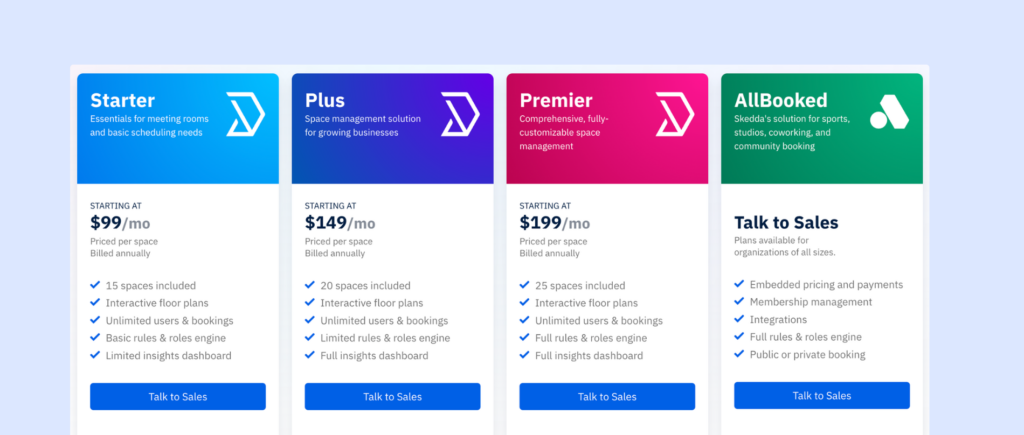
For example, Skedda offers visitor management as an additional module that complements its desk and room booking software.
This can be a good option if you’re already using the platform for workplace management, but less attractive if visitor management is the only feature you need.
Hardware-inclusive pricing
A few vendors bundle hardware into the subscription price. Instead of purchasing tablets, mounts, or kiosks separately, the equipment is included as part of the package.
VisitorOS is one example, including an iPad and mounting hardware with its plans.
While the monthly price may look higher, it can reduce upfront setup costs and simplify deployment.
- Quick take
In my experience, per-location pricing is often the easiest model to budget for because costs remain predictable as your employee count changes. However, the best pricing model depends on how many locations you manage, how many visitors you receive, and whether you need advanced security, compliance, or workplace management features.
Visitor management software price comparison
How much does Vizitor cost?
Vizitor’s pricing plans suit small teams that want the basics, and you can scale up as you grow:
- Starter plan, from $45/month, is good for very small offices or single locations. You get 1 device, up to 50 employees, and 300 check-ins each month. Core features are included: QR code check-in, visitor photos, digital agreements, e-badges, pre-registration, and a live visitor dashboard.
- For $90/month, you get 2 devices, up to 200 employees, and 1,000 check-ins each month. This plan adds physical badge printing, custom badge designs, Slack alerts for hosts, and multi-location management. For most midsize teams, this plan has the right balance of features and price.
- Custom pricing is available for larger organizations. Limits are removed for devices, employees, and check-ins. You also get advanced security like evacuation alerts, blacklisting, and overstay alerts, plus API and webhooks for custom integrations and priority support.
How much does Eden cost?
Eden offers different visitor management pricing plans to suit businesses of all sizes:
- The Accelerate Plan, priced at $89 per month per location (billed annually), covers all the essentials, including employee registration, custom kiosk branding, Slack and Teams integration, NDA management, badge printing, and touchless sign-in.
- For more advanced needs, the Scale Plan costs $179 per month per location (billed annually) and adds features like visitor photos, custom forms, file storage integrations, employee directory syncing, and Single Sign-On (SSO).
- The Enterprise Plan includes everything in Scale plus custom integrations for businesses with specific requirements, with pricing tailored to your needs.
How much does Skedda cost?
Visitor management is an add-on to Skedda and seamlessly complements its other features, making it a good choice for hybrid offices. The visitor management module costs $99 per month, but can’t be purchased separately. There’s also a free trial to explore its features before committing.
How to calculate the ROI of an automated visitor management system for a mid-sized office
For a mid-sized office, the biggest return on investment usually comes from saving time at the front desk, notifying hosts faster, and reducing manual admin work.
Teams often spend more time than they realize on paper sign-ins, calling hosts, collecting signatures, and finding visitor logs for audits or reports. A visitor management system automates most of that work, so reception teams can focus less on repetitive tasks and more on creating a smooth, professional welcome for every guest.
You can use this formula:
ROI (%) = ((Annual benefits – Annual costs) / Annual costs) × 100
Step 1: Calculate annual benefits (what you save)
For example:
- Time saved during check-in: This includes time saved by reception or office staff, and sometimes host time too (because the system sends automatic notifications instead of manual calls/messages).
- Admin and reporting time saved: Visitor management systems also reduce time spent on things like finding old visitor records, preparing audit logs, tracking contractor visits, or checking who was on-site during a drill or incident.
- Reduced delays and front desk bottlenecks: If your front desk gets busy at certain times (Monday mornings, interviews, deliveries, vendor visits), faster check-ins can reduce interruptions and overtime. This is not always huge, but it adds up over a year.
Step 2: Calculate annual costs (what you spend)
- Software costs: Monthly subscription × 12, along with any add-ons (SMS alerts, advanced integrations, premium support, etc.)
- Hardware costs: As you know already, typical hardware can include tablet / iPad, kiosk stand or mount, badge printer, and label rolls/supplies. If hardware is a one-time purchase, you can spread it across 2 to 3 years to get a fair annual cost.
- Setup and training: Include onboarding, internal setup time, and any implementation fees.
- Ongoing admin or IT time: Even easy systems still need some maintenance (user updates, workflows, printer troubleshooting, etc.), so add a small ongoing monthly estimate.
Step 3: Calculate the ROI of an automated visitor management system
Let’s use a realistic example for a mid-sized office:
- 350 employees
- 150 visitors per month
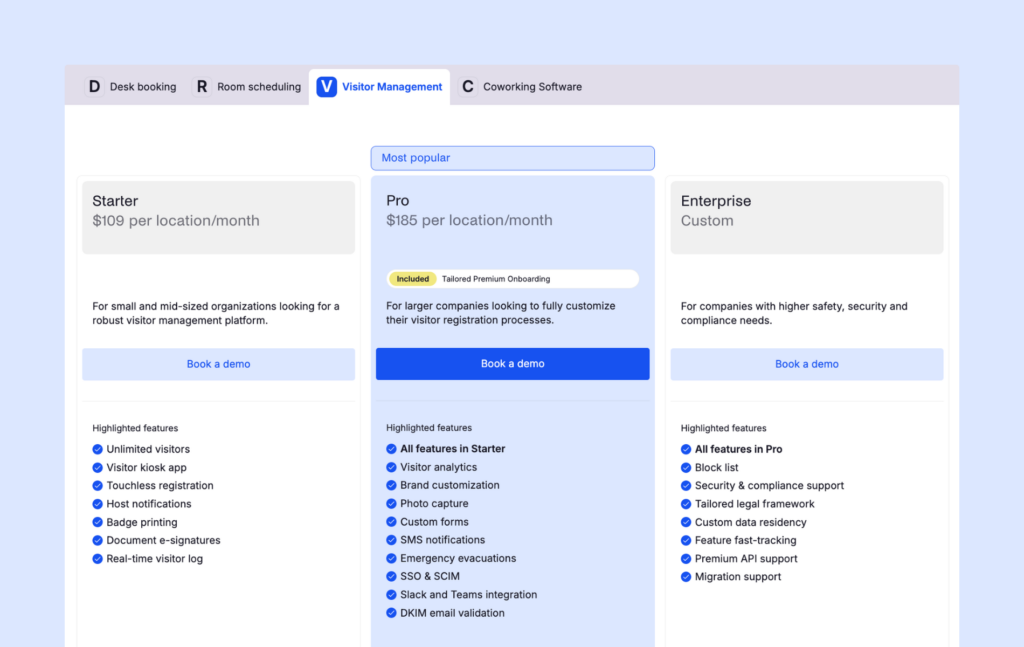
- Archie Visitors Pro plan: $185/month
- Basic hardware setup (tablet + stand + badge printer): $950 total
Estimated annual benefits (conservative example)
Check-in and host notification time savings
- 150 visits/month
- 4 minutes saved per visit (combined front desk + host time)
- 150 × 4 = 600 minutes/month = 10 hours/month
- 10 hours × $35 loaded hourly rate = $350/month
- Annual value: $4,200
Admin/reporting savings
- 3 hours/month saved
- 3 × $40 = $120/month
- Annual value: $1,440
Reduced front desk delays / overtime
- 2 hours/month saved
- 2 × $35 = $70/month
- Annual value: $840
Total annual benefits = $6,480
Estimated annual costs
Software
- $185/month × 12 = $2,220/year
Hardware (annualized over 3 years)
- $950 ÷ 3 = $316.67/year
Ongoing admin/IT time
- $40/month × 12 = $480/year
Supplies (labels, printer consumables)
- $120/year
Total annual costs
$2,220 + $316.67 + $480 + $120 = $3,136.67
Net annual benefit
$6,480 − $3,136.67 = $3,343.33
ROI
($3,343.33 ÷ $3,136.67) × 100 ≈ 106.6%
In this example, the visitor management system delivers an estimated 107% annual ROI.
That is a strong result for a mid-sized office, especially because this estimate does not fully include harder-to-measure benefits like improved security, better visitor experience, and faster emergency response.
Step 4: Check payback period
Payback period is useful when leadership wants to know how quickly the investment starts returning value.
If we treat visitor management hardware as the main upfront cost:
- Upfront costs = $950
- Monthly benefits = $6,480 ÷ 12 = $540
- Monthly recurring costs = $185 + $40 + $10 = $235
- Monthly net savings = $305
Payback period = $950 ÷ $305 ≈ 3.1 months
So in this example, the office recovers the upfront cost in about 3 months.
Hard ROI vs soft ROI of a visitor management system
When I build a business case for visitor management software, I like to split the benefits into two groups: hard ROI and soft ROI. Both matter, but they tell different parts of the story.
Hard ROI is the measurable side. This includes time saved during check-ins, fewer interruptions for hosts, less admin work when pulling reports, less pressure on front desk teams, and fewer manual mistakes to fix later.
These are the numbers you can put into a spreadsheet. For example, you can estimate how much time your team saves each week, multiply it by a realistic hourly rate, and show the financial value of that time back. This is usually the part finance teams look at first.
Soft ROI is harder to measure, but it can be just as important. A smoother visitor check-in process creates a better first impression. Shorter lobby lines make busy periods less stressful. Stronger security and compliance workflows reduce risk. Searchable visitor records make audits easier. Faster emergency roll calls improve safety. And less manual work helps the front desk run more smoothly every day.
These benefits may not always show up neatly in a cost calculation, but they still matter when leadership is deciding whether the software is worth it. In many cases, the hard ROI helps justify the investment, while the soft ROI makes the decision feel much easier.
Tips for building a realistic ROI estimate
When estimating ROI, I’d always stay conservative. For example, if you think automated check-ins save six minutes per visitor, model three or four minutes instead. If you expect to save five hours of admin work each week, test the numbers with three hours first. It’s better to show a cautious estimate that still delivers a strong return than to overpromise and lose trust.
I’d also watch out for a few common mistakes:
- Counting the same time savings twice
- Using base salary instead of the fully loaded hourly cost
- Forgetting hardware, badge, or supply costs
- Leaving out add-ons like SMS alerts or integrations
- Using an unusually busy or quiet month as your baseline
A simple way to make your ROI case stronger is to show three scenarios: a conservative case, an expected case, and a high-volume case.
This gives decision-makers a realistic range instead of one fixed number. It also shows that the system can pay for itself even with cautious assumptions, while the value grows even more during busier periods.
Visitor management system price FAQ
What is the most affordable visitor management software for small businesses?
The most affordable visitor management software depends on your needs, but tools like Archie, Vizitor, and Greetly are often popular choices for small and growing businesses. Some vendors also offer free plans, although these typically come with visitor limits or reduced functionality.
What is a good, affordable, and easy-to-use visitor management system?
If you’re looking for a balance of affordability, ease of use, and features, Archie is a strong visitor management system. It offers a modern visitor check-in experience, straightforward setup, and pricing that is generally easier to understand than many enterprise-focused platforms.
How much should I expect to pay for visitor management software?
Most visitor management systems cost between $30 and $350 per location per month. Small businesses can often find suitable solutions for under $100 per month, while larger organizations with advanced security and compliance requirements may pay significantly more.
Are free visitor management systems worth it?
Free plans can work well for small offices with a low volume of visitors. They usually include basic visitor sign-in and visitor logs. However, you’ll often need a paid plan if you require badge printing, integrations, analytics, custom workflows, or support for multiple locations.
Do visitor management systems charge per user or per location?
Most visitor management platforms charge per location rather than per employee. However, some vendors use different pricing models based on visitor volume, devices, features, or enterprise requirements. It’s always worth checking what is included before comparing prices.
Are there any hidden costs with visitor management software?
Sometimes. Additional costs can include hardware such as tablets and kiosk stands, badge printers and badge supplies, SMS notifications, advanced integrations, implementation or onboarding fees, and premium support.
Is visitor management software worth the investment?
For many organizations, yes. Visitor management software can reduce front desk workload, speed up check-ins, improve security, simplify audits, and create a more professional visitor experience. Many companies find that the time savings alone justify the cost.