




















- What you’ll learn
- How visitor management systems have evolved
- The key features that matter most
- Advanced features to consider if you manage multiple locations or have stricter compliance needs
- Which integrations offices commonly look for
- A practical checklist to help you choose the right solution without overpaying or missing critical features
If you’re researching visitor management software, it’s easy to get overwhelmed. Every vendor claims to have “everything you need.” But what actually matters?
In this guide, we break down the 10 most important visitor management system features, plus the integrations that modern offices rely on.
How does a visitor management system work, exactly?
A guest’s journey through a visitor management system usually comes down to the following events and actions:
- Invitation: The host (employee) sends a digital invite ahead of time. It can include directions, safety info, and any documents the visitor needs to complete.
- Arrival and check-in: When the visitor arrives, they check in using a tablet, app, or with help from a receptionist. If they pre-registered, they can simply scan a QR code for a quick check-in.
- ID verification: The system may ask the visitor to scan a form of ID, like a driver’s license or passport, to confirm who they are.
- Security screening: Some systems include questions or checks to screen visitors for safety or compliance. Only approved guests can go through.
- Signing documents: If needed, visitors can review and sign important forms like NDAs or health and safety agreements right on the screen.
- Getting a visitor badge: A badge is printed or issued digitally, showing the visitor’s name, photo, and access level. It helps staff and security know who’s allowed in.
- Host notification: The visitor management software notifies the host right away so they can greet the guest or prepare for the meeting.
- Meeting the host: The visitor connects with their host, often heading to a pre-booked meeting room.
- Check-out: Once the visit is over, the guest checks out using the same system. The system logs the time and updates visitor records automatically.
That being said, to set up a visitor management system, you’ll typically need:
Visitor management system components
- A computer – To run the VMS software and manage things like visitor records, check-ins, and appointments.
- A kiosk, tablet, or touchscreen – Usually placed at the front desk so visitors can check themselves in easily.
- A Wi-Fi connection – Needed if you’re using a cloud-based system to keep everything connected.
You can also upgrade your visitor management system with added extras like:
- Badge printers to print custom visitor ID badges on the spot.
- QR code scanners to allow guests to check in quickly with a scan.
- Cameras to snap visitor photos or help verify ID during check-in.
- Badge readers to scan badges and control access to certain areas.
- The visitor kiosk stands to keep your tablets secure and at the right height.
Keep in mind that all these upgrades come with additional visitor management system costs, though.
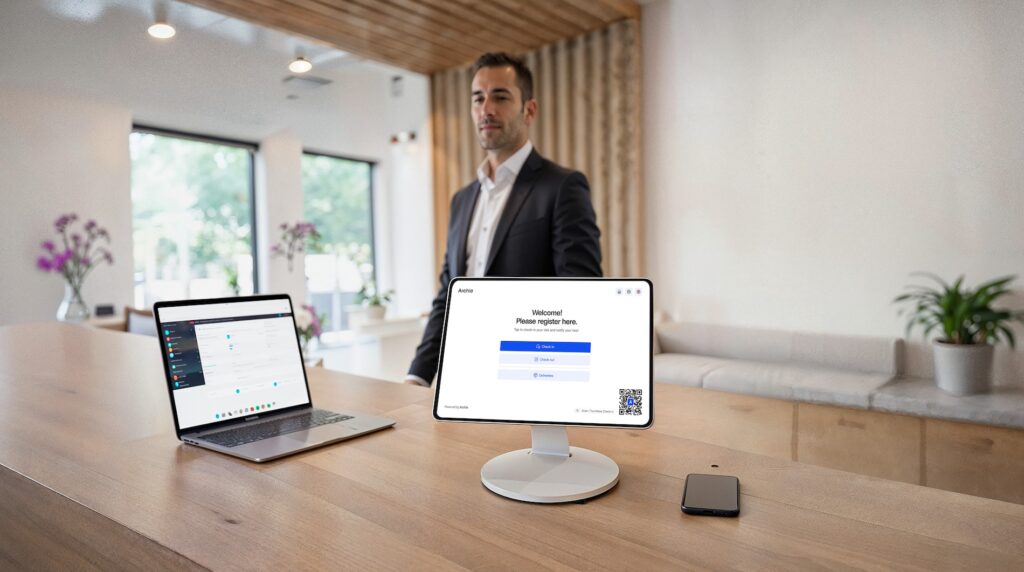
Key visitor management system features to look for
What makes a great visitor management system, then? Take a closer look at the key visitor management features that matter for your workplace:
- Easy and flexible check-in options
- Pre-registration for a smoother experience
- Instant host notifications
- Photo capture and badge printing
- Digital forms and e-signatures
- Real-time visitor tracking
- Emergency notifications and evacuation support
- Delivery handling
- Custom branding and settings
- Integrations with your other tools
A great example of a visitor management system is Archie. When a guest arrives at an office that uses Archie, they can either pre-register ahead of time or check in on the spot using a tablet or their phone. As soon as they check in, Archie sends an automatic alert to the host so they know their guest has arrived. Meanwhile, security teams can see who’s in the building in real time, helping keep things safe and organized.
Easy and flexible check-in options
Visitors should be able to check themselves quickly. That might be through a front desk tablet, a self-service kiosk, or even scanning a QR code on their phone. Some systems (like Archie) also allow manual check-in for walk-ins, so it works for any kind of guest, from planned meetings to surprise drop-ins.
Pre-registration for a smoother experience
Letting hosts register guests in advance makes everything easier. Visitors can receive directions, safety guidelines, or even fill out required forms before they arrive. That means a faster, more welcoming experience when they walk in the door.
Instant host notifications
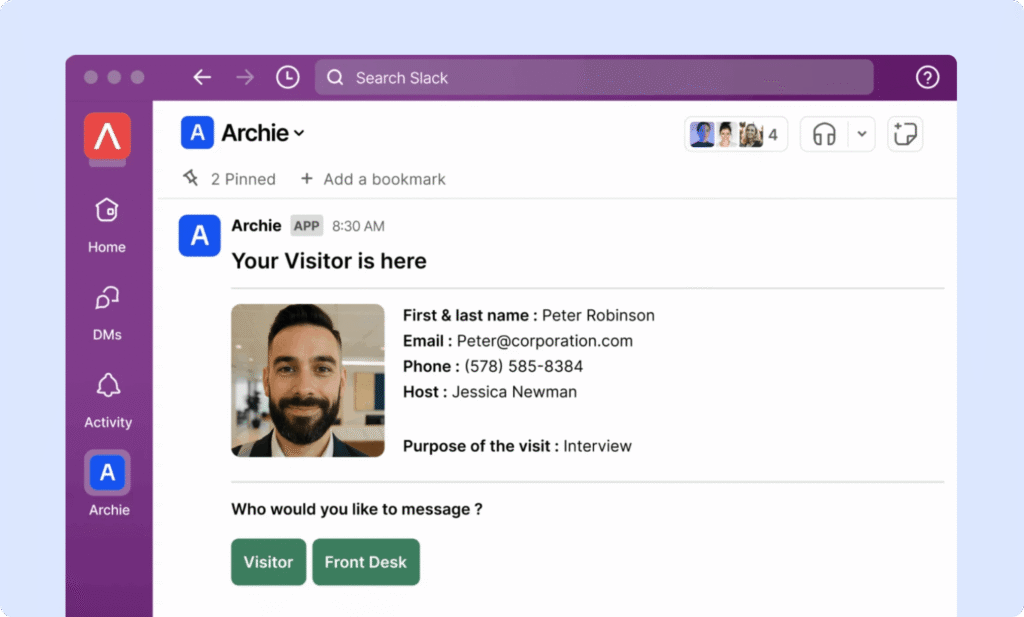
Nobody likes standing around waiting. A good visitor management system automatically alerts the host when their visitor checks in via email, SMS, Slack, or other integrated tools.
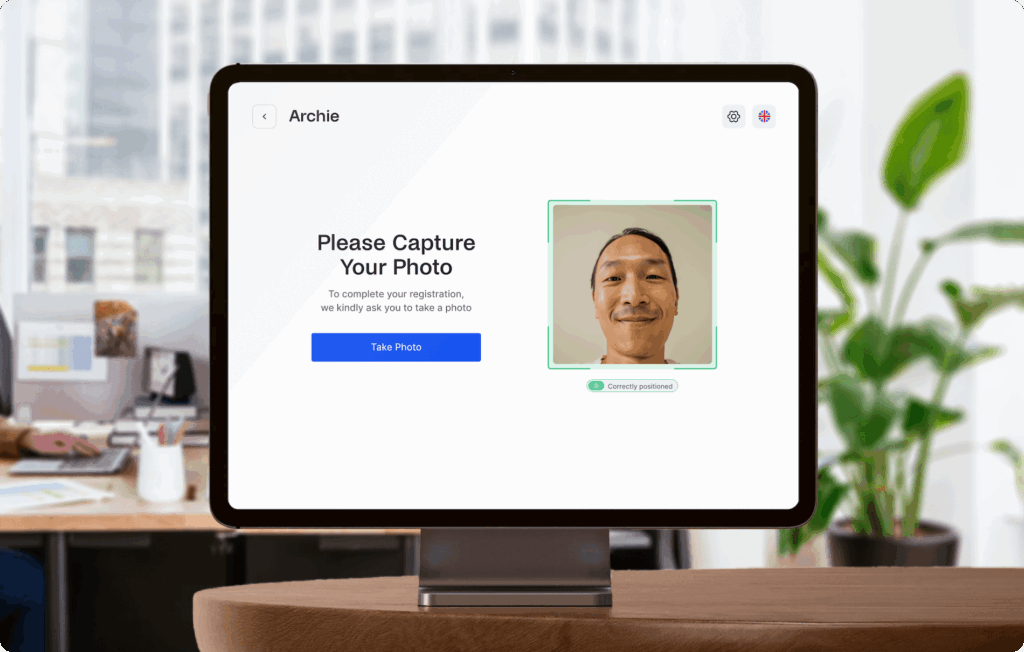
Photo capture and badge printing
For extra security, the system should be able to take a visitor’s photo and print a name badge on the spot.
Digital forms and e-signatures
Need guests to sign an NDA, agree to safety rules, or answer screening questions? A visitor management system should make it easy to collect this info digitally during check-in, with no paper or printing required.
Real-time visitor tracking
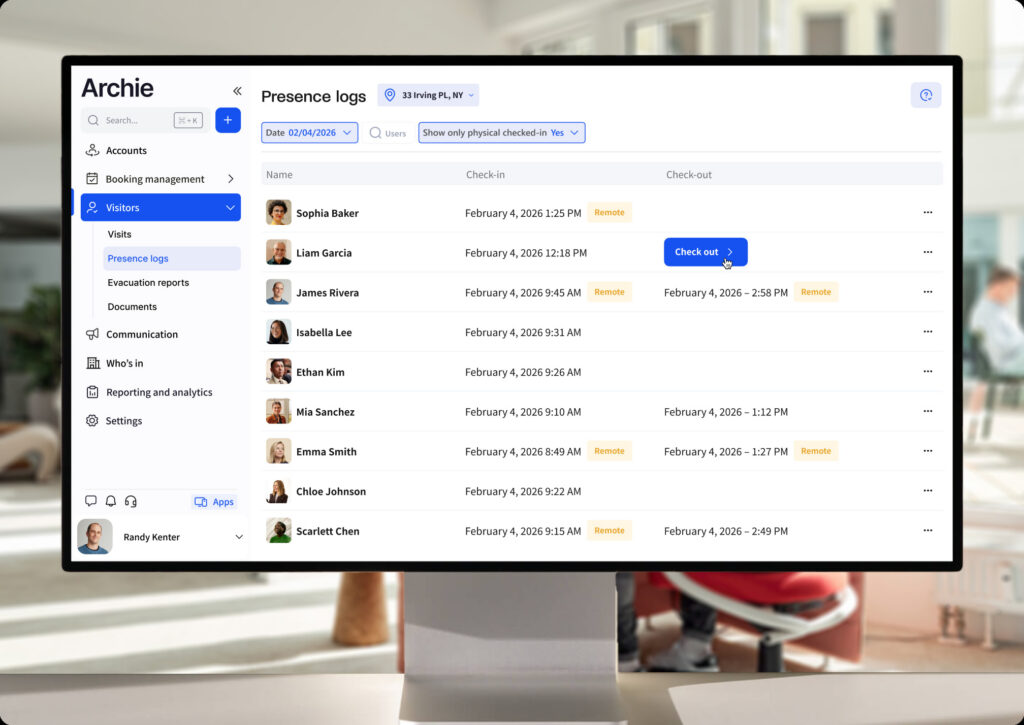
With a live dashboard and workplace analytics, admins can see who’s currently in the building, including both employees and guests. It’s helpful for security, knowing who to contact, and making sure everyone checks out at the end of their visit.
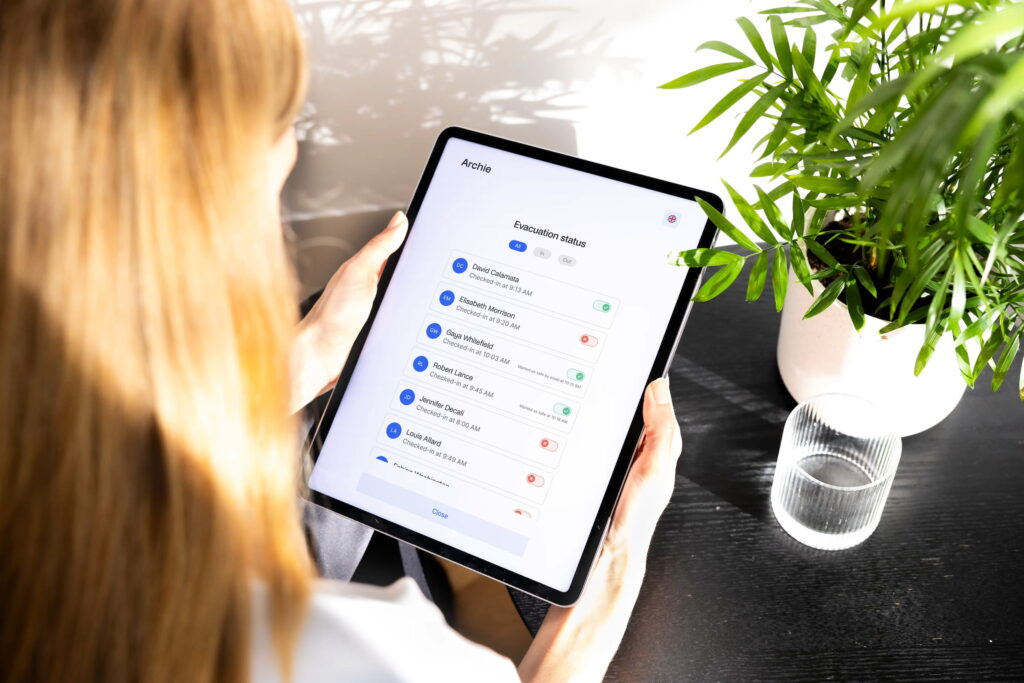
Emergency notifications and evacuation support
In case of an emergency, the system should be able to send instant alerts to everyone in the building, including guests. Archie takes it a step further by allowing you to track who’s marked safe and who still needs help, which is incredibly valuable during drills or real incidents.
Delivery handling
Some visitor systems also support delivery notifications. If a package arrives, the right person gets notified, and there are no more missed deliveries or clutter at the front desk.
Custom branding and settings
Every office is unique, and a good visitor management system should reflect that. You should be able to brand the check-in screen, personalize visitor messages, and adjust settings to match how your team works, whether that’s different visitor types, badge styles, or approval flows.
Integrations with your other tools
Finally, a strong visitor management system should work well with the tools your team already uses, like calendar apps, Slack, Microsoft Teams, Google Workspace, CRM systems, or your office’s door access controls.
Full list of visitor management system features & integrations
Visitor management systems can do a lot more than basic sign-in. The list below covers many of the features you may see in the best visitor management systems like Archie, Envoy, Greetly, SwipedOn, and Lobbytrack. Not every platform includes all of these, but this checklist covers the features people most often search for and compare:
Check-in experience features
- Walk-in registration at a kiosk
- Pre-registration via email, calendar invite, or portal
- Group or bulk registration (events, training sessions, interviews)
- Contactless check-in via QR code or personal device
- Mobile guest passes / pre-invitation links
- Returning visitor recognition (auto-fill or auto check-in)
- Check-in approvals (host must approve before entry)
- Scheduled check-in/check-out (with reminders)
- Automatic check-out after set time
- Manual check-in/out by receptionist or admin
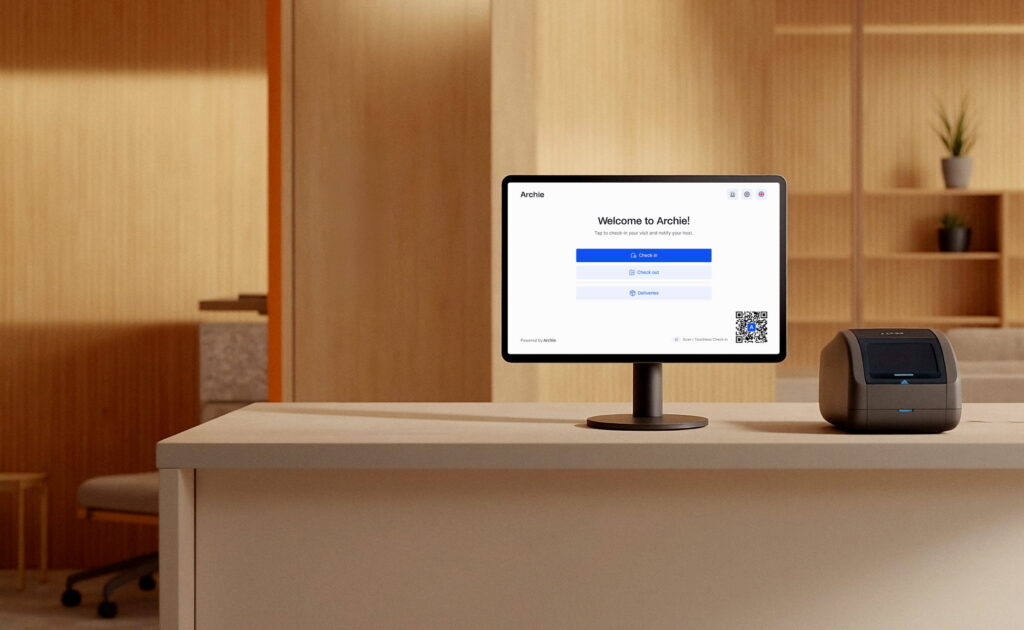
A modern system should support different ways for visitors to check in, depending on your lobby setup and visitor volume. This often includes contactless visitor check-in, QR code check-in, and self-service kiosk check-in on an iPad or Android tablet. Many tools also offer a receptionist mode (staff check visitors in manually), which is helpful for VIPs, walk-ins, or guests who need assistance.
Notifications and workflow features
- Instant host notifications (email, SMS, Slack, Teams, Google Chat)
- Multi-channel notifications (voice call, push notifications, WhatsApp business calling API or messaging in some tools)
- Two-way communication between visitor and host via kiosk
- Delivery notifications for packages
- Custom notification templates with branding
- Escalation workflows if host does not respond
The basics here are host notifications when a visitor arrives, sent through channels like SMS, Slack, or Microsoft Teams. Most systems also support visitor pre-registration, so guests receive instructions and a QR code before arrival. If your workplace has repeat guests or contractors, look for visitor scheduling and invites plus recurring visitor registration, which saves time for reception and hosts.
Security and compliance features
- Visitor photos taken at check-in
- Visitor badge printing (photo, QR code, company logo, custom designs)
- E-badges for digital check-in
- Expiring badges (auto-disable after set time)
- Legal document signing (NDAs, waivers, safety policies) with e-signatures
- Custom document workflows (different docs by visitor type)
- Government ID scanning (driver’s license, passport)
- Facial recognition for returning visitors
- Watchlists/blocklists (internal or external security databases)
- Blacklisting alerts (deny specific people)
- Overstay/outstay alerts (if visitor has not checked out)
- Safety and health screening questionnaires
- Contact tracing (historical logs of visitor/employee contact)
- Audit trails for compliance (downloadable logs)
- GDPR/CCPA compliance and data anonymization settings
- Choice of data hosting region (EU, US, etc.)
Security features are a big reason teams move away from paper logs. Many systems support NDA signing and other e-signature forms, so guests can agree to policies during check-in. For higher-security sites, you may also see ID capture (driver’s license or passport), watchlists or blocklists, and audit logs that create an exportable record of every visit. For safety planning, some platforms include evacuation reports and roll call tools, plus badge printing so visitors are easy to identify while on-site.
Customization and branding features
- White-label branding (no vendor logos, full company identity)
- Logo, colors, and background customization
- Customizable check-in workflows by visitor type (contractor, guest, delivery, interviewee, VIP)
- Multi-language support (global/localized interfaces)
- Personalized welcome screens with images or videos
- Custom messages on kiosk/tablet during check-in or check-out
- Configurable fields/forms (collect specific visitor data)
- Multi-tenant branding for shared buildings
Most platforms let you customize the visitor experience so it matches your workplace. This can include logos, colors, kiosk screens, welcome messages, badge templates, and different check-in flows for different visitor types (contractors, interviewees, VIPs, deliveries). Many tools also support multiple languages and multi-tenant setups for shared buildings.
Employee and workplace features
- Employee in/out board
- Geo-fenced auto sign-in/out for employees
- Employee sign-in using mobile app (e.g., SwipedOn Pocket, Vizitor Pass)
- Desk and room booking (part of broader workplace platforms)
- Occupancy tracking (who is in the office, capacity limits)
- Hot desk / shared resource management
- Meeting room management with visitor linkage
- Employee directory sync for host list management
Some platforms go beyond visitor check-in and include employee-facing features too. That can include an employee sign-in board, employee mobile apps, occupancy tracking, and in some workplace platforms, desk and room booking. These features are most common when visitor management is part of a broader workplace suite.
Reporting and analytics
- Real-time visitor dashboard (who is on-site now)
- Digital visitor logs (searchable, filterable, exportable)
- Visitor categories and analytics (e.g., contractors vs clients)
- Peak times and occupancy trends
- Custom reports for compliance (audit-ready exports)
- Scheduled reports (auto-send to admins)
- Multi-location dashboards for centralized reporting
- CSV and Excel exports for deeper analysis
Modern systems usually include a real-time dashboard that shows who is currently on-site, plus searchable visitor logs and export options. More advanced reporting can include visitor trends by day and time, visitor-type breakdowns, multi-location reporting, scheduled reports, and audit-ready exports for compliance reviews.
Deliveries and mailroom features
- Delivery and mailroom logging (packages, letters, parcels)
- Package photos and notes at intake
- Recipient notifications (email, SMS, Slack, or Teams)
- QR code pickup or pickup confirmation
- Signature capture or photo proof of pickup
- Chain of custody tracking (intake → storage → pickup)
- Searchable package history and status updates
- Reminders for unclaimed packages
- Multi-location mailroom support (if you manage multiple sites)
Some platforms go beyond guests and also handle deliveries and mailroom management. That can include package tracking, pickup notifications, and sometimes a full chain of custody record (who received it, where it was stored, who picked it up, and when). This is especially useful for busy offices and coworking spaces with a steady flow of packages.
Hardware and deployment options
- iPad kiosk apps
- Android tablet kiosk apps
- Web-based kiosk for laptops/touchscreens
- Visitor check-in via personal smartphone (QR scan → mobile form)
- Badge printer integrations (Brother, Zebra, etc.)
- “Receptionist in a Box” hardware bundles (tablet, stand, printer pre-configured)
- Multiple kiosks per location supported
- Multi-device support for high-traffic lobbies
- Offline check-in (continue operating without internet)
Most visitor systems run on iPads, Android tablets, or web-based kiosks. Many support mobile check-in through a visitor’s own phone. If you want printed badges, you will need a compatible badge printer (common brands include Brother and Zebra). Some vendors also offer “visitor hardware bundles” that arrive pre-configured, which can save time. Higher-traffic lobbies may use multiple kiosks, and some systems support limited offline check-in if the internet drops.
Admin controls and support
- Multi-location management under one account
- Centralized admin console with role-based permissions
- Custom admin roles (e.g., receptionist, security, manager)
- Priority or “white-glove” onboarding for enterprise clients
- Migration support (import past visitor data)
- Fast-tracked feature requests for large accounts
- 24/5 or 24/7 live support availability
- Dedicated customer success manager (Enterprise)
On the admin side, look for multi-location management, role-based permissions, and clear admin roles for reception, security, and workplace teams. Enterprise plans often include onboarding help, migration support, advanced configuration, and faster support response times, sometimes with a dedicated customer success manager.
Integrations people commonly look for
Integrations are often the deal-breaker, especially in offices that want visitor workflows to match the tools employees already use.
Many visitor management systems offer native integrations or connectors for:
- Calendar integrations (Google Calendar, Outlook/Office 365)
- Messaging apps (Slack, Teams, Google Chat)
- Email & SMS integrations (via Twilio, etc.)
- Wi-Fi provisioning (auto-generate guest Wi-Fi access)
- Access control integrations (Kisi, Brivo, SALTO, Lenel, Openpath, etc.)
- Identity management (Azure AD, Active Directory, Okta, OneLogin, SCIM, SSO)
- File/document storage integrations (Dropbox, Google Drive, DocuSign, Box)
- CRM/ERP (e.g. Hubspot or Marketo and Salesforce integration)
- HR system integrations (Workday, BambooHR, etc.)
- Zapier and open API for custom workflows
- Webhooks for real-time event triggers
Do you need a visitor management system?
If your workplace has many different types of guests, you’ll benefit from a system that structures their arrival and presence.
Some more advanced visitor management systems let you pre-register your guests, collect e-signatures for forms or NDAs, take visitor photos, and support emergency evacuations with real-time tracking. They can also connect with tools your company already uses, like Slack, Microsoft Teams, and access control systems.
So, what used to be a slow, manual process is now a smooth, automated, and professional one.
💡 In case you need more guidance, here’s our review of the best visitor management software solutions.
Visitor management features FAQ
Start with the basics that make check-in fast and reliable: simple visitor registration, pre-registration links or QR codes, and instant host notifications. From there, look for the features that match your workplace needs, like badge printing, photo capture, digital forms and e-signatures (for NDAs or safety policies), and a clear visitor log you can search and export. If you have multiple locations or stricter security requirements, integrations (Slack/Teams, Google/Outlook calendars, access control, and SSO) can matter just as much as the check-in experience.
The best way to evaluate a tool is to focus on what will affect your day-to-day workflow. In most offices, that comes down to: how easy it is for guests to check in, how quickly hosts get notified, and how well the system supports your security and compliance needs. It also helps to check how customizable the visitor flows are (for contractors, interviews, deliveries, VIPs), what reporting you get, and whether the tool integrates with the systems you already use. Finally, make sure the pricing is clear and that the hardware setup (tablet and badge printer) fits your front desk.
Touchless or contactless check-in means visitors can complete check-in without sharing a pen, clipboard, or even touching the kiosk screen. The most common example is a QR code: visitors receive a QR code ahead of time and scan it on arrival to confirm their check-in, often using their own phone. Some systems also support mobile pre-check-in links, digital visitor passes, and remote form signing before the visitor arrives. The goal is simple: faster check-ins, shorter lines, and a cleaner, more modern lobby experience.
Visitor management software keeps a live record of who is currently on-site, including guests, contractors, and sometimes employees. During an emergency, teams can use that information for roll calls, alerts, and safety checks. This makes it easier to respond quickly and account for people accurately.