






If you are shopping for a desk booking tool, pricing can get confusing fast. Two products can look almost identical, but end up costing very different amounts once you add users, desks, locations, and “must-have” features like SSO or Microsoft Teams desk booking.
This guide breaks down how desk booking pricing works in real life, what usually makes the price go up, and how to compare tools based on how offices actually work today (think shared desks, hybrid schedules, and changing headcount).
💡 TL;DR:
Most tools charge in one of three ways: per desk, per user, or quote-based. If you have more people than desks (which is pretty common nowadays), Archie’s per-desk pricing is often easier to budget. Always watch for minimum monthly fees, tier limits, and key features locked behind higher plans.
Desk booking software pricing guide
Why desk booking pricing can feel confusing
Most pricing confusion comes from one thing: what the vendor charges for.
Some tools charge for each employee who can log in. Others charge for each desk (or space) that can be booked. Some do both. And enterprise tools often hide pricing behind quotes, which makes comparisons even harder.
It also gets tricky because desk booking is rarely “just desk booking” anymore. Many tools bundle desks with rooms, visitor management, analytics, or workplace comms, then gate features across tiers.
So the right question is not “What does it cost?”, but “What does it cost for our setup?”.
Let’s find out.
The 3 main desk booking pricing models
#1 Per desk (or per space)
You pay for the desks (or other shared spaces) you make bookable.
Why it can be a good deal: If you have more employees than desks (very common in hybrid offices), your cost stays tied to your space, not your headcount.
Examples from the top desk booking software providers:
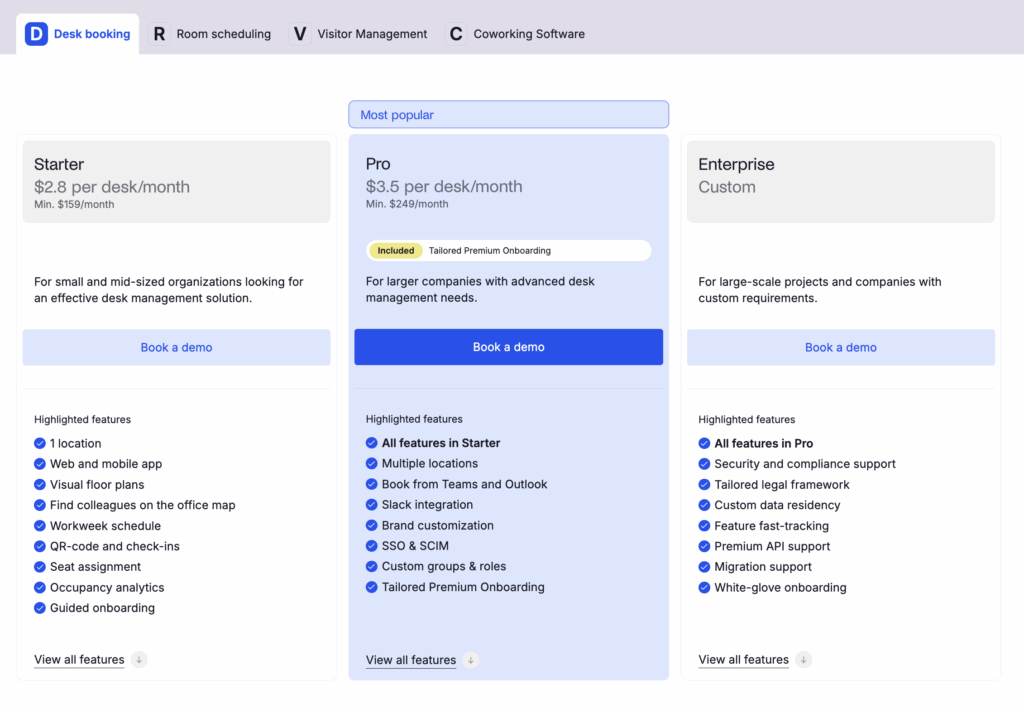
- Archie charges per desk. Starter is $2.80 per desk/month with a $159/month minimum.
- Envoy Reservations is $60 per bookable resource/year + platform fees.
- Eden charges $2.25 per desk/month, sold in sets of 25.
- Skedda is also “space-based,” but in tier bundles.
If you have more people than desks, per-desk pricing is usually the easiest to live with.
#2 Per user (or per active user)
You pay for each employee who uses the tool (or is counted as “active”).
Why it can get expensive: In hybrid teams, many people need access even if they come in only once a week. That can push up costs quickly.
Examples:
- deskbird: costs about $3.75 to $4.75 per user/month depending on tier
- Officely: $2.50 to $3.50 per user/month
If you are a small office where almost everyone has a seat, per-user pricing can be totally fine.

#3 Quote-based enterprise pricing
You do demos, share your requirements, and get a custom quote.
Why it exists: Enterprise tools often sell larger rollouts with onboarding, security, SLAs, and complex integrations.
Examples:
Pricing typically starts around enterprise levels, often reported around $5,000+ per year. If your office is complex (many locations, strict security, advanced analytics), quote-based pricing can make sense, but expect extra friction.
💡 A quick way to decide which pricing model is best for your setup:
- If you have more people than desks, per-desk pricing is usually the easiest to live with.
- If you are a small office where almost everyone has a seat, per-user pricing can be totally fine.
What usually increases the desk booking software price
- More locations and floors. Once you move beyond a single office, costs often go up. Multi-location support, extra floors, or separate buildings are commonly tied to higher plans or add-ons.
- SSO, SCIM, directory sync. Single sign-on and user provisioning sound basic, but many tools treat them as “advanced” features. They are often locked behind higher tiers, especially in per-user pricing models.
- Admin controls. The more control you need, the more you usually pay. Things like approvals, role-based access, desk neighborhoods, booking limits, buffers, and restrictions are often only available in paid or higher plans.
- Analytics depth. Most tools include basic dashboards. But if you want longer data history, exports, custom reports, or more detailed desk occupancy insights, that typically comes at an extra cost.
- Integrations. Some platforms include desk booking integrations like Microsoft 365 or Slack booking early on. Others reserve these integrations for higher tiers, even though many teams see them as essential.
- Extra modules. Visitors, parking, workplace requests, AI assistants, kiosks, and room displays can add cost quickly.
💡 When comparing desk booking tools, always look past the starting price. Check what’s actually included at that tier, and what you’ll need to pay for once your office setup gets a bit more complex. The most common things to watch for are minimum monthly fees, bundles or tiers that force you to overbuy, key features locked behind higher plans, and unclear “active user” billing where “active” can mean different things depending on the vendor.
Does a free desk booking system exist?
Yes, free desk booking software exists, but it usually means “free for small teams” rather than “free forever for any size.”
Most desk booking tools make money when a company grows. So the free version is often designed as a starting point. It helps you test the basics, roll it out to a small group, and see if people actually use it. Once you need more users, more offices, or more control, you normally move to a paid plan.
Still, there are a few different types of “free” desk booking software:
- Free plans (freemium). Some vendors offer a truly free plan you can use for as long as you want. The catch is that it comes with limits, usually around the number of users, office locations, or specific features you get. For example, deskbird positions its free plan as a way for small teams to get started, and then you upgrade as your needs grow. In real life, this is usually enough to test the experience, but not enough to run desk booking across a full office.
- Free trials (try before you buy). Many tools do not offer a free plan, but they do offer a free trial. This is different from freemium because the trial is time-limited, like 7, 14, or even 30 days. Trials are great when you want to test the “real” product, not a stripped-down version. The downside is that you need a plan for what happens when the trial ends, especially if people start relying on it.
- Desk booking via Excel/Google Sheets. Alternatively, you could also go for a free hot desk booking template and use Excel/Google Sheets for desk bookings.
💡 Keep in mind that user limits show up fast. A plan that works for 10 to 15 people can break the moment you try to include one full team, one department, or the whole office. The free plan may be missing the features and admin controls that actually make desk booking work. Plus, with free plans, support is often slower or more self-serve. That’s fine for testing, but it can be risky if the tool becomes business-critical.
Desk booking software pricing comparison
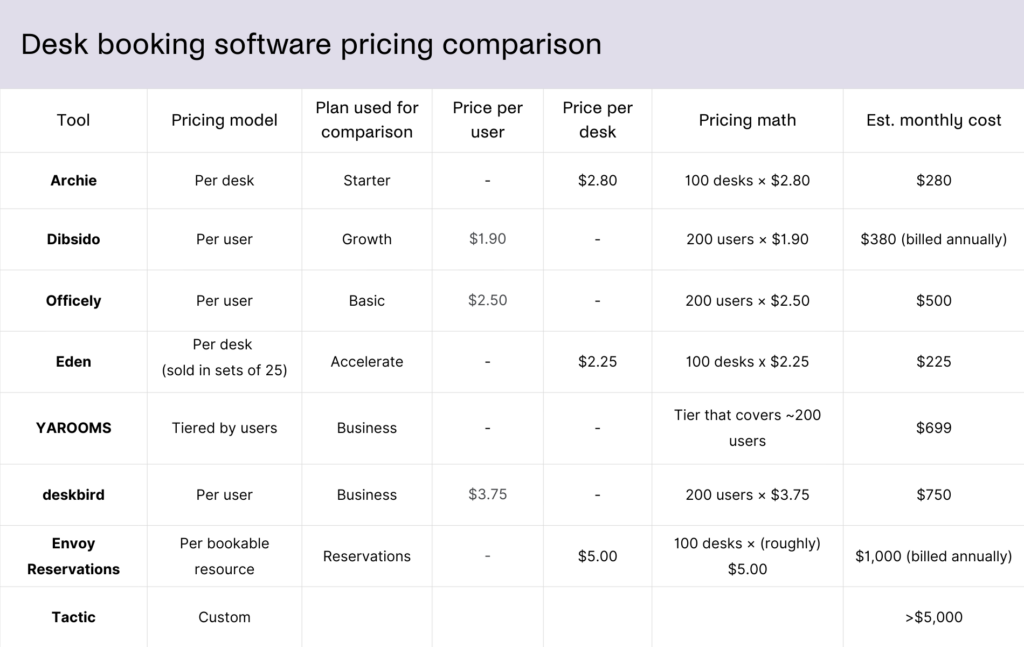
Here’s an exemplary desk booking software pricing comparison for 100 desks and 200 employees, charged per month in US dollars:
A simple way to estimate your monthly desk booking cost
You can get a pretty good estimate with four numbers:
- How many employees need access? Even occasional office users usually need access to book.
- How many desks will be bookable? Count only what will actually be reserved in the tool.
- How many locations and floors? Multi-site support can push you into different tiers.
- What are your “non-negotiables”? For many teams, that includes SSO, Microsoft Teams, or Slack, check-ins, analytics, and admin rules.
Once you have those, compare desk booking software pricing like this:
- If a tool is per user, multiply the per-user price by the number of users who need access.
- If a tool is per desk, multiply the per-desk price by the number of desks you will manage.
- If a tool uses tiers, check what happens when you exceed the included limits.
If you want a desk booking system that is easy to use, easy to roll out, and easy to budget for, Archie is a strong pick for most modern offices. It charges per desk, not per employee. That means your cost is tied to the number of desks you actually manage, which usually changes much slower than headcount in a shared-desk office.
At the same time, if you are a smaller team and you just need something lightweight, a per-user tool can still make sense, especially if you care most about quick setup and fast adoption. The main tradeoff is that per-user pricing often gets expensive later as more people need access, even if they only come in once or twice a week.

Berenika Teter
Archie's Content Manager, fueled by filter coffee and a love for remote work. When she’s not writing about coworking spaces and hybrid workplaces, you can probably find her exploring one.