








Coworking software pricing can get confusing fast. Two tools might look similar on paper, but end up costing very different amounts once you factor in members, locations, visitor management, or white-label mobile apps.
We decided to break down how coworking platforms charge in practice, what typically costs extra, and what to double-check before you commit. By the end, you’ll be able to compare options without getting surprised by add-ons or hidden fees.
💡 TL;DR:
Most coworking software costs $130 to $400 per month for one location with around 100 members, before add-ons. The biggest price differences come from how members are counted, whether key features are included or paid extras, and how pricing scales with growth.
For most coworking spaces, Archie offers the clearest and most predictable pricing, with fewer required add-ons as you grow.
Guide to coworking software pricing
Why coworking software pricing can be tricky
At first glance, a lot of coworking space management tools seem to cost about the same. You see a monthly price, you compare a few tiers, and it feels pretty straightforward.
The tricky part is what happens after you start digging in. That “starting at” price is often just the base fee. Once you begin adding the things most spaces actually need day to day, the total can change a lot.
Common issues operators run into when reviewing coworking software pricing:
- Important features locked behind higher tiers. A plan might cover the basics, but visitor management, integrations, branding, or automations only show up in the next tier.
- A low base price, but lots of paid add-ons. Think white-label mobile apps, visitor check-ins, advanced reports, or even software onboarding. None of these are “wrong” to charge for, but it can make budgeting harder if you only look at the base plan.
- Confusing definitions of “active users”. In one system, an active user might be anyone who makes a booking. In another, it might be someone who paid in the last 30 days. Some tools count only paying members, while others count anyone with access to the portal. So two spaces with the same 100 members can end up paying very different amounts, simply because the rules are different.
- Multi-location pricing. Many platforms are priced per location. Even if your total member count stays the same, splitting those members across two sites can push you into a higher tier, or add a separate location fee, or both.
- No public coworking software pricing. Sometimes the website just shows “starting from”, no base plans, or pricing that looks simple until you speak with sales and learn that your setup needs a custom quote.
That is why it helps to understand how coworking software is priced, not just how much it costs. Once you know what drives the total, you can compare tools more fairly and avoid surprise costs later.
The main coworking software pricing models
Coworking software pricing usually falls into a few common patterns:
#1 Pricing by active or paying members
This is the most common one. You pay based on how many members “count” toward billing. The catch is that a “member” is not defined the same way in every tool, even when the pricing page uses similar wording.
Examples of how different coworking tools count users:
- Archie: counts people who book resources (desks, rooms, offices) or have a subscription plan (visitors and event attendees don’t count toward your user total, and if the same person is added to multiple locations, they still count as just one user)
- Nexudus: often counts members who booked, were invoiced, or had an active membership recently
- Cobot: counts only paying members
Some tools count free users, trial members, and non-paying accounts, while others do not. If you have lots of drop-ins or day-pass users, your costs can swing a lot depending on the counting rules.
#2 Pricing by location
Some platforms price per location (site) first, then layer member limits on top. You will often see something like “$X per location” with a cap on members, or a plan that includes 1 location and charges extra for each additional site.
Most tools combine both models.
#3 Tiered plans with feature locks
This is the “Starter, Pro, Enterprise” style pricing you see everywhere. The tricky part is what is included in each tier and what gets pushed into the higher plans.
Common features that get locked behind higher tiers or paid upgrades:
- Visitor management
- White-label domains
- Advanced analytics and reporting
- Automations and workflow builders
- API access and webhooks
- Premium support and onboarding
A platform may look affordable on the entry tier, but the moment you need visitor tools, automations, or multi-location support, you effectively have to price the next tier up. Tools like Optix and OfficeRnD can become significantly more expensive once you add popular extras like automations or visitor management.
#4 Add-on driven pricing
Some tools keep the base price reasonable, but then charge separately for lots of things that many spaces consider “standard.” This model is not automatically bad. It just means you must budget for your real setup, not the cheapest entry plan.
Common paid add-ons:
- Visitor check-in and reception flows
- Door access integrations
- Wi-Fi management
- Advanced reporting modules
- Extra admin roles or permissions
- Paid onboarding, training, or implementation support
- White-label mobile apps
💡 Speaking of white-label apps, here’s more on how they’re different from app branding options offered by most coworking tools ↓
When you are comparing tools, list the add-ons you actually need and total them up. A tool with a higher base plan can sometimes be cheaper overall if it includes more of what you will end up using anyway.
#5 Quote-based or enterprise pricing
Instead of a public pricing page, you get a custom quote based on your needs, modules, and scale. This is common for larger, enterprise-focused platforms like Yardi Kube or OfficeRnD.
Downsides to watch for:
- Harder to budget upfront because there is no clear starting point
- Comparisons are less transparent
- Add-ons and modules can quietly increase costs over time, especially as you expand
What coworking software usually costs in practice
Here is a practical way to think about pricing, based on what most vendors charge today:
- Low-end/starter tools: $29 to $150 per month
- Mid-range plans: about $150 to $350 per month
- Enterprise/custom pricing: quote-based
Low-end/starter tools: $29 to $150 per month
This range is usually best for smaller spaces that want the basics and do not need advanced workflows. These plans often work for:
- New spaces and community spaces
- Single-location operators
- Spaces under roughly 100 members (depending on how the tool counts members)
In this range, you will often see simpler member portals, fewer integrations, and lighter reporting. Some tools also skip mobile apps or advanced automation, which is part of why they are cheaper.
Mid-range plans: about $150 to $350 per month
This is the most common “sweet spot” for established coworking spaces that want stronger operations, billing, and a better member experience. It is where many tools land once you are around:
- 100 to 250 members (again, depending on definitions)
- More structured memberships, credits, and add-ons
- More reporting, admin controls, and better member workflows
This is also the range where add-ons start to show up more often, so your final cost depends on what is bundled versus what is extra.
Enterprise/custom pricing: quote-based
If you are a larger, multi-location operator, expect pricing to move into custom quotes. This is common when you need:
- Many locations
- More complex billing (multi-entity, multi-currency, inter-company billing)
Is there free coworking space management software?
Yes, but free coworking space management software is very limited.
There are a few coworking tools that offer free plans (like CoWello, which is free for up to 10 members) or low-cost entry points, especially for very small spaces, early startups, or simple booking needs. These free coworking software options tend to cover the basics (like booking calendars) when you have just a few members, but don’t include the full set of features most spaces need as they grow.
That’s why even when free tools exist, many spaces end up upgrading once they reach ~20 members or need more advanced features.
Best coworking space management software pricing comparison
For one location with about 100 members, top coworking tools typically land between $130 and $400 per month for the base plan only (before optional add-ons like visitor tools, white-label apps, door access, Wi-Fi, premium support, etc.):
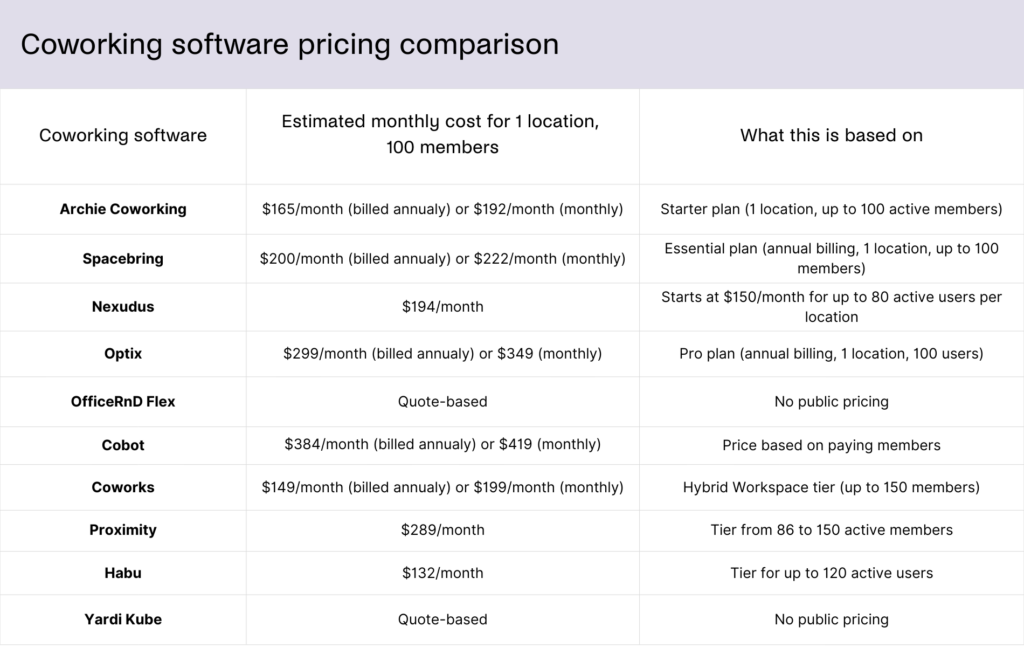
That is a useful starting point, but it is not a perfect apples-to-apples comparison because “100 members” is not counted the same way everywhere.
Let’s have a closer look at how the best coworking space management tools go about pricing:
Archie Coworking pricing
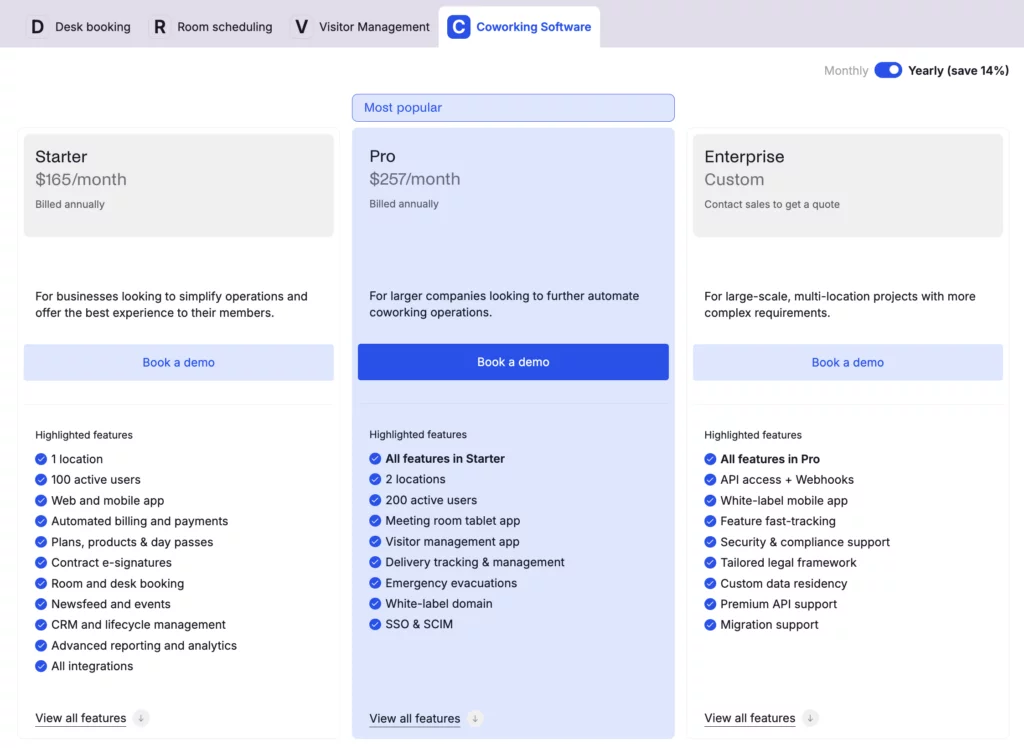
Archie Coworking uses clear tiers based on locations and active members. With annual billing, you’d pay:
- Starter: $165/month for 1 location and up to 100 active members
- Pro: $257/month for up to 2 locations and 200 active members
- Enterprise: custom pricing for larger setups
Common extras to budget for:
- Extra locations: $90/month each
- Extra members: $50/month per 50 members
- White-label mobile app: $90/month per location
Who counts as an active member: someone who books a resource or is on a subscription plan (visitors and event attendees do not count).
Spacebring pricing
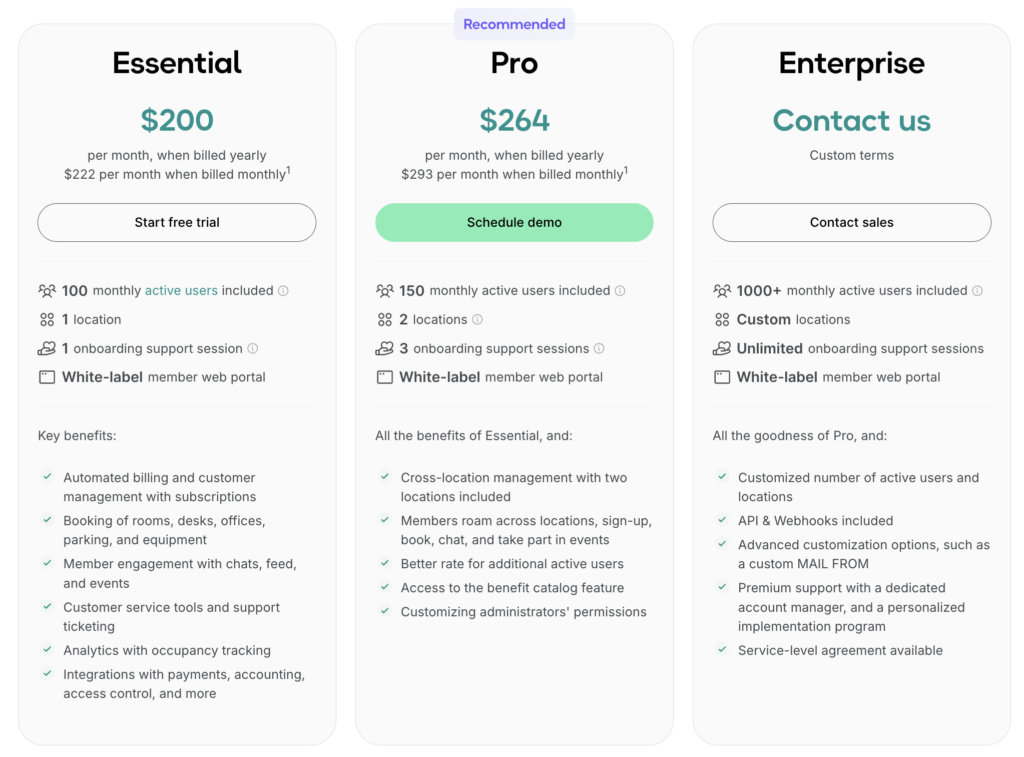
Spacebring uses tiers based on locations and member limits. Pricing is set in EUR, so USD amounts can vary slightly. With annual billing, you’d pay:
- Essential: about $200/month for 1 location and up to 100 members
- Pro: about $264/month for up to 2 locations and 150 members
- Enterprise: custom pricing
Common extras:
- Extra locations: about €59/month per location (on Pro)
- Extra members: about €71/month per extra block (40 members on Essential, 50 on Pro)
- Add-ons often include a mobile app, visitor reception kiosk, room displays, floor plan displays, and API/webhooks
Who counts as an active member: someone who uses Spacebring in a meaningful way, such as making bookings, paying invoices, or having an active personal or company subscription through the web portal or mobile app.
OfficeRnD Flex pricing
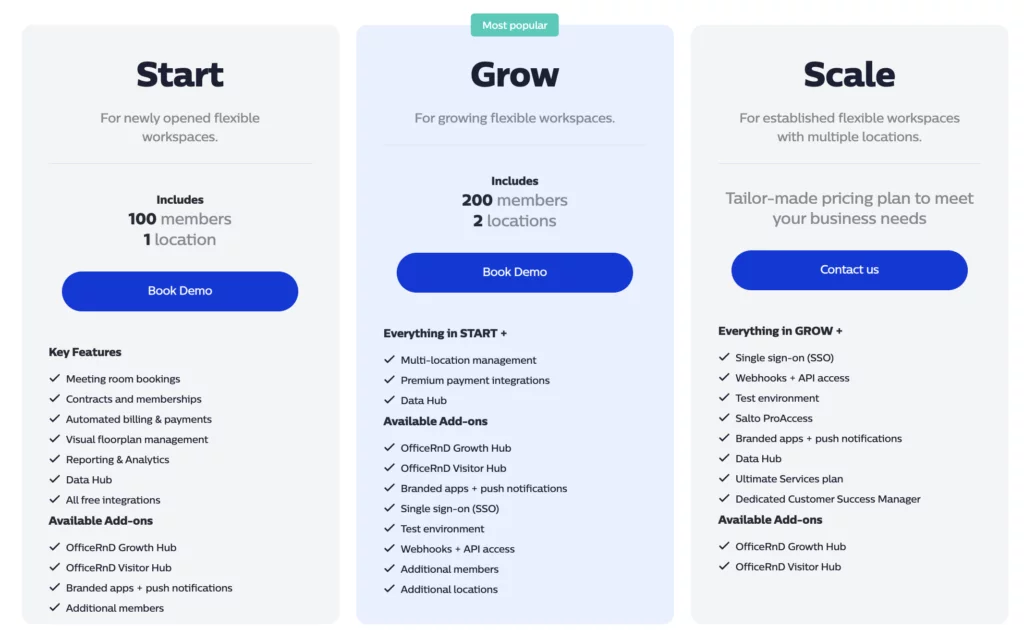
OfficeRnD Flex is now mainly quote-based (it used to start from $165/month for a single location with 100 members). It still lists a few plans, though:
- Start / Grow / Scale: pricing is custom and depends on your locations, member volume, and which hubs or modules you need.
What usually changes the quote:
- Multi-location requirements
- Advanced reporting needs
- Add-on hubs such as Visitor Hub or sales and onboarding modules (often referenced as “hubs”)
Nexudus pricing
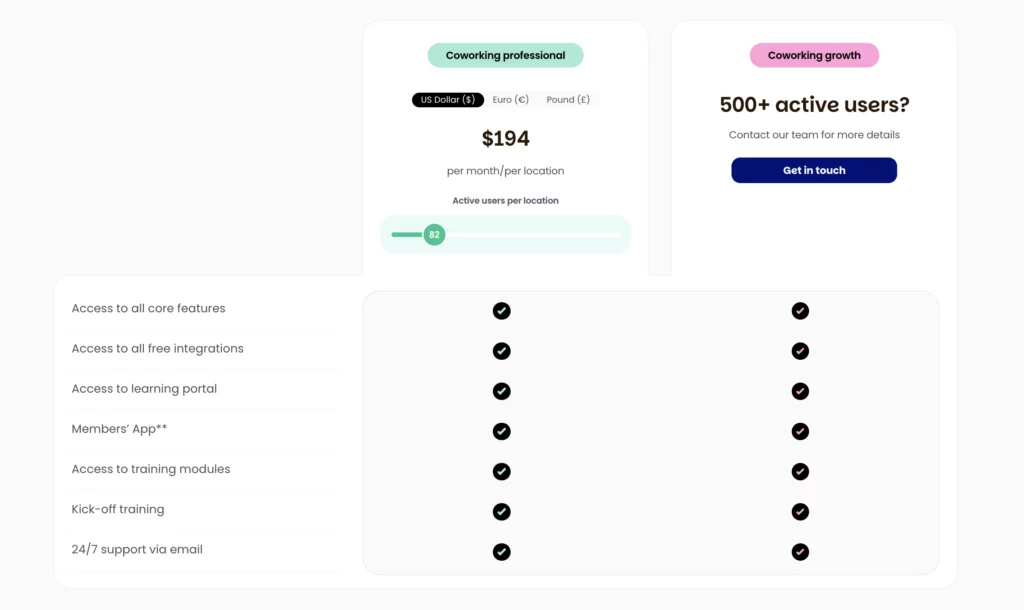
Nexudus is priced per location, and scales as you add active users:
- Base price: $150/month per location for up to 80 active users
- Above 80 active users: cost increases as your active user count grows
Common add-ons:
- White-label mobile app: $150/month (covers up to 5 locations)
- Explore Pro analytics: $100/month + $25/month per location
- Nexudus Academy training: $150/month for one location + $25/month per additional location
Who counts as an active member: those with a current membership or who have been invoiced or made a booking in the last 30 days. Other contacts stay in your CRM at no cost.
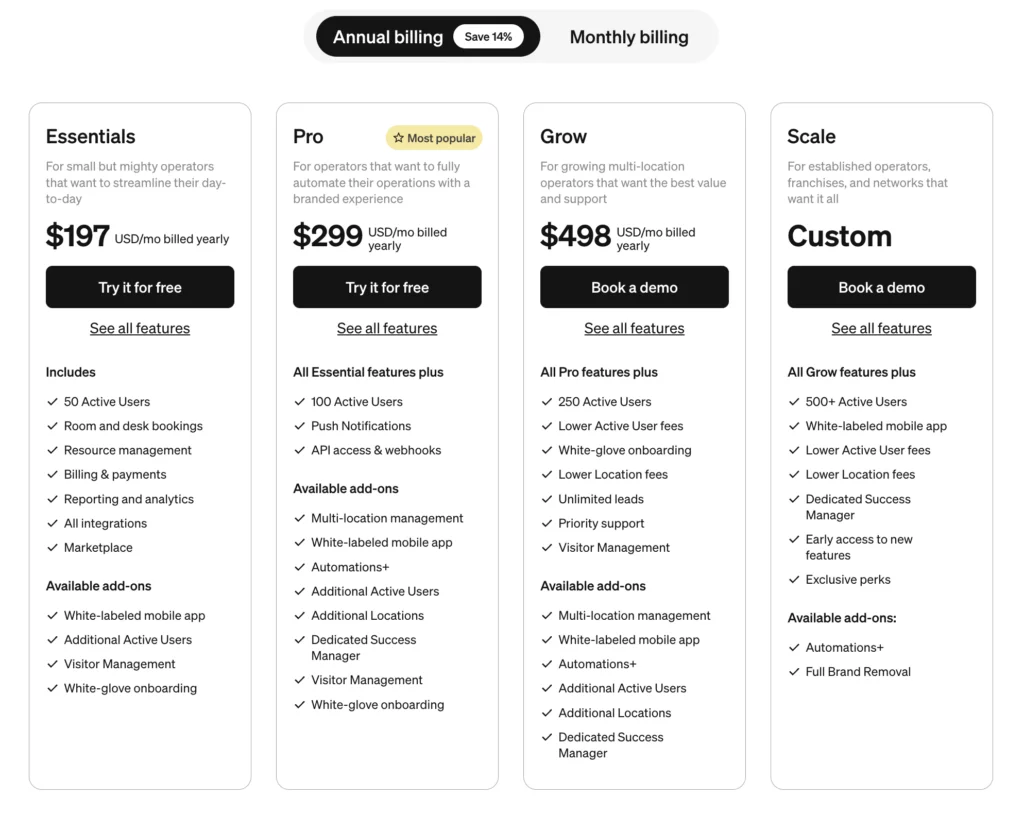
Optix pricing
Optix uses tiers based on user limits and one location, with several common paid add-ons. With annual billing, you’d pay:
- Essentials: $197/month (up to 50 users, 1 location)
- Pro: $299/month (up to 100 users, 1 location)
- Grow: $498/month (up to 250 users, 1 location)
- Scale: custom pricing
Common extras:
- Automations+ starts at $50/month
- Visitor management: $42/month extra on Essentials and Pro, included on Grow and Scale
- Extra locations: available on higher tiers (pricing varies by tier)
- Full brand removal: only on Scale, with a one-time fee (listed as $1,199)
Cobot pricing
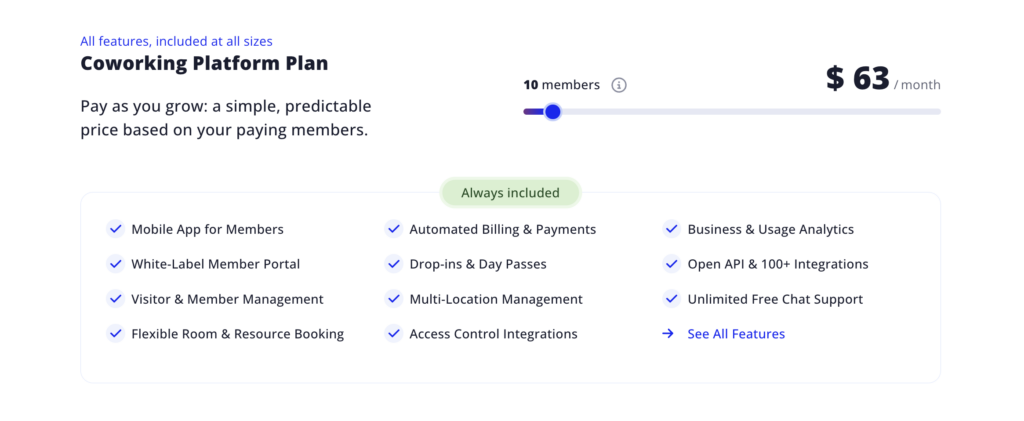
Cobot pricing is based on paying members, which many operators find easy to budget for.
- Starts at $63/month (annual billing) for up to 10 paying members
- At around 100 paying members, it is roughly $374/month (based on the pricing scale)
You can keep leads, contacts, and non-paying records in the system without them counting toward billing.
Coworks pricing
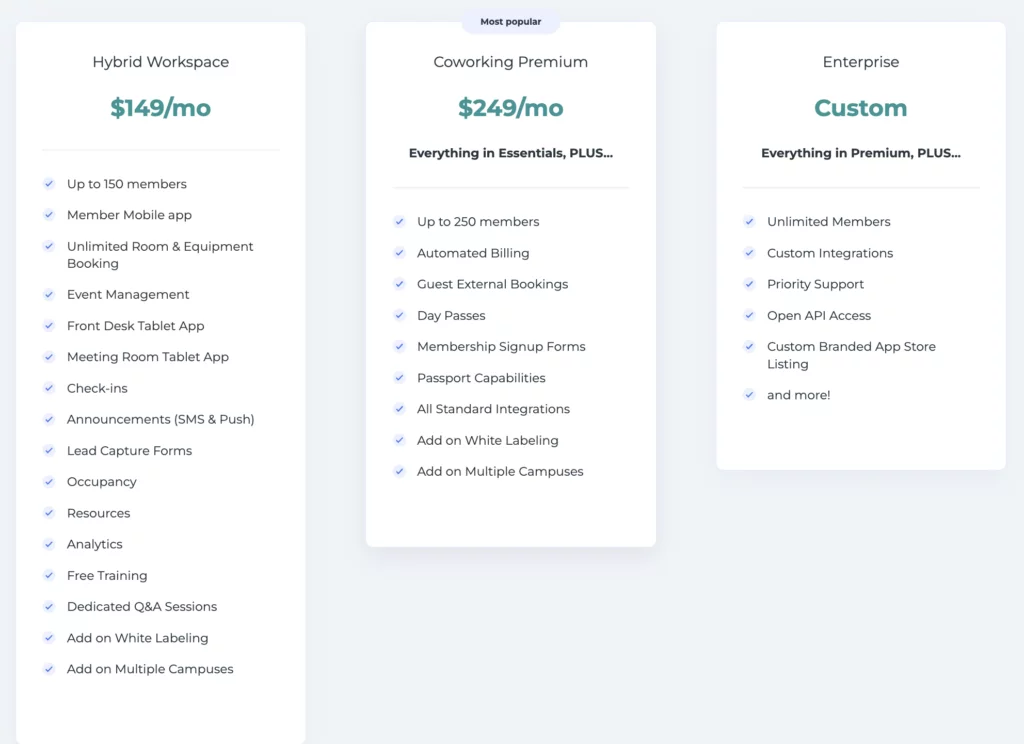
Coworks offers two main plans with annual vs month-to-month pricing, plus an enterprise tier.
- Hybrid Workspace: $149/month on annual billing or $199/month month-to-month, up to 150 members
- Coworking Premium: $249/month on annual billing or $299/month month-to-month, up to 250 members
- Enterprise: custom pricing (often for unlimited members and larger setups)
Common extras:
- White-labeling and multi-location support are often paid add-ons
- Some billing capabilities are positioned as included at Premium and above
Proximity pricing
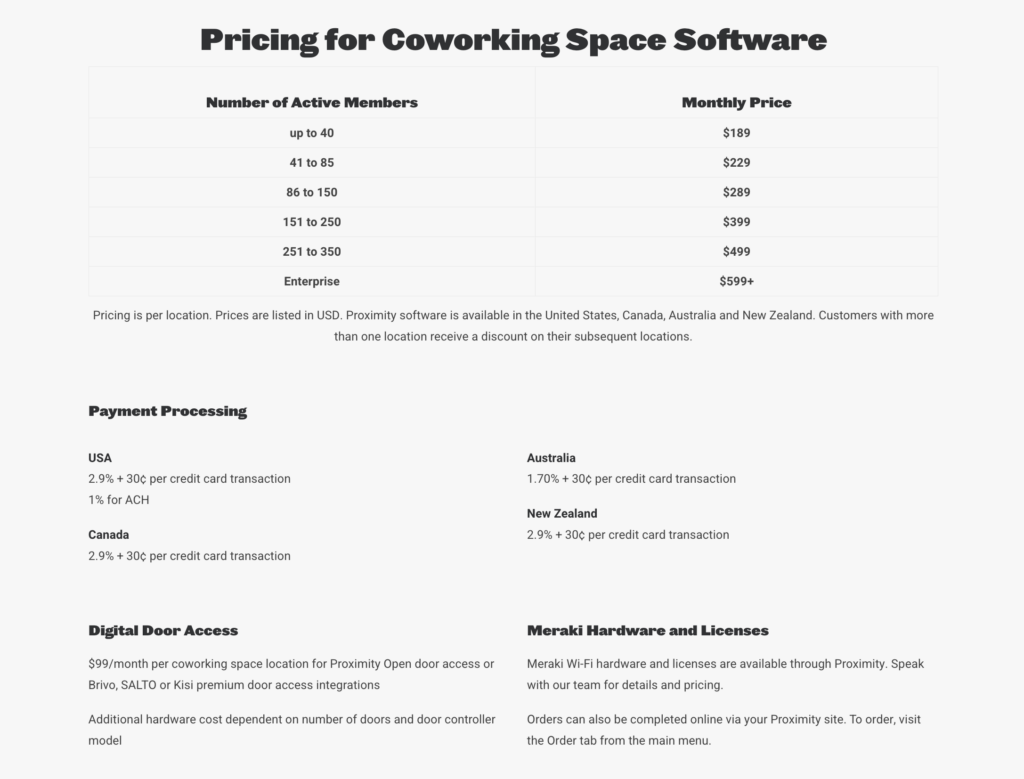
Proximity uses tiers per location based on member count.
- Starting tier: $189/month for up to 40 members
- Higher tiers for larger member counts (for example 85, 150, 250 members) with higher monthly fees
- Larger deployments can move to custom pricing
Common add-ons (facility controls):
- Door access: $99/location/month
- Wi-Fi management: $59/location/month
- Other facility features, like sensors, can also add cost
Habu pricing
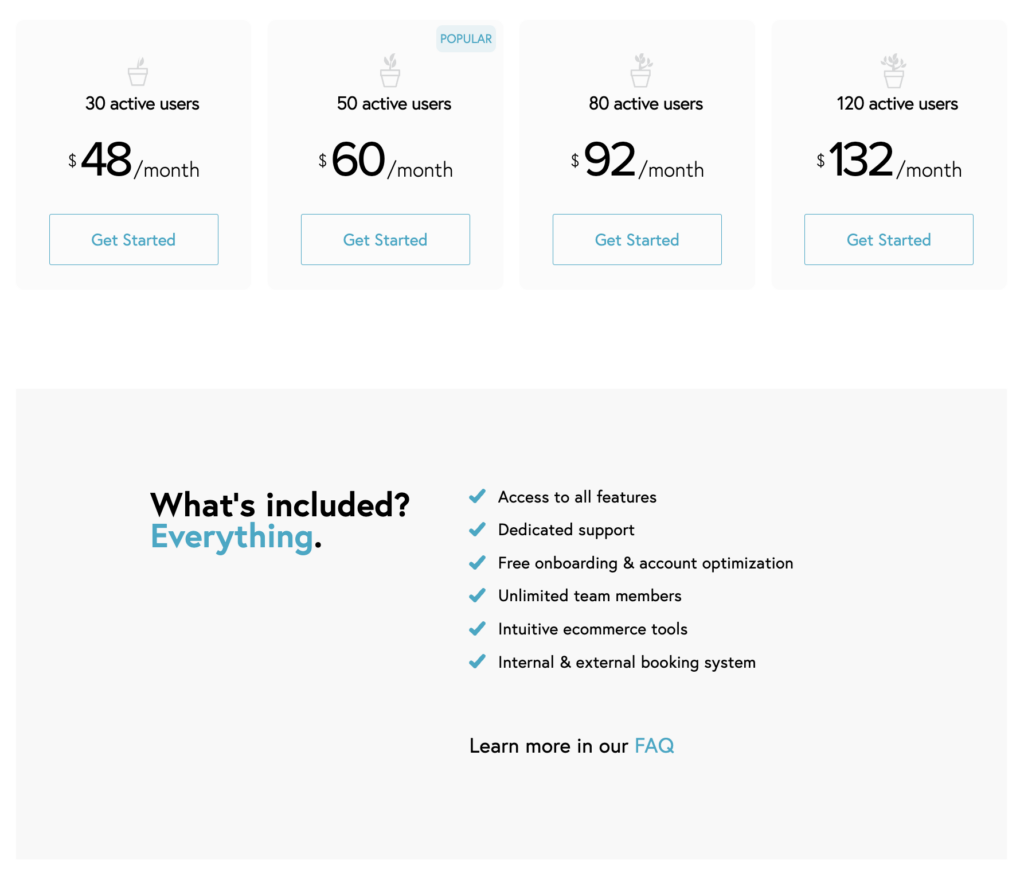
Habu is priced in very simple bands based on active members on subscription plans.
Example tiers:
- $48/month for up to 30 users
- $60/month for up to 50 users
- $92/month for up to 80 users
- $132/month for up to 120 users
“Active user” is tied to subscription membership, so casual users may not count the same way.
Yardi Kube pricing
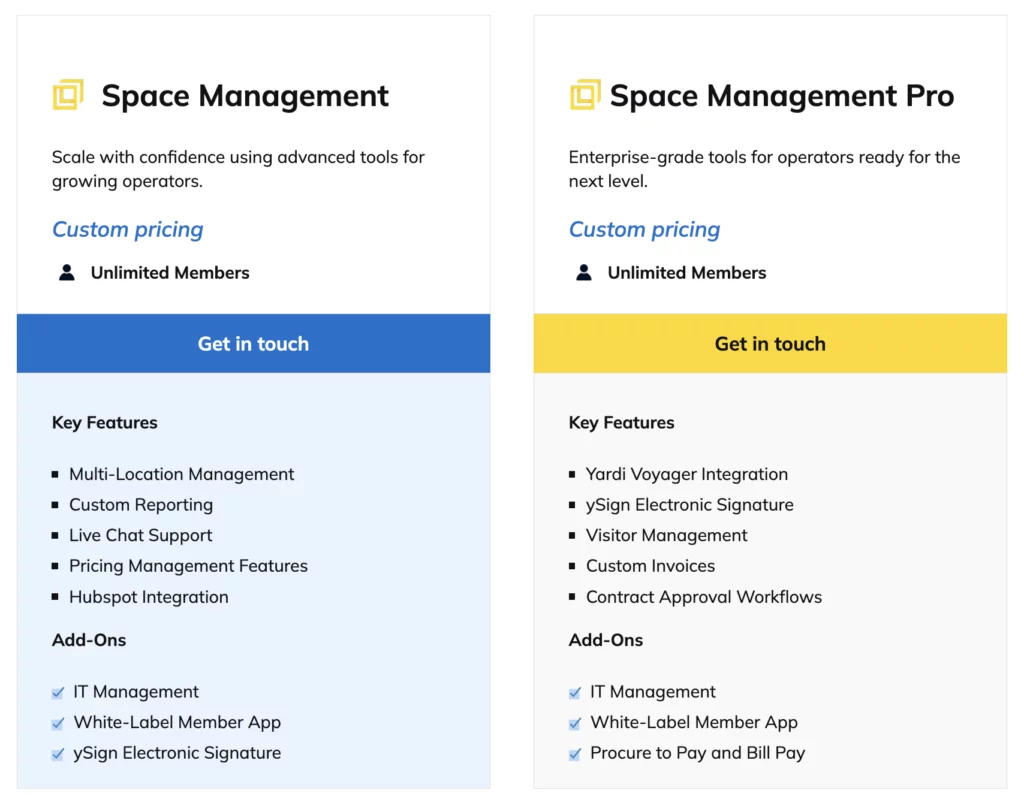
Yardi Kube is enterprise software with no public pricing.
- Pricing is quote-based and typically module-based
- Your total depends on which features and tools you need (coworking operations, IT and Wi-Fi management, visitor workflows, and other modules)
Deskworks pricing
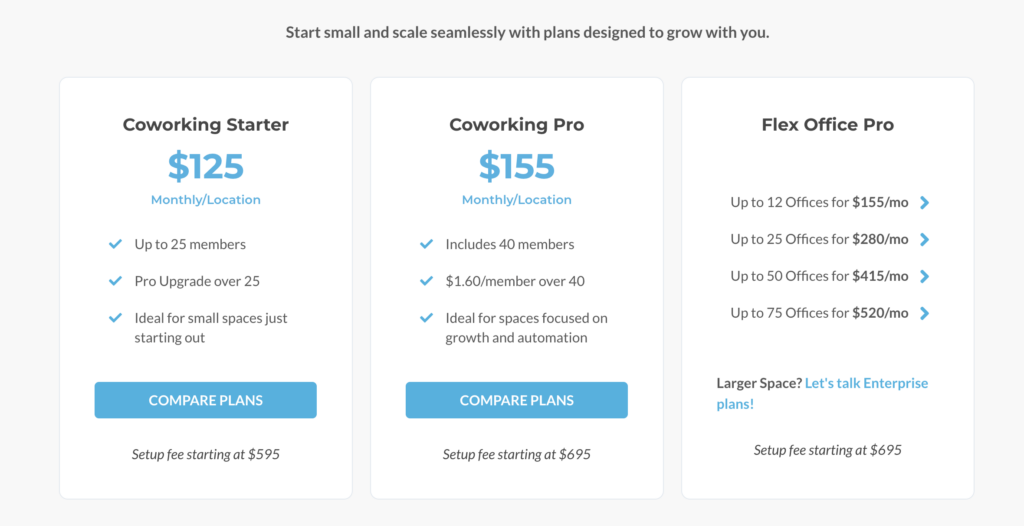
Deskworks is very transparent, with per-location plans plus setup fees.
Coworking plans:
- Starter: $125/month per location (includes up to 25 members)
- Pro: $155/month per location (includes 40 members, then $1.60 per additional member)
Private office focused plan:
- Flex Office Pro: starts around $155/month and scales up (pricing based on number of offices)
Other costs to note:
- One-time setup fee (often several hundred dollars)
- Optional Wi-Fi check-in add-on can include extra setup and monthly fees
Coworkify pricing
Coworkify is one of the lowest-cost options with very simple tiers by member count.
Common tiers referenced:
- Starter: $29/month (up to about 15 members)
- Mid-tier: around $99/month (up to about 80 members)
- Unlimited: $200/month (unlimited members)
Plans mostly change member capacity, not features.

CoWello pricing
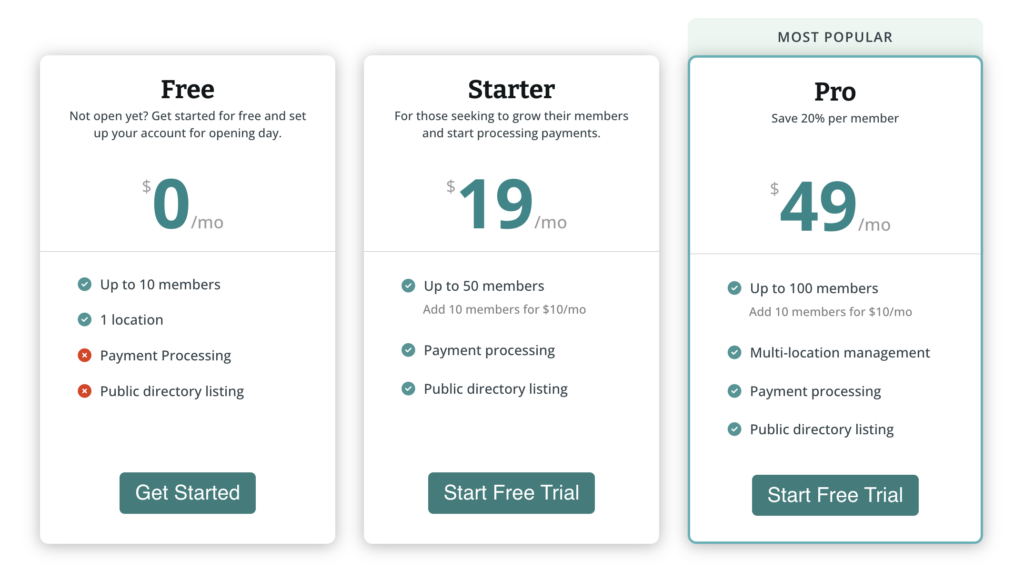
CoWello has a freemium entry point and very low pricing for small spaces.
- Free (up to 10 members)
- Starter: $19/month (up to 50 members)
- Pro: $49/month (up to 100 members)
- Enterprise: custom pricing
Extra members can be added for $10 per 10 members (handy if you are slightly above a tier).
Bottom line
Coworking software pricing is not just about the number on the pricing page. It is about how that number changes as your space grows.
The best choice is usually the one where:
- Pricing rules are clear
- Core features are included
- Scaling does not require rebuilding your budget every year
If you want a simple starting point, start with Archie. It is easier to predict, easier to explain to your team, and easier to grow with.
Sources
- Competitor website analysis
- Archie’s product research

Berenika Teter
Archie's Content Manager, fueled by filter coffee and a love for remote work. When she’s not writing about coworking spaces and hybrid workplaces, you can probably find her exploring one.