



















- What you’ll learn
- Why users often seek Robin alternatives when they want a more flexible option that is priced more reasonably.
- Archie, Office, Tactic, Skedda, and Kadence are all good Robin alternatives – although the best choice for you depends on size, budget, and priorities.
Robin is one of the most capable desk and room booking platforms for large hybrid offices. It’s built for enterprises with 500+ employees across multiple floors or buildings.
If that isn’t you, you’re possibly paying for the enterprise-level setup without getting the same value back. currently and you’re paying for it anyway, There are some other concerns users highlight: for one, Robin won’t show you a price until you’ve sat through a sales call, and reviewers alsosay that even simple changesmoving a single desk on the floor plan often needs Robin’s support team. When a simple reshuffle needs a ticket, and a wait, your booking tool is working on the vendor’s schedule.
This is precisely when you look elsewhere.
Five desk and room booking tools that do what Robin does, but without the baggage:
- Archie: Book desks and rooms from an interactive floor plan your own admins can redraw in minutes, no ticket required. Pricing starts at $159/month per location, whether you have 50 employees or 500., while Robin won’t quote a number upfront.
- Officely: Booking tool that lives inside desks without ever leaving Slack or MS Teams, so there’s essentially no new app for employees to adopt. Published pricing starts at $2.50/user/month, with a free plan for up to 5 users. G2 reviewers rate it easier to set up than Robin.
- Tactic: Booking platform with AI –Run desk, room, and visitor management in one platform, with Tessa is, an AI assistant employees that can chat with and book spaces. Pricing is based on desks and rooms you manage, with a 100-desk office estimated at $3,600-$4,800 a year, a fraction of Robin’s reported $15,000 starting price.
- Skedda: This one offers Control exactly who can book which desk or room, and when, with a rules engine more granular than Robin’s. Unlimited users and published pricing, from $249/month for 35 spaces.
- Kadence: Organize hybrid teams around neighborhoods and shared team days, with AI suggestions for the best days to come in. Unlike Robin that’s made for 500+ employee enterprises, Kadence serves teams of every size, with per-user pricing billed annually.
- Disclosure
Archie is included in this list. We have used product information and user feedback to keep the comparison thorough, transparent and fair to every tool.
1. Archie
🟠 4.9/5 G2 rating
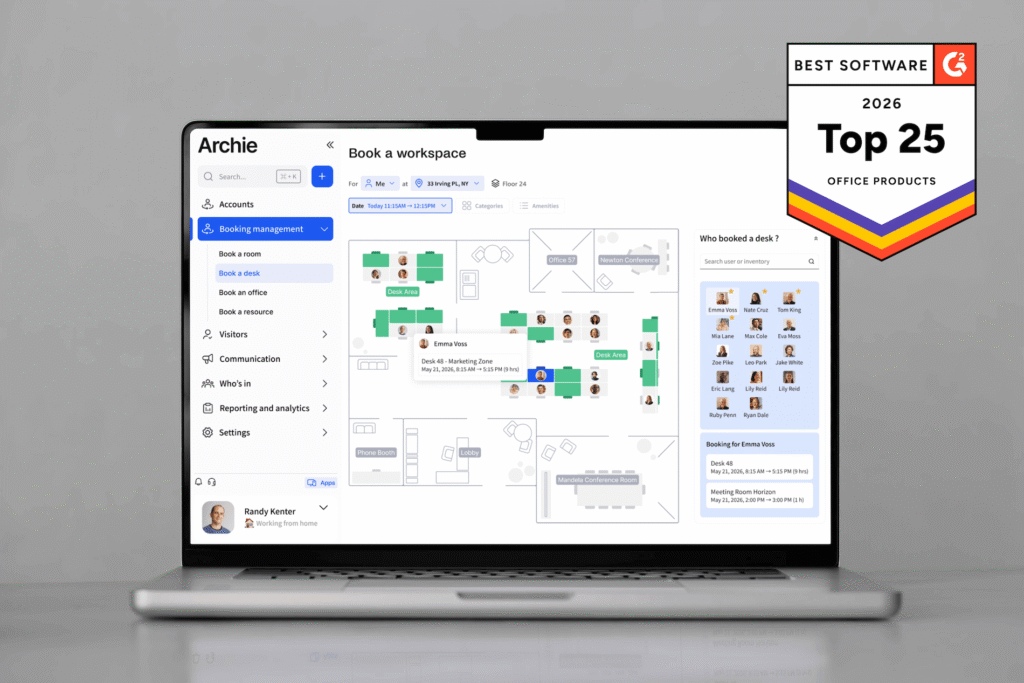
Archie is a powerful desk and meeting room booking platform, putting hot desks, assigned desks, meeting rooms, check-ins, and occupancy analytics in one space, with an interactive floor plan, so employees can see who’s in and book a space in seconds. More than 1,000 organizations across 46 countries use it, including Shopify, Siemens, and CBS News.
Archie is the best platform for growing to large hybrid offices, from a single floor to a multi-location portfolio, that want Robin-level desk and room booking without the typical, long-drawn enterprise sales cycle and user experience.
It fits teams where headcount is greater than the desks available, and where layouts change frequently.
Enterprises use it most; nearly half of Archie’s G2 reviewers work at companies with 1,000+ employees. However, organizations that need complex, multi-step approval processes across a large global real estate portfolio should test those workflows closely.
Here’s what Archie gives your workplace team and employees day-to-day.
What are the key features of Archie?
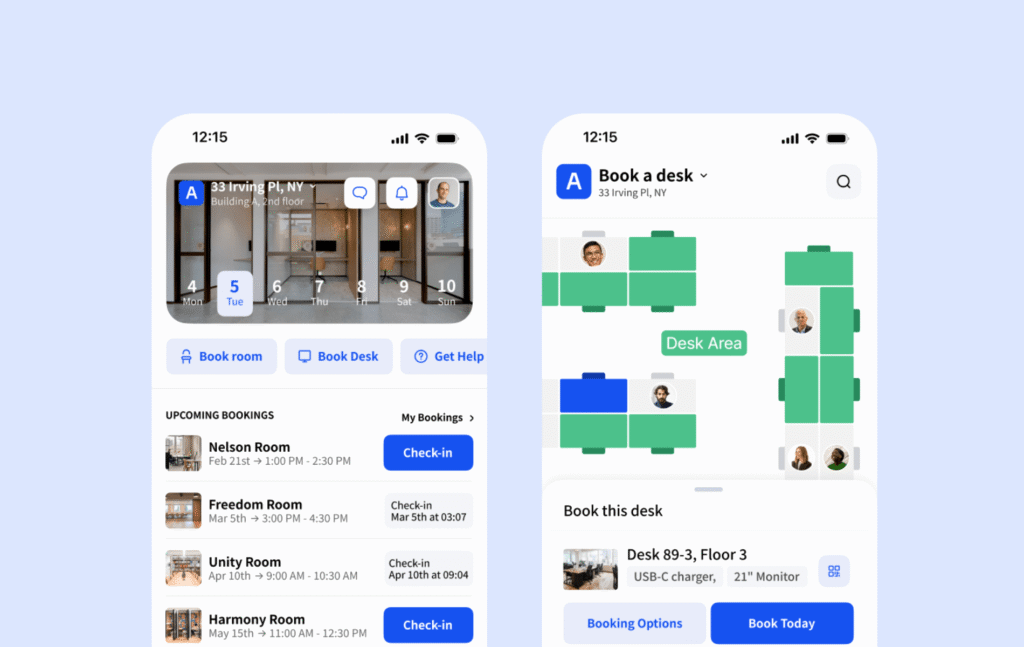
Archie’s features cover the full desk and room booking workflow, end-to-end:
- Desk photo previews for booking: Book hot desks, assigned or part-time desks straight from the floor plan, with photos of each desk and filters for equipment. Robin covers similar desk types, but Archie is a more visual platform, including office pictures, that lets employees see the actual desk before they book.
- Book from anywhere: Book rooms from Outlook, Google Calendar, Teams, the mobile app, or a tablet outside the door, with two-way calendar sync. It matches Robin’s calendar integrations, and room displays run on any device.
- Self-editable floor plans: Admins draw and update office maps themselves whenever desks move or teams grow. Robin users report that floor plan edits often need Robin’s support team involved.
- Visitor management: Archie’s visitor system is embedded right into the platform, making it easier to automate the guest flow, depending on who is arriving, and track presence,
- Invisible team zones: Reserve areas for specific teams, and make them unbookable or even invisible to everyone else. Robin offers neighborhoods too, but Archie’s zones can be hidden from other users entirely.
- No ghost bookings: Employees check in by QR code or app and desks or rooms left unclaimed are released automatically.
- Know who’s in: See who’s coming in on which days and book a desk next to teammates in a few clicks.
- Anti-hoarding rules: Set advance booking limits, duration caps, buffer times, and approval workflows per space. Robin’s booking policies cover similar ground.
- Empty-space insights: Track utilization, peak hours, no-show rates, and underused rooms across locations, with CSV support. Robin goes deeper with sensor data and an AI analytics assistant but at a greater cost as paid add-ons.
- Zero app-switching: Connect Microsoft Teams, Outlook, Google Workspace, Slack, Zoom, and SSO, plus an open API.
How much does Archie cost?
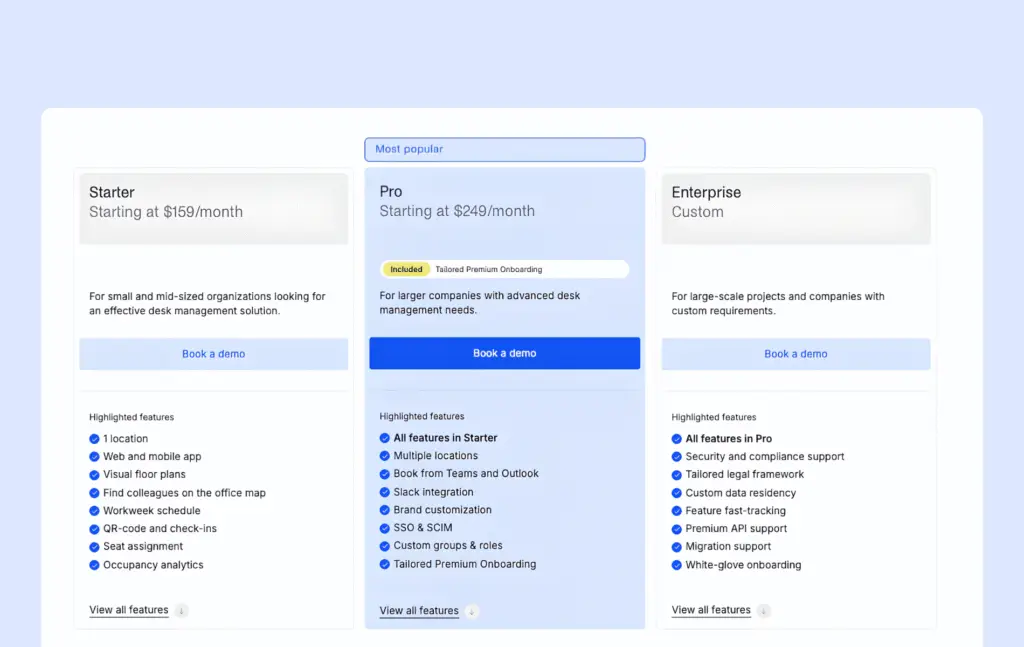
Archie prices by location, not by employee, so the bill stays the same as your headcount grows. There are three plans:
- Starter: From a minimum base of $159/month for one location, with the web and mobile apps, visual floor plans, colleague search, QR check-ins, and occupancy analytics.
- Pro: From $249/month, everything in Starter and the feature to add multiple locations, book from Outlook, Teams and Slack, custom branding, SSO and SCIM, custom groups and roles and tailored onboarding.
- Enterprise: Custom pricing for everything in Pro plus adding security and compliance support, custom data residency, a tailored legal framework, premium API support, migration help, and white-glove onboarding.
After a demo, Archie sets up a 14-day test environment, so you can try it on your own floor plan. Robin, by comparison, publishes no prices, bills annually and asks for a sales conversation before sharing a basic quote.
What are the pros and cons of Archie?
Archie has the core functionality covered. Now, let’s look at what you actually get with it, and what users say about it.
Pros
What buyers gain:
- Buyers who compared vendors in demos found Archie on par with the leading options, while its quote came in well below Robin’s.
- The app stays simple and uncluttered, so most employees start booking desks and rooms right away without instructions.
- Room bookings stay in sync with Outlook, and availability shows up correctly whether you book in Archie or your calendar. Teams switching from tools with patchy Outlook sync notice the difference.
- The mobile app is fast enough that reserving a desk takes less than a minute.
- Occupancy tracking shows which meeting rooms go underused, so workplace teams can plan space from real patterns
- Questions get fast answers, and the support team stays helpful well beyond onboarding.
Cons
- Employees running late can get warnings that their booking is about to be released, which some find stressful.
- The Starter Plan doesn’t include booking from Microsoft Tools
- Archie vs Robin
Archie outscores Robin on every rating G2 tracks for both tools, including ease of setup, quality of support, desk booking, and product direction.
On the flip side, Archie may not be the best choice for very small offices with more desks and rooms than employees. Sometimes some settings might take some clicking to find.
But for growing teams or large businesses looking for a powerful, reasonably-priced, all-in-one system that’s easy to set up and use, Archie is a strong Robin alternative.
2. Officely
🟠 4.6/5 G2 rating
Officely is a Robin alternative desk and room booking tool that, instead of asking employees to download another app, lets them book, see who’s in, and reserve a room in a couple of clicks from the chat tool they already use.
Officely is adequate for small and mid-sized hybrid teams, typically under 300 people that run their day in Slack or Teams if they just want simple desk booking.
It fits single offices or a handful of locations with straightforward layouts, where the goal is getting people to book and show up.
None of its G2 reviewers come from enterprises; they are split between small businesses and mid-sized organizations. Companies that need visitor management, access control integrations, or detailed space planning will find Robin or a fuller platform a better fit.
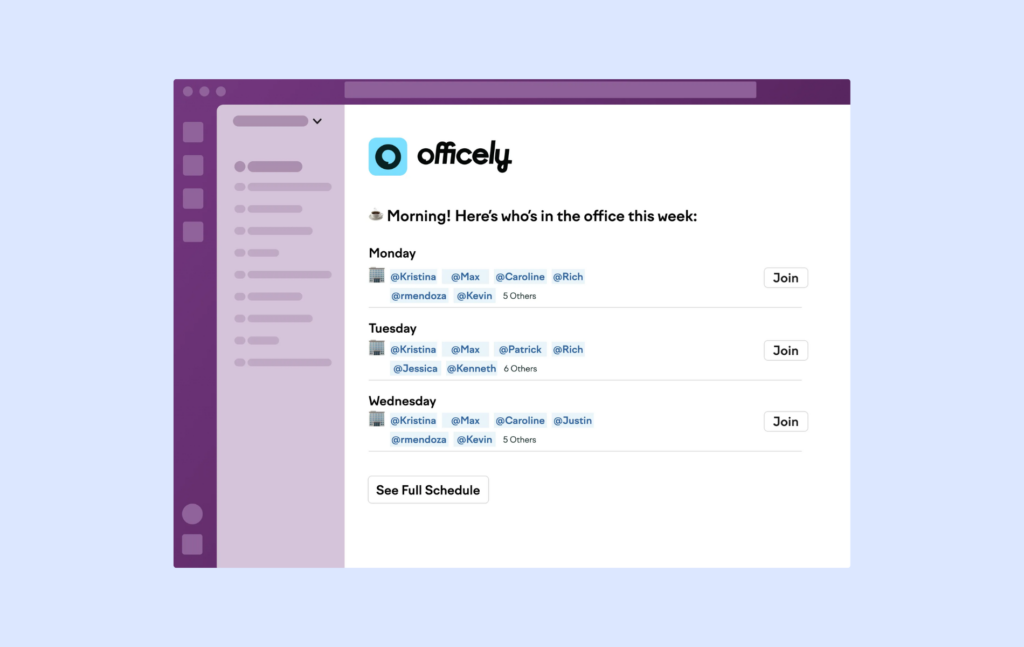
What are the key features of Officely?
- Desk-drop alerts: Employees can set an alert on a specific desk and get pinged the moment it frees up, or when a particular colleague books office time. Robin, on the other hand, reserves a desk for you based on your past behavior and schedule.
- Daily office channels: Officely auto-creates a Slack or Teams channel each day for everyone booked in, a digital water cooler for lunch plans and meetups for those present in person.
- Smart day suggestions: It recommends office days based on when key teammates or company events are scheduled. Robin only shows who’s in.
- Afternoon nudges: A 4 pm reminder asks people to confirm tomorrow’s plans, keeping headcounts accurate without admin chasing. Robin deals with no-shows on the day instead.
- Caps on anything: Admins can limit bookable spots for desks, lunch seats, which suits remote-first teams whose office is smaller than their headcount. Robin supports custom resources too, but Officely leans into perks like dog days and team lunches.
- Parking waitlists: The Parkly add-on tracks car registrations, runs a waitlist when spots fill up, and enforces booking limits, going beyond basic parking reservations. While Robin already offers parking alongside desks and lockers, Officely adds waitlists and plate tracking on top.
How much does Officely cost?
Officely prices desk booking per user, with rooms and parking billed separately per space.
- Free: Up to 5 users, with all features included
- Basic: $2.50/user/month, covering simple desk booking and capacity management for unlimited users
- Premium: $3.50/user/month, adding analytics, office check-ins, and automated booking
- Enterprise: Custom pricing, adding a dedicated account manager, local billing, and security support.
- Meeting Rooms add-on: $12/space/month, 7-day free trial
- Parking add-on: $15/space/month, 7-day free trial
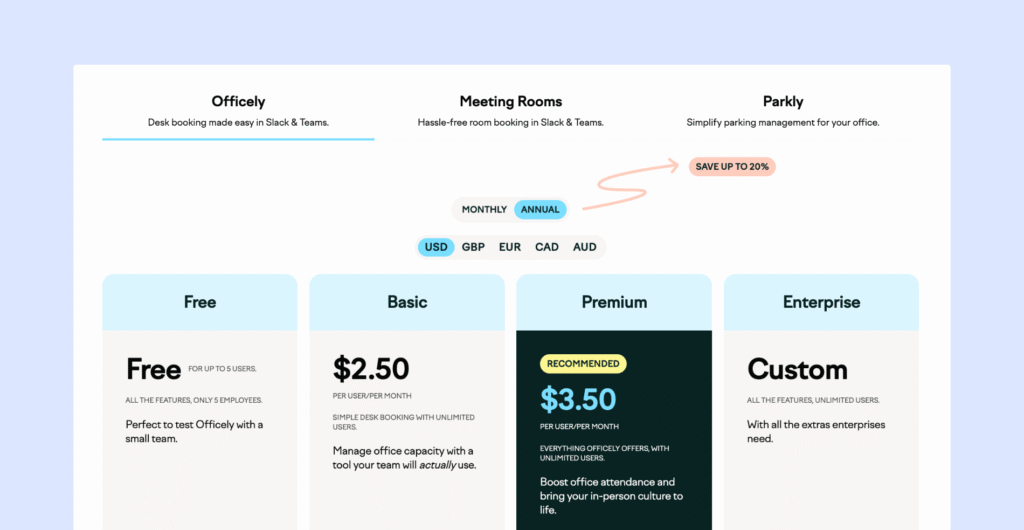
What are the pros and cons of Officely?
Officely’s simplicity is its biggest strength, and also where its limits show.
Pros
- Makes it super easy for Slack and MS Teams users to adopt, especially for teams already using these tools every day.
- Office managers use bookings to work out how many people to order lunch for on team lunch days.
- It’s also really quick to set up (we’re talking minutes), and the interface is clean and straightforward, so there’s no steep learning curve.
- Plus, it has a free plan for small teams, which is a nice bonus if you’re just getting started with hybrid work.
- The bring your dog option creates real buzz, while dog caps keep numbers manageable on busy days.
Cons
- All-day bookings only. There’s no way to book by the hour and colleagues can’t easily see who’s in only for the morning or afternoon.
- Officely doesn’t offer visitor management so if you need more advanced features for your floor plan, it might not be the right fit.
- If your team doesn’t use Slack or Teams, a lot of its convenience disappears. The Google Calendar connection can disconnect and needs frequent reconnecting.
A recurring theme in review platforms is that Officely makes the office feel social rather than managed, with people using it to plan lunches, bring dogs, and see friends’ office days.
3. Tactic
🟠 4.6/5 G2 rating
Tactic is a workplace platform for desk booking, room booking, and office coordination. It runs everything from a live office map and sells its tools as separate modules, so teams can start with desk booking and add rooms, visitors or workplace requests later.
Tactic is best for mid-sized to large hybrid companies, often with several offices, that want Robin’s breadth without Robin’s all-in pricing.
Since it offers a lot, setup can take a bit more time, especially if you want to customize things like maps and booking rules.
It also works well for teams that prefer paying by desk or room instead of per person.
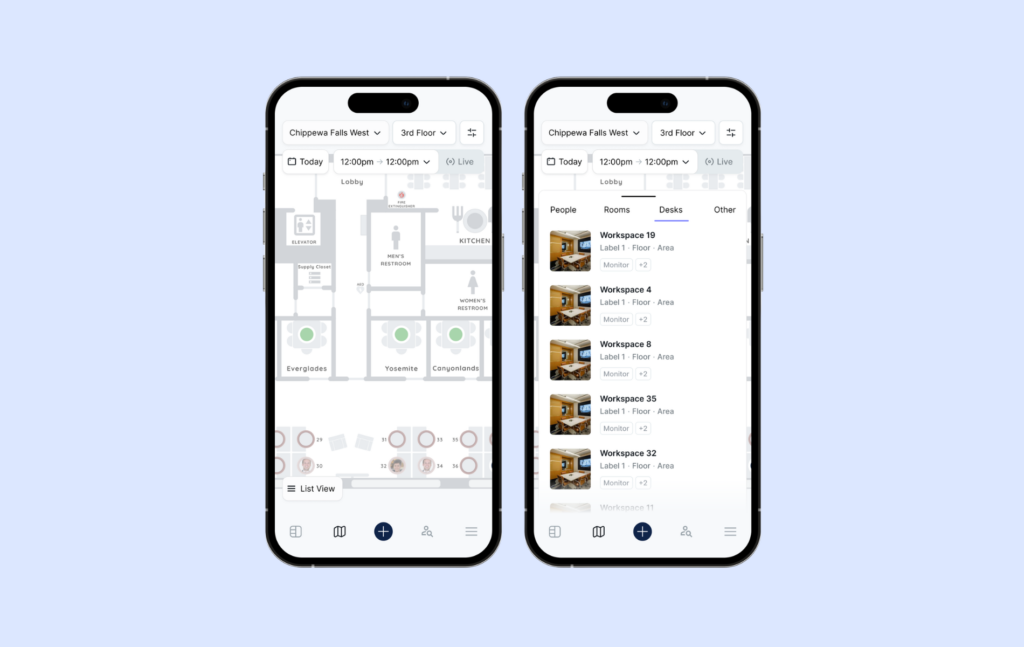
What are the key features of Tactic?
Tactic’s features go past booking into the day-to-day running of the workplace:
- Chat-based custom booking: Tessa, Tactic’s AI assistant lets employees describe what they need, such as a desk with two monitors near their team, and finds and books it. Robin’s AI assistant focuses on analytics rather than booking.
- Pay-per-module: Desk booking, rooms, visitors, requests and moves are sold separately with no forced bundles, while Robin sells a single platform on a custom annual quote.
- Map comparisons: Admins can compare floor plan layouts side by side before rolling out changes
- Move management: Workplace teams plan and run seating changes and office moves inside the same map.
- Desk zones: Group desks by floors or departments to keep teams working closely together.
- Seating assignments: Assign desks temporarily or permanently based on individual preferences or team needs.
- Future booking limits: To ensure fair access for everyone, limit how far in advance desks can be booked.Because it’s sold in modules, what you pay depends on how much of Tactic you actually use.
Because it’s sold in modules, what you pay depends on how much of Tactic you actually use.
How much does Tactic cost?
💡 July 2026 Update: Tactic doesn’t publish fixed plans anymore. Instead, it uses a modular pricing model, where you pay for the products you need and the resources you manage.
- The online pricing estimator suggests that deployments start at around $3,000 per year, with 100 desks costing approximately $3,600–4,800 per year.
- Additional products, integrations, and rollout services increase the cost, so you’ll need to contact Tactic for a tailored quote.
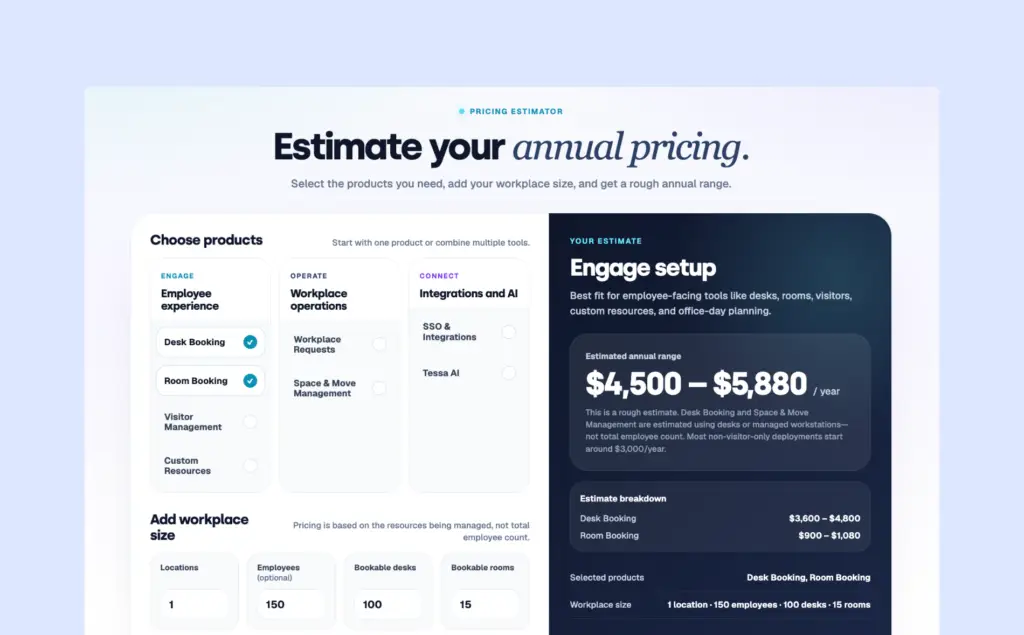
What are the pros and cons of Tactic?
Here’s what shines about Tactic, as confirmed by reviewers.
Pros
- Users often say the interface is easy to use. Even people who aren’t very technical can look at the office map, pick a desk, and book it without any help.
- Managers also like the usage dashboards and the automatic check-in rules because they keep everything organized.
- Leads can check where teammates are sitting instead of pinging them on Slack and waiting, bringing back some of the in-person visibility hybrid work lost
- Teams with shift-based staff use Tactic as a daily dashboard to manage shift logistics, check into assigned workstations, and to see how many people are on shift at any moment.
Cons
- There are a couple of things to be aware of, though. Some users have run into small technical hiccups, like login issues when setting up SSO for the first time. In most cases, Tactic’s support team fixed these quickly, and they didn’t get in the way of daily use.
- Compared with the web version, the mobile app feels limited and short on shortcuts.
- The app can lag right at front-desk check-in or fall out of sync with Outlook, leading to confusing notifications.
4. Skedda
🟠 4.8/5 G2 rating
Skedda is a space booking platform for desks, meeting rooms, and any other bookable space. More than 8,000 organizations use it, and people have made over 72 million bookings through it.
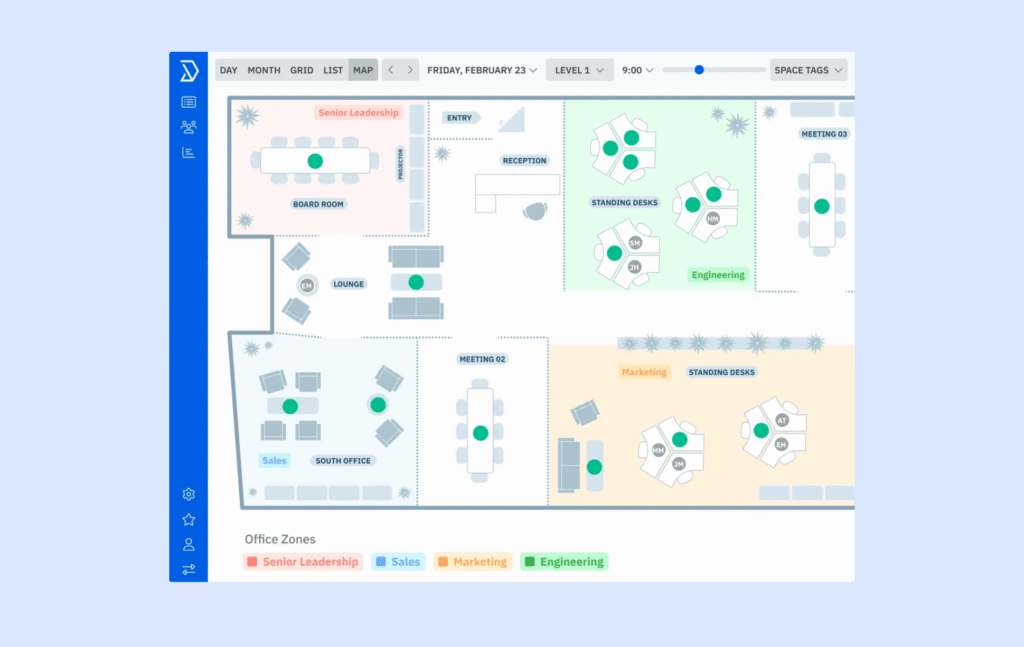
It works well for small to mid-sized offices with rule-heavy spaces, such as offices with shared labs, boardrooms, or specialist rooms, and multi-use buildings like universities where different groups need different booking rights. Nearly 2/3rds of its reviewers on G2 are mid-market companies.
It fits teams that want to enforce booking policies automatically rather than police them by hand.
What are the key features of Skedda?
Skedda’s features are all about setting the rules once and letting the system enforce them.
- Booking quotas: Admins cap how much any person or group can book, for example, four hours of meeting room time per employee per day. Robin supports booking policies too, but Skedda makes hard usage caps like this a standard setting.
- Per-space windows: Each space can have its own advance booking limit, so a boardroom might open only one day ahead, while desks open two weeks out.
- Setup buffers: Automatic gaps between bookings give cleaners or AV teams time to reset a room, without anyone blocking the calendar manually.
- Selective approval requests: Sensitive spaces can require an admin to approve each booking before it’s confirmed.
- Seamless integrations: Skedda works with tools like Slack, Google Workspace, and door access systems to streamline workflows.
How much does Skedda cost?
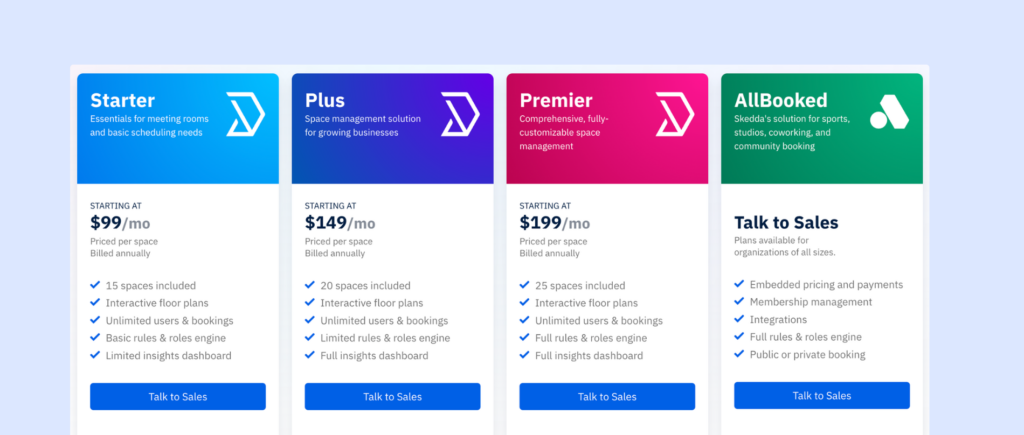
Skedda prices by the number of spaces you manage, with unlimited users on every plan and different rates by region.
- Plus (US and Canada): From $249/month for 35 spaces, billed annually, with interactive floor plans and a limited rules engine.
- Premier (US and Canada): From $349/month for 45 spaces, adding assigned spaces, the full rules engine, and unlimited custom fields.
- Enterprise: Custom pricing with a dedicated account manager and white-glove implementation.
- EMEA and APAC: The Starter Plan starts lower, from $99/month for 15 spaces; Plus is at $149/month for 20 spaces; Premier is at $199/month for 25 spaces; and AllBooked requires a custom quote.
A 14-day free trial is available, no strings attached.
What are the pros and cons of Skedda?
Skedda earns its reputation for control and service, but its space-based licensing and static floor plans create friction as offices change. Here’s what verified G2 reviewers report:
Pros
- Employees can start booking with little to no training, which helps teams get going fast.
- Skedda also offers helpful features like interactive floor plans, custom booking rules, time limits, and user permissions, so you can tailor the system to fit your specific office setup.
- It integrates well with tools like Google Calendar and Slack, making it a smooth fit for your daily workflow.
- There’s even a basic visitor check-in option, which adds a little extra convenience.
- It’s built for multi-office, multi-time-zone teams. Companies use it to manage meeting rooms and visitor check-ins consistently across locations in different time zones.
Cons
- Every bookable item eats a license, because Skedda prices by space. This means non-physical or shared items, such as 20 bookable laptops, each count as a separate space, which gets costly fast.
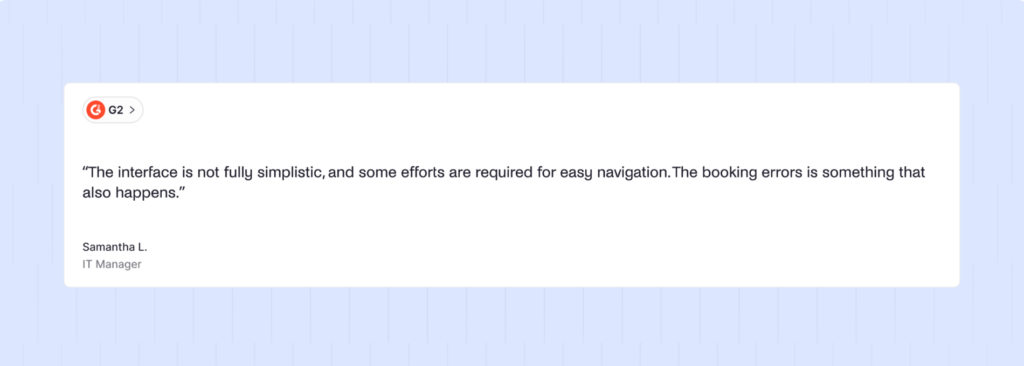
- Awkward overnight bookings are a big con. Reservations that run past midnight aren’t handled smoothly.
- It doesn’t have built-in tools for hybrid team coordination that some of Skedda competitors provide, like showing who’s planning to be in the office or helping teams schedule in-office days together.
- Its reporting tools are also on the simpler side, which is fine for basic tracking, but not as deep or detailed as what you’ll find in some more advanced platforms like Archie.
Still, if you’re mainly looking for a solid Robin alternative that’s affordable, reliable, and easy to use, consider Skedda vs Robin.
5. Kadence
🟠 4.5/5 G2 rating
Kadence is a newer Robin alternative and a hybrid work platform for desk booking, room booking, and team coordination.
Kadence is suitable for medium and large companies that manage hybrid work and want coordinated team days rather than ad hoc desk booking, and that are ready to try AI in their workplace tools.
It fits organizations running several offices with neighborhoods, and teams already working in Microsoft Teams or Slack.
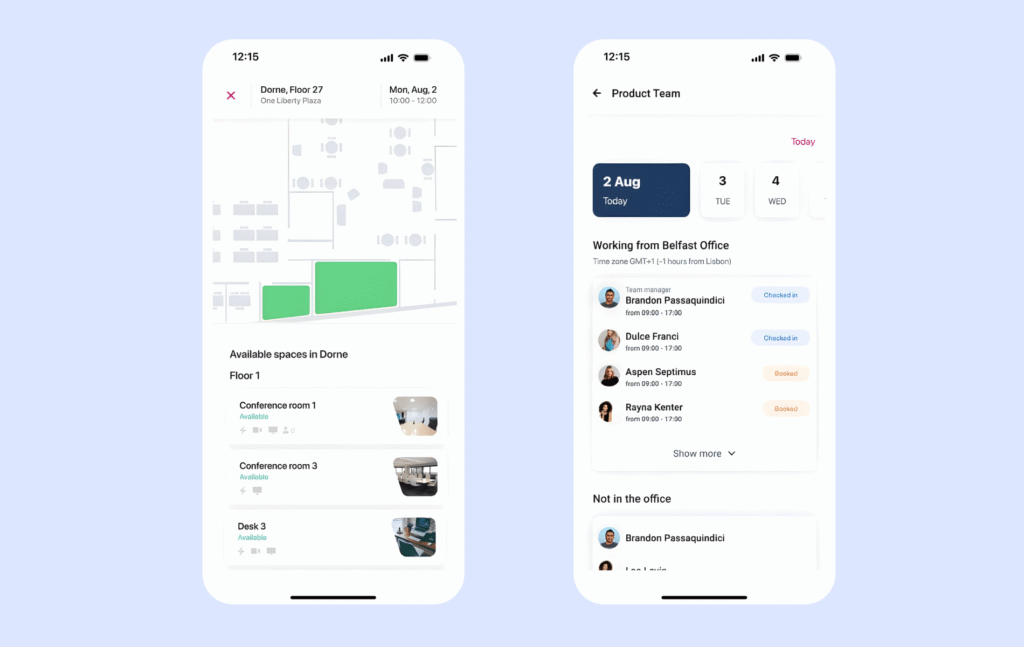
Kadence is a newer Robin alternative that helps medium and large companies manage hybrid work. It covers desk and room booking, visitor check-ins, team scheduling, workplace analytics, and even office event management. But, because Kadence packs in so many features, it can take a bit of time to set up and learn everything. If you’re a smaller business or just need basic booking, Kadence might be more than you need.
What are the key features of Kadence?
Kadence’s features lean on data and automation more than most tools on this list:
- Sensorless occupancy: Kadence Sense measures real office use from Wi-Fi, badge, kiosk, and room display data, with no hardware sensors required.
- Booking by AI: Through Kadence MCP, employees can book a desk, room or parking spot in one sentence from Claude, ChatGPT, Microsoft Copilot, Gemini, or Grok. Robin’s AI assistant only lives in its own analytics.
- HRIS-triggered moves: New hires get desks assigned automatically from HR data, bookings cancel when someone goes on leave, and move sheets generate themselves
- Leadership insights: Leaders can ask the AI to model space scenarios before a lease renewal.
- Team day suggestions: Kadence recommends the best days for teams to come together, while Robin focuses on suggesting spaces.
- Smart assistant: Kadence can book several desks for a team on the same day, send a notification when a popular desk becomes free, or suggest other spots if someone’s favorite desk is taken.
- Separate spaces: Admins can wall off manager offices from the general employee pool.
How much does Kadence cost?
Kadence uses custom, quote-based pricing. It bills per active user and reportedly has a $250 setup fee per floor plan. For current and accurate pricing, you will need to reach out to their team directly.
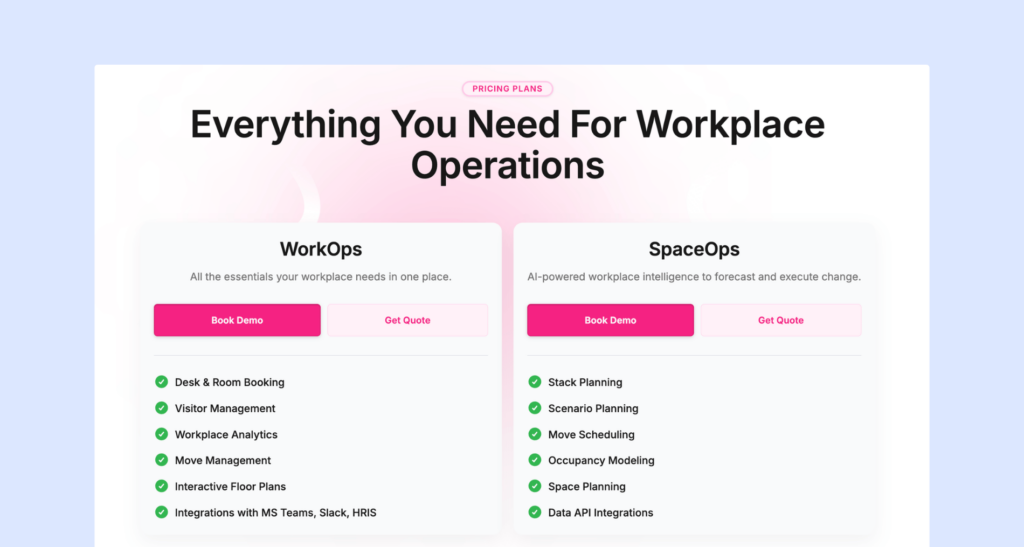
- WorkOps: The core plan for day-to-day hybrid office management, covering desk and room booking, interactive floor plans, workplace analytics, and Microsoft Teams, Slack, and HR-system integrations.
- SpaceOps: Adds AI-powered space planning on top of WorkOps, with scenario and stack planning, move scheduling, team neighborhood assignment, custom dashboards and data exports.
What are the pros and cons of Kadence?
Here’s where Kadence delivers, and where users say it still has rough edges.
Pros
- Kadence also gets good feedback for its customer support. Many customers say the team replies quickly, is easy to work with, and makes setup and rollout much smoother.
- A director of IT and a user say the interface is simple enough that they save on IT resources because users need no training, and a facilities manager calls it the simplest desk booking system in 15 years of facilities work.
- Small firms sharing a single office use it to split and coordinate space between two businesses at a reasonable price.
Cons
- The desktop agent can check people in too early when it connects to office Wi-Fi, and it doesn’t always work.
- The built-in reports are limited enough that one admin exports to another tool to get numbers for business owners
- Some teams also report Insights values that don’t add up
- Admins can’t lock a desk to one person only on certain days, such as Mondays and Wednesdays
- There’s no kiosk app for visitors and no way to alert an office admin about bookings at their location.
Head-to-head comparison of Robin alternatives
Robin | Archie | Officely | Tactic | Skedda | Kadence | |
|---|---|---|---|---|---|---|
Rating (G2) | 4.4 | 4.9 | 4.6 | 4.6 | 4.8 | 4.5 |
Best for | Enterprises with 500+ employees across multiple buildings | Growing and large hybrid offices | Slack or Teams-first teams under 300 people | Mid-sized companies who want to experiment with AI | Offices with rule-heavy shared spaces | Mid-sized teams coordinating team days |
Standout feature | Automatic desk booking and enterprise integrations | User-friendly, with Desk photo previews and invisible team zones | Booking inside Slack and Teams | Tessa AI booking assistant | Booking quotas, buffers, and approvals | AI booking via MCP |
Where employees book | Web, mobile, Outlook, Teams, Slack | Web, mobile, Outlook, Teams, Slack | Slack and Teams | Web, mobile, Slack, Teams | Web, mobile, calendar sync | Web, mobile, Teams, Slack, AI assistants |
Pricing model | Custom quote | Per resource | Per user | By resource and module | By number of spaces | Per active user |
Starting price | Not published (G2 lists ~$15,000/year) | $159/month | $2.50/user/month; free for up to 5 users | ~$3,000/year | $249/month for 35 spaces (US) | Not published; $250 setup fee per floor |
What is Robin?
Robin is a workplace experience platform from Robin Powered, a Boston company founded in 2014. It helps office teams book desks and meeting rooms, check in visitors, and see useful data on how their space is used, all in one place.
It’s built for large organizations. Robin’s own ideal customer has 500+ employees, multiple floors or buildings, and at least a third of staff in the office regularly.
Robin’s core capabilities include:
- Desk and room booking, including automatic desk booking
- Space management with maps and neighborhoods
- Workplace analytics, with deeper reports on a paid add-on
Smaller teams might find it a bit much, but if you need detailed insights, advanced tools, and strong integrations, Robin can definitely be a good fit.
What are the key features of Robin?
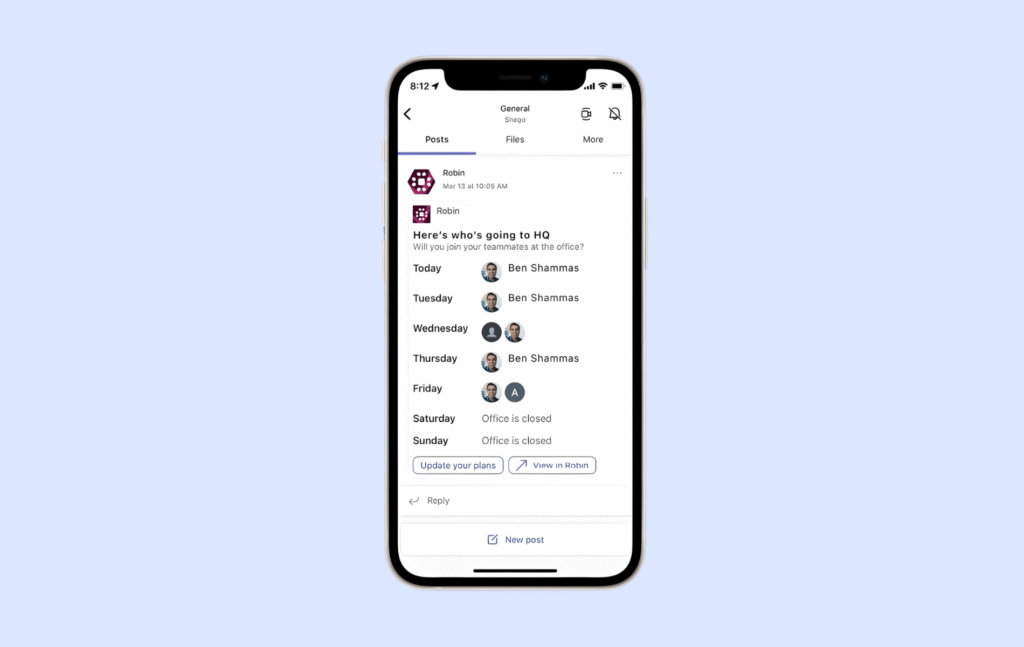
- Interactive office maps: The office map itself is often a managed service. Robin’s design team converts uploaded floor plans into interactive maps, typically within two to three business days
- Automatic desk booking: Robin can book desks for employees based on their past behavior, default schedule, and preferred office.
- Visitor management: Guest check-in, badge printing, and deliveries, now fully manageable from mobile
- Advanced workplace analytics: Standard reporting, plus an Advanced Analytics add-on with custom dashboards and an AI assistant powered by Google Gemini.
- Enterprise integrations: Access control systems such as Brivo, Gallagher, and Genetec, plus SSO, SCIM, and SOC2 Type II compliance.
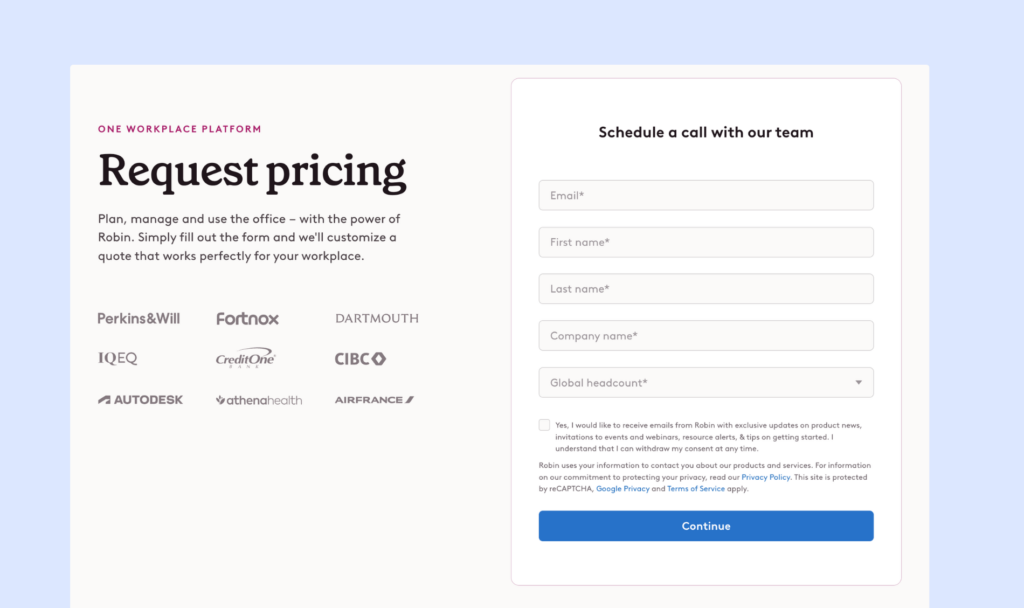
Robin does not share its prices on the website, so you need to talk to their sales team to get a quote. Product research suggests many companies start at around $15,000 per year. This puts Robin in the enterprise price range.
It can make sense for large companies that will use most of its features, but it may feel expensive for smaller teams that just need basic desk and room booking.
Why do companies look for Robin alternatives?
Most teams look beyond Robin when its enterprise pricing, managed setup, and annual contracts stop matching the size and pace of their office.
The feature gaps that push teams to evaluate alternatives are specific:
1. Floor plan gaps that depend on Robin
Maps are often built by Robin’s design team with a two-to-three-day turnaround. Teams that reshuffle desks often want a self-serve editor where layout changes go live the same day.
2. Deeper analytics behind an add-on
Custom dashboards and the AI analytics assistant require the separately sold Advanced Analytics module and users of the standard tier say reports don’t always give them the information they need. Buyers expect utilization reporting good enough to share with leadership to be included in the base price.
3. Inflexible check-in rules
Mobile auto check-in can take around 45 minutes to kick in, and admins can’t exempt specific users, such as executives or assigned desk holders, from check-in requirements. Alternatives are judged on faster, more reliable presence detection and per-user check-in policies.
4. Admin work tied to the desktop
Some admin functions are only available on desktop, not in the mobile app, and the permission model isn’t granular enough for role-based restrictions. Workplace managers who run the office on the move need full admin control from their phone and finer-grained roles.
5. Friction in Microsoft-heavy setups
Reviewers describe doing work in both Microsoft and Robin because Robin sits on top of it, plus tenant issues when booking through Outlook. Microsoft-first companies look for booking that lives natively inside Outlook and Teams.
Pricing and contracts often decide the switch. Robin doesn’t publish prices, but from user feedback, it’s clear extras like parking spots cost more on top. For a growing company that means paying enterprise rates before it needs enterprise features.
When should you switch from Robin? | When should you stay with Robin? |
|---|---|
If your office has fewer than 500 people, your layout changes often, and you want transparent pricing. | You rely on Robin’s access control integrations, scenario planning or all-in-one enterprise contract. |
How do you choose the right Robin alternative?
The right Robin alternative is the one that fits how your office runs.
Start with four facts:
- How often your layout changes
- How many people share each desk
- Where employees already spend their day
- How headcount will move over the next two or three years
A 200-person company adding a floor next year needs something very different from a 2,000-person enterprise consolidating buildings, even if both write desk booking at the top of the requirements list.
These criteria should drive the shortlist, in roughly this order:
- Pricing model fit: This decides whether your bill grows with headcount, with desks, or with locations.
Ask each vendor for a written cost projection at your current and expected size, using your real employee-to-desk ratio. Per-user pricing looks cheap until hiring picks up, while per-location or per-space pricing can punish offices with many small bookable items.
- Admin independence: This covers whether your team can change floor plans, neighborhoods, and booking rules without the vendor.
In the demo, ask them to add a desk, move a team zone, and publish the map live. Some tools, Robin included, route map builds or bigger edits through their own team, which adds days to every little reshuffle. Full self-service, on the other hand, means your admins own the setup work.
- Where booking happens: Adoption depends on employees booking where they already work.
Test the Outlook add-in, Teams app, or Slack bot with real users, not just the web app, and check whether calendar sync is truly two-way. Chat-first tools win on adoption but can be harder to enforce as a formal system.
- Presence and check-in reliability: Your utilization data is only as good as check-ins.
Ask how check-in works, how quickly auto check-in fires, and whether you can exempt specific people. The more automated the method, the more it depends on your network and access control setup.
- Time to value: This measures how quickly the platform is live and adopted.
Ask references how long rollout took and how much depended on their own team versus the vendor; faster setup usually means fewer advanced configurations on day one.
Lower pricing usually beats broader functionality unless the missing feature affects a workflow you run every week, such as visitor check-in at a busy reception. Paying for scenario planning you’ll use once a year rarely makes sense.
When two tools tie on paper, choose the one your employees are most likely to open every morning.
Which is the best Robin alternative for hybrid desk and room booking?
For hybrid companies whose main job is desk and room booking, Archie is the strongest Robin alternative. It covers all the workflows most teams buy Robin for at a published price that starts at $159/month per location.
It also holds the highest rating of any tool in this comparison, 4.9/5 on G2 against Robin’s 4.4/5, and outscores Robin on ease of setup, quality of support, and desk booking.
Archie is the strongest fit for these profiles:
- Predictable pricing based on the spaces you manage, not the number of users
- Full control over floor plan, zones, and meeting rooms without relying on support
- A flexible room booking system built to accommodate different workplace needs
- One platform for desk and room reservations, with a unified view of space utilization, as well as visitor management if you opt for it
Why do companies choose Archie as a Robin alternative?
Companies switch to Archie because it fixes what Robin customers complain about most. Robin hides its price, starting around $15,000 reportedly. Archie’s pricing is published, straightforward, and stays the same as you hire.
Robin’s interface can feel crowded, while Archie is simple enough that most employees start booking on day one. Robin charges extra for deeper analytics, while Archie includes them from its first plan.
The key differences between Archie and Robin come down to scope, price, and effort:
Archie | Robin | |
|---|---|---|
Capabilities | Desk and room booking, check-ins, auto-release, neighborhoods, colleague finder, occupancy analytics | Desk, room, parking, and locker booking, visitors, meeting services, move management, scenario planning, advanced analytics |
Pricing approach | Published and per location, from $159/month | Quote-only and billed annually; G2 lists a $15,000/year starting price |
Integrations | Outlook, Teams, Google Calendar, Slack, Zoom, Kisi, Entra ID SSO, SCIM, open API | Google and Microsoft calendars, Slack, Teams, access control (Brivo, Gallagher, Genetec), SSO, SCIM |
Scalability | One location to many, with pricing that scales by location | Built for 500+ employees across multiple floors or buildings |
Support | 9.5 on G2; tailored onboarding on the Pro plan | 8.7 on G2; maps built by Robin's team in 2–3 business days |
Ideal customer | Growing and large hybrid offices focused on desk and room booking | Large enterprises consolidating workplace tools under one contract |
Reviews offer a useful snapshot of how a product performs, but the details behind those ratings often tell you much more.
Archie | Robin | |
|---|---|---|
Overall rating | 4.9/5 (245 reviews) | 4.4/5 (211 reviews) |
Recurring praise | Simple UI, reliable Outlook sync, seeing who's in | Easy booking for employees, automatic cancellation of ghost meetings |
Recurring criticism | Extra features for small teams | Price, floor plan edits that need Robin's help, check-in friction |
How do you migrate from Robin to Archie?
Switching from Robin to Archie is a three-stage move: secure your data, run both systems side by side, then flip the switch once everything checks out.
- Secure your Robin data: Download your people roster, desk and room lists, and booking and check-in history from Robin’s Analytics > Exports. Save each file, because Robin’s download links stop working after 24 hours.
- Run Archie alongside Robin: Recreate your floor plans, team zones, and booking rules in Archie while employees keep booking in Robin as usual.
- Connect, test, then switch: Hook up room calendars, single sign-on, and room displays, and confirm each one works.
- Common failure point while migrating off Robin
It’s easy to move bookings and forget past usage data. Robin’s standard plan only lets you export 90 days back so anything older needs to be saved before your contract ends.
- Key sources
FAQ
What’s the best alternative to Robin?
For most hybrid companies focused on desk and room booking, Archie is the strongest Robin alternative. Officely, Tactic, Skedda and Kadence are worth shortlisting depending on your size, tools, and booking rules.
How much does Robin cost?
Robin doesn’t publish prices, so you’ll need a sales quote. Extras like parking spots and the Advanced Analytics add-on cost more on top.
Is Archie cheaper than Robin?
For most small and mid-sized offices, yes. Archie charges by location starting at $159/month, so the bill doesn’t grow as you hire, while Robin’s quote-based pricing is aimed at enterprises with 500+ employees.
How long does it take to switch from Robin?
Yes, you can easily mark any desk as temporarily or permanently unavailable. Keep in mind that for recurring bookings, you can let individual employees “release” a desk when they are not going into the office, so that the resource is unavailable by default, but can be made available by the user at any time.
Can I change which desks are available?
Most teams can go live on Archie within days by running it alongside Robin before switching over.