




















- What you’ll learn
- Where LobbyGuard works well and where it starts to feel limiting
- How the Raptor acquisition changed the direction of the product
- Which LobbyGuard alternatives make the most sense for workplaces
- Why Archie is the best LobbyGuard alternative
Here’s the thing about LobbyGuard: it’s really good at one very specific job. If you need to screen every single person who walks into a building against government watchlists, especially in places like schools, hospitals, or government facilities, it’s built for exactly that.
But I’ve noticed that a lot of organizations using LobbyGuard don’t actually need that level of screening. They chose it because it sounded thorough, or because the dedicated kiosk hardware made it feel more secure and official. And then over time, the downsides start to show up. Kiosks need reboots. Reports are hard to customize. The interface is English-only. Integrations are limited. Pricing is hard to understand without talking to sales.
Another thing worth mentioning is the Raptor acquisition. Raptor Technologies acquired LobbyGuard in 2019, and while the product is still supported and used in many organizations, there haven’t been many visible public product updates in recent years. That doesn’t automatically mean the product isn’t being maintained, but from a buyer’s point of view, it does raise a fair question about how much the platform is still evolving compared to newer visitor management systems.
At the same time, the visitor management software market has grown a lot. It’s now a multi-billion-dollar market and still growing quickly, which means there are far more options than there were a few years ago. The old paper sign-in sheet is finally disappearing, and the software replacing it has gotten much better.
So in this guide, I’m going to walk through the LobbyGuard alternatives that are actually worth looking at, and help you figure out which one makes the most sense depending on what you really need.
What is LobbyGuard?
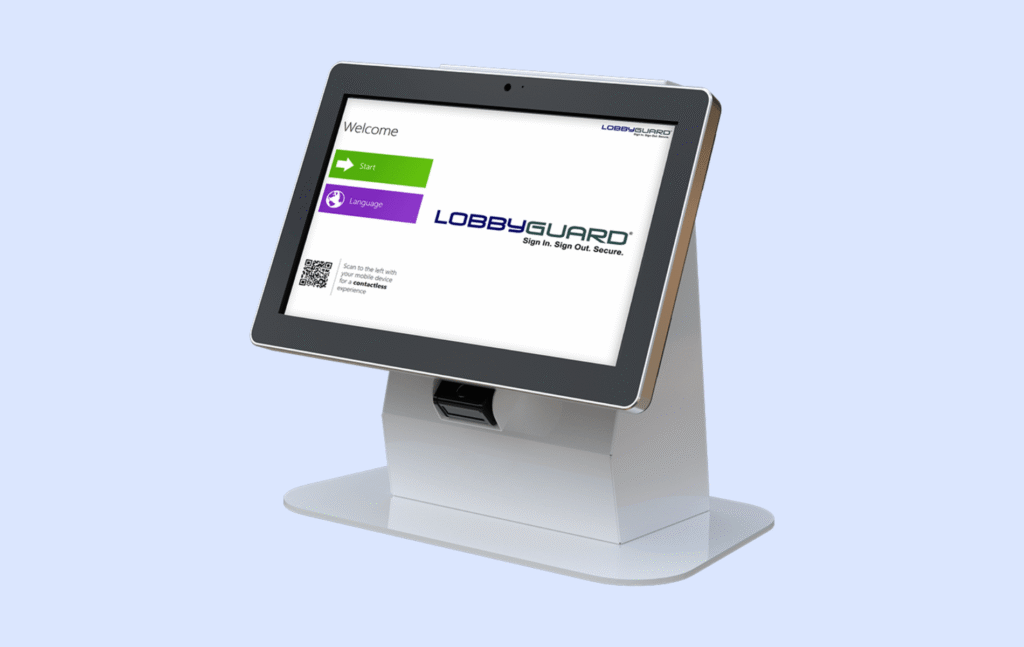
LobbyGuard is a visitor management system built for places that care a lot about knowing who is in the building, why they are there, and whether they should be allowed in at all. LobbyGuard’s own product positioning leans heavily into self-service kiosks, badge printing, ID scanning, watchlists, host notifications, and emergency visibility, which makes it feel closer to a security and compliance tool than a lightweight guest welcome app.
That distinction matters. Plenty of visitor management tools are designed mainly to create a smooth office experience: pre-register a guest, send a welcome email, alert the host, and move on. LobbyGuard comes from a different tradition. It grew up in environments like schools, government facilities, healthcare sites, and other buildings where visitor management is not just about convenience. That is why its feature set puts so much weight on kiosk hardware, identity capture, screening, and badge-based visibility.
A big part of LobbyGuard’s identity is its hardware-first approach. The product is especially known for its self-service kiosk stations, which can include a touchscreen, barcode scanner, optional passport scanner, camera, and badge printer.
That hardware angle also helps explain where LobbyGuard fits best. It tends to make the most sense in buildings where security and consistency matter more than a polished, hospitality-style guest experience. A school may want every visitor screened and badged. A government office may want stronger tracking and a more controlled check-in flow. A healthcare site may need clear records and tighter oversight. In those settings, LobbyGuard’s more structured approach can feel like a strength rather than friction.
LobbyGuard acquisition
The 2019 acquisition by Raptor Technologies is an important part of that story. Raptor, best known for school safety software and particularly its strong presence in the U.S. K-12 market, acquired LobbyGuard as part of a broader push to expand its visitor management and front office capabilities.
After the deal, Raptor said LobbyGuard would continue operating as a division, with its existing team and leadership staying in place. At the same time, the acquisition clearly signaled that LobbyGuard would sit inside a much larger security-focused ecosystem rather than remain a standalone visitor management brand.
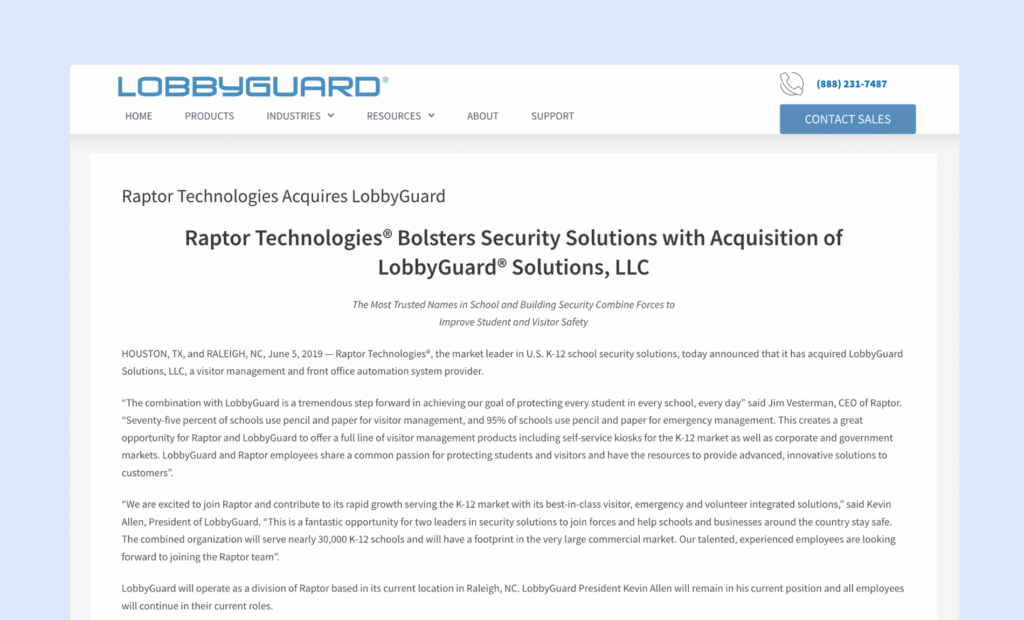
For LobbyGuard users, that matters in two ways. On the positive side, being part of Raptor likely gave the product more long-term stability and tied it to a company with a strong security and education focus. It also reinforced LobbyGuard’s position in places where visitor management overlaps with broader safety needs, especially schools and other regulated environments.
On the other hand, it also pushed the product identity even further toward security, screening, and institutional workflows, rather than the lighter, more brand-forward direction many workplace visitor tools have taken in recent years. That is not necessarily a drawback, but it does shape who the product feels built for.
LobbyGuard strengths & limitations
The simplest way to think about LobbyGuard is this: it is not trying to be the most modern, trendy, or workplace-focused visitor app. It is trying to make the front door more controlled, more traceable, and more secure.
If your main priority is security screening, kiosk check-in, badge printing, and having a very structured visitor process, LobbyGuard’s approach makes a lot of sense. But if your priority is a smooth, friendly guest experience or a system that connects with the rest of your workplace tools, LobbyGuard can feel a bit rigid compared to newer visitor management alternatives.
It’s also important to understand what LobbyGuard does not try to do. It is purely a visitor management system. It does not include desk booking, meeting room booking, employee scheduling, or broader workplace management features. The interface is English-only, pricing is quote-based, and there is no publicly documented API for third-party integrations.
Where LobbyGuard is strong
Even though there are not many recent reviews (probably because of the Raptor acquisition), the available Capterra and G2 reviews show very consistent themes around what LobbyGuard does well.
The most common positive feedback is ease of use, especially for visitors checking in at the kiosk. More than half of the reviews mention that the check-in process is simple and easy for visitors to follow. This is important because many LobbyGuard setups are used in schools, government buildings, and facilities where visitors are not tech-savvy and the process needs to be very clear and structured.
The second major strength is security screening. This is really LobbyGuard’s core feature and the thing that makes it different from many office-focused visitor systems. Reviews frequently mention background checks, watchlists, and sex offender screening, as well as the ability to flag certain visitors. If your organization needs formal screening and audit trails, this is one of the main reasons teams choose LobbyGuard in the first place.
Where LobbyGuard struggles
The weaknesses are a bit more spread out, but there are a few issues that show up multiple times in reviews, and they are important because they affect day-to-day operations.
One of the biggest themes is hardware and peripherals. LobbyGuard is often used with a full kiosk setup that includes a badge printer, camera, and ID scanner. In theory, this is great because everything is integrated. In practice, several reviews mention printer jams, badge printing failures, ID scanning issues, and poor photo quality. These are not software problems in the traditional sense, but they still affect the visitor experience and the front desk workflow.
Another repeated issue is reliability and stability. Some reviewers mention that the kiosk needs to be rebooted periodically, that the system does not always work consistently, or that connectivity problems can interrupt check-in. A particularly frustrating complaint is that software updates sometimes introduce new glitches, like badge printing stopping or barcode scanning failing. When that happens, and especially if you manage multiple locations, it can create a lot of extra work for administrators.
Support is another area where feedback is very mixed. Some customers say support is excellent and very responsive, while others describe very negative experiences, especially after the initial sale. This suggests that the support experience may depend a lot on the specific situation, the contract, or the complexity of the issue. In other words, support is not consistently bad, but it is also not consistently great.
One more limitation is the uncertainty around LobbyGuard’s long-term product direction. LobbyGuard was acquired by Raptor Technologies in June 2019, and while the product is still being marketed and supported on the website, the public release-note trail feels thin after that point.
There are also some smaller but still important limitations that come up in reviews:
- The system can be slow to start or slow during check-in in some cases
- Signing in large groups can take too long
- Reporting is not very flexible and can be hard to customize
- Some admins want more control over reports and exported data
These issues do not affect every customer, but they show up often enough to be worth paying attention to, especially if you expect heavy visitor traffic or need detailed reporting. There are also a few platform limitations that are not really “bugs,” but more like product decisions: no open API for easy integrations, no multi-language interface, and no public visitor management pricing.
Bottom line
LobbyGuard works best for organizations that care most about control and security at the front desk. If you want strong visitor screening, badge printing, detailed visitor logs, and a structured kiosk-based check-in process, it can still be a solid fit.
But if you want a platform that feels more modern, is easier to connect with other tools, offers more flexible reporting, or goes beyond visitor management into desks, rooms, and employee workflows, LobbyGuard may feel a bit limited. The lack of visible recent product updates may also leave some buyers wondering how much the platform is still evolving.
The good news is that there are several LobbyGuard alternatives worth looking at, especially if you want a more modern visitor experience or a broader workplace platform.
Best LobbyGuard alternatives
The right alternative really depends on what you actually need. LobbyGuard sits in a very security-focused category, and not every organization needs that level of screening and hardware. Once you move outside of that niche, there are quite a few strong visitor management systems that are easier to use, easier to deploy, and often more transparent on pricing.
Here are the LobbyGuard alternatives worth considering:
- Archie: Best overall alternative for offices that want visitor management plus desks and meeting rooms.
- Envoy: Enterprise visitor system with strong integrations and a very polished experience.
- SwipedOn: Simple and affordable visitor system for small to mid-size workplaces.
- Greetly: Highly customizable and branded check-in experiences.
Let’s take a closer look.
1. Archie: best overall LobbyGuard alternative for offices
If you’re moving away from LobbyGuard because you want something broader and more modern, not because you need deeper security screening, Archie is a strong place to start. It combines a visitor management system, desk booking software, and meeting room scheduling app in one platform. So instead of using one tool for guests and another for employees and spaces, you can manage everything in one place.
It has also picked up a number of industry awards recently, which helps validate the product beyond just marketing claims. Archie has been ranked among G2’s Top Office Management Software products, placed #1 on Capterra’s Visitor Management Shortlist, and received the SoftwareReviews Emotional Footprint Award, which is based largely on verified customer feedback and user satisfaction.
That said, Archie is not meant to replace LobbyGuard in highly security-focused environments like schools or healthcare facilities where thorough screening or government watchlist checks are a must. Archie is built more for corporate offices, professional services firms, and flexible workspaces where the visitor experience matters just as much as security.
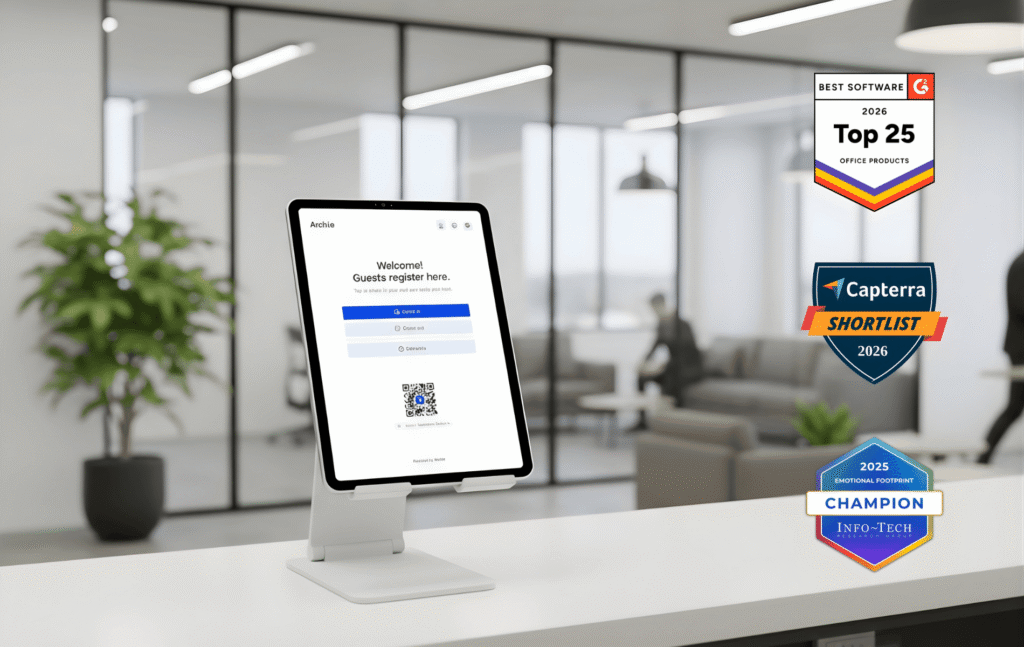
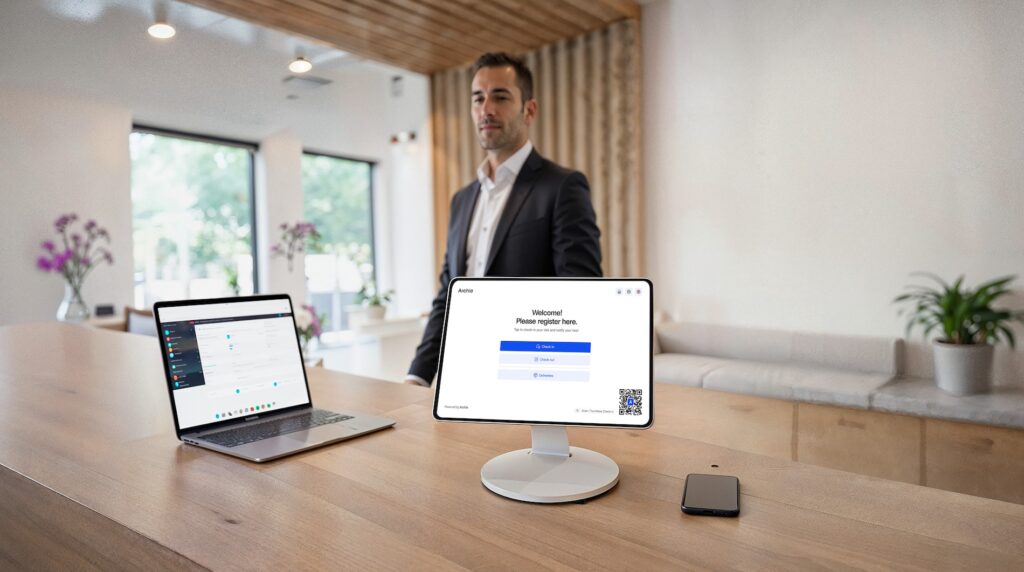
On the visitor side, Archie includes customizable check-in flows for different visitor types, badge printing, photo capture, NDA e-signatures, pre-registration, host notifications through Slack, Microsoft Teams, and email, and emergency evacuation tools with real-time roll call. It also supports contactless check-in, so visitors can sign in by scanning a QR code on their phone. And unlike systems that depend on dedicated visitor kiosk hardware, Archie works on both iPad and Android devices.
One of the biggest differences compared with LobbyGuard is that Archie is much more open and flexible. It includes SSO, SCIM, and a fully documented open API, which makes it easier to connect with the rest of your workplace tools. Multi-language check-in is built in too, which is useful for offices with international teams or guests.
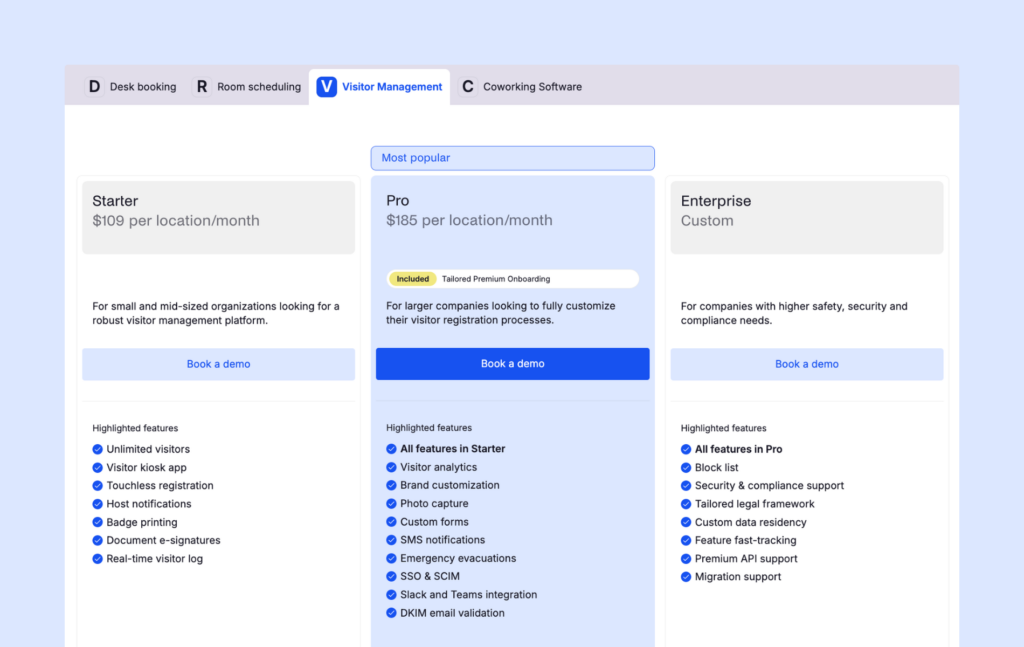
Pricing starts at $109 per month per location for Starter and $185 per month per location for Pro, with Enterprise pricing available on request. There is also a 14-day free trial, which makes it easier to test the product before committing.
2. Envoy: the enterprise option (if you have the budget)
Envoy is one of the best-known names in visitor management, and it’s easy to see why. The product feels polished, the check-in experience is smooth, and the integration ecosystem is strong. It is built for companies that want a modern front-desk experience with a lot of enterprise-ready controls — and enterprise pricing.
Another big reason teams choose Envoy is its integration lineup. It connects with tools many offices already use, including Slack, Microsoft Teams, Google Workspace, Outlook, and access control systems. It also offers a deliveries product for workplaces that receive a lot of packages, which can be genuinely useful for busy offices that want better mailroom visibility.
It is also worth being clear about where Envoy fits compared with LobbyGuard. Envoy is more modern, easier on the eyes, and much better connected to the rest of an office tech stack. But it is not a direct replacement for LobbyGuard in highly security-focused environments that need deeper screening like government watchlists or offender registry checks. Envoy’s Enterprise plan does add blocklist and ID scanning, which is a step up from basic office visitor tools, but it still serves a different use case overall.
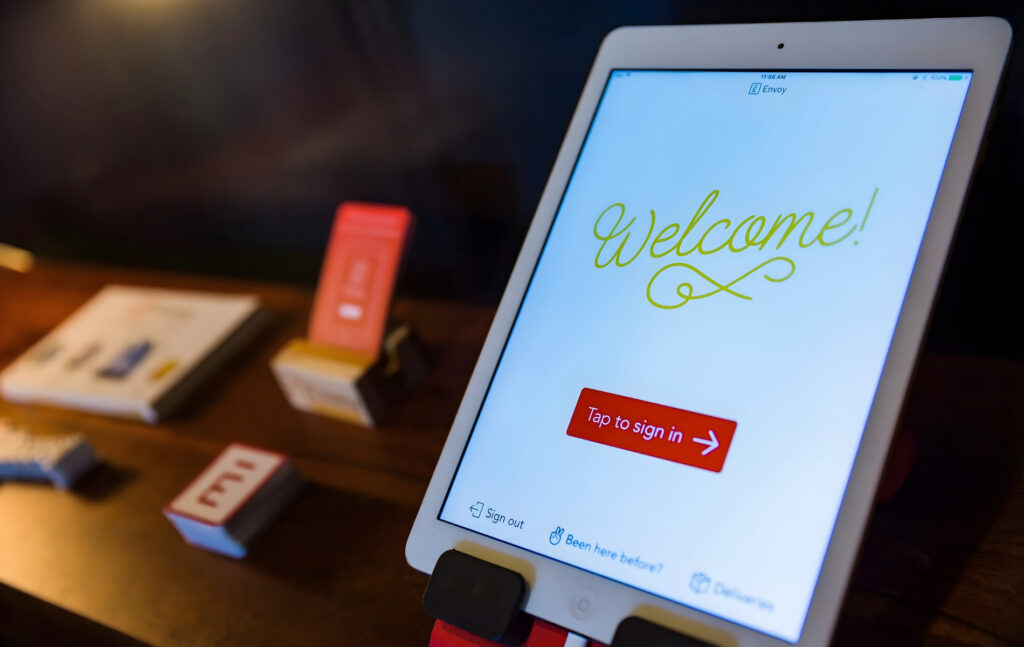
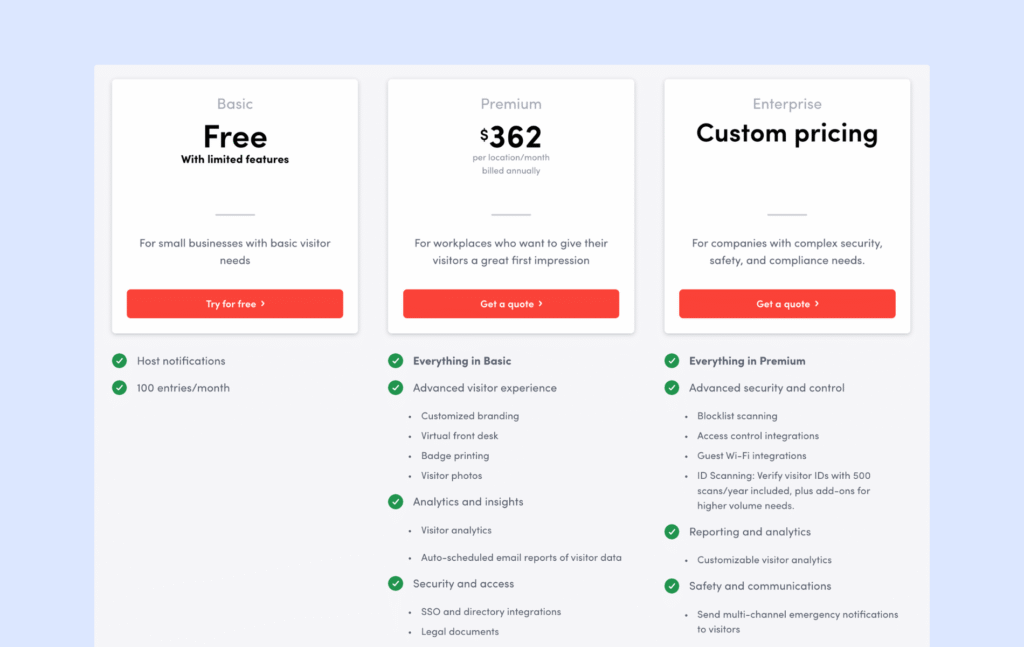
The main trade-off is cost. Envoy can get expensive pretty quickly, especially once you move beyond the free plan and start needing the security and admin features most larger teams actually want. A lot of the more advanced controls, like blocklist scanning, guest Wi-Fi, and access control integrations, sit on the Enterprise tier, so you may need a custom quote sooner than expected. Hardware is another limitation: for Visitors, Envoy’s kiosk setup is built around iPads, not Android tablets.
Envoy’s visitor plans currently include a free Basic plan, a Premium plan at $362 per location per month billed annually, and an Enterprise tier with custom pricing. Premium includes features like customized branding, virtual front desk, badge printing, visitor photos, analytics, SSO, and legal documents. Enterprise adds blocklist scanning, access control integrations, guest Wi-Fi integrations, and more advanced reporting and safety tools.
3. SwipedOn: the “just works” budget pick
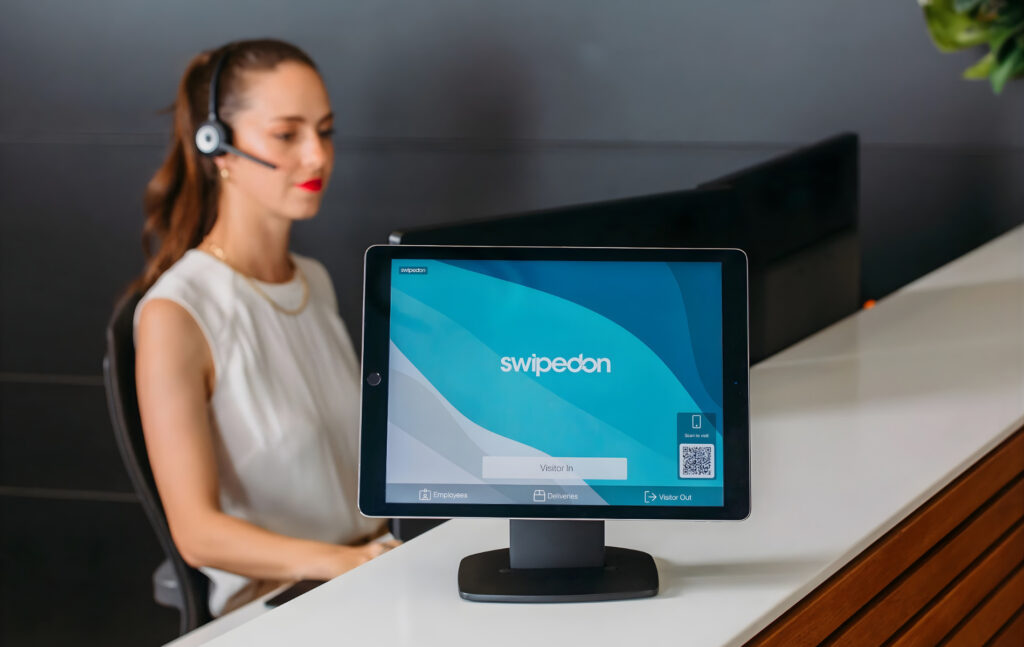
SwipedOn is almost the complete opposite of LobbyGuard. Where LobbyGuard is very security-focused and built around dedicated kiosk hardware, SwipedOn is lightweight, affordable, and runs on tablets you probably already have. It is used by thousands of workplaces around the world, and the check-in process is simple enough that most visitors can use it without any help.
That said, SwipedOn is also no longer a standalone product in the same way it used to be. In 2024, Sign In Solutions acquired SmartSpace Software, which brought SwipedOn into the same portfolio as Sign In App. Since then, SwipedOn’s pricing and positioning have started moving closer to the wider Sign In Solutions platform.
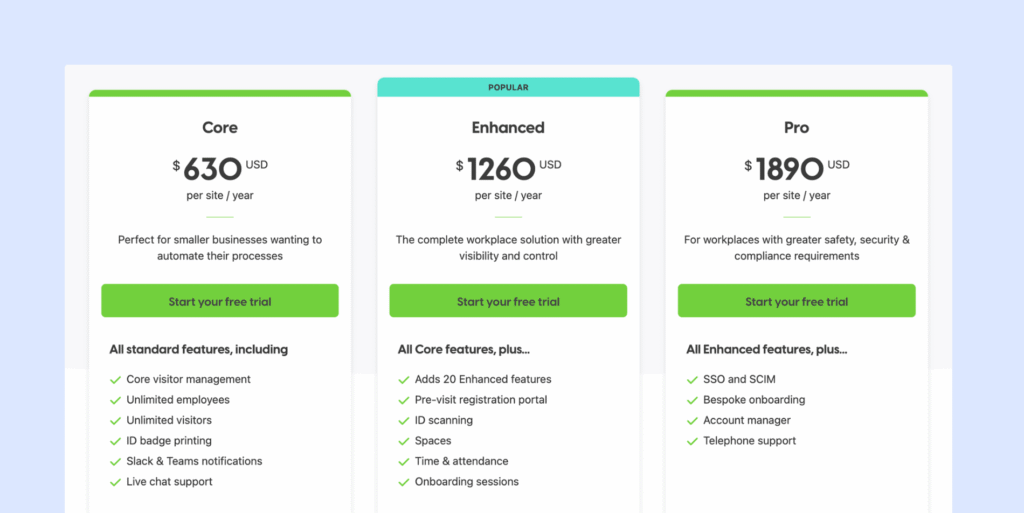
The Core plan is $630 per year (about $53 per month) and includes unlimited visitors and employees, badge printing, Slack and Teams notifications, and live chat support. The Enhanced plan is $1,260 per year (about $105 per month) and adds pre-registration, ID scanning, resource booking, and time tracking. The Pro plan is $1,890 per year (about $158 per month) and includes SSO, SCIM, onboarding help, an account manager, and phone support.
However, it is important to be clear about the trade-offs. SwipedOn does not offer watchlist screening, background checks, or advanced security screening. So if you need deep security and compliance features, this will not replace LobbyGuard or more advanced SwipedOn alternatives. Security is more basic and based mostly on approval workflows and sign-in records.
4. Greetly: if branding your check-in matters to you
If you want your check-in experience to feel like an extension of your brand, Greetly is one of the strongest options to look at. It puts a big focus on customization, so you can tailor the visitor flow with your logo, colors, wording, and different workflows for different visitor types. Greetly is now part of OfficeSpace, which announced the acquisition in May 2023, but it still runs as its own visitor management product.
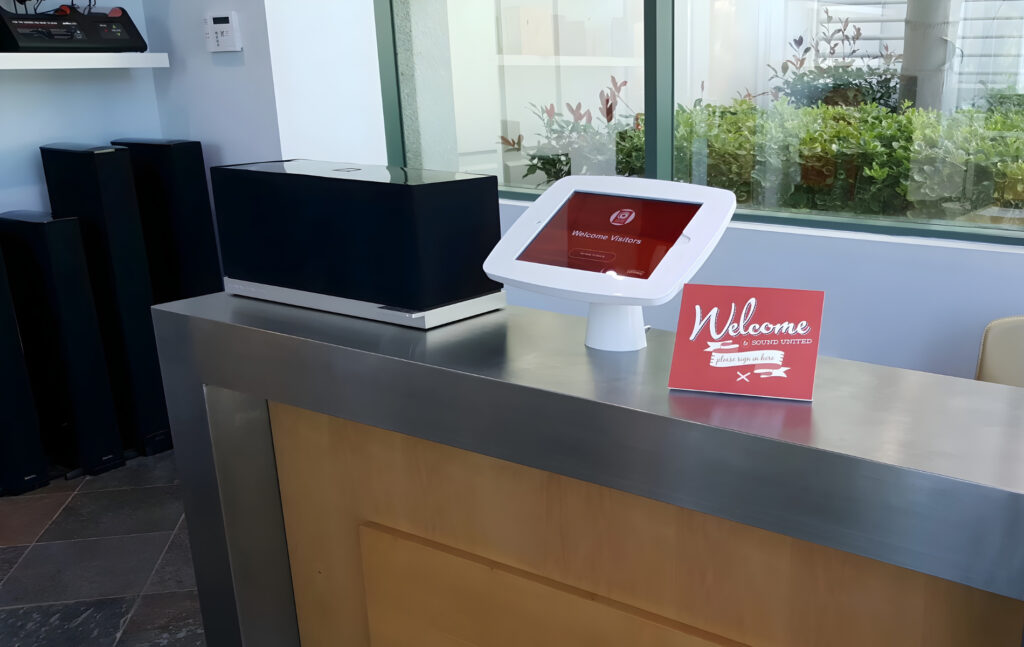
Greetly also feels much more flexible than older, more rigid systems. It works on both iPad and Android, supports touchless check-in, and includes features like automatic checkout, visitor photos, legal document signing, multilingual check-in, and emergency evacuation tools.
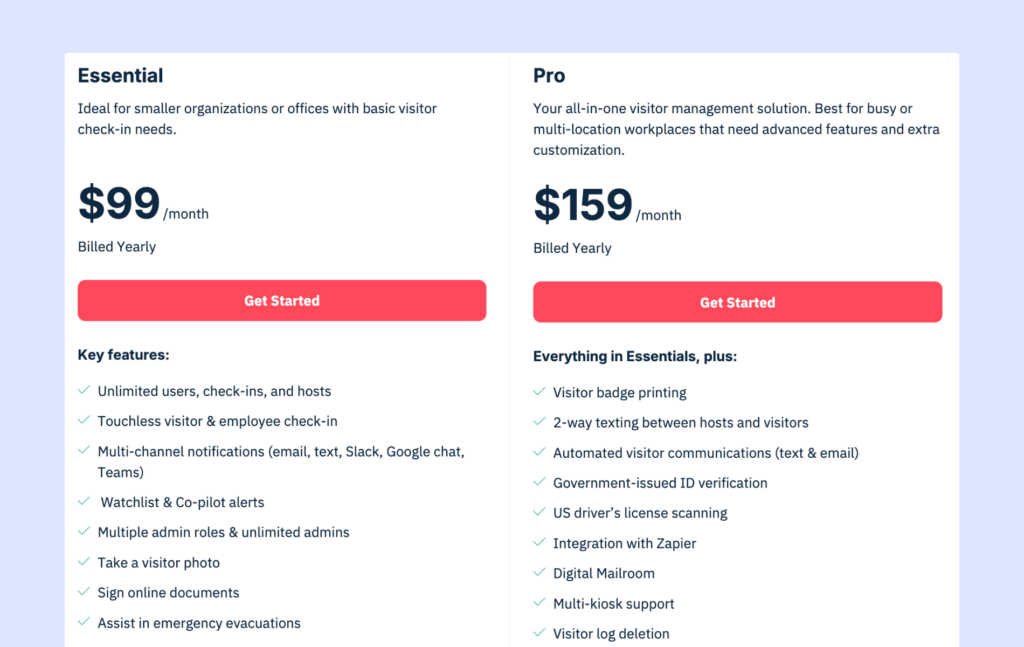
Greetly’s Essential plan starts at $99 per month, billed annually, and already includes watchlist alerts, preregistration, photo capture, e-signatures, multi-language support, and notifications through email, text, Slack, Google Chat, and Teams. The Pro plan is $159 per month billed annually and adds badge printing, two-way texting, government-issued ID verification, US driver’s license scanning, digital mailroom features, multi-kiosk support, and remote or automatic checkout.
Compared with LobbyGuard, Greetly is a much better fit if your main frustration is that the check-in process feels too rigid or the experience does not feel modern enough. It is easier to shape around your brand and front-desk workflow, and it does not rely on specialized hardware. But there is still a trade-off. Even though Greetly includes watchlist alerts and ID verification, it is not really built for the same kind of deep security screening that makes LobbyGuard popular in schools and other high-security environments.
Which LobbyGuard alternative should you actually pick?
Start with one question: Do you need to screen visitors against government watchlists or offender registries?
If the answer is yes, then LobbyGuard still makes sense. If the answer is no, then you have many more options, and most of them are more modern, easier to use, and easier to integrate with the rest of your office tools.
The best way to decide is very practical: test the tools. Almost every platform on this list offers a free trial. Try the check-in process, test badge printing, see how host notifications work, and check whether the visitor logs and reports give you the information you need. That will tell you more than any feature list.
Before you sign anything, there are a few practical things to double-check:
- First, hardware. If you already have Android tablets, choosing a system that only works on iPad will increase your costs right away.
- Second, integrations. Make sure the system connects directly with the tools you already use, like Slack, Microsoft Teams, Google Workspace, Outlook, or your access control system. Native integrations are usually much more reliable than workarounds.
- Third, pricing. Some platforms advertise a low starting price but charge extra for things like badge printing, SMS notifications, or certain integrations. Always ask what the total cost will look like for your number of locations, visitors, and visitor management features.
- And fourth, support. This one is often overlooked. Before you commit, send the support team a question through chat or email and see how fast they respond and how helpful the answer is. Support quality matters a lot once the system is live and something goes wrong on a busy day.
So do not overcomplicate the decision. If you truly need deep screening and compliance features, your shortlist will be very small. If you do not, then you can focus on user experience, integrations, pricing, and how well the system fits your day-to-day operations. That is usually what makes the biggest difference in the long run.
Why Archie is the best LobbyGuard alternative
For most office-based teams, I think Archie strikes one of the best overall balances. It covers the visitor management features most companies actually need, gives you more flexibility on hardware than LobbyGuard, and makes pricing much easier to follow. It also leaves room to grow. If you decide later that you also need desk booking, meeting room scheduling, or hybrid work tools, you do not have to go out and buy a separate platform.
It has also picked up some strong industry recognition recently. Archie was ranked among G2’s top office management software products, placed #1 on Capterra’s Visitor Management Shortlist, and received the SoftwareReviews Emotional Footprint Award. What makes those awards worth mentioning is that they are largely based on verified user reviews, so they give you a better sense of how real customers feel about the product, not just how it looks on a feature list.
That said, Archie is not built for highly security-focused environments that need government watchlist screening or offender registry checks. But for corporate offices, professional services firms, and modern workplaces, it is often the more practical, flexible, and easier-to-roll-out option.
Archie vs other LobbyGuard alternatives
- Archie vs Envoy: Envoy is a strong option for companies that want a very polished visitor experience and deep integrations, especially around access control. But it can become expensive quickly, and its kiosk setup is limited to iPads. Archie supports both iPad and Android, offers similar core visitor features, and often ends up being more cost-effective for teams that also need desk and room booking.
- Archie vs SwipedOn: SwipedOn is a great choice if you want something simple, affordable, and easy to roll out. But it is more limited when it comes to customization, analytics, enterprise features, and broader workplace tools. Archie is usually a better fit for mid-sized and larger organizations that want more flexibility, stronger reporting, SSO and SCIM, access control integrations, and a platform that can scale with them.
- Archie vs Greetly: Greetly is a strong option if your main priority is branding and a highly customized check-in experience at the front desk. Archie makes more sense if you want visitor management plus a broader workplace platform around it, with deeper integrations, more advanced controls, and a clear path into desks, rooms, and occupancy analytics.
- Key sources