



















- Lo que aprenderás
- Cómo comparar los principales proveedores de gestión de visitantes en 2026
- Por qué Archie es el mejor sistema de gestión de visitantes para oficinas
- ¿Qué plataformas son las más adecuadas para los diferentes casos de uso, desde pequeñas recepciones hasta organizaciones con múltiples sedes y estrictas medidas de seguridad?
- Cómo elegir el sistema adecuado para tu oficina, sin perderte en interminables listas de «el mejor software» que carecen de criterios de evaluación claros.
A visitor management system (VMS) is a way to digitally manage guests at your premises. VMS software can cover automatic host notifications, badge printing, document signing, visitor logs and more. (Not to be confused with a visitor sign in system, which refers to the check-in part only.)
Buyers want software that integrates check-in, security, compliance, and reporting into a single workflow. The visitor management software market is growing rapidly, indicating it is no longer just a front-desk tool.
This article is the result of up-to-date product research and real user feedback found through G2 and Capterra reviews. So while I am, of course, writing for Archie, at the outset my aim is to present each visitor management system vendor as objectively as possible.
Each vendor is presented with an overall score, and I’ve analyzed who and what they’re best for.
Software | Ideal para | Aplicación para quiosco de visitantes | Precio inicial | Calificación G2 | Nuestra puntuación |
|---|---|---|---|---|---|
Archie | Oficinas medianas y grandes | iPad, Android | Desde 109 $ al mes | 4,9/5 | 9,3/10 |
Envoy Visitors | Oficinas empresariales con mayores necesidades de seguridad y cumplimiento normativo. | Solo iPad | $362/month | 4,7/5 | 8,5/10 |
The Receptionist para iPad | Mostradores de recepción pequeños y medianos | Solo iPad | Desde unos 52,50 $ al mes | 4,8/5 | 8,3/10 |
VisitorOS | Lugares de trabajo con alta seguridad | Solo iPad | Desde 199 $ al mes | 4,7/5 | 8,3/10 |
Kastle | Edificios con múltiples inquilinos | iPad, Android | Precios personalizados | 4,6/5 | 8,1/10 |
Greetly | Equipos pequeños y medianos | iPad, Android | Desde 99 $ al mes | 4,8/5 | 8,0/10 |
Sign In App | Offices with compliance needs | iPad, Android | Desde unos 52,50 $ al mes | 4,6/5 | 7,8/10 |
Eptura Visitor | Grandes organizaciones reguladas con múltiples sedes | iPad, Android | Precios personalizados | 4,6/5 | 7,9/10 |
Lobbytrack | Escuelas, pymes | iPad, Android | Desde 50 $ al mes | 4,6/5 | 7,8/10 |
seno | Businesses with many contractor visits | iPad | From $69/site/month | 4,5/5 | 7.6/10 |
Visitly | Smaller offices | iPad | From $69/site/month | 4,4/5 | 7.3/10 |
Not every office or premises has identical needs; from budget to enterprise, high security to simple check-in functionality. Different visitor management systems cater to different needs.
Sin embargo, antes de comparar los distintos proveedores, primero me preguntaría qué situación describe mejor mi configuración:
- una oficina más pequeña con una recepción sencilla
- un lugar de trabajo con varias sedes y varias entradas
- una instalación muy transitada
- un entorno regulado o de alta seguridad
If you’re starting to evaluate visitor management systems, you’ll find below a full comparison of core features, ease of use, integrations, pricing, and real user feedback.
1. Archie
🏆 Archie is the best visitor management software for mid-sized and large offices that want visitor check-in, desk and room booking, and workplace analytics in one place.
🔶 Score: 9.3/10
For your visitors, we know that our customers love having every digitized and automated on their side – while their visitors are given a very clean, professional welcome. I know from our own customer feedback that Archie ticks a lot of boxes without being bloated (and overpriced): custom visitor workflows, automated process, host notifications, document signing, touchless or advance check-in and more. Larger offices with different visitor types need a system that covers more than just check-in.
Going beyond the Archie visitor management system, Archie itself is a complete workspace management platform. Many corporate offices combine Archie Visitors with Archie software’s desk and room booking solution.
Archie received a score of 9.3/10 as it has the highest score in G2, is compatible across hardwares. Its strong feature depth and clear tiered pricing also factor in.
Capterra reviewers compliment the ease of use and professionalism it presents to guests, giving it 4.8/5. G2 reviewers give it a 4.9/5, commenting on the flexibility and reliability.
Archie is best suited to large or hybrid offices. Its features allow the hands-off yet professional approach to visitors that modern front-desks require to easily manage all guest types. For smaller offices or teams, it might not be the best option. Similar, high security places will be better suited to more specified visitor management systems.
- Archie recognition
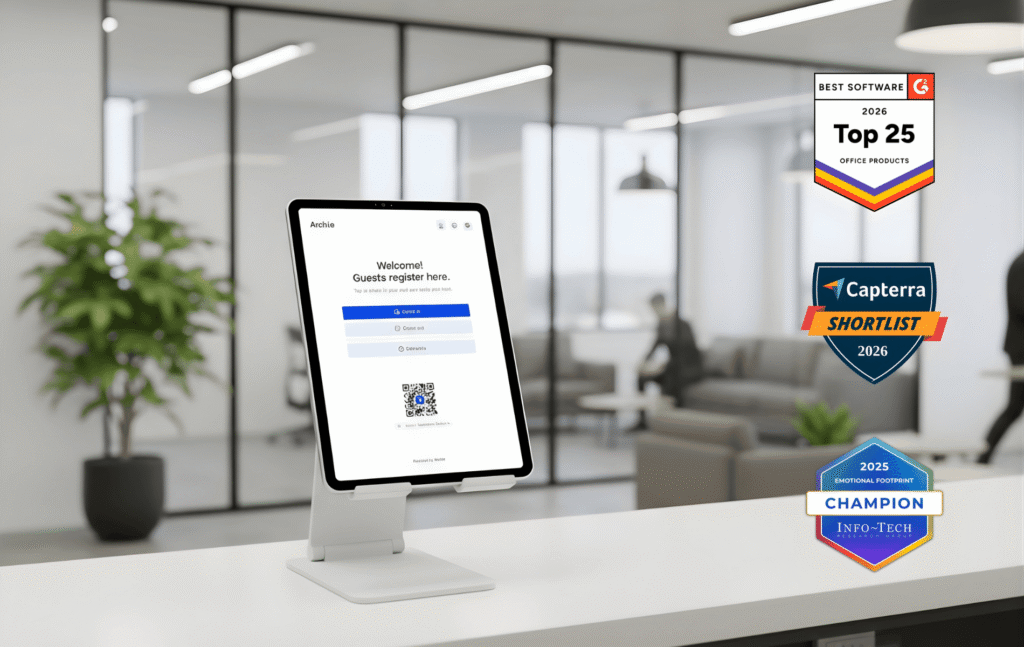
Rated #1 easiest to use system out of 199 visitor management vendors on G2.
What are Archie's Key Visitor Management Features?
With Archie Visitors, guests and managers both enjoy a smart VMS that’s easy to use.
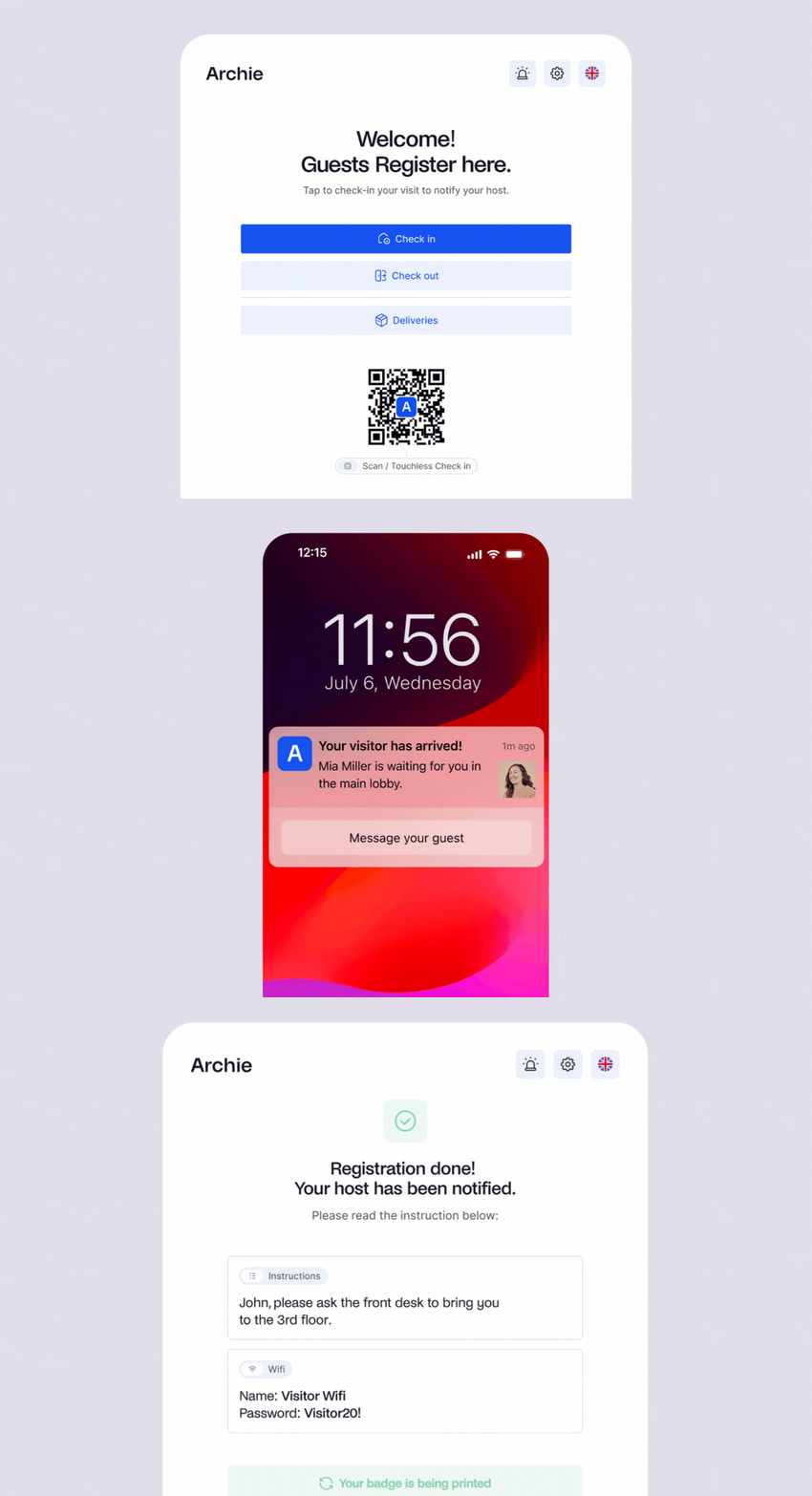
- Guest registration: Allow guests to register and complete part of check-in process ahead of time, as well as a touchless check-in option with QR codes –making check-ins faster and reducing wait times.
- Detailed visitor logs: Maintain comprehensive records of all visitors, ideal for security and traceability requirements. If you are hosting events or have peak times, this keeps people from waiting in the lobby for their turn.
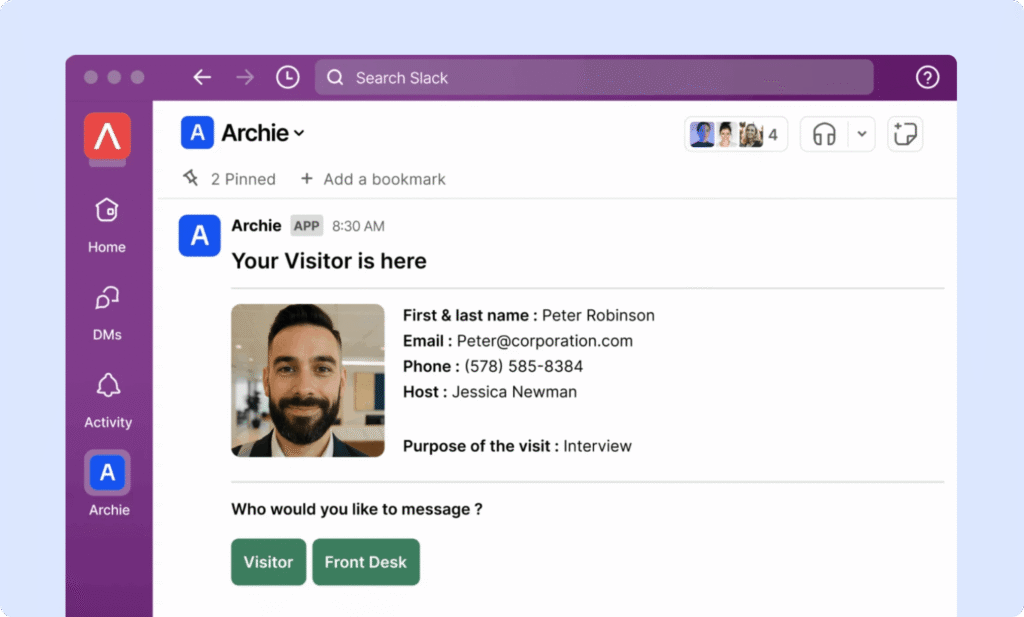
- Notificaciones instantáneas para los anfitriones: avisa automáticamente a los anfitriones cuando sus huéspedes se registren.
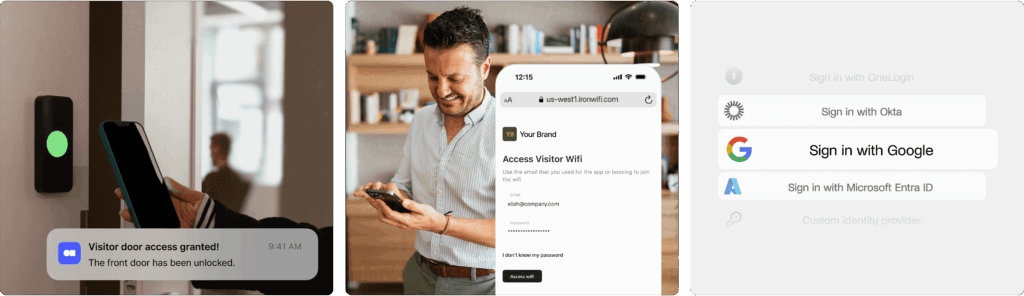
- Easy integrations: Connect Archie with tools like access control systems, Wi-Fi, and SSO – for larger offices or spaces with multiple tenants, this improves security and navigation.
- Tarjetas de visitante y fotos: Imprime tarjetas para facilitar la identificación.
- Formularios digitales y firmas electrónicas: recopila acuerdos de confidencialidad, políticas y preguntas personalizadas directamente en el flujo de trabajo, sin necesidad de papel.
- Custom visitor flows: Busy offices can set different steps for contractors, interviewees, VIPs, and deliveries.
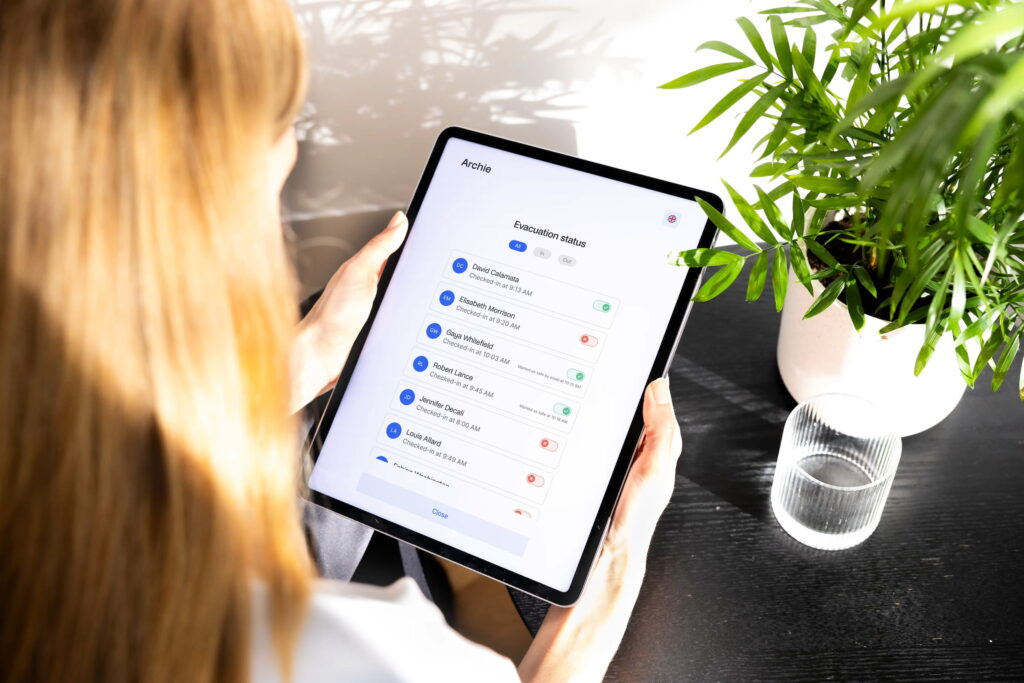
- Alertas de emergencia y pases de lista: avisa a todas las personas presentes en las instalaciones durante simulacros o incidentes y lleva un registro de quiénes se han marcado como a salvo.
- Gestión de envíos: registrar los paquetes y notificar automáticamente a los destinatarios para que los recojan.
- Custom branding & UI control: So that your guests have a seamless experience, you can customize check-in screens, badges, emails, and messages to match your brand.
- Multi-tenant visitor management: If you manage visitors across multiple companies, they can be managed from one platform while keeping each company’s hosts, workflows, permissions, and visitor records separate.
¿Cuánto cuesta Archie?
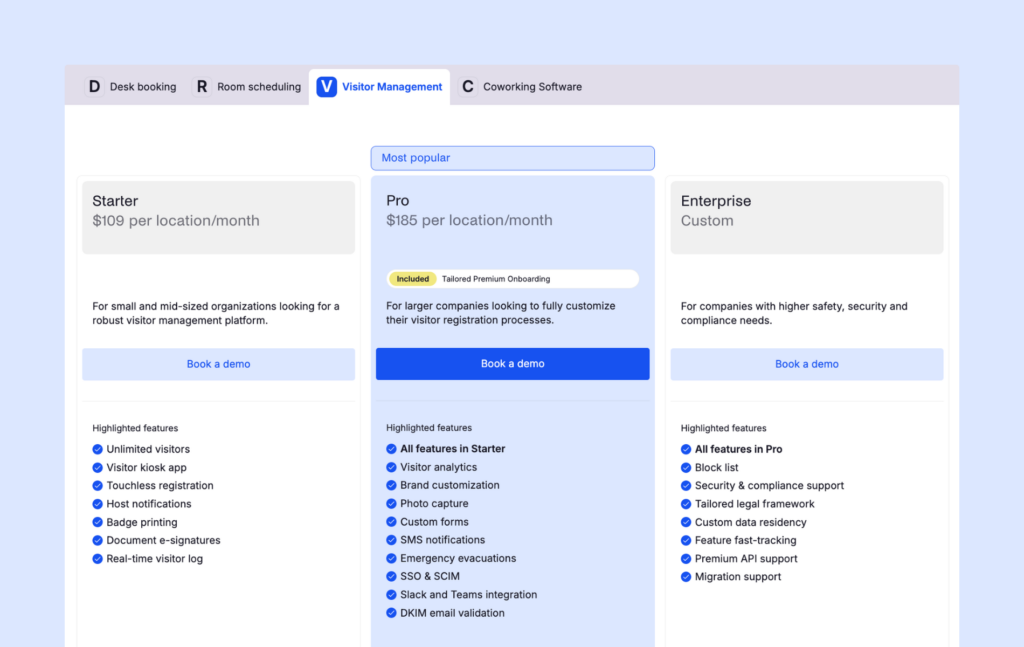
Pricing starts at $109 per location per month. All plans include unlimited check-ins, with the pricing plans being as follows:
- Arranque: 109 $ al mes por oficina
- Pro: 185 $ al mes por oficina (incluye SSO y SCIM)
- Empresa: Precios personalizados
The Starter plan includes visitor kiosk app, touchless registration and e-signatures. The Pro is the most popular, as it includes analytics, brand customization, Slack and Teams integrations, and more. The Enterprise tier offers custom data residency, tailored legal framework and block lists.
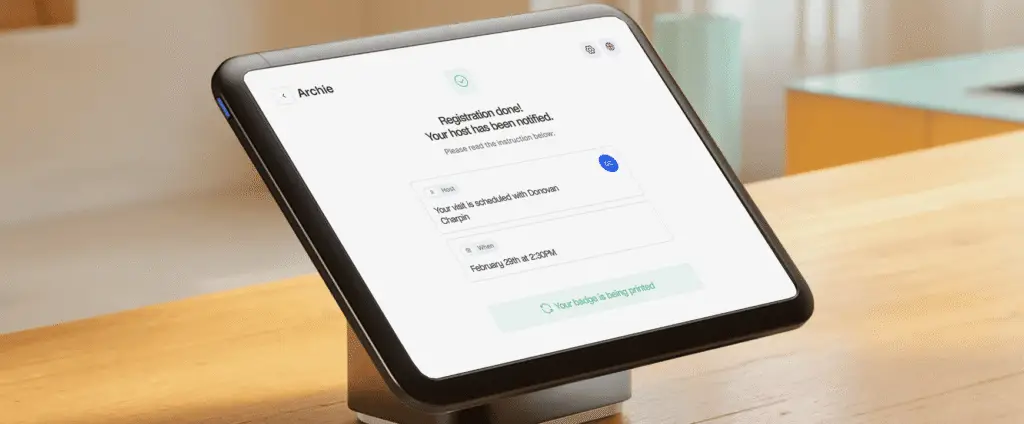
Archie is compatible across iPad and Android hardware, to reduce additional costs. Other hardware like badge printers and visitor kiosk stands are optional extras.
También hay una prueba gratuita y puedes reservar una demostración para ver Archie en acción. Aunque el sistema de gestión de invitados se puede vender por separado, se integra perfectamente con el resto de soluciones de Archie para oficinas híbridas.
What are the pros and cons of Archie?
➕ User experience: Archie’s interface is simple to set up and easy to use, so new users can get started quickly. Plus, our customer support team is known for being responsive and helpful in case you need anything.
➕ Customization: You can personalize Archie software to match your brand, from the visitor management app interface to emails and notifications.
➕ Complete workplace software: Desk and room booking, employee directories, and interactive floor plans can all live in the same place as visitor management – reducing the tech stack is one of the biggest reasons large offices opt for Archie visitor management.
➖ Not ideal for smaller teams: Archie’s automated visitor management system shines when used alongside the hybrid workplace tools, making it a great fit for medium-sized and growing teams.
➖ Advanced security features: Sites with more complex compliance requirements may not find that Archie fulfills all needs.
Archie Visitors is built for offices that are past the “just need a sign-in sheet” stage. Where it really pulls ahead is for offices already using (or planning to use) Archie for desks & room bookings. Consolidating those into one platform is an efficiency win, and it’s why larger, multi-space offices tend to get the most value per dollar.
Before you commit, consider your size and growth trajectory. Archie’s per-location, unlimited-visitor pricing rewards offices with steady or growing visitor traffic.
2. Envoy
🏆 Para empresas que necesitan un control avanzado de visitantes y no les importa pagar un precio superior.
🔶 Score: 8.5/10
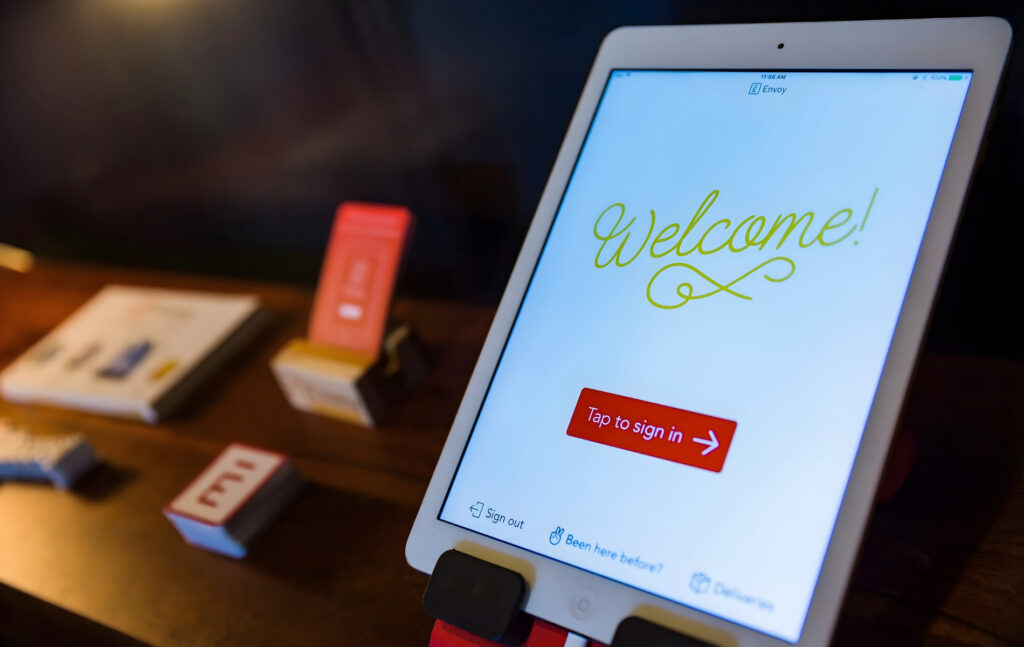
Envoy es un robusto sistema de seguimiento de visitantes diseñado para empresas de nivel empresarial. Se centra en proporcionar un proceso de registro seguro, eficiente y flexible, lo que lo convierte en una excelente opción para las empresas que dan prioridad a la seguridad y la protección en el lugar de trabajo.
Capterra reviewers like the notification system; G2 reviewers love the sleek experience it provides visitors, although comment that the mobile app isn’t so reliable.
We give it an 8.5/10 as its G2 rating and compliance features work in its favor, but the price is one of the highest you’ll find in the industry.
Envoy is likely going to be a good choice for those running multiple locations with complex compliance needs. Its price puts it out of the consideration circle for most modern offices who are looking for a strong visitor management system but don’t need these specified features.
What are Envoy's Key Visitor Management Features?
- Registro sin contacto: permite a los visitantes registrarse utilizando sus dispositivos móviles sin necesidad de contacto físico.
- Fácil integración con herramientas de comunicación: Envoy se integra con herramientas como Slack, lo que permite recibir notificaciones instantáneas y facilitar una comunicación eficaz entre los anfitriones y los visitantes.
- Registros y análisis de visitantes: datos detallados sobre los visitantes, incluidos los patrones de comportamiento y la duración de la visita.
- Funciones de seguridad avanzadas: incluye alertas de listas de vigilancia y captura de imágenes, lo que añade una capa adicional de protección para garantizar que solo las personas autorizadas tengan acceso.
The watchlist alerts and threat features are unusual in this field, and if it’s a need for your business then Envoy is built with you in mind.
How Much Does Envoy Visitors Cost?
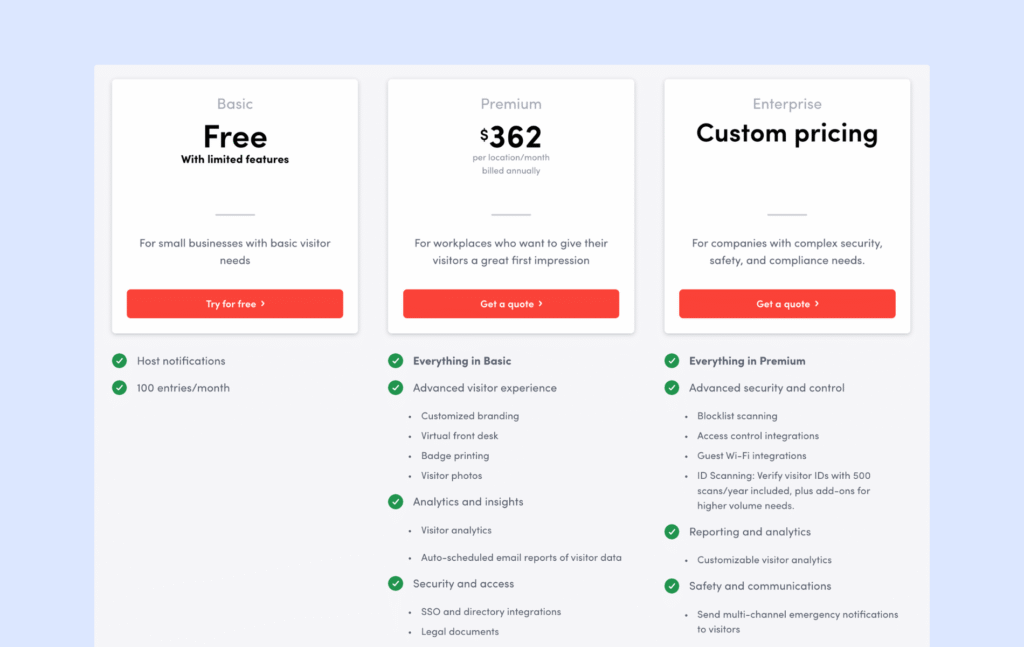
Los precios de Envoy Visitors se aplican por ubicación y se dividen en tres niveles principales:
- Básico (gratuito): funciones limitadas, 1 ubicación y hasta 50 empleados en el directorio.
- Premium ($362/location/month, billed annually): Branding, Virtual Front Desk, badges, photos, legal documents, and analytics (about $362/month when averaged out).
- Enterprise (Custom): Premium + advanced security and compliance features
The more advanced security features like blocklist scanning, access control, and Wi-Fi integrations, scheduled reports, customizable analytics, and emergency notifications are all only available within the custom tier. This means it will be upwards of $362.
Envoy’s threat notification feature is also set apart from these tiers – priced at $2 per user/month. Additional costs include a platform fee and hardware purchases.
What are the Pros and Cons of Envoy?
➕ Funciones de seguridad de la oficina: Envoy prioriza la seguridad con herramientas como registros sin contacto, controles de visitantes y alertas de seguridad avanzadas.
➕ Plan gratuito: Para lugares de trabajo más pequeños con necesidades básicas de gestión de visitantes, hay disponible de forma gratuita un sencillo software de registro de visitantes con notificaciones al anfitrión. Incluso si necesita más que eso, esta opción también le permite probar el panel de control y los casos de uso básicos antes de comprometerse.
➖ Coste: La funcionalidad de nivel empresarial de Envoy se refleja en su precio, lo que puede suponer un problema para las pequeñas empresas, que a menudo recurren a alternativas a Envoy.
All of these support Envoy’s positioning: a VMS suited for sites with high compliance needs, but not the most attractive option for offices looking for a standard professional visitor management system.
If you’re considering Envoy, also be aware that the software price has fluctuated more than usual over the past year or so. Ask about potential price changes during the sales process to ensure you lock in your future price.
3. The Receptionist
🏆 Para oficinas pequeñas y medianas que desean un quiosco de registro sencillo para iPad y no necesitan una «plataforma de trabajo» completa a su alrededor.
🔶 Score: 8.3/10
The Receptionist para iPad es un sistema de gestión de visitantes diseñado para ofrecer simplicidad y fiabilidad. Solo funciona en iPads y se centra en realizar muy bien las tareas principales: registros, tarjetas de identificación, notificaciones a los anfitriones y cumplimiento básico. Una de sus características más destacadas es la mensajería bidireccional entre visitantes y anfitriones.
One thing to keep in mind: The Receptionist is now part of Sign In App. They’ve shared plans to bring the products closer together over time, including features like desk booking and appointment scheduling. Until then, we’ll focus on The Receptionist as it exists today.
We gave it the 8.3/10 score because it is generally a well-liked system for iPad users. Yet its recent merge makes it a less stable choice.
You’ll find reviews in both Capterra and G2 who praise The Receptionist for being user-friendly, yet comment that it’s a little pricey.

What are The Receptionist's Key Features?
- Quiosco para iPad: una aplicación para iPad diseñada específicamente para que los visitantes realicen el registro de entrada por sí mismos.
- Mensajería bidireccional: los anfitriones pueden responder a las alertas de registro, y sus respuestas se muestran en el quiosco para que las vea el visitante.
- Flujos de trabajo personalizados: flujos basados en botones para huéspedes, entrevistas, entregas, proveedores y empleados.
- Tarjetas de identificación y fotos: Imprime tarjetas de identificación personalizadas para los visitantes e incluye fotos para mayor seguridad.
- Códigos PIN de los empleados: Permite al personal registrar su entrada y salida con un código PIN para realizar un seguimiento básico de la asistencia.
Resumen de precios
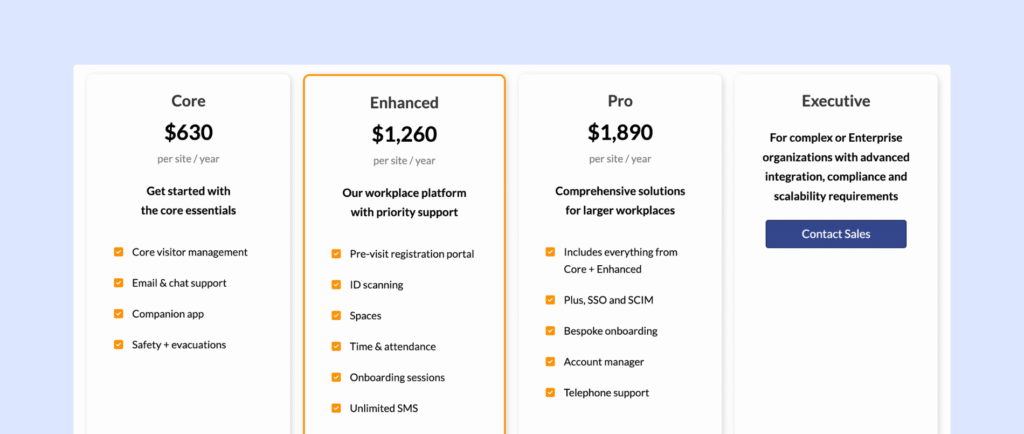
Históricamente, The Receptionist aplicaba una tarifa por sede basada en el número de empleados que figuraban en su directorio, con planes que oscilaban entre unos 60 y 360 dólares al mes.
Sin embargo, tras la adquisición por parte de Sign In Solutions, los precios están empezando a acercarse a la estructura común utilizada en toda la cartera:
- Tarifa básica: 630 $ por sitio web al año
- Versión mejorada: 1260 $ por sitio al año
- Tarifa Pro: 1.890 $ por sitio web al año
Este cambio refleja una tendencia general hacia una plataforma más unificada que combina la gestión de visitantes, la seguridad y las herramientas para el lugar de trabajo en productos como Sign In App, SwipedOn y The Receptionist.
For now, some customers may still see legacy pricing depending on their plan or region, but over time, expect more consistency across all three tools. Additional costs include iPads and compatible hardware.
What are the Pros and Cons of The Receptionist?
➕ Mensajería bidireccional: Cuando un huésped se registra, el anfitrión recibe una notificación y puede responder de inmediato. La respuesta se muestra en la pantalla del quiosco, para que los visitantes sepan exactamente qué hacer a continuación.
➕ Quick rollout and friendly support: Many reviews mention that The Receptionist is very easy to set up and most teams are up and running within a few days. Customers also often highlight how responsive and helpful the support team is.
➖ Limitado para casos de uso con altos requisitos de seguridad. El SSO tiene un coste adicional, las integraciones de control de acceso suelen requerir un trabajo de API personalizado y no hay escaneo de ID ni filtrado de listas de vigilancia integrados. Para oficinas con necesidades estrictas de seguridad o cumplimiento normativo, estas carencias pueden suponer un inconveniente en comparación con otras alternativas más avanzadas. alternativas a The Receptionist.
Its current pricing puts The Receptionist high on the list for smaller offices who need a capable VMS that matches their budget.
If you’re considering The Receptionist, ask about upcoming changes to the product due to the acquisition.
4. VisitorOS (formerly iLobby)
🏆 For security-heavy workplaces like industrial or government sites that want a ready-to-use hardware and software setup.
🔶 Score: 8.3/10
VisitorOS (antes conocido como iLobby, parte del paquete FacilityOS) es un sistema de gestión de visitantes diseñado para hacer que los lugares de trabajo sean más seguros y organizados. Ayuda a las empresas a gestionar el registro de invitados, imprimir tarjetas de identificación para visitantes, controlar a los visitantes y mantener registros detallados de los mismos. Es muy útil para empresas que necesitan funciones sólidas de seguridad y cumplimiento normativo.
The reviews on G2 and Capterra are mainly positive, with people liking how fully fledged the feature list is. However, the software can be a little slow at times.
We gave is the score of 8.3 since it is one of the best in this category for security-heavy industries. Its hardware slowness holds it back for other customers.
What are the key features of VisitorOS?
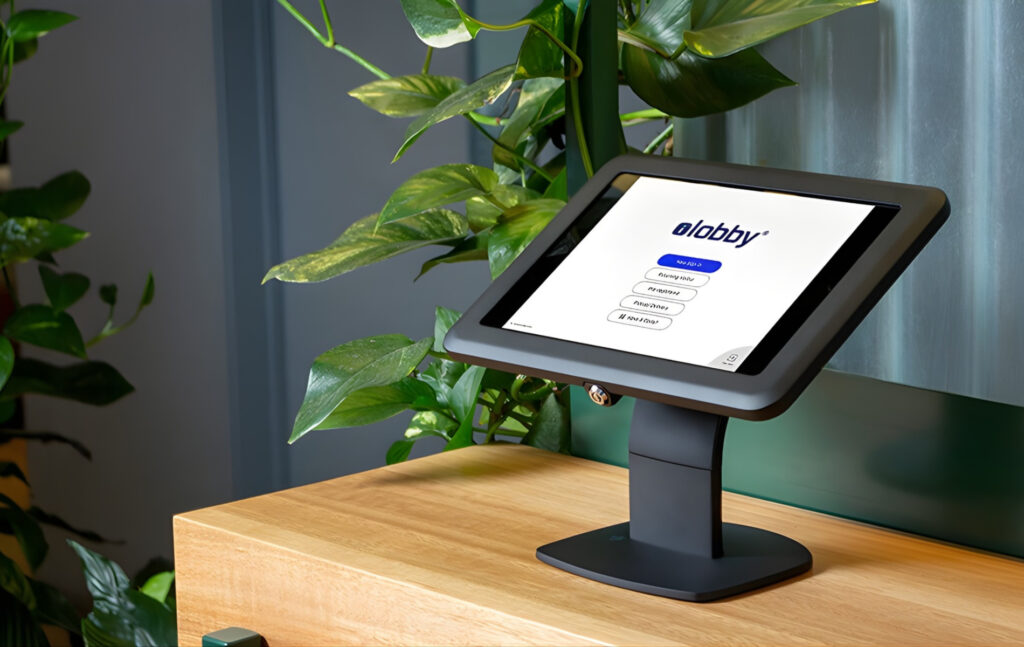
Somewhat unique in visitor management, VisitorOS comes with ready-to-use visitor management software and hardware.
- The visitor management system comes with pre-loaded and pre-configured visitor hardware and software, so no long setup time is required.
- Preinscripción y notificaciones: Los visitantes pueden preinscribirse antes de llegar, y los anfitriones reciben alertas inmediatas cuando los invitados se registran.
- Personalización: Puedes adaptar VisitorOS a tus requisitos de seguridad y a los procedimientos de recepción.
- Análisis en tiempo real: realiza un seguimiento de la actividad de los visitantes en tiempo real y comprueba quién está en la página web.
¿Cuánto cuesta VisitorOS?
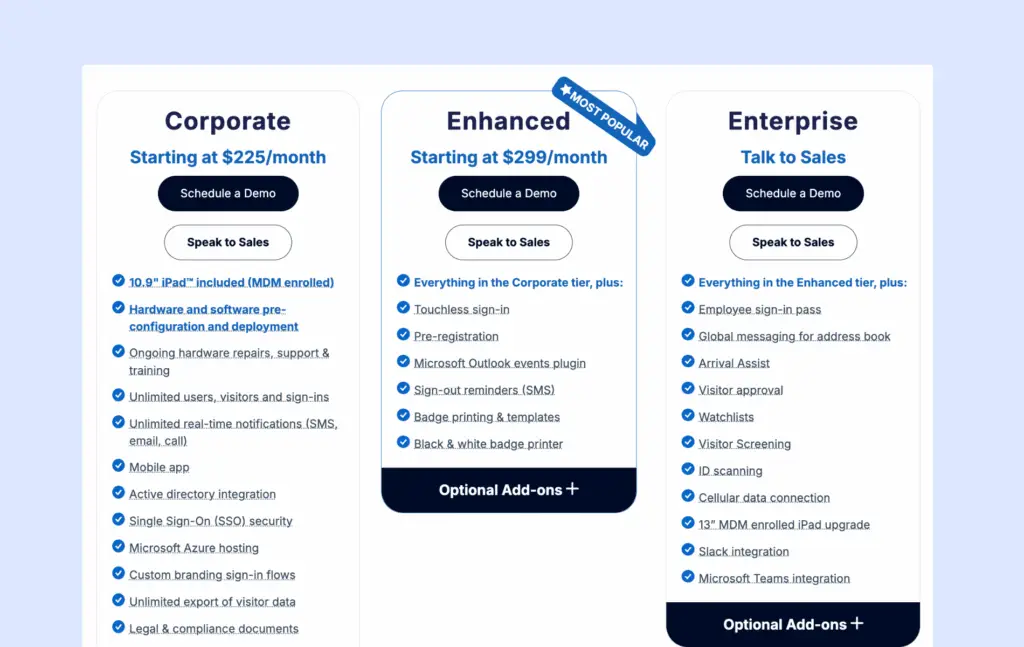
Bear in mind that from the first tier, hardware is included in the price:
- The Corporate Plan starts at $225/month and includes everything to get started: a 10.9″ iPad with Mobile Device Management (MDM), an anti-theft mount, and pre-configured hardware and software for easy setup.
- The Enhanced plan starts at $299/month and includes added features like touchless sign-in, pre-registration, or visitor badge printing.
All plans support unlimited users and sign-ins and offer features like SMS, email, or call notifications, a mobile app, Active Directory integration, SSO, and secure hosting on Microsoft Azure.
A positive to factor in, is that ongoing hardware support, including repairs and training, is also included. Not all options who provide their own software follow through with this, so for that reason I gave it extra points.
What are the Pros and Cons of VisitorOS?
➕ Enterprise-grade compliance and security: Reviewers like the flexible workflows, ID scanning, watchlist screening, and compliance features that support regulated industries.
➕ Turnkey deployment: Because VisitorOS ships managed iPads that are already set up, you can start using the system on day one. You do not have to source, configure, or maintain your own hardware, which many reviewers appreciate.
➖ Higher price point: With pricing starting around 225 USD per month, including managed hardware, it is less budget-friendly than VisitorOS alternatives that let you bring your own devices.
Many features are paid add-ons across tiers, such as pre-registration and Outlook plugin. In practice, the final price depends heavily on which of these add-ons you bundle on top of the base license.
5. Kastle
🏆 Para organizaciones con estrictas medidas de seguridad que desean que un único proveedor se encargue del control de acceso, la gestión de visitantes y la videovigilancia en múltiples emplazamientos.
🔶 Score: 8.1/10
Kastle es una plataforma de gestión de visitantes y seguridad de edificios que forma parte de un conjunto más amplio de soluciones de seguridad gestionadas. En lugar de ser «solo» una aplicación de recepción, conecta el registro de visitantes con el control de acceso, el vídeo y la gestión de identidades, de modo que los invitados solo pueden acceder a las zonas a las que tienen permiso para entrar.
On G2, customers praise the support team’s responsiveness – though some note they’d prefer more self-service options so they wouldn’t need to reach out as often.
Our score of 8.1/10 is a reflection of its strengths for multi-tenant buildings, but weakness around pricing.

What are Kastle's Key Visitor Management Features?
Kastle is part of a broader security ecosystem. Its VMS offers:
- Invitaciones basadas en el calendario: programa las visitas directamente desde Outlook o Google Calendar.
- Códigos QR de acceso automático: antes de la reunión, los visitantes reciben un correo electrónico con un código QR que sirve como credencial temporal para el día, la hora y las zonas correspondientes.
- Integración del control de acceso: los datos de los visitantes se transfieren al sistema de control de acceso de Kastle, lo que le permite controlar qué puertas pueden abrir los visitantes y durante cuánto tiempo, además de mantener un registro de auditoría completo.
- Códigos PIN para proveedores y gestión de entregas: Asigna códigos PIN únicos a los repartidores y a los proveedores de servicios.
- Videoportero: los visitantes pueden llamar a los inquilinos o a la recepción para que se les identifique visualmente antes de entrar, lo cual está integrado en el mismo sistema de acceso.
Kastle’s strengths are keenly felt when customers want visitor management to connect to a much more sophisticated security network – so you’re reducing your integration need across sites. However, those looking for a modern and intuitive interface will not find what they’re looking for with Kastle.
How much does Kastle cost?
Kastle no publica los precios de sus soluciones de gestión de visitantes y acceso. Debe ponerse en contacto con su equipo de ventas para obtener un presupuesto basado en el número de ubicaciones y puertas, la combinación de servicios (gestión de visitantes, control de acceso, vídeo, supervisión, etc.), así como las necesidades de hardware e instalación.
What are Kastle's Pros and Cons?
➕ Fácil de usar para el personal y los inquilinos: Muchos usuarios afirman que Kastle es fácil de usar en el día a día. A los administradores les gusta el portal claro para gestionar horarios y puertas, y a los inquilinos/residentes les resulta muy cómodo el acceso sin llaves (tarjetas, llaveros, aplicación móvil).
➕ Strong security with reliable support: Users praise Kastle for making buildings feel safer and for the reliability of the system. A lot of reviews highlight how fast and helpful the support team is when there is an issue.
➖ Feels more like legacy software: The tech stack is older and less polished than the modern, cloud-first solutions mentioned above. However, it offers a lot of customization and configuration options, so I think the broader platform can be attractive for certain enterprise setups.
If you’re considering Kastle, you’ll have to talk to their Sales team in person for a custom quote.
6. Greetly
🏆 Para equipos pequeños y medianos que desean un sistema de registro con iPad asequible y personalizado con su marca, que funcione como una recepcionista virtual.
🔶 Score: 8.0/10
Greetly is a visitor management system that helps businesses handle check-ins quickly and easily. It offers features like touchless sign-ins, visitor badges, and notifications to hosts.
Capterra customers praise Greetly’s convenience and efficiency.
We give Greetly its 8/10 score because the drag and drop features are very user friendly, and unique in this field. However, reviews are limited, so it’s difficult to draw comparisons about the true user experience.
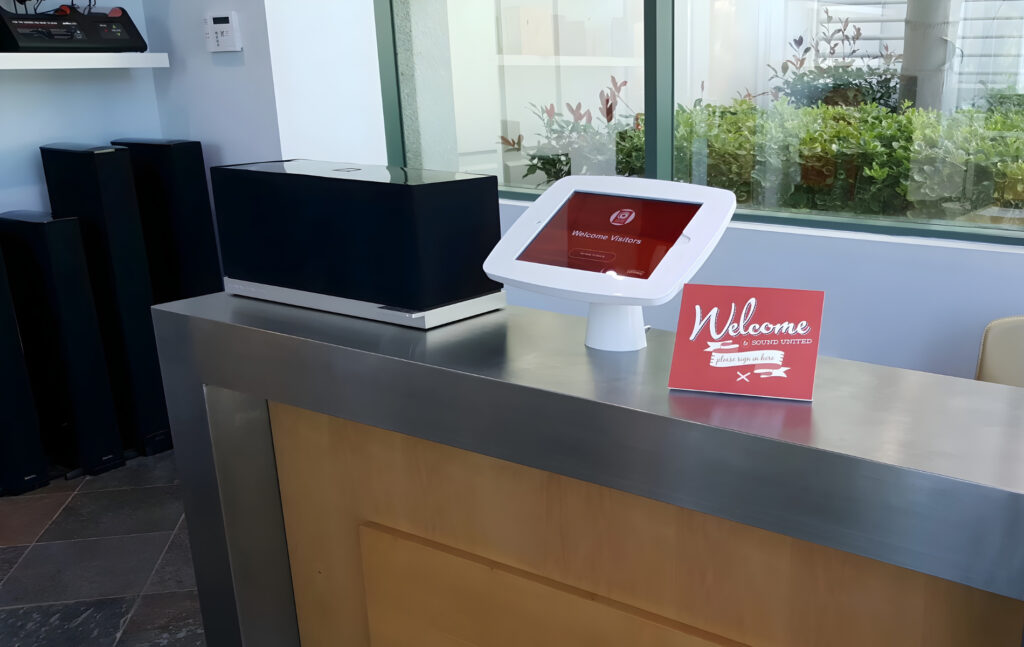
What are Greetly's Key Visitor Management Features?
Greetly fulfills the core expectations of a VMS, with its standout being customizability:
- Greetly’s no-code, drag-and-drop builder lets you customize visitor check-in workflows, electronic forms, and badge layouts.
- Experiencia personalizable para los visitantes: personaliza todo, desde el proceso de registro hasta la imagen de marca que ven los visitantes.
- Integraciones con terceros: Greetly se integra con aplicaciones de mensajería corporativa, sistemas de gestión de clientes y bases de datos internas.
¿Cuánto cuesta Greetly?
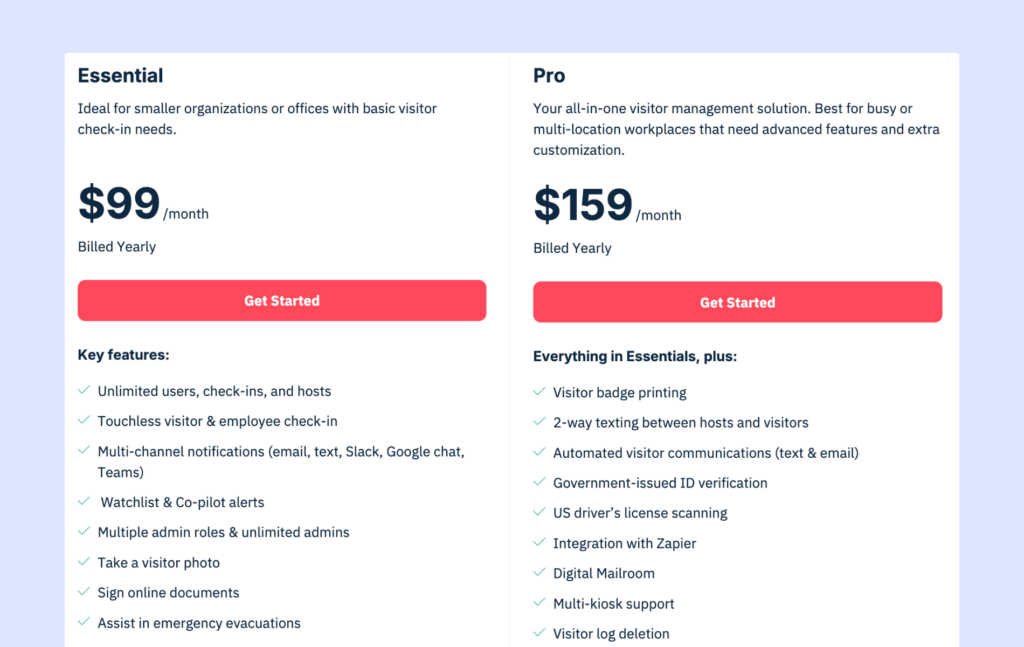
Todos los planes incluyen usuarios, registros y notificaciones ilimitados:
- Plan Essential: 99 $ al mes (facturado anualmente), perfecto para empresas que necesitan un sistema de registro sencillo y fiable.
- Plan Pro: 159 $ al mes (facturado anualmente), añade funciones avanzadas como impresión de tarjetas de identificación, mensajes de texto bidireccionales y escaneo de documentos de identidad.
Greetly’s pricing is very competitive. Considering the features available at each tier, Greetly seems to be a very good option for small options wanting a full breadth of features.
Your hardware will incur additional costs.
What are the pros and cons of Greetly?
➕ Fácil de usar: Greetly es fácil de configurar y utilizar, y muchos usuarios destacan su interfaz intuitiva.
➕ Personalizable: La plataforma permite una amplia personalización, lo que le permite adaptar los flujos de trabajo de registro y la imagen de marca a sus necesidades específicas.
➖ Disponibilidad limitada de la plataforma: Actualmente, Greetly solo funciona en dispositivos iPad, lo que puede limitar la accesibilidad para algunos usuarios que deseen considerar otras alternativas a Greetly que funcionen en dispositivos Android.
➖ Greetly’s integration strength has been called into question in one of the reviews, which complained about syncing issues.
Overall, it is harder to make a full summary of Greetly without a larger review set to draw from (at the time of writing).
7. Sign In App
🏆 For offices that want visitor management bundled with compliance tooling.
🔶 Score: 7.8/10
Sign In App is a cloud-based visitor and workplace management system that handles guest check-ins, staff sign-in/out, and resource booking from a single platform. It leans harder into compliance and safety than most visitor-only tools, with a Companion app that doubles as an employee sign-in and desk/room booking tool.
2026 update: Sign In App’s parent company, Sign In Solutions, has acquired both SwipedOn and The Receptionist. SwipedOn has now been sunset and features are merged with Sign In App. In future, we can expect The Receptionist to meet the same fate.
Reviewers on G2 consistently call it easy to use, though a few flag that syncing with tools like Zoom and Google Calendar can lag or misbehave.
We give it a 7.8/10 because it’s feature breadth is commendable, it scores lower than most on G2.
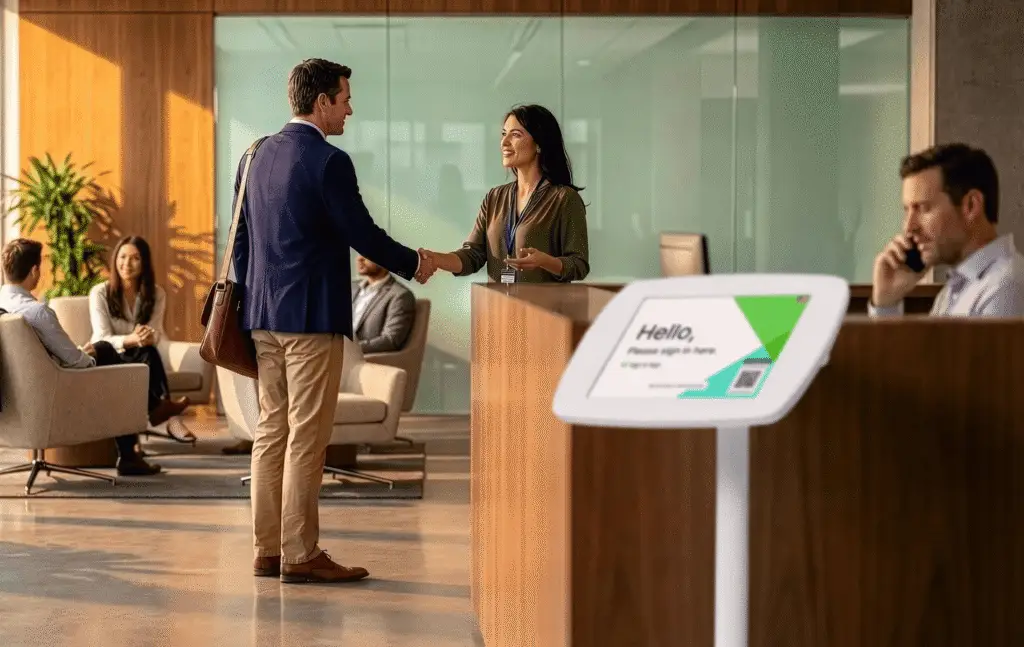
What are Sign In App's key features?
Sign In App runs on iPad, Android tablets, and QR-only entry points, so you’re not locked into one hardware type.
- Companion app: A free smartphone and web app that lets staff sign in/out, run evacuation roll calls, and book desks, rooms, and resources.
- Digital NDAs and policies: Collect signatures and share terms electronically as part of the check-in flow.
- Evacuation management: Get a live, up-to-date list of everyone on site during a drill or real emergency.
- Custom branding and translations: Localize the kiosk experience in 20+ languages and match it to your brand.
- Visitor pre-registration: Send arrival details and forms to guests before they show up.
How much does Sign In App cost?
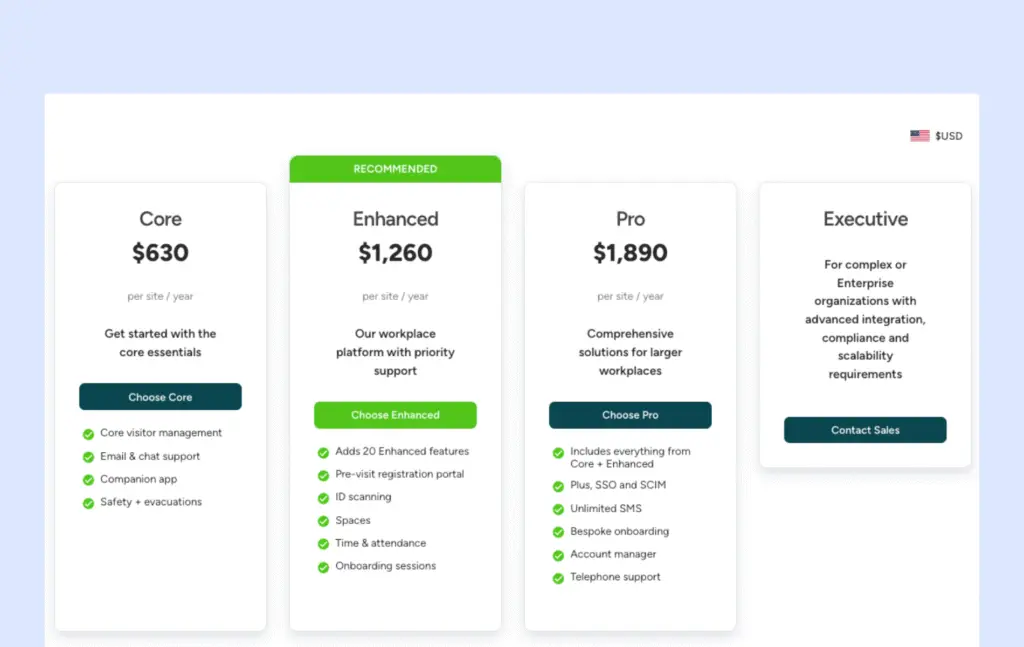
Sign In App’s pricing is now the shared structure rolling out across the Sign In Solutions portfolio, billed annually per site:
- Paquete básico: 630 $ al año por centro, que incluye gestión básica de visitantes, número ilimitado de visitantes y empleados, impresión de tarjetas de identificación y notificaciones en Slack/Teams.
- Enhanced: $1,260 per site/year adds a pre-visit registration portal, ID scanning, spaces, and time & attendance features.
- Pro: $1,890 per site/year adds SSO and SCIM, unlimited SMS, bespoke onboarding, an account manager, and telephone support.
- Executive: Custom pricing for complex or enterprise organizations needing advanced integration, compliance, and scalability.
As with its sister products, some features (pre-registration, ID scanning, resource booking) are gated to higher tiers, so it’s worth mapping your must-haves against the plan before you commit.
What are the pros and cons of Sign In App?
➕ Easy for day-to-day use: Reviewers on G2 repeatedly describe it as simple and reliable, with a dashboard that makes it easy to see who’s on-site.
➕ Broader than check-in alone: The Companion app extends the product into staff sign-in and desk/room booking.
➖ Reliability: Some users note that syncing with other tools like Zoom and Google Calendar can be slow or inconsistent, which is worth testing against your own stack before rolling it out.
Like Archie, Sign In App is a positive choice for hybrid offices, since the workplace features are baked into the same platform.
If you’re considering Sign In App, keep an eye on how pricing and features shift as The Receptionist get folded into the same structure.
8. Eptura Visitor
🏆 Para organizaciones grandes, reguladas y con múltiples sedes que estén dispuestas a implementar una plataforma empresarial más pesada.
🔶 Score: 7.9/10
Eptura Visitor (antes Proxyclick) es un sistema de gestión de visitantes empresarial diseñado para oficinas corporativas y recintos tipo campus. Se centra en flujos de trabajo flexibles, un generador visual de flujos de trabajo y una profunda integración con los sistemas de control de acceso.
G2 reviewers love the ease of use, which I think is always commendable for an enterprise-focused product. However a Capterra user flagged that the team can be a little unresponsive.
For us, it earns a score of 7.9 due to user feedback and its regulatory strengths.

What are Eptura Visitor's key features?
- Self-service check-in: iPad and Android kiosks with pre-registration, QR codes, and branded flows, designed for busy offices where someone is. not always available on the front desk.
- Visual workflow builder: Design custom check-in steps in a drag-and-drop editor – includes approval gates and language handling for personalized visitor flows.
- Notificaciones del servidor: alertas por correo electrónico, SMS, Slack y Microsoft Teams.
- Strong security and compliance features: Watchlist screening will check visitors against internal and external watchlists. ID verification matches identification to validate before granting access.
- Compatibilidad con múltiples entradas: asigna varios vestíbulos y entradas a un mismo establecimiento.
¿Cuánto cuesta Eptura Visitor?
Eptura Visitor has two main plans: Advanced and Power. Try as I might, I couldn’t find details of prices listed publicly. You need to speak with sales for a quote.
Rough estimates put Eptura Visitor at around 7,500 USD per year for a base setup, plus implementation fees. Free trials are not on offer.
There can also be separate implementation fees, depending on your setup and integrations.
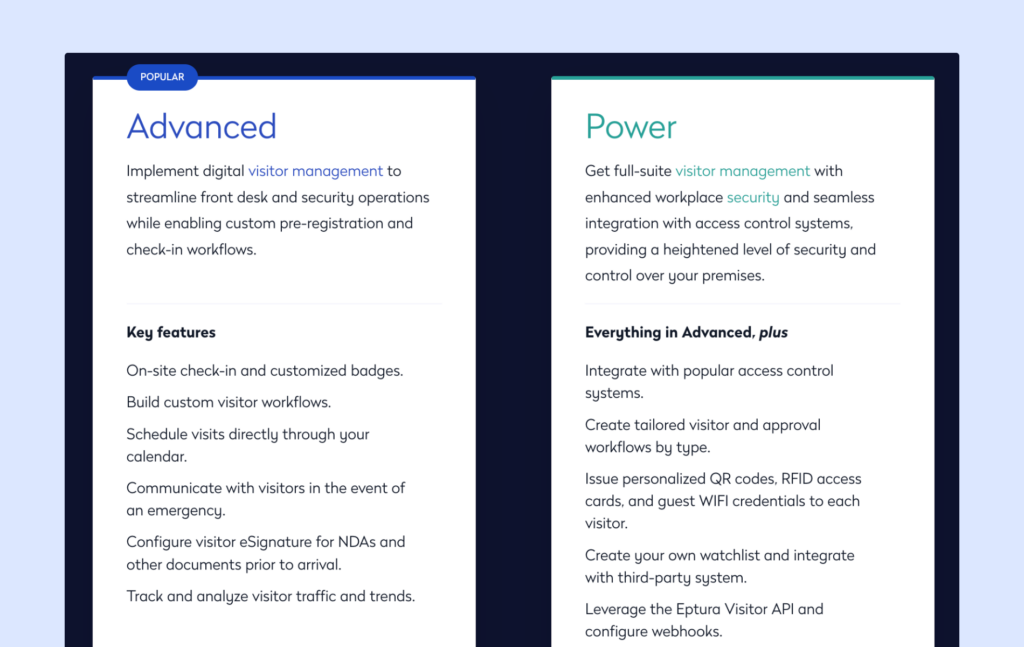
What are the pros and cons of Eptura Visitor?
Pros
➕ Flexible, enterprise-ready workflows: Reviewers like that you can create tailored flows for different visitor types, such as guests, contractors, and deliveries.
➕ Potentes funciones de seguridad y cumplimiento normativo: La selección de listas de vigilancia, las comprobaciones de identidad, las alertas de emergencia, las integraciones de control de acceso y los registros de auditoría detallados ayudan a elevar el nivel de seguridad y a respaldar el cumplimiento normativo en los sectores regulados. Encontrará funciones similares en algunas alternativas, pero Eptura Visitor / Proxyclick sigue siendo una de las opciones más sólidas en este ámbito.
Cons
➖ Time to value and overall cost: Product research and estimates suggest a longer pre-sales and implementation cycle, which can slow things down if you are trying to fix front desk issues quickly. On top of that, pricing is quote-based. Price is a leading factor driving some evaluators to Eptura Visitor alternatives.
If you work in a regulatory industry where compliance and security regulations are woven into most aspects of your business, and budget is not of great concern, Eptura Visitor could be a great choice. For all others, however, there is likely a better option.
9. Lobbytrack
🏆 Para organizaciones más pequeñas que buscan un sistema de gestión de visitantes flexible y multiplataforma con sala crecer.
🔶 Score: 7.8/10
Lobbytrack is one of the oldest visitor management systems in our list, tracing back to 2007. It’s a VMS best suited to mid-size offices needing basic guest management services.
Lobbytrack supports basic check-ins on iOS, Android, and Windows kiosks, and covers some more advanced features, like watchlist screening and queue management. That said, reviews mention that Lobbytrack’s sometimes lacks in functionality and polish.
For this reason we give it a 7.8/10. Reviews on G2 Capterra describe it as ‘simple and effective’, although most reviews are a few years old.
What are Lobbytrack's key features?
Lobbytrack offers core visitor management software that fits a variety of customers with:
- Aplicaciones por funciones: aplicaciones independientes para recepción, empleados y guardias, de modo que cada uno vea solo lo que le corresponde.
- Escaneo de documentos de identidad: escanea permisos de conducir y pasaportes para verificar la identidad; resulta útil cuando hay contratistas o conductores habituales en las instalaciones.
- Impresión de acreditaciones: crea acreditaciones personalizadas con fotos y datos de la visita.
- Notificaciones del administrador: envía alertas por correo electrónico, SMS o notificaciones dentro de la aplicación.
- Queue management: Keep busy lobbies organised by managing visitor queues – a solid asset particularly for those hosting events.
¿Cuánto cuesta Lobbytrack?
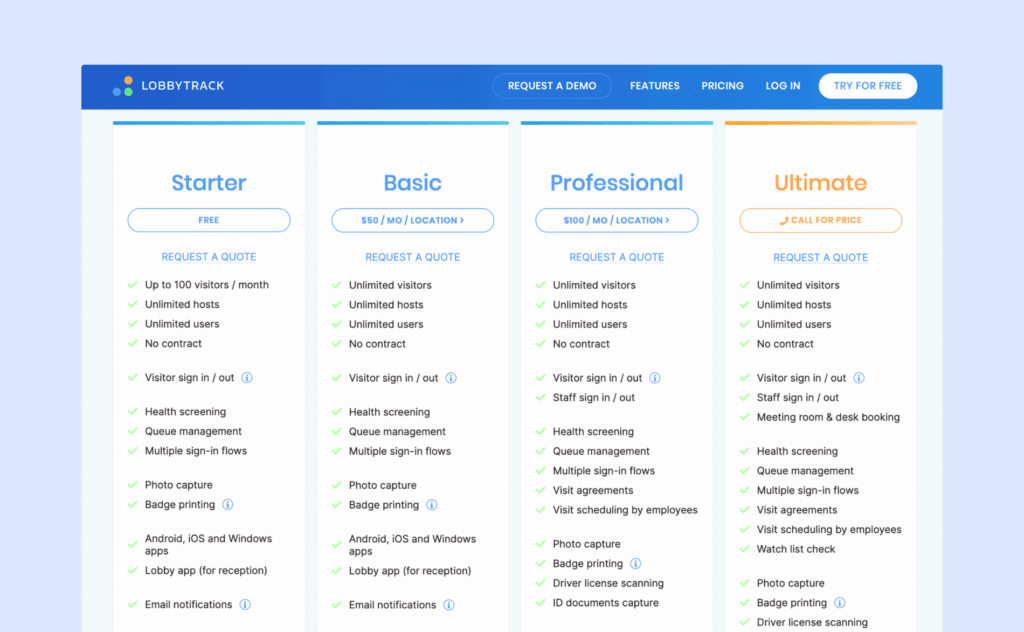
Lobbytrack utiliza precios por niveles basados en las características y la escala. Todos los planes incluyen hosts ilimitados y características básicas de gestión de visitantes:
- Starter: Gratis (funciones limitadas, 1 ubicación)
- Basic: 50 USD per month per location, includes unlimited visitors
- Professional: 100 USD per month per location, includes ID scanning and capture
- Enterprise: Custom pricing, includes watch list check and staff sign-in/sign-out
Advanced options like ID scanning, watchlists, and evacuation tools are available on the higher tiers. Since Lobbytrack is compatible across devices, you have more flexibility with hardware purchases.
For multi-location sites, there are discounts: 20% off the per location price for 5+ locations, 40% off the per location price for 10+ locations.
What are the pros and cons of Lobbytrack?
Pros
➕ Rápido de implementar y sencillo para los visitantes: A los equipos les gusta Lobbytrack porque es rápido de implementar y fácil de usar en la recepción. Los evaluadores dicen que las pantallas de los quioscos son claras, que el proceso de registro resulta sencillo para los visitantes y que los anfitriones reciben alertas por correo electrónico cuando llegan los huéspedes.
➕ Buenas opciones de seguridad: Los equipos de seguridad y operaciones exigen medidas de protección prácticas. Se dispone de captura de identificación y comprobación de listas de vigilancia, y algunos usuarios empresariales destacan el enlace en tiempo real con el control de acceso para emitir tarjetas temporales y desactivarlas automáticamente al cerrar la sesión o después de un tiempo determinado.
Cons
➖ Admin UI feels dated, and some flows are clunky: Some reviewers mention stability and UX issues. A few note that the system can occasionally disconnect or need a restart, and parts of the admin and desktop experience feel dated or awkward to use.
Since there are several reviews commenting that Lobbytrack’s interface can lack polish and functionality ebbs, I wouldn’t recommend it for a busy office. Lobbytrack’s pricing makes it an attractive option for mid-size to multi-location sites who need a basic VMS.
10. Sine (by Honeywell)
🏆 For sites with frequent contractors needing permits, access control, and more.
🔶 Score: 7.6/10
Sine positions itself around contractor and compliance management, rather than just a front-desk VMS system. Sine is sold under the Honeywell brand, so you’ll see that name show up during your research, also.
This is a good option for sites with many contractors coming in and out. Sine Workflows let teams build custom induction, permit, inspection, and qualification-tracking processes.
Reviews on G2 consistently commend Sine’s customer support team, however hardware setup is a recurring friction point. For this reason, we give Sine a score of 7.6.
What are the key features of Sine?
- Sine Workflows: I think this is the true selling point for those whose contractor needs are complex. Custom induction, permit, inspection, and qualification-tracking processes – it’s possible to block check-in if requirements aren’t met.
- iPad kiosks: Visitor invitations, badge printing, host notifications, and live on-site lists.
- NDAs and compliance forms signed digitally as part of check-in.
- Custom visitor types: Separate flows for visitors, staff, and contractors.
- Entra ID sync, SAML SSO, and Outlook integration.
- API access and visitor screening: Available on the Large tier and up.
¿Cuánto cuesta Sine?
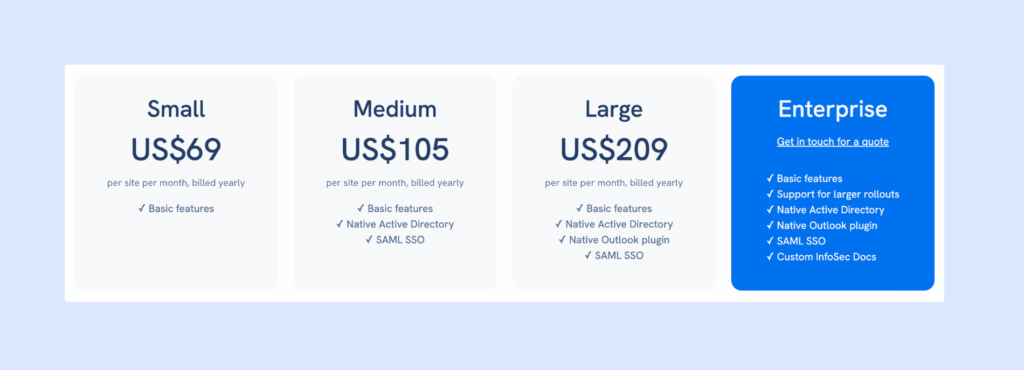
Sine publishes the base price of each tier, billed yearly. However, Sine Workflows – which is a key differentiator for many looking in-depth into this solution – is sold as a separate add-on.
- Small: $69/site/month
- Medium: $105/site/month — adds Entra ID sync, SAML SSO, Outlook integration
- Large: $209/site/month — adds API access, visitor screening, access control
- Enterprise: Custom quote
Hardware is extra: a starter pack (iPad, stand, printer, labels) is $978. Reviewers also comment that the setup fee is high and it can be quite a jump in price to the Enterprise tier.
What are the pros and cons of Sine?
Pros
➕ Genuine compliance depth: Workflows that connect check-in with inductions or permits necessary particularly for businesses with many contractors coming through the door.
➕ Responsive support during setup: Reviewers consistently praise how helpful support is when getting hardware, forms, and permissions configured.
Cons
➖ Pricing is opaque with the best features demanding extra fees: Full pricing isn’t visible without talking to sales, several features are tier-gated, and hardware/add-on costs push up the initial price.
➖ Hardware and setup fee as well as add-on expense makes this one of the less budget-friendly options.
If you are need of bespoke contractor workflows, Sine could be a good option for you. Confirm current tier pricing and Workflows add-on costs directly, as this is clearly an area where published numbers can shift.
11. Visitly
🏆 For small offices that want a straightforward, iPad-based visitor check-in.
🔶 Score: 7.3/10
Visitly is a cloud-based visitor management system focused on front-desk check-ins and workplace security, commonly used by small and mid-sized companies in tech, healthcare, manufacturing, and nonprofits.
In August 2026, Visitly changed their plans, with a Starter plan that is more expensive, but with unlimited visitors and employees.
Reviewers on G2 consistently praise how easy and quick the setup is. However some negative reviews about performance issues pull the average G2 rating down to 4.3/5. This is why we score it a 7.3 overall.
What are the key features of Visitly?
- Custom sign-in flows: Different check-in paths for visitors, staff, and contractors.
- Watchlist screening and ID scanning: Real-time checks plus facial recognition for faster check-ins – which has real appeal for offices who regularly receive repeat visitors.
- Badge printing and photo capture: Standard front-desk basics, included from the base plan.
- Emergency evacuation lists.
- Integrations: Slack and Microsoft Teams, although two-way calendar syncs are gated to the Enterprise tier.
How much does Visitly cost?
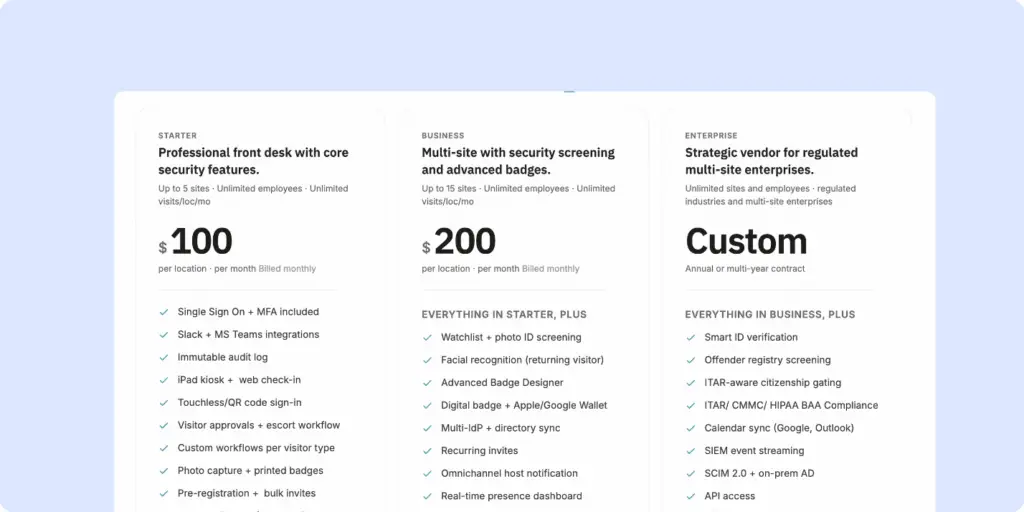
Visitly uses per-location pricing, billed annually. Every tier includes unlimited visitors:
- Starter: $100/month/location, unlimited employees and unlimited visits (it was previously limited to 50 and 100 respectively)
- Business: $200/location/month with watchlist, ID screening and facial recognition included
- Enterprise: custom for multi-site enterprises, includes ITAR compliance and offender registry screening
Take note that Visitly is only compatible with iPads.
Paying annually saves you roughly 20% per tier. Visitly updated its pricing and plans mid-2026. Although each tier is now more inclusive (no longer restricting visitor count and with more advanced features included within every plan), the price jump is high for existing customers or large companies who don’t need a complex product.
What are the pros and cons of Visitly?
➕ Easy, fast setup: Reviewers repeatedly describe getting Visitly running on existing hardware in minutes.
➕ Solid security basics included early: Watchlist screening, ID scanning, and facial recognition are available.
➖ Privacy concerns: Facial recognition requires due diligence with consent and impact assessment to avoid any legal issues (this of course varies per jurisdiction).
➖ Glitching and freezing: Some users report that the app gets overloaded easily and needs resetting. The customization is not intuitive and printer connections leave something to be desired.
Visitly’s new price update makes its Starter tier a competitive choice for mid-size offices who want an affordable visitor management system that handles SSO, Slack integration, and custom workflows from the go. That said, the warnings about software issues from reviewers makes me hesitant to recommend this to larger spaces (since busyness seems to overload the system).
What criteria were used to rank these visitor management systems?
On a high level, here is the criteria we used to assess each visitor management system:
- User sentiment (G2 and Capterra ratings): Measures how real customers rate day-to-day use. If reviewers consistently flag the same friction point — slow support, sync issues, an admin panel that feels dated — this affects the total score.
- Feature depth: Measures how much of the core VMS job (check-in, badges, notifications, logs) is handled natively versus bolted on. Also assesses suitability for security-focused and/or compliance heavy workplaces.
- Pricing transparency and value: Although packages are different across the board, and pricing structure is not identical, an honest assessment of price to value is made per option.
- Ease of use: There are several factors at play here: i) how easy it is to set up; ii) how easy it is for visitors; iii) how easy it is for front desk and hosts.
Feature depth was given 20% weight, pricing was given 30% weight, user reviews were given 40% weight, and 10% went on a judgment call of usability.
Which visitor management system is best for your type of workplace?
For modern offices which need a professional, secure visitor management system that is also easy to use, Archie is the best VMS.
For high-security sites who are willing to allocate a higher budget to an enterprise product, Envoy is a strong choice.
If you are looking for a basic iPad product, that is reliable and covers the core features of a VMS (host notifications, kiosk compatibility), The Receptionist should be high on your list.
If you are looking for a visitor management system that primarily focuses on contractor visits, then Sine is specifically designed around this purpose.
If you are looking for a free VMS and don’t host too many guests, Envoy Visitors has a basic tier that is free to use for up to 100 entries a month.
¿Qué sectores se benefician más del software de gestión de visitantes?
Muchas empresas diferentes pueden beneficiarse del software de gestión de visitantes, pero los sectores que más utilizan los sistemas de gestión de visitantes son aquellos con visitantes habituales, necesidades de seguridad, requisitos de cumplimiento normativo o recepciones muy concurridas. Por ejemplo:
- Corporate offices and hybrid workplaces: Visitor management software for corporate offices helps manage guests, interviews, contractors, and employees coming in for meetings. It also helps notify hosts quickly and keeps reception running smoothly.
- Coworking spaces and flex offices: They have a constant flow of members, guests, day-pass users, and deliveries. Coworking visitor management software helps with check-ins, guest policies, badges, and tracking who is on-site.
- Healthcare and clinics: Hospitals, clinics, and medical offices need a secure and organized way to manage patients, visitors, vendors, and contractors. Visitor management software for healthcare can also support privacy and compliance processes.
- Manufacturing and warehouses: These sites often have strict safety rules and a lot of contractors, delivery drivers, and vendors. Visitor management software can collect safety forms, print badges, and track visitors who are on-site during emergencies.
- Schools and universities: Education sites need to manage parents, vendors, contractors, and campus visitors while keeping students and staff safe. Visitor management software for schools can make this much easier.
- Government buildings and public sector offices: These organizations often need stronger security, visitor logs, and compliance records. Visitor management systems help standardize the process and improve accountability.
- Financial services and legal offices: Banks, insurance firms, and law offices often handle sensitive information. Visitor tracking, badges, and check-in records help improve security and create a more professional experience.
- Tech companies and R&D facilities: These workplaces often host candidates, clients, and vendors while protecting confidential projects and equipment. Visitor management software helps balance a smooth welcome with tighter access controls.
- Commercial real estate and multi-tenant buildings: Office towers and shared buildings need a simple way to manage visitors across multiple tenants. A visitor system can support front desk teams, tenant notifications, and building-wide records.
What is a Visitor Management System (VMS)?
A visitor management system (VMS) is any digital system you have in place which handles guests in a workplace.
How a visitor management system works:
- A visitor management solution keeps a detailed visitor log of who enters the building, when they arrive, and how long they stay.
- It can issue visitor badges, work alongside access control systems, and limit where visitors can go inside the building. That means only authorized guests can access specific areas, helping you protect both people and sensitive spaces.
- Visitor management systems also save everyone time and make scheduling visits easier by automating the visitor management process. Pre-registration and self-check-in mean visitors don’t have to wait around, and your front desk staff can focus on other tasks. The system tracks visit times and schedules, making it easier to plan ahead, monitor trends, and manage your workplace more efficiently.

Are Visitor Check-In, Guest Management, and Sign-In Software the Same as a Visitor Management System?
Not exactly, though people use these terms interchangeably often enough that the lines blur. Here’s the actual distinction:
- Visitor sign-in system refers to the check-in part only — the moment a guest arrives and logs their visit, whether that’s on a tablet, a visitor kiosk, a QR code, or a digital replacement for the old paper logbook.
- Visitor management software is the broader system. Sign-in is one piece of it, but it also covers what happens before and after: pre-registration ahead of arrival, automatic host notifications, badge printing, document signing for NDAs or safety forms, and visitor logs and reporting you can actually run analysis on.
So “guest management” and “visitor check-in” usually point at that narrower sign-in function, while “visitor management system” is the term for the full workflow. Worth knowing before you start comparing vendors — a tool marketed as a “sign-in app” may only solve the front-desk moment, not the security, compliance, and reporting layer a full VMS is built to handle.
What are the benefits of a visitor management system?
The benefits of office visitor management systems are pretty straightforward. It saves time, tightens security, and creates a professional first impression. The following are all examples of how a strong VMS can benefit a workplace, however, different sites and industries will have different priorities:
- Faster check-ins: Removes the bottleneck of a manual sign-in sheet or a receptionist calling around to track down a host.
- Automatic host notifications: Employees feel this one daily – an instant, easy solution to avoid any time wasted and reduce front desk labor.
- Tighter building security: Removes the risk of unlogged or unverified visitors moving through the building unchecked. Facilities and security teams feel this most.
- Less admin work for front-desk staff: Removes the repetitive parts of the job — re-entering the same visitor details, printing badges by hand, chasing down NDAs on paper.
- Digital visitor logs: Compliance and security teams feel this the most, automating records with searchable timestamps.
How Big Is the Visitor Management System Market?
Mordor Intelligence says the software component held 71.4% of market share in 2025, and cloud deployments held 66.34%, which matches what many workplaces are buying today: easier rollout, easier updates, and better multi-site management. It also notes healthcare led by the end-user industry (24.9% of 2025 revenue), while North America remained the largest region, and Asia-Pacific is the fastest-growing.
Another clear trend is the move toward touchless visitor management and mobile-friendly access, while hybrid setups remain very common. In HID’s 2025 report, 61% of security leaders said mobile identity growth is a top trend, and nearly two-thirds had already deployed (37%) or planned to deploy (32%) mobile credentials. At the same time, 84% still use a mix of mobile and physical credentials, and 48% still require visible ID in their facilities. HID also reports a broader shift toward unified, software-driven security platforms, with 67% of security leaders and 73% of integrators/consultants reporting that move.
Cómo elegir el software adecuado para la gestión de visitantes
1. Comprender sus necesidades y requisitos.
To pick a visitor management system that fits your needs without hidden fees or surprises, ask yourself:
- ¿Cuántos visitantes suelo recibir?
- ¿Quiénes son mis visitantes (por ejemplo, clientes, repartidores, solicitantes de empleo)?
- ¿Necesito diferentes pasos de registro para diferentes tipos de visitantes?
- ¿Debo realizar un seguimiento de los visitantes durante su visita o seleccionarlos antes de que lleguen?
- ¿Necesito tarjetas de visitante?
- ¿Sería útil enviar alertas o mensajes de emergencia a los visitantes?
- ¿Los visitantes deben firmar documentos como acuerdos de confidencialidad?
- ¿El precio es claro y el sistema de gestión de visitantes puede crecer al mismo ritmo que mi negocio?
- Piensa en cuánto tiempo y dinero (si lo hay) puedes dedicar a la configuración y la formación.
- ¿Con qué herramientas, como Slack o sistemas de acceso a puertas, debería funcionar el sistema de gestión de visitantes?
- ¿Puedo ajustar el software de gestión de visitantes para que se adapte al funcionamiento actual de mi lugar de trabajo?
2. Evaluar minuciosamente los planes de precios.
Dependiendo de las funciones que necesites, los sistemas de gestión de visitantes cuestan entre 29 y más de 350 dólares al mes por ubicación. Se pueden vender como herramientas independientes o complementos para soluciones de oficina híbridas.
Al analizar los planes de precios, comprueba qué incluyen. Es posible que algunos planes más económicos no incluyan funciones como análisis del lugar de trabajo o impresión de tarjetas de identificación, que solo están disponibles en planes más caros.
Por ejemplo, VisitorOS incluye SSO en su plan estándar, pero solo ofrece impresión de tarjetas de identificación en su plan Premium. Envoy requiere planes Premium o Enterprise para funciones como análisis e integraciones, lo que puede aumentar los costes. Compare los planes detenidamente para encontrar el que mejor se adapte a sus necesidades.
3. Investiga las opiniones de los usuarios.
Revise los testimonios y los casos prácticos para ver cómo otras empresas se benefician del sistema de gestión de visitantes. Consulte sitios web de reseñas como G2, Capterrao SaaSworthypara obtener más información sobre la fiabilidad, la facilidad de uso y la atención al cliente. Es esencial contar con un equipo de asistencia receptivo y servicial si el sistema tiene una curva de aprendizaje más pronunciada.
4. Prueba antes de comprometerte
La mayoría de los sistemas de gestión de visitantes ofrecen demostraciones en vivo y pruebas gratuitas. Estas oportunidades le permiten probar las funciones, evaluar la facilidad de uso y hacerse una idea del servicio de atención al cliente de la empresa. Aprovéchelas para ver las plataformas en acción y asegurarse de que se ajustan a sus necesidades antes de elegir su favorita. ¡Usted puede hacerlo!
What are the key visitor management system features to look for?
While the nuances of different visitor management system features vary across providers, these are the most typical expectations:
Third-party integrations
These allow the system to connect with the tools your business already uses — like access control systems, Wi-Fi, calendar apps, communication tools, and even CRM or HR platforms.
Pre-registration
Letting hosts register visitors in advance saves time and helps everything run more smoothly. Visitors can get directions, safety info, and even fill out forms before they arrive.
Flexible check-in options
Look for a system that supports a self-service kiosk, tablets, or phones — as well as manual check-in for walk-in visitors. The more options, the better for different visitor types.
Instant host notifications
As soon as a guest checks in, the system should automatically alert their host via email, SMS, or app notification so there’s no guesswork or waiting around.
Visitor log and reporting
The system should keep a detailed, time-stamped record of all check-ins and check-outs. This log helps with security, audits, and understanding visitor patterns.
Emergency notifications & evacuation support
Look for a system that includes emergency notifications, which can instantly alert all visitors and employees if there’s a fire, lockdown, or other urgent situation. These alerts can be sent via SMS, email, or even push notifications, helping everyone stay informed and respond quickly.
Deliveries handling
Some VMS platforms can also manage package deliveries — sending notifications to employees when something arrives for them. It’s a great bonus for busy front desks.
Customization options
Every company is different. It’s helpful if the VMS lets you customize things like sign-in screens, forms, visitor badges, and messages so it feels like a seamless part of your brand.
What questions should you ask when evaluating a visitor management software vendor?
✅ Does it offer easy and flexible check-in options? )A tablet at the front desk, a self-service kiosk, or a QR code visitors can scan on their phone.) Does it also support manual check-in by a receptionist, especially for walk-ins, VIPs, or visitors who need assistance?
✅ Does it support pre-registration? Can hosts send instructions in advance, share directions, and collect forms before arrival?
✅ Does it provide instant host notifications? Does it notify the host right away when their visitor arrives — via email, SMS, Slack, Microsoft Teams, or another tool your team already uses?
✅ Does it offer photo capture and badge printing? If security matters, can the system capture a photo and print a visitor badge on the spot?
✅ Does it support digital forms and e-signatures? If guests need to sign an NDA, waiver, safety policy, or screening questionnaire, is it easy to do digitally during check-in?
✅ Does it offer real-time visitor tracking? Is there a live dashboard showing who is currently on-site, useful for security, compliance, and day-to-day visibility?
✅ Does it provide emergency notifications and evacuation support? Can it send alerts to visitors and help teams manage evacuation roll calls or track who has been marked safe?
✅ Does it support delivery handling? Does it support package and delivery notifications?
✅ Does it allow custom branding and settings? Can you adjust visitor flows, messages, forms, badge styles, and branding so the experience matches how your business operates?
✅ Does it integrate with your existing tools? Does it work well with the tools your team already relies on, such as Slack, Teams, Google Workspace, Outlook, access control systems, HR tools, guest Wi-Fi, or APIs for custom workflows?
What are the types of visitor management systems?
Visitor management systems are typically divided by where the software runs and who manages it — cloud-based or on-premise — and that single distinction shapes almost everything else: cost, IT overhead, control over data, and how easily the system scales across locations.
Here’s what separates the two, and which workplace each one actually suits:
- Cloud-based visitor management software: Suits most businesses, especially ones with multiple locations or a small IT team. The trade-off is that you’re dependent on your internet connection and an ongoing subscription, in exchange for a provider that handles the updates, security patches, and server maintenance for you.
- On-premise visitor management system: Suits organizations with strict privacy, security, or compliance requirements, and companies that already have a strong internal IT team. The trade-off is more control over data and configuration in exchange for a higher upfront cost and the ongoing responsibility of maintaining it yourself.
Software de gestión de visitantes basado en la nube
Los sistemas de gestión de visitantes basados en la nube funcionan en línea, lo que facilita su gestión y ampliación. Se actualizan en tiempo real y suelen conectarse con otras herramientas que tu equipo ya utiliza, como Google Calendar, Outlook, Slack, Microsoft Teams o sistemas de control de acceso.
Dado que el software de registro de visitantes está alojado por el proveedor, su equipo no necesita gestionar servidores, actualizaciones ni parches de seguridad por su cuenta. Esto suele suponer menos trabajo para el departamento de TI. Los sistemas basados en la nube también son una buena opción para empresas con múltiples ubicaciones, ya que los equipos pueden gestionar todo desde un único panel de control.
Para la mayoría de las empresas, esta es la opción más fácil y flexible.
🟢 Ventajas
- Fácil de configurar y escalar
- Actualizaciones en tiempo real en todas las ubicaciones
- Se integra con las herramientas habituales del lugar de trabajo.
- El proveedor se encarga de las actualizaciones y los parches de seguridad.
- Menos mantenimiento informático
🔴 Contras
- Depende de la conexión a Internet.
- Menor control sobre el entorno de alojamiento
- Costes de suscripción al software de gestión de visitantes en curso
Sistema de gestión de visitantes en las instalaciones
Los sistemas de gestión de visitantes locales se instalan en los servidores de su propia empresa. Esta configuración le permite tener un mayor control sobre cómo se configura el sistema y dónde se almacenan los datos de los visitantes.
Las organizaciones con requisitos estrictos de privacidad, seguridad o cumplimiento suelen utilizarlo. Si su empresa ya cuenta con un equipo de TI sólido y una infraestructura interna existente, el software local puede ser una buena opción.
Dicho esto, suele tener un coste inicial más elevado y requiere un mantenimiento continuo. Las actualizaciones, las copias de seguridad y el soporte técnico suelen ser responsabilidad del usuario.
🟢 Ventajas
- Más control sobre los datos y el alojamiento
- Puede satisfacer estrictas necesidades de seguridad o cumplimiento normativo.
- Puede permitir una configuración personalizada más profunda.
🔴 Contras
- Mayor coste inicial
- Requiere soporte y mantenimiento informático.
- Las actualizaciones y correcciones pueden tardar más tiempo.
- Más difícil de escalar en múltiples ubicaciones
What hardware do you need to run a visitor management system?
For most setups, the core visitor management hardware is:
- Una tableta o un dispositivo con pantalla táctil (iPad/Android, dependiendo del VMS)
- Un soporte/montura/carcasa (mostrador, pared o soporte de suelo)
- Alimentación (cargador + cable, idealmente gestionado/oculto)
- Conexión a Internet (Wi-Fi o Ethernet, según la configuración)
Many visitor systems today are tablet-based. For example, Envoy Visitors requires an iPad, while Archie’s visitor management system supports both iPads and Android tablets.
A recommended setup for most offices adds a compatible badge printer (usually a thermal label printer). If you want visitor badges printed automatically at check-in, you usually need:
- Una impresora de etiquetas/credenciales compatible (muchos sistemas de visitantes utilizan impresoras de etiquetas compactas de la serie Brother QL).
- Rollos de etiquetas/soportes para insignias (del tamaño y tipo adecuados para su impresora)
- Método de conexión (Wi-Fi, Bluetooth, USB o LAN, dependiendo de su impresora + VMS)
- Adaptador de corriente/cable
- Colocación de la impresora cerca del quiosco/mostrador de recepción.
El hardware opcional depende de sus necesidades de seguridad y puede incluir un escáner de códigos de barras 2D para permisos de conducir o documentos de identidad, un lector MRZ/pasaportes para documentos de viaje, un escáner de documentos de identidad de página completa con funciones de verificación adicionales (como compatibilidad con UV/IR/RFID), además de extras como una pantalla de privacidad, una carcasa con cerradura para el quiosco, gestión de cables o alimentación de reserva.
Can you run a visitor management system without any dedicated hardware? You can, if your system supports touchless check-in (like Archie). In this circumstance, you display QR codes on your front-desk or door – or wherever else is logical. Guests scan this on their phone and then can complete the entire visitor flow there.

What integrations does a visitor management system support?
A visitor management system should connect to the tools that already run in your workplace.
Communication tools: (Slack, Microsoft Teams): Sends the host an instant notification when their visitor checks in (owned by whoever admins the workspace’s chat tool).
Calendar apps: (Outlook, Google Calendar): Pulls visitor invites from scheduled meetings, so hosts don’t re-enter guest details manually. (Owned by the individual host or an EA/admin.)
Access control systems: Connects visitor check-in to physical door access, owned by security, so a visitor’s credential can open doors during relevant times.
Ones for IT teams to manage:
Identity and access (SSO, SCIM): Lets employees and admins log into the VMS with existing company credentials, and syncs user directories automatically.
Guest Wi-Fi: Shares network access automatically as part of check-in.
API / Zapier: Many customers build custom workflows with VMS software.
Not all integrations are built the same. Native integrations are built and maintained by the vendor. API/middleware integrations work on your end, so enquire how this works during your demo. Integrations are often reserved for higher tier plans.
¿Cuánto cuesta un sistema de gestión de visitantes?
Most paid visitor management systems are priced between $40 and $400 per month (free plans are available, but for basic sign-ins and limited visitors only). Base plans tend to cover single locations, with digital visitor logs and host notifications included. If you are hosting multiple locations & high visitor volumes, and desire features like badge printing, door access control, and SSO, you will usually be looking at mid-tier or enterprise plans.
There are different pricing structures, so comparing vendors isn’t always a side-by-side understanding. The most typical are:
- Per location: A fixed monthly fee per office or building, regardless of host or visitor count. Costs stay predictable but each new site adds a full new fee. Used by Archie, Envoy, and most enterprise-focused platforms.
- Per visitor or check-in limits: A set number of monthly visitors included in the plan, with an upgrade required past that cap. Manageable for small, steady offices only.
Bear in mind that not everything sits within your visitor management price. Hardware and onboarding go into your setup costs, and badge supplies should factor into monthly spend. Some vendors also apply add-on charges for things like SMS notifications and premium support.
Plan | Price range | Ideal para | Common features |
|---|---|---|---|
Básico | $40 - $100/location/month | Small businesses | Standard check-ins, visitor logs, host alerts |
Mid-tier | $100–$300/location/month | Teams needing more control (often larger) | Badge printing, branded check-ins, approvals, integrations |
Premium | Custom (expect $300+ monthly) | Larger companies with security/compliance needs | Access control, SSO, emergency alerts, custom workflows |
Are there open-source visitor management systems options?
Yes, there are some open-source VMS options (software with publicly available source code that an organization can self-host without paying fees):
- FrontDesk: Supports digital check-ins and custom workflows
- VisitorInOut: Tailored for entry-exit logging.
- neozhu/visitormanagement: A community GitHub project with check-ins and time-tracking.
The appeal of open-source software is cost, as there are no licensing fees and you have full access to modify the system however you need. However, the tradeoff is that maintenance is solely your team’s responsibility. This can be a real burden without in-house expertise, or if your in-house expert leaves. Open-source is recommended for highly technical teams who have simple visitor management needs.
How do you implement a visitor management system in an office?
Start by understanding your visitor flow. Who comes to your site, how often, and what information do you need to collect from them? A corporate office that welcomes visitors, clients, and job candidates will have different needs than a manufacturing site handling contractors, vendors, and delivery drivers.
This is also the time to create a clear visitor policy. Define visitor types, required check-in fields, screening rules, badge requirements, and what happens if there is a security or compliance issue.
Bring in the teams that will be affected by the rollout, including IT, legal or compliance, HR, and facilities or front desk teams. Getting everyone aligned early helps avoid delays later.
Step 1: Evaluate and choose the right platform
Cree una lista de proveedores preseleccionados y realice demostraciones estructuradas utilizando situaciones reales de recepción, no solo presentaciones de ventas. Por ejemplo, compruebe qué ocurre cuando un contratista olvida su identificación, llega un VIP preinscrito o aparece un visitante inesperado mientras el recepcionista está ausente.
When comparing tools, look closely at ease of use, check-in options, integrations, security features, and pricing.
Step 2: Pilot, configure, and train your team
Configure los tipos de visitantes, los flujos de registro, las plantillas de tarjetas de identificación, las notificaciones y cualquier formulario o firma electrónica que necesite. A continuación, pruebe las integraciones con su sistema de control de acceso, herramientas de calendario, aplicaciones de mensajería y flujos de trabajo de emergencia.
Training is just as important as setup. Front desk staff should know how to handle everyday check-ins and edge cases, like a failed ID scan or a walk-in visitor who was not pre-registered.
Step 3: Launch, measure, and improve
After going live, collect feedback from receptionists, hosts, and visitors. Track a few simple metrics, such as average check-in time, visitor volume by day and hour, host response time, and any compliance exceptions.
How long does visitor management software implementation take?
The exact timeline will vary, but a typical visitor management software rollout from exploration to decision to implementation can be several months. The rollout of the software itself may be as short as 1-2 weeks. A timeline example:
Week 1: Define requirements and policies
Align on visitor types, visitor management policies, check-in flows, approval rules, data retention, and emergency procedures.
Week 2: Run demos and finalize vendor selection
Score shortlisted vendors using the same criteria and test scenarios.
Weeks 3–4: Set up and run the pilot
Launch the system in one location with real workflows, notifications, and reporting.
Weeks 4–5: Validate integrations and security
Test SSO, directory sync, messaging tools, calendars, APIs, Wi-Fi, and any access control integrations.
Week 6: Finalize procurement and rollout plan
Confirm total cost, hardware needs, support level, and responsibilities.
Weeks 7–8: Initial rollout
Go live in core locations, train staff, and track early adoption.
Weeks 9–12+: Expand and optimize
Standardize workflows across locations, enable reporting, and refine visitor management processes.
For smaller teams or single-location offices, this can move much faster, sometimes in just a couple of weeks. For larger organizations with more integrations and compliance requirements, it can take longer to go live across locations (training staff and refining processes across locations).
Best visitor management software FAQs
¿El software de gestión de visitantes se puede integrar con los sistemas de control de acceso a edificios existentes?
Sí. Muchas plataformas modernas de gestión de visitantes ofrecen integraciones nativas o conexiones API para los sistemas de control de acceso más populares. Esto le permite emitir automáticamente credenciales temporales, controlar el acceso a las puertas en función del estado de registro y mantener un registro claro de quién entró en qué áreas y cuándo.
What’s the difference between a visitor management system and a sign-in app?
A sign-in app helps you keep a digital visitor log. Visitor management software offers a safer, more sophisticated experience: automated host notifications, digital document signing, access control, and more.
¿Los visitantes pueden registrarse antes de llegar al lugar?
Sí. Muchos sistemas de gestión de visitantes admiten el registro previo a través de enlaces de correo electrónico o formularios adaptados a dispositivos móviles. Los visitantes pueden rellenar sus datos, firmar documentos y recibir un código QR antes de llegar. Al registrarse, pueden escanear el código en el quiosco, lo que ayuda a reducir los tiempos de espera y la congestión en el vestíbulo.
¿Por qué las empresas implementan software de gestión de visitantes?
Most businesses implement visitor management software to improve security, enhance the visitor experience, reduce front-desk administrative work, and maintain accurate visitor records. It also helps with compliance, reporting, and emergency response.
¿El software de gestión de visitantes es lo mismo que el software de gestión de invitados?
A menudo, sí, pero los términos pueden utilizarse de forma diferente. El término «gestión de invitados» se utiliza a veces en un sentido más amplio (por ejemplo, hostelería o eventos), mientras que el término «software de gestión de visitantes» suele referirse a los flujos de trabajo relacionados con el registro, la seguridad y el cumplimiento normativo en el lugar de trabajo y en los edificios. En muchas herramientas de software de oficina, los términos se solapan.
¿Qué datos recopila el software de gestión de visitantes?
La mayoría de los sistemas de gestión de visitantes recopilan datos básicos sobre la visita, como el nombre, la empresa, la persona que recibe al visitante, la hora de llegada y el motivo de la visita. Dependiendo de la configuración, también pueden recopilar fotos, datos de la tarjeta de identificación, documentos firmados, respuestas a cuestionarios y horas de salida. Los datos exactos del visitante dependen de su flujo de trabajo y de la configuración de privacidad.
- Fuentes principales