



















- Ce que vous apprendrez
- Comment comparer les principaux fournisseurs de solutions de gestion des visiteurs en 2026
- Pourquoi Archie est le meilleur système de gestion des visiteurs pour les bureaux
- Quelles sont les meilleures plateformes pour différents cas d'utilisation, des petits comptoirs d'accueil aux organisations multi-sites à forte sécurité ?
- Comment choisir le système adapté à votre bureau, sans vous perdre dans d'interminables listes des « meilleurs logiciels » qui manquent de critères d'évaluation clairs.
A visitor management system (VMS) is a way to digitally manage guests at your premises. VMS software can cover automatic host notifications, badge printing, document signing, visitor logs and more. (Not to be confused with a visitor sign in system, which refers to the check-in part only.)
Buyers want software that integrates check-in, security, compliance, and reporting into a single workflow. The visitor management software market is growing rapidly, indicating it is no longer just a front-desk tool.
This article is the result of up-to-date product research and real user feedback found through G2 and Capterra reviews. So while I am, of course, writing for Archie, at the outset my aim is to present each visitor management system vendor as objectively as possible.
Each vendor is presented with an overall score, and I’ve analyzed who and what they’re best for.
Logiciel | Idéal pour | Application pour borne d'accueil visiteurs | Prix de départ | Note G2 | Notre score |
|---|---|---|---|---|---|
Archie | Bureaux de taille moyenne et grande | iPad, Android | À partir de 109 $/mois | 4,9/5 | 9,3/10 |
Envoy Visitors | Bureaux d'entreprise ayant des besoins plus importants en matière de sécurité et de conformité | iPad uniquement | $362/month | 4,7/5 | 8,5/10 |
The Receptionist pour iPad | Comptoirs d'accueil de petite à moyenne taille | iPad uniquement | À partir de ~52,50 $/mois | 4,8/5 | 8,3/10 |
VisitorOS | Lieux de travail hautement sécurisés | iPad uniquement | À partir de 199 $/mois | 4,7/5 | 8,3/10 |
Kastle | Immeubles à locataires multiples | iPad, Android | Tarification personnalisée | 4,6/5 | 8,1/10 |
Greetly | Équipes de petite à moyenne taille | iPad, Android | À partir de 99 $/mois | 4,8/5 | 8,0/10 |
Sign In App | Offices with compliance needs | iPad, Android | À partir de ~52,50 $/mois | 4,6/5 | 7,8/10 |
Eptura Visitor | Grandes organisations réglementées multi-sites | iPad, Android | Tarification personnalisée | 4,6/5 | 7,9/10 |
Lobbytrack | Écoles, PME | iPad, Android | À partir de 50 $/mois | 4,6/5 | 7,8/10 |
Sinus | Businesses with many contractor visits | iPad | From $69/site/month | 4,5/5 | 7.6/10 |
Visitly | Smaller offices | iPad | From $69/site/month | 4,4/5 | 7.3/10 |
Not every office or premises has identical needs; from budget to enterprise, high security to simple check-in functionality. Different visitor management systems cater to different needs.
Avant de comparer les fournisseurs les uns aux autres, je me demanderais d'abord quelle situation correspond le mieux à ma configuration :
- un bureau plus petit avec un simple comptoir d'accueil
- un lieu de travail réparti sur plusieurs sites et comportant plusieurs entrées
- un établissement très fréquenté
- un environnement réglementé ou hautement sécurisé
If you’re starting to evaluate visitor management systems, you’ll find below a full comparison of core features, ease of use, integrations, pricing, and real user feedback.
1. Archie
🏆 Archie is the best visitor management software for mid-sized and large offices that want visitor check-in, desk and room booking, and workplace analytics in one place.
🔶 Score: 9.3/10
For your visitors, we know that our customers love having every digitized and automated on their side – while their visitors are given a very clean, professional welcome. I know from our own customer feedback that Archie ticks a lot of boxes without being bloated (and overpriced): custom visitor workflows, automated process, host notifications, document signing, touchless or advance check-in and more. Larger offices with different visitor types need a system that covers more than just check-in.
Going beyond the Archie visitor management system, Archie itself is a complete workspace management platform. Many corporate offices combine Archie Visitors with Archie software’s desk and room booking solution.
Archie received a score of 9.3/10 as it has the highest score in G2, is compatible across hardwares. Its strong feature depth and clear tiered pricing also factor in.
Capterra reviewers compliment the ease of use and professionalism it presents to guests, giving it 4.8/5. G2 reviewers give it a 4.9/5, commenting on the flexibility and reliability.
Archie is best suited to large or hybrid offices. Its features allow the hands-off yet professional approach to visitors that modern front-desks require to easily manage all guest types. For smaller offices or teams, it might not be the best option. Similar, high security places will be better suited to more specified visitor management systems.
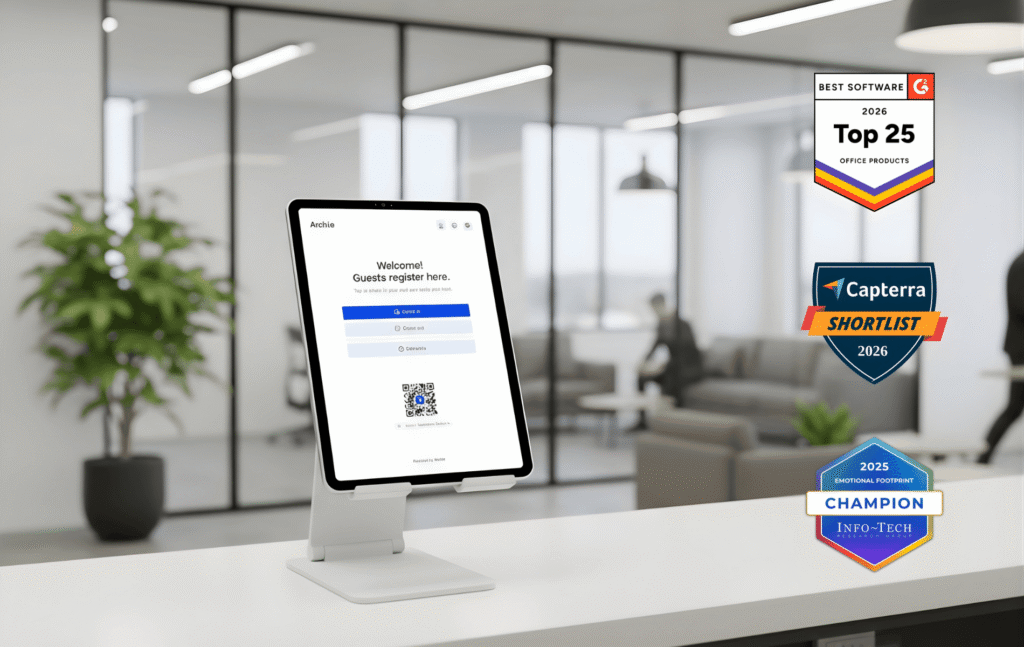
- Archie recognition
Rated #1 easiest to use system out of 199 visitor management vendors on G2.
What are Archie's Key Visitor Management Features?
With Archie Visitors, guests and managers both enjoy a smart VMS that’s easy to use.
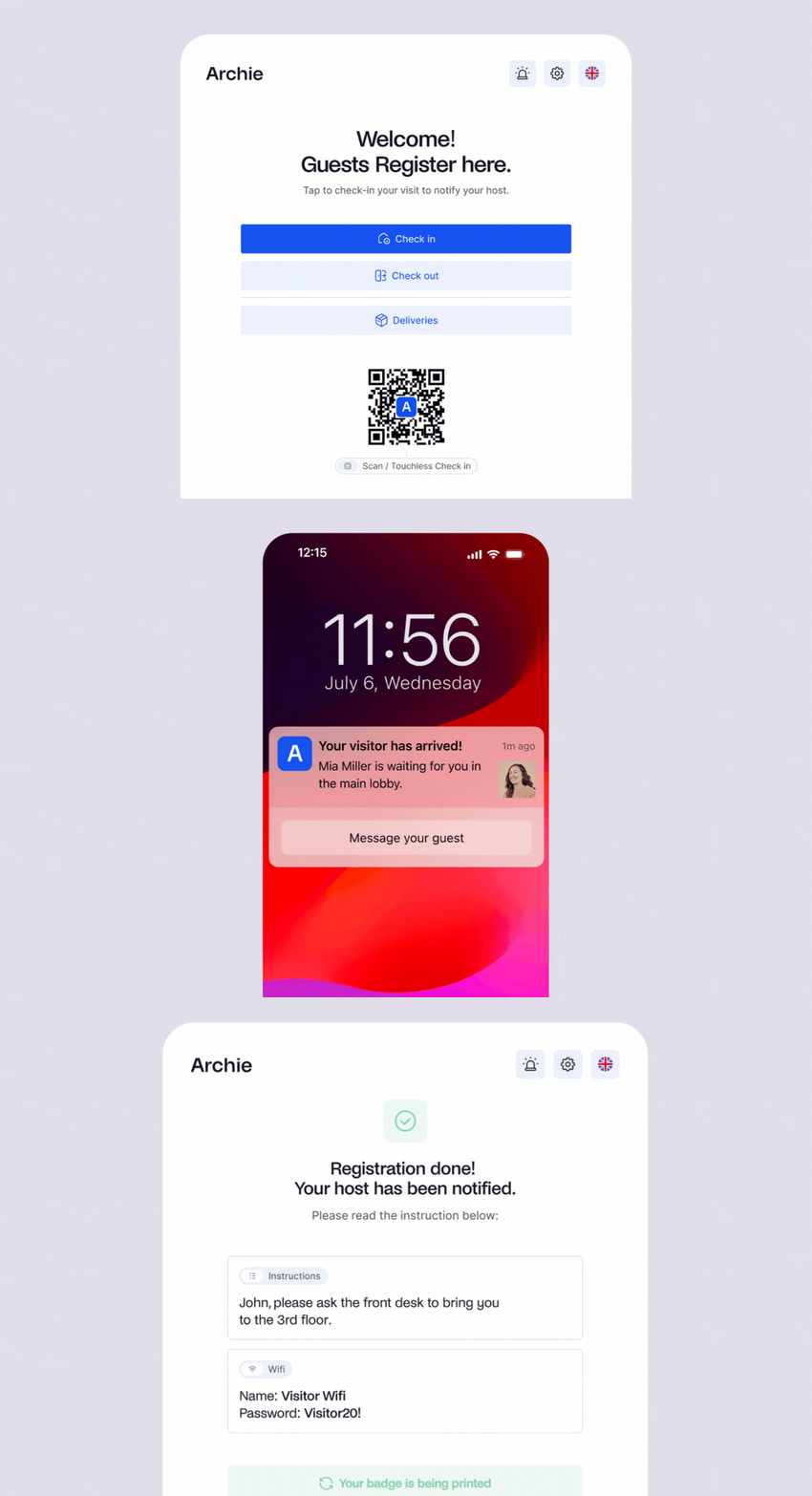
- Guest registration: Allow guests to register and complete part of check-in process ahead of time, as well as a touchless check-in option with QR codes –making check-ins faster and reducing wait times.
- Detailed visitor logs: Maintain comprehensive records of all visitors, ideal for security and traceability requirements. If you are hosting events or have peak times, this keeps people from waiting in the lobby for their turn.
- Notifications instantanées aux hôtes : informez automatiquement les hôtes lorsque leurs voyageurs s'enregistrent.
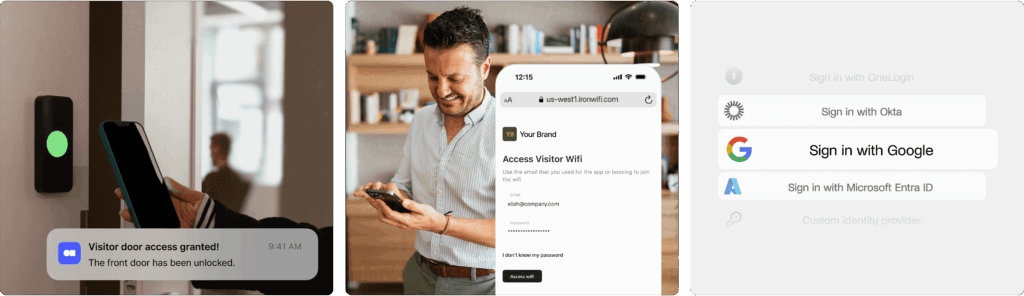
- Easy integrations: Connect Archie with tools like access control systems, Wi-Fi, and SSO – for larger offices or spaces with multiple tenants, this improves security and navigation.
- Badges visiteurs et photos : imprimez des badges pour faciliter l'identification.
- Formulaires numériques et signatures électroniques : recueillez les accords de confidentialité, les politiques et les questions personnalisées directement dans le flux, sans papier.
- Custom visitor flows: Busy offices can set different steps for contractors, interviewees, VIPs, and deliveries.
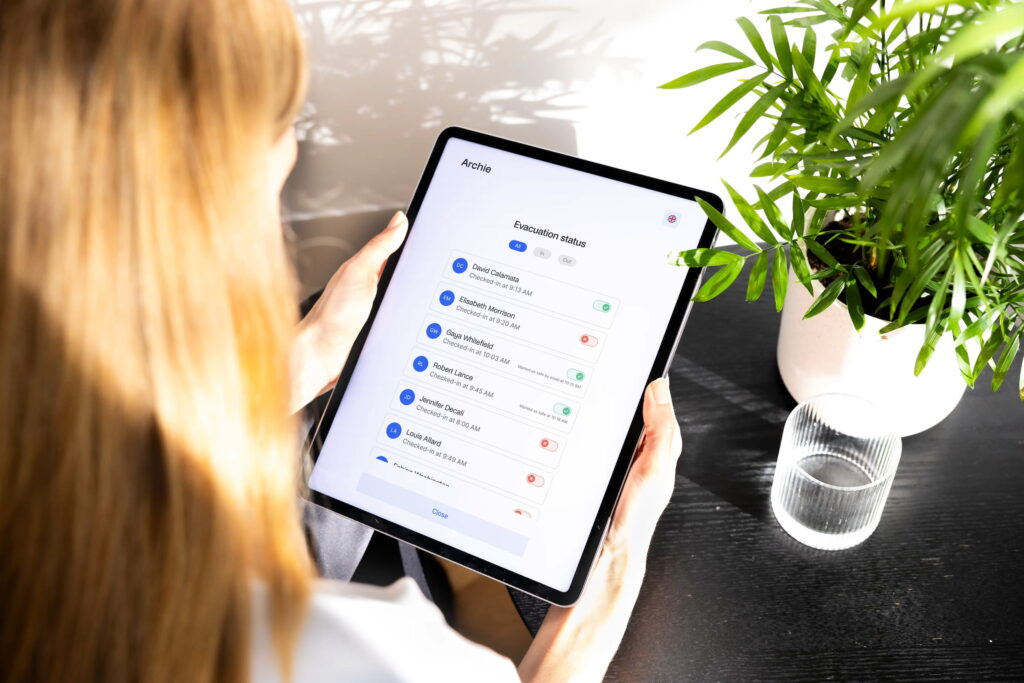
- Alertes d'urgence et appels nominaux : informez toutes les personnes présentes sur place lors d'exercices ou d'incidents et vérifiez qui a été signalé comme étant en sécurité.
- Gestion des livraisons : enregistrer les colis et avertir automatiquement les destinataires de venir les retirer.
- Custom branding & UI control: So that your guests have a seamless experience, you can customize check-in screens, badges, emails, and messages to match your brand.
- Multi-tenant visitor management: If you manage visitors across multiple companies, they can be managed from one platform while keeping each company’s hosts, workflows, permissions, and visitor records separate.
Combien coûte Archie ?
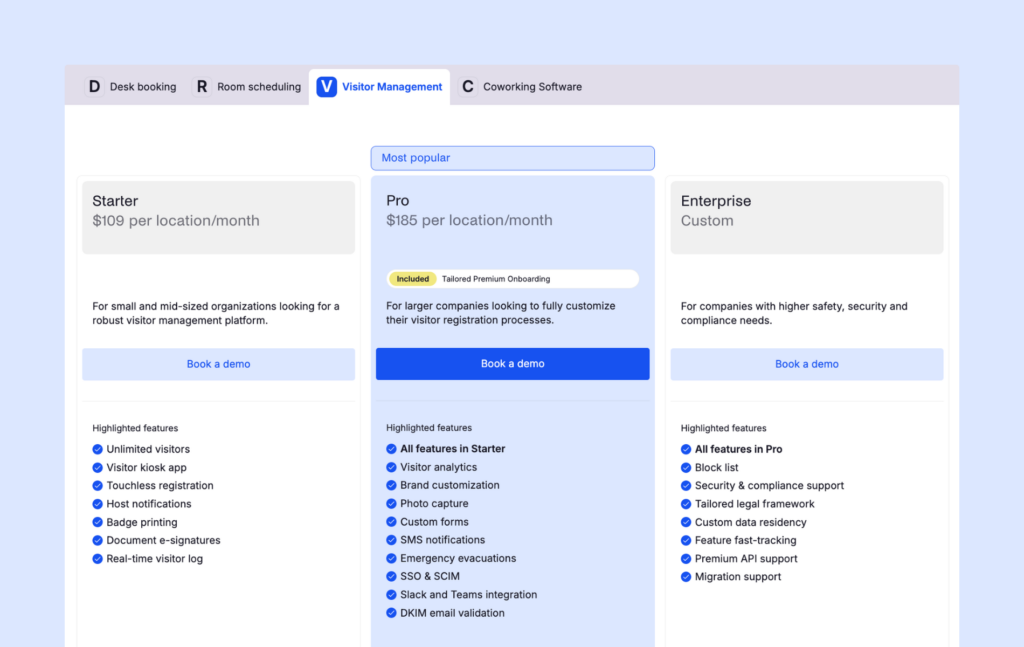
Pricing starts at $109 per location per month. All plans include unlimited check-ins, with the pricing plans being as follows:
- Forfait de démarrage : 109 $/mois par bureau
- Pro : 185 $/mois par bureau (inclut SSO et SCIM)
- Entreprise : Tarification personnalisée
The Starter plan includes visitor kiosk app, touchless registration and e-signatures. The Pro is the most popular, as it includes analytics, brand customization, Slack and Teams integrations, and more. The Enterprise tier offers custom data residency, tailored legal framework and block lists.
Archie is compatible across iPad and Android hardware, to reduce additional costs. Other hardware like badge printers and visitor kiosk stands are optional extras.
Il existe également une version d'essai gratuite, et vous pouvez réserver une démonstration pour voir Archie en action. Bien que le système de gestion des invités puisse être vendu séparément, il s'intègre parfaitement au reste des solutions Archie pour les bureaux hybrides.
What are the pros and cons of Archie?
➕ User experience: Archie’s interface is simple to set up and easy to use, so new users can get started quickly. Plus, our customer support team is known for being responsive and helpful in case you need anything.
➕ Customization: You can personalize Archie software to match your brand, from the visitor management app interface to emails and notifications.
➕ Complete workplace software: Desk and room booking, employee directories, and interactive floor plans can all live in the same place as visitor management – reducing the tech stack is one of the biggest reasons large offices opt for Archie visitor management.
➖ Not ideal for smaller teams: Archie’s automated visitor management system shines when used alongside the hybrid workplace tools, making it a great fit for medium-sized and growing teams.
➖ Advanced security features: Sites with more complex compliance requirements may not find that Archie fulfills all needs.
Archie Visitors is built for offices that are past the “just need a sign-in sheet” stage. Where it really pulls ahead is for offices already using (or planning to use) Archie for desks & room bookings. Consolidating those into one platform is an efficiency win, and it’s why larger, multi-space offices tend to get the most value per dollar.
Before you commit, consider your size and growth trajectory. Archie’s per-location, unlimited-visitor pricing rewards offices with steady or growing visitor traffic.
2. Envoy
🏆 Pour les entreprises qui ont besoin d'un contrôle avancé des visiteurs et qui ne craignent pas les prix élevés.
🔶 Score: 8.5/10
Envoy est un système robuste de suivi des visiteurs conçu pour les entreprises de grande envergure. Il vise à fournir un processus d'enregistrement sûr, efficace et flexible, ce qui en fait un excellent choix pour les entreprises qui accordent la priorité à la sécurité et à la sûreté sur le lieu de travail.
Capterra reviewers like the notification system; G2 reviewers love the sleek experience it provides visitors, although comment that the mobile app isn’t so reliable.
We give it an 8.5/10 as its G2 rating and compliance features work in its favor, but the price is one of the highest you’ll find in the industry.
Envoy is likely going to be a good choice for those running multiple locations with complex compliance needs. Its price puts it out of the consideration circle for most modern offices who are looking for a strong visitor management system but don’t need these specified features.
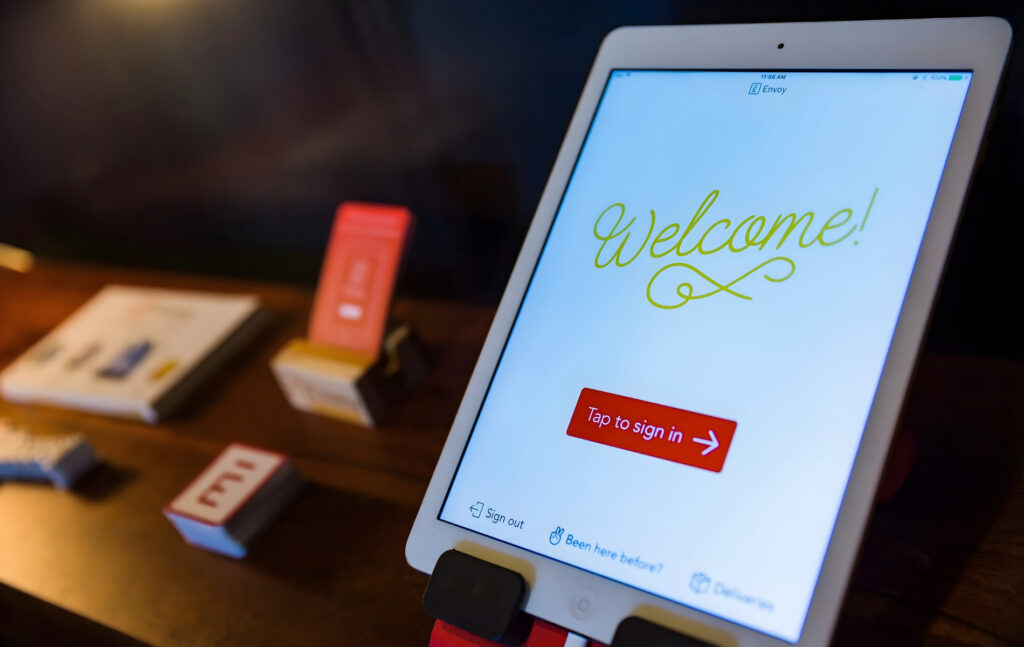
What are Envoy's Key Visitor Management Features?
- Enregistrement sans contact : permet aux visiteurs de s'enregistrer à l'aide de leur appareil mobile sans contact physique.
- Intégration facile avec les outils de communication : Envoy s'intègre à des outils tels que Slack, permettant ainsi des notifications instantanées et une communication efficace entre les hôtes et les visiteurs.
- Journaux de visite et analyses : données détaillées sur les visiteurs, notamment leurs habitudes et la durée de leur visite.
- Fonctionnalités de sécurité avancées : comprend des alertes via la liste de surveillance et la capture de photos, offrant ainsi une protection supplémentaire pour garantir que seules les personnes autorisées puissent y accéder.
The watchlist alerts and threat features are unusual in this field, and if it’s a need for your business then Envoy is built with you in mind.
How Much Does Envoy Visitors Cost?
Les tarifs d'Envoy Visitors sont fixés par emplacement, avec trois niveaux principaux :
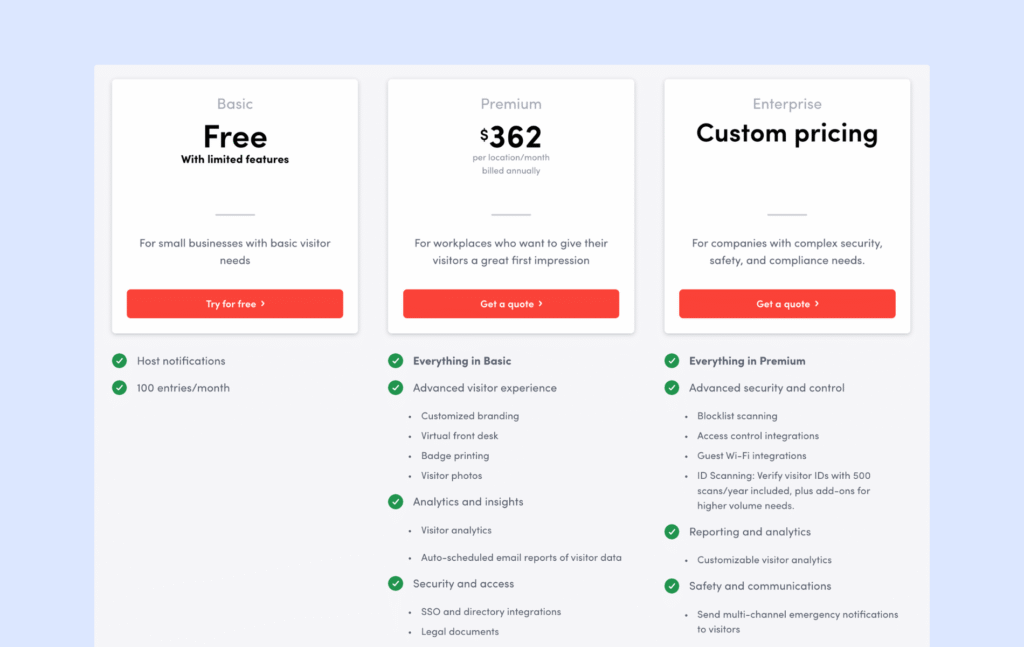
- Basique (gratuit) : fonctionnalités limitées, 1 emplacement et jusqu'à 50 employés dans l'annuaire.
- Premium ($362/location/month, billed annually): Branding, Virtual Front Desk, badges, photos, legal documents, and analytics (about $362/month when averaged out).
- Enterprise (Custom): Premium + advanced security and compliance features
The more advanced security features like blocklist scanning, access control, and Wi-Fi integrations, scheduled reports, customizable analytics, and emergency notifications are all only available within the custom tier. This means it will be upwards of $362.
Envoy’s threat notification feature is also set apart from these tiers – priced at $2 per user/month. Additional costs include a platform fee and hardware purchases.
What are the Pros and Cons of Envoy?
➕ Fonctionnalités de sécurité du bureau: Envoy accorde la priorité à la sécurité grâce à des outils tels que l'enregistrement sans contact, le contrôle des visiteurs et les alertes de sécurité avancées.
➕ Formule gratuite: pour les petites entreprises ayant des besoins basiques en matière de gestion des visiteurs, un logiciel simple d'enregistrement des visiteurs avec notifications à l'hôte est disponible gratuitement. Même si vous avez besoin de plus, cette option vous permet également de tester le tableau de bord et les cas d'utilisation basiques avant de vous engager.
➖ Coût : Les fonctionnalités professionnelles d'Envoy se reflètent dans son prix, ce qui peut poser problème aux petites entreprises qui se tournent souvent vers des alternatives à Envoy.
All of these support Envoy’s positioning: a VMS suited for sites with high compliance needs, but not the most attractive option for offices looking for a standard professional visitor management system.
If you’re considering Envoy, also be aware that the software price has fluctuated more than usual over the past year or so. Ask about potential price changes during the sales process to ensure you lock in your future price.
3. The Receptionist
🏆 Pour les petites et moyennes entreprises qui souhaitent disposer d'une borne d'enregistrement iPad simple et n'ont pas besoin d'une « plateforme de travail » complète autour de celle-ci.
🔶 Score: 8.3/10
Receptionist pour iPad est un système de gestion des visiteurs conçu pour être simple et fiable. Il fonctionne uniquement sur iPad et se concentre sur les tâches essentielles : enregistrement, badges, notifications aux hôtes et conformité de base. L'une de ses fonctionnalités phares est la messagerie bidirectionnelle entre les visiteurs et les hôtes.
One thing to keep in mind: The Receptionist is now part of Sign In App. They’ve shared plans to bring the products closer together over time, including features like desk booking and appointment scheduling. Until then, we’ll focus on The Receptionist as it exists today.
We gave it the 8.3/10 score because it is generally a well-liked system for iPad users. Yet its recent merge makes it a less stable choice.
You’ll find reviews in both Capterra and G2 who praise The Receptionist for being user-friendly, yet comment that it’s a little pricey.

What are The Receptionist's Key Features?
- Kiosque iPad : une application iPad spécialement conçue pour l'enregistrement autonome des visiteurs.
- Messagerie bidirectionnelle : les hôtes peuvent répondre aux alertes d'arrivée, et leurs réponses s'affichent sur la borne à l'intention du visiteur.
- Flux de travail personnalisés : des flux basés sur des boutons pour les clients, les entretiens, les livraisons, les prestataires et les employés.
- Badges et photos : imprimez des badges personnalisés pour les visiteurs et ajoutez-y des photos pour plus de sécurité.
- Codes PIN des employés : permettez au personnel de pointer à l'arrivée et au départ à l'aide d'un code PIN pour un suivi de présence de base.
Aperçu des tarifs
Auparavant, The Receptionist proposait une tarification par site, calculée en fonction du nombre d'employés figurant dans votre annuaire, avec des forfaits allant d'environ 60 $ à 360 $ par mois.
Cependant, suite à l'acquisition par Sign In Solutions, la tarification commence à s'aligner sur la structure commune appliquée à l'ensemble du portefeuille :
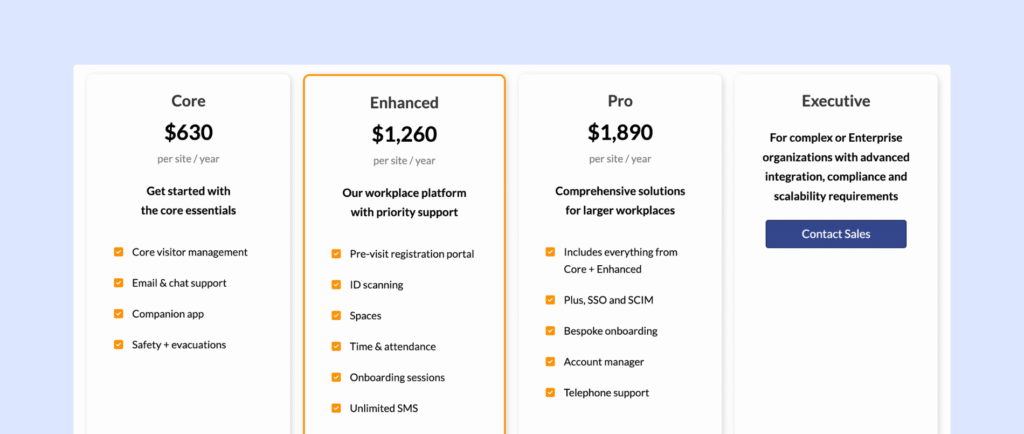
- Forfait de base : 630 $ par site et par an
- Formule avancée : 1 260 $ par site et par an
- Tarif Pro : 1 890 $ par site et par an
Cette évolution s'inscrit dans une tendance plus générale vers une plateforme plus unifiée qui regroupe la gestion des visiteurs, la sécurité et les outils de travail au sein de produits tels que Sign In App, SwipedOn et The Receptionist.
For now, some customers may still see legacy pricing depending on their plan or region, but over time, expect more consistency across all three tools. Additional costs include iPads and compatible hardware.
What are the Pros and Cons of The Receptionist?
➕ Messagerie bidirectionnelle : Lorsqu'un invité s'enregistre, l'hôte reçoit une notification et peut répondre immédiatement. La réponse s'affiche sur l'écran du kiosque, afin que les visiteurs sachent exactement quoi faire ensuite.
➕ Quick rollout and friendly support: Many reviews mention that The Receptionist is very easy to set up and most teams are up and running within a few days. Customers also often highlight how responsive and helpful the support team is.
➖ Limité aux cas d'utilisation nécessitant une sécurité renforcée. Le SSO entraîne des coûts supplémentaires, les intégrations de contrôle d'accès nécessitent souvent un travail d'API personnalisé, et il n'y a pas de scan d'identité ni de filtrage de liste de surveillance intégrés. Pour les bureaux ayant des besoins stricts en matière de sécurité ou de conformité, ces lacunes peuvent constituer un inconvénient par rapport à des solutions plus avancées. Les alternatives à Receptionist.
Its current pricing puts The Receptionist high on the list for smaller offices who need a capable VMS that matches their budget.
If you’re considering The Receptionist, ask about upcoming changes to the product due to the acquisition.
4. VisitorOS (formerly iLobby)
🏆 For security-heavy workplaces like industrial or government sites that want a ready-to-use hardware and software setup.
🔶 Score: 8.3/10
VisitorOS (anciennement connu sous le nom d'iLobby, faisant partie de la suite FacilityOS) est un système de gestion des visiteurs conçu pour rendre les lieux de travail plus sûrs et mieux organisés. Il aide les entreprises à gérer l'enregistrement des visiteurs, à imprimer des badges, à filtrer les visiteurs et à conserver des registres détaillés. Il est pratique pour les entreprises qui ont besoin de fonctionnalités de sécurité et de conformité robustes.
The reviews on G2 and Capterra are mainly positive, with people liking how fully fledged the feature list is. However, the software can be a little slow at times.
We gave is the score of 8.3 since it is one of the best in this category for security-heavy industries. Its hardware slowness holds it back for other customers.
What are the key features of VisitorOS?
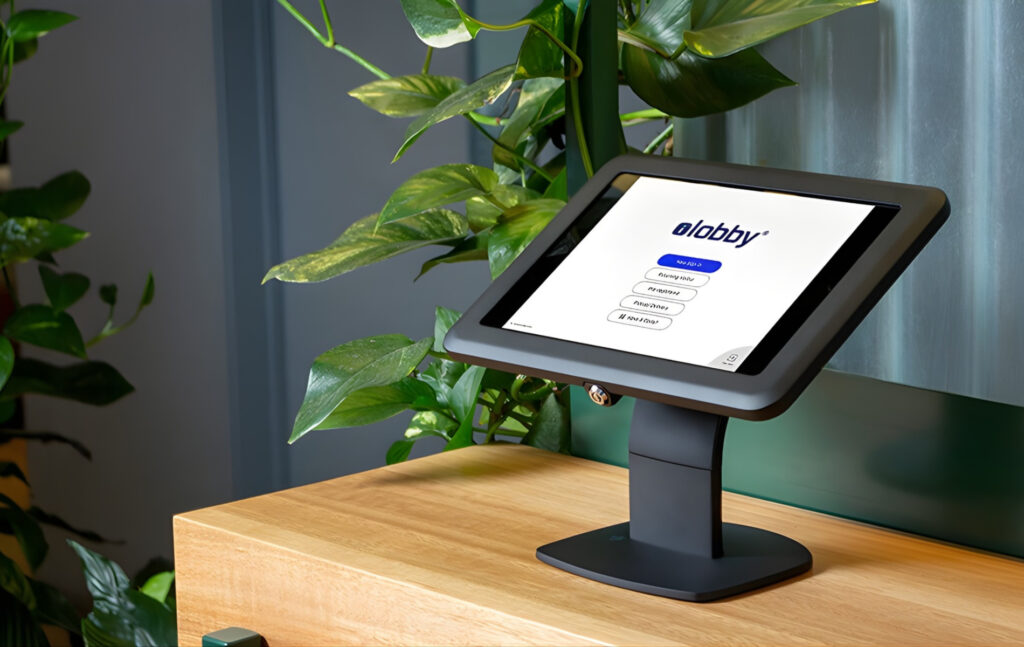
Somewhat unique in visitor management, VisitorOS comes with ready-to-use visitor management software and hardware.
- The visitor management system comes with pre-loaded and pre-configured visitor hardware and software, so no long setup time is required.
- Préinscription et notifications : les visiteurs peuvent s'inscrire à l'avance, et les hôtes reçoivent une notification dès que leurs invités s'enregistrent.
- Personnalisation : vous pouvez adapter VisitorOS à vos exigences en matière de sécurité et à vos procédures d'accueil.
- Analyses en temps réel : suivez l'activité des visiteurs en temps réel et identifiez les personnes présentes sur le site.
Combien coûte VisitorOS ?
Bear in mind that from the first tier, hardware is included in the price:
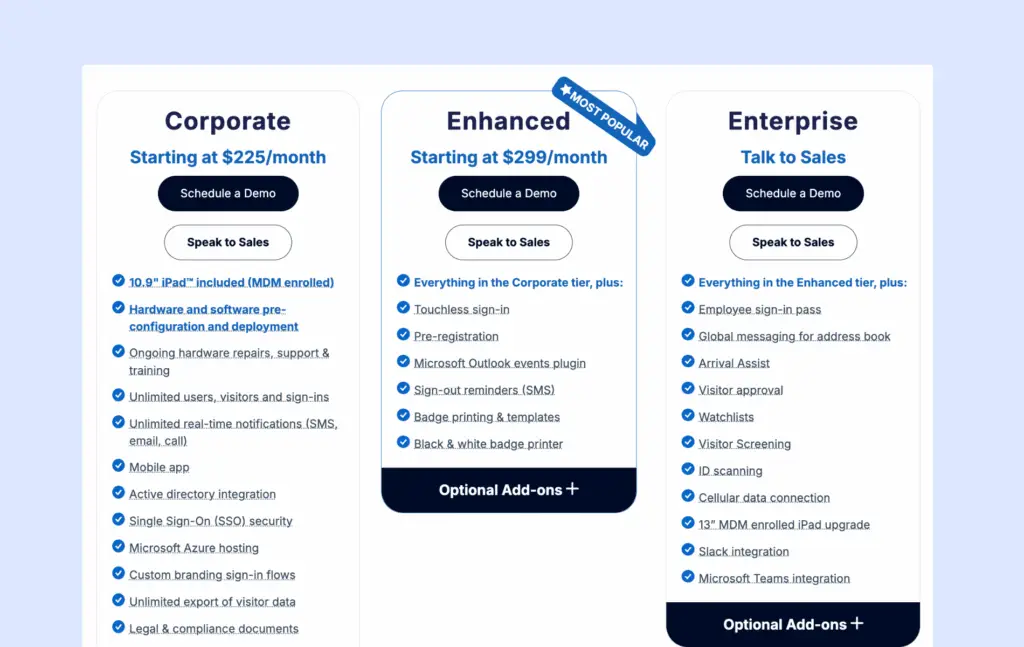
- The Corporate Plan starts at $225/month and includes everything to get started: a 10.9″ iPad with Mobile Device Management (MDM), an anti-theft mount, and pre-configured hardware and software for easy setup.
- The Enhanced plan starts at $299/month and includes added features like touchless sign-in, pre-registration, or visitor badge printing.
All plans support unlimited users and sign-ins and offer features like SMS, email, or call notifications, a mobile app, Active Directory integration, SSO, and secure hosting on Microsoft Azure.
A positive to factor in, is that ongoing hardware support, including repairs and training, is also included. Not all options who provide their own software follow through with this, so for that reason I gave it extra points.
What are the Pros and Cons of VisitorOS?
➕ Enterprise-grade compliance and security: Reviewers like the flexible workflows, ID scanning, watchlist screening, and compliance features that support regulated industries.
➕ Turnkey deployment: Because VisitorOS ships managed iPads that are already set up, you can start using the system on day one. You do not have to source, configure, or maintain your own hardware, which many reviewers appreciate.
➖ Higher price point: With pricing starting around 225 USD per month, including managed hardware, it is less budget-friendly than VisitorOS alternatives that let you bring your own devices.
Many features are paid add-ons across tiers, such as pre-registration and Outlook plugin. In practice, the final price depends heavily on which of these add-ons you bundle on top of the base license.
5. Kastle
🏆 Pour les organisations très soucieuses de la sécurité qui souhaitent qu'un seul fournisseur gère le contrôle d'accès, la gestion des visiteurs et la vidéosurveillance sur plusieurs sites.
🔶 Score: 8.1/10
Kastle est une plateforme de gestion des visiteurs et de sécurité des bâtiments qui s'intègre dans une infrastructure de sécurité gérée plus large. Au lieu d'être « simplement » une application de réception, elle relie l'enregistrement des visiteurs au contrôle d'accès, à la vidéo et à la gestion des identités, afin que les invités n'accèdent qu'aux zones auxquelles ils sont autorisés à entrer.
On G2, customers praise the support team’s responsiveness – though some note they’d prefer more self-service options so they wouldn’t need to reach out as often.
Our score of 8.1/10 is a reflection of its strengths for multi-tenant buildings, but weakness around pricing.

What are Kastle's Key Visitor Management Features?
Kastle is part of a broader security ecosystem. Its VMS offers:
- Invitations via le calendrier : planifiez les visites directement depuis Outlook ou Google Agenda.
- Codes d'accès QR automatiques : avant la réunion, les visiteurs reçoivent un e-mail contenant un code QR qui leur sert de badge temporaire valable pour le jour, l'heure et les zones concernés.
- Intégration du contrôle d'accès : les données relatives aux visiteurs sont transmises au système de contrôle d'accès de Kastle, ce qui vous permet de déterminer quelles portes les visiteurs peuvent ouvrir et pendant combien de temps, tout en conservant une trace d'audit complète.
- Codes PIN des prestataires et gestion des livraisons : attribuez des codes PIN uniques aux livreurs et aux prestataires de services.
- Vidéophone : les visiteurs peuvent appeler les locataires ou la réception pour une vérification visuelle avant d'entrer, ce système étant relié au même système d'accès.
Kastle’s strengths are keenly felt when customers want visitor management to connect to a much more sophisticated security network – so you’re reducing your integration need across sites. However, those looking for a modern and intuitive interface will not find what they’re looking for with Kastle.
How much does Kastle cost?
Kastle ne publie pas les tarifs de ses solutions de gestion des visiteurs et d'accès. Vous devez contacter leur équipe commerciale pour obtenir un devis basé sur le nombre de sites et de portes, la combinaison de services (gestion des visiteurs, contrôle d'accès, vidéo, surveillance, etc.), ainsi que les besoins en matériel et en installation.
What are Kastle's Pros and Cons?
➕ Facile à utiliser pour le personnel et les locataires : De nombreux utilisateurs affirment que Kastle est simple à utiliser au quotidien. Les administrateurs apprécient le portail clair pour gérer les horaires et les portes, et les locataires/résidents trouvent l'accès sans clé (cartes, badges, application mobile) très pratique.
➕ Strong security with reliable support: Users praise Kastle for making buildings feel safer and for the reliability of the system. A lot of reviews highlight how fast and helpful the support team is when there is an issue.
➖ Feels more like legacy software: The tech stack is older and less polished than the modern, cloud-first solutions mentioned above. However, it offers a lot of customization and configuration options, so I think the broader platform can be attractive for certain enterprise setups.
If you’re considering Kastle, you’ll have to talk to their Sales team in person for a custom quote.
6. Greetly
🏆 Pour les petites et moyennes équipes qui recherchent une solution d'enregistrement sur iPad abordable et personnalisée, qui fait office de réceptionniste virtuel.
🔶 Score: 8.0/10
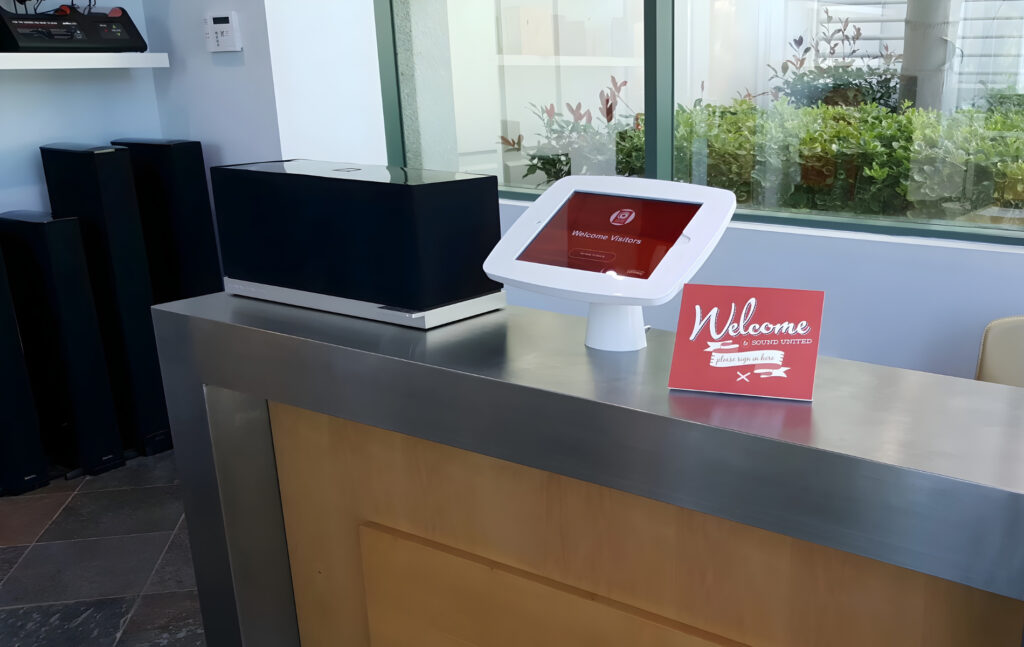
Greetly is a visitor management system that helps businesses handle check-ins quickly and easily. It offers features like touchless sign-ins, visitor badges, and notifications to hosts.
Capterra customers praise Greetly’s convenience and efficiency.
We give Greetly its 8/10 score because the drag and drop features are very user friendly, and unique in this field. However, reviews are limited, so it’s difficult to draw comparisons about the true user experience.
What are Greetly's Key Visitor Management Features?
Greetly fulfills the core expectations of a VMS, with its standout being customizability:
- Greetly’s no-code, drag-and-drop builder lets you customize visitor check-in workflows, electronic forms, and badge layouts.
- Une expérience personnalisable pour les visiteurs : personnalisez tous les aspects, du processus d'enregistrement à l'image de marque présentée aux visiteurs.
- Intégrations tierces : Greetly s'intègre aux applications de messagerie d'entreprise, aux systèmes de gestion de la relation client et aux bases de données internes.
Combien coûte Greetly ?
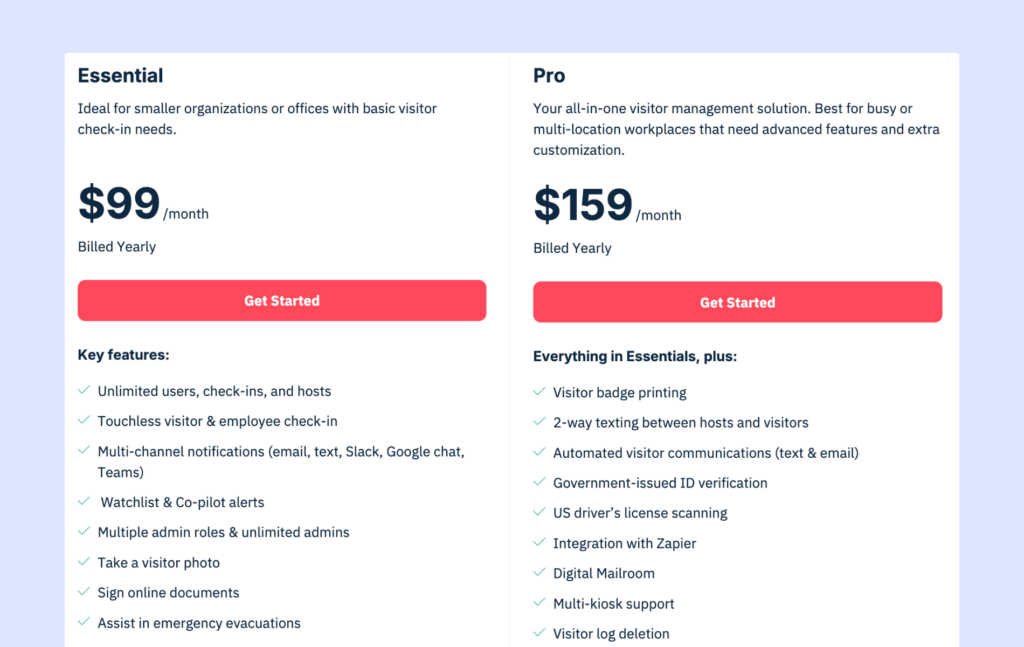
Tous les forfaits comprennent un nombre illimité d'utilisateurs, d'enregistrements et de notifications :
- Formule Essential : 99 $/mois (facturation annuelle), idéale pour les entreprises qui ont besoin d'un système d'enregistrement simple et fiable.
- Formule Pro : 159 $/mois (facturée annuellement), ajoute des fonctionnalités avancées telles que l'impression de badges, l'envoi de SMS bidirectionnels et la numérisation de pièces d'identité.
Greetly’s pricing is very competitive. Considering the features available at each tier, Greetly seems to be a very good option for small options wanting a full breadth of features.
Your hardware will incur additional costs.
What are the pros and cons of Greetly?
➕ Convivial: Greetly est facile à configurer et à utiliser, et de nombreux utilisateurs soulignent son interface intuitive.
➕ Personnalisable: la plateforme permet une personnalisation poussée, vous permettant d'adapter les processus d'enregistrement et l'image de marque à vos besoins spécifiques.
➖ Disponibilité limitée de la plateforme: Actuellement, Greetly fonctionne uniquement sur les appareils iPad, ce qui peut limiter l'accessibilité pour certains utilisateurs qui pourraient envisager d'autres alternatives à Greetly fonctionnant sur des appareils Android.
➖ Greetly’s integration strength has been called into question in one of the reviews, which complained about syncing issues.
Overall, it is harder to make a full summary of Greetly without a larger review set to draw from (at the time of writing).
7. Sign In App
🏆 For offices that want visitor management bundled with compliance tooling.
🔶 Score: 7.8/10
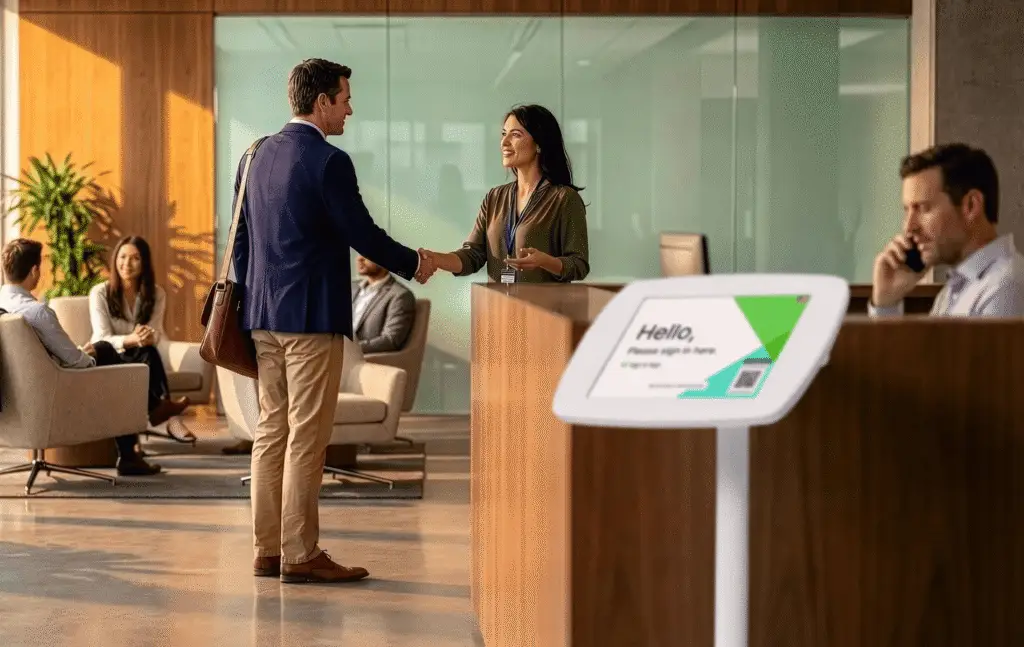
Sign In App is a cloud-based visitor and workplace management system that handles guest check-ins, staff sign-in/out, and resource booking from a single platform. It leans harder into compliance and safety than most visitor-only tools, with a Companion app that doubles as an employee sign-in and desk/room booking tool.
2026 update: Sign In App’s parent company, Sign In Solutions, has acquired both SwipedOn and The Receptionist. SwipedOn has now been sunset and features are merged with Sign In App. In future, we can expect The Receptionist to meet the same fate.
Reviewers on G2 consistently call it easy to use, though a few flag that syncing with tools like Zoom and Google Calendar can lag or misbehave.
We give it a 7.8/10 because it’s feature breadth is commendable, it scores lower than most on G2.
What are Sign In App's key features?
Sign In App runs on iPad, Android tablets, and QR-only entry points, so you’re not locked into one hardware type.
- Companion app: A free smartphone and web app that lets staff sign in/out, run evacuation roll calls, and book desks, rooms, and resources.
- Digital NDAs and policies: Collect signatures and share terms electronically as part of the check-in flow.
- Evacuation management: Get a live, up-to-date list of everyone on site during a drill or real emergency.
- Custom branding and translations: Localize the kiosk experience in 20+ languages and match it to your brand.
- Visitor pre-registration: Send arrival details and forms to guests before they show up.
How much does Sign In App cost?
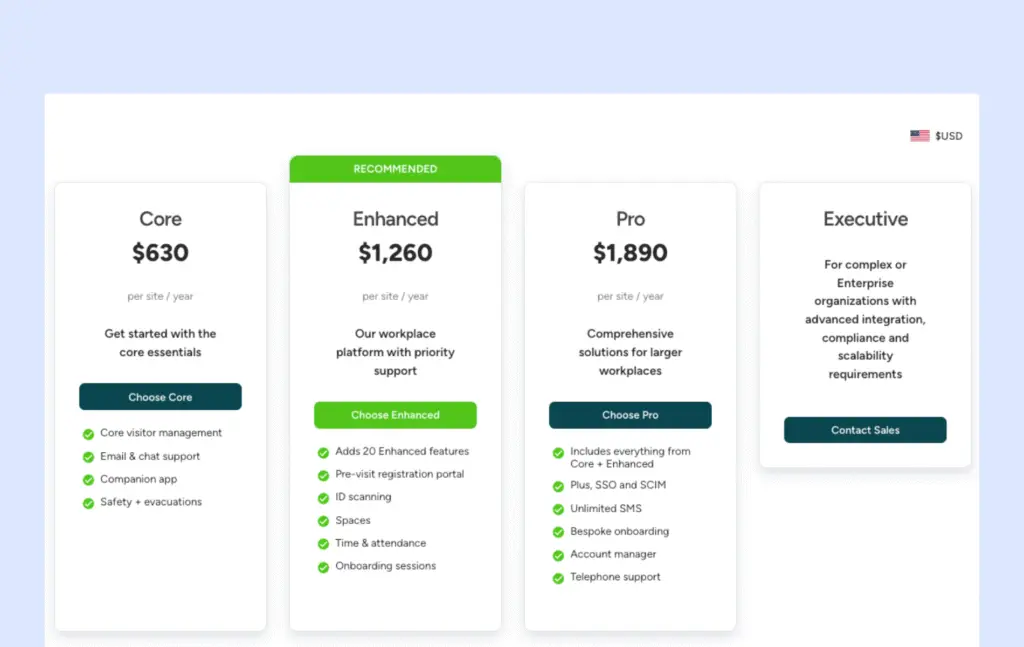
Sign In App’s pricing is now the shared structure rolling out across the Sign In Solutions portfolio, billed annually per site:
- Formule de base : 630 $ par site et par an, comprenant la gestion de base des visiteurs, un nombre illimité de visiteurs et d'employés, l'impression de badges et les notifications via Slack/Teams.
- Enhanced: $1,260 per site/year adds a pre-visit registration portal, ID scanning, spaces, and time & attendance features.
- Pro: $1,890 per site/year adds SSO and SCIM, unlimited SMS, bespoke onboarding, an account manager, and telephone support.
- Executive: Custom pricing for complex or enterprise organizations needing advanced integration, compliance, and scalability.
As with its sister products, some features (pre-registration, ID scanning, resource booking) are gated to higher tiers, so it’s worth mapping your must-haves against the plan before you commit.
What are the pros and cons of Sign In App?
➕ Easy for day-to-day use: Reviewers on G2 repeatedly describe it as simple and reliable, with a dashboard that makes it easy to see who’s on-site.
➕ Broader than check-in alone: The Companion app extends the product into staff sign-in and desk/room booking.
➖ Reliability: Some users note that syncing with other tools like Zoom and Google Calendar can be slow or inconsistent, which is worth testing against your own stack before rolling it out.
Like Archie, Sign In App is a positive choice for hybrid offices, since the workplace features are baked into the same platform.
If you’re considering Sign In App, keep an eye on how pricing and features shift as The Receptionist get folded into the same structure.
8. Eptura Visitor
🏆 Pour les grandes organisations réglementées, multi-sites, qui sont prêtes à déployer une plateforme d'entreprise plus lourde.
🔶 Score: 7.9/10
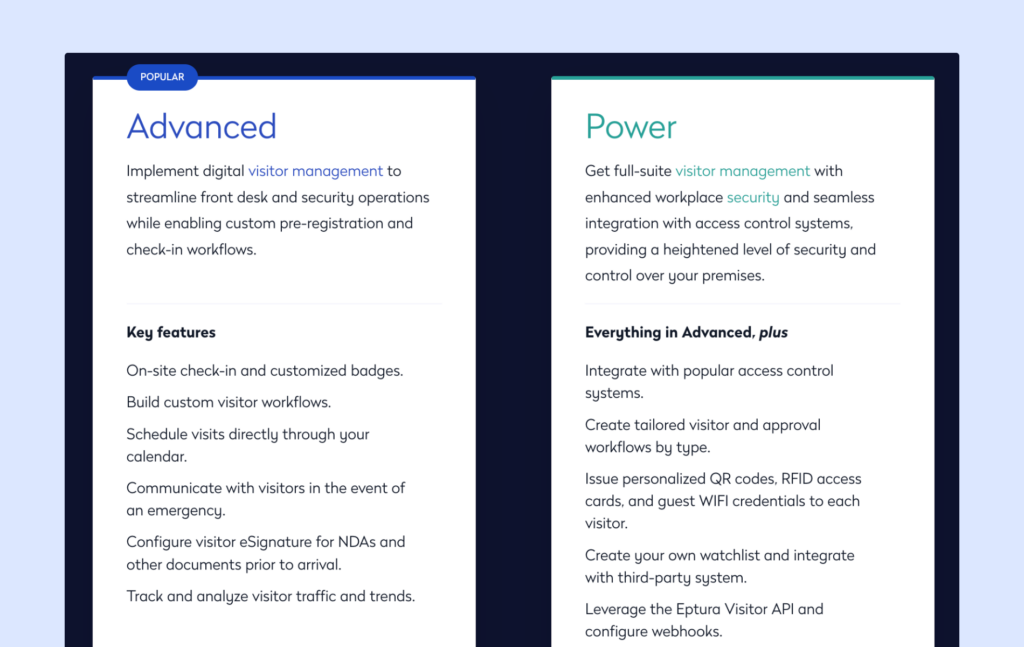
Eptura Visitor (anciennement Proxyclick) est un système de gestion des visiteurs destiné aux sièges sociaux et aux sites de type campus. Il met l'accent sur la flexibilité des flux de travail, un générateur visuel de flux de travail et une intégration poussée avec les systèmes de contrôle d'accès.
G2 reviewers love the ease of use, which I think is always commendable for an enterprise-focused product. However a Capterra user flagged that the team can be a little unresponsive.
For us, it earns a score of 7.9 due to user feedback and its regulatory strengths.

What are Eptura Visitor's key features?
- Self-service check-in: iPad and Android kiosks with pre-registration, QR codes, and branded flows, designed for busy offices where someone is. not always available on the front desk.
- Visual workflow builder: Design custom check-in steps in a drag-and-drop editor – includes approval gates and language handling for personalized visitor flows.
- Notifications de l'hébergeur : alertes par e-mail, SMS, Slack et Microsoft Teams.
- Strong security and compliance features: Watchlist screening will check visitors against internal and external watchlists. ID verification matches identification to validate before granting access.
- Prise en charge de plusieurs entrées : associez plusieurs halls d'accueil et entrées à un même site.
Combien coûte Eptura Visitor ?
Eptura Visitor has two main plans: Advanced and Power. Try as I might, I couldn’t find details of prices listed publicly. You need to speak with sales for a quote.
Rough estimates put Eptura Visitor at around 7,500 USD per year for a base setup, plus implementation fees. Free trials are not on offer.
There can also be separate implementation fees, depending on your setup and integrations.
What are the pros and cons of Eptura Visitor?
Pros
➕ Flexible, enterprise-ready workflows: Reviewers like that you can create tailored flows for different visitor types, such as guests, contractors, and deliveries.
➕ Fonctionnalités avancées en matière de sécurité et de conformité : la vérification des listes de surveillance, les contrôles d'identité, les alertes d'urgence, les intégrations de contrôle d'accès et les journaux d'audit détaillés contribuent tous à renforcer la sécurité et à favoriser la conformité dans les secteurs réglementés. Vous trouverez des fonctionnalités similaires dans certaines alternatives, mais Eptura Visitor / Proxyclick reste l'une des options les plus performantes dans ce domaine.
Cons
➖ Time to value and overall cost: Product research and estimates suggest a longer pre-sales and implementation cycle, which can slow things down if you are trying to fix front desk issues quickly. On top of that, pricing is quote-based. Price is a leading factor driving some evaluators to Eptura Visitor alternatives.
If you work in a regulatory industry where compliance and security regulations are woven into most aspects of your business, and budget is not of great concern, Eptura Visitor could be a great choice. For all others, however, there is likely a better option.
9. Lobbytrack
🏆 Pour les petites organisations qui recherchent un système de gestion des visiteurs flexible, multiplateforme et évolutif.
🔶 Score: 7.8/10
Lobbytrack is one of the oldest visitor management systems in our list, tracing back to 2007. It’s a VMS best suited to mid-size offices needing basic guest management services.
Lobbytrack supports basic check-ins on iOS, Android, and Windows kiosks, and covers some more advanced features, like watchlist screening and queue management. That said, reviews mention that Lobbytrack’s sometimes lacks in functionality and polish.
For this reason we give it a 7.8/10. Reviews on G2 Capterra describe it as ‘simple and effective’, although most reviews are a few years old.
What are Lobbytrack's key features?
Lobbytrack offers core visitor management software that fits a variety of customers with:
- Applications par rôle : des applications distinctes pour l'accueil, les employés et les agents de sécurité, afin que chaque groupe puisse accéder aux informations qui lui sont destinées.
- Numérisation des pièces d'identité : numérisez les permis de conduire et les passeports à des fins de vérification d'identité, ce qui s'avère utile lorsque vous avez régulièrement recours à des prestataires ou à des chauffeurs sur le chantier.
- Impression de badges : créez des badges personnalisés avec des photos et les détails de la visite.
- Notifications de l'hôte : envoyez des alertes par e-mail, SMS ou via des notifications dans l'application.
- Queue management: Keep busy lobbies organised by managing visitor queues – a solid asset particularly for those hosting events.
Combien coûte Lobbytrack ?
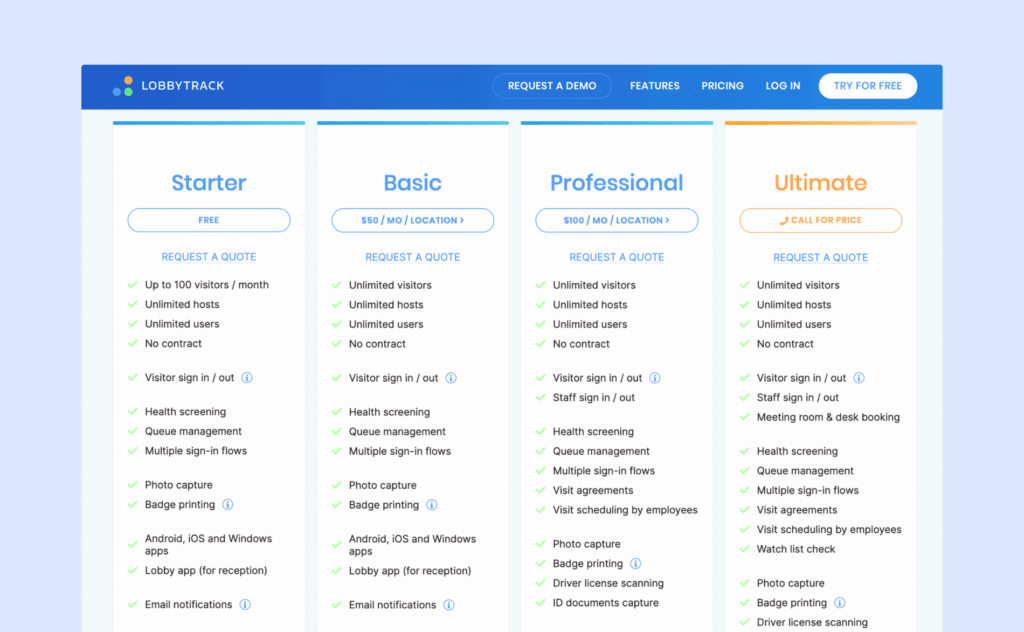
Lobbytrack utilise une tarification échelonnée en fonction des fonctionnalités et de l'échelle. Tous les forfaits comprennent un nombre illimité d'hôtes et les fonctionnalités de base de gestion des visiteurs :
- Starter : Gratuit (fonctionnalités limitées, 1 emplacement)
- Basic: 50 USD per month per location, includes unlimited visitors
- Professional: 100 USD per month per location, includes ID scanning and capture
- Enterprise: Custom pricing, includes watch list check and staff sign-in/sign-out
Advanced options like ID scanning, watchlists, and evacuation tools are available on the higher tiers. Since Lobbytrack is compatible across devices, you have more flexibility with hardware purchases.
For multi-location sites, there are discounts: 20% off the per location price for 5+ locations, 40% off the per location price for 10+ locations.
What are the pros and cons of Lobbytrack?
Pros
➕ Rapide à mettre en place et simple pour les visiteurs : Les équipes apprécient Lobbytrack car il est rapide à déployer et facile à utiliser à la réception. Les évaluateurs affirment que les écrans des bornes sont clairs, que le processus d'enregistrement est simple pour les visiteurs et que les hôtes reçoivent des alertes par e-mail en temps réel lorsque leurs invités arrivent.
➕ Bonnes options de sécurité : Les équipes chargées de la sécurité et des opérations préconisent des mesures de protection pratiques. La capture d'identité et la vérification des listes de surveillance sont disponibles, et certains utilisateurs professionnels soulignent le lien direct avec le contrôle d'accès pour émettre des cartes temporaires et les désactiver automatiquement à la déconnexion ou après un certain temps.
Cons
➖ Admin UI feels dated, and some flows are clunky: Some reviewers mention stability and UX issues. A few note that the system can occasionally disconnect or need a restart, and parts of the admin and desktop experience feel dated or awkward to use.
Since there are several reviews commenting that Lobbytrack’s interface can lack polish and functionality ebbs, I wouldn’t recommend it for a busy office. Lobbytrack’s pricing makes it an attractive option for mid-size to multi-location sites who need a basic VMS.
10. Sine (by Honeywell)
🏆 For sites with frequent contractors needing permits, access control, and more.
🔶 Score: 7.6/10
Sine positions itself around contractor and compliance management, rather than just a front-desk VMS system. Sine is sold under the Honeywell brand, so you’ll see that name show up during your research, also.
This is a good option for sites with many contractors coming in and out. Sine Workflows let teams build custom induction, permit, inspection, and qualification-tracking processes.
Reviews on G2 consistently commend Sine’s customer support team, however hardware setup is a recurring friction point. For this reason, we give Sine a score of 7.6.
What are the key features of Sine?
- Sine Workflows: I think this is the true selling point for those whose contractor needs are complex. Custom induction, permit, inspection, and qualification-tracking processes – it’s possible to block check-in if requirements aren’t met.
- iPad kiosks: Visitor invitations, badge printing, host notifications, and live on-site lists.
- NDAs and compliance forms signed digitally as part of check-in.
- Custom visitor types: Separate flows for visitors, staff, and contractors.
- Entra ID sync, SAML SSO, and Outlook integration.
- API access and visitor screening: Available on the Large tier and up.
Combien coûte Sine ?
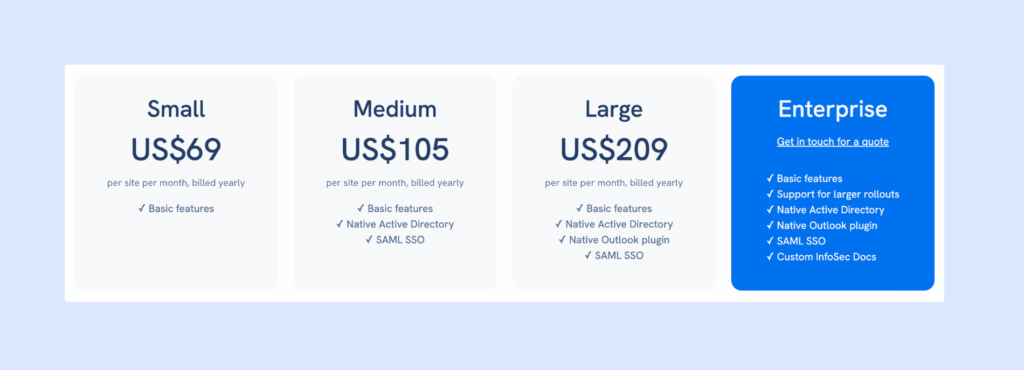
Sine publishes the base price of each tier, billed yearly. However, Sine Workflows – which is a key differentiator for many looking in-depth into this solution – is sold as a separate add-on.
- Small: $69/site/month
- Medium: $105/site/month — adds Entra ID sync, SAML SSO, Outlook integration
- Large: $209/site/month — adds API access, visitor screening, access control
- Enterprise: Custom quote
Hardware is extra: a starter pack (iPad, stand, printer, labels) is $978. Reviewers also comment that the setup fee is high and it can be quite a jump in price to the Enterprise tier.
What are the pros and cons of Sine?
Pros
➕ Genuine compliance depth: Workflows that connect check-in with inductions or permits necessary particularly for businesses with many contractors coming through the door.
➕ Responsive support during setup: Reviewers consistently praise how helpful support is when getting hardware, forms, and permissions configured.
Cons
➖ Pricing is opaque with the best features demanding extra fees: Full pricing isn’t visible without talking to sales, several features are tier-gated, and hardware/add-on costs push up the initial price.
➖ Hardware and setup fee as well as add-on expense makes this one of the less budget-friendly options.
If you are need of bespoke contractor workflows, Sine could be a good option for you. Confirm current tier pricing and Workflows add-on costs directly, as this is clearly an area where published numbers can shift.
11. Visitly
🏆 For small offices that want a straightforward, iPad-based visitor check-in.
🔶 Score: 7.3/10
Visitly is a cloud-based visitor management system focused on front-desk check-ins and workplace security, commonly used by small and mid-sized companies in tech, healthcare, manufacturing, and nonprofits.
In August 2026, Visitly changed their plans, with a Starter plan that is more expensive, but with unlimited visitors and employees.
Reviewers on G2 consistently praise how easy and quick the setup is. However some negative reviews about performance issues pull the average G2 rating down to 4.3/5. This is why we score it a 7.3 overall.
What are the key features of Visitly?
- Custom sign-in flows: Different check-in paths for visitors, staff, and contractors.
- Watchlist screening and ID scanning: Real-time checks plus facial recognition for faster check-ins – which has real appeal for offices who regularly receive repeat visitors.
- Badge printing and photo capture: Standard front-desk basics, included from the base plan.
- Emergency evacuation lists.
- Integrations: Slack and Microsoft Teams, although two-way calendar syncs are gated to the Enterprise tier.
How much does Visitly cost?
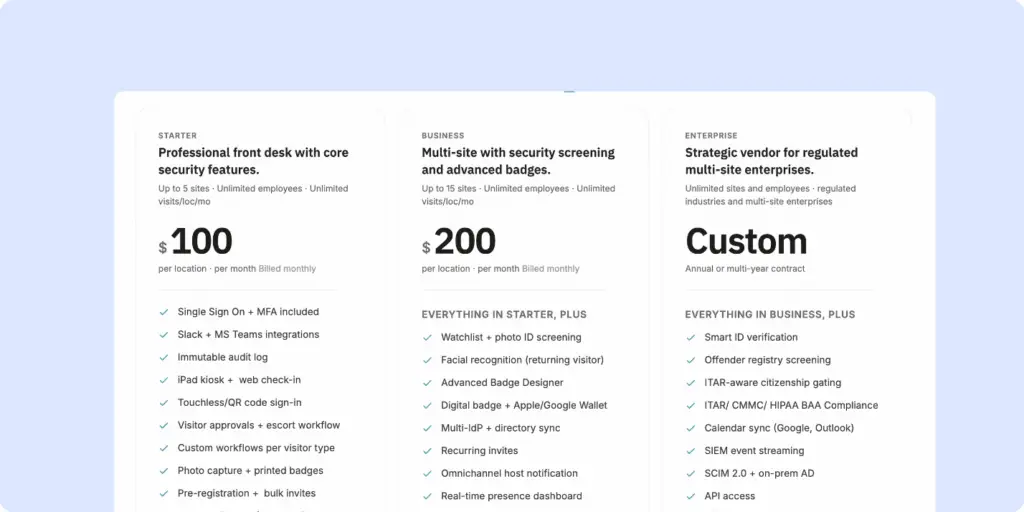
Visitly uses per-location pricing, billed annually. Every tier includes unlimited visitors:
- Starter: $100/month/location, unlimited employees and unlimited visits (it was previously limited to 50 and 100 respectively)
- Business: $200/location/month with watchlist, ID screening and facial recognition included
- Enterprise: custom for multi-site enterprises, includes ITAR compliance and offender registry screening
Take note that Visitly is only compatible with iPads.
Paying annually saves you roughly 20% per tier. Visitly updated its pricing and plans mid-2026. Although each tier is now more inclusive (no longer restricting visitor count and with more advanced features included within every plan), the price jump is high for existing customers or large companies who don’t need a complex product.
What are the pros and cons of Visitly?
➕ Easy, fast setup: Reviewers repeatedly describe getting Visitly running on existing hardware in minutes.
➕ Solid security basics included early: Watchlist screening, ID scanning, and facial recognition are available.
➖ Privacy concerns: Facial recognition requires due diligence with consent and impact assessment to avoid any legal issues (this of course varies per jurisdiction).
➖ Glitching and freezing: Some users report that the app gets overloaded easily and needs resetting. The customization is not intuitive and printer connections leave something to be desired.
Visitly’s new price update makes its Starter tier a competitive choice for mid-size offices who want an affordable visitor management system that handles SSO, Slack integration, and custom workflows from the go. That said, the warnings about software issues from reviewers makes me hesitant to recommend this to larger spaces (since busyness seems to overload the system).
What criteria were used to rank these visitor management systems?
On a high level, here is the criteria we used to assess each visitor management system:
- User sentiment (G2 and Capterra ratings): Measures how real customers rate day-to-day use. If reviewers consistently flag the same friction point — slow support, sync issues, an admin panel that feels dated — this affects the total score.
- Feature depth: Measures how much of the core VMS job (check-in, badges, notifications, logs) is handled natively versus bolted on. Also assesses suitability for security-focused and/or compliance heavy workplaces.
- Pricing transparency and value: Although packages are different across the board, and pricing structure is not identical, an honest assessment of price to value is made per option.
- Ease of use: There are several factors at play here: i) how easy it is to set up; ii) how easy it is for visitors; iii) how easy it is for front desk and hosts.
Feature depth was given 20% weight, pricing was given 30% weight, user reviews were given 40% weight, and 10% went on a judgment call of usability.
Which visitor management system is best for your type of workplace?
For modern offices which need a professional, secure visitor management system that is also easy to use, Archie is the best VMS.
For high-security sites who are willing to allocate a higher budget to an enterprise product, Envoy is a strong choice.
If you are looking for a basic iPad product, that is reliable and covers the core features of a VMS (host notifications, kiosk compatibility), The Receptionist should be high on your list.
If you are looking for a visitor management system that primarily focuses on contractor visits, then Sine is specifically designed around this purpose.
If you are looking for a free VMS and don’t host too many guests, Envoy Visitors has a basic tier that is free to use for up to 100 entries a month.
Quels sont les secteurs qui tirent le plus profit des logiciels de gestion des visiteurs ?
De nombreuses entreprises peuvent tirer profit d'un logiciel de gestion des visiteurs, mais les secteurs qui utilisent le plus ces systèmes sont ceux qui accueillent régulièrement des visiteurs, ont des besoins en matière de sécurité, doivent se conformer à certaines exigences ou ont des réceptions très fréquentées. Par exemple :
- Corporate offices and hybrid workplaces: Visitor management software for corporate offices helps manage guests, interviews, contractors, and employees coming in for meetings. It also helps notify hosts quickly and keeps reception running smoothly.
- Coworking spaces and flex offices: They have a constant flow of members, guests, day-pass users, and deliveries. Coworking visitor management software helps with check-ins, guest policies, badges, and tracking who is on-site.
- Healthcare and clinics: Hospitals, clinics, and medical offices need a secure and organized way to manage patients, visitors, vendors, and contractors. Visitor management software for healthcare can also support privacy and compliance processes.
- Manufacturing and warehouses: These sites often have strict safety rules and a lot of contractors, delivery drivers, and vendors. Visitor management software can collect safety forms, print badges, and track visitors who are on-site during emergencies.
- Schools and universities: Education sites need to manage parents, vendors, contractors, and campus visitors while keeping students and staff safe. Visitor management software for schools can make this much easier.
- Government buildings and public sector offices: These organizations often need stronger security, visitor logs, and compliance records. Visitor management systems help standardize the process and improve accountability.
- Financial services and legal offices: Banks, insurance firms, and law offices often handle sensitive information. Visitor tracking, badges, and check-in records help improve security and create a more professional experience.
- Tech companies and R&D facilities: These workplaces often host candidates, clients, and vendors while protecting confidential projects and equipment. Visitor management software helps balance a smooth welcome with tighter access controls.
- Commercial real estate and multi-tenant buildings: Office towers and shared buildings need a simple way to manage visitors across multiple tenants. A visitor system can support front desk teams, tenant notifications, and building-wide records.
What is a Visitor Management System (VMS)?
A visitor management system (VMS) is any digital system you have in place which handles guests in a workplace.
How a visitor management system works:
- A visitor management solution keeps a detailed visitor log of who enters the building, when they arrive, and how long they stay.
- It can issue visitor badges, work alongside access control systems, and limit where visitors can go inside the building. That means only authorized guests can access specific areas, helping you protect both people and sensitive spaces.
- Visitor management systems also save everyone time and make scheduling visits easier by automating the visitor management process. Pre-registration and self-check-in mean visitors don’t have to wait around, and your front desk staff can focus on other tasks. The system tracks visit times and schedules, making it easier to plan ahead, monitor trends, and manage your workplace more efficiently.

Are Visitor Check-In, Guest Management, and Sign-In Software the Same as a Visitor Management System?
Not exactly, though people use these terms interchangeably often enough that the lines blur. Here’s the actual distinction:
- Visitor sign-in system refers to the check-in part only — the moment a guest arrives and logs their visit, whether that’s on a tablet, a visitor kiosk, a QR code, or a digital replacement for the old paper logbook.
- Visitor management software is the broader system. Sign-in is one piece of it, but it also covers what happens before and after: pre-registration ahead of arrival, automatic host notifications, badge printing, document signing for NDAs or safety forms, and visitor logs and reporting you can actually run analysis on.
So “guest management” and “visitor check-in” usually point at that narrower sign-in function, while “visitor management system” is the term for the full workflow. Worth knowing before you start comparing vendors — a tool marketed as a “sign-in app” may only solve the front-desk moment, not the security, compliance, and reporting layer a full VMS is built to handle.
What are the benefits of a visitor management system?
The benefits of office visitor management systems are pretty straightforward. It saves time, tightens security, and creates a professional first impression. The following are all examples of how a strong VMS can benefit a workplace, however, different sites and industries will have different priorities:
- Faster check-ins: Removes the bottleneck of a manual sign-in sheet or a receptionist calling around to track down a host.
- Automatic host notifications: Employees feel this one daily – an instant, easy solution to avoid any time wasted and reduce front desk labor.
- Tighter building security: Removes the risk of unlogged or unverified visitors moving through the building unchecked. Facilities and security teams feel this most.
- Less admin work for front-desk staff: Removes the repetitive parts of the job — re-entering the same visitor details, printing badges by hand, chasing down NDAs on paper.
- Digital visitor logs: Compliance and security teams feel this the most, automating records with searchable timestamps.
How Big Is the Visitor Management System Market?
Mordor Intelligence says the software component held 71.4% of market share in 2025, and cloud deployments held 66.34%, which matches what many workplaces are buying today: easier rollout, easier updates, and better multi-site management. It also notes healthcare led by the end-user industry (24.9% of 2025 revenue), while North America remained the largest region, and Asia-Pacific is the fastest-growing.
Another clear trend is the move toward touchless visitor management and mobile-friendly access, while hybrid setups remain very common. In HID’s 2025 report, 61% of security leaders said mobile identity growth is a top trend, and nearly two-thirds had already deployed (37%) or planned to deploy (32%) mobile credentials. At the same time, 84% still use a mix of mobile and physical credentials, and 48% still require visible ID in their facilities. HID also reports a broader shift toward unified, software-driven security platforms, with 67% of security leaders and 73% of integrators/consultants reporting that move.
Comment choisir le bon logiciel de gestion des visiteurs
1. Comprendre vos besoins et vos exigences
To pick a visitor management system that fits your needs without hidden fees or surprises, ask yourself:
- Combien de visiteurs ai-je habituellement ?
- Qui sont mes visiteurs (par exemple, clients, livreurs, candidats à un emploi) ?
- Dois-je suivre des étapes d'enregistrement différentes selon le type de visiteurs ?
- Dois-je suivre les visiteurs pendant leur visite ou les filtrer avant leur arrivée ?
- Ai-je besoin d'un badge visiteur ?
- Serait-il utile d'envoyer des alertes ou des messages d'urgence aux visiteurs ?
- Les visiteurs doivent-ils signer des documents tels que des accords de confidentialité ?
- La tarification est-elle claire et le système de gestion des visiteurs peut-il évoluer avec mon entreprise ?
- Réfléchissez au temps et à l'argent (le cas échéant) que vous pouvez consacrer à la configuration et à la formation.
- Avec quels outils, tels que Slack ou les systèmes d'accès aux portes, le système de gestion des visiteurs doit-il fonctionner ?
- Puis-je adapter le logiciel de gestion des visiteurs au fonctionnement actuel de mon lieu de travail ?
2. Évaluer minutieusement les plans tarifaires
Selon les fonctionnalités dont vous avez besoin, les systèmes de gestion des visiteurs coûtent entre 29 et 350 dollars par site et par mois. Ils peuvent être vendus sous forme d'outils autonomes ou d' en tant que modules complémentaires pour solutions de bureau hybrides.
Lorsque vous examinez les offres tarifaires, vérifiez ce qu'elles comprennent. Certaines offres moins chères peuvent ne pas inclure certaines fonctionnalités telles que l'analyse du lieu de travail ou l'impression de badges, qui peuvent être réservées aux offres plus coûteuses.
Par exemple, VisitorOS inclut le SSO dans son forfait standard, mais ne propose l'impression de badges que dans son forfait Premium. Envoy nécessite les forfaits Premium ou Enterprise pour bénéficier de fonctionnalités telles que les analyses et les intégrations, ce qui peut augmenter les coûts. Comparez attentivement les forfaits afin de trouver celui qui correspond le mieux à vos besoins.
3. Rechercher les avis des utilisateurs
Consultez les témoignages et les études de cas pour découvrir comment d'autres entreprises tirent parti du système de gestion des visiteurs. Consultez des sites d'avis tels que G2, Capterraou SaaSworthypour obtenir plus d'informations sur la fiabilité, la facilité d'utilisation et le service client. Une équipe d'assistance réactive et serviable est essentielle si le système présente une courbe d'apprentissage plus raide.
4. Essayez avant de vous engager
La plupart des systèmes de gestion des visiteurs proposent des démonstrations en direct et des essais gratuits. Ces opportunités vous permettent de tester les fonctionnalités, d'évaluer la facilité d'utilisation et de vous faire une idée du service client de l'entreprise. Profitez-en pour voir les plateformes en action et vous assurer qu'elles répondent à vos besoins avant de choisir celle qui vous convient le mieux. Vous avez tout compris !
What are the key visitor management system features to look for?
While the nuances of different visitor management system features vary across providers, these are the most typical expectations:
Third-party integrations
These allow the system to connect with the tools your business already uses — like access control systems, Wi-Fi, calendar apps, communication tools, and even CRM or HR platforms.
Pre-registration
Letting hosts register visitors in advance saves time and helps everything run more smoothly. Visitors can get directions, safety info, and even fill out forms before they arrive.
Flexible check-in options
Look for a system that supports a self-service kiosk, tablets, or phones — as well as manual check-in for walk-in visitors. The more options, the better for different visitor types.
Instant host notifications
As soon as a guest checks in, the system should automatically alert their host via email, SMS, or app notification so there’s no guesswork or waiting around.
Visitor log and reporting
The system should keep a detailed, time-stamped record of all check-ins and check-outs. This log helps with security, audits, and understanding visitor patterns.
Emergency notifications & evacuation support
Look for a system that includes emergency notifications, which can instantly alert all visitors and employees if there’s a fire, lockdown, or other urgent situation. These alerts can be sent via SMS, email, or even push notifications, helping everyone stay informed and respond quickly.
Deliveries handling
Some VMS platforms can also manage package deliveries — sending notifications to employees when something arrives for them. It’s a great bonus for busy front desks.
Customization options
Every company is different. It’s helpful if the VMS lets you customize things like sign-in screens, forms, visitor badges, and messages so it feels like a seamless part of your brand.
What questions should you ask when evaluating a visitor management software vendor?
✅ Does it offer easy and flexible check-in options? )A tablet at the front desk, a self-service kiosk, or a QR code visitors can scan on their phone.) Does it also support manual check-in by a receptionist, especially for walk-ins, VIPs, or visitors who need assistance?
✅ Does it support pre-registration? Can hosts send instructions in advance, share directions, and collect forms before arrival?
✅ Does it provide instant host notifications? Does it notify the host right away when their visitor arrives — via email, SMS, Slack, Microsoft Teams, or another tool your team already uses?
✅ Does it offer photo capture and badge printing? If security matters, can the system capture a photo and print a visitor badge on the spot?
✅ Does it support digital forms and e-signatures? If guests need to sign an NDA, waiver, safety policy, or screening questionnaire, is it easy to do digitally during check-in?
✅ Does it offer real-time visitor tracking? Is there a live dashboard showing who is currently on-site, useful for security, compliance, and day-to-day visibility?
✅ Does it provide emergency notifications and evacuation support? Can it send alerts to visitors and help teams manage evacuation roll calls or track who has been marked safe?
✅ Does it support delivery handling? Does it support package and delivery notifications?
✅ Does it allow custom branding and settings? Can you adjust visitor flows, messages, forms, badge styles, and branding so the experience matches how your business operates?
✅ Does it integrate with your existing tools? Does it work well with the tools your team already relies on, such as Slack, Teams, Google Workspace, Outlook, access control systems, HR tools, guest Wi-Fi, or APIs for custom workflows?
What are the types of visitor management systems?
Visitor management systems are typically divided by where the software runs and who manages it — cloud-based or on-premise — and that single distinction shapes almost everything else: cost, IT overhead, control over data, and how easily the system scales across locations.
Here’s what separates the two, and which workplace each one actually suits:
- Cloud-based visitor management software: Suits most businesses, especially ones with multiple locations or a small IT team. The trade-off is that you’re dependent on your internet connection and an ongoing subscription, in exchange for a provider that handles the updates, security patches, and server maintenance for you.
- On-premise visitor management system: Suits organizations with strict privacy, security, or compliance requirements, and companies that already have a strong internal IT team. The trade-off is more control over data and configuration in exchange for a higher upfront cost and the ongoing responsibility of maintaining it yourself.
Logiciel de gestion des visiteurs basé sur le cloud
Les systèmes de gestion des visiteurs basés sur le cloud fonctionnent en ligne, ce qui les rend faciles à gérer et à adapter. Ils se mettent à jour en temps réel et se connectent souvent à d'autres outils que votre équipe utilise déjà, tels que Google Agenda, Outlook, Slack, Microsoft Teams ou des systèmes de contrôle d'accès.
Comme le logiciel d'enregistrement des visiteurs est hébergé par le fournisseur, votre équipe n'a pas besoin de gérer elle-même les serveurs, les mises à jour ou les correctifs de sécurité. Cela signifie généralement moins de travail pour le service informatique. Les systèmes basés sur le cloud conviennent également aux entreprises disposant de plusieurs sites, car les équipes peuvent tout gérer à partir d'un seul tableau de bord.
Pour la plupart des entreprises, c'est l'option la plus simple et la plus flexible.
🟢 Avantages
- Facile à configurer et à adapter
- Mises à jour en temps réel sur tous les sites
- S'intègre aux outils courants utilisés sur le lieu de travail
- Le fournisseur gère les mises à jour et les correctifs de sécurité.
- Moins de maintenance informatique
🔴 Inconvénients
- Dépend de la connexion Internet
- Moins de contrôle sur l'environnement d'hébergement
- Coûts d'abonnement au logiciel de gestion des visiteurs
Système de gestion des visiteurs sur site
Les systèmes de gestion des visiteurs sur site sont installés sur les serveurs de votre entreprise. Cette configuration vous permet de mieux contrôler la configuration du système et l'emplacement de stockage des données des visiteurs.
Les organisations soumises à des exigences strictes en matière de confidentialité, de sécurité ou de conformité y ont souvent recours. Si votre entreprise dispose déjà d'une équipe informatique solide et d'une infrastructure interne existante, un logiciel sur site peut être une bonne solution.
Cela dit, cela coûte généralement plus cher au départ et nécessite une maintenance continue. Les mises à jour, les sauvegardes et l'assistance technique sont généralement à votre charge.
🟢 Avantages
- Plus de contrôle sur les données et l'hébergement
- Peut prendre en charge des exigences strictes en matière de sécurité ou de conformité
- Peut permettre une configuration personnalisée plus approfondie
🔴 Inconvénients
- Coût initial plus élevé
- Nécessite une assistance informatique et une maintenance
- Les mises à jour et les corrections peuvent prendre plus de temps.
- Plus difficile à mettre en œuvre sur plusieurs sites
What hardware do you need to run a visitor management system?
For most setups, the core visitor management hardware is:
- Une tablette ou un appareil à écran tactile (iPad/Android, selon le VMS)
- Un support/une fixation/un boîtier (comptoir, support mural ou support au sol)
- Alimentation (chargeur + câble, idéalement géré/caché)
- Connexion Internet (Wi-Fi ou Ethernet, selon la configuration)
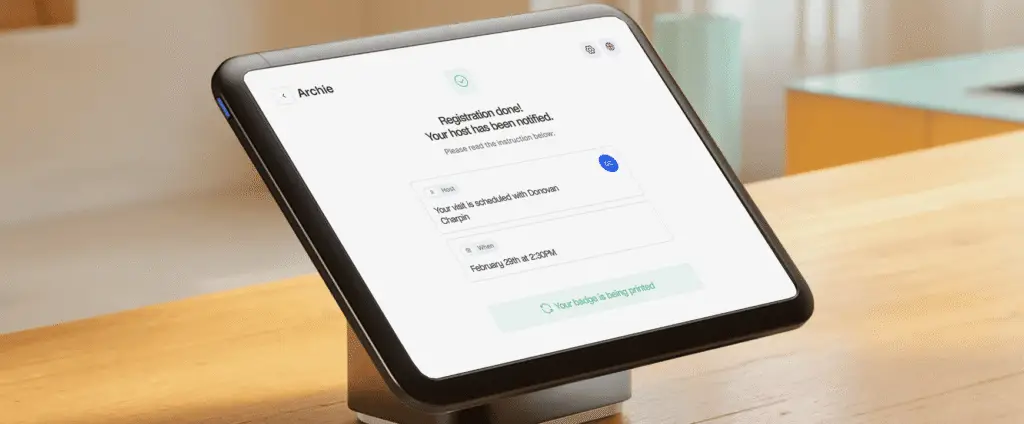
Many visitor systems today are tablet-based. For example, Envoy Visitors requires an iPad, while Archie’s visitor management system supports both iPads and Android tablets.
A recommended setup for most offices adds a compatible badge printer (usually a thermal label printer). If you want visitor badges printed automatically at check-in, you usually need:
- Une imprimante d'étiquettes/badges compatible (de nombreux systèmes de gestion des visiteurs utilisent des imprimantes d'étiquettes compactes de la série Brother QL)
- Badges/rouleaux d'étiquettes (de taille et de type adaptés à votre imprimante)
- Méthode de connexion (Wi-Fi, Bluetooth, USB ou LAN, selon votre imprimante + VMS)
- Adaptateur secteur/câble
- Emplacement de l'imprimante près du kiosque/de la réception
Le matériel optionnel dépend de vos besoins en matière de sécurité et peut inclure un lecteur de codes-barres 2D pour les permis de conduire ou les pièces d'identité, un lecteur MRZ/passeport pour les documents de voyage, un scanner de pièces d'identité pleine page avec des fonctionnalités de vérification supplémentaires (comme la prise en charge UV/IR/RFID), ainsi que des options supplémentaires telles qu'un écran de confidentialité, un boîtier verrouillable pour borne, un système de gestion des câbles ou une alimentation de secours.
Can you run a visitor management system without any dedicated hardware? You can, if your system supports touchless check-in (like Archie). In this circumstance, you display QR codes on your front-desk or door – or wherever else is logical. Guests scan this on their phone and then can complete the entire visitor flow there.

What integrations does a visitor management system support?
A visitor management system should connect to the tools that already run in your workplace.
Communication tools: (Slack, Microsoft Teams): Sends the host an instant notification when their visitor checks in (owned by whoever admins the workspace’s chat tool).
Calendar apps: (Outlook, Google Calendar): Pulls visitor invites from scheduled meetings, so hosts don’t re-enter guest details manually. (Owned by the individual host or an EA/admin.)
Access control systems: Connects visitor check-in to physical door access, owned by security, so a visitor’s credential can open doors during relevant times.
Ones for IT teams to manage:
Identity and access (SSO, SCIM): Lets employees and admins log into the VMS with existing company credentials, and syncs user directories automatically.
Guest Wi-Fi: Shares network access automatically as part of check-in.
API / Zapier: Many customers build custom workflows with VMS software.
Not all integrations are built the same. Native integrations are built and maintained by the vendor. API/middleware integrations work on your end, so enquire how this works during your demo. Integrations are often reserved for higher tier plans.
Combien coûte un système de gestion des visiteurs ?
Most paid visitor management systems are priced between $40 and $400 per month (free plans are available, but for basic sign-ins and limited visitors only). Base plans tend to cover single locations, with digital visitor logs and host notifications included. If you are hosting multiple locations & high visitor volumes, and desire features like badge printing, door access control, and SSO, you will usually be looking at mid-tier or enterprise plans.
There are different pricing structures, so comparing vendors isn’t always a side-by-side understanding. The most typical are:
- Per location: A fixed monthly fee per office or building, regardless of host or visitor count. Costs stay predictable but each new site adds a full new fee. Used by Archie, Envoy, and most enterprise-focused platforms.
- Per visitor or check-in limits: A set number of monthly visitors included in the plan, with an upgrade required past that cap. Manageable for small, steady offices only.
Bear in mind that not everything sits within your visitor management price. Hardware and onboarding go into your setup costs, and badge supplies should factor into monthly spend. Some vendors also apply add-on charges for things like SMS notifications and premium support.
Plan | Price range | Idéal pour | Common features |
|---|---|---|---|
De base | $40 - $100/location/month | Small businesses | Standard check-ins, visitor logs, host alerts |
Mid-tier | $100–$300/location/month | Teams needing more control (often larger) | Badge printing, branded check-ins, approvals, integrations |
Premium | Custom (expect $300+ monthly) | Larger companies with security/compliance needs | Access control, SSO, emergency alerts, custom workflows |
Are there open-source visitor management systems options?
Yes, there are some open-source VMS options (software with publicly available source code that an organization can self-host without paying fees):
- FrontDesk: Supports digital check-ins and custom workflows
- VisitorInOut: Tailored for entry-exit logging.
- neozhu/visitormanagement: A community GitHub project with check-ins and time-tracking.
The appeal of open-source software is cost, as there are no licensing fees and you have full access to modify the system however you need. However, the tradeoff is that maintenance is solely your team’s responsibility. This can be a real burden without in-house expertise, or if your in-house expert leaves. Open-source is recommended for highly technical teams who have simple visitor management needs.
How do you implement a visitor management system in an office?
Start by understanding your visitor flow. Who comes to your site, how often, and what information do you need to collect from them? A corporate office that welcomes visitors, clients, and job candidates will have different needs than a manufacturing site handling contractors, vendors, and delivery drivers.
This is also the time to create a clear visitor policy. Define visitor types, required check-in fields, screening rules, badge requirements, and what happens if there is a security or compliance issue.
Bring in the teams that will be affected by the rollout, including IT, legal or compliance, HR, and facilities or front desk teams. Getting everyone aligned early helps avoid delays later.
Step 1: Evaluate and choose the right platform
Dressez une liste restreinte de fournisseurs et organisez des démonstrations structurées à partir de scénarios réels de réception, et non pas seulement des présentations commerciales. Par exemple, testez ce qui se passe lorsqu'un entrepreneur oublie sa carte d'identité, qu'un VIP arrive après s'être préinscrit ou qu'un visiteur inattendu se présente pendant que la réceptionniste est absente.
When comparing tools, look closely at ease of use, check-in options, integrations, security features, and pricing.
Step 2: Pilot, configure, and train your team
Configurez les types de visiteurs, les flux d'enregistrement, les modèles de badges, les notifications et tous les formulaires ou signatures électroniques dont vous avez besoin. Testez ensuite les intégrations avec votre système de contrôle d'accès, vos outils de calendrier, vos applications de messagerie et vos workflows d'urgence.
Training is just as important as setup. Front desk staff should know how to handle everyday check-ins and edge cases, like a failed ID scan or a walk-in visitor who was not pre-registered.
Step 3: Launch, measure, and improve
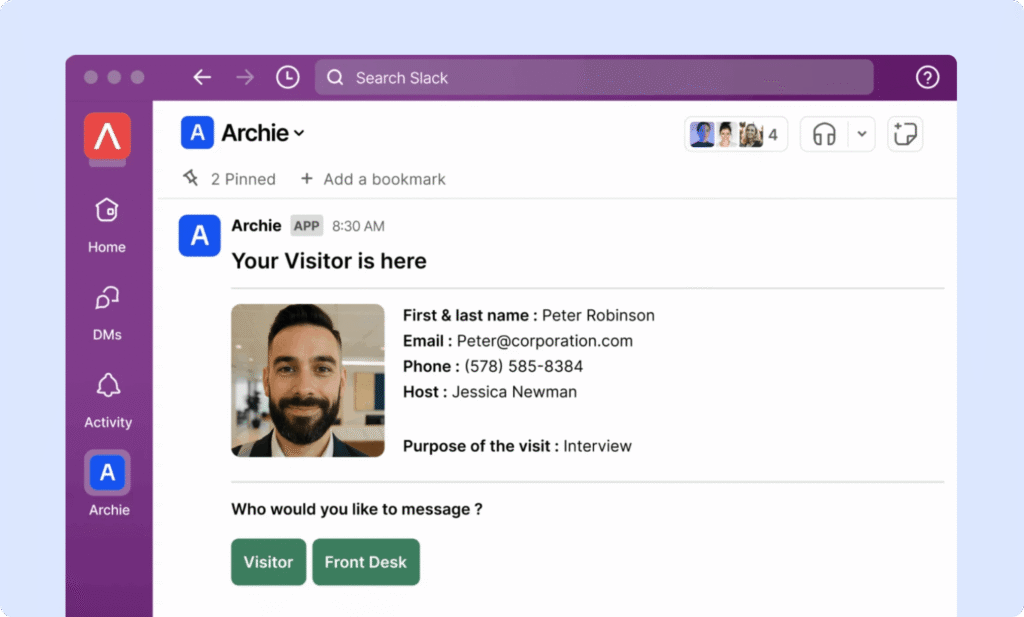
After going live, collect feedback from receptionists, hosts, and visitors. Track a few simple metrics, such as average check-in time, visitor volume by day and hour, host response time, and any compliance exceptions.
How long does visitor management software implementation take?
The exact timeline will vary, but a typical visitor management software rollout from exploration to decision to implementation can be several months. The rollout of the software itself may be as short as 1-2 weeks. A timeline example:
Week 1: Define requirements and policies
Align on visitor types, visitor management policies, check-in flows, approval rules, data retention, and emergency procedures.
Week 2: Run demos and finalize vendor selection
Score shortlisted vendors using the same criteria and test scenarios.
Weeks 3–4: Set up and run the pilot
Launch the system in one location with real workflows, notifications, and reporting.
Weeks 4–5: Validate integrations and security
Test SSO, directory sync, messaging tools, calendars, APIs, Wi-Fi, and any access control integrations.
Week 6: Finalize procurement and rollout plan
Confirm total cost, hardware needs, support level, and responsibilities.
Weeks 7–8: Initial rollout
Go live in core locations, train staff, and track early adoption.
Weeks 9–12+: Expand and optimize
Standardize workflows across locations, enable reporting, and refine visitor management processes.
For smaller teams or single-location offices, this can move much faster, sometimes in just a couple of weeks. For larger organizations with more integrations and compliance requirements, it can take longer to go live across locations (training staff and refining processes across locations).
Best visitor management software FAQs
Le logiciel de gestion des visiteurs peut-il s'intégrer aux systèmes de contrôle d'accès existants dans les bâtiments ?
Oui. De nombreuses plateformes modernes de gestion des visiteurs offrent des intégrations natives ou des connexions API pour les systèmes de contrôle d'accès courants. Cela vous permet de délivrer automatiquement des identifiants temporaires, de contrôler l'accès aux portes en fonction du statut d'enregistrement et de conserver un registre clair des personnes qui sont entrées dans quelles zones et à quel moment.
What’s the difference between a visitor management system and a sign-in app?
A sign-in app helps you keep a digital visitor log. Visitor management software offers a safer, more sophisticated experience: automated host notifications, digital document signing, access control, and more.
Les visiteurs peuvent-ils s'enregistrer avant leur arrivée sur place ?
Oui. De nombreux systèmes de gestion des visiteurs prennent en charge la pré-inscription via des liens e-mail ou des formulaires adaptés aux appareils mobiles. Les visiteurs peuvent remplir leurs coordonnées, signer des documents et recevoir un code QR avant leur arrivée. Lors de leur enregistrement, ils peuvent scanner le code à la borne, ce qui permet de réduire les temps d'attente et l'encombrement du hall d'entrée.
Pourquoi les entreprises mettent-elles en place des logiciels de gestion des visiteurs ?
Most businesses implement visitor management software to improve security, enhance the visitor experience, reduce front-desk administrative work, and maintain accurate visitor records. It also helps with compliance, reporting, and emergency response.
Le logiciel de gestion des visiteurs est-il identique au logiciel de gestion des invités ?
Souvent, oui, mais ces termes peuvent être utilisés différemment. Le terme « gestion des invités » est parfois utilisé dans un sens plus large (par exemple, l'accueil ou les événements), tandis que le terme « logiciel de gestion des visiteurs » fait généralement référence aux flux de travail liés à l'enregistrement, à la sécurité et à la conformité sur le lieu de travail et dans les bâtiments. Dans de nombreux outils logiciels de bureau, ces termes se recoupent.
Quelles données le logiciel de gestion des visiteurs collecte-t-il ?
La plupart des systèmes de gestion des visiteurs collectent des informations de base sur les visites, telles que le nom, la société, l'hôte, l'heure d'arrivée et l'objet de la visite. Selon la configuration, ils peuvent également collecter des photos, des informations sur les badges, des documents signés, des réponses aux questionnaires de sécurité et les heures de départ. Les données exactes sur les visiteurs dépendent de votre flux de travail et de vos paramètres de confidentialité.
- Sources principales