






So many hybrid workplace tools sprang up after the pandemic that you might forget that some platforms predate the shift. Like Robin, which began over a decade ago as a simple way to book meeting rooms.
Today, the platform is mainly used by larger organizations seeking a smarter, more connected office experience and willing to pay for it. In this article, we’ll break down Robin’s powerful feature set so you can decide if its complexity is worth the investment, or if you might find a better balance with a platform like Archie that offers a similar feature set and simpler pricing.
💡 TL;DR:
Robin works well for very large teams (500+) that need advanced scheduling tools, deep analytics, automation, and a wide range of integrations. The tradeoff comes with a high cost and a steeper learning curve. If you need a more streamlined and budget-friendly platform that’s faster to roll out, a Robin alternative like Archie can be a better fit.
Robin software review
What is Robin?
Robin (robinpowered.com, not the other ‘Robin’ tools out there) is an enterprise software platform designed to manage the hybrid workplace. It started in 2014 as a conference room scheduling app and has since expanded to cover virtually all areas of the hybrid office.
In 2022, the company closed a $30 million Series C round led by Tola Capital, which brought its total funding to about $60 million. Such a significant investment at that time spoke to both confidence in Robin software and a broader bet that hybrid work and flexible offices weren’t going away.
And nowadays, we know how well that bet has paid off, since hybrid is very much here to stay. Countless companies, whether early champions of hybrid work or more cautious adopters, are now seeking tools like Robin, OfficeSpace, or Archie to manage their workplaces more effectively.
Who is Robin Powered best for?
Robin now positions itself as a complete workplace management platform with a deep feature set. It focuses heavily on the employee experience, with tools for wayfinding, booking desks and rooms, and coordinating office visits, as well as using AI to suggest and automatically reserve the right spaces for the people who use them.
A big part of that focus is surveying not just how people use their office, but how they feel about it. Robin’s unique employee experience features include built-in surveys, feedback prompts, and satisfaction tracking, making it a great tool for workplace leaders and employees alike.
Ultimately, Robin is primarily designed around the needs of large-scale companies and organizations that need strategic workplace data along with the most comprehensive, complex toolsets. Companies with tighter budgets, smaller teams, and/or lean IT teams may struggle with the platform’s premium price and implementation time. Specifically, companies with fewer than 500 employees may also want to consider more streamlined Robin alternatives like Archie.
Pros and cons of Robin Powered
According to G2 and Capterra reviews, Robin users tend to value its room and desk booking features, as well as its overall usability. To quote one enterprise user working in a company with over 1000 people, “Robin offers a variety of features that users find beneficial for managing office resources and coordinating workdays.”
Their marketing explicitly targets companies with multiple locations and hundreds of employees, so it’s no surprise that positive Robin Powered reviews tend to highlight its ability to coordinate complex hybrid policies at scale.
Indeed, the following strengths all make it a good fit for larger hybrid deployments:
Robin strengths
🟢 Enterprise-grade functionality: Robin offers a comprehensive suite of features, including room and desk booking, visitor management, and advanced analytics.
🟢 Reliable space automation: Users appreciate advanced features like auto-canceling ghost meetings, which frees up underused rooms and automatically improves space utilization.
🟢 Polished employee experience: Users typically find it easy enough to adopt and use Robin, thanks to its intuitive and well-designed UI on both mobile and web. For example, automatic check-ins via mobile, network, or sensor data reduce some of those pesky manual touchpoints for employees.
🟢 Solid enterprise integrations: Robin integrations include key native connections to Google Workspace, Microsoft 365, Slack, Teams, access control, and sensor partners, among others.
🟢 Robust workplace data: Robin pulls together information from bookings, access control, and occupancy sensors to provide deep insights on utilization, occupancy, and collaboration trends.
Robin limitations
Because Robin is designed for multi‑office, enterprise‑style deployments, smaller organizations with basic hot‑desking needs might find it more platform than they actually need, especially given its pricing and implementation effort.
And with Robin’s premium price point, any limitations are going to stand out. As one Facility Manager stresses on Capterra, the “product falls short due to price point.”
🔴 Higher cost and opaque pricing: Unlike competitors with transparent per-user or per-resource pricing, Robin uses custom pricing that requires you to contact sales. This makes it harder to budget and compare options upfront.
🔴 Difficult floor plan management: Editing or modifying floor plans often requires help from the Robin team, which can slow down office renovations or seating updates.
🔴 Minor user interface issues: Reviewers complain about small bugs and UI glitches, especially around settings, dashboard accuracy, and time display. The Robin Powered app also receives mixed reviews, with several users calling it clunky or inconsistent.
🔴 Slower customer support: Some users report that response times from the customer support team are slower than expected (especially considering the price tag).
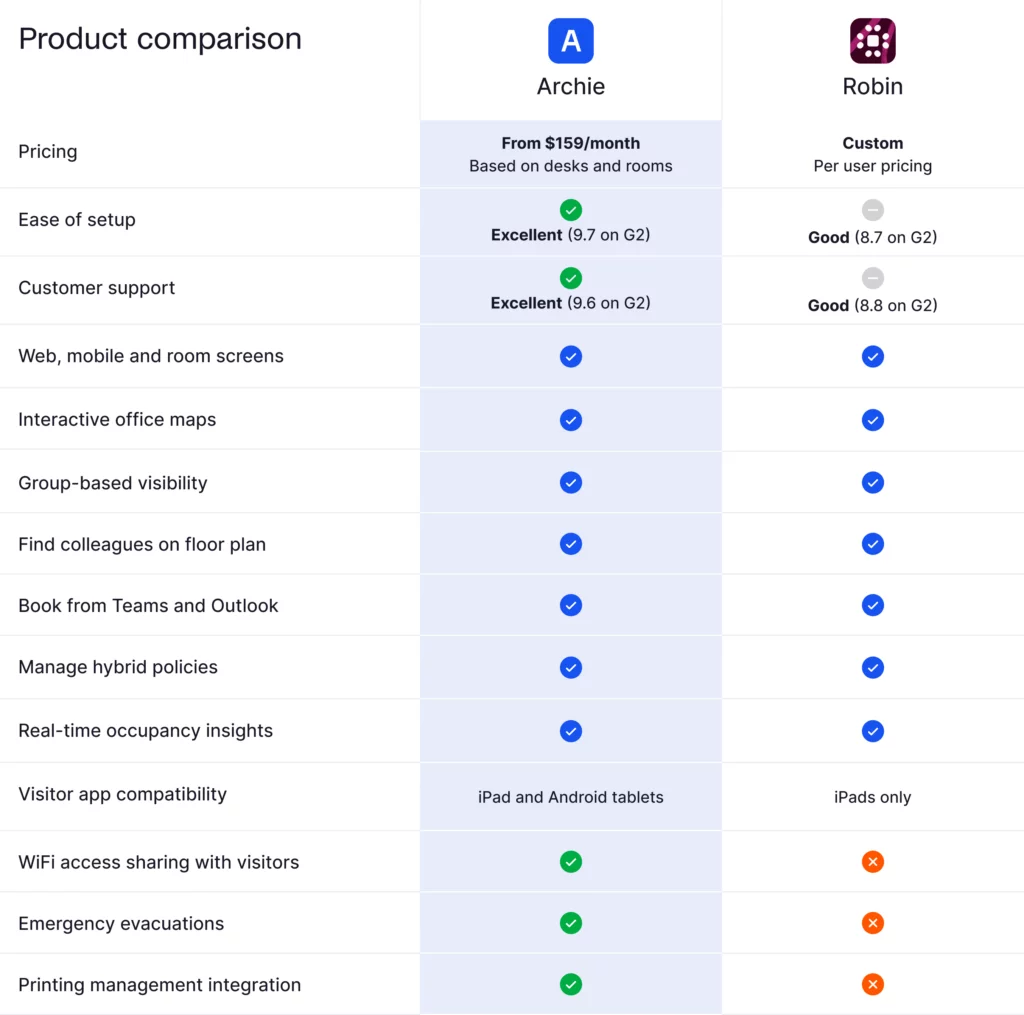
🔴 Missing features compared to competitors: Robin lacks WiFi access sharing with visitors, emergency evacuation tools, and printing management integration (all features that are included in Archie’s standard offering). The Robin visitor app is only available via iPad only (and not Android tablets).
Robin’s key features and differentiators
Robin makes clear on its website that their platform is designed for organizations with 500 employees or more, as long as a third of them are office regulars (i.e., as long as you’ve got a minimum of 150 hybrid employees), and assuming they’re spread out over multiple floors, offices, or buildings.
So clearly, this is a platform aimed at large-scale enterprise organizations with large footprints
And as such, the features that it focuses on are going to be those that are beneficial for these big orgs, while some might feel like overkill for smaller teams:
Employee engagement and office experience
Like we’ve covered, Robin invests heavily in employee experience features to improve daily life in hybrid offices. Workplace teams can use the platform to run recurring office experience surveys, capture feedback on spaces or resources, and share office announcements or events within the Robin Powered app.
Meanwhile, employees can use the platform to see when their colleagues will be in, reserve desks and rooms accordingly, and receive notifications or reminders about upcoming office days.
“Love the ease of use on Robin for booking a desk, seeing who is in the office, adding any guests to visit our offices,” says one executive assistant who’s been using Robin software for two years. “It helps keep our organization organized with people coming in and out of the office.”
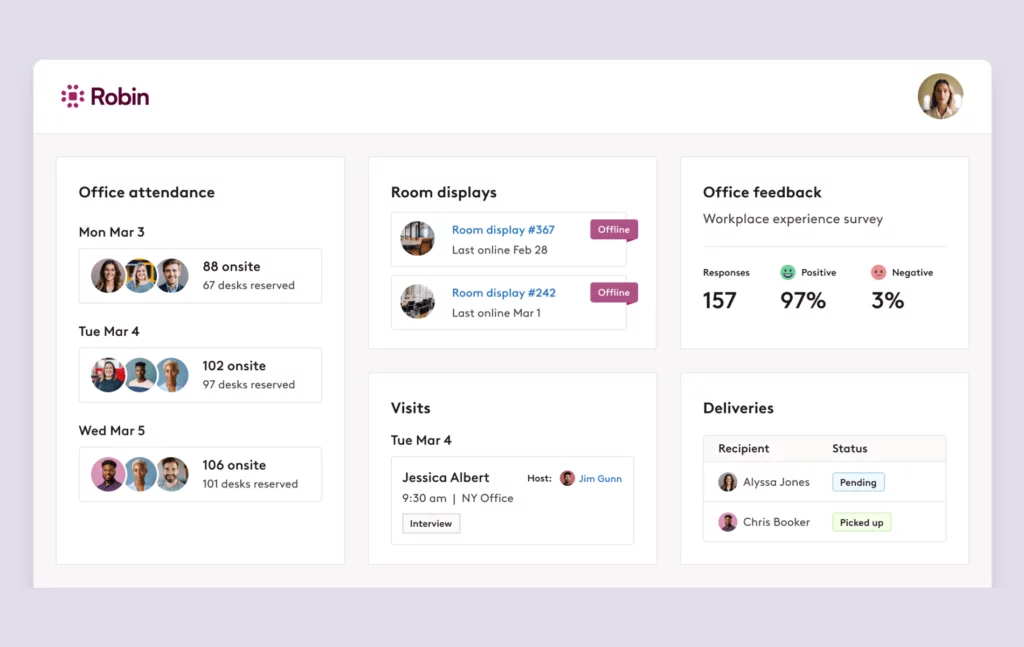
Similar to other workplace management platforms, many employees using Robin find this added context around who’s in to help them plan their in-office time more effectively (although some do complain about navigation and having to learn some of the more advanced features).
AI-powered booking and automation
Perhaps not surprisingly, given its Series C funding and enterprise focus, Robin is leaning heavily into AI automation for several common hybrid workflows.
For example, its desk booking tool automatically uses data from an employee’s past reservations and preferences to choose and reserve their desk for each in-office day automatically. It can even take factors like proximity to favorite teammates and preferred seats into account.
Similarly, Robin’s AI can automatically find and book rooms that match meeting size and any amenity needs.
And when the abandoned meeting protection is enabled, the system can automatically release a room if nobody checks in within a set time window, which in turn will free up high-demand spaces.
The platform also boasts an auto check-in feature that tracks office presence automatically with check-in data from mobile, network, and occupancy sensors. Speaking of…
Automatic check-in
Robin’s automatic check-in capabilities pull from multiple signals to track office presence with minimal extra work for employees.
For example, if you’ve integrated with Kisi access control, users can swipe their badge to unlock the door and check into Robin automatically. The platform can then tie that presence to desk reservations or visitor logs.
Visitor management
Like many platforms, Robin also includes a built-in visitor management system designed to make guest check-ins quick and predictable. Workplace teams can create branded invites, collect arrival details ahead of time, and send guests everything they need before their visit (including directions, day-of instructions, and check-in info).
Robin also lets admins require important compliance steps during check-in, like NDAs or other agreements.
Still, some limitations persist. Kiosk displays only work on iPads (not Android), there’s no emergency evacuation system in place, and advanced customization may need admin tweaks.
Robin integrations
No one wants to learn new tools as they’re going about their day-to-day. So if you’re going to simplify the hybrid office, you have to do it within the tools employees already use.
In other words, no workplace management software can compete today without solid integrations. And unsurprisingly, Robin comes with a host of integrations that will be attractive to enterprise organizations.
Robin puts a strong emphasis on integrations with communication and calendar systems in particular. This makes sense, since these are the types of tools employees use daily.
For example, it has native integrations with both Microsoft 365 and Google Workspace, which allows employees to manage all their bookings directly from Outlook or Google Calendar.
It also offers robust integrations with communication tools like Slack and Microsoft Teams, which are great for quick resource notifications and booking. In this way, it can act as a hub for the hybrid office, keeping bookings, presence data, and notifications in sync so employees don’t have to remember which tool to use for what.
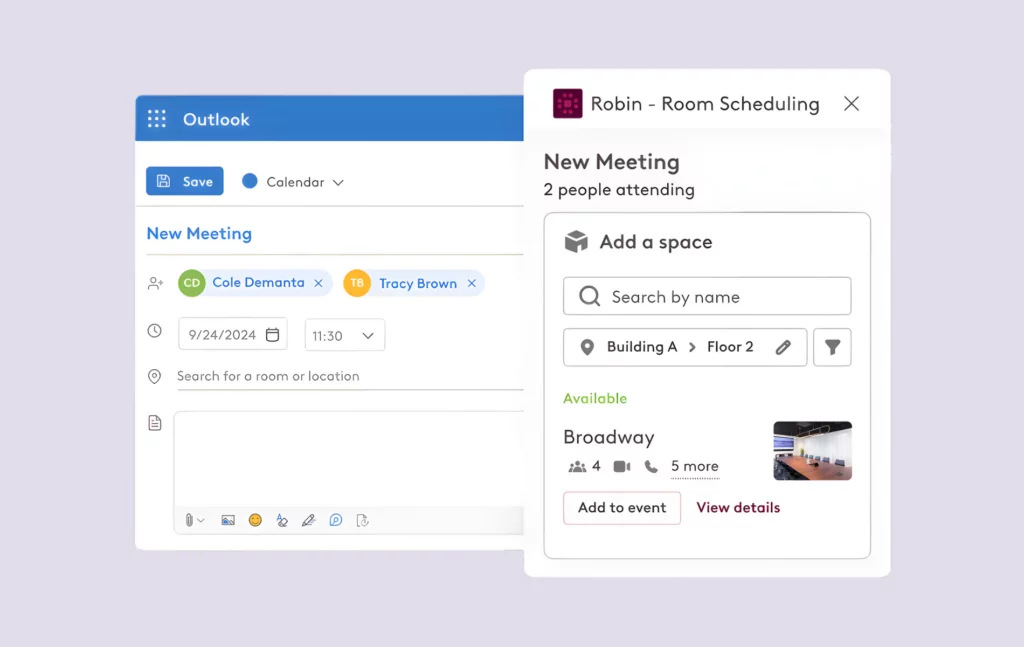
Robin also offers extensive integrations for hardware and building systems (not surprising, given its focus on space utilization and automated check-ins). Specifically, it connects with room displays, access control platforms like Kisi, Brivo, and Avigilon, and occupancy sensors like VergeSense.
Organizations can also enable SSO and user provisioning through identity providers like Azure AD / Entra ID, Okta, OneLogin, and Google Workspace.
Note, however, that Robin’s focus remains purely on workplace management, so it doesn’t offer native integration with Customer Relationship Management (CRM) platforms like Salesforce or HubSpot. This might create friction for organizations where visitor management is closely tied to sales or client-facing activity.
That said, Robin uses an open API that customers can use to build custom integrations if needed.
Robin pricing
Throughout this review, we’ve been stressing Robin’s focus on enterprise organizations. And so it’s probably not surprising that its pricing reflects this focus.
Translation: Robin software is priced for large companies with large budgets, too.
Specifically, Robin operates on a quote-based, custom pricing model, which reflects its focus on large enterprise organizations. It doesn’t publish its plan structures publicly, so prospective buyers have to contact the sales team directly for a specific estimate.
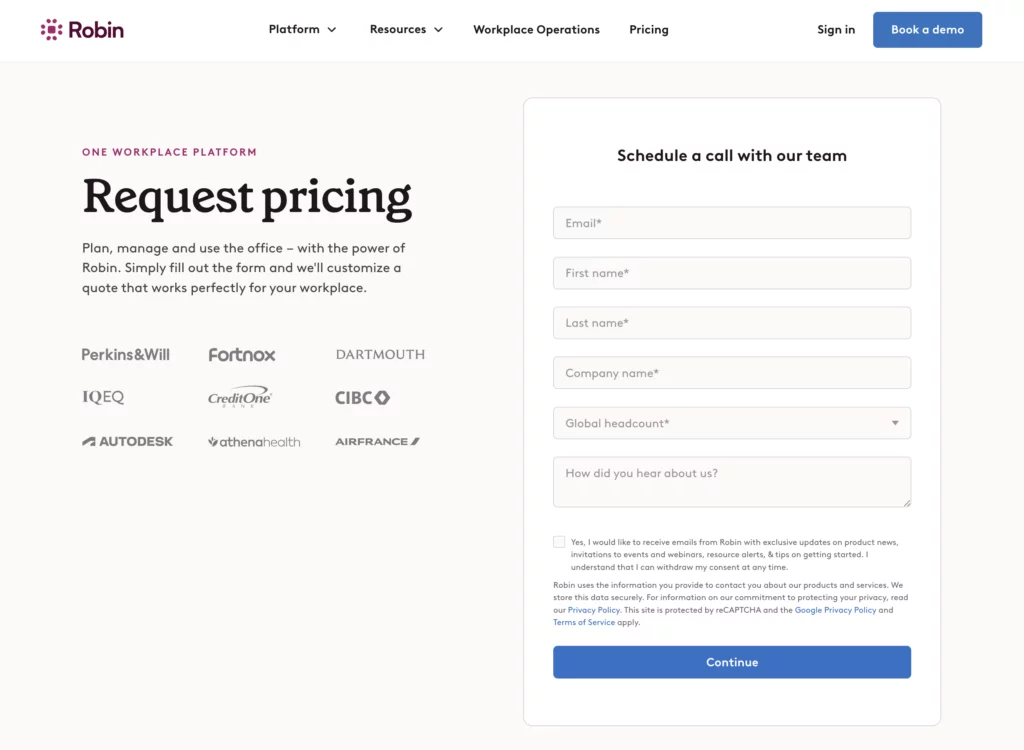
A common starting point for the platform is at least $5,000 annually, typically combined with per-user licensing costs. Of course, for many of those large enterprise organizations, this is about what they’d expect to pay for feature-rich, scalable software.
But that steeper cost also may be prohibitive for smaller organizations exploring the platform. For example, Kiera A. on G2 writes that choosing Archie was a ‘no brainer’ for her team since “the price quoted was significantly lower than companies like Robin.”
Robin does offer a free trial period so companies can fully evaluate the platform before committing to a contract. It’s also worth noting that the company provides special pricing for universities and colleges, which may soften the cost for education customers.
What users like (and don’t like) about Robin software
According to user reviews, what people like most about the Robin Powered app and platform is its polished user interface and robust features. In particular, employees stress how intuitive it is to book a desk or a room, to find their colleagues on a floor plan, and to add visitors. And once they’re familiar with the layout, they also tend to describe the desktop and mobile UI as well-designed, responsive, and simple to navigate.
Meanwhile, administrators tend to value the platform’s extensive settings and reservation rules, which help them keep the office organized.
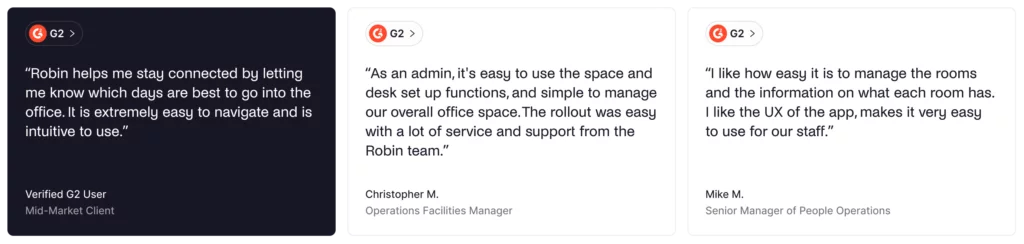
However, the enterprise-level depth of features that makes Robin so powerful can also be frustrating for some users. For example, some admins find the sheer number of settings daunting to learn, noting that all the available features can take some time to master.
“Personally it does take a little getting used to,” says one mid-market user, “Especially working out all the features.”
Others mention that Robin can feel a bit overloaded. Small bugs, inaccurate dashboards, and settings that don’t always behave as expected are common themes, particularly among midmarket customers.
“Too many small mistakes,” says one Facility Manager. “Maybe there’s too many features that don’t work so well for the end use, please focus on making the few things we need, and make those work perfect.”
The Robin Powered app also comes up as a pain point. A few reviewers describe it as clunky or inconsistent, even if the overall service still works well for their end needs. Indeed, “the app can be a bit clunky sometimes but all in all it’s a great service,” says one enterprise-level Privacy Specialist.
Editing Robin’s interactive floor plans proves time-consuming and often requires Robin’s support. Users report that major redesigns force full re-mapping of desks and assignments from scratch.
“If you need to edit a floor plan, it takes more time than I would like and needs the help from someone at Robin,” laments one Senior Manager of People Ops for an enterprise organization. “So if you are going through a big floor redesign (and using desks or adding/removing rooms) it is a bit of a pain point.”
And it’s not just editing floor plans that can be a hassle. “Importing floor plans is a real issue,” says Fred P. on Capterra. “In the event our facility underwent a renovation, you have to redo all the work you did in the first place. Re-assign desks and employee locations, etc.”
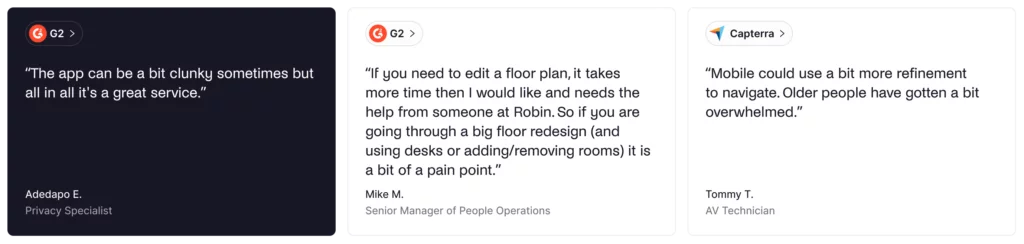
Finally, support quality also appears mixed. Some reviewers say response times aren’t as quick as they’d like, and a few mention friction when trying to connect with sales or customer success.
Given Robin’s complexity and enterprise-level pricing, it’s these lower ratings for setup and support that stand out the most. When implementation is this involved and the investment is this high, customers reasonably expect onboarding and day‑to‑day help to be a clear strength, not a potential weak spot.
All said, these experiences don’t outweigh the positives for most users, who still give the platform high marks in most areas. But they do suggest that, enterprise-grade notwithstanding, Robin’s otherwise robust platform can feel less flexible in day-to-day use.
Is Archie a better alternative to Robin?
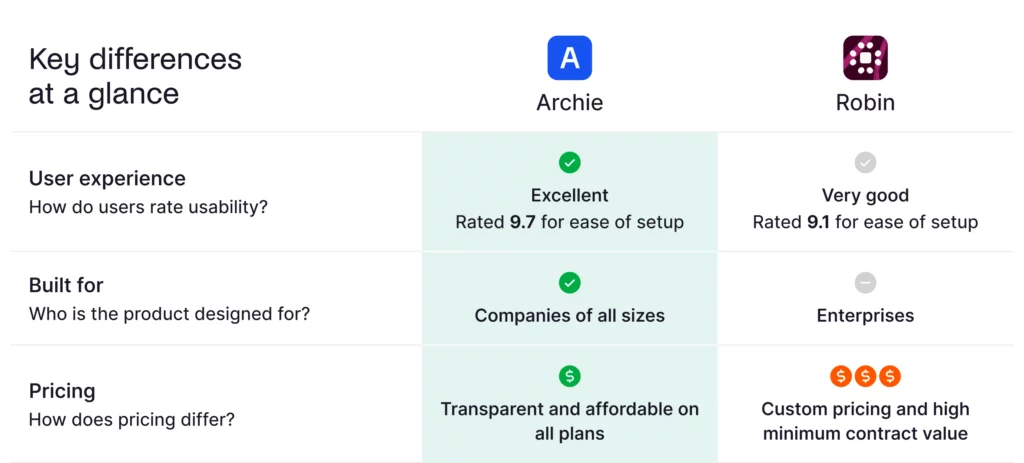
Archie follows a per-resource pricing model that is more cost-effective than most of its competitors, Robin definitely included. So if price is your only consideration, then your choice is going to be obvious.
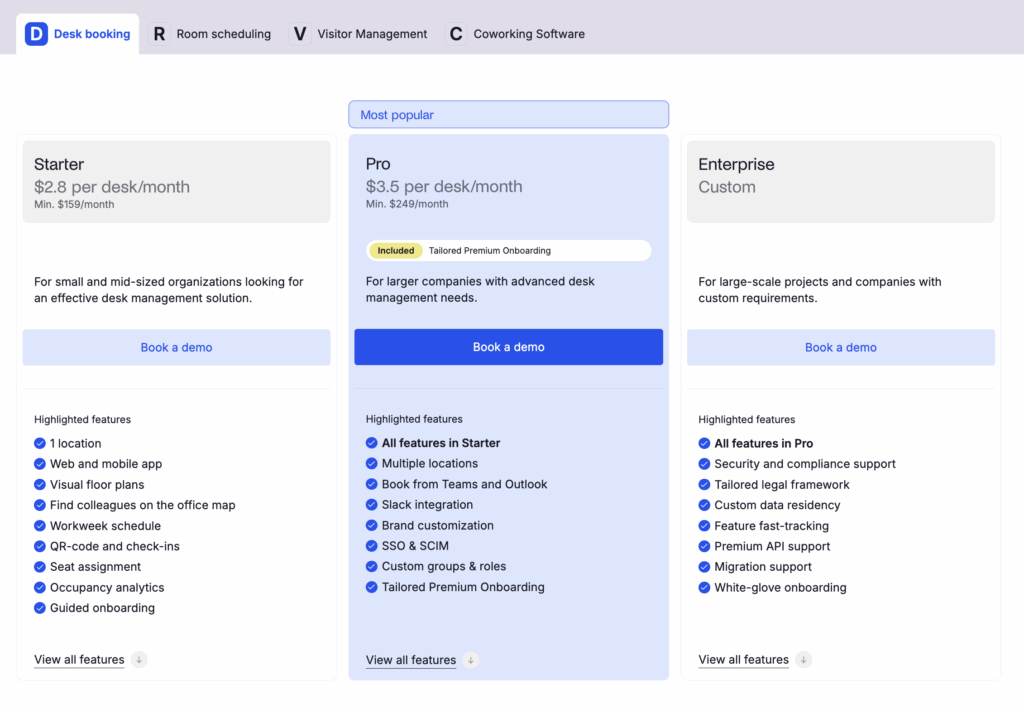
But of course, pricing isn’t usually the sole determining factor when assessing software, nor should it be.
And indeed, Archie and Robin both cover the fundamentals of hybrid workplace management well. Each offers desk booking, meeting room scheduling, visitor management, interactive office maps, and occupancy analytics, along with plenty of integrations and web and mobile apps that work across multiple locations.
So for many organizations, either platform will check the basic feature boxes needed to coordinate people and spaces.
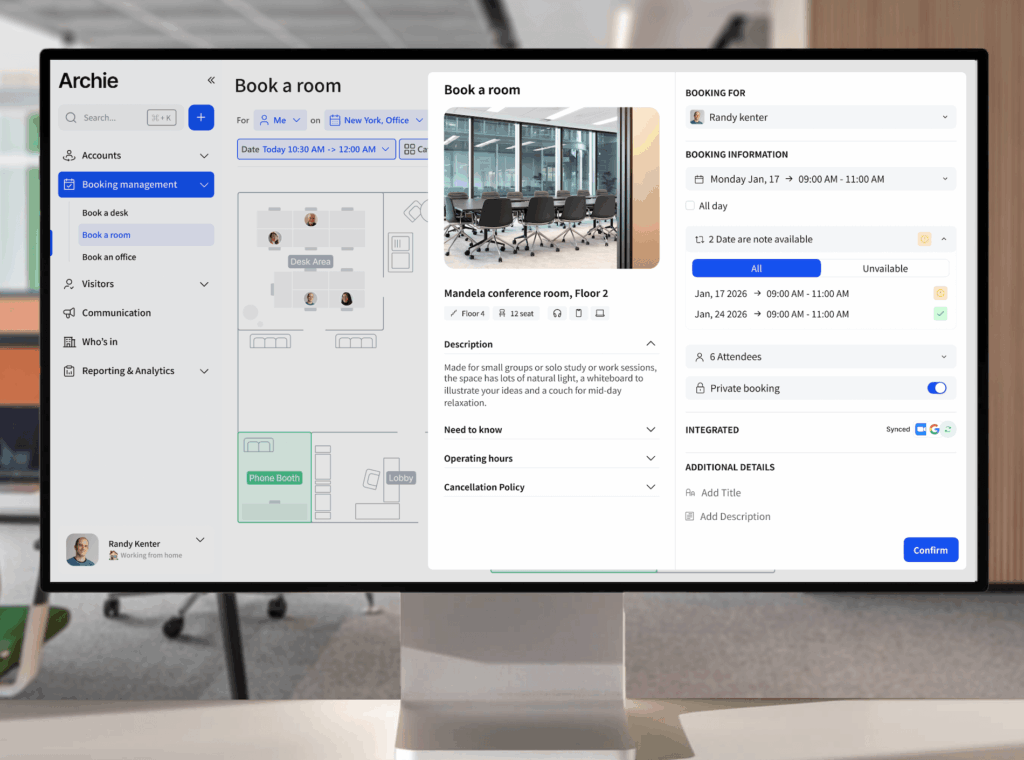
How can you choose between two hybrid workplace platforms with similar features? Often, it comes down to user-friendliness. If software isn’t easy to use, you’re unlikely to reap all its benefits.
And on G2 rankings, Archie pulls ahead of Robin on ease of use, ease of setup, ease of admin, and quality of support. In short, Archie customers find the platform simpler to roll out and run over time.
Ultimately, if your focus is on having the most comprehensive, AI-powered toolset available, and you place high value on deep analytics and mature enterprise features, then you’ll likely see good value in Robin. You’ll appreciate having deep and strategic workplace data and Robin’s extensive capabilities, assuming you’re prepared for the premium price tag.
But if your focus is on rolling out a truly seamless hybrid model with high employee adoption, you’ll likely find that a cleaner (and much more affordable) platform like Archie will be the stronger choice.

Sources
- Review sites (G2, Capterra)
- Archie’s product research
- Competitor website analysis