




















- What you’ll learn
- The most popular OficeSpace alternatives are Archie, Skedda, Officely, Tactic, and YAROOMS.
- Archie is the highest rated OfficeSpace alternative on G2.
- Customers seek OfficeSpace alternatives when they find that they are paying for product depth they don't use, when other desk and room booking tools offer plans more suited to their needs.
OfficeSpace is a workplace management platform built for facilities and real estate teams running large office portfolios, with stack plans, moves, asset tracking, and desk booking, all in one place. It’s powerful, and it is priced like it.
It has earned its reputation for depth and strong support. But for hybrid teams whose daily need is simply booking a desk or a room, that depth can feel more than they signed up for.
Beyond the overwhelming depth, OfficeSpace is also relatively expensive, with a platform fee plus extra charges for employees above your plan’s limit.
If the headcount grows, so does your bill, even if half the company only comes in twice a week. If that’s relatable, it’s worth looking at alternatives now.
These five alternatives offer similar core capabilities with a different mix of features, flexibility, and pricing:
- Archie: The best OfficeSpace alternative for growing hybrid teams that want fast deployment and an interface employees pick up in minutes. Pricing is resource-based, and starts at $159/month, unlike OfficeSpace’s quote-based, per-employee model.
- Skedda: Gives admins far more booking control than OfficeSpace. Its rules engine sets who can book what, when, and for how long, with unlimited users on every plan and published entry pricing.
- Officely: This lightweight alternative runs inside Slack or Teams, so there’s no separate app to roll out. It skips the planning modules OfficeSpace bundles in, with a free plan for up to 5 users and paid plans from $2.50 per user per month.
- Tactic: Sells desk booking, rooms, visitors, and space management as separate products, unlike OfficeSpace’s bundled Workplace plans.
- YAROOMS: Built for Microsoft-first companies. Its Yarvis assistant books desks for a whole team in one request, and Enterprise customers can run it on a dedicated Azure or AWS infrastructure. You get a free trial, no strings attached.
- Disclosure
Archie is included in this list. Although I am writing for Archie, I have used the most current product information, and user feedback to make the comparison thorough and fair to every tool.
#1 OfficeSpace alternative: Archie
❇️ 4.9/5 G2 Rating
Archie is a workplace management platform for desk booking, meeting room booking, and visitor management in hybrid offices. More than 1,000 organizations use it, including large enterprises such as Shopify, Siemens and CBS News.
Archie is the best for mid-sized, large, and growing hybrid workplaces where fewer people come in on a given day than the company employs. It fits companies running one to many offices that want self-service booking live in days, rather than weeks.
Archie is a strong match for Microsoft 365, or Google Workspace environments that need SSO, SCIM, and multi-location control without moving to an enterprise contract.
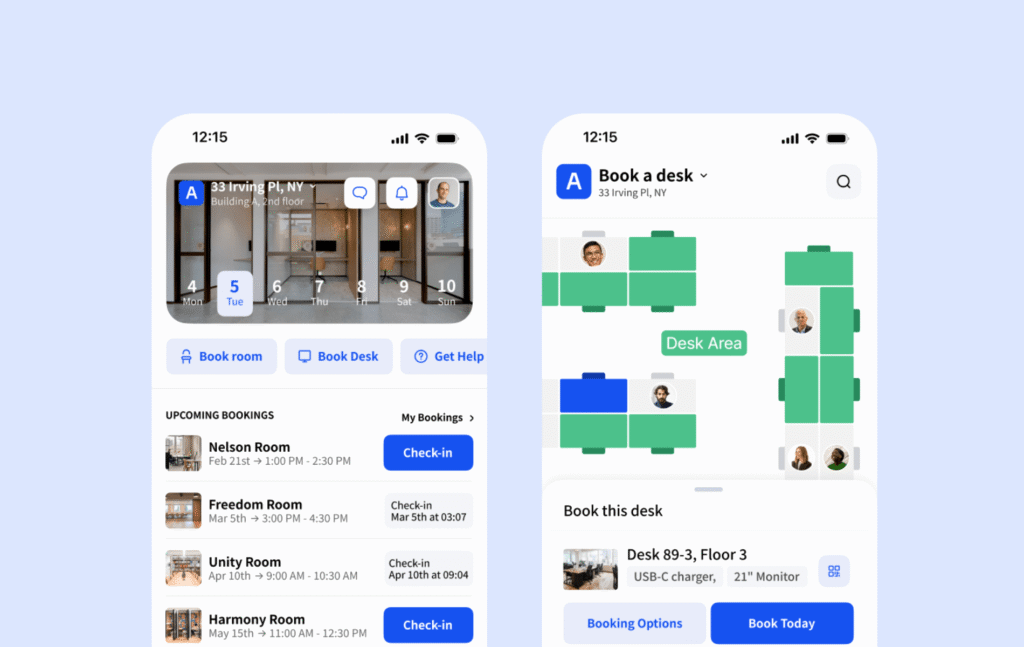
What are the key features of Archie?
Archie’s key features are built around the hybrid booking loop: plan the office day, book, check in, and review usage.
- Floor plans built for direct booking: Employees pick a desk or room directly on the office map itself, filtered by equipment such as monitors or docking stations. OfficeSpace’s maps are tied to its space planning data, which suits facilities teams editing layouts, while Archie’s are set up by workplace teams purely for self-service booking and are easily altered.
- Neighborhoods and booking windows: Admins can reserve zones for specific teams and give some groups earlier booking access, so departments land together on shared office days. This handles seating policy through booking rules. Booking rules also cover approvals, buffers between meetings, capacity limits and team days.
- Colleague-aware booking: Before booking, employees see who from their team is coming in and where they sit, then book nearby. OfficeSpace’s people directory is designed more for finding someone across a large campus than for planning a day.
- QR check-in with automatic release: Desks that are booked but not checked into are released for others, which helps maximize the space so that no resources are left unused. Admins can tune check-in windows to match how their office runs.
- Visitor management system: Hosts pre-register guests, and visitors check in at a tablet kiosk, so reception can see guests and desk bookings in one place.
- Usage analytics for right-sizing: Check-in data on Archie shows real use, with peak days and unused desks on every plan. It also covers occupancy, utilization, peak hours, no-show rate, desks freed by auto release, most and least used spaces, rollups across locations, and rooms that are too big, too small or underused. OfficeSpace reserves deep forecasting for higher tiers only.
- Occupancy tracking: Archie’s Presence app can accurately detect when employees are in-office, with no action required from the employee. This add-on is very popular with large hybrid offices, and OfficeSpace has no equivalent.
- Integrations: Archie integrates with Microsoft 365 and Google Workspace, among other popular office tools, to make it easy for your team to book workspaces. It’s also integrated with Slack, to deliver instant notifications on your booking.
- Mobile access: Book and manage reservations on the go with Archie’s free mobile app.
How much does Archie cost?
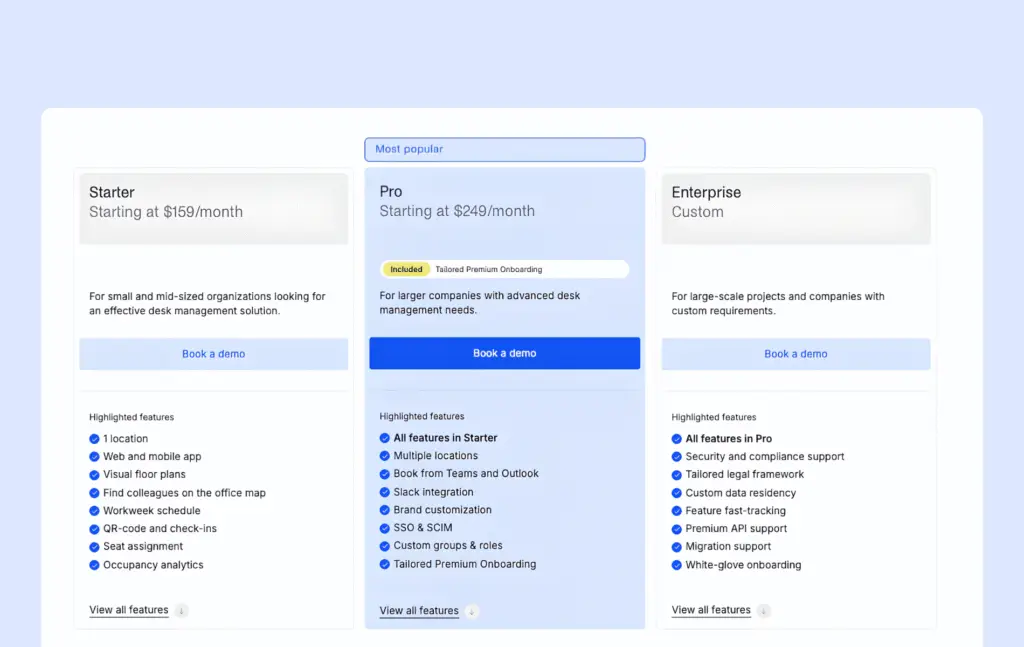
Archie charges per desk, starting at $159/month.
- Starter (from $159/month): One location with web and mobile apps, floor plans, colleague mapping, QR check-in, and occupancy analytics. Archie notes that the starting price can cover more than 50 desks (depending on meeting room additions).
- Pro (from $249/month): Adds multiple locations, Teams and Outlook booking, Slack and SSO and SCIM, custom groups and roles, branding and premium onboarding.
- Enterprise (custom pricing): Adds compliance support, custom data residency, premium API support, migration support, and white-glove onboarding.
Each plan starts with a demo and a 14-day test environment.
What are the pros and cons of Archie?
Archie’s clear strengths show up in ease of adoption and cost predictability, but there are a few limitations you may have to bear in mind.
Pros
- Archie scores an impressive 9.6/10 for ease of setup on G2, and reviewers describe moving to hot-desking without any chaos. Neighborhoods let teams switch gradually instead of all at once.
- Clear visibility is a strength of Archie, as noted by many reviewers on G2.
- The platform is quick to work with, so you can book on your way in, on your mobile, and don’t have to leave Outlook, Teams, or Google Workspace.
- Cost follows desks only, so your headcount growth is unaffected unless your desks increase.
- SSO and SCIM come with the Pro plan, while several other alternatives in this list reserve them for higher tiers.
Cons
- Auto-releases can feel strict. The check-in window is tight, which creates worry about losing a booking when running late. Admins can widen the window, but the default needs tuning at rollout.
- The minimum price makes it less suited to very small businesses.
#2 OfficeSpace alternative: Skedda
❇️ 4.8/5 G2 Rating
Skedda is a space scheduling platform for desk and meeting room booking, used by more than 8,000 organizations and 3 million people. Its defining feature is a booking rules engine that controls who can book which space, when, for how long, and under what conditions.
Universities and labs use it alongside hybrid offices, which reflects how flexible its space model is.
Skedda answers OfficeSpace’s limited customization most directly and gives the much-needed flexibility workspace teams want.
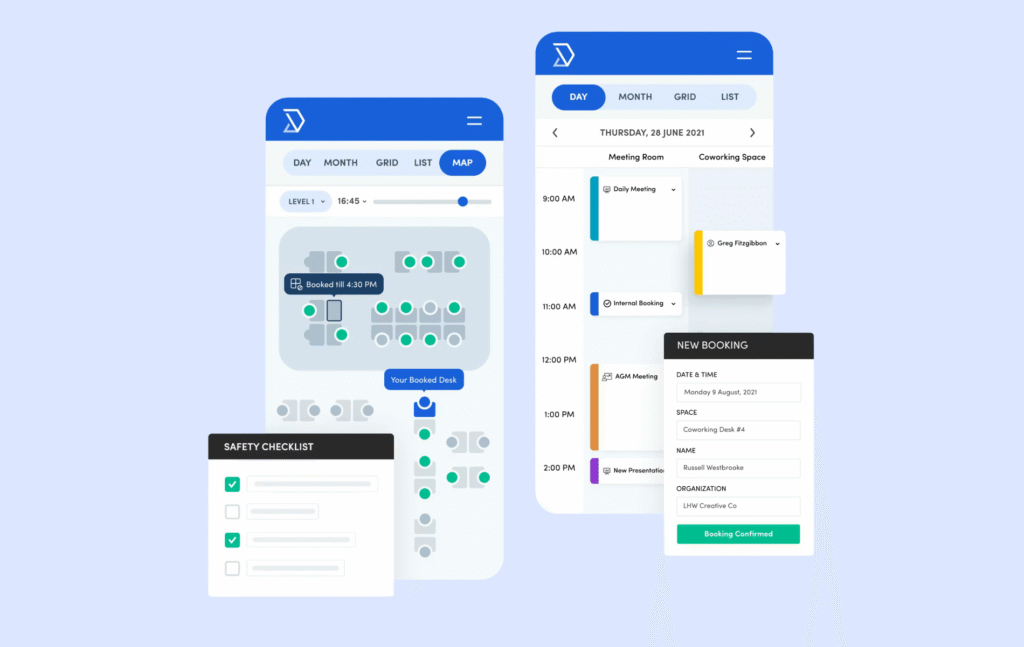
What are the key features of Skedda?
- Room-tech integrations: Logitech Tap Scheduler, Zoom, Webex, and ServiceNow connect alongside SAML SSO and SCIM through Entra ID and Okta.
- Approvals and custom fields: High-demand spaces can require approval, and on Premier, bookings can collect unlimited custom fields such as purpose or cost center.
- Treats any kind of space as bookable: Treats anything as a bookable space, from classrooms to meeting halls, social spaces, event halls, private offices, studios, and community spaces too.
- Map-first booking: Employees pick spaces on an interactive floor plan, so that users can see exactly where a space is located.
- Assigned and bookable desks together: Premier plan lets admins mix permanent desks with hot desks on the same floor.
- Room-tech integrations: Logitech Tap Scheduler, Zoom, Webex, and ServiceNow connect alongside SAML SSO and SCIM through Entra ID and Okta.
- User tags for access control: Admins tag users by team, building or role, and the tags decide what each person can book. Once tagged, users don’t need any training.
- Approvals and custom fields: High-demand spaces can require approval, and on Premier, bookings can collect unlimited custom fields such as purpose or cost center.
How much does Skedda cost?
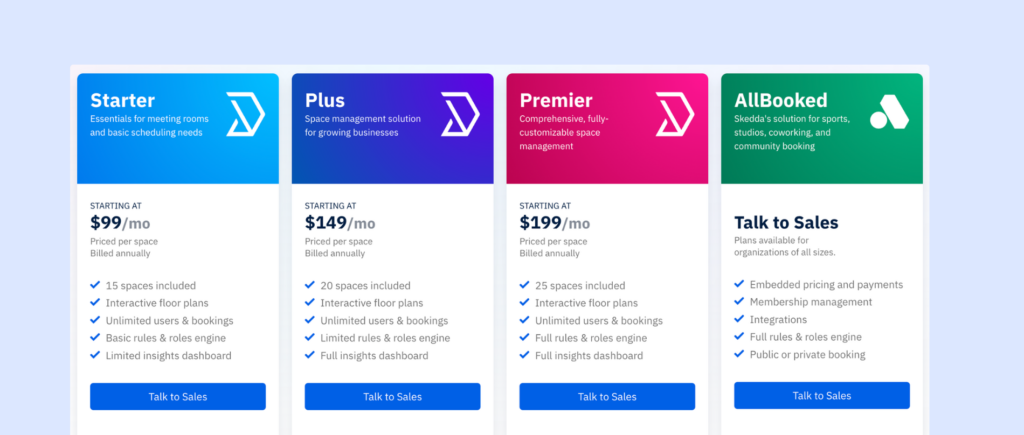
Skedda prices are based on the number of bookable spaces with unlimited users, billed annually. US and Canada plans are:
- Plus (from $249/month): 35 spaces, floor plans, a limited rules and roles engine, and the full insights dashboard
- Premier (from $349/month): 45 spaces, assigned spaces, the full rules engine, and unlimited custom fields.
- Enterprise (custom pricing): Custom space counts, a dedicated account manager, contract flexibility, and white-glove implementation.
EMEA and APAC pricing is lower, starting at $99/month for 15 spaces. A free 14-day trial is available.
What are the pros and cons of Skedda?
Skedda is rewarding for teams that need absolute control for various roles, but it doesn’t come without its limitations.
Pros
- The simple, intuitive design allows employees to start using it right away with little to no training.
- Admins get one source of truth for who can use which space.
- Every pricing plan includes unlimited users. This is one of the reasons universities might be inclined towards Skedda, as per-user pricing in most other tools would bring a hefty bill to the university otherwise.
- Layered rules replace the manual policing admins otherwise do.
Cons
- As you expand, or bring in amenities to improve employee experience, the bill can grow quickly, since all kinds of spaces are taken into account for license calculation.
- Space caps shape the real price. Plus plan covers 35 spaces, and Premier plan covers 45 spaces, so larger offices have to land on custom Enterprise pricing. Some G2 reviewers also finds Skedda a bit on the expensive side..
- Users report they cannot cancel reservations directly from email notifications.
- Overnight reservations can be tough to book.
- Users also report you can’t attach an external Zoom link to a meeting.
- There’s no way to set a default floor on the map, so if you have a multi-floor office, it always opens on the first map.
#3 OfficeSpace alternative: Officely
❇️ 4.8/5 G2 Rating
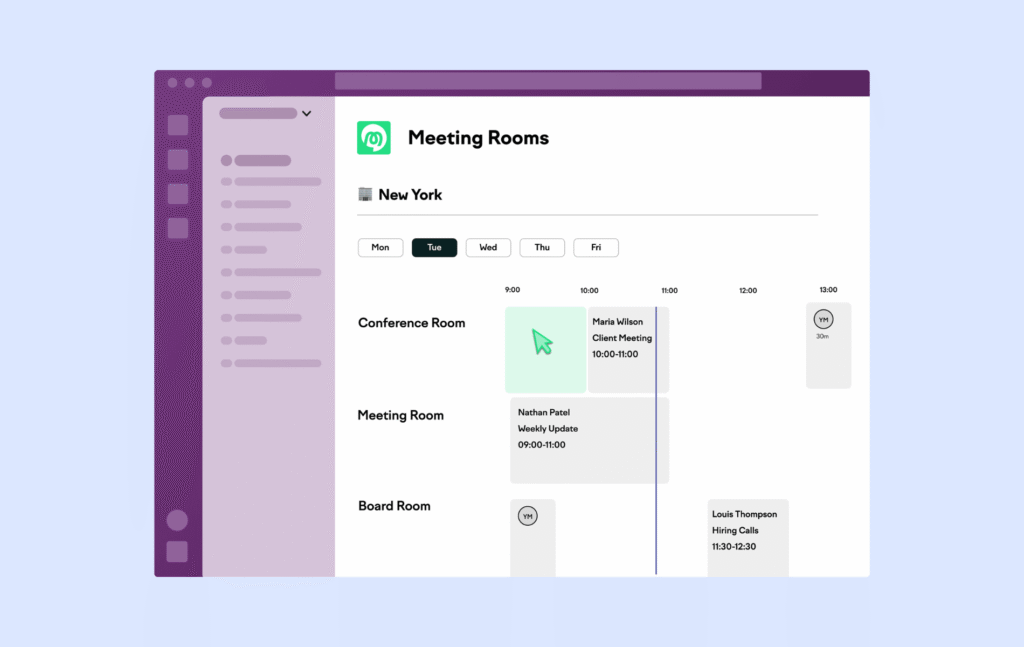
Officely is an OfficeSpace alternative that treats Slack and Microsoft Teams as its main interface, rather than an add-on.
Employees share where they are working each day, book desks, and see who is coming in, all from chat. Rooms and parking are available as add-ons.
Officely is best for small and mid-sized companies with Slack-centric teams with one or a few offices that want attendance coordination to happen where conversations already are. About 41% of its G2 reviewers are small businesses.
It drops the planning modules OfficeSpace buyers pay for, but rarely use.
What are the key features of Officely?
Officely’s key features are designed to encourage team collaboration and communication.
- Chat-first booking and status: Employees set a daily status such as office, remote, or traveling, and book a desk from the same Slack or Teams message.
- Resource management: Book desks, parking spaces, bike racks, and even pet-friendly areas.
- Daily office chat: Officely opens a channel for each day’s in-office group, so people can plan lunch or meetings with whoever is in.
- AI office day suggestions: Officely recommends days to come in based on teammates’ plans and notifies people when a colleague books or a desk frees up.
- Simple floor plans and neighborhoods: Admins can map the office and define zones, though maps are far less detailed than OfficeSpace’s multi-floor plans.
- Rooms and parking as add-ons: Meeting rooms are priced per room and parking runs through Officely’s Parkly product.
How much does Officely cost?
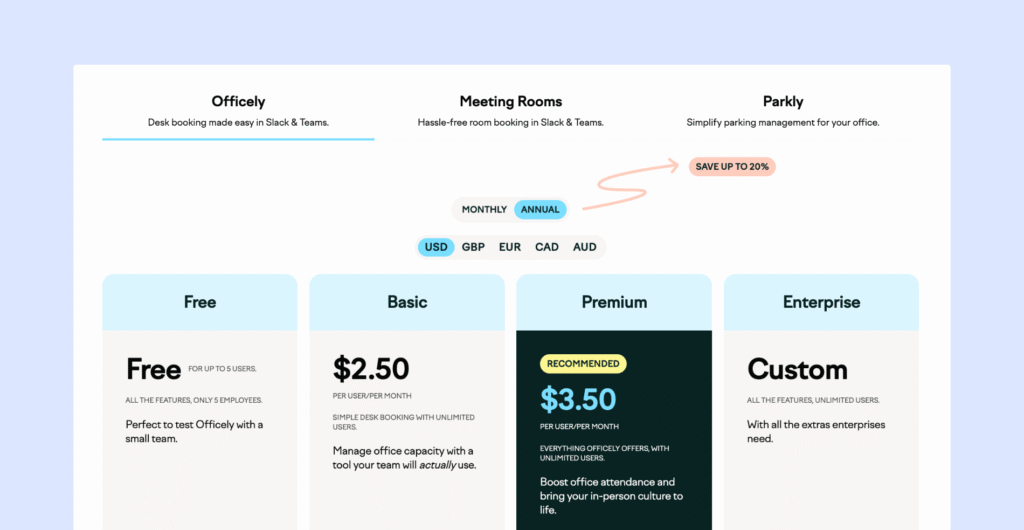
Officely charges per user per month and offers a free plan for very small teams.
- Free: Up to 5 users with core desk booking and Slack or Teams integration.
- Basic (from $2.50/user/month, annual billing): Unlimited users, desk booking, and capacity management; about $3.00/user on monthly billing.
- Premium (from $3.50/user/month, annual): Adds advanced analytics, usage insights, and collaboration features.
- Enterprise (custom pricing): Custom integrations and dedicated support.
Meeting rooms and parking are billed separately per room or space, and AI features use paid credits.
What are the pros and cons of Officely?
Officely comes out as the winner for small teams, but becomes less efficient as headcount, booking complexity, and reporting needs increase, even to a reasonable extent.
Pros
- Those who had very complicated office management systems before would love using Officely’s straightforward booking system. Users share how Officely has made their lives easier.
- Status updates and the daily chat give people a social reason to come in, not just a desk.
- The free plan covers up to 5 users and offers a pretty low entry point for small organizations to benefit from.
Cons
- Per-user math at scale. A 300-person company on Premium pays about $1,050/month, whether 40 or 200 people come in on a typical day.
- Office check-ins, guest invitations, and some calendar features are only available in Slack.
- No phone support. Major support is through chat and email, and even then, first responses come from AI, which could be off-putting for users reaching out for help.
- One reviewer on G2 notes you cannot tweak or modify the statuses you set.
#4 OfficeSpace alternative: Tactic
❇️ 4.6/5 G2 Rating
Tactic is an OfficeSpace alternative that sells desk booking, room booking, visitor management, and workplace operations as separate products. The Tessa AI assistant uniquely helps employees find the right desks and rooms.
Tactic is best for hybrid companies with roughly 100 or more employees or bookable resources that expect their needs to grow from booking into facilities workflows.
This can be a good choice for organizations where workplace, IT, and People Ops share ownership of the office and need separate admin roles.
What are the key features of Tactic?
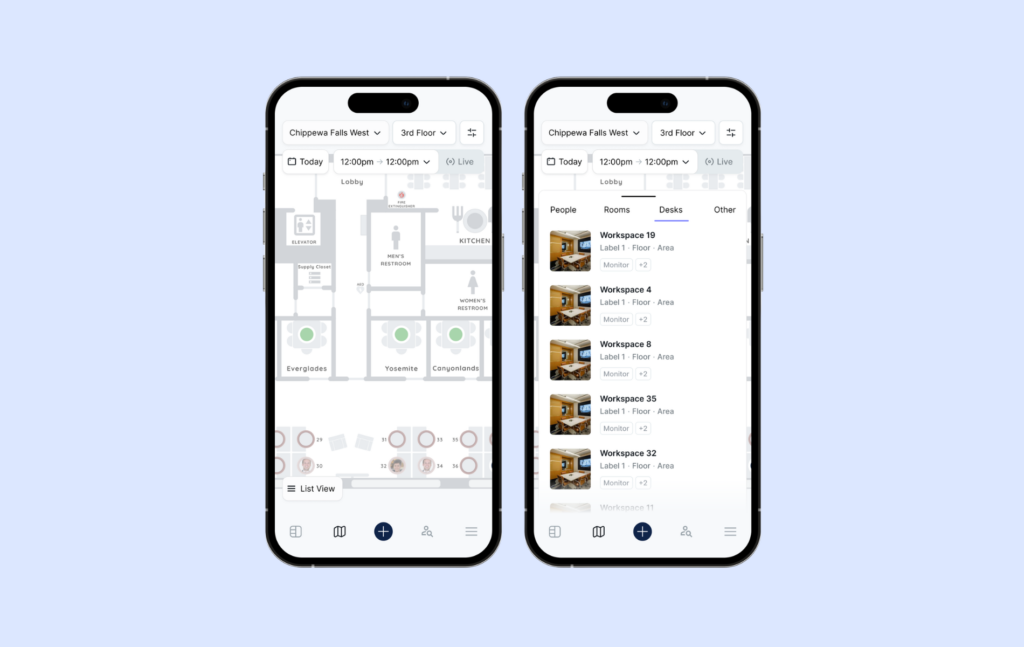
- Buy only the modules you need: Desk booking, rooms, visitors, and space management are sold separately and can be added later. In comparison, OfficeSpace Workplace packages capabilities into Essentials Plus, and Pro Plus tiers, so buyers often pay for planning tools they do not use yet.
- Desk booking: Employees can reserve desks easily, which makes it ideal for hot desking and office hoteling setups.
- Tessa AI Assistant: Employees book through plain language requests in Slack or Teams, and Tessa handles reminders and no-show releases, without opening another tab.
- Seating assignments: Assign desks on a temporary or permanent basis to accommodate different employee needs.
- Future booking limits: Control how far in advance employees can reserve desks.
- HR-driven org data: Workday, BambooHR, Okta, and Azure AD integrations keep teams and departments in sync, so neighborhoods stay accurate as people change roles.
How much does Tactic cost?
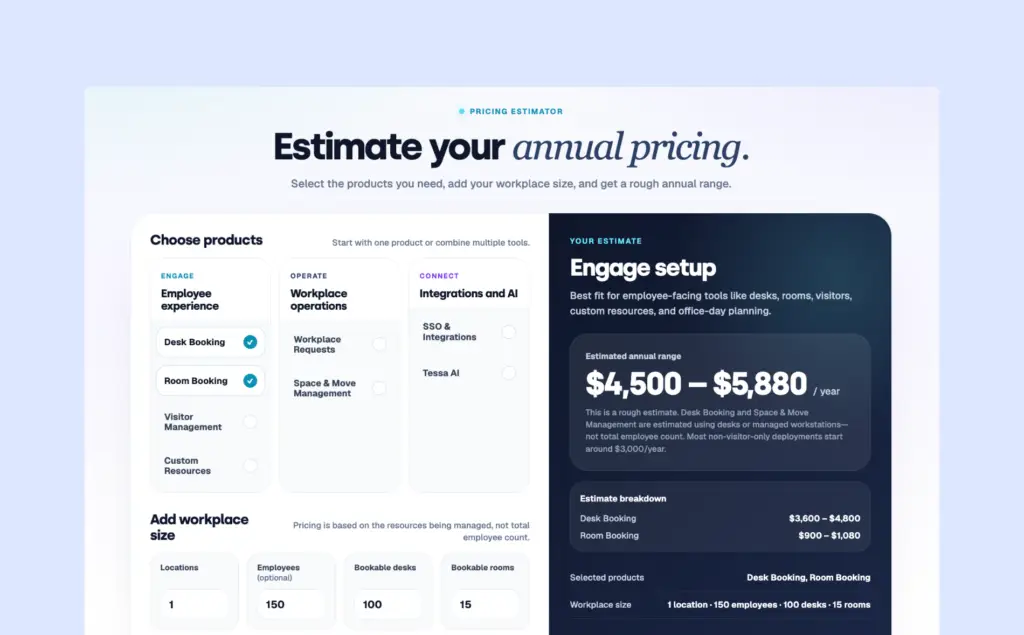
Tactic quotes each deal based on the product chosen, office footprint, and rollout support.
- Product-based pricing: Each module is priced individually, so a desk-booking-only deployment costs less than a full suite.
- Choice of billing model: The company can pay per monthly active user or per desk, room, or parking space.
- Example estimate: Desk booking for one location with 150 employees and 100 desks is estimated at $3,600 to $4,800 per year.
What are the pros and cons of Tactic?
Pros
- Room to grow into operations without switching vendors. Teams can keep adding modules based on the growth they attain, without migrating off Tactic.
- The minimal onboarding effort, followed by a simple user experience, has been consistently raved about by users on G2.
- Suits organizations in even the most regulated industries, with SOC 2 Type II, GDPR, data residency, and Enterprise HIPAA support.
Cons
- Slow loading is the most cited complaint by users across G2.
- Map changes go through support, and that slows down reconfiguration.
- Rigorous auto-release feature, that, when staff forget to check in during meetings, kicks in and releases rooms that are actually in use.
- Several reviewers find the mobile experience a little basic compared to the web app.
#5 OfficeSpace alternative: YAROOMS
❇️ 4.3/5 G2 Rating
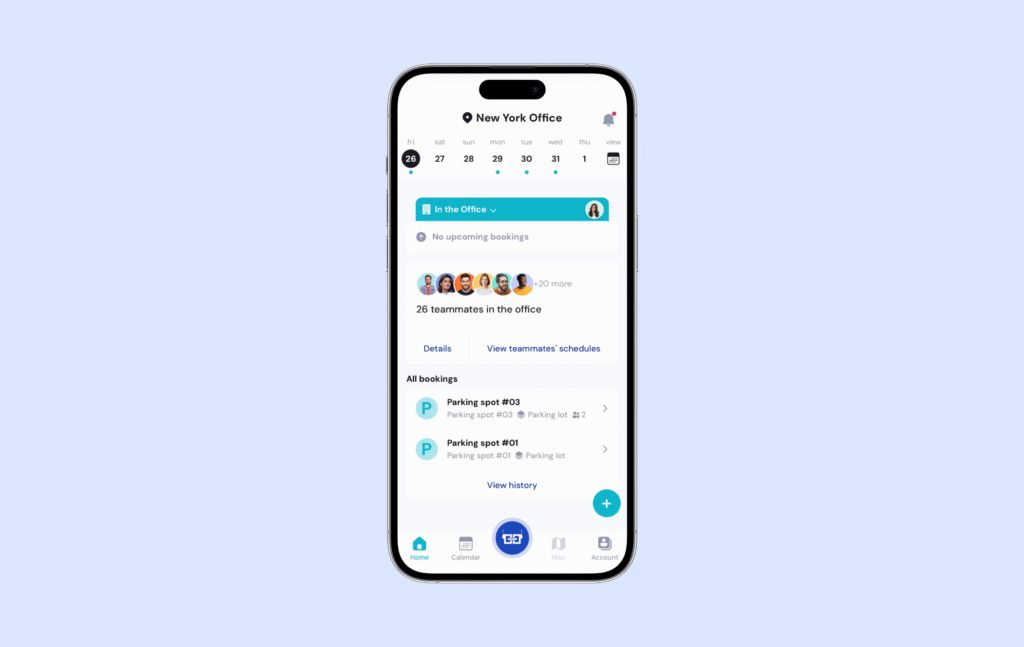
YAROOMS is an OfficeSpace competitor that helps you book meeting rooms, manage desks, and track space usage with ease. Designed for hybrid and flexible workplaces, YAROOMS ensures teams can stay organized and make the most of their office spaces.
It closes the calendar gaps OfficeSpace reviewers report by booking inside Teams and Outlook, but its tier jumps can make costs as hard to predict as OfficeSpace’s quotes.
YAROOMS is suitable for Microsoft 365 organizations that plan hybrid schedules centrally and want AI to take over routine booking. It fits companies that want desks, rooms, parking, and lobby screens from one vendor, and have IT teams that may require a dedicated cloud deployment.
What are the key features of YAROOMS?
- Yarvis AI assistant: Yarvis can book several desks for a team in one request, find a room with specific equipment, or say where a coworker is sitting. OfficeSpace’s assistant, Ossie, covers broader workplace questions, while Yarvis focuses on the booking itself inside Teams.
- Hybrid work planning: Managers and employees plan office and remote days in advance, giving workplace teams expected occupancy per day. OfficeSpace’s forecasting serves longer-range real estate decisions instead.
- QR check-in: Reviewers appreciate scanning a QR code to claim a desk quickly, though some report camera recognition issues on mobile.
- Room displays: Screens outside rooms sold as an add-on.
- Dedicated deployment: Enterprise customers can run YAROOMS on dedicated Azure or AWS infrastructure, which few booking tools offer
- Office utilization reports: YAROOMS provides analytics on space usage, no-show rates, and popular booking times. Enterprise also adds a carbon dashboard.
How much does YAROOMS cost?
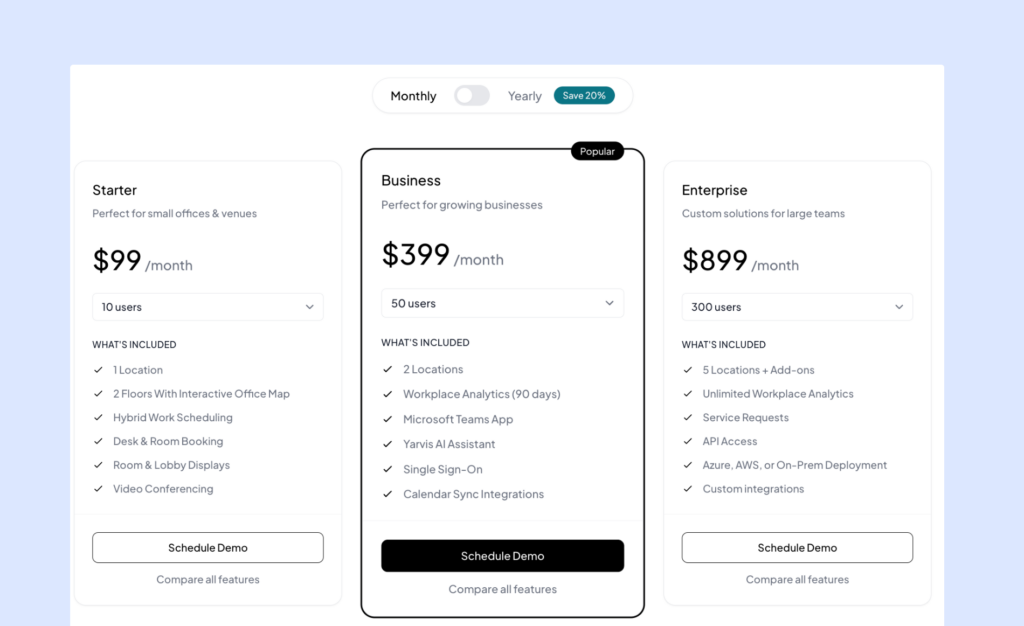
YAROOMS offers three pricing plans based on the number of users and office locations.
- Starter (about $99 to $199/month): One location with desk and room booking and the mobile app, analytics aren’t included.
- Business (about $399 to $500/month): Up to two locations, adding interactive maps, hybrid work planning analytics, and Microsoft 365 and Google Calendar integration.
- Enterprise (custom, from about $899/month): Unlimited locations, SSO, API access, dedicated deployment, Teams integration and the carbon dashboard.
Visitor management is about $99 per location per month on top of any plan, and room displays are extra.
What are the pros and cons of YAROOMS?
Pros
- Many users say the interface feels simple and intuitive, even for people who don’t usually work with booking tools.
- Users often highlight quick and helpful support, setup guidance, and troubleshooting from the support team.
- Dedicated Azure or AWS hosting helps organizations with strict IT or data requirements.
- Users call it very user-friendly for scheduling meetings, which is a strength for room-heavy offices.
Cons
- Some users feel the mobile app isn’t as smooth or fully featured as the desktop version
- One enterprise reviewer says it is difficult to identify who has booked each desk unless you click each icon, which undercuts team coordination.
- Visitor management, displays and full analytics history all cost extra.
- Reviewers report recurring meetings can only be booked on a weekly pattern.
- Space limits trigger price jumps. A user feels the limited spaces available before price jumps could have been more.
Head-to-head comparison of OfficeSpace alternatives
OfficeSpace | Archie | Skedda | Officely | Tactic | YAROOMS | |
|---|---|---|---|---|---|---|
Best for | Large real estate portfolios | Growing hybrid teams, one to many offices | Offices with strict booking rules | Small, Slack-first teams | Teams expanding into facilities workflows | Microsoft-first companies |
Pricing model | Platform fee + synced employees | Per desk or room | Per space, unlimited users | Per user | Modular pricing depending on product usage and size | Tiered by users and locations |
Starts at | Custom quote | $159/mo | $249/mo | Free for 5 users, then $2.50/user | Custom quote | $99/mo - $199 |
Free trial | None listed | 14-days | 14 days | Free plan | On request | Yes, card needed |
Book from | Teams, Slack, web | Teams, Outlook, Slack, mobile | Teams, Outlook, Slack | Slack and Teams | Slack and Teams (Tessa AI) | Teams, Slack (Yarvis AI) |
Standout | Stack planning and moves | Neighborhoods, QR check-in, SSO on Pro | Granular rules engine | Daily office chat and status | Modular buying | Group bookings via AI |
Watch out for | Quote-only pricing, slower setup | Tight default check-in window | Space caps raise the price | Cost grows with headcount | Slow loading, support-led map edits | Price jumps at limits |
G2 rating | 4.7 (128) | 4.9 (245) | 4.8 (287) | 4.6 (158) | 4.6 (550+) | 4.3 (~100) |
What is OfficeSpace?
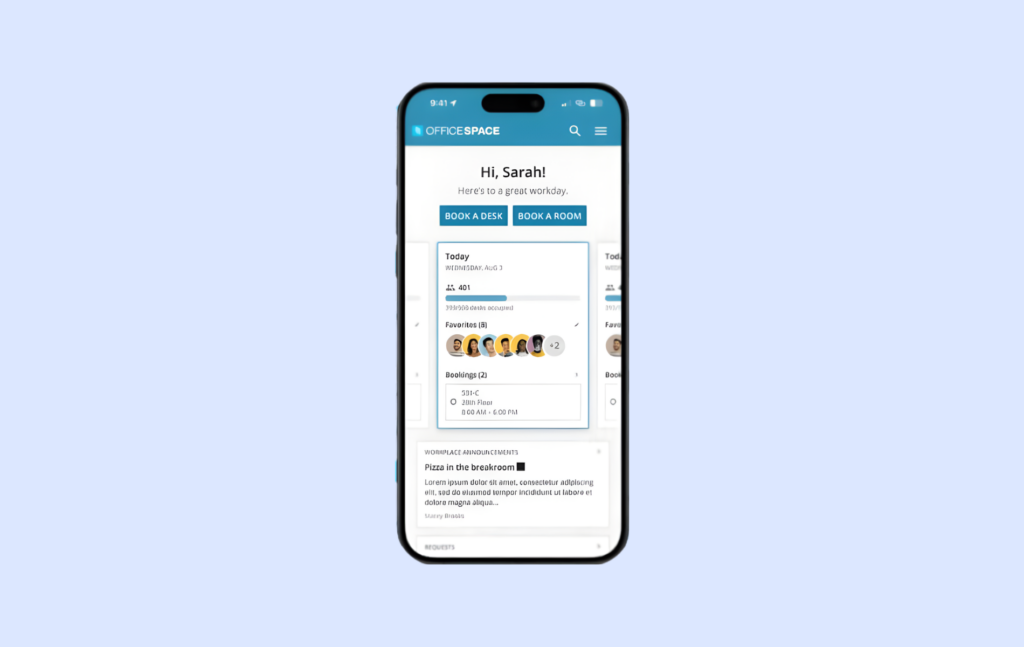
OfficeSpace is a workplace management platform from OfficeSpace Software for companies that need tight control over their offices. It brings space planning, team moves, and day-to-day desk and room booking into one toolkit across one or many locations.
OfficeSpace reports more than 1,700 customers worldwide, used by facilities teams, workplace operations leaders, and their employees at mid-market and enterprise organizations. On G2, about 52% of its reviewers come from mid-market and 48% from enterprises.
OfficeSpace’s core capabilities span planning and day-to-day workplace operations:
- Space planning and moves: Scenario modeling, block-and-stack floor planning, and move coordination with tasks and status updates.
- Interactive floor plans and wayfinding: Live office maps for viewing seating, finding coworkers and rooms, and setting up team neighborhoods.
- Desk and room booking: Web and mobile booking with live availability and equipment filters, plus mobile or badge check-in that releases no-shows automatically.
- Visitor management: Greetly kiosks or QR check-in, NDAs and signatures, badges, and instant host notifications.
- Facility requests: Maintenance and service tickets with progress tracking.
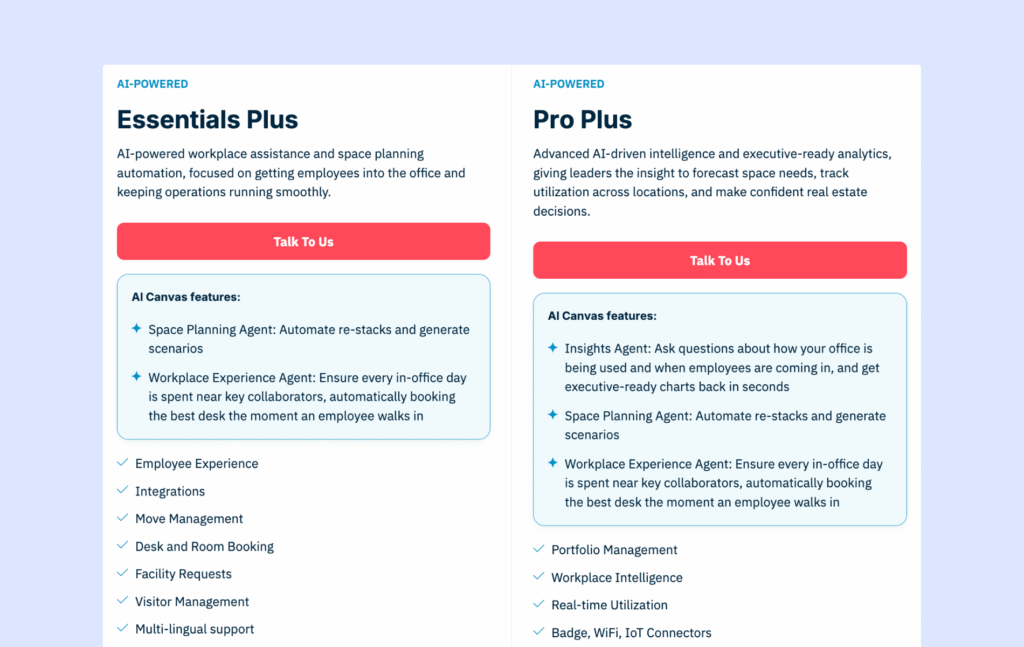
- Workplace analytics: Utilization dashboards and reports, with AI-generated insights and deeper analytics on Pro Plus.
- Integrations: Outlook and Google calendars, Slack, Teams, SSO and directory sync, HR systems, access control, sensors, and APIs.
These capabilities aside, OfficeSpace’s typical strengths are scenario forecasting, stack planning, and an asset directory that suits a mature facilities operation. Buyers usually choose it when real estate planning is the main use case and desk booking is one part of a broader program.
Why do companies look for OfficeSpace alternatives?
Companies evaluate OfficeSpace alternatives when they are struggling with employee adoption and want an alternative that is a more intuitive booking system for daily use.
The gaps that most often lead teams to consider replacing OfficeSpace are:
1. Paying for planning tools that sit unused
Stack planning, along with move management and asset tracking are valuable for real estate teams but pile on cost for companies that mainly need desk and room booking.
These buyers want a tool scoped and priced for daily booking.
2. Admins can’t edit floor plan
An enterprise reviewer of OfficeSpace notes that users aren’t able to make modifications to floor plans in real-time or on their own.
Teams want an alternative they can adjust themselves when layouts or policies change, without waiting in line for support to do it for them.
3. Major booking and calendar gaps
Reviewers describe calendar integration and Outlook sync as not developed enough, and a facilities manager cannot schedule an upcoming desk type change without canceling existing bookings.
Hybrid employees expect booking to work equally well from Outlook, Teams, or a phone.
4. Limited room for customization
A senior workplace manager, a user of OfficeSpace, finds some features a little less customizable and that forecasting is being gatekept for higher tiers only.
5. Long time to value
Buying usually starts with a demo and a custom quote. There is no free trial, and onboarding can take weeks. That is fine for enterprises with formal rollouts, but it is slower if you want a quick start.
That said, large, multi-site organizations that run frequent moves, rely on badge or sensor data, and need advanced space planning often get strong value from OfficeSpace’s depth and enterprise support. But for companies with large teams or on-and-off office attendance, the total can climb quickly.
6. Steep pricing
Pricing, mainly, decides the switch. OfficeSpace doesn’t publish prices, lists no free trial on G2, and sells all plans through custom quotes only, for planning features most mid-sized and single location offices don’t need.
When pricing grows with headcount, every new hire raises the bill even if they come in once a week.
When should you switch from OfficeSpace? | When should you stay with OfficeSpace? |
|---|---|
When desk and room booking are the core need and planning modules are rarely used, or you need predictable, resource-based pricing | High traffic, photo capture, long-term performance |
How do you choose the right OfficeSpace alternative?
The criteria that should drive the shortlist, in decision order, are:
- Workplace model and core use case: Confirm whether you need hybrid desk and room booking, space planning, or both.
Ask vendors to demo your real scenario, such as hot desking with team neighborhoods. Please note that booking-focused tools rarely include stack planning.
- Booking rules and policies: List the rules you must enforce, like booking windows, team zones, check-in, and no-show release.
Test them in a trial, and weigh rule depth against the admin time it takes to maintain them.
- Employee experience and adoption: Check that booking works on mobile, Outlook, Teams, and Slack, not only on the web.
Pilot with a small group and track how many book without help, since a chat-only tool may lack visual floor plans.
- Pricing model and total cost: Compare per-user, per-desk, and per-space pricing against your headcount and desk count.
Model costs at today’s size and at your next expansion, and confirm what add-ons cost.
- Scalability across locations: Confirm multi-location support, role-based admin access, and regional data residency.
Check the tier you’d need in two years.
When your priorities clash, rank them by what blocks adoption first. Lower pricing doesn’t really pay off if employees avoid the tool, so ease of use and integrations should outweigh a small price gap.
What’s the best OfficeSpace alternative for hybrid desk and room booking?
Archie is the best OfficeSpace alternative for most hybrid workplaces. Run through the criteria above, and it is the option that clears each one without a major trade-off. In 2026, Archie’s booking system was recognized by G2 as the Best Estimated ROI for Enterprise teams.
Each of the other tools leads on one dimension and asks buyers to give something up elsewhere, but not Archie.
Archie’s booking software covers desks, rooms, and visitors in one platform, works in the tools employees already use, and works in a resource-based pricing model with a base of $159/month.
The customer profiles where Archie is the strongest fit are:
- Companies with more employees than desks
- Companies opening or consolidating offices and need multi-location management without the gruntwork
- Microsoft 365 and Slack environments
- Teams moving off assigned seating with companies who want accurate figures about employee in-office presence
- Enterprises with strict security and data requirements
- Global companies with complex organization structures
- Enterprises that need deep IT integration to match their stack
- Teams that need one tool for desk, room reservations, and a unified view of space utilization
The most reliable way to know if Archie is the best fit for you is to get in touch with our sales team, ask about our different features and see what works for you.

Why do companies choose Archie as an OfficeSpace alternative?
Companies usually choose Archie when they realize most of their OfficeSpace use is booking and not planning. OfficeSpace remains strong at portfolio work, such as stack plans and moves. The daily work of a hybrid office is different. You’ll need to help people find a desk, sit near their team, and free up space they will not use.
Archie is built for that loop, and its pricing follows desks and rooms rather than headcount.
Criteria | Archie | OfficeSpace |
|---|---|---|
Core focus | Hybrid desk booking, room booking, and visitor management | Space planning, move management, and booking for facilities and real estate teams |
Pricing approach | Per desk or room; Starter from $159/month, Pro from $249/month | Custom quotes for Essentials Plus, and Pro Plus tiers |
Trial | 14-day test environment after demo | None listed |
Setup | Configured by workplace teams; G2 ease of setup 9.6 | Longer configuration for advanced features; G2 ease of setup 9.0 |
Integrations | 30+ tools, including Teams, Outlook, Slack, Google Calendar, Zoom, Zapier, SSO, SCIM, open API | HRIS, ITSM, IWMS, Outlook, Teams, Slack, SSO |
Planning depth | Usage analytics and CSV export | Forecasting, scenario modeling, and stack planning |
Scalability | Multi-location from Pro; data residency on Enterprise | Multi-site portfolios with planning tools |
When put head-to-head in terms of how users feel about each core feature on G2, Archie edges ahead on every score, most clearly on setup:
G2 metric | Archie | OfficeSpace |
|---|---|---|
Overall rating | 4.9/5 (245 reviews) | 4.7/5 (128 reviews) |
Ease of use | 9.5 | 9.4 |
Ease of setup | 9.6 | 9.0 |
How do you migrate from OfficeSpace to Archie?
A smooth migration comes down to three moves: take your data with you, build Archie before you switch, and go live.
- Bring your workplace data with you: Export the people, spaces, floor plans, bookings, and historical data you want to keep from OfficeSpace. Think of this as your safety net before you make the move.
- Build Archie while OfficeSpace keeps running: Recreate your workplace setup, neighborhoods, booking rules, and permissions in Archie. Your team can keep using OfficeSpace while you test the new setup behind the scenes.
- Test everything, then flip the switch: Connect your calendars, SSO, tablet kiosks, and other integrations. Once everything checks out, set your go-live date, tell your team what’s changing, and move your upcoming bookings to Archie.
- Points to keep in mind when migrating off OfficeSpace
- Ask OfficeSpace for current floor plans before your contract ends.
- OfficeSpace’s visitor management system, Greetly’s data retention rules can delete older records automatically, so check those settings.
- Check that SSO, SCIM, and calendar sync work for every user group, and that analytics match expected occupancy. Keep an archive of OfficeSpace data for reporting and compliance before the contract ends.
Bring your workplace over to Archie without the usual migration headaches. We’ll help you get set up, tested, and ready to go.
- Key sources
FAQ
What’s the best alternative to OfficeSpace?
Archie is the strongest overall alternative. Skedda, Officely, Tactic, and YAROOMS are also worth considering for specific needs like custom rules, Slack booking, facilities tools, or AI scheduling.
What are the disadvantages of OfficeSpace?
Common drawbacks include quote-only pricing, limited floor plan control, incomplete Outlook sync, and limited customization. Forecasting also requires a higher-tier plan.
How much does a visitor system cost?
Yes, you can easily mark any desk as temporarily or permanently unavailable. Keep in mind that for recurring bookings, you can let individual employees “release” a desk when they are not going into the office, so that the resource is unavailable by default, but can be made available by the user at any time.
Is Archie cheaper than OfficeSpace?
It depends on your employee-to-desk ratio. Archie starts at $159/month and charges by locations, while OfficeSpace adds employee-based fees. Archie can be more cost-effective for hybrid teams with more employees than desks.
Which OfficeSpace alternative is best for hybrid teams?
Archie is a strong fit for teams focused on desk and room booking, with booking through Teams, Outlook, Slack, and mobile. OfficeSpace is better for teams needing advanced real estate planning and move management.