



















- What you’ll learn
- What coworking cloud printing actually is
- Why traditional coworking printing setups create operational friction
- The biggest benefits of cloud printing for members and operators
- How integrations like Archie + ezeep automate printing access, tracking, and billing
- Real examples of coworking printing automations and membership-based print rules
If you ask me what printing should look like in a coworking space, I’d keep it simple. A member walks in, opens their laptop or phone, prints a document, and gets back to work.
No downloading drivers. No asking the front desk for help. No “this printer only works on Windows.” And definitely no tracking print usage later in a spreadsheet.
But in many coworking spaces, printing still creates small daily headaches.
That’s where cloud printing comes in. In this guide, I’ll walk through what coworking cloud printing is, why it matters, and how to make it work in a way that keeps things simple for members and easier for your team (using the Archie + ezeep integration as an example).
What is coworking cloud printing?
Cloud printing lets members print from any device (laptop, phone, tablet) without installing printer drivers or needing IT help. For coworking spaces, leading solutions like ezeep and PaperCut connect directly to the printers and integrate with coworking management software, so printer access, usage tracking, credits, and billing can all be automated based on membership plans.
Benefits of cloud printing for coworking spaces
I’ve seen operators deal with the same coworking printing challenges again and again: helping members install printer drivers, fixing Mac and Windows compatibility issues, giving people access manually, tracking print credits by hand, and trying to work out who printed what at the end of the month.
When you look at it as a whole, those “small” tasks start adding up very quickly. Coworking surveys & statistics show that onboarding, print access, and billing can take 20–30 minutes per new member, and operators spend at least a few hours per month troubleshooting print and access issues, and then reconciling invoices and usage manually.
The actual act of printing a document takes seconds. What takes time and effort is everything surrounding it — and it gets worse when you’re trying to open more locations.
“If you’re scaling and experiencing friction in one location, you’ll eventually experience it across every location. The problem may seem small at the beginning, but as you grow, it gets much bigger. Removing that friction not only makes operations easier, it also helps you scale and unlock new revenue streams.”
- Alberto di Risio
- Head of Marketing @ Archie
So, here’s how cloud printing can help in coworking spaces:
It makes printing easier for members
Today, members expect a printing experience that “just works”, which basically means instant access from day one and no IT setup. If that doesn’t happen, the frustration builds slowly in the background.
With cloud printing, members can print from the device they already use, whether that’s a laptop, phone, tablet, Mac, or Windows device. They don’t need to install drivers or ask the front desk for help. In many cases, they can simply use an app or web portal, choose the printer, and send the document.
Of course, a member may not cancel because of one printer issue. But if the space constantly feels difficult, disorganized, or full of little friction points, it absolutely affects retention and overall experience.
It saves your team time
Your community manager should not have to become printer support. Cloud printing helps reduce those everyday questions like “How do I connect to the printer?” or “Why isn’t this working on my laptop?”
Instead of setting up every member manually, your team can manage printing from one central system. That means fewer interruptions and more time for the work that actually matters, like helping members, running events, and building the community.
It connects printing to membership plans
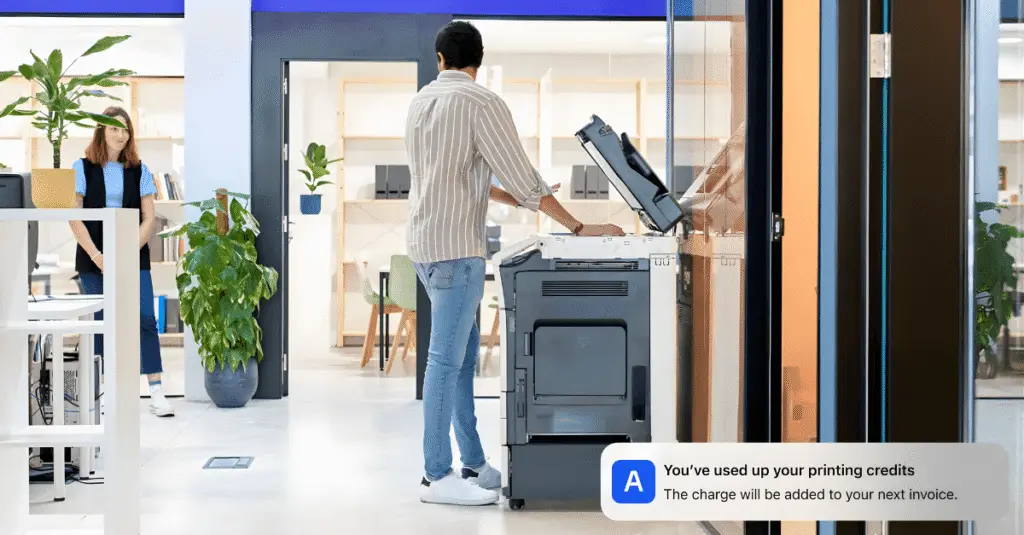
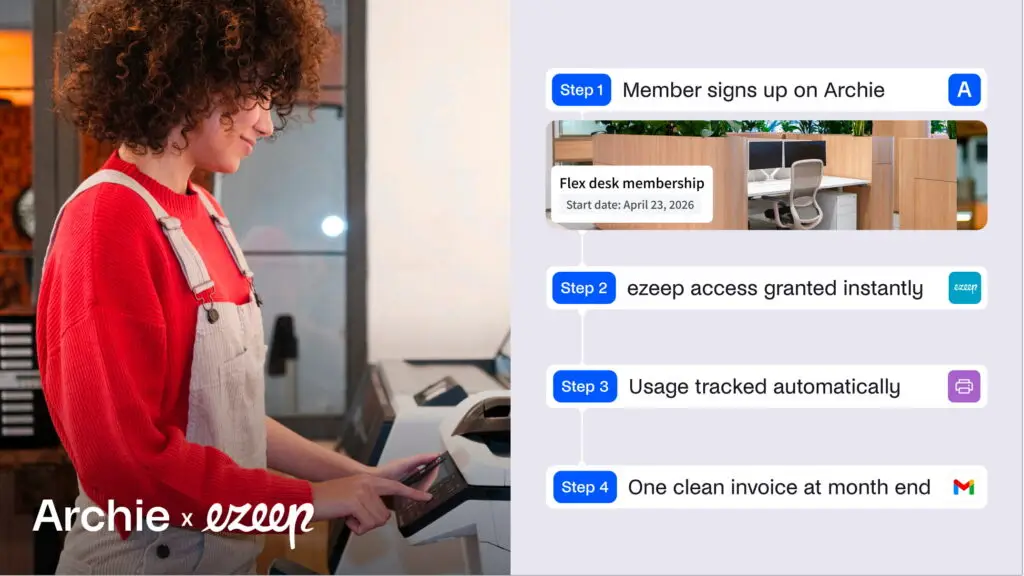
This is where cloud printing becomes especially useful for coworking spaces. When it connects with coworking management software, printing can be linked directly to a member’s plan. For example, with an integration like Archie + ezeep, a new member can automatically get printer access when they sign up.
Their print credits, pricing rules, and overage charges can also be assigned automatically. Usage is tracked in the background, and any extra charges can be added to their invoice.
So instead of checking spreadsheets or calculating print usage by hand, the system does the work for you:
It gives you more flexible pricing options
Cloud printing also makes it easier to offer printing in a way that fits your business.
You can include a few free pages in basic plans, offer more credits to premium members, or charge extra when someone goes over their allowance. You can also set different prices for black-and-white and color printing.
This is helpful because not every member prints the same amount. A freelancer may barely use the printer, while a law firm, consultant, or finance team may print much more often.
It can open up a new revenue stream
Most coworking spaces don’t make huge amounts of money from printing, but cloud printing can help turn it from a pure expense into a small additional revenue stream.
For example, you can:
- Charge per page automatically
- Include printing credits in certain membership plans
- Offer premium printing allowances for teams that print more often
- Bill overages automatically when members go above their quota
And honestly, I don’t think the goal should be to monetize every single page someone prints. In many coworking spaces, unlimited or fair-use printing still works perfectly well. But once you have larger teams, multiple locations, or members with heavier printing needs (think law firms, finance companies, or consulting teams), having automated usage tracking and billing can make a big difference.
“The connection between Archie and ezeep works well for tracking usage and recording the information we need when it’s time to bill clients. It gives our members an option to print on site, lets us track that activity, and it opens up a new stream of revenue.”
- Lane Braidwood
- General Manager @ Modspace
It keeps documents more secure
In a shared coworking space, printed documents can easily sit in the printer tray where someone else might see them.
Many cloud printing tools support secure print release. That means a member sends the document to the printer, but it only prints when they confirm it at the device, usually with a PIN, badge, or app.
It removes one more daily headache
For me, this is the biggest benefit. As coworking print management gets easier (and less annoying for everyone involved), your team gets fewer support requests. Billing becomes cleaner. Members get a smoother experience. And printing stops being something you have to think about every day.
How to improve coworking printing with ezeep & Archie
At this point, you’re probably already thinking that cloud printing is the way to go. And honestly, that’s the right move.
Tools like ezeep or PaperCut make printing much easier for coworking spaces, but the real magic happens when you connect cloud printing to your coworking software.
“The main benefit is to have printing usage tracked directly in Archie and billed to our users through it.”
- Camille Ruest
- Operations Coordinator @ Coast
Connect ezeep to your coworking software
The idea behind the integration is pretty simple:
- ezeep handles the cloud printing side
- Archie handles the coworking operations side
Once both tools are connected, a lot of the manual work around printing can happen automatically in the background.
For example, printer access can be assigned when someone joins, printing rules can be linked to membership plans, credits and quotas can be managed automatically, and usage can be tracked without spreadsheets. If a member goes over their included credits, the extra charges can appear directly on their invoice.
Instead of setting up every member by hand, you define the rules once and let the system handle the rest. This becomes especially useful as your coworking space grows, adds more members, or expands into multiple locations.
But we’ll get to that in a bit.
Now, to connect both platforms, go to Archie’s Settings, open Integrations / App marketplace, find ezeep, and click Connect. Then log into your ezeep account and authorize the connection.
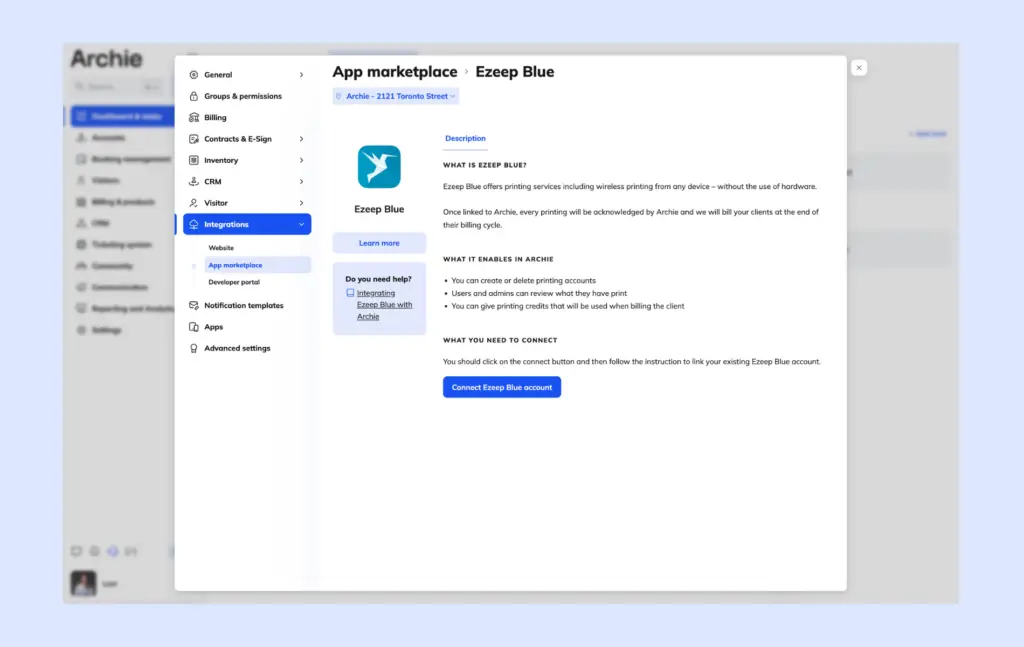
Once connected, Archie creates an “Archie” user group inside ezeep. From there, you can choose which printers are available, manage color settings, define paper types, and set printer permissions.
For multi-location coworking spaces, you can also organize printers by site or member group, so each member gets access to the right printers for their location or plan.
Specify printing rules
This is where you decide:
- Who gets printer access
- How printing is billed
- What credits are included
- And how much automation you actually want
Inside Archie, you can configure pricing rules, taxes and accounting codes, paper types, black-and-white vs color pricing, printer access by location, and printing credits and quotas.
The nice part is that everything can connect directly to membership plans. So once someone joins a specific plan, the system automatically applies the correct printing rules in the background.
Let’s take a closer look at it.
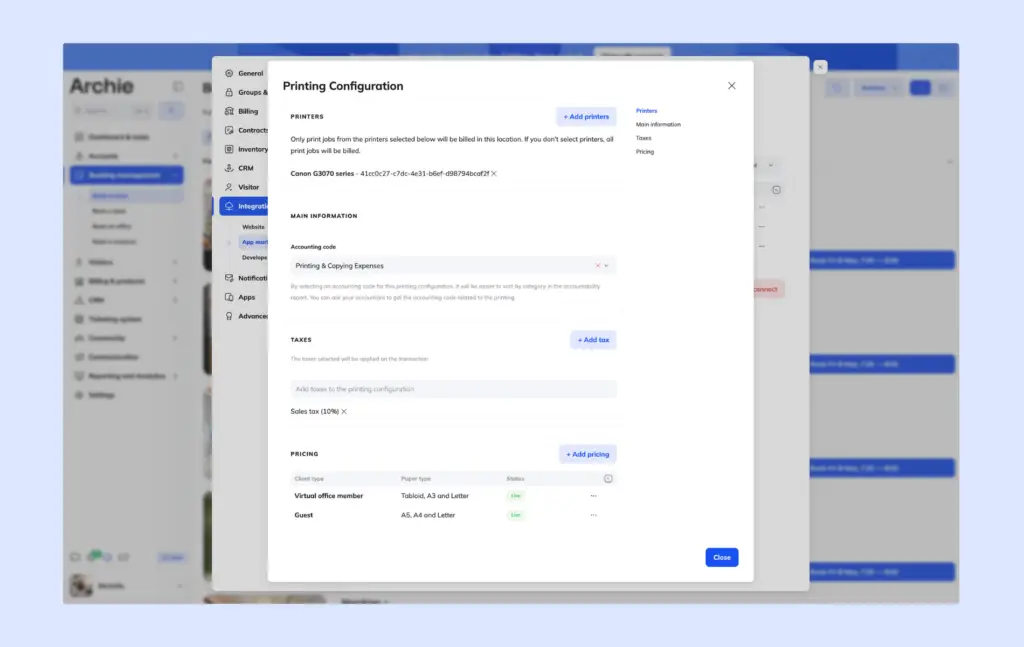
Connect printing to membership plans
Instead of setting up printing for every member by hand, you can connect printing rules directly to your membership plans. That means printer access, pricing, credits, and billing can all follow the plan someone is on.
You can set up:
- 25 free printing credits per month for a standard plan
- Unlimited black-and-white printing for premium members
- Enterprise teams may receive larger quotas or different pricing
- Different color printing limits for different plans
- Credits that expire monthly
- Separate rules for day passes, teams, or virtual office members
- Specific paper types that credits can or cannot be used for
- Guests can follow separate rules entirely
So, let’s say a company joins your coworking space on a “Premium Team” plan. Once they are added to that plan, the system already knows which printers they can use, how many credits they get, what pricing applies, and what happens if they print more than their allowance.
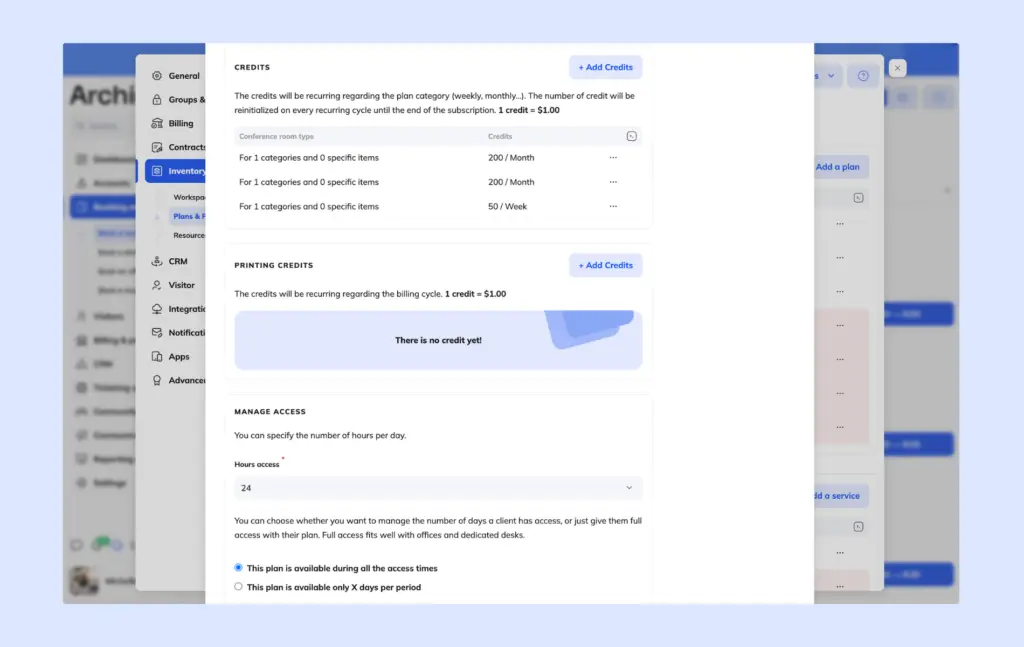
When someone prints, the system checks their available credits first. If they still have credits, those are used automatically. If they go over their allowance, the extra usage can be added to their invoice based on the pricing rules you set.
This gives you a lot of flexibility. You can keep printing simple for casual members, while offering higher allowances to teams that print more often, like law firms, finance companies, or consulting teams.
You can also view printing activity for both individual members and company accounts, so you always know who has access and how printing is being used.
The best part is that you only need to set this up once. After that, whenever someone joins the right plan, the access, credits, pricing, and billing rules apply automatically in the background.
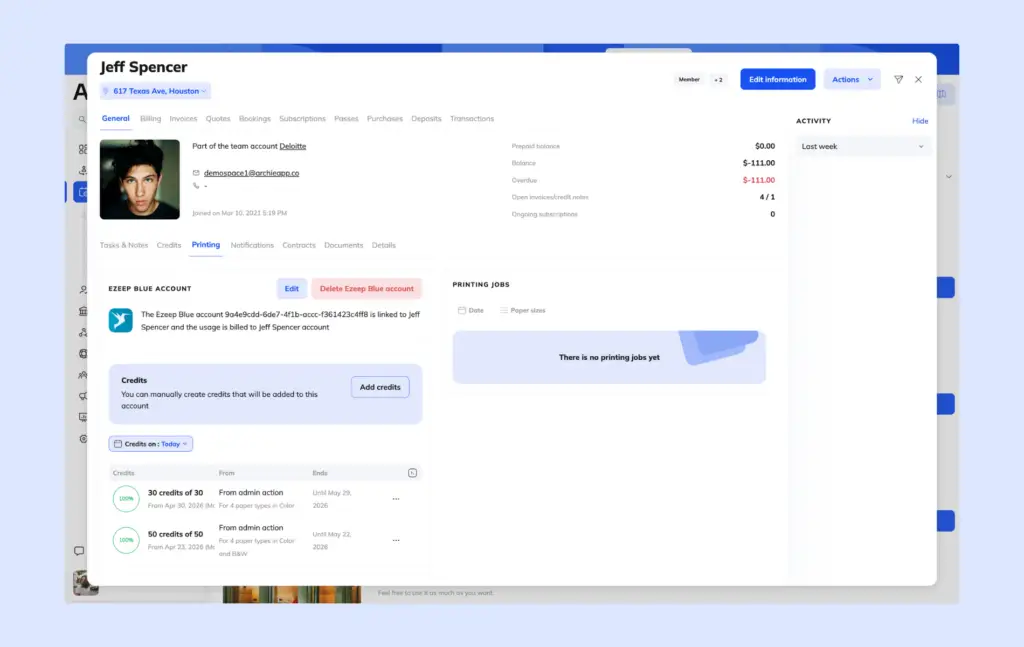
Automate print tracking and billing
One of the biggest frustrations with coworking printing is trying to track everything manually.
- Who printed what?
- How many pages did they use?
- Did they go over their allowance?
- Should that extra usage be added to the invoice?
Those questions can quickly turn into messy admin work, especially if you’re checking printer logs, updating spreadsheets, or calculating overages by hand every month.
With Archie + ezeep, that work can happen automatically in the background.
Every time a member prints, the activity is tracked and sent back to Archie. The system can record details like the number of pages, paper type, black-and-white or color usage, and which member or company account the print job belongs to.
Then, Archie applies the rules you already set up.
For example:
- Available print credits are used first
- Pricing rules are applied automatically
- Overages are calculated if someone exceeds their allowance
- And the final amount can be added directly to the member’s invoice
At the end of the month, you don’t need to manually figure out who printed what or what they owe. Archie calculates the final amount based on printing activity, credits, pricing, and coworking membership rules.
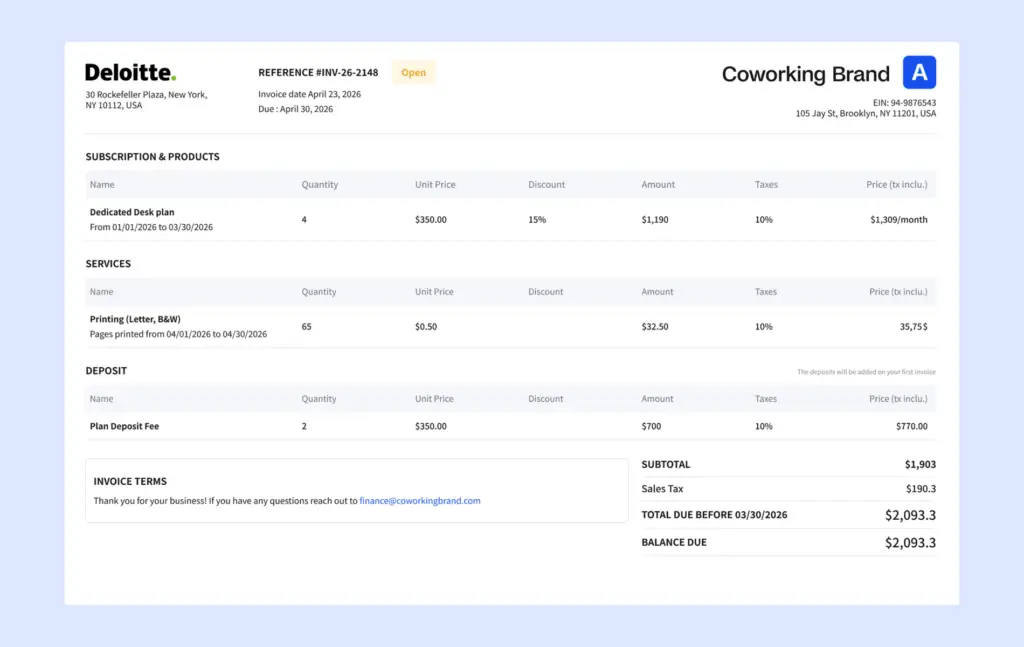
Examples of coworking printing automations
Here are a few real-world examples of how coworking spaces can automate printing workflows with tools like Archie + ezeep.
Example 1: Include free printing in a membership plan
You could offer:
- Hot Desk plan → 10 free black-and-white pages per month
- Dedicated Desk plan → 20 pages per month
- Private Office plan → unlimited black-and-white printing
Example 2: Different rules for enterprise teams
A law firm rents a private office for 25 employees and prints much more than the average coworking member.
Instead of manually tracking usage, you could set:
- Higher monthly print quotas
- Discounted per-page pricing
- Access to color printing
- Billing linked directly to the company account
Employees can print freely, while all usage rolls into one invoice for the company.
Example 3: Free black-and-white printing, paid color printing
You want to keep printing simple while still controlling expensive color printing costs.
The setup looks like this:
- Unlimited black-and-white printing
- Color printing charged per page
- Color printing available only for certain plans
Members don’t need approval or manual setup, and the pricing rules apply automatically in the background.
Example 4: Day-pass and guest printing access
You offer day passes that include:
- 8 free printing credits
- Access only to shared coworking printers
- Automatic expiration after 24 hours
When someone purchases a day pass:
- Printer access activates automatically
- Credits are added automatically
- And access disappears automatically when the pass expires
Example 5: Automatic overage billing
A member receives 30 included printing credits per month, but at the end of the month:
- They used 53 credits
- The first 30 are applied automatically
- The remaining 23 credits are added directly to the invoice
No spreadsheets, manual calculations, or invoice adjustments needed.
Example 6: Expiring monthly print credits
You want to prevent unused credits from accumulating forever.
The setup could be:
- 25 monthly printing credits
- Credits expire at the end of the billing cycle
- Unused credits do not roll over
Everything resets automatically every month.
Example 7: “Unlimited but reasonable” automation
You want a low-friction member experience, but still wants visibility into unusually high usage. Which is why you offer:
- Unlimited black-and-white printing
- No hard quotas
- Automatic usage tracking running quietly in the background
Most members never notice the system, but if someone suddenly prints 2,000 pages in a month, the operator can step in and handle it manually instead of policing everyone upfront.
Final tips for coworking printing automation
If there’s one thing I learned while researching coworking printing, it’s that most spaces do not actually need extremely complicated print management.
In fact, many coworking operators said printing volume is lower than expected, abuse is rare, and most members behave pretty reasonably. A lot of spaces successfully run with:
- Unlimited black-and-white printing
- Fair-use policies
- Or simple monthly print credits
That said, not every coworking space stays small forever.
For many spaces, printing is not a huge issue at the beginning. But once you start scaling, adding locations, onboarding enterprise teams, or manually managing billing and usage across multiple members, printing can slowly turn into operational friction.
And if you experience friction in one location, you’ll probably experience it everywhere as you grow.
That’s usually the point where automation starts becoming much more valuable. Not because you suddenly need strict control over every printed page, but because you want to reduce manual work, simplify coworking operations, and keep the member experience smooth as your coworking space grows.
Start with your real printing needs
Before investing in printing automation, I’d start by looking at what your space actually needs.
For example, ask yourself:
- How many pages do members really print each month?
- Are most of your members freelancers, or do you also have teams that print a lot?
- Are members spread across different rooms, floors, or work zones?
- Do you manage one location, or multiple coworking spaces?
A common estimate is around 6 to 10 printed pages per active member per month, but every space is different. Some coworking spaces barely use their printers, while others have law firms, consultants, or finance teams that rely on printing much more often.
Printer placement matters too. In many cases, a few smaller printers placed near busy work areas can create a better experience than one large machine hidden in a back office.
And while software is important, hardware still matters.
Even the best cloud printing setup will be frustrating if the printer constantly jams, toner runs out every week, the Wi-Fi is unstable, or the machine simply isn’t reliable enough for shared daily use.
Most members probably won’t notice when printing works perfectly, but they will definitely remember when it doesn’t.
Choose the level of automation that fits your space
Coworking spaces usually follow one of three printing models:
- Free and unlimited printing. This works well for smaller coworking spaces, low print usage, and community-first environments.
- Fair-use printing policies. This is probably the most common approach. Members can print freely, but they’re expected to use the printer reasonably. If someone has a large print job, you can handle it case by case.
- Automated tracking and billing. This becomes much more useful as your space grows. If you manage multiple locations, support enterprise members, work with larger teams, or see higher print usage, manual printing workflows can quickly become a headache. That’s where a coworking tech stack like Archie + ezeep can help.
Use secure “pull printing”
In a shared coworking space, printed documents can easily be seen by the wrong person if they sit in the printer tray for too long.
But, with pull printing, a document does not print right away. Instead, it waits in a secure queue until the member goes to the printer and confirms the job.
They can usually release the document using:
- Their phone
- A PIN code
- A badge
- Or an access card
This gives members more control over their documents and helps keep sensitive information private. It’s especially helpful for people printing contracts, financial documents, legal paperwork, client files, or anything confidential.
- Bottom line
The best coworking printing setup is usually not the most complicated one. It’s the one that fits your space, keeps the experience easy for members, and quietly works in the background with Archie and coworking cloud printing integrations.
Coworking cloud printing FAQs
Should coworking spaces charge for printing?
It depends on the space and how much members actually print. Many coworking spaces successfully offer unlimited black-and-white printing or simple fair-use policies because print usage is often lower than expected. But once you start working with larger teams, multiple locations, or heavier printing needs, tracking usage and billing can become much more useful.
How much does coworking printing cost?
The main costs usually come from paper, toner, printer maintenance, and staff time spent managing printing. In many cases, the admin work around printing ends up costing more than the actual printing itself. Cloud printing tools add another cost, but they can also save a lot of operational time by automating access, tracking, and billing.
Does unlimited printing in coworking spaces actually work?
Surprisingly, yes. Many coworking operators say abuse is rare and most members print responsibly. That’s why “unlimited but reasonable” printing is very common, especially in smaller or community-focused coworking spaces.
When do you actually need coworking print management?
For smaller spaces, simple printing setups often work perfectly fine. But once you start scaling, adding locations, supporting enterprise teams, or manually managing billing and usage, printing can slowly become operational overhead. That’s usually when automation and print management tools start becoming much more valuable.