



















- What you’ll learn
- What coworking automation actually means
- When it makes sense to start automating your coworking space
- Which coworking tasks you should automate first (and why)
- Real examples of automations across memberships, visitors, WiFi, printing, and more
- How to automate coworking space operations with Archie
When I look at coworking operations, I usually notice the same pattern. Most teams are busy all day, but not always with high-value work.
They are chasing invoices, resetting WiFi passwords, manually granting door access, solving room booking conflicts, checking who paid, answering repeat questions, and updating spreadsheets.
That’s where coworking space automation can make a huge difference.
In this guide, I’ll walk through how I’d approach coworking automation in a practical way, what to automate first, what still needs a human touch, and how modern coworking software like Archie can help connect everything together.
- About Archie
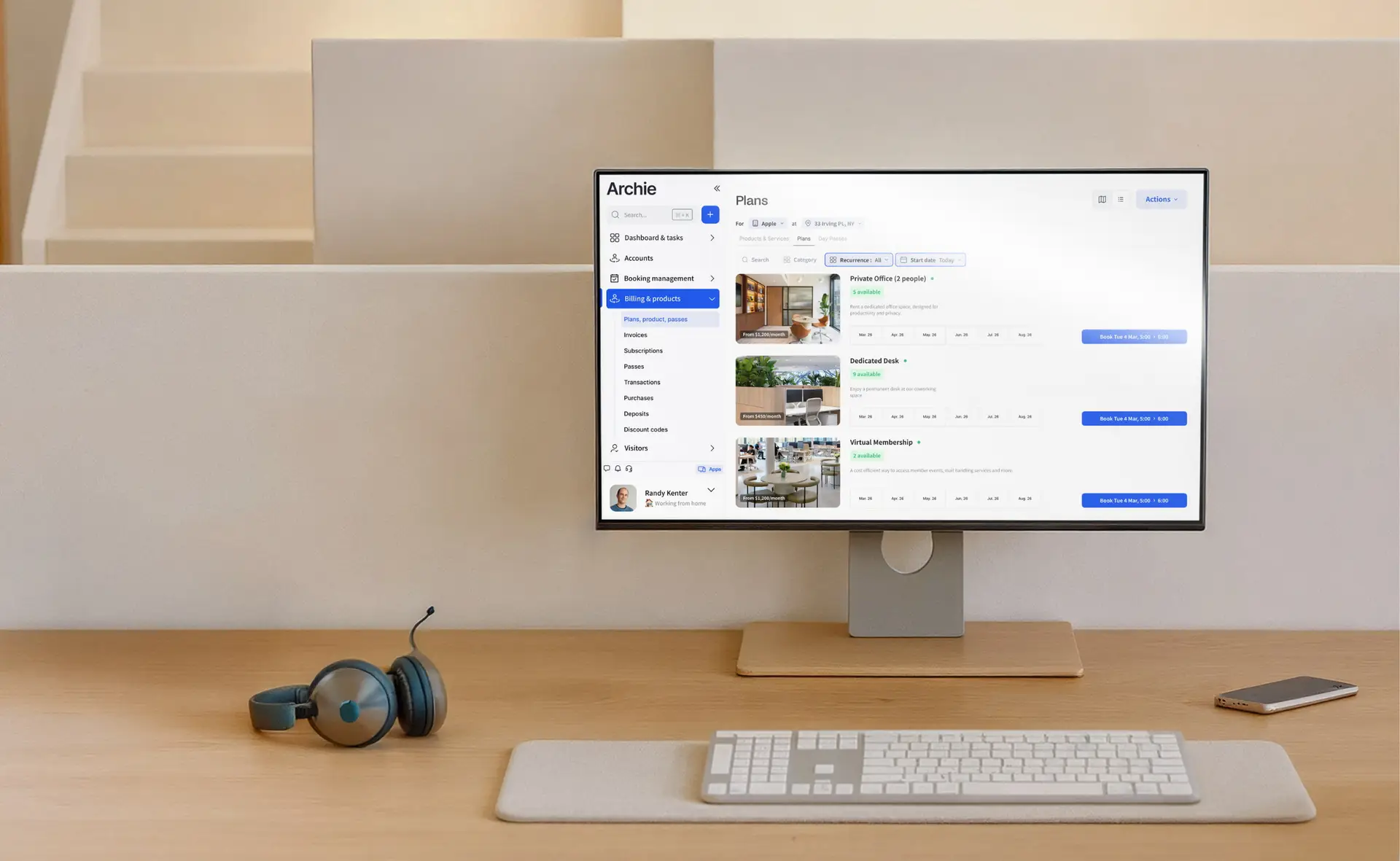
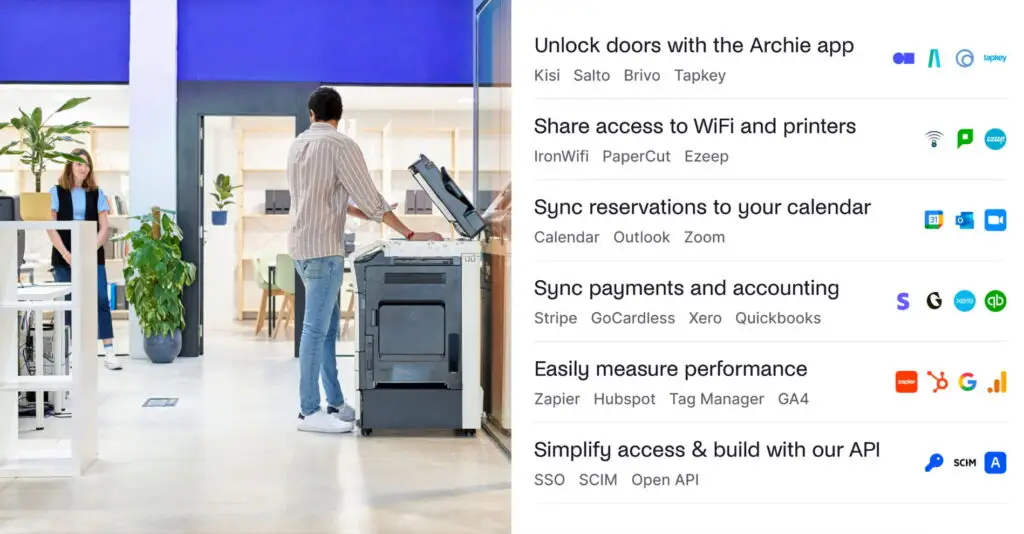
Archie brings coworking operations into one connected platform, so you can automate and manage memberships, billing, bookings, visitors, reporting, and integrations without jumping between separate tools all day. It also connects with the systems many coworking spaces already use, like Stripe, QuickBooks, Kisi, Google Calendar, Slack, IronWiFi, and ezeep.
What is coworking software automation
Automating coworking space operations means using coworking management software together with smart rules and integrations to handle repeat tasks automatically.
Instead of your team doing the same manual work every day, the system you set up takes care of it in the background. That could mean:
- Sending monthly invoices
- Pausing access when a membership expires
- Letting members book desks and rooms on their own
- Syncing invoices with accounting software
- Notifying hosts when visitors arrive
- Giving printer access only to active members
- Sending onboarding emails after someone signs up
In practice, coworking automation usually connects your main system (in this case, Archie) with the tools you already use across your space, such as access control systems, WiFi, printers, payment systems, accounting tools, calendars, and communication apps to create a coworking tech stack.
When it makes sense to automate coworking space operations
Usually, coworking operators start thinking seriously about automation after a clear trigger. Maybe they’re opening a second location. Maybe the team is spending too much time on billing, check-ins, and access requests. Or maybe they’re launching their first space and want to avoid building messy processes from the start.
And that makes sense.
“If you’re scaling and you’re already experiencing friction in one location, you’ll likely experience the same friction in every new location, too. It might not feel like a big problem at first, but it will get much bigger as you grow.”
- Alberto di Risio
- Head of Marketing @ Archie
So, the value of coworking automation comes down to three things:
- First, it saves time. If your team spends hours every week on repeat admin, that time could be used for sales, community building, events, or member support.
- Second, it meets modern member expectations. People are used to fast, self-service experiences. They expect to book a room, get access, receive confirmations, and manage their account without waiting for someone at the front desk.
- Third, it makes scaling easier. When your core processes are repeatable, documented, and handled by the right systems, opening another location becomes much less chaotic.
How to automate coworking space operations with software
First and foremost, never automate chaos.
Buying any software before understanding your current processes is one of the fastest ways to create bigger problems. If a workflow is already confusing, inconsistent, or full of workarounds, coworking software will usually magnify that.
Step 1: Review your current workflows
First, I’d look at every recurring task your team handles each day, week, and month. Ask questions like:
- How do leads sign up?
- How are memberships managed?
- How are invoices sent?
- Who gives door access?
- How are visitors handled?
- How do people book rooms?
- How are late payments followed up on?
- How do members get WiFi?
- How are reports built?
Then I’d evaluate each task:
- Is this repetitive?
- Is it rules-based?
- Is it prone to human error?
- Does it waste staff time?
- Could software do this better?
If the answer is yes, it’s a strong candidate for coworking space automation.
Usually, the biggest time drains are things like manual invoicing, booking requests through email, updating spreadsheets, onboarding new members manually, and chasing overdue payments. But we’ll get to the specifics in a bit.
Step 2: Choose the right coworking software
Once you know what needs fixing, the next step is choosing software that solves those workflows without adding new complexity.
Some tools only handle one area, like desk booking, invoicing, or visitor check-in. Best coworking space solutions usually offer a broader platform that covers billing, bookings, visitor management, analytics, member management, and community tools in one place.
This is where a connected platform like Archie really shines. Archie brings many of the coworking workflows into one system, so you do not have to patch together separate tools for every part of your operation. You can manage memberships, contracts, bookings, visitors, deliveries, invoices, reports, and member communication from one dashboard.
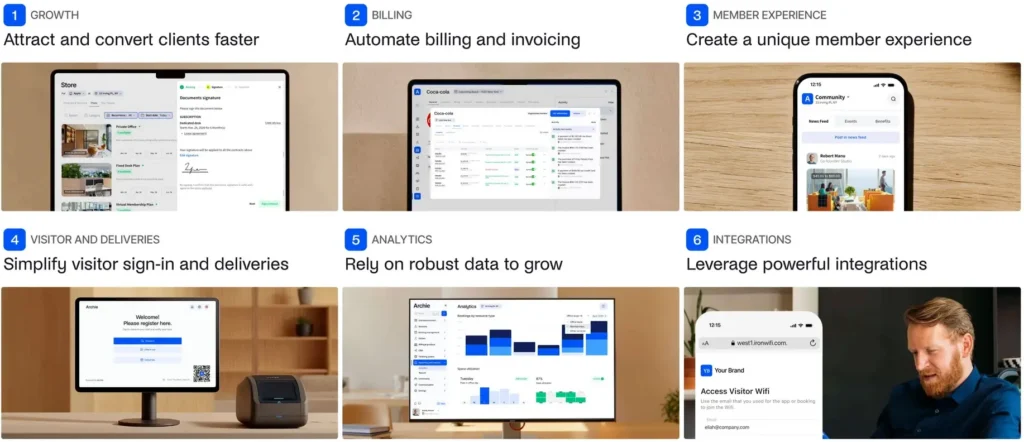
It also connects with the tools many coworking spaces already use, including payment providers, accounting tools, access control systems, calendars, WiFi, printing, and communication apps. That means your team can automate more of the day-to-day work while still keeping everything organized and easy to manage.
Speaking of…
Step 3: Check integrations carefully
Even strong software should fit into the tools you already use. I’d always check coworking integrations with:
- Stripe or GoCardless for payments
- QuickBooks or Xero for accounting
- Slack for internal alerts
- Google Workspace or Microsoft Teams for calendars and scheduling
- Access control tools like Kisi, SALTO, or Brivo
- Printing software like ezeep
If a native integration is missing, API access or tools like Zapier can often help.
Step 4: Implement coworking automation in phases
Trying to automate everything at once usually creates more problems than it solves.
I’d roll things out step by step. This makes it easier for your team to adapt, and gives you time to test what works before adding more.
For example, start from billing and onboarding only. It’s usually the fastest win: automating recurring invoices, payment reminders, retries, and overdue notices. At the same time, onboarding can handle welcome emails, contracts, first payments, WiFi access, and door permissions. What used to take 30 minutes per member can become almost hands-off.
Once billing runs smoothly, move to bookings. Let members book desks, meeting rooms, or day passes on their own. The system handles availability, confirmations, booking rules, and no-show policies. You also get real-time data on how your space is used, which helps with planning and pricing.
Next, connect your physical space to your digital system. Door access can be granted or removed automatically based on membership status. Visitor flows can handle pre-registration, QR check-in, host notifications, and badges. This reduces front desk interruptions while keeping things secure.
💡 Below, you’ll find a full list of what can be automated in a coworking space.
Key areas for coworking automation
When looking at coworking automation, don’t think about “what can we automate?” first. Think about what creates the most friction every week.
Usually, it’s the same areas:
1. Memberships, onboarding, and move-ins
Many coworking spaces still manage new members through emails, PDFs, spreadsheets, and manual follow-ups. That can work in the early days, but it gets messy fast as more people sign up, change plans, book resources, or need access to different parts of the space.
A better setup automates the journey from lead to active member.
For example, a new member could choose a plan online, complete a signup form, sign their contract, make their first payment, and receive their welcome information without your team having to chase each step manually.
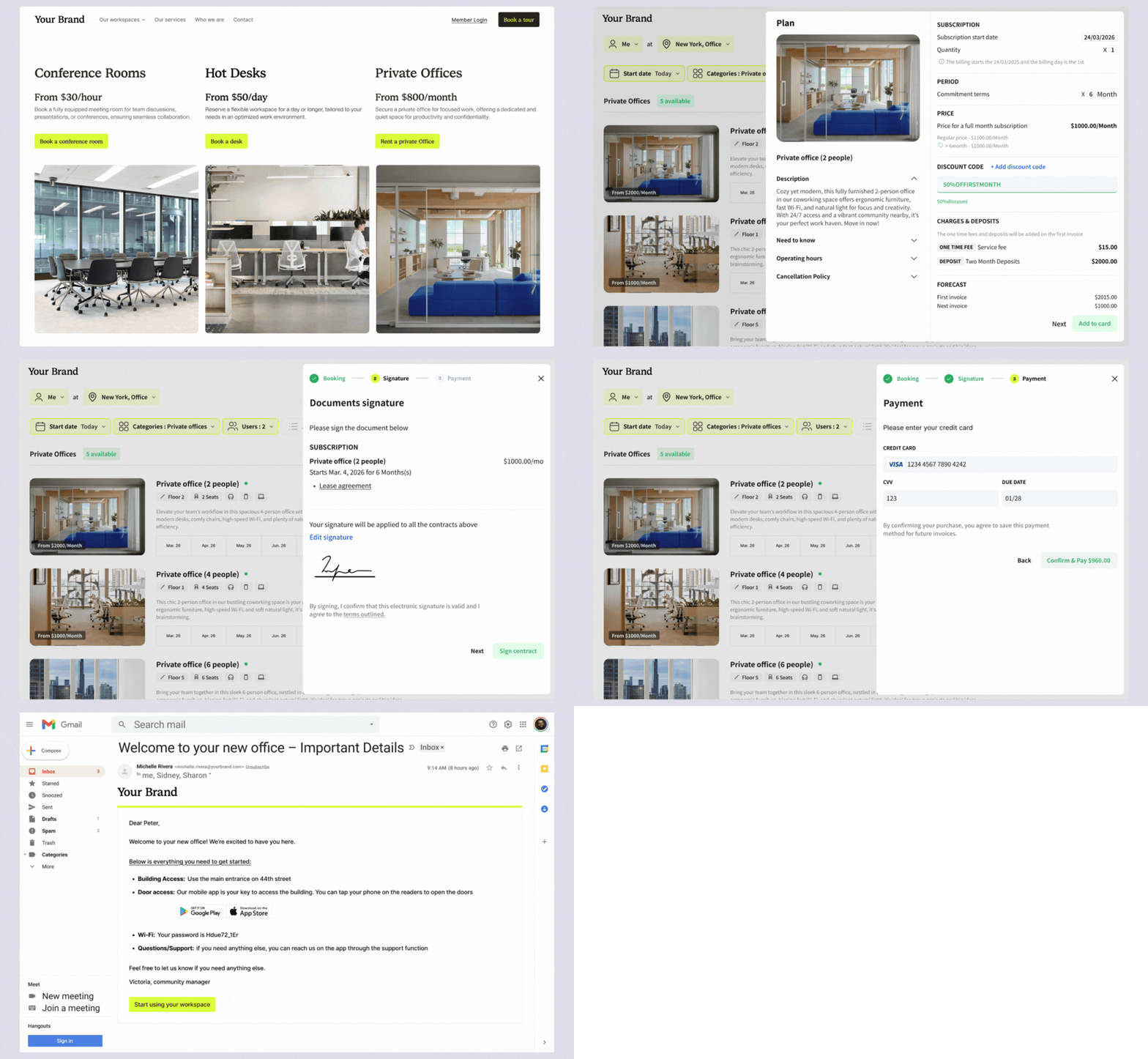
With Archie, you could automate the following steps:
- Online plan selection and instant signup (no back-and-forth emails, simply embed a form on your coworking space website)
- Digital contracts with e-signatures sent automatically after signup (Archie has a native e-signature feature, so you don’t have to integrate with dedicated tools like DocuSign)
- Automatic first payment collection during onboarding
- Welcome email sent instantly with all key info (WiFi, access, bookings, contacts)
- Automatic account creation in your coworking system after signup
- Door access granted automatically based on membership plan
- WiFi access created and sent without manual setup
- Booking access enabled for desks, rooms, or specific resources
- Member added automatically to the directory or community platform
- Tour booking flows for prospects who prefer to speak to someone first
- Plan-based onboarding flows (different emails/instructions per plan type)
Simply add different membership plans and products, and then specify what happens after they are purchased.
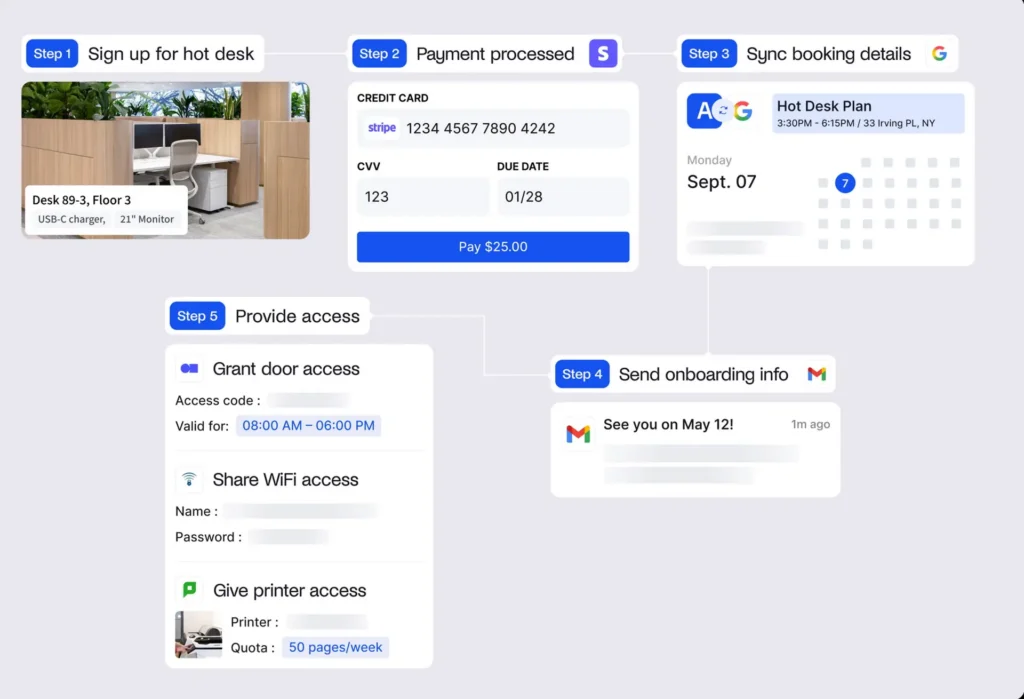
Of course, not every prospect wants a fully self-serve experience. Some will still want to book a tour, ask questions, or speak to someone before joining. That’s fine. The point is not to automate every relationship, but to repeat the admin around onboarding, so your team has more time to make each new member feel welcome.
2. Billing, invoicing, and late payments
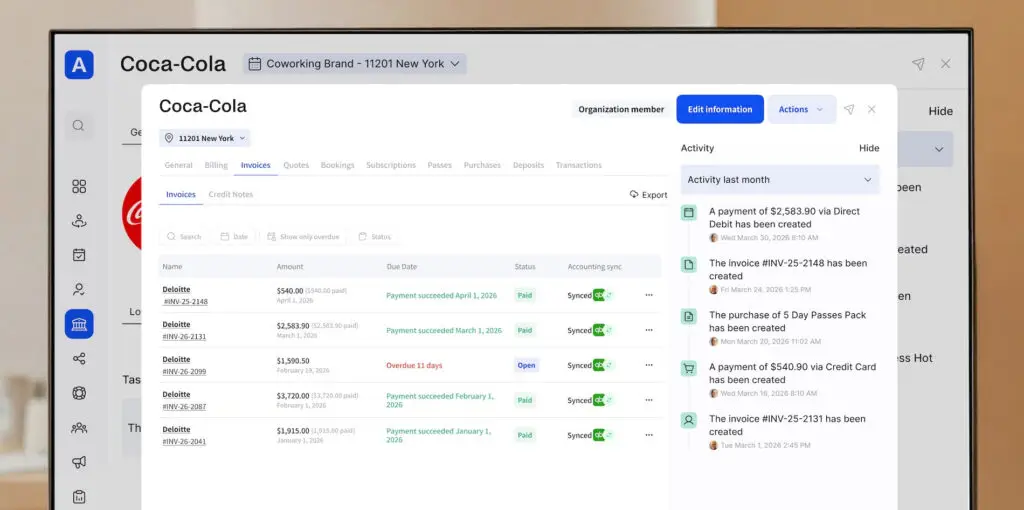
If I ran a space, coworking billing would most likely be one of the first workflows I’d automate. Manual invoicing takes time, creates room for mistakes, and makes it harder to keep track of who has paid, who is overdue, and what still needs to be followed up on.
With the right setup, coworking software can connect to payment tools like Stripe or GoCardless, as well as accounting systems like QuickBooks or Xero. This helps automate crucial things like:
- Recurring membership charges
- Day pass or booking fees
- Failed payment retries
- Overdue reminders
- Invoice syncing to accounting tools
The biggest benefit is control. Your team spends less time chasing payments, members get a smoother payment experience, and you always have a clearer view of collected revenue, overdue invoices, and upcoming charges.
3. Access control and security
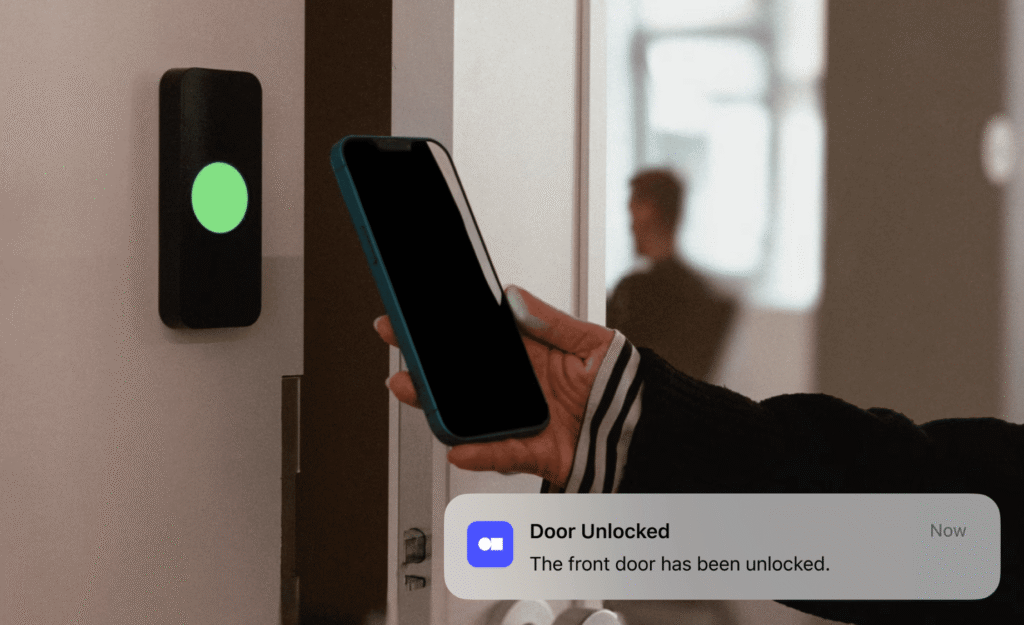
Instead of managing keycards, updating permissions by hand, or having staff open doors, you can connect your coworking software with access control tools like Kisi, SALTO, Brivo, or Tapkey.
This way, access follows the member’s plan automatically. How come?
When you add a new member in Archie, the right door permissions can be granted at once through an integration like Kisi. You can also set access groups, so different plans unlock different doors, areas, or time windows. For example:
- A 24/7 member can get round-the-clock access,
- A day-pass user can get access for one day only.
When the membership ends, Archie and Kisi stay in sync, and access can be revoked without your team having to update anything manually.
“The system is really slim, all in the app, the integration with Archie is amazing. I can still use Kisi without the space management app, and that is also helpful.”
- Emma Holland
- Founder and COO @ The Collab
The same logic can work for visitors, day passes, or prospects coming in for a tour. They can receive temporary access that only works for the right time and place.
That means fewer physical keys to manage, fewer awkward follow-ups, and less risk of someone keeping access when they should not have it. For members, it also makes the experience smoother. They can unlock the right doors from their phone, without carrying extra cards or waiting for staff.
4. Desk and meeting room booking
Instead of asking staff to handle every desk, room, booth, or studio reservation, members should be able to book what they need on their own through a member portal, mobile app, or online booking page.
For example, a member could open the portal, check what’s available, book a desk for the day, reserve a meeting room for 2 PM, or grab a phone booth for a call. Your team does not need to confirm the booking manually, update a spreadsheet, or answer another “Is this room free?” message.
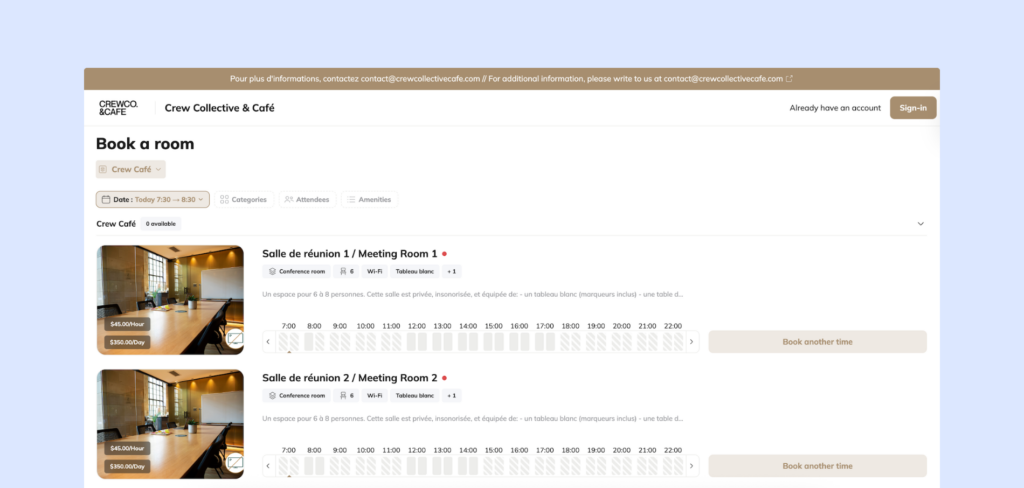
I’d also use booking rules to keep everything fair and organized. You can set time limits, cancellation windows, member-only access, automatic credit usage, extra charges for overages, check-in requirements, and buffer time between meetings.
There are plenty of small booking automations you can set up in Archie that can make a big difference here:
- A room can be released automatically if nobody checks in (no-show protection)
- Premium rooms can require approval
- Certain desks can be limited to specific teams or membership plans
- Recurring bookings can be allowed for private offices, but limited for shared meeting rooms
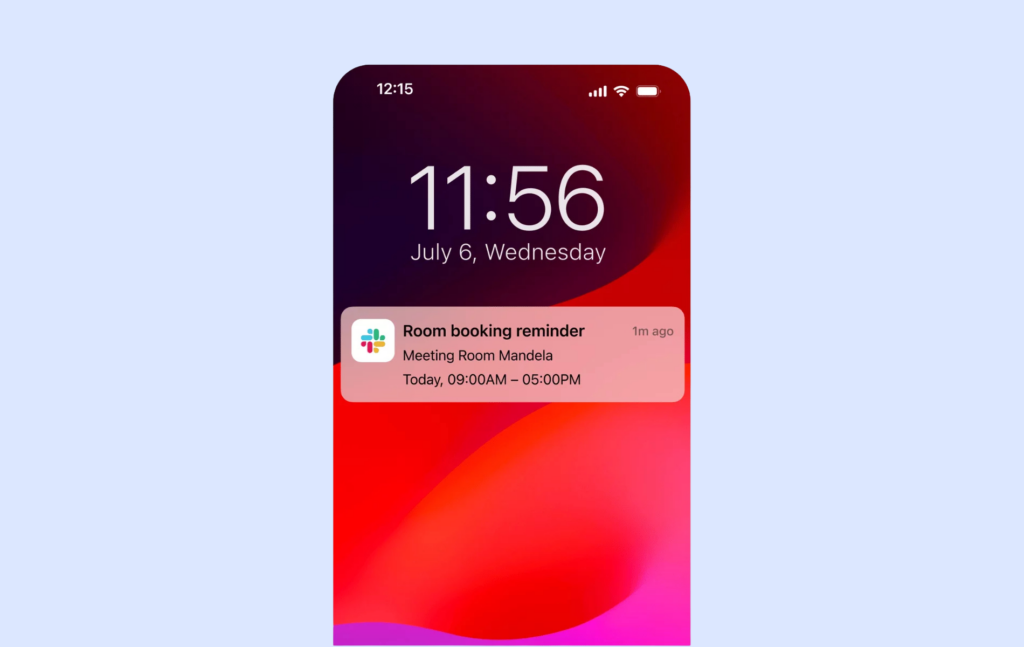
- You can also send automatic booking confirmations, reminders, cancellation notices, and no-show alerts
The best setup also connects with the tools people already use, like Slack, Google Calendar, Microsoft Outlook, or Microsoft Teams. That way, meeting room bookings show up in calendars automatically, availability stays up to date, and members do not have to switch between too many systems.
5. Visitor check-in
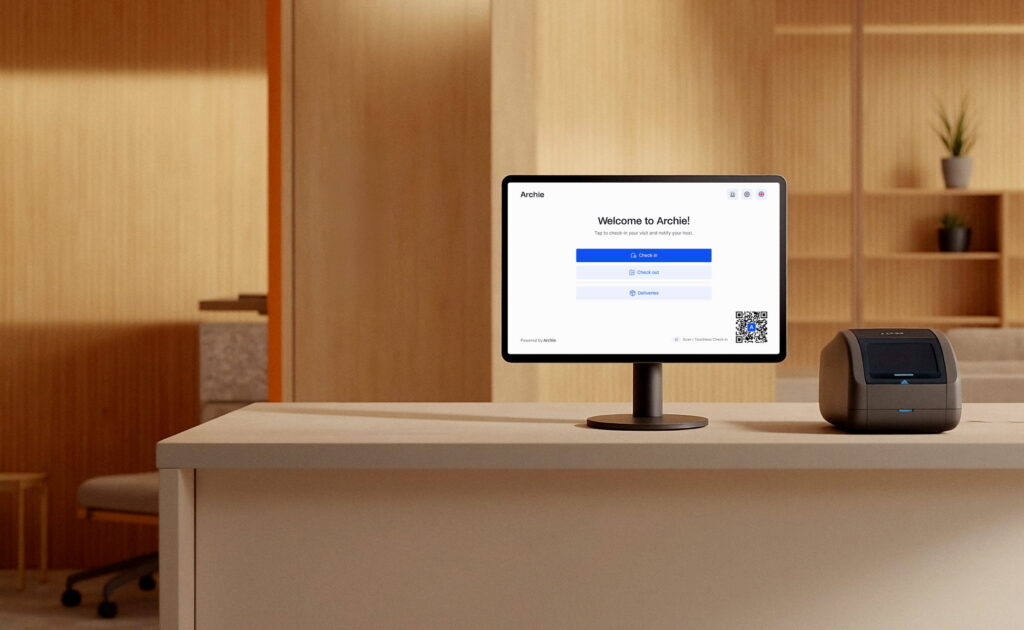
Modern coworking spaces do not always need someone at the front desk to handle every arrival. With the right setup, members can check in on their own, and visitors can follow a simple self-service flow when they arrive.
For example, they can receive a QR code before the meeting, check in at a kiosk, sign any required forms, print a badge if needed, and automatically notify their host when they arrive.
Deliveries can also be part of the same workflow. When a package comes in, your team can log it and send an automatic notification to the right member. No more walking around the space trying to find who it belongs to.
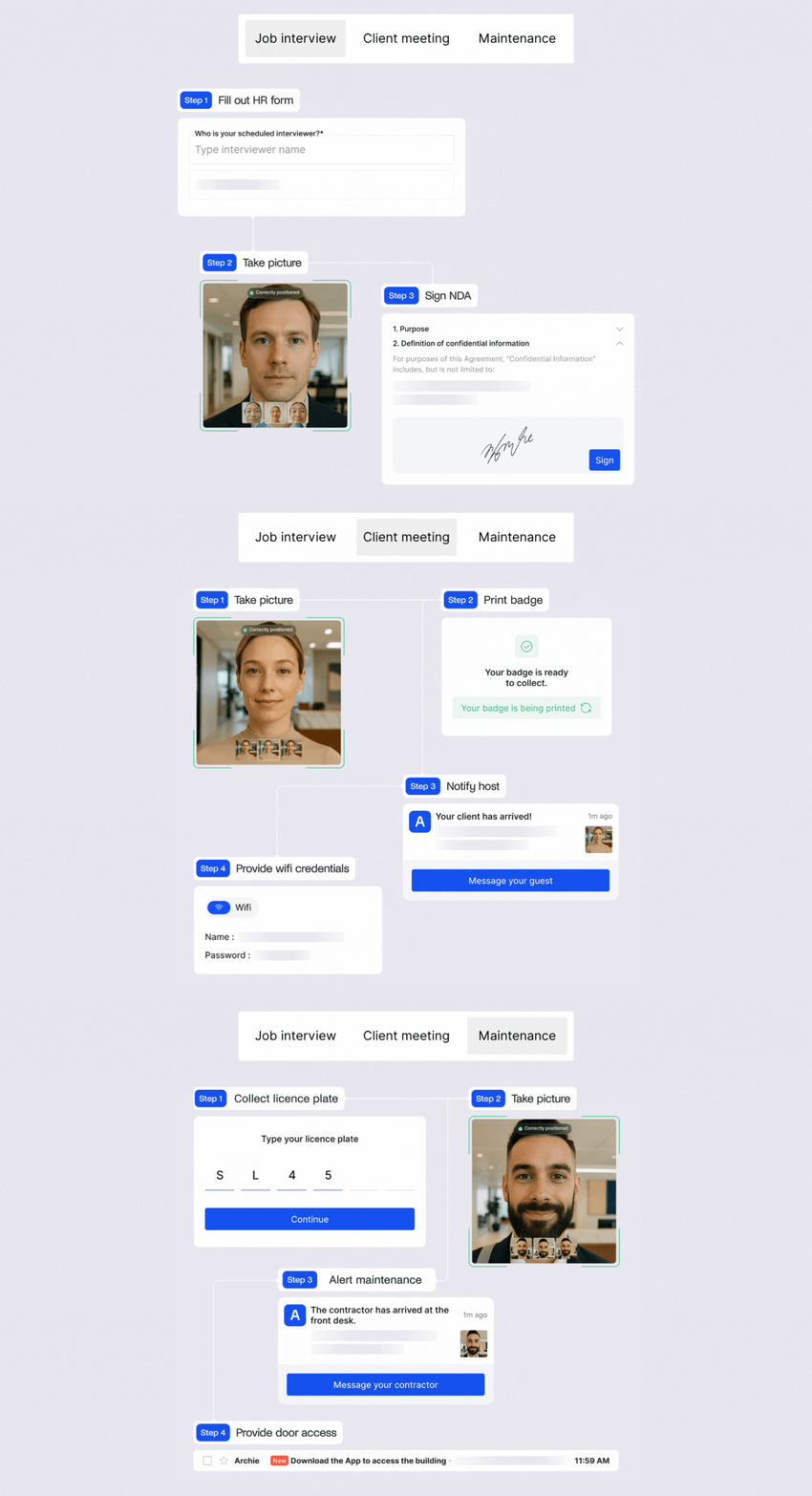
Here are some simple automation examples based on different visitor types you can specify in Archie:
- Member pre-registers a guest from the app or portal
- QR code sent automatically before the visit
- The guest checks in at the kiosk, and the host is notified instantly
- Badge printed with company/member name
- Optional WiFi access generated for the visit
- Auto check-out at the end of the day
6. WiFi access
WiFi is a classic example of a small issue that can create constant interruptions for your team.
When everyone uses the same password, it gets shared around, forgotten, or changed over time. Your team then has to keep answering the same question: “What’s the WiFi password?”
A better way is to connect your WiFi tool with your coworking software.
For example, you can connect a tool like IronWiFi to Archie and set up a simple login page for your network. Members can then access WiFi based on their profile, plan, or day pass.
So, a full-time member gets regular access, a day-pass user gets access for the day, and a visitor can use a separate guest network. When someone’s membership ends, their WiFi access can be removed automatically.
This makes WiFi easier to manage and more secure. Members get online without asking for help, guests can connect through the right network, and your team does not have to keep sharing or updating passwords.
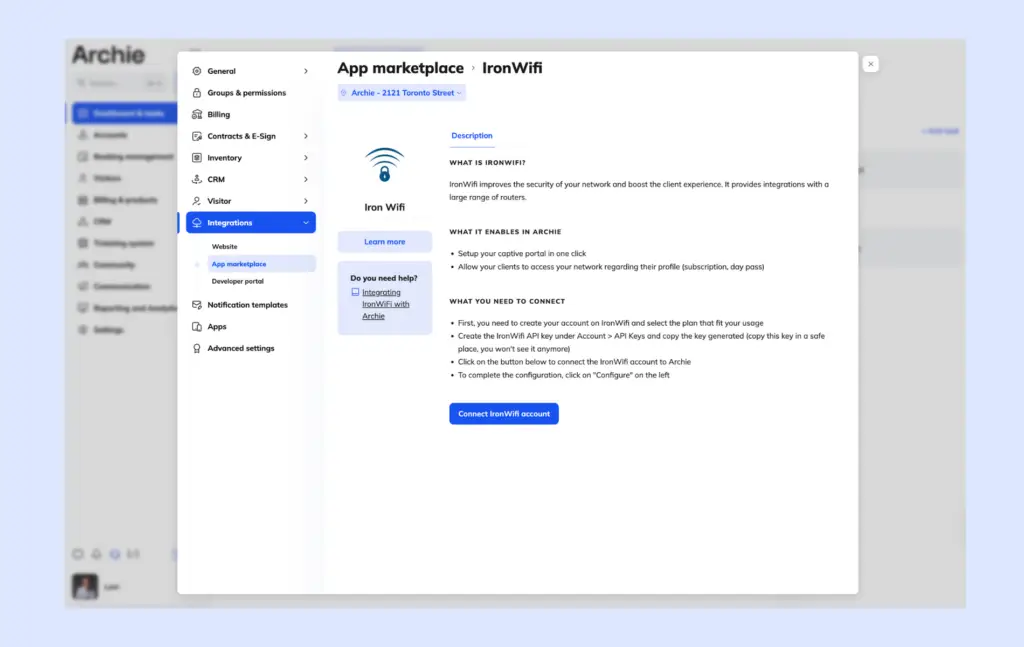
Here are some simple WiFi automation ideas you can set up in a coworking space:
- Access based on membership (full-time, day pass, expired = automatic changes)
- Captive portal login instead of shared passwords
- Separate guest networks for visitors
- Time-based access (e.g., business hours vs 24/7 plans)
- Automatic expiry for visitor access
- Auto-generated login credentials sent on signup
- Usage tracking (who connected, when, how often)
All of these can be set up once and then run automatically in the background while being fully synced with membership status, payments, bookings, and user profiles you have in Archie.
7. Printer access
A good setup connects your coworking software, like Archie, directly to your printing system. From there, everything is tied to the member’s plan.
When someone joins, they automatically get access to the right printers, the right pricing, and the right limits. There is no need to install drivers manually, assign permissions one by one, or explain how printing works every time someone new joins. And when they leave or stop paying, it’s removed.
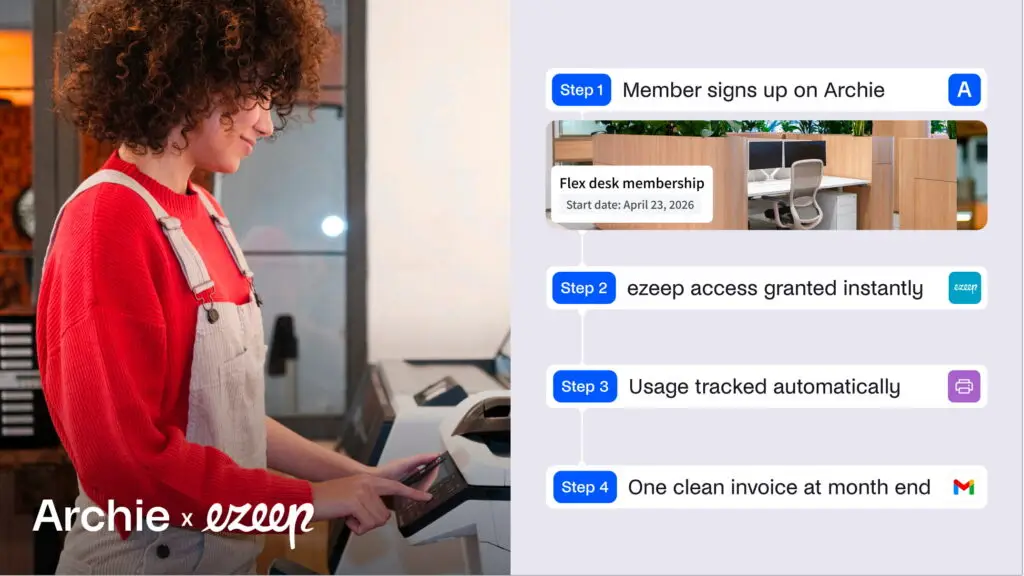
You can define how coworking printing should work once, and let the system handle the rest. For example, different membership plans can include different pricing, free monthly credits, or full pay-as-you-go access:
- A Hot Desk member gets basic printing access (e.g., 50 credits/pages per month)
- A Private Office team gets higher limits (200 credits for premium plans)
- A Day Pass user gets temporary access
- A Virtual member gets no access
Plus, you can automate pricing rules like:
- Cost per page
- Different pricing for color vs black & white
- Different pricing by paper size
- Discounts based on membership plan
At the end of the month, everything is already calculated. Print activity is visible per user or company, charges are clearly mapped, and invoices reflect exactly what was used. There is no need to manually count pages, adjust invoices, or answer questions about who printed what.
💡 You can find more coworking printing automations in our guide.
“The connection between Archie and ezeep works well for tracking usage and recording the information we need when it’s time to bill clients. It gives our members an option to print on site, lets us track that activity, and it opens up a new stream of revenue.”
- Lane Braidwood
- General Manager @ Modspace
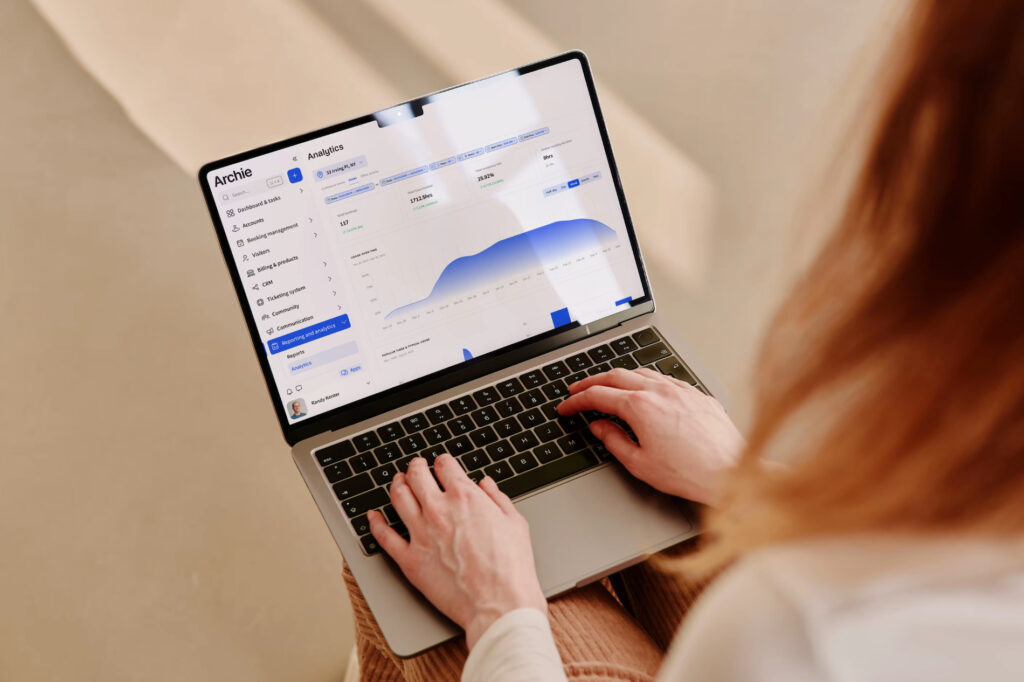
8. Reporting templates and dashboards
Many coworking operators still build reports manually every month, often by pulling coworking space KPIs and data from different tools and spreadsheets. That takes time, and it also makes it harder to spot problems early.
With automated reporting, you can track the numbers that matter most in one place, such as occupancy, room utilization, revenue by product, unpaid invoices, churn, new members, busiest days and hours, and location performance.
This gives you a clearer view of what is happening across your space without having to rebuild the same reports over and over again.
Plus, when the data is live and easy to understand, decisions get easier too. You can see which rooms are underused, which plans are performing best, where revenue is coming from, and what needs attention before it becomes a bigger issue.
What great coworking automation feels like: Archie example
The best coworking automation does not feel robotic or complicated. It simply feels like everything works the way people expect it to.
Here’s what the automated coworking process can look like when you’re using Archie and its native integrations:
- A potential member finds your website and either books a tour or signs up online.
- Their inquiry is captured automatically, follow-ups are organized, and if they are ready to join, they can choose a plan, sign digitally, and pay instantly.
- Once they become a member, the system automatically sends welcome details, activates their account, and grants access to the right doors, WiFi, printers, and booking tools based on their membership plan.
- On their first day, they arrive and unlock the space from their phone instead of waiting for a keycard.
- Just before sitting down, they book a desk through the mobile app.
- Later, they schedule a meeting room directly from their Google Calendar without needing to contact the front desk.
- They invite a guest for that meeting and pre-register them in Archie’s coworking visitor system.
- When the guest arrives, they check in with a QR code at the kiosk, the member receives an instant notification, and meets them at the entrance.
- Before the meeting starts, the member prints a document. The usage is tracked automatically, and any extra charges are added to their account.
- At the end of the day, they open the member portal or community feed, see an event happening that evening, and decide to stay.
From the member side, the experience can feel smooth from the very first interaction to the end of the day. From the operator side, dozens of small tasks are being handled automatically in the background.
Coworking tasks I’d still keep manual
Here’s the thing: Not everything in your coworking space should be automated.
Some moments still need human judgment, empathy, and experience. Software can support them, but it should not replace them.
That’s why I’d still keep clear checklists and manual processes for things like emergency procedures, community issues, private office negotiations, sales conversations, escalations, hospitality standards, and event hosting.
For example:
- Software can log an incident or send an alert, but your team still needs to know how to respond calmly.
- A coworking CRM can track a lead, but closing a private office deal still depends on trust and conversation.
- Event software can manage signups, but a great event still comes down to energy, hosting, and personal connection.
I know some operators worry that automation will make their space feel less personal. I actually think the opposite is true.
When your team spends less time chasing invoices, updating spreadsheets, and managing bookings by hand, they have more time for the work that makes a coworking space special: welcoming new members, hosting events, solving real problems, and building relationships.
Coworking space automation vs control
When processes are simple, clearly documented, and easy to adjust, automation can actually give you more control. You know what happens, when it happens, and why. Changes can be made quickly without rebuilding everything from scratch.
Control usually disappears when systems become messy, overly custom, or dependent on setups that nobody fully understands. Then even small changes feel risky, slow, or expensive.
“If your setup is well thought out and easy to manage, automation does not make you lose control. You lose control when the system becomes too complex, depends on developers or consultants, and your team no longer understands how everything works.”
- Alberto di Risio
- Head of Marketing @ Archie
In coworking operations, consistency often matters more than complexity. A process that works smoothly every day is usually more valuable than one packed with coworking features that your team avoids using. At the end of the day, technology should make your work easier, not harder.
Which brings us to the next point:
Recommended tools to automate coworking space administrative tasks
Here are a few coworking space tools I’d start with:
- Coworking management software: Archie. This is your main system. It brings together memberships, billing, bookings, visitors, coworking analytics, and integrations in one place.
- Access control: Kisi (or similar tools like Tapkey, SALTO, or Brivo). Lets you automate door access based on membership plans and visitor flows.
- Payments: Stripe or GoCardless. For recurring billing, payment collection, and automated retries.
- Accounting: QuickBooks or Xero. Keeps invoices, payments, and financial data in sync.
- WiFi management: IronWiFi. Helps you control network access based on membership and visitor type.
- Printing: ezeep. Automates printer access, usage tracking, and billing.
- Communication & alerts: Slack. Useful for internal notifications like new members, failed payments, or deliveries.
- Automation layer (if needed): Zapier. Connects tools when native integrations are not available.
If you’re not sure where to start, it helps to talk it through. A team like Archie can walk you through your current setup, show you what can be automated, and help you design a system that actually works day to day.
Coworking space automation FAQs
Can automation software handle different membership tiers and pricing?
Yes. Most coworking management platforms like Archie let you create different membership plans, pricing rules, add-ons, booking credits, and access permissions.
For example, a hot desk member, private office team, virtual office member, and day-pass user can all have different prices, access hours, booking limits, and included services you specify in Archie. Once the rules are set, the system applies them automatically.
How do automated coworking systems handle failed payments?
Automated billing tools can retry failed payments, send reminder emails, and flag overdue accounts for your team. Some systems can also ask members to update their payment method if a card expires or is declined.
Can I automate multiple coworking locations from one platform?
Yes. Many coworking platforms, including Archie, support multi-location management.
This means you can manage members, billing, bookings, access, visitors, and reporting across multiple spaces from one system. You can still set different prices, access rules, amenities, and booking policies for each location.
How does coworking software handle complex recurring billing?
Good coworking software like Archie can handle recurring invoices, plan renewals, add-ons, and discounts. It can also sync invoices and payment data with accounting tools like QuickBooks or Xero, so your financial records stay cleaner and easier to manage.
Can coworking software integrate with other tools?
Yes. Coworking software often integrates with tools for payments, accounting, access control, WiFi, printing, calendars, communication, and automation.
For example, Archie integrates with tools like Stripe, GoCardless, QuickBooks, Xero, Kisi, SALTO, Brivo, Google Calendar, Microsoft Outlook, Slack, ezeep, IronWiFi, Zapier, and API connections.