- What you’ll learn
- What a meeting room reservation system actually is
- Why spreadsheets and manual booking methods often create problems
- How to use a free meeting room booking template in Excel or Google Sheets
- The pros and cons of using spreadsheets for room scheduling
- How platforms like Archie simplify room booking
Managing meeting rooms sounds simple until two teams show up for the same space at the same time. That’s why the management side of things is just as important as the meetings themselves.
The last thing you want is your team arguing over a conference room or wasting time because of double bookings. The good news is that you don’t always need advanced software right away. If your setup is small and simple, a meeting room booking template can be a great place to start.
In this guide, I’ll explain how a meeting room reservation template works, when it makes sense to use one, and when it may be time to switch to proper room booking software.
What is a meeting room reservation system?
A meeting room reservation system is a tool that helps teams book and manage shared meeting spaces.
It can be as simple as an Excel or Google Sheets template where people add their room bookings manually. Or it can be a dedicated room booking tool that shows live availability, prevents double bookings, sends reminders, and connects with tools like Google Calendar, Outlook, Slack, and Microsoft Teams.
The goal is always the same: make it easy for people to find and book the right room without confusion.
Why do you need a meeting room booking system?
If your team only has one meeting room and a few people using it, booking rooms manually might work for a while. But as soon as more people start using the same spaces, things can get messy fast.
Without a proper meeting room booking system, teams may run into:
- Double bookings
- Last-minute room conflicts
- Outdated schedules
- Confusion about who booked what
- Wasted time looking for available rooms
- Meetings starting late because the space is not ready
That’s why having some kind of room booking process matters. But, if you’re not ready for dedicated meeting room booking software yet, a free meeting room schedule template can help you organize bookings without adding another paid tool.
Here’s a free meeting room booking Excel template to download
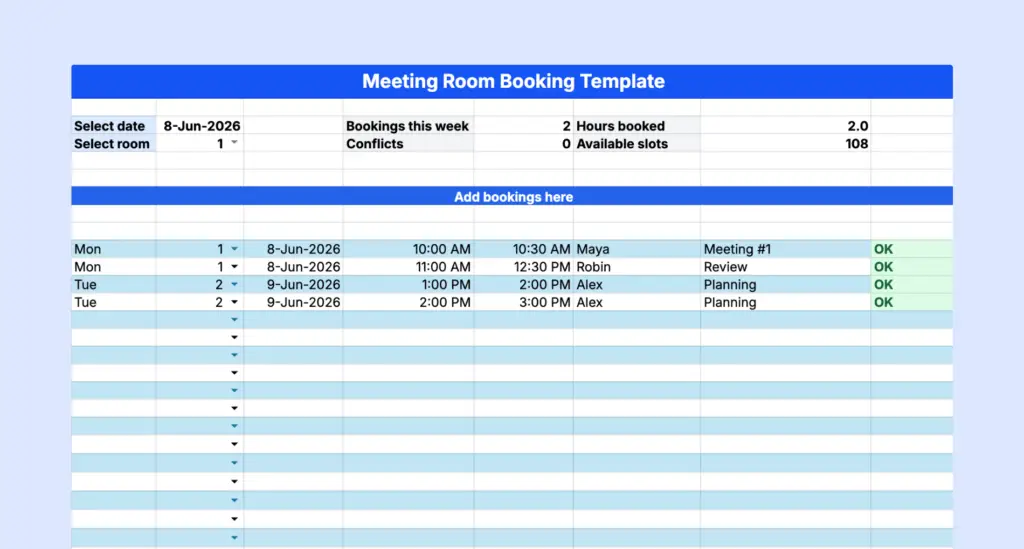
To make managing meeting rooms easier, we’ve created a flexible, free-to-download conference room schedule template. With this free room booking tool, you can:
- Track bookings by date, room, and time slot,
- Record key details like the meeting organizer and purpose,
- Quickly check the status of each booking.
How to set up the meeting room schedule template
Once you open the meeting room booking template, start by making your own copy. In Google Sheets, go to File > Make a copy so you can edit the spreadsheet without changing the original version.
Next, choose a date in the template. The schedule will show the week that includes this date, so you can manage bookings one week at a time.
Then, choose the room number you want to view. The weekly schedule will update automatically for that specific room.
Before sharing the template with your team, make sure the rooms, dates, and booking table are set up correctly. This helps everyone use the same format and reduces mistakes later.
Can you connect the meeting room booking template to Google Calendar?
Yes, you can use Google Sheets and connect your booking template to Google Calendar with add-ons like Sheets2GCal or From Sheets to Calendar. This can make the setup a little more automated, especially if your team already works in Google Workspace.
Still, it’s worth keeping in mind that this kind of setup usually needs some configuration and maintenance. It can work well for simple use cases, but it may feel clunky compared to dedicated room booking software.
How to make a room reservation using the template
Once the template is ready, share it with your team. You can store it in Google Drive, OneDrive, SharePoint, or another shared folder so everyone knows where to find it.
When someone wants to book a room, they can open the template, find the date and time they need, and check whether the room is available.
A dash means the room is available. Booked means the room is already taken.
If the room is free, add your booking to the table starting on row 10. Include the meeting date, room number, start time, end time, organizer, and any notes.
Use a clear time format, such as 1:00 PM or 13:00. Avoid mixed formats like 13:00 PM, as this can confuse the spreadsheet.
After adding your booking, check the Status column. If it says Conflict, it means another booking overlaps with yours for the same room and date. In that case, choose a different time or room.
Before saving the booking, it’s a good idea to double-check that no one else has already reserved the same room at the same time.
If plans change, the person who made the booking should update or remove it from the spreadsheet. This keeps the schedule accurate and helps other people find available rooms.
Who should use a meeting room reservation template
A meeting room booking template works best for smaller teams that need a simple way to manage shared spaces.
It can be useful for:
- Small businesses that want a free room booking system
- Office admins managing a few meeting rooms
- Facilities teams that need a basic overview of room usage
- Schools or colleges scheduling classrooms or shared spaces
- Teams that are not ready for dedicated booking software yet
In short, a template is a good option when your setup is simple and everyone can follow the same process. But if your team is growing, rooms are booked often, or people work across different locations, a spreadsheet may not be enough for long.
Can you use an Excel room booking system for your space?
Yes, you can use Excel to manage room bookings. For a small office, it can work perfectly fine. You can track meeting times, room names, organizers, attendees, and equipment needs in one place.
But Excel also has limits. It relies on people updating the file correctly. It does not always show live availability. It can be easy to overwrite someone else’s entry. And if many people are using the same file, mistakes can happen quickly.
Google Sheets is a small step up because it supports real-time collaboration. But even then, it still depends on manual updates and careful use.
Meeting room booking template vs software
A meeting room booking template is a good starting point if you only have a few rooms and do not need to manage many reservations. It’s free, easy to set up, and familiar to most teams.
The downside is that it requires manual work. Someone needs to keep the file clean, check for conflicts, and make sure people update their bookings when plans change.
Meeting room booking software is a better fit when your office is busier. It can show real-time room availability, prevent double bookings, send reminders, sync with calendars, and give you useful data about how rooms are used. For hybrid teams, multi-location offices, or growing companies, this can save a lot of time and reduce daily frustration.
Why room booking software beats spreadsheets
Managing meeting rooms shouldn’t feel like extra work. Room booking software makes it easier for employees to find and reserve the right space, while helping workplace teams stay organized behind the scenes.
Compared to a meeting room booking template, room booking software like Archie can offer:
- Easy room reservations: Employees can quickly find available rooms, choose the right space, and book it without checking a spreadsheet manually.
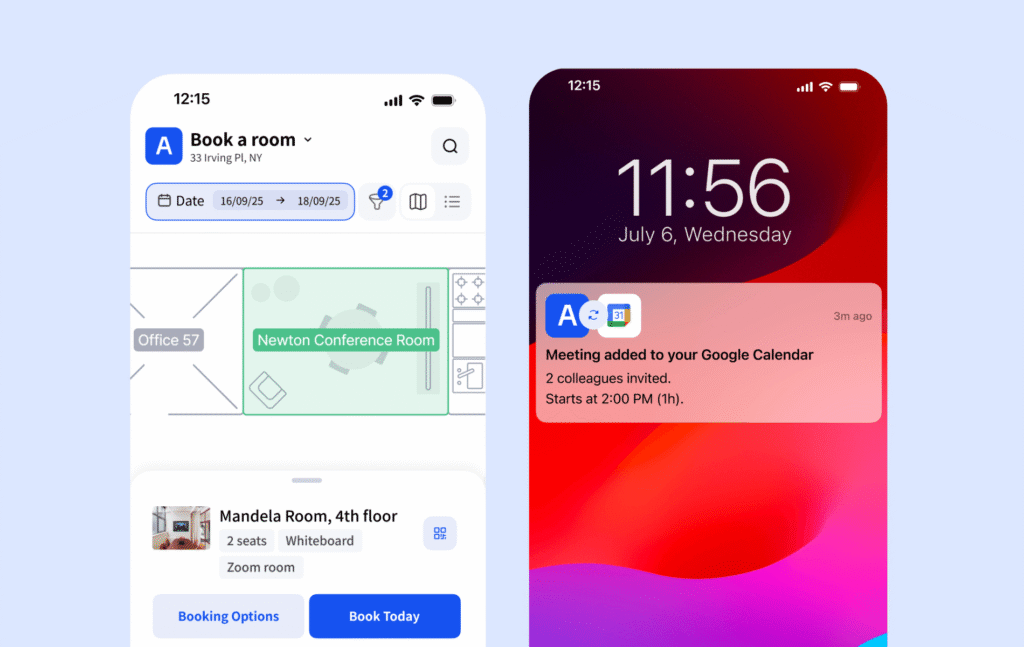
- Flexible booking options: People can book rooms through a web app, mobile app, Google Calendar, Microsoft Outlook and Teams, Slack, or a tablet placed outside the meeting room.
- Interactive office maps: Instead of scrolling through rows and columns, employees can see available rooms on a visual floor plan and choose the best space for their meeting.
- Automatic reminders and confirmations: The system can send reminders before meetings, helping reduce no-shows and forgotten bookings.
- Recurring bookings: Teams can easily book rooms for weekly meetings, monthly reviews, or other recurring events.
- Real-time availability: Everyone can see which rooms are free and which ones are already booked, which helps avoid conflicts.
- Room usage analytics: Workplace teams can see how often rooms are used, which spaces are most popular, and where there may be wasted space.
- Better space planning: With better data, you can make smarter decisions about your office layout, meeting room setup, and future space needs.
Advanced room booking software takes care of everything, from finding the right room to confirming the meeting, without the hassle of back-and-forth emails or messy spreadsheets. If your team wants a more efficient way to handle schedules, this is a better solution than the meeting room booking format in Excel.
How to choose the best room booking system
With so many options, picking the right room booking system can feel overwhelming. Since many platforms offer similar features, it all comes down to your needs, priorities, and budget. I’d start with a few simple questions:
How many meeting rooms do you manage? How often are they booked? Do people work hybrid? Do you need calendar integrations? Do you want people to book from Slack, Teams, or a mobile app? Do you need usage analytics?
Pricing matters too. Room booking systems come with different pricing models:
- Per-user pricing: Traditional platforms charge based on the number of users, which can get expensive as your team grows.
- Per-resource pricing: Newer options like Archie or Eden charge based on the resources you’re booking. For example, if you have 100 employees but only 10 meeting rooms, you only pay for the meeting rooms — potentially saving you a lot of money.
Some platforms include desk booking and other features in their pricing, while others charge setup fees or require additional costs for add-ons. For example, OfficeSpace has a higher initial setup fee, but others may have a lower starting price with fewer included features.
Plus, while pricing is often shown monthly, many vendors require annual billing, so check the terms carefully.
Luckily, most platforms offer live demos and free trials. Use these to try out the features, see how user-friendly the system is, and evaluate customer support. This hands-on experience will help you decide if the software is the right fit for your business.
Once you’re at it, you might want to give Archie a try
Archie is more than a meeting room booking system. It helps teams manage rooms, desks, visitors, and shared spaces from one connected platform.
Employees can book meeting rooms from an interactive map, check real-time availability, reserve spaces from their phone or computer, and connect bookings with tools like Google Workspace and Microsoft Teams.
Archie also gives workplace teams useful data about how rooms and office spaces are used. This makes it easier to improve layouts, reduce wasted space, and plan for the future.
Key features include:
- Map-based room booking
- Real-time room availability
- Mobile, web, and tablet booking
- Google Workspace and Microsoft integrations
- Meeting room display hardware compatibility
- Workplace analytics
- Employee lookup
- Desk and room booking in one system
- Support for hybrid offices and coworking spaces
If your team only needs a simple system for now, the free meeting room booking template is a great place to start. But if spreadsheets are starting to feel messy, Archie can help you manage meeting rooms in a much smoother and more reliable way.