




















- What you’ll learn
- An enterprise visitor management system complies with any security or industry regulations, and connects with the technology you already use.
- It turns visitor access into something you can govern, audit, and scale.
When you’re operating across multiple sites, many hosts, and many visitor types (contractors, candidates, vendors, regulators), your system needs to conform to compliance and security requirements. Enterprise visitor management system software integrates with your access and communication tools, offers data control, and supports multi-site management.
That’s why software like Archie matters here: it turns visitor access into something you can govern, audit, and scale.
What is an enterprise visitor management system?
At a basic level, an enterprise visitor management system replaces the paper sign-in sheet with something both security and front-desk teams can rely on:
- A professional first impression for guests, with an intuitive touchless check-in flow, pre-registration guidance, and SSO (Single Sign On) for authentication,
- Automatic host notifications on the tools your employees use (Google, Teams, Email, Slack, SMS),
- Customizable with own branding and workflows per visitor type (badge printing, access rights, NDA and e-signatures),
- Integrates with access control systems, like Tisi, Salto, Bravo, and Tapkey, and offers strong API access for custom builds,
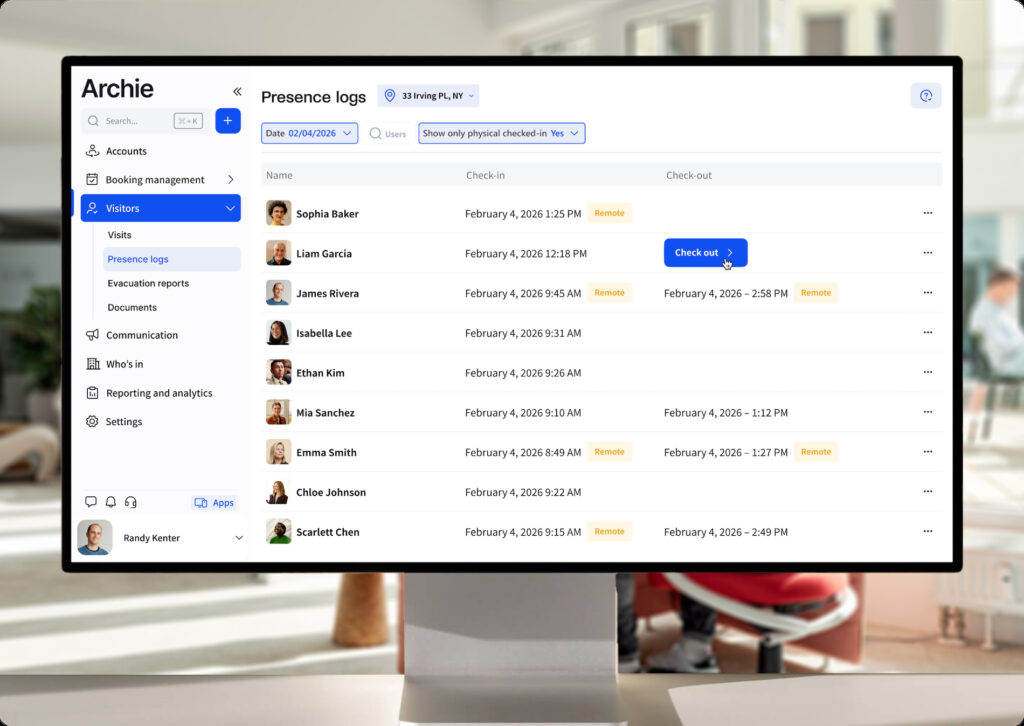
- Comprehensive reporting and analytics, with detailed audit trails ready to export for security teams (timestamps, visitor details, compliance records).
At enterprise scale, you’re managing visitors across buildings, each with its own access zones, regulations, and hosts.
Under the hood, that means a few things working together: pre-registration and screening before a visitor ever reaches the lobby, real-time tracking of who’s actually on-site right now, and custom flows that treat a job candidate differently from a contractor carrying tools. Data governance matters just as much – your visitor data needs to be stored, retained, and deleted in line with GDPR, CCPA, or whichever regulatory regime applies to where and how you operate.
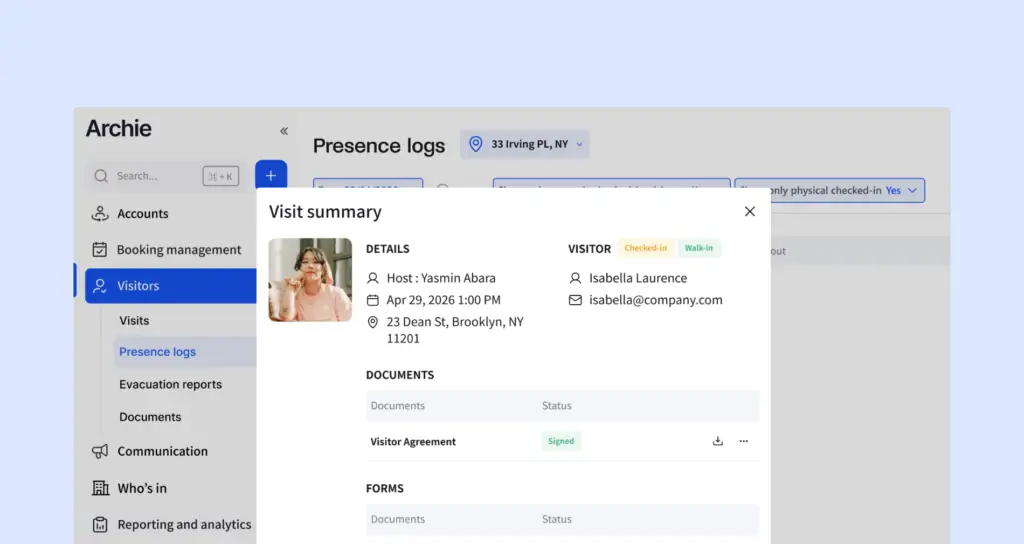
Visitor management system vs access control system
These terms are sometimes mistakenly interchanged. Yet they solve different problems: a VMS knows who someone is and why they’re there; an access control system decides where they’re physically allowed to go.
Access control system
Governs doors, badges, and turnstiles. It enforces which credentials open which locks, and it doesn’t much care whether the person holding the credential is a guest, an employee, or a contractor — it just checks the credential against the rule.
Visitor management system
Covers the visitor process from invite to check-out, and after holds records. Your visitor management system is a digital replacement for any paper sign-in and paper trails: welcoming, registering, and tracking everyone who enters a building (with many more options besides).
You technically need a VMS whether or not you have an access control system in place — someone still needs to know who’s in the building. But the two are strongest together: the best enterprise visitor systems connect visitor check-in directly to door access, so a visitor’s credential only opens the doors it should, for exactly as long as it should.
What are the key features of an enterprise visitor management system?
Depth is where enterprise VMS platforms truly earn their place. Below the surface-level check-in flow, here’s what you should expect:
- Integrations with door access and communication tools. A VMS needs to talk to your access control system and your hosts as soon as a visitor checks-in. Native integrations mean access is provisioned and revoked automatically, and hosts get notified without anyone lifting a finger.
- SSO/SCIM and identity integration. IT teams don’t want to manage another separate login system. Single sign-on and automated user provisioning (SCIM) keep the VMS inside your existing identity governance instead of becoming its own island.
- Data residency. Some industries and jurisdictions require visitor data to stay within a specific country or region. It’s worth confirming this early, since retrofitting data residency after you’ve already onboarded is a miserable exercise.
- Industry compliance: SOC 2, ISO 27001, CMMC, EAR, ITAR, HIPAA, etc. If your company needs to comply with certain regulations, your procurement and legal teams have to ensure that your visitor management system can also comply. Ask directly which certifications and requirements a vendor can support.
- Centralized watchlist screening. Large organizations need the ability to flag a person once and have that flag apply across every location.
- Multi-tenant visitor management. Enterprise visitor systems can manage everything in one system, while still keeping every tenant company’s data and processes separate.
- Emergency evacuation. Lets you instantly alert all visitors and staff, tracking presence as people leave the building to mark them safe, generating a full aftermath report.
Software | Features | Integrations | Usability | G2 Rating |
|---|---|---|---|---|
Archie | Custom data residency, Premium API support, Block list, Tailored legal framework | Access control, Wi-Fi, SSO, Slack, Teams | Praised for user-friendliness and intuitive setup; reviewers cite flexibility and reliability | 4.9/5 |
Envoy | Blocklist scanning, scheduled reports, customizable analytics | Slack, access control, Wi-Fi, blocklist scanning | Sleek visitor-facing experience | 4.6/5 |
The Receptionist | Two-way messaging, employee PINs | SSO costs extra; access control possible with API work | User-friendly, responsive support; two-way messaging is a standout | 4.8/5 |
VisitorOS (formerly iLobby) | ID scanning, pre-loaded/managed hardware, live analytics | Active Directory, SSO, secure hosting on Azure | Full-featured for security use cases, but reviewers note the hardware/software can run slow | 4.7/5 |
Sign In App | Companion app (staff sign-in, desk/room booking), multi-language branding | Slack, Teams, Companion app; calendar sync flagged as occasionally laggy | Consistently called easy and reliable by G2 reviewers; sync issues with Zoom/Google Calendar noted | 4.6/5 |
What are the main benefits of enterprise visitor management software?
1. Scalability
One system that holds up whether you’re managing three offices or three hundred, across time zones, languages, and local compliance rules. Your VMS should be able to treat a job candidate, a delivery driver, and a contractor with different workflows – relieving your front-desk of paperwork and automating security policies.
2. Compliance
Every check-in generates an automatic, timestamped record. This record earns its keep across a range of audits: GDPR and SOC 2 reviews asking who accessed the premises and when; fire-safety headcounts that need to be accurate to the minute; NDA tracking that proves sign-off happened before entry; and data subject access requests, where a clean record lets you answer precisely instead of guessing.
3. Security
Pre-screening (watchlists, host approval, ID capture) stops the wrong person at the door instead of catching the problem in the incident report afterward. Your visitor log shows accurate visibility into who’s actually on-site.
4. Host & front-desk experience
A professional welcome is perhaps the ‘soft’ benefit but not one to underestimate. If you have candidates, clients, or investors walking in the door, check-in is the first opportunity you have to make an impression. Digital receptionist software aims to enhance any guest experience. Modern visitor management systems like Archie offer a polished, branded interface and pre-check-in flows that leaves no guest questioning what to do or where to go.
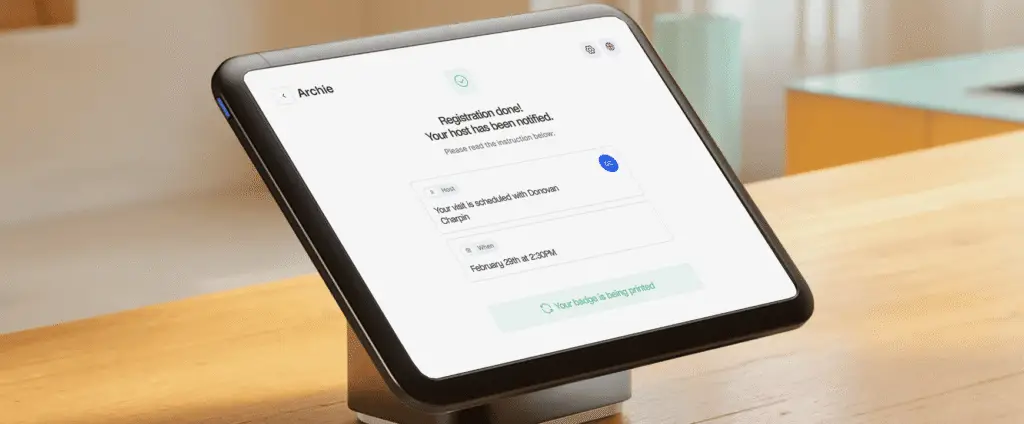
Automated visitor management system
Automation is where these benefits make a difference day to day for your staff.
Touchless check-in and pre-registration mean visitors complete NDAs, safety forms, and screening questions before they ever reach your lobby. The payoff is in part speed, but it’s also that your front-desk staff are no longer data-entry clerks. Your visitors walk in already cleared instead of standing in line holding up the person behind them.
Custom flows route a VIP, a contractor, and an interview candidate down entirely different paths. Your candidate e-signs an NDA on the spot and it’s stored in their record. Your contractor gets access to exactly the area they’re cleared for from the moment they arrive. Your VIP’s host is notified immediately.
A visitor digital log replaces the sign-in sheet with searchable, exportable records — whether that’s for a security review, an audit, or just tracking down a lost laptop.
How do different industries benefit from an enterprise visitor system?
Large corporate offices and hybrid workplaces. A VMS tied into desk and room booking gives security a full picture of who’s actually on-site at all times. With hybrid schedules, “who’s supposed to be in the building today” is already a moving target for employees. Adding unmanaged visitor traffic on top makes front-desk staff the last line of defense.
To consolidate software, a small number of visitor management systems, Archie being one of them, also cover desk and meeting room bookings.
Healthcare. Hospitals and clinics need to track patients, visitors, and vendors while protecting patient privacy. A VMS that can separate visitor types and control what data is collected from each supports both the safety and the confidentiality side of the job.
Education. Schools and universities need to know who’s on campus around students at all times, while still welcoming parents, guest lecturers, and contractors. This is where watchlists are of highest value.
Industrial and manufacturing sites. Contractor and permit management is the whole game here. A visitor system that can block check-in until a safety induction or certification is confirmed genuinely prevents incidents, not just paperwork gaps.
Government. Public sector buildings carry stricter security and audit requirements almost by default, and visitor logs often need to hold up as legal records, not just operational ones.
Financial services and legal offices. Confidentiality is the product here. Visitor tracking and controlled access protect both physical premises and the sensitive information inside them.
How to choose enterprise visitor management software
First, talk to the various stakeholders to understand the safety and compliance requirements any VMS should adhere to.
- Ask about specific certifications, SSO, data residency, and watchlist screening. This should shape a shortlist before you look at a single demo. Involve:
- IT teams for identity and integrations,
- Legal and compliance for certifications and data handling,
- Facilities and front-desk teams for day-to-day usability,
- Security for access control.
- Read best visitor management software guides for an understanding of the market and which vendors might match your needs. Prioritize in terms of budget, features, and integrations.
- Read user reviews across G2 and Capterra to closer understand true user experience.
- Run structured demos using real scenarios from your own buildings, not generic sales walkthroughs. What happens when a contractor’s ID scan fails? Or an unregistered VIP shows up while reception is short-staffed? Ask vendors directly which certifications they currently hold, what their data residency options actually are today, and how pricing scales as you add locations.

How to implement your enterprise visitor management system
Define your visitor policy first (visitor types, forms or documents, host notifications, etc) before you touch configuration.
Customize and configure all settings, including own-branding.
Pilot in one or two locations before a full rollout, so you catch integration issues with your access control system, calendar tools, and identity provider while the blast radius is small. Train front-desk and security staff on edge cases: a failed ID scan or an unregistered walk-in is where a system either holds up or falls apart.
Expand site by site, standardizing workflows as you go rather than letting each location invent its own process. Full rollouts across a large, multi-site enterprise typically run a few months from evaluation to full deployment, even though the software itself can go live at a single site in a couple of weeks.
Which visitor management hardware is recommended?
Hardware needs vary by site, but most enterprise deployments land on iPad or Android kiosks with a compatible badge printer for locations that need physical credentials, plus optional ID or passport scanners for higher-security entrances. Typical setups:
- Touchscreen or tablet display – Multiple tablets (an iPad or Android device) can be the entrypoint for visitors to scan QR codes, enter details and/or sign documents digitally.
- Kiosk or tablet stand – A mount keeps the tablet in place and can be placed anywhere across your site.
- Badge printer (optional) – Baked into your visitor flow, a printer can automatically create visitor passes with name, photo, visit type, and more.
Sites that want to avoid dedicated kiosk hardware altogether can lean on QR-code-based touchless check-in instead.
For a full breakdown of what to buy and why, see Archie’s visitor management kiosk hardware guide.
- More about Archie
Archie brings visitor management, desk booking, and meeting room scheduling together in one platform, so your enterprise isn’t stitching together different systems. Scaling to more locations means less operational risk and more visibility, not more tools to manage.
FAQ
How can you automate enterprise visitor management?
Your enterprise visitor management system should be automated to help alleviate work from the front desk; improve guest experience; and help your business comply with security and compliance policies. At Archie, automation covers the full visitor lifecycle: pre-registration and screening before arrival, touchless or QR-based check-in on-site, automatic host notifications, digital NDA and form signing, and access provisioning tied directly to your access control system.
How does an enterprise visitor management system help with compliance and security?
It creates a timestamped, exportable record of every visit for audits. On the security side, it ensures every visitor is verified and logged before they reach sensitive areas; it can enforce that access is revoked the moment a visit ends; and any necessary documents can be signed and logged.
Does Archie support SSO and SCIM for enterprise identity management?
Yes, SSO and SCIM are included from Archie’s Pro tier upward, letting enterprise IT teams manage visitor system access through their existing identity provider rather than a separate login.
Where is Archie's visitor data hosted?
Custom data residency is available as part of Archie’s Enterprise plan for organizations with specific regional requirements. Please raise this directly with sales if this is a must-have for your compliance team, since regional options continue to expand and we’re always happy to discuss.
Can a visitor management system integrate with access control and security platforms?
Yes. Enterprise visitor management systems, like Archie, should integrate with your access software for security. Integration lets visitor credentials automatically map to the correct doors and time windows, and lets access get revoked the moment a visit ends — no one has to remember to walk over and deactivate a badge.