



















- What you’ll learn
- Since the Sign In App acquisition, many The Receptionist customers are missing out on features and the strong customer support team.
- Archie, Greetly, Lobbytrack, Envoy Visitors, and Visitly are all valid alternatives.
For more than a decade, The Receptionist for iPad sold two things that wowed customers: a check-in kiosk simple but sophisticated for anyone to use, and a support team so good that reviewers regularly named support staff in their reviews.
In January 2026, though, The Receptionist was acquired by Sign In Solutions, and the company has since confirmed it is building a plan to move The Receptionist customers onto Sign In App.
It’s no longer a question of whether The Receptionist is a good product, but more whether the product you’re using and the support you rely on still look the same next year.
For some customers, the answer is already no. The move means giving up workflows they built around and, as one customer told us, support not answering the way it used to.
If you’re being asked to migrate, here are the five The Receptionist alternatives worth a serious look in 2026:
- Archie: A workplace platform where visitor check-in, desk booking, and room booking share one system and one set of data. It’s everything The Receptionist does well, minus the iPad requirement, the paid SSO, and the custom code needed to open a door.
- Greetly: A highly brandable, multilingual kiosk, now part of OfficeSpace. It’s the only pick here that keeps two-way host-visitor texting, so teams attached to The Receptionist’s signature feature give up the least.
- Lobbytrack: A security-first system with dedicated apps for reception, hosts and guards. It brings the watchlists, deny rules, and capacity limits The Receptionist never had, runs on iOS, Android, and Windows, and starts free.
- Envoy Visitors: The category’s best-known name, built for enterprises with complex tech stacks. It’s the big step up in screening and integrations (ID scans, facial recognition, 100+ apps), at about seven times The Receptionist’s entry price.
- Visitly: A founder-led, iPad-based kiosk with security built in. It’s the closest like-for-like swap: the same per-location model, plus SSO on every plan, approvals and watchlists, from a vendor that hasn’t been sold.
- FYI
Archie is included in this list. I’ve used product information and user feedback to make the comparison thorough, transparent, and fair to every tool.
To choose between them, check each tool against these points before comparing feature lists:
- Does it run on the tablets you already own, or does it require iPads?
- Do your sites need only badges and logs or ID scanning, watchlists, and approvals?
- Are SSO, SCIM, and your access control system supported natively, and on which plan?
- Can each visitor type follow its own flow with one clear owner?
- What will you pay across every site, including hardware and upper-tier features?
- How responsive is support today, and is the product facing its own ownership change?
Once you have your answers, let’s go over each alternative in detail.
The Receptionist alternative #1: Archie
4.9/5 G2 rating
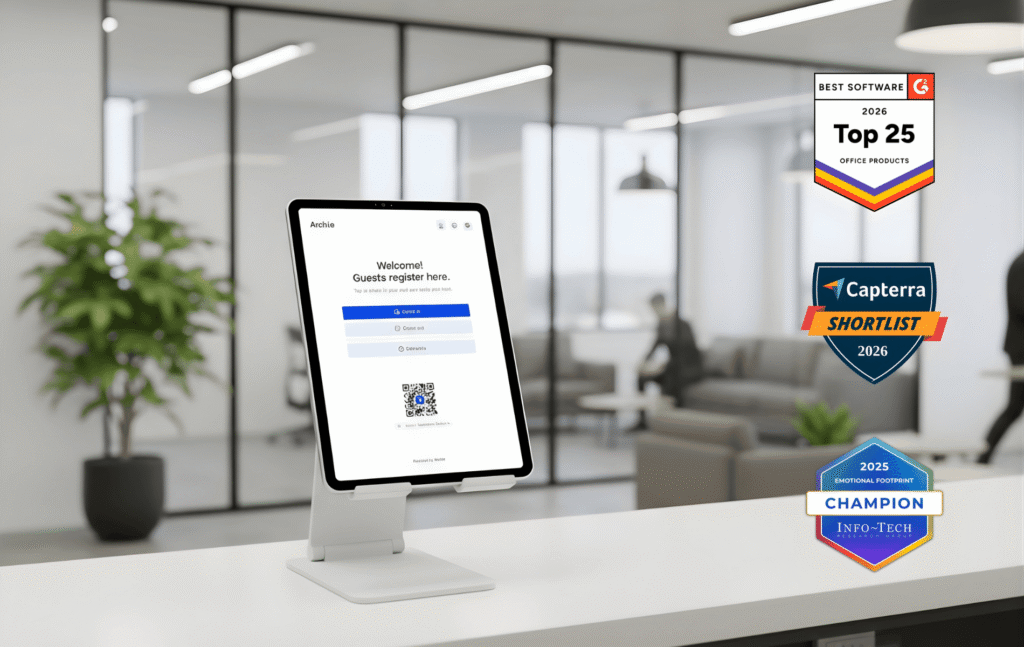
Archie is a workplace platform that makes visitor check-in one part of a connected office, alongside desk, room booking, occupancy, and safety. So, instead of you having to use separate tools, you get one unified system for employees, admins, and visitors. To compare it with The Receptionist fairly, though, let’s just focus on the VMS side of things.
More than 1,000 organizations run on Archie, from Deloitte and KPMG to Shopify, Atlassian, and the BBC.
It also tends to top the lists buyers check first when browsing for visitor management systems: G2 ranks Archie the easiest to use of 188 visitor management systems.
When switching over from The Receptionist, the useful way to think about Archie is that the front desk experience will feel familiar, but the things around the front desk (the hardware, the identity setup, the door, and the data) will not be separate problems to handle.
Archie fits mid-sized and large offices, especially those running more than one location, that want visitor check-in to sit inside a wider workplace platform. It suits IT teams that expect SSO and SCIM without an add-on fee, facilities teams that want check-in to grant door access natively, and companies with mixed iPad and Android tablets.
What are the key features of Archie?
Archie Visitors covers the core visitor workflow and adds the integrations and automation The Receptionist demands as custom work:
- Compatible across hardware: Works on iPad and Android tablets, without needing any special hardware. The Receptionist only runs on iPad.
- Automation by visit type: Set highly automated flows that can be configured for different visitor types with custom fields. The Receptionist offers button-based flows too, but the process is less seamless and has some kinks.
- Native door access: Archie connects to Kisi, Salto, Brivo, Tapkey, UniFi, DoorFlow, and others, so a check-in can share temporary access with a visitor. With The Receptionist, unlocking a door upon check-in means building on its webhooks or open API.
- Time-and location-based restrictions: Walk-ins can register on the spot by default, but admins can tighten things where a site needs it by limiting entry to only pre-registered guests, screening visitors on a questionnaire, etc. The Receptionist lets you tailor questions, but it doesn’t list rules, like pre-registered entry only or blocking early arrivals.
- Native e-signature and custom forms: NDAs, health questions and surveys sit inside the registration flow, filled in on-site or in advance, with no separate signature tool required.
- Host notifications where people work: Hosts get alerts by email, SMS, Slack or MS Teams and can invite visitors directly from Teams.
- Emergency evacuations with roll call: A coordinator can trigger an alert to everyone on site, and Archie tracks who has checked out or been marked safe, and a report is saved. The Receptionist can broadcast an evacuation message, but Archie adds the live headcount on top.
- SSO and SCIM: Single sign-on and directory sync are included at the Pro tier, adding an extra layer of security.
- Workplace analytics: Since visitors, desk bookings, and room bookings sit in the same platform, when enabled, the ‘who is on site’ info includes everyone and occupancy reports come from one place. The Receptionist is strictly a VMS, so this data lives in separate tools.
How much does Archie Visitors cost?
Archie’s visitor management pricing is per location, not per user or per visitor. All plans include unlimited visitor check-ins and hosts on every plan:
- Starter: $109/month per location, with a Kiosk app, touchless registration, pre-registration, badge printing, e-signatures, host notifications, and visitor logs
- Pro: $185/month per location. Adds visitor analytics, brand customization, photo capture, SMS notifications, evacuation tracking, Slack and Teams integrations, and SSO and SCIM
- Enterprise: Custom pricing. Adds tailored legal and security support, custom data residency, migration support, and white-glove onboarding
Desk booking and room scheduling are available as additional modules. There’s also a 14-day free trial, and you can book a demo to get your team on Archie.
What are the pros and cons of Archie Visitors?
Archie’s strengths are breadth and fit with IT, and its trade-offs show up mainly for teams with very specific front desk or security needs.
Pros
- Custom branding features to customize visitor interface as per the organization’s brand (Pro plan)
- Gives a live picture of who’s in the building, making evacuation roll calls and occupancy reports reliable
- Responsive, consistently highly rated support. There’s some configuration to do, but you won’t be doing it alone
- Ease of use is one of the most-mentioned strengths for Archie Visitors
- Works great with everyday tools, so hosts can act where they already work
Cons
- Archie doesn’t offer two-way messaging, where the host’s replies appear directly on the kiosk screen, which is The Receptionist’s standout feature.
- The platform may also be more than needed for very small offices that only want a simple visitor kiosk.
- Lighter on government ID scanning than other security-first tools
The Receptionist alternative #2: Greetly
4.8/5 G2 rating
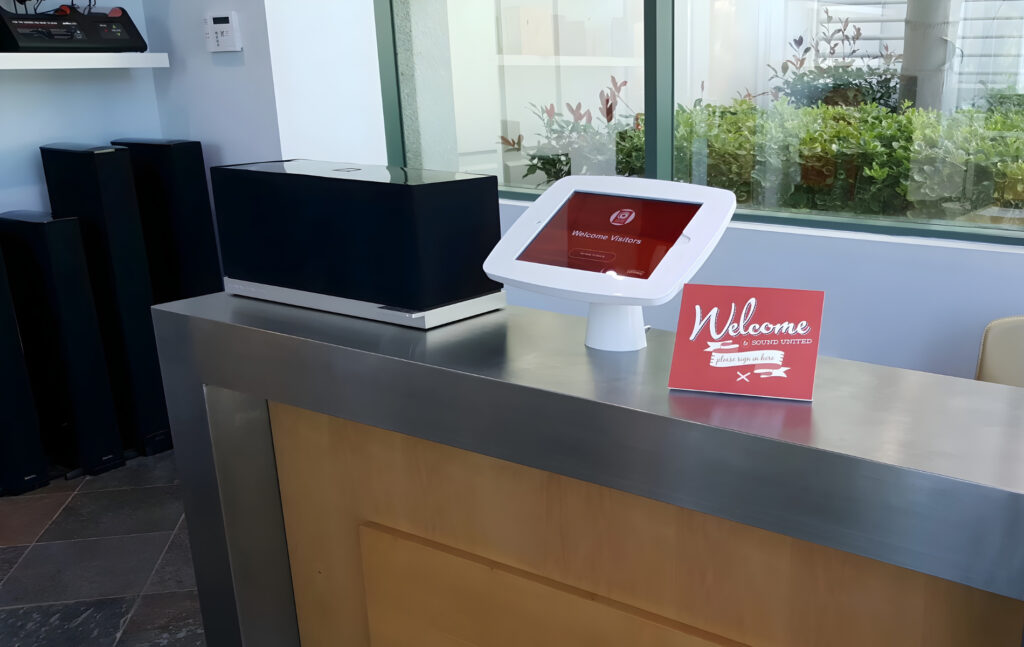
Greetly is a visitor management system now owned by OfficeSpace. It focuses squarely on the lobby: a branded multilingual kiosk, flexible check-in flows, and one of the widest notification ranges in the category.
For The Receptionist customers, Greetly matters mainly because it is the only tool on this list that keeps two-way texting between hosts and visitors. If that feature is crucial to your front desk, start here.
Greetly suits small and mid-sized offices, clinics, law firms, and professional service teams that care about how the front desk looks and sounds, often with multilingual visitors. Around three-quarters of its G2 reviewers come from small businesses.
It’s not the right fit for businesses that want desk and room booking in the same tool.
What are the key features of Greetly?
- Two-way texting between hosts and visitors (Pro): A host can text the visitor directly. The Receptionist’s version shows the host’s reply on the kiosk screen, while Greetly sends the reply to the visitor’s phone.
- Voice calls on top of text and chat alerts: Greetly notifies hosts by voice call (in 26 languages and accents), text, email, Slack, Teams, and Google Chat. The Receptionist covers SMS, email, Slack, and Teams, so Greetly adds value where hosts are on a shop floor or with patients
- Co-pilot notifications: An assistant can receive a host’s alerts automatically, every time. The Receptionist escalates to backup responders only when the host doesn’t answer.
- Drag-and-drop branding: Colors, themes, every visitor-facing word and badge layouts are editable without help. The Receptionist’s frequently cited complaint is a lack of customization and limited options.
- ID checks and watchlists: Essential includes internal watchlist alerts; Pro plan adds government ID verification and US driver’s license scanning. The Receptionist has no native ID scanning, though the Sign In app adds watchlist screening after migration
- Digital mailroom (Pro): Packages are photographed, logged, and routed, with pickups tracked. The Receptionist also notifies tenants about packages by email or text, so the difference is mostly in tracking pickups.
- Hardware and identity: Greetly runs on iPads and some Android tablets (Android 12 and up). The Receptionist is iPad only.
How much does Greetly cost?
Greetly keeps pricing pretty straightforward compared with many other visitor management tools.
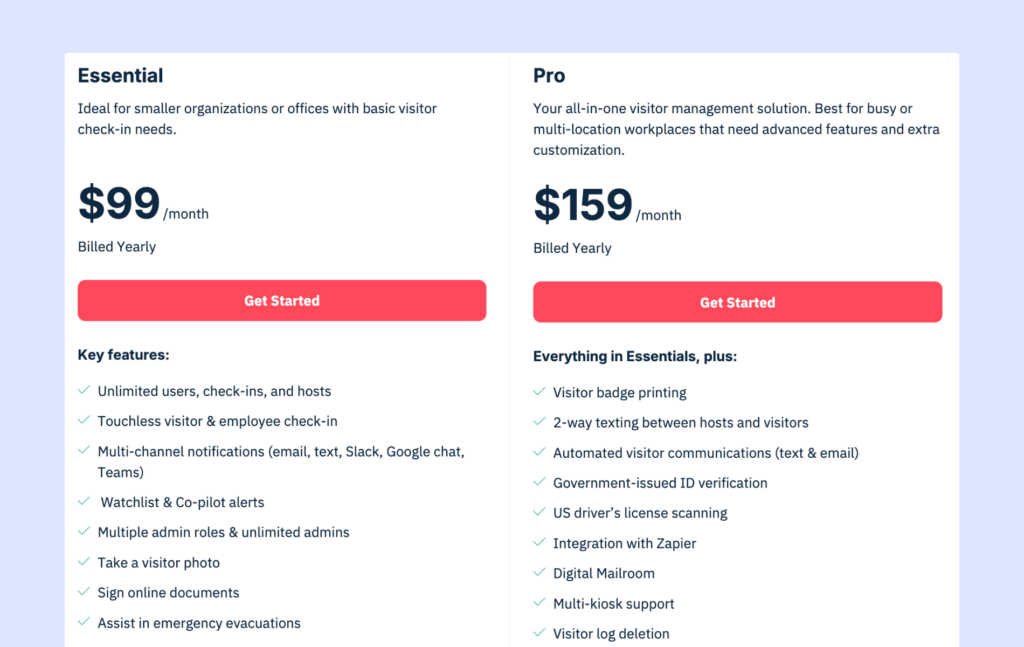
- Essential: $99/month, with touchless check-in, multi-channel notifications, watchlist and co-pilot alerts, visitor photos, e-signatures, evacuation support, pre-registration, and multilingual check-in
- Pro: $159/month, adds more advanced features like badge printing, two-way texting between hosts and visitors, visitor messaging automations, driver’s license scanning, multi-kiosk support, and ID verification.
What are the pros and cons of Greetly?
Greetly gives you the most expressive lobby experience on this list, but it stays a lobby tool. Most recent feedback for Greetly comes from Capterra.
Pros
- For offices with occasional visitors, Greetly lets them stop stationing someone permanently at the front desk, which is a frequently cited return on subscription
- Branding that feels like yours. A design-agency user says the white-labeled app fits their brand and their unusual reception needs very well.
- Unlimited users, simple pricing, and easy reporting from the cloud
- Good customer service
- Package recipients get an instant email with a photo of the package label
Cons
- Due to more limited hardware compatibility, you’ll likely have to spend more on devices
- Not suitable for organizations whose contractor or compliance flows branch heavily
- Price is higher for smaller companies, especially once Pro features are needed.
The Receptionist alternative #3: Lobbytrack
4.6/5 G2 rating
Lobbytrack is a visitor management system built for organizations with serious security and compliance requirements. Instead of a single kiosk app, it ships a set of role-based apps: one for the lobby, one for employees, and one for security guards, available on iOS, Android, and Windows.
Lobbytrack is designed to make a lobby feel controlled on who is allowed in, how many people are inside, and who still needs to leave during an evacuation.
It fits schools, nonprofits, manufacturing plants, government offices, and other sites where screening and headcounts matter more than branding. Its free tier and nonprofit and education discounts make it attractive to budget-constrained organizations.
What are the key features of Lobbytrack?
- iOS, Android and Windows, plus an on-premises option: Lobbytrack runs on all three and still offers a desktop version for organizations that can’t use the cloud. The Receptionist runs only on iPad and only in the cloud
- Role-based apps: Security staff get a guard app that monitors arrivals and receives deny alerts, while employees use a host app to schedule visitors and see their visit list. The Receptionist has one admin portal and a kiosk, with no dedicated security view.
- ID scanning: Scan driver’s licenses and passports for identity verification, and send discreet alerts to security. The Receptionist offers none of this natively.
- Deny rules and capacity limits: Admins can block specific people and cap how many visitors a site holds; extra visitors are asked to wait. The Receptionist has no equivalent controls
- Screening questions that stop the flow: Lobbytrack can require a set answer to yes/no questions before a visitor proceeds, and alert staff if they fail. The Receptionist doesn’t have pass-or-fail gating.
- Queue management: Manage visitor flow in busy lobbies to keep everything organized in walk-in heavy lobbies.
- Evacuation tools: Emergency mustering and headcount features, along with guard-side visibility.
- Access card provisioning: You can activate guest access cards on arrival and have them shut off automatically at sign-out through access control integration
How much does Lobbytrack cost?
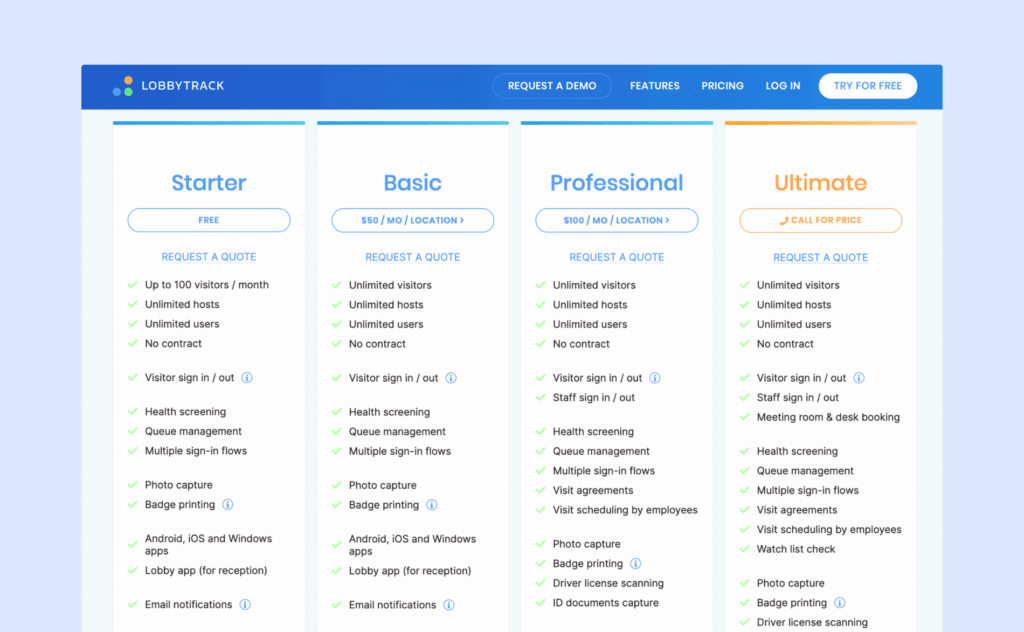
Lobbytrack offers tiered pricing per location with unlimited hosts and users on every plan and no contract:
- Starter: Free (limited features, 1 location) up to 100 visitors per month, photos, badges, deny rules, health screening, queue management, location capacity, multiple flows, QR check-in, all three app platforms, and email support
- Basic: $50/month per location. Unlimited visitors plus email and phone support
- Professional: $100/month per location. Adds more advanced security and workflow features
- Ultimate: Custom pricing for tailored deployments
Advanced features like ID scanning, watchlists, and evacuation tools are only available on higher tiers.
How Archie compares to The Receptionist
Both platforms handle the core visitor management workflow well. Whether you choose Archie or The Receptionist, you’ll get custom check-in flows, e-signatures, badge printing, photo capture, host notifications, and real-time visitor logs. Both offer pre-registration and contactless check-in options, and both have good reputations for reliability and support.
The Receptionist shines in its two-way messaging and is the choice for small offices that just want everything unlocked from day one. Archie is a better overall option if you don’t want to be locked into Apple hardware, need SSO and SCIM, or want direct integrations with access control systems.
What are the pros and cons of Lobbytrack?
Lobbytrack gives you more security per dollar than The Receptionist, at the cost of polish.
Pros
- The guard app lets security monitor visitors and employees effortlessly, while the employee app cuts congestion at reception. Few tools in this price range split the experience by role like this.
- Closes a common gap where temporary badges stay live by disabling access cards at sign-out
- Quick to set up the kiosk, compared to the employee app. Live in an hour with the hardware you have.
- Flexible for non-standard visitors
- Both cloud and on-premise versions work well
Cons
- SSO is reserved for the highest license tier and doesn’t extend to the employee app
- The interface isn’t as polished or intuitive as some competitors.
- Reporting takes extra work, as reports are hard to pull
- The free tier is very limited and mostly useful as a demo, capping visits at 100 a month
The Receptionist alternative #4: Envoy Visitors
4.7/5 G2 rating
Envoy is one of the most well-known visitor management systems in the industry. It started with a sleek iPad sign-in app and has grown into a workplace platform covering visitors, deliveries, desks, rooms, and emergency communication. Here, we zoom in on Envoy Visitors.
If The Receptionist is the friendly small-business choice, Envoy is the enterprise default with more integrations, security, and a price to match.
It fits mid-sized and enterprise organizations, often tech companies with complex software stacks, that want a polished lobby, deep integrations, and advanced screening, and that have the budget for premium per-location pricing.
What are the key features of Envoy Visitors?
Envoy’s strengths are depth of security and breadth of integrations:
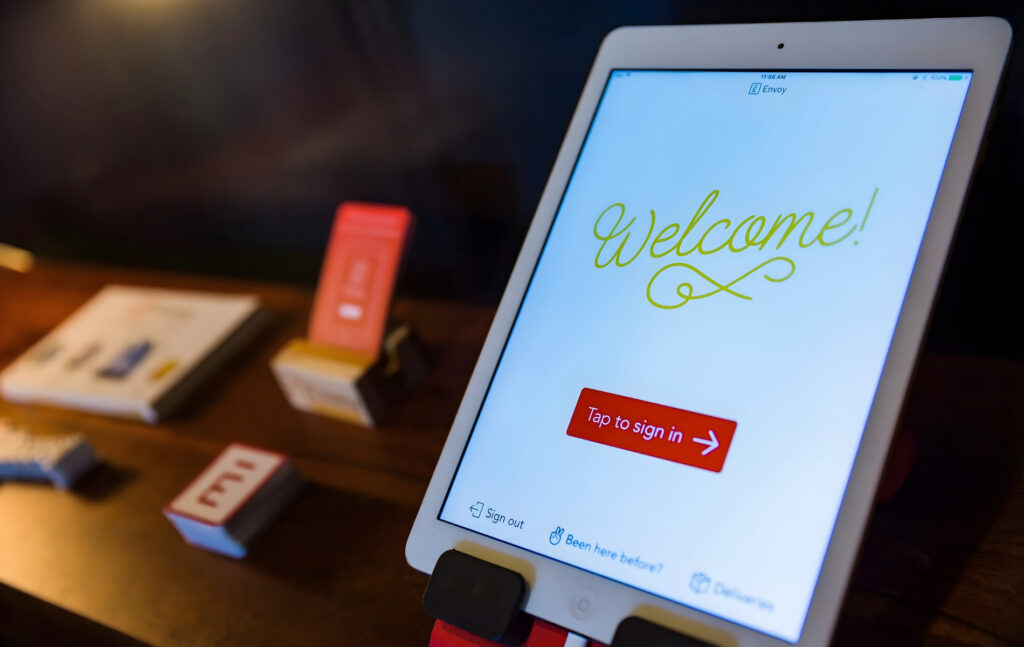
- iPad-first kiosk: Envoy’s check-in is widely seen as one of the most polished in the category, but it is built around the iPad, and works not as well on Android
- Multiple sign-in flows per visit type and site: Each visit type gets its own questions, configurable location by location. The Receptionist also builds flow by visitor type.
- Identity verification (Premium and up): Envoy scans IDs and checks visitors against internal blocklists and third-party watchlists. The Receptionist has neither natively.
- Security integrations: Envoy connects check-in to access control, RFID badges, and mobile QR codes, and its marketplace lists 100+ integrations. The Receptionist has a short integration list plus webhooks
- Documents beyond NDAs: Envoy can require NDAs, quizzes, and training certifications before entry, which suits regulated sites like data centers and manufacturing.
- Virtual Front Desk (Premium): Remote staff can greet and help visitors over video. The Receptionist has no equivalent.
How much does Envoy Visitors cost?
Envoy uses per-location pricing for visitors, with every plan including unlimited visitors and host notifications:
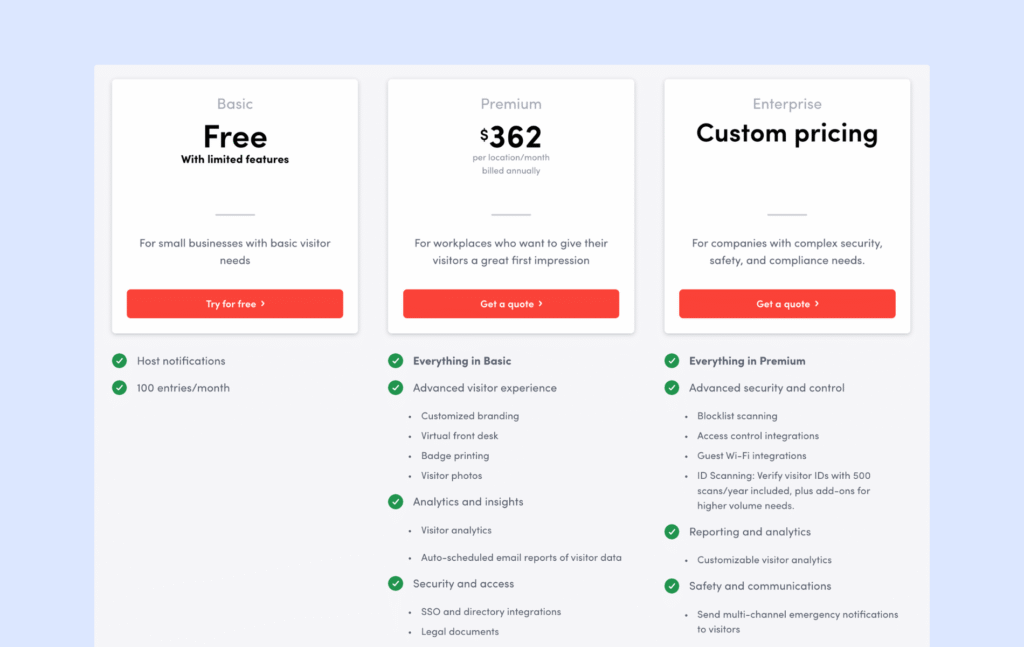
- Basic: Free (limited features), capped at 100 entries a month and for 50 employees
- Premium: $362/month per location. Roughly $4,344 per location per year, with advanced security features, integrations, and Virtual Front Desk
- Enterprise: Custom pricing. For large multi-site deployments
The jump from free to $362 is steep, and other Envoy products (deliveries, emergency notifications, desks, and rooms) are priced separately. For a 10-site company, Premium alone passes $43,000 a year before any add-ons.
What are the pros and cons of Envoy Visitors?
Envoy is excellent and expensive, and most of its trade-offs come back to cost and gating.
Pros
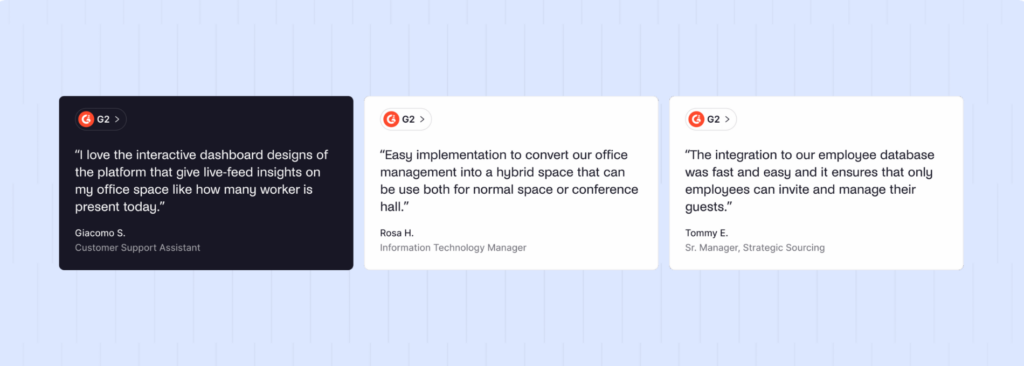
- Visitors get it instantly; G2’s head-to-head data gives Envoy a 9.6 for visitor check-in
- Flexible to build, thorough training materials, and intuitive for end users to use every day
- Returning visitors are remembered. Visitor details captured are saved for future visits, so regular guests and contractors move through faster
- Contractor management is a feature reviewers love, and the audit logs it comes with. The Receptionist doesn’t offer accountability at this depth
- Some reviewers find Envoy’s support more responsive and helpful than Sign In Solution’s, the group The Receptionist now belongs to.
Cons
- Costs keep climbing steeply. Many popular features (ID scanning, restricted-party checks, Wi-Fi provisioning, and access control integrations) are only on the Premium tier or require custom pricing.
- Setup can be bumpy, so allow a buffer before a hard go-live
- Plus, Envoy Visitors is iPad-first, which limits hardware flexibility.
The Receptionist alternative #5: Visitly
4.3/5 G2 rating
Visitly is a founder-led visitor management platform, now used by more than 1,300 organizations in over 40 countries. It started as a simple iPad check-in app and has since repositioned around visitor security and compliance, with SOC 2 Type II and ISO 27001 certification.
Visitly fits small and mid-sized organizations from single offices up to around 15 sites that want a familiar iPad kiosk with stronger security than The Receptionist offers: SSO on every plan, approvals, and watchlist screening a tier up. It’s a weaker fit for companies on Android or Windows hardware, or for teams that want desk and room booking in the same system.
What are the key features of Visitly?
Visitly keeps the front desk simple and puts its depth into security and IT controls:
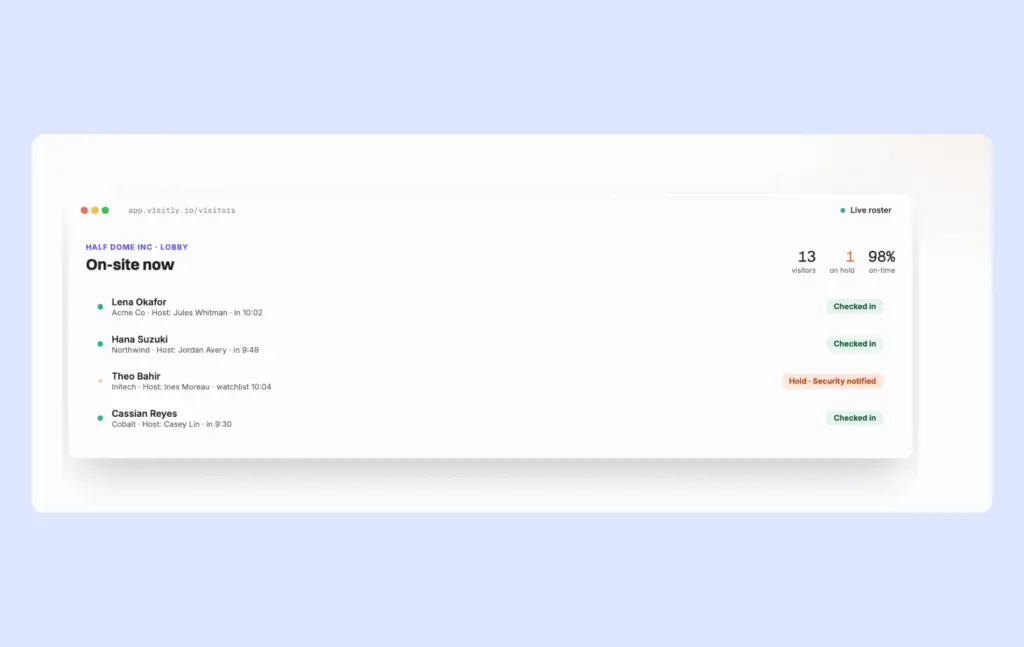
- iPad kiosk plus web check-in: Visitors check in on an iPad, or on the web via a touchless QR code, and Visitly says check-in takes under 15 seconds. You can bring your own iPads or buy a ready-made bundle
- SSO and MFA on every plan: SAML single sign-on and an immutable audit log come with the $1,000 Starter plan for up to 5 locations. The Receptionist sells SSO as a paid add-on, so for IT-led buyers this is the most direct upgrade
- Approvals and escort workflows: Hosts can approve or deny entry and assign escorts, even on Starter. The Receptionist has no approval step; Sign In App adds one after migration.
- Watchlist and photo ID screening: Visitors are screened against watchlists and their photo ID checked, and returning visitors can check in by facial recognition. The Receptionist offers none of this natively.
- Custom flows and documents per visitor type: Each visitor type gets its own workflow and documents, with expiry and re-acknowledgement rules for NDAs and safety briefings. This matches The Receptionist’s expiring e-signatures, though Starter caps you at 10 document templates.
- Evacuation roll call with drill mode: Visitly runs roll calls with email and in-kiosk alerts and lets you practice with a drill mode. SMS alerts cost extra below Enterprise.
- Host alerts in Slack, Teams, Webex, or SMS: Starter plan notifies hosts on one channel; Business unlocks every channel at once. The Receptionist covers SMS, email, Slack, and Teams on all plans and adds two-way replies, which Visitly doesn’t.
- Access control, but only on Enterprise: Integrations with Genetec, Brivo, LenelS2, Kisi, and CCURE 9000 sit on the custom-priced Enterprise plan.
How much does Visitly cost?
Visitly publishes per-location pricing, with unlimited employees and visits on every plan.
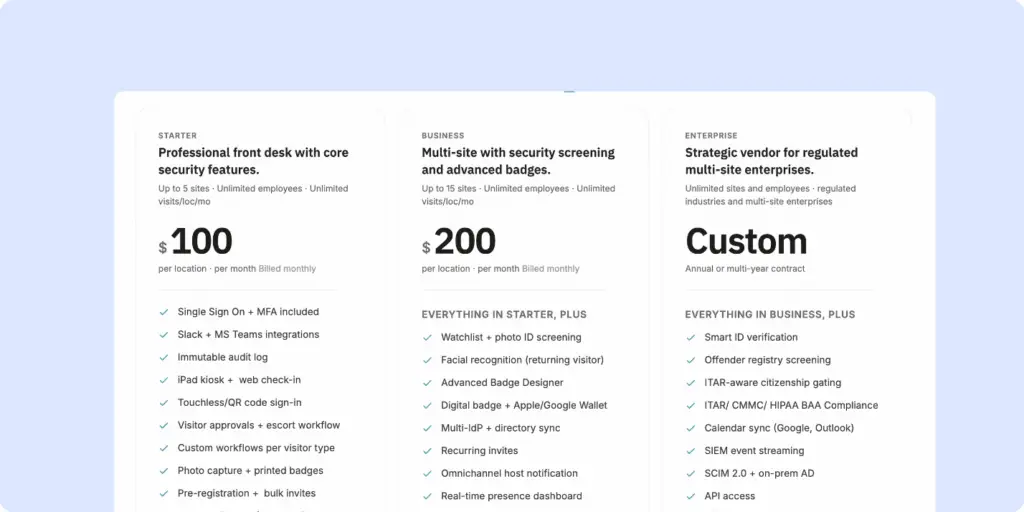
- Starter: $1,000 per location per year, up to 5 locations and 2 iPads per site, with SSO, approvals, custom workflows, badges, pre-registration, document signing, one notification channel and evacuation alerts
- Business: $2,000 per location per year, up to 15 locations, adding watchlist and photo ID screening, facial recognition, all notification channels, a presence dashboard, and audit log export
- Enterprise: Custom pricing. Unlimited locations, plus SCIM, access control, guest Wi-Fi, HRIS, and CRM integrations, SMS evacuation alerts, data residency, and a named CSM.
There’s a 14-day free trial and an SMS add-on below Enterprise.
What are the pros and cons of Visitly?
Visitly offers The Receptionist’s simplicity with tighter security controls, but its reviews are more mixed than the others here:
Pros
- Simple for visitors, useful behind the scenes
- A clean, customizable interface which makes managing check-ins and security protocols easy
- Straightforward integrations
- Lower cost with good customer support, praised for quick, friendly answers across several reviews
- Faster returns through facial recognition, although it only works well in well-lit lobbies, and dim light pushes visitors back to manual check-in
Cons
- Apple-only hardware lock-in
- Teams integration could sometimes be difficult to get right, and involve several back-and-forth with the Visitly team
- For organizations that see a high daily visitor volume, Visitly’s kiosks may be difficult as they tend to freeze under load, and you’ll have to close and reopen the app
Other visitor management alternatives
If none of the options above fit your needs, here are other visitor management systems worth considering:
- Eptura Visitor: Best for global organizations with strict compliance needs and centralized, multi-site administration.
- VisitorOS (formerly iLobby): Best for security-heavy sites that want a ready-to-deploy hardware + software bundle.
- Honeywell Sine: Best for multi-site operations that want strong mobile check-in, contractor flows, and geofencing.
- Vizito: Best for cost-conscious teams that want touchless QR check-in and basic integrations.
The Receptionist | Archie | Greetly | Lobbytrack | Envoy Visitors | Visitly | |
|---|---|---|---|---|---|---|
Best for | Small, single-site offices on iPad | Mid-sized to large and multi-site offices | Brand-focused small offices and clinics | Security-first sites on a budget | Enterprises with complex tech stacks | iPad offices wanting tighter security |
Pricing model | Per site (legacy plans scale with employees) | Per location, unlimited visitors and hosts | Flat monthly plan, unlimited users | Per location, unlimited hosts | Per location | Per location, billed yearly |
Starts at | $630/site/year | $109/location/mo | $99/mo | Free (100 visits/mo), then $50/mo | Free (limited), Premium $362/mo | $1,000/location/year |
Kiosk hardware | iPad only | iPad and Android | iPad and some Android | iOS, Android, Windows | iPad-first | iPad + web check-in |
Door access | Webhooks or API | Native (Kisi, Salto, Brivo and more) | Third-party access control integration | Premium or custom | Enterprise only | |
Notify hosts via | SMS, email, Slack, Teams | Email, SMS (Pro), Slack, Teams | Voice, text, email, Slack, Teams, Google Chat | Email, SMS, Slack, Teams | Envoy app, SMS, email, Slack, Teams | Slack, Teams, Webex, SMS (one channel on Starter) |
Standout | Two-way kiosk messaging | Visitors, desks and rooms in one platform | Two-way texting, multilingual | 100+ integrations, ID scanning | Approvals and SSO on every plan | |
G2 rating | 4.8 (432) | 4.9 (245) | 4.8 (21) | 4.6 (25) | 4.7 (437) | 4.3 (106) |
What is The Receptionist?
The Receptionist for iPad is a visitor management system designed to run on iPads in your lobby. At the time of acquisition, it served more than 5,500 customers in 35 countries. Over time, the platform is expected to move closer to other tools in the same group, like Sign In App and SwipedOn.
It sits squarely in the visitor management category rather than broader workplace management.
The Receptionist is designed to replace the paper sign-in sheet and, in many offices, the receptionist’s desk itself. Visitors check in on an iPad, have their photo taken, sign any documents, print a badge, and trigger an alert to their host.
Its users are mostly small and mid-sized organizations: behavioral health practices, law and financial firms, nonprofits, schools, manufacturers, and multi-tenant office buildings. Office managers, executive assistants, and HR teams run it day to day, and just over half of its G2 reviewers come from mid-market companies.
- Custom check-in workflows: Button-based flows with custom fields for different visitor types (guests, interviews, deliveries, employees).
- Two-way messaging where a host’s reply appears on the kiosk screen
- Documents and e-signing: Collect signatures for NDAs, waivers, and safety rules with expiration dates for returning visitors.
- Badge printing and photos: Print custom badges with the visitor’s name, photo, host, company name, visit date, etc.
- Contactless check-in: Visitors can scan a QR code to check in from their own device.
- Pre-registration: Hosts can register guests ahead of time for faster check-in.
- Employee PINs: Staff can check in/out with personal PINs for basic presence tracking.
- Notifications: Send alerts to specific admins, let hiring teams claim interview candidates, and broadcast evacuation messages.
- Real-time visitor log: See who’s on-site and export reports for audits.
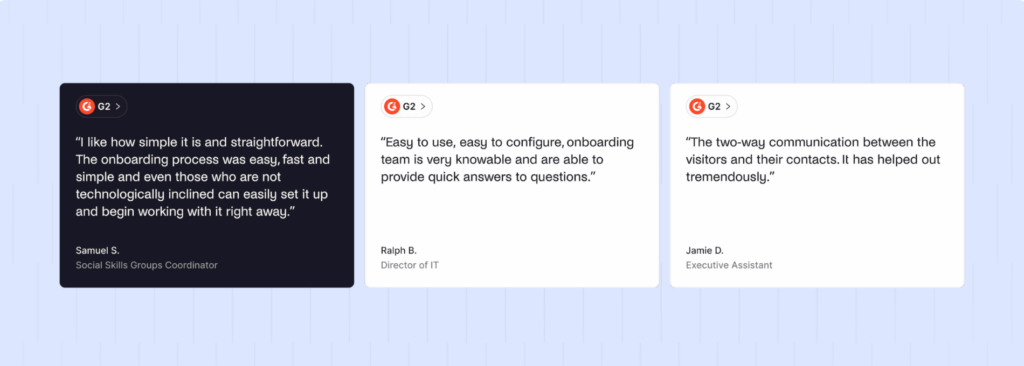
In the market, The Receptionist (before the acquisition) is known for being easy to use. Reviewers praise its Radical Support, which earned a 4.9 for customer service on Capterra. Its two-way messaging remains genuinely distinctive.
That’s why the Sign In App migration matters. The Receptionist’s own FAQ says the company is building a plan to eventually move The Receptionist for iPad and Receptful customers to the appropriate Sign In Solutions product, with timelines still to be announced. Sign In App does not have the same reputation for support, and customers are starting to miss The Receptionist’s values.
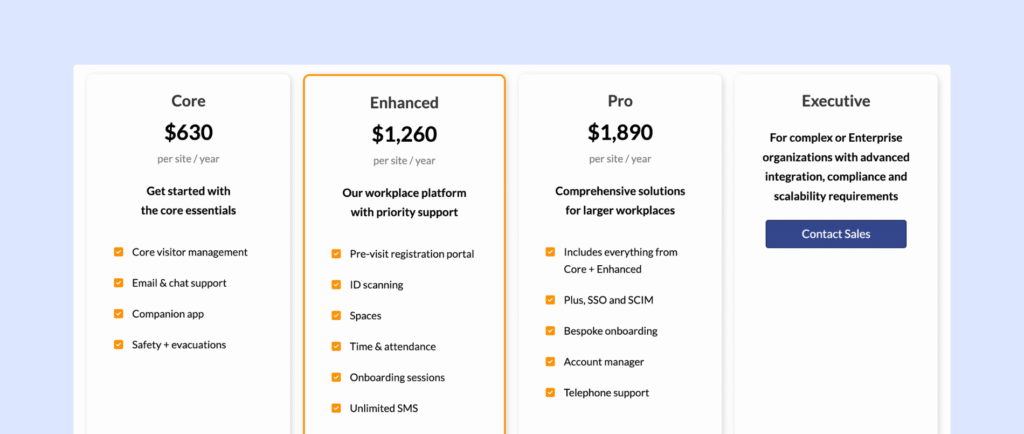
Pricing already aligns with Sign In App’s structure. Newer customers see Core priced at $630, Enhanced at $1,260, and Pro at $1,890 per site per year.
Some teams are still on the older “per employee” pricing, while newer customers will be on the updated structure.
Why do companies look for The Receptionist alternatives?
Most teams start looking for one of three reasons: they have hit The Receptionist’s product limits, they are unhappy with what the migration means, or both.
The gaps that come up most often in G2 and Capterra reviews, and in our own sales conversations, are:
- Migration changing what customers once loved
From conversations we had with a few The Receptionist customers, it seems the transition to Sign In App means losing functionality some teams built their front desk around. One customer also mentioned that the support has become hard to reach, which is a striking change for a brand whose identity was its stellar support.
- Pricing and contract structure
The legacy model charges per location and steps up with employee count, so a growing headcount pushes you into a higher tier even if visitor traffic stays flat. Now that plans are being realigned to Sign In App’s tiers, customers face a second uncertainty: not knowing what they will pay, and for which features, once the migration lands.
For multi-site companies, both effects compound.
- iPad-only hardware
Offices standardized on Android or Windows have to buy and manage separate Apple devices. Reviewers ask for cheaper hardware options, and some even use personal iPads at the front desk to avoid the cost.
- Rigid flows for some visitor types
Depending on the button type, the back office can’t always claim a visitor, so more than one person walks to the door. Buyers want flows that route each visitor type to exactly one owner.
- Limited customization
Reviewers mention fixed button colors, limited logo and background options, and no way to set an ‘I’m away’ schedule for a host. They want a kiosk that matches their brand and their real working patterns.
- No native door access
Unlocking a door on check-in requires the open API or webhooks. Teams expect a check-in to grant access out of the box.
- SSO as a paid add-on
IT and security teams see single sign-on and directory sync as baseline, not an upsell.
- Basic analytics
Reports show who came and when, but not peak times, trends, or utilization. Workplace teams want visitor data alongside desk and room data.
- Quick take
Reviews on G2 and Capterra still rate The Receptionist’s service highly, but most of those were written before the acquisition.
When should you stay with The Receptionist? | When should you switch? |
|---|---|
If The Receptionist still fits and the Sign In App product works for you, staying put is reasonable | If you’re being migrated anyway, you’ll go through a change of software, retraining, and new pricing, at which point you can switch to other providers |
How do you choose the right The Receptionist alternative?
The right alternative depends on four things about your business: the hardware you run in your visitor management function, the security your sites require, how many locations you manage, and whether visitor management should stand alone or share a platform with desks and rooms.
Get these four right and the shortlist is easier to curate.
Work through these criteria in order:
- Hardware and kiosk options: Decide whether iPad-only is acceptable or whether you need Android or Windows.
- Ask each vendor which devices are supported today, then test the kiosk app on the exact tablet you plan to deploy
- Security and compliance depth: List what each site truly needs: a badge and a log, or ID scanning, watchlists and approvals.
- Verify by running a real flow during the trial, such as a contractor who must sign a safety policy and wait for approval.
- Identity and access integrations: Confirm whether SSO, SCIM, and your door access system connect natively, and on which plan.
- Ask to see the integration configured in the demo, not just listed on the page.
- Workflow flexibility: Check that flows branch by visitor type, that each visit has one clear owner, and that back-office staff can claim visitors.
- Build your three most common visit types during the trial.
- Total cost across your sites: Price every location, every tablet, and printer, and every feature that sits in an upper tier or add-on.
- Ask how pricing scales with headcount and locations.
- Support quality and vendor stability: Read recent reviews, and ask about support hours and response times.
- Inquire about ownership and roadmap
- Data and reporting: Make sure you get a live ‘who’s on site’ view, evacuation lists, trends, and exports,
- Consider whether visitor data should sit alongside desk and room data
If you’re replacing The Receptionist, put vendor stability and support close to the top of your priority list; you don’t want to be doing this again in the next few years.
Shortlist two or three options and schedule demos. Pre-register a guest, print a badge, trigger an approval, and export a report. Pick the one that’s fastest for visitors and easiest for your team.
Which is the best The Receptionist alternative for mid-sized and multi-location offices?
Archie Visitors is the best The Receptionist alternative for most mid-sized and multi-location offices. It keeps the simple, friendly check-in experience The Receptionist customers love, then removes the main friction of Apple-only hardware, paid SSO, and custom work for door access.
Its per-location pricing with unlimited visitors and hosts also makes budgeting predictable as you grow.
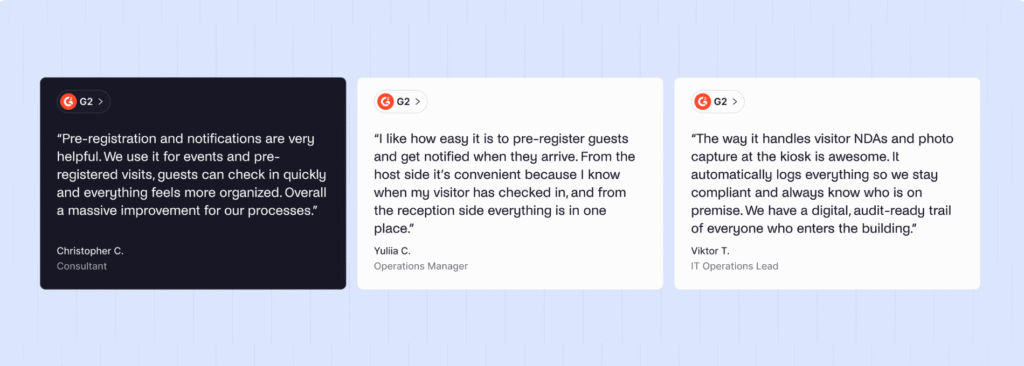
Archie is the strongest fit for:
- Multi-site companies, which get one admin view, consistent flows, and per-location pricing that doesn’t increase with headcount
- IT-led organizations, which get SSO and SCIM on Pro and an open API
- Mixed-device environments where iPad and Android kiosks run side by side
- Offices with smart locks, which can connect check-in to Kisi, Salto, brivo, and others natively
- Hybrid workplaces which want visitors, desks and rooms in one platform and one set of reports
- Teams who value support and want fast, helpful answers during and after migration
Why do companies choose Archie as a The Receptionist alternative?
Companies choose Archie because it answers the specific frustrations The Receptionist customers raise, without losing what they liked. The kiosk stays simple and welcoming, but the iPad requirement goes. SSO is part of the package, check-in can open a door, and you get desk and room booking in the same tool without having to manage different vendors for each.
At a moment when The Receptionist customers are unsure what their experience will look like after the migration, Archie’s support team remains one of the most consistently praised parts of the product.
Here’s how the two compare, side by side:
Archie | The Receptionist | |
|---|---|---|
Kiosk hardware | iPad and Android | iPad only |
Check-in flows | Automated flows by visit type, with time and location rules | Button-based flows by visitor type |
Door access control | Native: Kisi, Salto, Brivo, Tapkey, UniFi and more | Via webhooks or open API |
SSO and SCIM | Included on Pro | SSO is a paid add-on |
Emergency tools | Alerts plus live roll call and saved reports | Evacuation broadcast message |
Analytics | Visitor analytics, presence log, plus desk and room data in one platform | Visitor logs and exports |
Desk and room booking | Same platform | Not available |
Pricing model | Per location, unlimited visitors and hosts | Per site; legacy plans scale with employee count |
Entry price | $109 per location per month | $630 per site per year (new Core plan) |
Roadmap | More sophisticated security features and deeper integrations | Customers being migrated to Sign In App |
Ideal customer | Mid-sized and multi-site offices | Small and mid-sized single-site offices |
The Archie capabilities that matter most for a The Receptionist migration are:
- Compatible across hardware: Facilities teams can reuse existing Android tablets or standardize on iPads, per office. The Receptionist forces an Apple purchase wherever it runs.
- One owner per visit: Visit-type automations route interviews to recruiters, deliveries to the mailroom, and contractors to facilities. This removes the double-handling The Receptionist reviewers describe when the back office can’t claim a visitor.
- Native door access: Security and facilities teams can grant temporary access on check-in without engineering time. The Receptionist leaves this to custom API work.
- Built-in identity management: IT gets SSO and SCIM on Pro, so access follows your directory automatically. The Receptionist charges for SSO separately.
- Evacuation roll call: Safety coordinators see who is still inside, not just who was messaged. The Receptionist stops at the broadcast.
- Unified workplace data: Workplace teams see visitors, desk bookings and room bookings together. With The Receptionist, those numbers live in different tools.
Here’s how verified reviewers rate the two platforms:
G2 metric | Archie | The Receptionist |
|---|---|---|
Overall rating | 4.9/5 (245 reviews) | 4.8/5 (432 reviews) |
Ease of use | 9.5 | 9.5 |
Time to ROI (from reviewers) | 5 months | 9 months |
The more telling difference is in the direction of travel: Archie’s reviews keep coming in on the product you’d actually be using, while much of The Receptionist’s praise describes a product and support model that are now being folded into Sign In App.
G2’s own recognition points the same way. In Fall 2026, Archie was named Overall Leader, Momentum Leader, and Enterprise Leader for Visitor Management, part of 49 badges across visitor, space, meeting room, and hybrid work categories.
Momentum Leader, in particular, reflects products gaining traction quickly with users, which is the opposite of the uncertainty The Receptionist customers face right now.
How do you migrate from The Receptionist to Archie?
Moving off The Receptionist to Archie is simpler than you’d expect.
You can keep your iPads, run both systems side by side for a few days, and lean on Archie’s onboarding team (tailored onboarding on Pro, white-glove migration support on Enterprise) to do the heavy lifting.
It all comes down to four steps:
- Export your data: Download your visitor logs and signed documents, and note your visitor types
- Set up Archie: Connect your directory and recreate your check-in flows
- Connect your tools: Install the kiosk on your tablets and link Slack or Teams, printers, and doors
- Test, then switch: Try Archie at one site for a few days, then roll it out everywhere
The Receptionist earned its reputation, and if it still works for you, there’s no rush. But if the Sign In App migration is coming for your smooth front desk operations anyway, you might as well choose where you land.
Archie helps you hit the ground running, right after your migration, with the same hardware and a whole lot of advanced features.
- Key sources
FAQ
Will my price change if I stay with The Receptionist for now?
Not yet. The Receptionist’s own FAQ says current customers keep their existing pricing and billing for now, and that any future changes will be communicated in advance. Newer customers are already seeing Sign In App-style plans (Core, Enhanced, Pro), so expect pricing to converge once your account migrates.
Is Sign In App just a rebranded The Receptionist?
No. Sign In App is a separate platform, founded in the UK in 2014 and acquired by Sign In Solutions in 2021. It now runs across more than 18,000 sites. It adds features The Receptionist lacks, such as desk booking, appointment scheduling, AI visitor insights and stronger evacuation and ID tools. Because it’s a different product, check which of your current workflows, especially two-way kiosk messaging, will carry over.
How long does it take to switch visitor management systems?
On G2, reviewers of both Archie and The Receptionist put implementation at about a month. Archie reviewers report reaching ROI in about five months, against nine for The Receptionist. A single site with a few visitor types can go live much faster, so allow extra time mainly for SSO, door access and multi-site rollouts.
Can I start with visitor management and add desk or room booking later?
Yes. Archie sells Visitors, Desks and Rooms as separate modules, so you can replace The Receptionist with Archie Visitors alone (from $109 per location per month) and add desk or room booking later. Everything stays in the same platform and data, so you don’t have to migrate twice.