



















- What you’ll learn
- What meeting room booking software is and how it works
- The main benefits of using a room booking system
- Which meeting room booking software features and integrations to look for
- Common challenges teams face and how to avoid them
- How to choose, implement, and roll out meeting room booking software successfully
- The biggest meeting room booking trends and statistics for 2026
Meeting room booking software has become a core part of how modern workplaces run. In this guide, I’ll walk through what meeting room booking software is, how it works, which features matter most, and how to choose the right system for your team. I’ll also look at pricing, implementation tips, common challenges, and the trends shaping the software in 2026.
What is meeting room booking software?
Meeting room booking software is a digital tool that helps teams find, reserve, and manage meeting spaces.
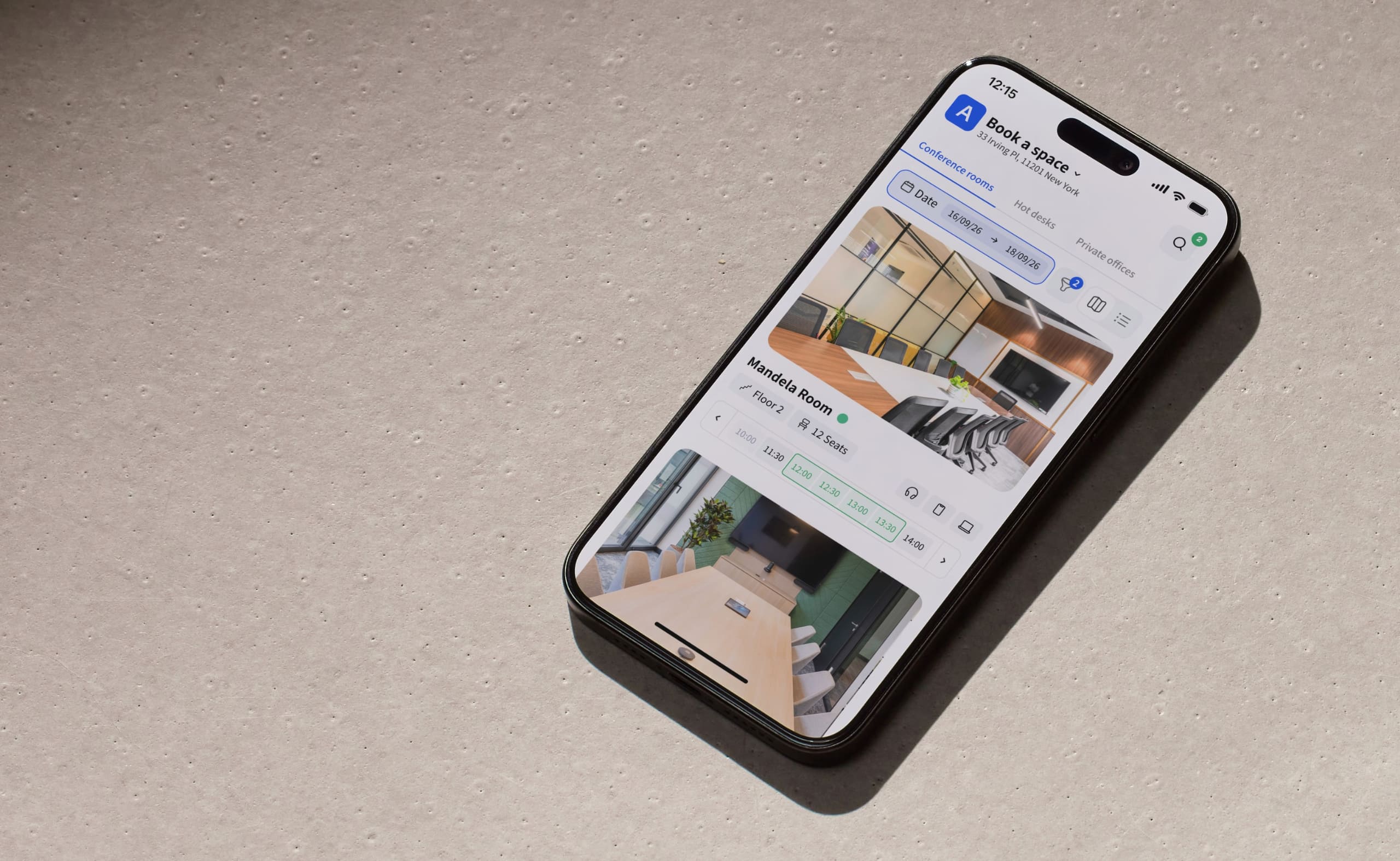
Instead of checking a whiteboard, asking coworkers if a room is free, or sending a long email thread, employees can open an app, website, or calendar and see available rooms right away. From there, they can book a space, add meeting details, and invite the right people in just a few clicks.
It’s most commonly used in office spaces, but many other industries use it too, which I’ll explore later in this guide.
Meeting room booking software vs desk booking software
Meeting room booking software and desk booking software solve similar problems, but they focus on different types of workspaces:
- Meeting room booking software is designed for shared meeting spaces such as conference rooms, collaboration areas, or phone booths. Employees usually reserve these rooms for a specific meeting with colleagues or clients, often for a set time, such as 30 minutes or an hour.
- Hot desk booking software focuses on individual workspaces. It allows employees to reserve a desk or workstation for the day when they come into the office. This is common in hybrid offices where desks are shared instead of being permanently assigned.
The two systems often work together in modern offices. An employee might book a desk for the day and then reserve a meeting room for a team discussion later in the afternoon. Many workplace management platforms like Archie combine both features in one tool so companies can manage desks, meeting rooms, and other shared spaces from the same system.
How meeting room booking software works
At its core, meeting room booking software replaces manual scheduling methods, like shared spreadsheets, sticky notes on doors, or long email threads.
Every meeting room in the office appears on a live calendar or an interactive office floor plan. Anyone with access can quickly see which spaces are available, book them in seconds, and receive confirmation right away.
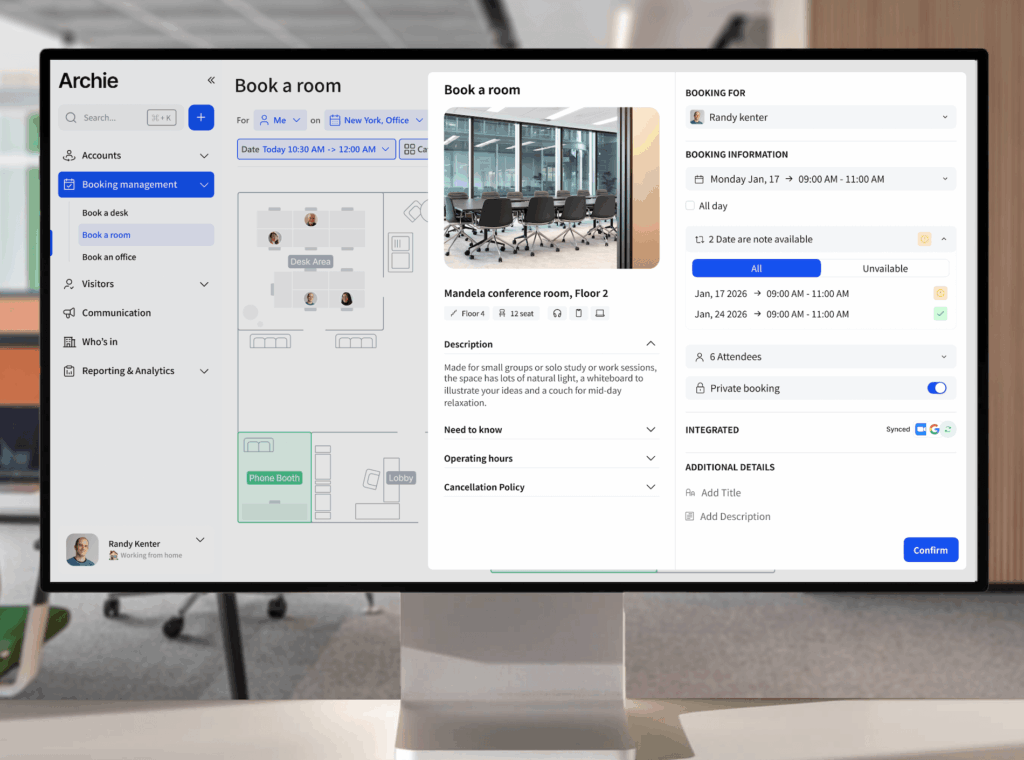
Modern systems go far beyond a basic calendar, though. Many include other meeting room booking features like:
- Auto-release, which frees a room if nobody checks in within a set time
- Recurring booking rules for weekly meetings
- Approval workflows for high-demand rooms
- Usage analytics that show how often each space is actually used
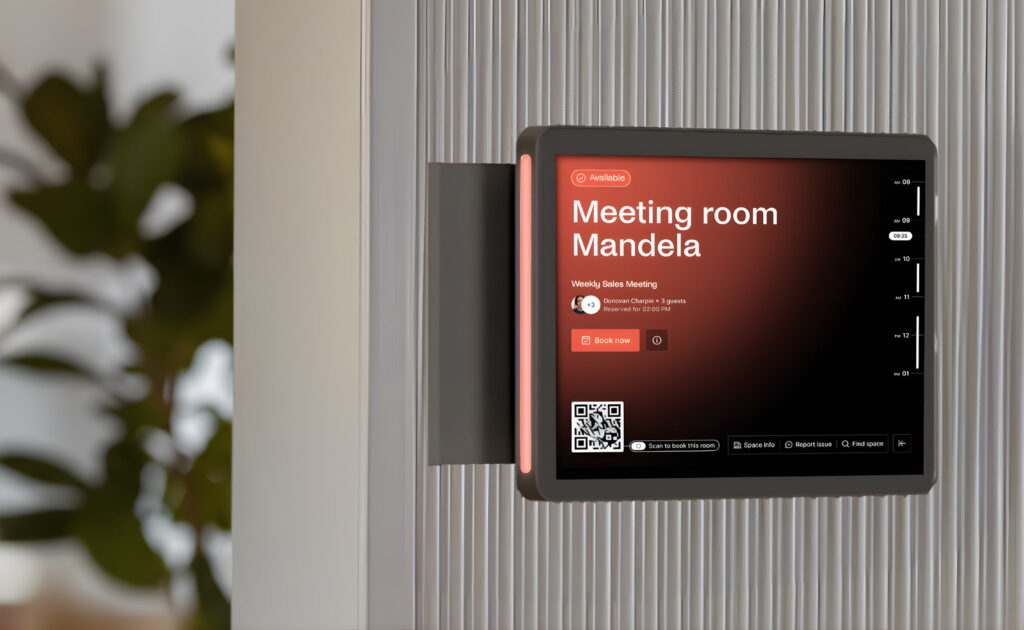
Some platforms also integrate with physical tools in the office. For example, tablets outside meeting rooms can show schedules and allow instant bookings. QR codes or mobile check-ins can confirm that the meeting has started.
Understanding the meeting room booking flow
Here is what the typical meeting room booking flow looks like:
- Search and filter. A team member opens the booking app on their phone or computer. They choose a date and time, then filter rooms by size, location, or equipment like a screen, video conferencing system, or whiteboard.
- Reserve the room. They select the room they want and confirm the booking. The system automatically creates a meeting invite that syncs with the company calendar, such as Microsoft 365 or Google Workspace.
- Check in. When the meeting starts, the organizer checks in using the app, a meeting room display, or a QR code. If nobody checks in within a set window, often about 10 minutes, the system automatically releases the room so others can use it.
- Meeting analytics. After the meeting ends, the system records data such as how long the room was used, whether the meeting started on time, and how often the space is booked.
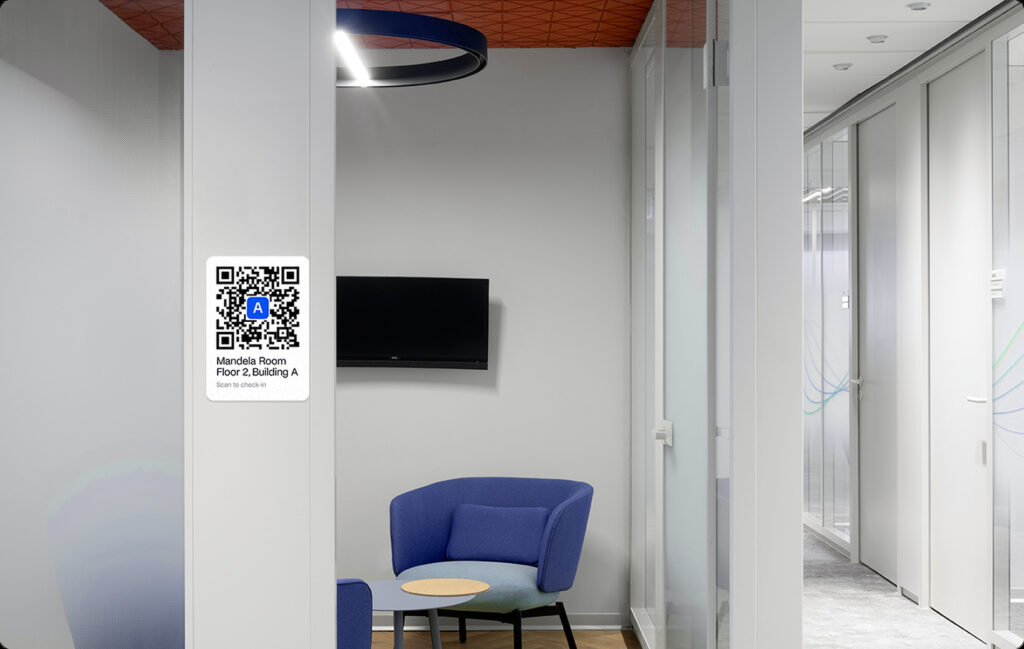
That auto-release feature is especially valuable as a no-show protection. Many offices struggle with “ghost meetings,” where rooms stay reserved but nobody actually shows up. Automatically freeing unused rooms helps teams find space more easily and improves overall room availability.
Benefits of meeting room booking systems
Many companies invest in meeting room booking software because meeting spaces are often among the most shared and contested resources in an office. Without a system in place, it is common to see rooms double-booked, reserved but empty, or occupied by people who never officially booked them.
Research from Cognitive Market Research suggests that 79% of U.S. corporate offices with more than 100 employees already use meeting room booking systems. Adoption at that level shows that many organizations see real operational value in managing meeting spaces digitally.
Here are some of the biggest benefits companies gain:
Improve meeting room utilization
One of the main reasons companies adopt meeting room booking software is to make better use of the meeting spaces they already have.
In many offices, rooms appear fully booked on the calendar, but when you walk around the office, several of them are empty. This happens because meetings are canceled but never removed from the calendar, or because someone booked a room “just in case.”
Booking software solves this with tools like check-ins and auto-release. If no one confirms the meeting within a set time window, the room becomes available again for others.
Studies from MarketResearchFuture suggest organizations see around a 44% improvement in meeting room utilization after introducing booking systems. That kind of improvement can reduce the need to build or lease additional meeting space.
Stop ghost meetings and no-shows
Ghost meetings are a common frustration in busy offices. A room appears reserved, but nobody shows up. Meeting room booking software helps eliminate this problem through features like:
- check-in requirements
- automatic room release
- reminders to cancel unused bookings
These simple mechanisms free up rooms that would otherwise stay blocked on the calendar. Over time, this makes it much easier for employees to find available meeting spaces when they actually need them.
Prevent double bookings and scheduling conflicts
Without a centralized booking system, teams often rely on shared calendars or manual coordination. That can lead to:
- double-booked rooms
- meeting conflicts in Outlook or Google Calendar
- confusion about whether a space is actually available
Meeting room booking software solves this by giving everyone one shared source of truth. Once a room is reserved, it immediately appears as unavailable to everyone else.
Help employees find available rooms quickly
In many offices, employees waste time walking around the building trying to find an empty meeting room.
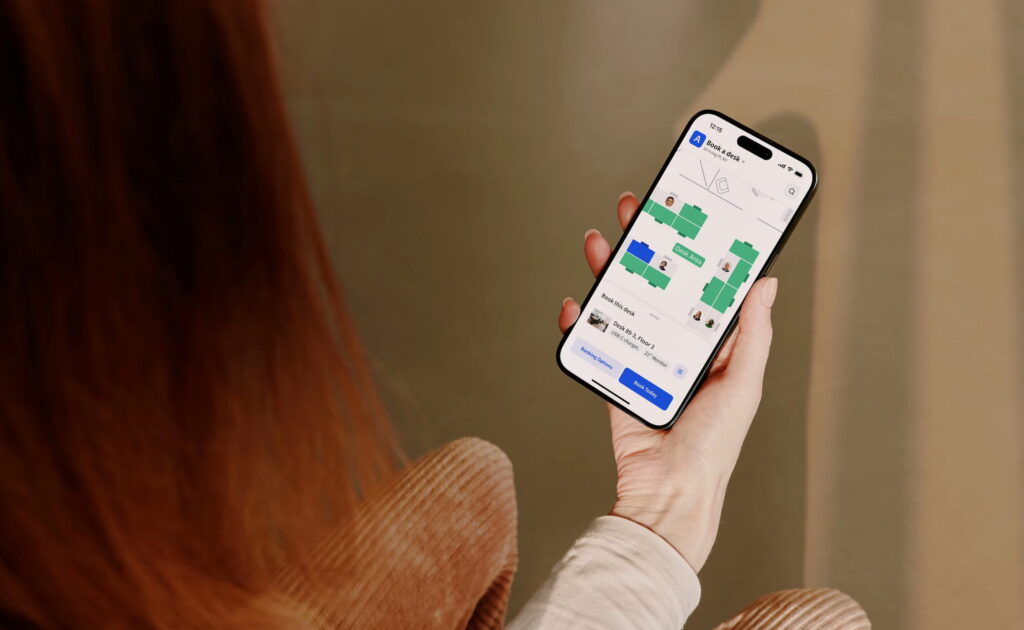
Booking software makes this much easier. Employees can open the app and instantly:
- see which rooms are free
- filter by room size or equipment
- reserve a space in seconds
Instead of searching the office, they can find an available room fast and get back to work.
Enforce room capacity and meeting policies
Meeting room booking systems also help organizations manage how rooms are used.
Admins can create simple booking rules such as:
- limiting large rooms to bigger groups
- requiring approval for high-demand spaces
- blocking certain rooms for specific teams
- ensuring hybrid meetings use AV-equipped rooms
These rules help prevent situations like one person taking a large conference room for a quick video call.
Industries that use meeting room booking software
Meeting room booking software is helpful anywhere people share meeting spaces. The basic idea is the same across industries, but the way organizations use the software can look a little different depending on their needs:
- Meeting room booking for coworking spaces. Coworking spaces often manage many shared meeting rooms used by different members, teams, and companies. Coworking booking software helps keep everything organized and makes it easy for members to reserve rooms when they need them.
- Meeting room booking for enterprise offices. Large companies usually have many meeting rooms spread across different floors, departments, or office locations. Booking software helps employees find the right space quickly and gives workplace teams better control over how rooms are used.
- Meeting room booking for universities. Universities manage a wide range of shared spaces, including classrooms, seminar rooms, meeting rooms, and collaboration areas. The software helps staff and students reserve spaces more easily and reduces scheduling conflicts.
- Meeting room booking for healthcare organizations. Hospitals and healthcare teams use a meeting room booking system for staff meetings, training, consultations, and administrative work.
- Meeting room booking for government organizations. Government offices often have shared meeting spaces used by multiple departments and teams. Booking software helps manage these rooms more efficiently and keeps scheduling clear across the organization.
- Meeting room booking for law firms. Law firms often need meeting rooms for client meetings, internal discussions, and private consultations.
- Meeting room booking for multi-tenant buildings. In multi-tenant office buildings, meeting rooms may be shared by several companies in the same building. Booking software helps property managers and tenants coordinate usage fairly and avoid conflicts.
Features to look for in meeting room booking software
Not all meeting room booking tools offer the same experience. Some only give you a simple calendar view, while others help you manage rules, hardware, analytics, and hybrid meeting workflows in much more detail.
Here are the main meeting room booking features worth looking for:
Room booking experience
A good room booking system should be easy to use from the start. If employees need too many clicks to reserve a room, adoption usually suffers.
Look for tools that support:
- Real-time room availability so people can instantly see which spaces are free
- Room booking with Outlook so reservations appear directly in Microsoft calendars
- Room booking with Google Calendar for teams using Google Workspace
- Room booking with Microsoft Teams for organizations that schedule meetings inside Teams
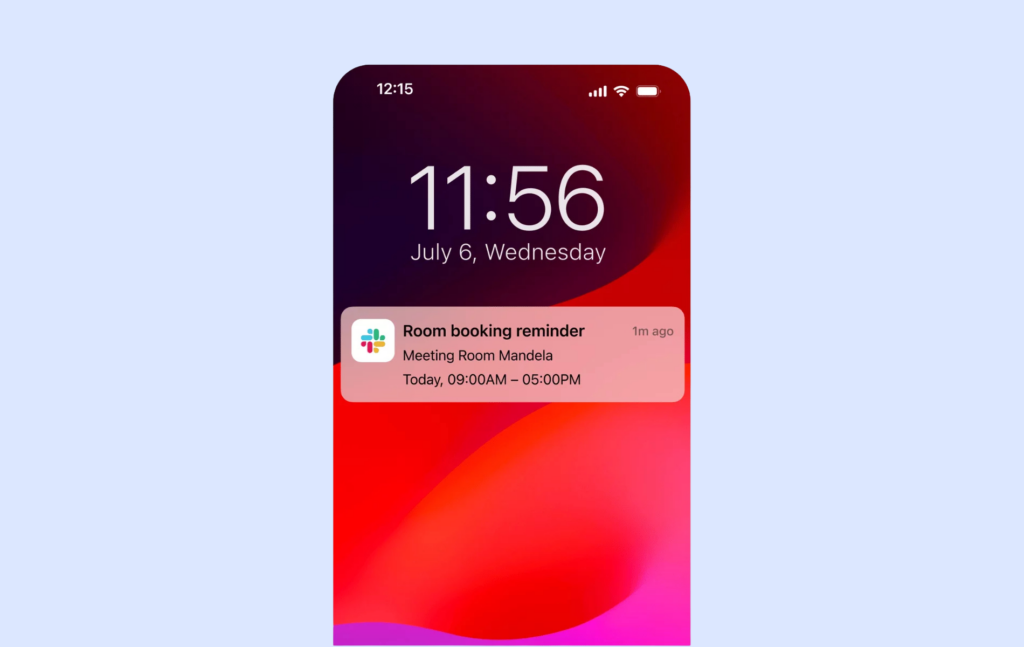
- Meeting room booking inside Slack so employees can check availability or reserve spaces directly from their workspace chat
- Meeting room booking with Zoom or Teams links, so video meeting details are added automatically
- Recurring room bookings for weekly standups, client meetings, or leadership check-ins
- Multi-day room bookings for workshops, training sessions, or longer events
- Room booking on mobile so employees can reserve spaces while moving around the office
Room displays and on-the-spot booking
Room displays make the booking process much more visible in the office itself. These are the screens or tablets placed outside meeting rooms that show whether a room is free, booked, or about to become available.
- Meeting room display software that shows live availability outside the room
- Book a room from the display so employees can reserve a space on the spot
- Walk-up room booking for quick ad hoc meetings
- Support for both iPad and Android meeting room display hardware
- Running on flexible hardware instead of expensive dedicated devices
Rules and automation
This is where modern meeting room booking software becomes much more valuable than a shared calendar. Strong automation features help offices prevent misuse, reduce conflicts, and keep rooms available for the people who actually need them.
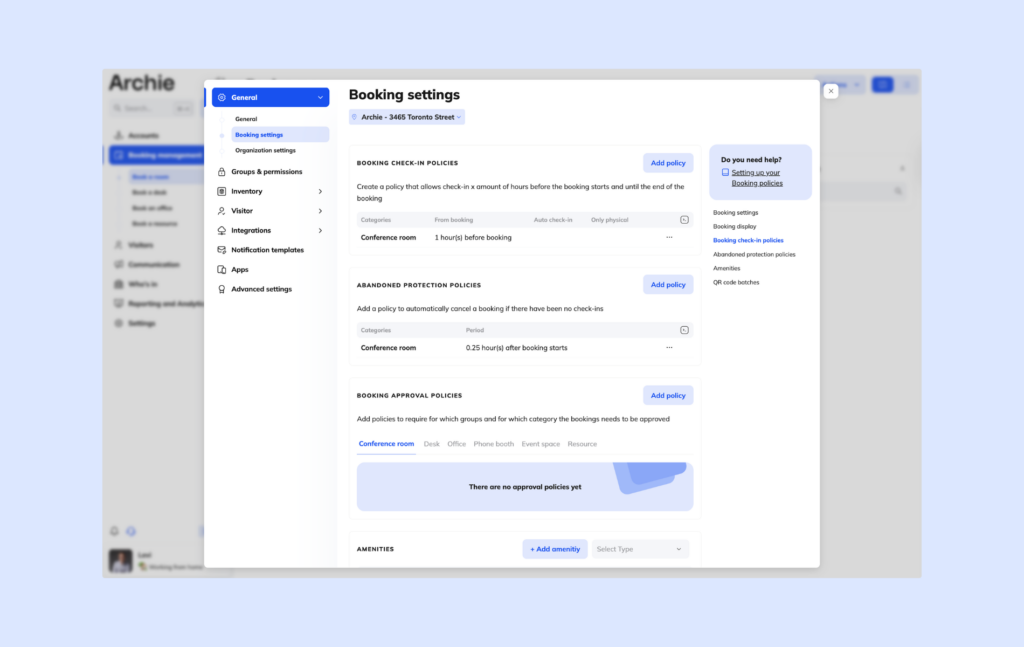
- Prevent double bookings for meeting rooms by locking the room once it is reserved
- Room booking approvals for executive rooms, boardrooms, or other high-demand spaces
- Buffer time between meetings to allow setup, cleanup, or transition time
- Max meeting length rules so one team cannot block a room for half a day unnecessarily
- No-show detection for meeting rooms to identify when booked spaces are not actually used
- Auto-cancel if no check-in, so unused bookings do not keep rooms blocked
- Release the room if it is empty after a set number of minutes
Space and resources
A room is more than just four walls. In many offices, employees need specific equipment or nearby spaces to make a meeting work.
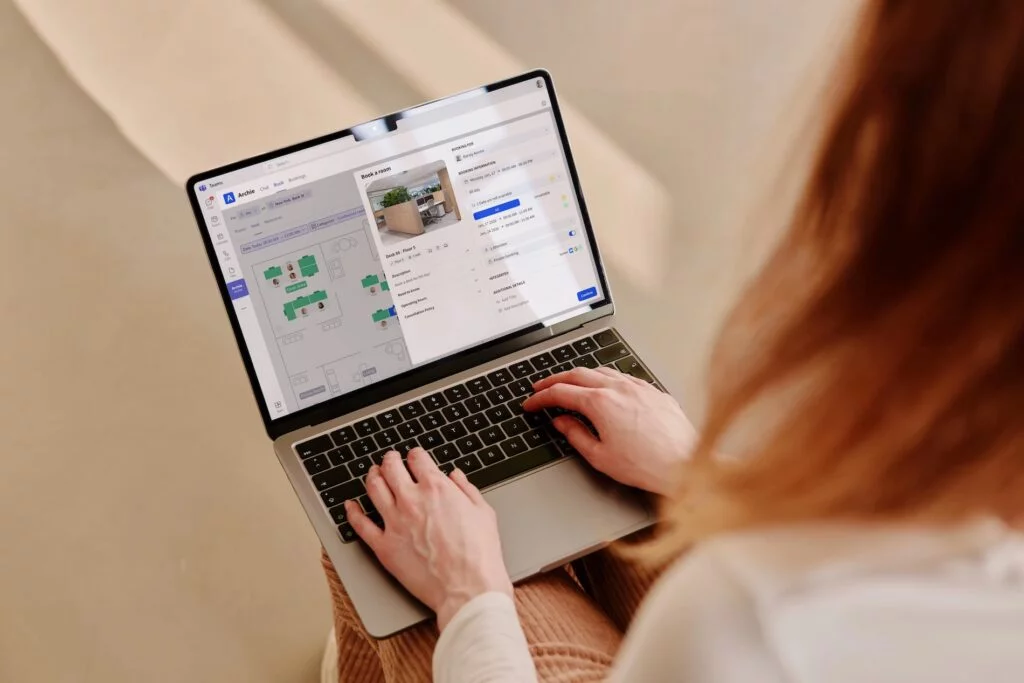
- Room booking with floor plans so employees can see where each room is located
- The ability to book meeting room equipment, such as TVs, whiteboards, microphones, or video bars
- Catering requests with room booking for longer meetings, workshops, or client sessions
- AV or IT requests tied to room bookings, so support teams know what is needed ahead of time
- The option to book desks and rooms in one system for a smoother hybrid office experience
Analytics
Many companies buy meeting room booking software for convenience, but the reporting side is just as valuable. Analytics help workplace teams understand whether the meeting spaces are actually being used the way they think they are.
- Meeting room utilization analytics to show booking trends over time
- Room occupancy vs reservations to compare booked rooms with rooms that were really used
- Peak hours for meeting rooms to see when demand is highest
- Underused rooms report to spot spaces that rarely get booked
- Meeting room capacity planning to understand whether teams need more small rooms, more large rooms, or a better room mix overall
Integrations
Integrations matter because room booking rarely happens in isolation. Employees already work in calendars, chat tools, and identity systems, so the booking platform should fit into that setup naturally.
The strongest tools usually support:
- Meeting room booking Outlook integration for calendar-based scheduling
- Meeting room booking Teams integration, so employees can schedule a space where they already collaborate
- Meeting room booking Microsoft 365 integration for broader Microsoft environments
- Google Calendar integrated room scheduling for Google Workspace
- Meeting room booking Google Workspace integration for Google-based teams
- Meeting room booking Slack integration for reminders and notifications
- Meeting room booking SSO with providers like Okta or Entra ID
- Meeting room booking SCIM for user provisioning and account management
- Meeting room booking API or Zapier support for custom workflows and third-party automations
💡 What really matters most: If you want to keep this section practical, the biggest things to look for are:
- A booking experience employees will actually use
- Rules that stop empty rooms and no-shows
- Integrations with your calendar and collaboration tools
- Analytics that help you improve space usage over time
Those four areas usually separate basic room schedulers from platforms that genuinely improve how an office runs.
Common challenges with meeting room booking software
Meeting room booking software can make office life much easier. But like any workplace tool, it only works well when it is set up properly and adopted by employees.
Many organizations run into similar challenges when they first introduce a booking system:
Low employee adoption
One of the most common problems is simple: people do not use the system. If booking a room feels complicated, employees may go back to old habits like:
- walking into empty rooms without reserving them
- creating informal bookings in personal calendars
- asking coworkers if a room is free
When this happens, the schedule quickly becomes unreliable. A good booking system should make it faster to reserve a room than to bypass the system.
Simple interfaces, calendar integrations, and mobile access usually help improve adoption.
Rooms appear booked but are actually empty
Many offices struggle with the “ghost meeting” problem.
A meeting is scheduled, but the organizer forgets to cancel it. The room stays blocked on the calendar even though nobody is using it.
Without features like check-ins or automatic release rules, this can make it look like the office has no available meeting space when several rooms are actually empty.
Systems that support check-ins, auto-release, and no-show detection help solve this problem.
Double bookings and calendar conflicts
If the booking system is not properly synced with calendars, conflicts can happen.
For example, a room may appear available in Outlook but already be reserved in another system. This can lead to awkward situations where two teams arrive expecting to use the same room.
Reliable calendar integrations with tools like Microsoft 365 or Google Workspace are essential to prevent these kinds of conflicts.
Rooms are used inefficiently
Another challenge is mismatched room usage.
For example:
- one person booking a large conference room for a short call
- small meetings taking up the biggest rooms
- long bookings that block rooms most of the day
Without booking rules, these situations can quickly reduce overall room availability.
Features like capacity limits, booking approvals, and maximum meeting length rules help keep rooms available for the teams that need them.
Hardware and setup complexity
Some meeting room systems rely heavily on hardware such as room displays, check-in tablets, or dedicated panels outside rooms.
While these devices can improve the booking experience, they can also create challenges — installation costs, device maintenance, or compatibility with the office infrastructure.
Many organizations now look for systems that support flexible hardware options, such as iPads, Android tablets, or QR code check-ins.
Limited visibility into room usage
In many offices, teams assume they need more meeting rooms, but they do not actually have clear data about how existing rooms are used.
Without analytics, it is difficult to answer questions like:
- Which rooms are used the most?
- Are large rooms always booked by small groups?
- What are the busiest meeting hours?
Meeting room booking software should provide clear analytics and utilization reports so workplace teams can make better decisions about space planning.
Managing hybrid meetings
Hybrid work has introduced a new challenge for meeting rooms.
Some meetings are fully in-person, while others include remote participants. This means teams need rooms that support video conferencing, screens, and audio equipment.
Without a booking system that shows room equipment and meeting capabilities, employees may book a room that cannot support the meeting they planned.
Good systems allow users to filter rooms by equipment or technology, which helps avoid last-minute meeting disruptions.
The biggest challenge: aligning the system with real office behavior
The biggest challenge with meeting room booking software is not technical. It is behavioral.
Offices have different habits around meetings, collaboration, and space usage. A booking system works best when it reflects how people actually work instead of forcing completely new routines.
When organizations choose software that fits their workflows, set clear policies, and make booking easy for employees, meeting room booking systems can quickly become one of the most useful tools in the workplace.
Examples of conference room scheduling systems
There are many conference room scheduling tools on the market, and the best one depends on your office size, budget, and the kind of features you need.
A few well-known options include Archie, Skedda, Robin, Envoy, Joan, and Officely:
- Archie is built as a broader workspace management platform, so room booking is part of a larger system that can also support desks, visitors, and other workplace needs. Its pricing starts at $159 per month, with higher plans adding features like Outlook and Teams booking, Slack, SSO, and SCIM.
- Skedda focuses more directly on space booking. Its pricing is based on the number of spaces you manage, which can make it easier to predict costs if you have a limited number of rooms.
- Robin and Envoy are often better known in larger workplace programs, especially for companies that need stronger analytics, enterprise controls, and support across multiple offices.
- Joan is especially known for meeting room displays and scheduling panels, which makes it a popular option for companies that want a visible, in-office room booking experience.
- Officely is often considered by smaller teams because it offers a lighter, simpler booking experience inside Slack and can be easier to roll out quickly.
Affordable room booking solutions for small businesses
For small businesses, affordability usually means more than just the lowest price. It can also mean easy setup, predictable costs, and a pricing model that fits the way the office actually works.
For example, a team with 50 employees but only a few meeting rooms may not want to pay for every user if only a handful of rooms need to be managed.
Tools like Skedda can be appealing for smaller teams because the pricing is based on spaces rather than overall headcount. Archie Rooms can also work well for small businesses that want room booking as part of a broader workplace setup, especially if they expect to add desks, visitors, or other shared resources later on. Officely is another option for smaller teams that want something lightweight and easy to use, especially if they already work heavily in Slack.
Enterprise-grade workspace management for global offices
For larger organizations, the decision usually goes beyond basic room scheduling.
Enterprise teams often need:
- stronger admin controls
- multi-location support
- deeper analytics
- identity management features like SSO and SCIM
- easier rollout across many offices and teams
That is where broader workplace platforms often stand out.
Robin is positioned as a workplace platform for planning, booking, and managing office resources across desks, meeting rooms, and other shared spaces. Archie’s higher plans add multi-location support, admin controls, SSO, and SCIM for growing organizations.
Meeting room booking software reviews and comparisons
When comparing meeting room booking software, it helps to look at what each platform does best instead of trying to force every tool into one simple ranking.
For example, Archie and Skedda are easier to compare if transparent pricing and space-based billing matter most to you. Robin makes sense to compare if you are looking at broader workplace platforms with stronger enterprise workflows. Joan stands out when room displays and signage are a big priority. Officely is worth looking at if you want a lighter, Slack-first experience without too many advanced controls.
A practical way to compare tools is to look at:
- ease of booking
- calendar integrations
- no-show protection
- room displays
- analytics
- admin rules
- mobile experience
- pricing model
- rollout complexity
That kind of comparison gives a much clearer picture than just asking which tool is “best,” because the right choice depends on how your workplace actually operates.
💡 Here’s a detailed meeting room booking software comparison to help you out.
What is the cost of meeting room booking solutions?
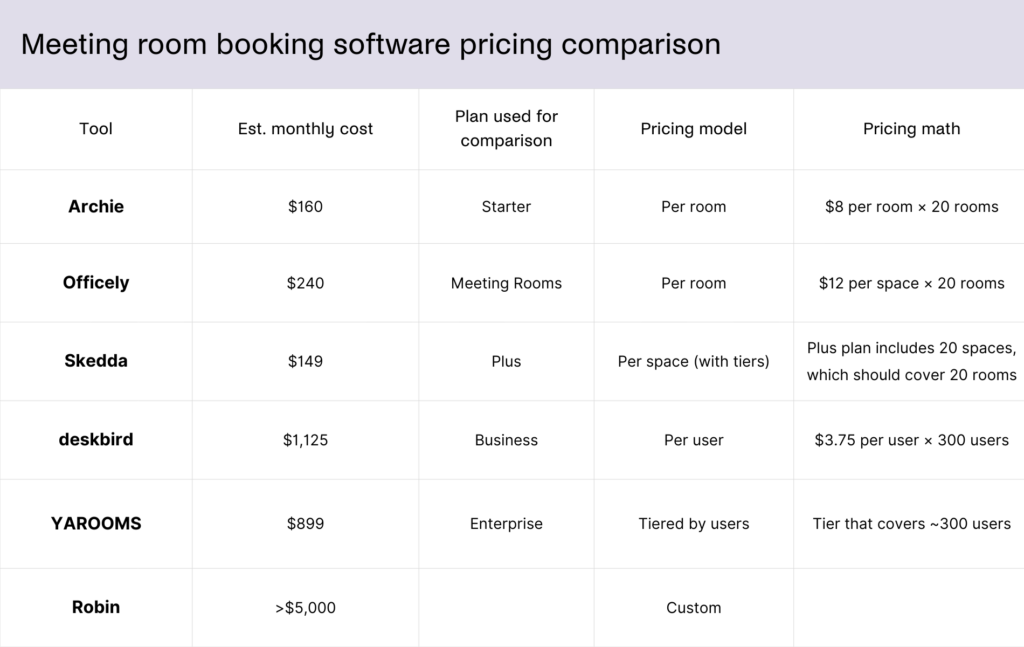
The cost of meeting room booking software can vary quite a bit because vendors do not all price their products the same way.
Some charge per room or per space, others charge per user, and some offer flat monthly plans based on company size or feature bundle.
For example, Skedda uses space-based pricing, with public plans starting at $99 per month, then increasing based on the number of spaces you manage. Archie uses per-room pricing starting at $8 per room per month, although minimum monthly fees apply. Officely uses a mixed model, with per-user pricing for desks and separate pricing for meeting spaces. Robin, like many enterprise-focused platforms, often uses custom pricing instead of showing full rates publicly.
Because of these different models, the cheapest option on paper is not always the most affordable in practice. The right fit depends on how many rooms you manage, how many employees need access, and which features your team actually needs.
How to choose and implement meeting room booking software
Step 1: Audit your current meeting room usage
Before evaluating vendors, take some time to understand how your meeting rooms are used today, including:
- how often rooms are booked
- how many meetings are canceled or never used
- peak booking hours during the day
- which rooms sit empty most of the time
This baseline gives you real numbers to measure improvement later. It also helps identify common problems like ghost meetings or large rooms being used by small groups.
If you do not have booking software yet, even a simple meeting room booking spreadsheet can help collect this data.
Step 2: Map your integration requirements
Meeting room booking software should work naturally with the tools your team already uses.
Start by confirming compatibility with your main calendar system, such as Microsoft 365 or Google Workspace. Ideally, employees should be able to book rooms directly from their calendar.
Next, review integrations with collaboration tools, such as:
- Slack notifications for booking updates
- Microsoft Teams meeting scheduling
- automatic Zoom or Teams meeting links
IT teams should also check identity management features like SSO and SCIM provisioning, which simplify user onboarding and account management at scale.
Step 3: Evaluate features based on company size
The features you prioritize should match the size and complexity of your organization:
Feature | Priority for SME | Priority for Enterprise |
|---|---|---|
Basic calendar sync | High | High |
Auto-release for no-shows | Medium | High |
Approval workflows | Low | High |
Multi-location support | Low | High |
Analytics and utilization reporting | Medium | High |
SSO / SAML / SCIM | Low | High |
Visitor management integration | Medium | High |
Room display hardware support | Low | Medium |
At this stage, it is also important to understand meeting room booking pricing models. As already mentioned, some vendors charge per user, others per room, and hardware like door displays can affect the total cost of ownership.
Step 4: Prepare for rollout with an implementation checklist
Before launching the system, make sure the core setup is ready. A typical meeting room booking software implementation checklist includes:
- a complete list of bookable meeting rooms
- room names, capacities, and equipment details
- calendar integration with Microsoft 365 or Google Workspace
- booking rules such as approvals, maximum meeting length, and buffer time
- a check-in method such as mobile app, QR code, or room display
- signage or room display hardware plans if needed
- employee access groups and permissions
- reporting goals for utilization and no-show tracking
- internal launch communications
- quick training materials for admins and employees
Step 5: Run a pilot before a full rollout
Instead of launching the system across the entire company immediately, start with a small pilot. Choose one department, floor, or office location and run the system for two to four weeks. During the pilot period, track:
- employee adoption
- reduction in meeting room no-shows
- feedback on the booking experience
Assign a room booking champion within the pilot group to help answer questions and surface issues quickly.
Step 6: Roll out company-wide
Once the pilot is successful, expand the system to the rest of the company. A smooth rollout usually includes:
- a short training video
- a simple room booking policy
- clear communication about when the new system becomes the official booking method
Rolling out gradually helps teams adapt without overwhelming them.
Training employees on a new meeting room booking system
Introducing a room booking system is not only a technical change. It is also a behavior change. Employees need to trust that the system actually makes their workday easier.
Keep training short and practical
Most employees only need to know three things:
- how to find a room
- how to book it
- how to cancel it
A short five-minute video or quick demo during a team meeting is usually enough.
Train inside tools employees already use
If bookings happen through Outlook, Google Calendar, or Teams, show employees how the process works inside those tools instead of asking them to learn a completely new interface.
Set clear booking rules
Explain simple guidelines such as:
- cancel rooms you no longer need
- check in for meetings
- avoid large rooms for small meetings
Clear expectations help prevent confusion later.
Use signage near meeting rooms
Simple instructions or QR codes outside rooms can remind employees how to check in, release unused rooms, or book a space quickly.
Identify internal champions
Choose a few employees or office managers who understand the system well and can help others during the first weeks after launch.
Meeting room booking trends and statistics
Here are some of the biggest trends and statistics shaping meeting room booking software today:
Growing demand for meeting room booking tools
The meeting room booking software market is growing steadily, but one important note up front: market size estimates vary a lot depending on how analysts define the category. Some reports look only at meeting room booking software, while others bundle it into broader resource booking or space management software. Because of that, you’ll often see different totals from different firms.
One recent Research and Markets report values the global meeting room booking software market at about $152.3 million in 2025, with a forecast of $359 million by 2034, which implies about 10% CAGR.
A separate Market Research Future report gives a much larger estimate for the broader meeting room booking system software category, projecting it to reach $3.62 billion by 2035 at a 9.63% CAGR. That same source also says the market could hit $2.51 billion by 2032.
If you zoom out to the wider resource booking software market, Research and Markets estimates it at $2.81 billion in 2025, growing to $4.88 billion by 2029 at 14.8% CAGR. That matters because many meeting room tools are now sold as part of bigger workplace, desk booking, or resource management platforms rather than as standalone room schedulers.
On the workplace side, JLL says global office utilization reached 54% in 2025, up from 49% in 2024, while utilization targets rose from 74% to 79%. That is a strong signal that companies are paying more attention to how office space is used, which supports demand for tools that help manage rooms and shared spaces more efficiently.
Hybrid work is still the biggest demand driver
Even with more return-to-office pressure, hybrid work is still shaping office operations. CBRE’s 2025 outlook says hybrid arrangements will remain in place even as attendance increases, and JLL’s 2025 benchmark report says companies are investing more in occupancy tracking and portfolio optimization to support that shift. In practice, that creates more demand for software that can coordinate shared meeting rooms, collaboration spaces, and office resources.
Meeting room booking is becoming part of broader workplace platforms
The category is moving beyond simple room calendars. More vendors now bundle room scheduling with desk booking, visitor management, occupancy analytics, and workplace experience tools. You can see this broader market shift in the larger growth forecasts for resource booking and space management software compared with the narrower room-booking-only category.
Analytics and utilization reporting are becoming core features
Companies are no longer buying these tools just to stop double bookings. They want data on room usage, peak hours, underused spaces, and true occupancy versus calendar reservations in the office. JLL’s 2025 report highlights growing investment in occupancy tracking technology, and CBRE’s global workplace insights also emphasize space effectiveness, workplace metrics, and tech-enabled planning.
AI is starting to shape the next wave of product features
AI is becoming a real trend in this category, especially around usage analytics, automated scheduling suggestions, and smarter space optimization. Market Research Future specifically points to AI-driven analytics, mobile apps, and hybrid-work-related booking needs as growth opportunities in the meeting room booking system software market.
Mobile-first and real-time booking are now expected
Booking from a desktop calendar is no longer enough for many teams. The market is shifting toward mobile booking, live availability, quick check-ins, and on-the-spot room access, especially in hybrid offices where people move around more and need fast answers. This is also reflected in research commentary pointing to mobile applications and real-time booking as part of market growth.
Smart office tech is pushing room booking closer to automation
As companies modernize offices, room booking tools are being connected to occupancy sensors, room displays, check-in workflows, and other smart office systems. JLL notes increasing investment in occupancy tracking technology, and CBRE’s workplace insights point to the role of technology and AI in future workplace planning. That suggests room booking software is becoming less of a standalone scheduling tool and more of a smart-office layer.
Are you ready to find the right meeting room booking software for your office?
Meeting room booking software FAQs
Yes. Most meeting room booking systems integrate directly with popular calendar tools like Microsoft Outlook and Google Calendar. This means employees can often book meeting rooms directly from the calendar they already use. When a room is reserved, the booking appears on the meeting invite automatically, so everyone can see the location and schedule.
Yes, but free options are usually limited. There’s a free meeting room booking template, plus some tools offer free plans for small teams, while others provide free trials so you can test the system before committing. These versions limit the number of rooms, users, or features available.
Not always. If a small team only has one or two meeting rooms, a shared calendar may be enough. However, once multiple teams start sharing several meeting spaces, scheduling can quickly become confusing. Even small businesses benefit from tools that prevent double bookings, show room availability instantly, and make it easy for employees to reserve spaces.
Yes. Most modern platforms support multiple offices or locations. Companies can manage meeting rooms across different buildings, cities, or even countries from a single system. Employees can search for rooms within a specific office or see availability across locations. This is especially useful for larger organizations that want a consistent booking experience across all their workplaces.
Ghost meetings happen when a room is reserved but no one shows up.
Most booking systems reduce this problem by using check-in requirements and automatic room release. For example, employees may need to confirm their meeting using a mobile app, a QR code, or a display outside the room. If no one checks in within a set time window, the system automatically releases the room so someone else can book it.
Most booking systems prevent conflicts automatically. When two people try to reserve the same room at the same time, the system processes the first request and immediately marks the room as unavailable for everyone else. The calendar refreshes in real time, usually within a second or two.
Yes. Most meeting room booking systems support role-based permissions. Admins can control who is allowed to reserve certain rooms. For example, executive meeting rooms or boardrooms can be restricted to specific teams, departments, or senior staff. Some platforms also allow approval workflows, where certain rooms require manager or admin approval before the booking is confirmed.
- Key sources