



















- What you’ll learn
- What Eptura Engage offers, and who it is actually built for
- Why some teams start looking for Eptura Engage alternatives
- How Archie, Robin, Skedda, deskbird, and YAROOMS compare
- Which platform is the best fit based on your team size, budget, and workplace needs
- Why Archie stands out as the strongest Eptura Engage alternative for most organizations
Eptura Engage, formerly Condeco, is one of the better-known workplace management platforms for large enterprises. It offers desk booking, meeting room scheduling, and visitor management for companies with complex workplace needs, often across multiple offices, countries, and time zones.
That said, software built for a global enterprise is not always the right fit for every organization. A platform designed for 50,000 employees across dozens of locations may feel too heavy, too expensive, or simply more complex than necessary for a 200-person office. Some teams are also re-evaluating their options after the Condeco rebrand and looking for tools with a more modern feel, clearer pricing, or a simpler setup.
In this guide, we’ll look at five Eptura Engage alternatives: Archie, Robin, Skedda, deskbird, and YAROOMS. Each one is built for a different type of organization, and we’ll help you figure out which one fits your space, budget, and team best.
About Eptura Engage
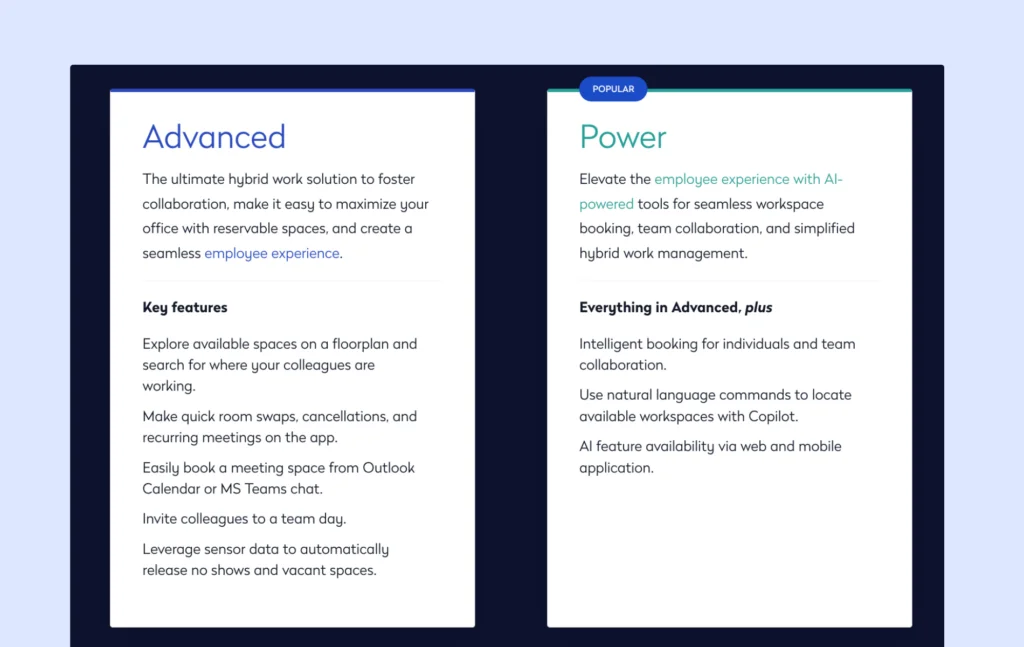
Eptura Engage is part of the larger Eptura workplace software suite. Instead of offering just one tool, Eptura combines several products for things like visitor management, desk booking, room scheduling, asset tracking, service requests, and space planning. That makes it a better fit for larger companies that want one vendor for several workplace needs.
The platform covers desk booking and meeting room scheduling, with features like floor plans, desk filters, room displays, and check-in options. Employees can book spaces from the web portal, and room bookings can also connect with Microsoft Outlook. There is also a feature that releases a meeting room if no one checks in within the first part of the booking, which helps reduce no-shows.
Where Eptura stands out most is visitor management. The Eptura Visitor product offers several ways for guests to check in, including QR codes, mobile check-in, and iPad kiosks. Teams can build custom visitor flows, add as many questions as needed, collect signatures, print badges, and send host notifications by SMS, Teams, or Outlook. It also includes useful extras like delivery tracking, employee presence logs, visitor history, multi-language forms, and emergency evacuation tools. If visitor experience and front-desk workflows are a big priority, this is clearly one of Eptura’s stronger areas.
That said, the desk booking and room scheduling side feels less modern. The sales process also seems more complex than with simpler workplace software, with multiple discovery calls, longer rollout timelines, and implementation fees on top of annual software costs.
Pricing is quote-based, but based on industry research, desk booking appears to be priced per user per year, with visitor management packages starting at around $2,500 to $7,500 per year. Access control options and enterprise features raise the cost further. Implementation also costs extra and can get expensive depending on the setup.
Who is Eptura Engage best for?
Eptura Engage is best for large enterprises with multiple offices, complex workplace needs, and dedicated teams managing workplace operations. It is a stronger fit for companies that need desk booking, room scheduling, visitor management, and workplace tools connected to a broader enterprise system, rather than smaller teams looking for a simpler setup.
Why teams look for Eptura Engage alternatives
Enterprise pricing does not work for every budget
Eptura Engage does not list pricing on its website, which often points to a more enterprise-focused pricing model. Based on industry research, the total cost can add up quickly once you include implementation, add-ons, and advanced features. That can be hard to justify for smaller teams or companies that mainly need straightforward desk booking and room scheduling.
The platform can feel complex
Eptura Engage offers a wide range of tools, which is helpful for large organizations managing multiple offices and workplace systems. But that also means there is more to set up, learn, and maintain. Smaller workplaces or IT teams may find the platform harder to manage, especially when it comes to configuration, floor plans, and handling several modules at once.
The platform might still be adjusting after major changes
Condeco was rebranded as Eptura Engage after the acquisition, and big platform changes like that can take time to settle. While existing accounts continued working, some users have mentioned slower support and occasional syncing issues with calendar integrations. If you are comparing workplace platforms now, it is worth keeping in mind how recently the product and support structure changed.
5 best Eptura Engage alternatives
Archie is the best Eptura Engage alternative for most teams because it gives you desk booking, room scheduling, visitor management, and workplace analytics in one platform, but with simpler setup, transparent pricing, and a more modern user experience. It is a better fit for companies that want strong workplace tools without the complexity, long implementation, and enterprise-style buying process that often come with Eptura Engage.
1. Archie: best for all-in-one workplace management without enterprise complexity
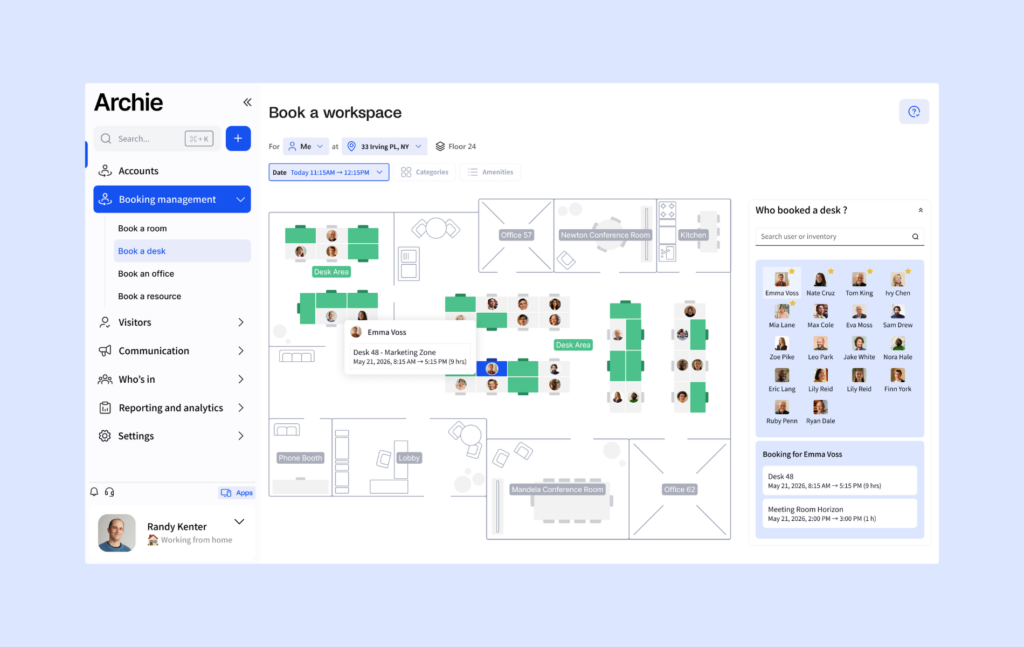
Archie is a smart workspace technology platform that brings together desk booking, meeting room booking, visitor management, and workplace analytics in one system. It is built for companies that want strong features without the heavy setup, long rollout, or confusing pricing that often comes with enterprise tools. The platform helps teams make better use of their space while making it easier for employees and guests to move through the office.
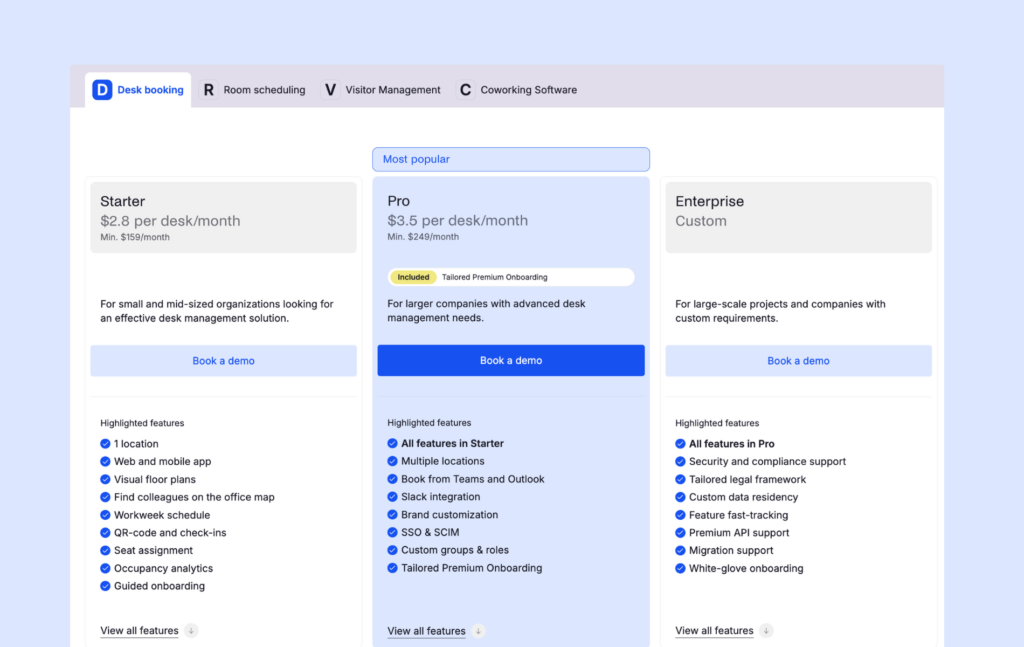
Archie uses transparent per-resource pricing. Desk booking starts at $2.80 per desk per month, with a $159 monthly minimum. Room scheduling starts at $8 per room per month, with a $249 monthly minimum for the Pro plan. Visitor management is available as an add-on. This pricing model works especially well for modern offices where there are more employees than desks, since you only pay for the spaces you manage.
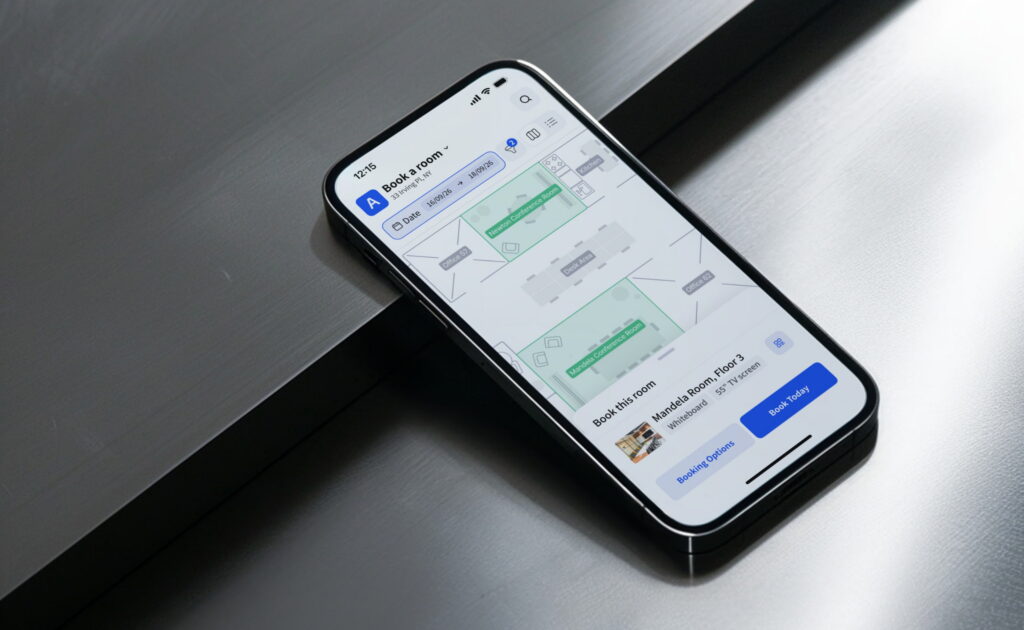
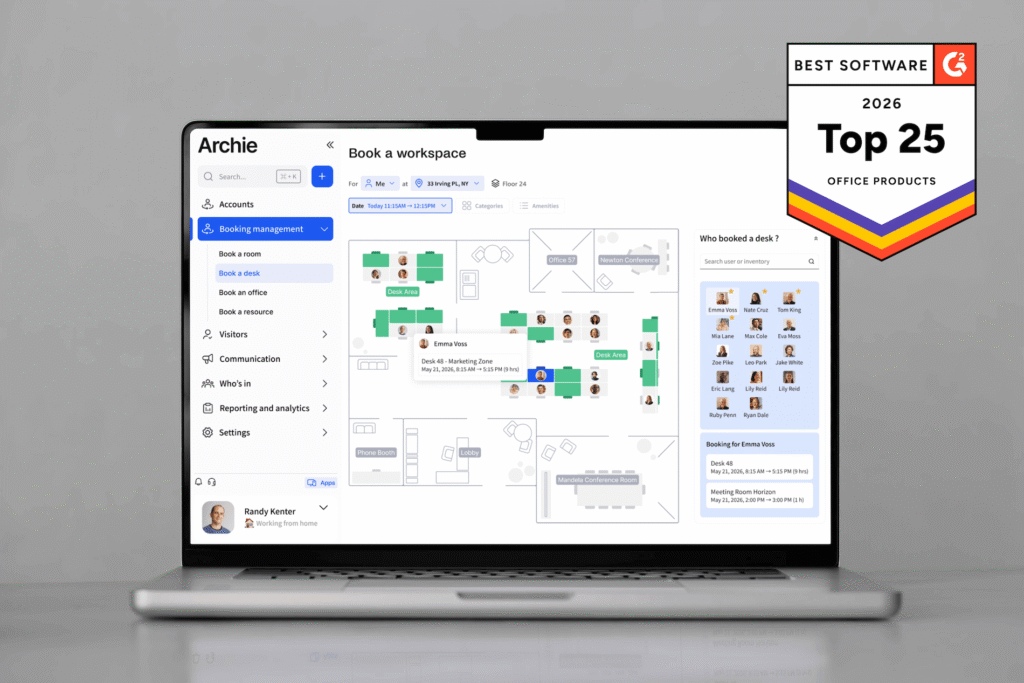
The employee experience is simple. People can find and book desks or rooms through an interactive floor plan, filter spaces by amenities like monitors or standing desks, and check in with QR codes. Archie also includes native Microsoft Teams booking, so employees can reserve desks and rooms without leaving Teams. There is also an Outlook add-in, Slack integration, Entra ID sync for user provisioning, access control integrations, and wayfinding tools to help visitors and new employees find the right space.
Archie also gives workplace teams the data they need to improve how the office runs. Its analytics tools help track usage, spot underused spaces, plan for future needs, and support occupancy goals across locations. For growing companies, that means you can start simple and still have room to scale.
Archie holds 4.9 out of 5 ratings on both G2 and Capterra. Users often highlight its ease of setup and responsive support, and G2 ranked it among the Top 25 Office Products in 2026.
Best for: Companies with 50 to 5,000 employees that want desk booking, room scheduling, visitor management, and analytics in one platform, without opaque pricing or long implementation cycles.
2. Robin: best for enterprise analytics and planned office collaboration
Robin is a workplace management platform built for larger organizations that want more visibility into how their office space is being used. It is especially strong on analytics, giving workplace teams tools to track space usage, measure attendance patterns, and build reports that support real estate planning. For companies managing several offices or large hybrid teams, that level of insight can be a big selling point.
The platform includes desk booking, meeting room booking, visitor management, and workplace analytics. Employees can book desks and rooms, check in with QR codes, and, in some cases, use WiFi or access control integrations for automatic check-in. Robin also includes no-show protection, which helps free up unused rooms automatically. On the employee side, the experience is built around helping teams coordinate office days and making it easier for colleagues to work together in person.
Robin integrates with Outlook, Google Calendar, Slack, and Microsoft Teams, which helps it fit into existing workplace workflows. Its visitor management tools also help companies create a smoother guest experience, while the reporting side gives workplace leaders more data to support occupancy planning and real estate decisions.
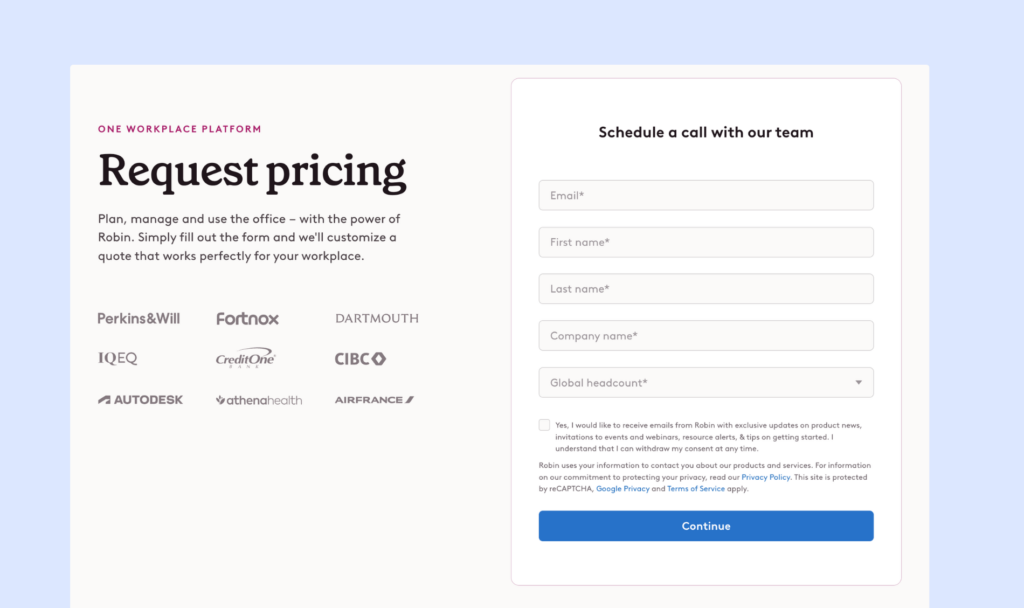
Robin is generally aimed at larger companies. The platform is best suited for organizations with hundreds of employees, multiple floors, or several buildings, where deeper analytics can justify the added cost and setup. Pricing is quote-based, but industry research suggests that many companies start at around $5,000 per year (about $40-45 per desk or $70 per user annually). Since Robin targets companies with 500+ employees, small teams often find that such desk booking costs are simply too high.
Best for: Multi-location enterprises with 500+ employees that want deep workplace analytics, stronger real estate planning data, and dedicated teams to manage implementation and ongoing setup.
3. Skedda: best for simple, visual desk and room booking
Skedda is a workplace booking platform built for teams that want an easy way to manage desks and meeting rooms without getting buried in complexity. The interface is clean, visual, and easy to understand, with drag-and-drop booking, color-coded calendars, and interactive floor plans that help employees quickly find the right space for focused work or in-person meetings.
The platform covers desk booking and room scheduling, and it integrates with Microsoft 365, Google Calendar, Slack, and Zapier. Skedda also includes basic visitor management features, which can help teams keep track of guests without needing a separate system right away. For organizations that mainly want a straightforward reservation tool, that simplicity can be a big advantage.
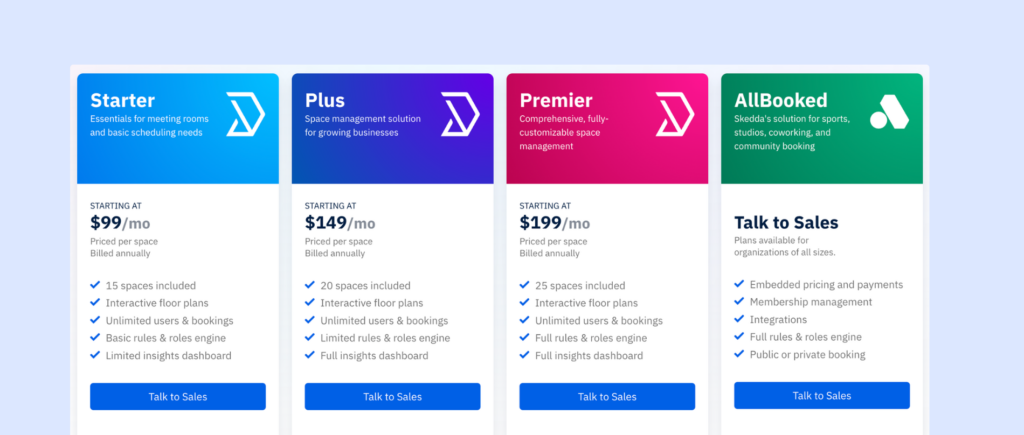
Skedda uses flat monthly pricing based on the number of spaces you manage. Plans start at $99 per month for 15 spaces, $149 per month for 20 spaces, and $199 per month for 25 spaces. That makes pricing fairly easy to understand at first, but costs can rise as you add more rooms, desks, or other bookable spaces. Some features, like more advanced booking rules or assigned desks, may also require a higher-tier plan.
Best for: Small to mid-sized companies, universities, and nonprofits that want simple desk and room booking with a clean, visual interface.
4. deskbird: best for hybrid teams that need office day coordination
deskbird combines desk booking and room booking with tools for managing hybrid work policies. It is built for companies that want more than just a booking system. If your team has rules around office days, remote work, or team attendance, deskbird helps bring those policies into one place and makes them easier to manage day to day.
One of its strongest features is visibility. Employees can set their weekly status, such as working from the office, from home, or while traveling, and the “see who’s in” view makes it easier for teammates to coordinate office days. That helps teams plan in-person collaboration more easily and gives managers a clearer view of attendance patterns without relying on scattered calendars or manual check-ins.
deskbird also helps companies avoid overcrowding on popular office days and make better use of available desks and spaces. For organizations trying to balance flexibility with some structure, that kind of hybrid planning is a big part of the appeal.
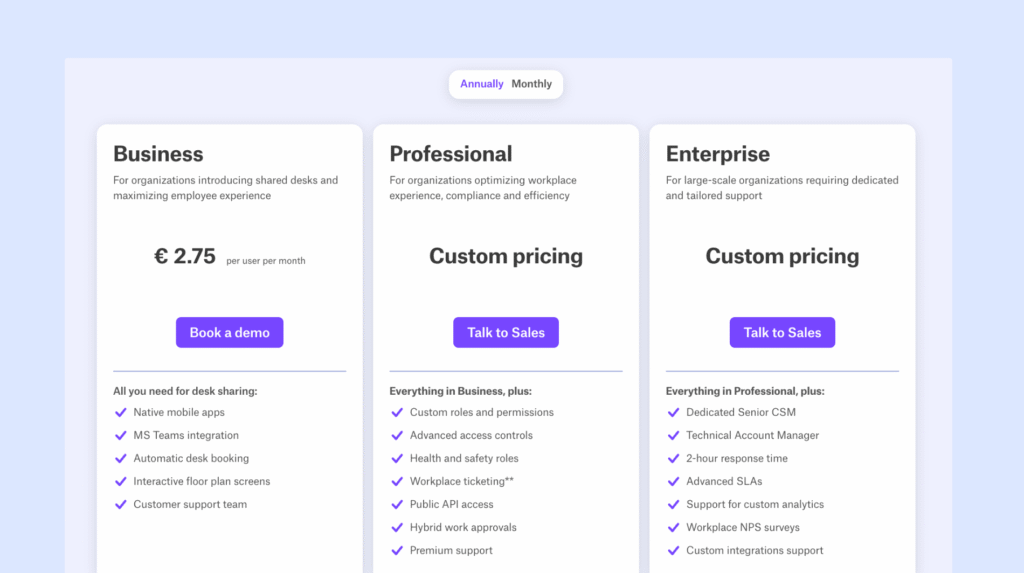
The platform integrates with Microsoft Teams, Slack, Google Calendar, and HRIS tools, which helps keep employee data and workplace schedules in sync. Pricing starts at €2.75 (~$3.75) per user/month (annual billing), and increases as you add features. Since the pricing is per user, the cost can rise quickly as headcount grows, which is worth keeping in mind for larger or fast-growing teams.
Best for: Companies managing hybrid work and return-to-office policies that want booking tools, attendance visibility, and better coordination around office days.
5. YAROOMS: best for teams that want strong Microsoft and Google integration
YAROOMS is a workplace management platform that covers desk booking, room scheduling, and visitor management, with a strong focus on fitting smoothly into Microsoft 365 and Google Workspace. For companies already working heavily in Teams, Outlook, or Google Calendar, this can make the platform feel more natural to adopt across the organization.
The platform includes desk and room booking, interactive maps, wayfinding tools, and visitor management options such as kiosks for guest check-in. It also supports extras like catering requests and other meeting-related services, which can help create a more complete office experience for both employees and visitors.
YAROOMS integrates with Microsoft Teams, Outlook, Google Calendar, Azure AD, Okta, and Zoom. Reviewers also often mention that the company is open to building custom solutions for specific client needs, which can be useful for organizations with more specialized workplace workflows.
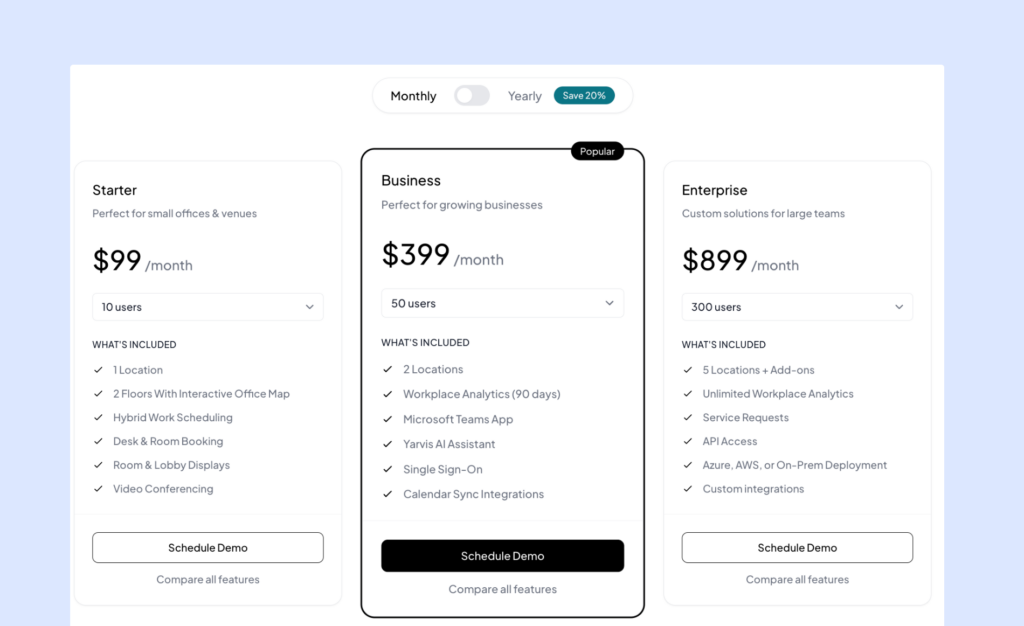
Pricing starts at $99 per month for Starter, $399 per month for Business, and $899 per month for Enterprise. Visitor management is priced separately at $99 per location per month. YAROOMS also holds ISO 27001, ISO 27701, and SOC 2 Type 2 certifications, which may matter for companies with stricter security and compliance requirements. On review sites, it holds 4.3 out of 5 on G2 and 4.6 out of 5 on Capterra.
Best for: Organizations that rely heavily on Microsoft 365 or Google Workspace and want workplace booking tools that fit neatly into those ecosystems.
How to choose the right Eptura Engage alternative
With five strong options, the best choice really comes down to what your team needs most:
If transparent pricing matters most…
Archie, Skedda, and deskbird all share pricing publicly. That makes it much easier to compare options, estimate costs for room booking, desk reservations, or visitor management pricing, and avoid getting pulled into a long sales process just to understand the basics.
If you are managing a large enterprise rollout…
Robin and YAROOMS are better suited to larger, more complex deployments across multiple offices. They offer the depth, controls, and reporting that bigger organizations often need, especially when workplace teams are managing several locations.
If hybrid work policy is a big focus…
deskbird is especially strong here. It was built with hybrid scheduling and office day coordination in mind. Archie is also a good fit for hybrid offices that want attendance visibility and an easier way to plan team days without adding too much complexity.
If you want the fastest, simplest setup…
Archie and Skedda are usually the easier options to roll out. They are more straightforward to understand, and teams can get started faster without a heavy implementation process.
If Microsoft Teams integration is a must-have…
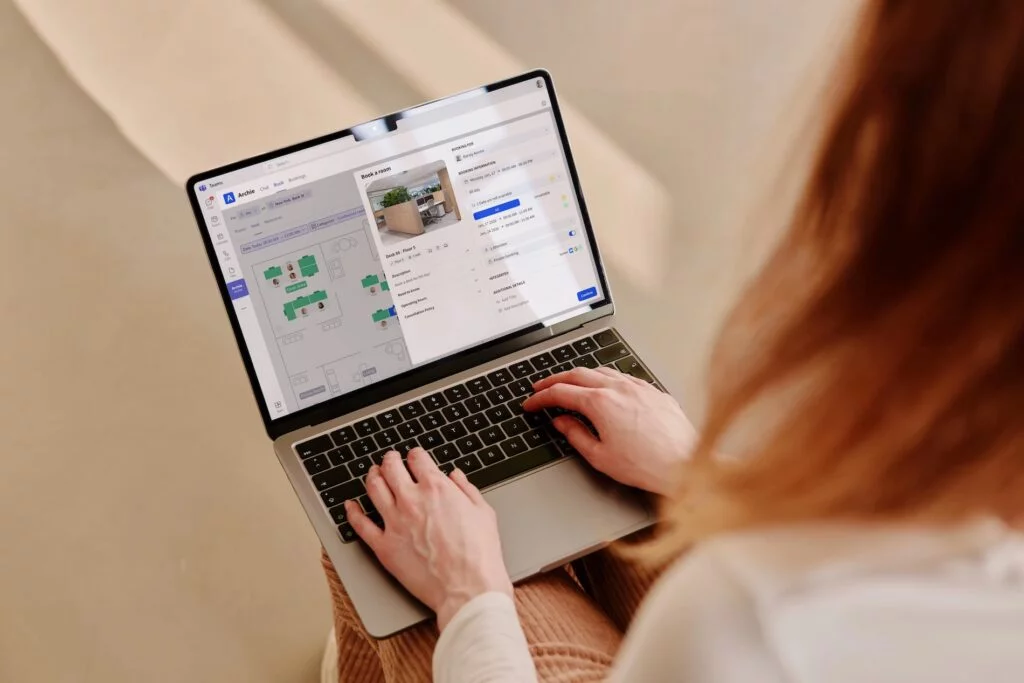
Archie stands out with its native Microsoft Teams app for desk and room booking. YAROOMS is also a strong option for companies that want workplace booking to fit neatly into Microsoft 365 workflows.
If deep analytics matter most…
Robin is the strongest choice if your main priority is workplace analytics. It gives larger organizations more detailed data to help plan space, track usage, and make real estate decisions with more confidence.
All in all, Archie is the strongest Eptura Engage alternative because it gives teams the same core workplace tools in a much simpler, more transparent package. You get desk booking, room scheduling, visitor management, and workplace analytics in one platform, without the long rollout, complex setup, or unclear pricing that often come with enterprise software. For most organizations, it offers a better balance of functionality, ease of use, and value.
Comparison table with Eptura Engage alternatives
Feature | Archie | Robin | Skedda | deskbird | YAROOMS |
|---|---|---|---|---|---|
Pricing model | Per desk/room | Quote-based | Per space tier | Per user | Per user tier |
Desk booking | ✓ | ✓ | ✓ | ✓ | ✓ |
Room booking | ✓ | ✓ | ✓ | ✓ | ✓ |
Visitor management | ✓ (add-on) | ✓ (add-on) | ✓ (add-on) | ✓ (add-on) | ✓ (add-on) |
G2 rating | 4.9/5 | 4.4/5 | 4.7/5 | 4.5/5 | 4.3/5 |
Best for | Mid-sized offices | Large enterprises | Simple setups | Hybrid policy enforcement | MS/Google integrations |
Eptura Engage vs Archie: what should you choose?
If you are deciding between Eptura Engage and Archie, the right choice mostly comes down to your company size, your internal resources, and how much complexity you actually need.
Company size and day-to-day complexity
Eptura Engage is mainly built for large enterprises with dedicated workplace, facilities, or real estate teams. It makes the most sense for organizations managing many locations, large employee counts, and more complex workplace operations. Archie works for a wider range of companies, from smaller offices to large multi-site organizations, and it is especially well-suited to teams that need strong functionality without needing a full team just to manage the platform.
Pricing and buying process
Eptura Engage uses quote-based pricing, so you usually need to speak with sales before you can understand the full cost. Archie publishes its pricing publicly, which makes it easier to estimate costs, compare options, and decide whether the platform fits your budget before starting sales conversations.
Setup and time to value
Eptura Engage can take longer to roll out, especially for larger deployments with multiple modules, custom workflows, and implementation services. Archie is built to be faster and easier to launch. Teams can upload floor plans, set booking rules, invite users, and get started without a long implementation process. You also do not need to install extra hardware to begin, though desk booking kiosks, room displays, and other add-ons can be added later.
User experience
Eptura stands out more in advanced visitor management and broader workplace operations. Archie focuses on giving employees and admins a simpler experience for booking desks and rooms, managing visitors, and understanding how space is being used. For many teams, that easier day-to-day experience matters just as much as feature depth.
💡 Bottom line: If you are a large enterprise with complex workplace operations, a bigger budget, and dedicated teams to manage implementation, Eptura Engage may be the better fit. If you want transparent pricing, faster setup, and an easier all-in-one platform for desk booking, room scheduling, visitor management, and analytics, Archie will be the better choice for most organizations.
Eptura Engage alternatives FAQs
Eptura Engage (formerly Condeco) is an enterprise workspace management platform for desk booking, meeting rooms scheduling, and hybrid work coordination. It targets organizations with 500+ employees managing complex space reservations.
Yes. Condeco rebranded to Eptura Engage in early 2025 after the acquisition, with added AI features like Microsoft Copilot integration using natural language commands to help users find space and book rooms.
Pricing is quote-based, but industry estimates suggest desk booking is priced per user per year, with visitor management starting around $2,500–$7,500 annually. Implementation and enterprise features can increase the total cost.
The best Eptura Engage alternatives: Archie (visitor management, Microsoft Teams, transparent pricing), Robin (planned collaboration, enterprise analytics), Skedda (simple booking, office days), deskbird (hybrid enforcement, team days), YAROOMS (Microsoft/Google-native organizations).
- Key sources