



















- What you’ll learn
- The difference between free and paid meeting room booking software features
- The most important features to look for in meeting room booking software
- What the meeting room booking experience looks like with Archie
Meeting rooms sound simple in theory. You book a space, show up, have the meeting, and move on with your day.
In reality, though, meeting room management can get surprisingly messy. Rooms get double-booked, people forget to cancel reservations, teams waste time looking for available spaces, and workplace managers are left trying to keep everything organized.
That’s why many teams find room booking software so useful.
But not all room booking software is built the same. Some tools focus on lightweight scheduling for small teams. Others are built for larger hybrid workplaces that need analytics, automation, interactive floor plans, room displays, and deep integrations with Microsoft 365 or Google Workspace.
And honestly, a lot of platforms look very similar on feature lists until you start using them in real office situations.
That’s why this guide focuses less on generic marketing claims and more on the meeting room booking features that actually make a difference day to day: the ones employees end up relying on, workplace teams actually use, and admins eventually realize they cannot live without.
Free vs paid meeting room booking software features
In my experience, the biggest difference between free and paid meeting room booking software is not necessarily the ability to reserve a room. Most tools can technically do that. The real difference is everything around the room booking experience: automation, integrations, analytics, hybrid workplace support, and operational controls.
For very small teams, a freemium room booking tool or even a meeting room booking template can absolutely work. But once offices become busier, hybrid schedules become more common, or multiple teams start sharing meeting spaces, companies often realize the limitations pretty quickly.
One of the biggest limitations is automation. Many free plans do not include advanced booking rules like no-show detection, automatic room release, approvals, buffer times, recurring booking controls, and permissions.
Workplace analytics is another area where free plans are often very limited. A lot of free tools provide almost no visibility into room utilization, occupancy trends, or workplace capacity planning.
Integrations are also commonly restricted. Free plans may support only basic calendar syncing, while paid plans usually unlock more native integrations.
Feature | Free(mium) software | Paid software |
|---|---|---|
Basic room reservations | Yes | Yes |
Simple room availability views | Yes | Yes |
Access | Usually web-based | Web, mobile apps, room displays, and kiosks |
User or room limits | Often yes | Usually higher limits or unlimited, depending on plan |
Custom booking rules and permissions | No | Yes |
Room booking approvals | No | Yes |
Recurring and multi-day bookings | Limited | Yes |
Interactive office floor plans | No | Yes |
Room filters by capacity and equipment | No | Yes |
Room displays and walk-up booking | No | Yes |
Check-ins and no-show protection | No | Yes |
Meeting room utilization analytics | No | Yes |
Integrations | Limited (or no at all) | Microsoft 365, Google Workspace, Teams, Slack, SSO/SCIM, and API access |
So, for small offices with simple scheduling needs, free room booking software can absolutely be enough. But for hybrid workplaces, larger organizations, or companies trying to optimize office usage long term, paid platforms usually provide much more operational value.
Which brings us to the next point:
What features should meeting room software have?
At a minimum, features to look for in meeting room booking software are:
- Real-time room availability
- Room filters by equipment and capacity
- Interactive office maps and floor plans
- Mobile room booking
- Calendar integrations
- Recurring and multi-day reservations
- No-show detection and automatic room release
- Meeting room analytics and utilization reporting
- Hybrid workplace support, including desk + room booking together
Of course, not every team needs every feature on this list right away. A small office with two meeting rooms may only need real-time availability and calendar syncing. A larger hybrid workplace may need floor plans, room displays, automation, analytics, and desk booking in the same system.
So instead of treating this as a simple checklist, let’s break down what each feature actually does, why it matters, and when it becomes useful.
Easy room booking experience
You can have advanced analytics, smart automation, and every integration imaginable, but if employees avoid the platform because it feels slow or confusing, the whole system falls apart pretty quickly. That’s why the booking experience itself should always come first.
Look for meeting room booking features like:
- Real-time room availability, so people can instantly see which spaces are free
- Multiple booking options, including mobile app, web browser, calendar view, interactive floor plans, Microsoft Teams, Slack, Outlook, Google Calendar, meeting room displays, and booking kiosks
- Room filters by amenities, such as display screens, whiteboards, video conferencing equipment, or room capacity
- Recurring room bookings for weekly standups, client meetings, or leadership check-ins
- Multi-day room bookings for workshops, training sessions, onboarding sessions, or longer events
At the most basic level, employees should be able to instantly see which rooms are available in real time. Nobody wants to walk across the office only to discover the room is already occupied, booked, or not suited for the meeting. Good meeting room booking systems make availability clear immediately, whether someone is booking from their laptop, phone, room display, calendar, or office map.
One-click booking also makes a surprisingly big difference. The fewer steps it takes to reserve a room, the more likely employees are to actually use the software instead of creating workarounds, sending chat messages, or informally claiming rooms.
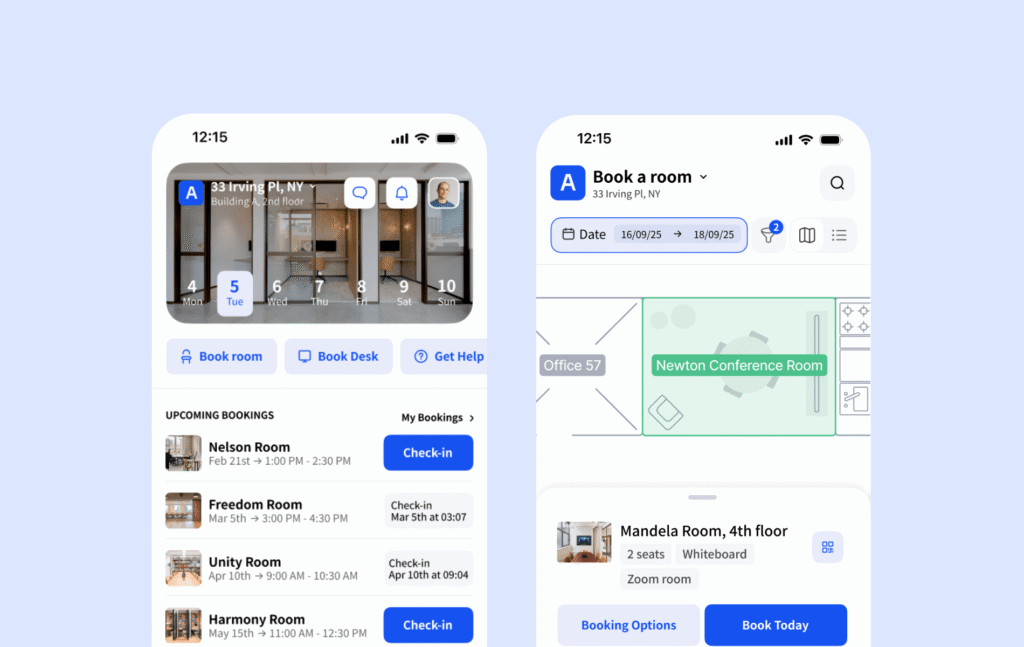
Mobile booking is equally important now, especially in hybrid offices. People are constantly moving around the workplace, joining meetings between calls, or trying to quickly find a free room before a client presentation or team check-in. If they can book from their phone in a few taps, the system becomes much easier to adopt.
Calendar integrations are another feature I’d consider essential. Most employees already work inside tools like Outlook or Google Calendar all day, so room booking should happen naturally within those platforms instead of forcing people into a completely separate workflow.
The same goes for collaboration tools like Microsoft Teams and Slack. In many companies, meetings are already planned inside those platforms, so being able to check availability, reserve a room, or receive reminders directly where employees are already communicating makes adoption much easier. We’re going to dive more into the integrations a little later, though.
Recurring bookings are also important for everyday office life. Think weekly leadership meetings, hybrid team standups, training sessions, or recurring client calls. Employees should not have to manually recreate the same booking every week. Plus, multi-day reservations can also be extremely useful for workshops, onboarding sessions, company training, or larger internal events that span several days.
In my experience, the best room booking systems are the ones employees barely have to think about. The booking process feels fast, natural, and integrated into the tools they already use every day.
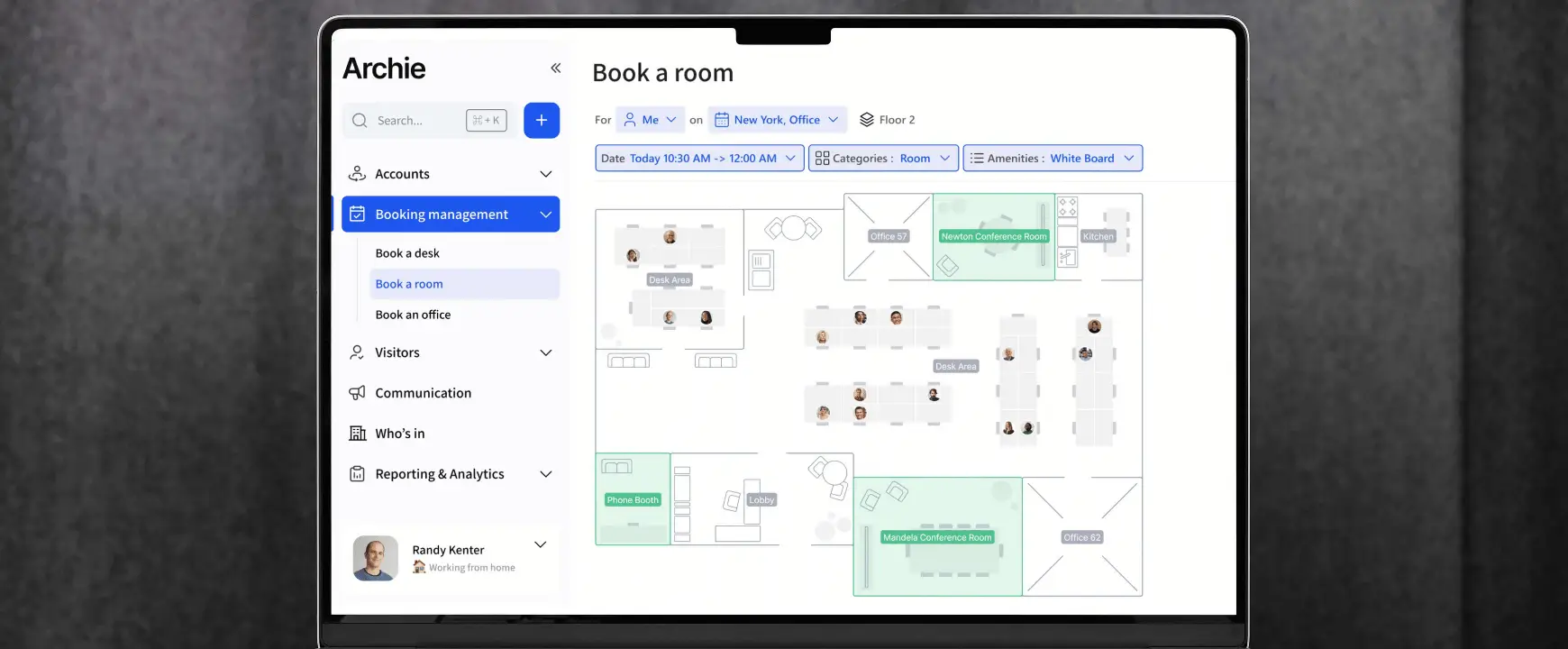
Interactive office maps and floor plans
In larger workplaces, employees often waste time just trying to figure out where things are. They might know they need a six-person meeting room with a TV, but they have no idea which floor it’s on, whether it’s nearby, or if it’s even available.
That’s where interactive office maps become incredibly useful:
- Room booking with interactive floor plans
- Live room availability on office maps
- Visual room selection by floor, zone, or neighborhood
- Room filters by size, capacity, and equipment
- Visibility into nearby desks, rooms, and shared spaces
- Teammate location or “who’s in” visibility
- Wayfinding for larger or multi-floor offices
- Support for multiple office locations
- Easy map updates when the office layout changes
This is one of those features that seems small at first, but makes a huge difference once offices grow beyond a simple layout.
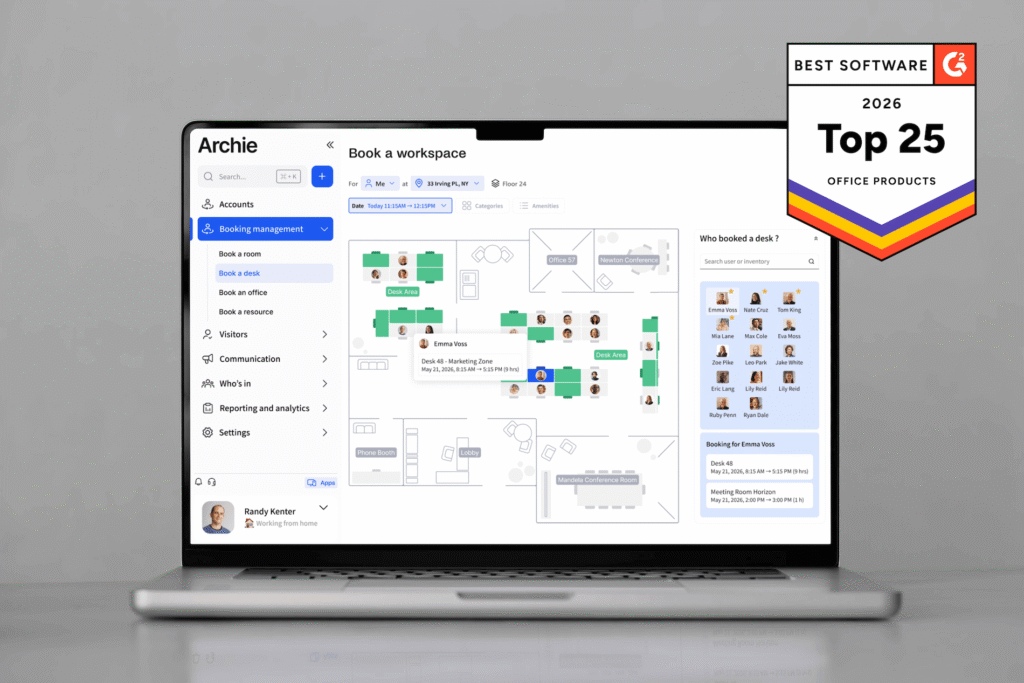
Instead of scrolling through long room lists or trying to remember room names, employees can visually browse the office layout and immediately see which spaces are free. The booking process feels much more natural because people can simply click directly on the room they want from the floor plan.
This becomes even more valuable in hybrid workplaces where employees are not in the office every day. Someone coming in once or twice a week may not remember where certain rooms are located, which neighborhoods different teams sit in, or which meeting spaces are best for specific types of meetings. Interactive floor plans help remove a lot of that friction.
Good meeting room booking software should also make it easy to filter rooms based on what employees actually need. For example, they should be able to narrow results by room size, capacity, TVs or monitors, video conferencing equipment, whiteboards, accessibility features, or room type, such as phone booths versus larger conference rooms.
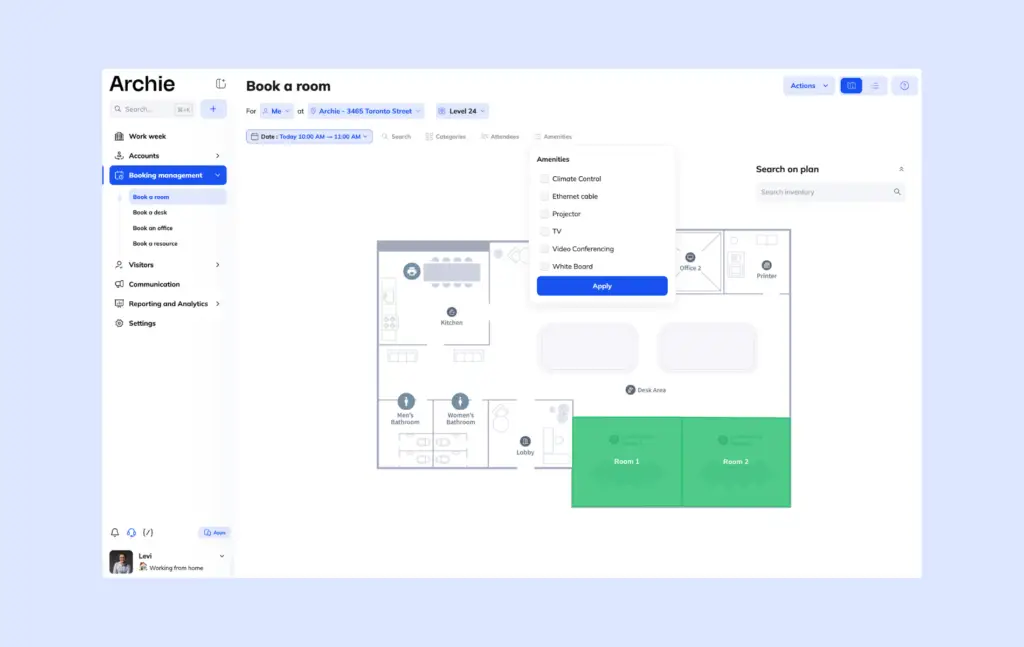
Wayfinding is another feature that becomes more important as companies scale. In multi-floor offices or flexible workplaces, employees and visitors can easily get lost trying to find the correct room. Interactive maps help people navigate the space much faster.
In my experience, office maps are one of the features employees end up using far more than leadership initially expects. Once people get used to visually booking rooms and locating teammates from a floor plan, it becomes very hard to go back to static room lists or basic calendar scheduling.
Room displays and walk-up booking
Room displays are the screens placed outside meeting rooms that show whether a space is available, occupied, or about to become free. On paper, it sounds simple. In practice, it removes a surprising amount of daily office friction:
- Live room availability on displays outside each room
- Walk-up booking for ad hoc meetings
- Check-ins directly from the room display
- Automatic room release if nobody checks in
- Support for iPad room displays
- Support for Android room displays
- Clear meeting status, including available, occupied, or reserved next
- Flexible hardware options instead of expensive proprietary devices
Employees can walk through the office and immediately see which rooms are available, when meetings end, which spaces are reserved next, and whether a room is currently occupied.
That visibility becomes especially useful for ad hoc meetings. Not every meeting is planned hours in advance. Sometimes two or three employees simply need a quick place to collaborate for 15 minutes. Instead of opening calendars or searching through apps, they can quickly spot an available room and reserve it directly outside the space.
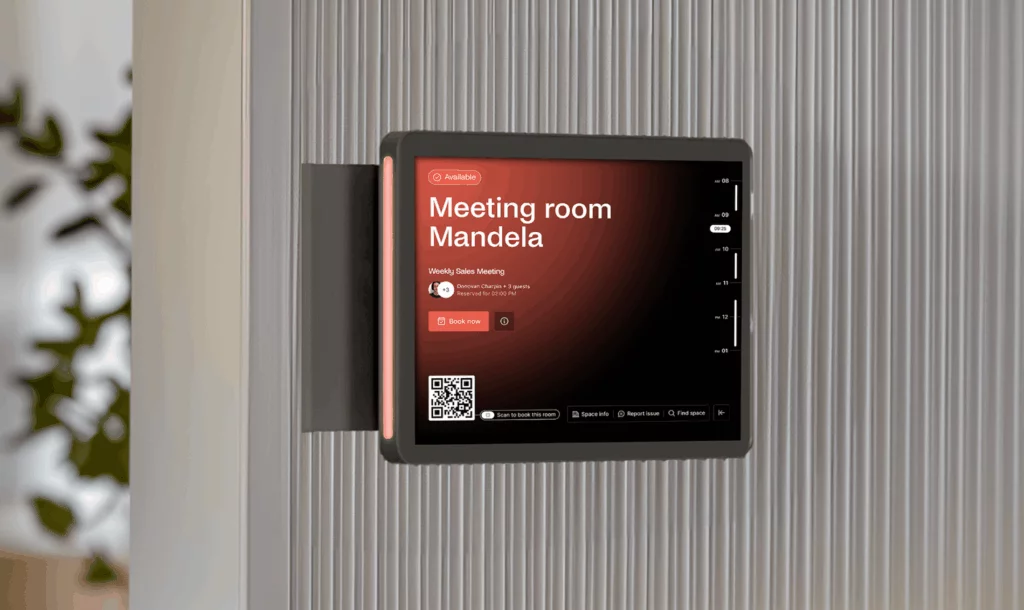
Check-ins from outside the room are another feature worth looking for. Employees can confirm they’ve arrived directly from the room display software, which helps the system identify no-shows more accurately. If nobody checks in after a certain number of minutes, the room can automatically become available again for other teams.
From a hardware perspective, flexibility matters a lot too.
Some meeting room platforms require expensive proprietary hardware that can become costly to deploy across an entire office. Others support standard iPads or Android tablets, which gives companies much more flexibility and often lowers rollout costs significantly.
I personally think this is an important comparison point because meeting room booking software + hardware costs can scale very quickly in larger offices with dozens or hundreds of meeting spaces.
With Archie, you’re not locked to a specific device. You can turn your iPad or Android tablet into a room display and pay for workspaces, not devices.
Meeting room booking rules and automation
This is the part where meeting room booking software starts becoming truly valuable:
- Double-booking prevention, so the same room cannot be reserved by two people at once
- Room booking approvals for boardrooms, executive rooms, client-facing spaces, or event areas
- Buffer time between meetings for setup, cleanup, or room reset
- Maximum meeting length rules, so one team cannot block a room for too long
- No-show detection for meeting rooms
- Auto-cancel if nobody checks in
- Automatic room release if a booked room is empty
- Advance booking limits, so rooms are not reserved too far ahead unnecessarily
- Recurring booking controls, so repeat meetings do not take over high-demand rooms
A lot of companies don’t realize how important these meeting room booking features are until they start dealing with constant frustrations with meeting rooms. Employees reserve rooms and never show up. Large conference rooms stay blocked for hours while sitting completely empty. Certain teams monopolize the best spaces. And office managers end up spending time manually solving problems that software should handle automatically.
One of the biggest features to look for is no-show protection that solves one of the most common workplace problems: ghost bookings.
For example, an employee books a large meeting room for an hour, but the meeting gets canceled, moved online, or simply forgotten. If nobody updates the reservation, the room still appears unavailable in the system, even though it is physically empty.
Modern meeting room booking software can help prevent this by requiring check-ins and automatically releasing the room after a set number of minutes if nobody shows up. In many offices, even a 10 or 15-minute auto-release window can make a big difference.
Buffer times are another underrated feature that can make day-to-day operations much smoother.
Not every meeting can start and end instantly. Some rooms need setup time, cleanup, equipment checks, or a quick reset between bookings. Executive meetings or client-facing meetings may also require extra preparation before the next group walks in.
Buffer rules allow companies to automatically block short gaps between reservations, so employees are not constantly dealing with rushed transitions, awkward overlaps, or rooms that are not ready when the next meeting starts.
I also think approval workflows are important for companies with high-demand or sensitive spaces. Some organizations may want approval requirements for boardrooms, executive meeting spaces, client-facing rooms, training rooms, or event areas. Approval workflows help workplace teams manage these spaces without relying on manual coordination through email, chat messages, or spreadsheets.
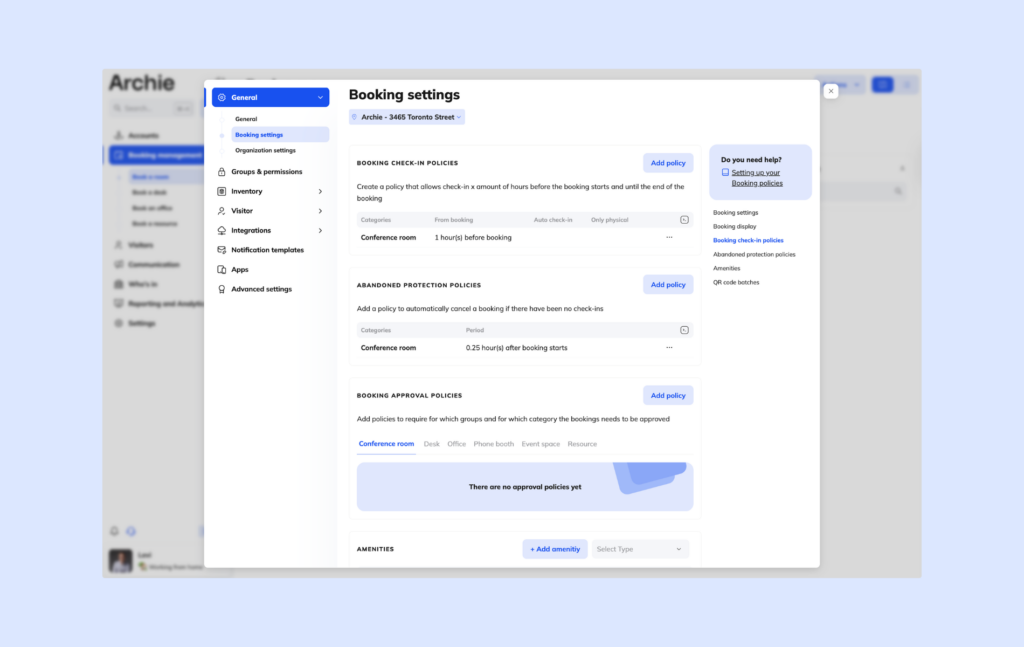
Booking limits are equally important, especially in larger organizations. Without limits, it is surprisingly easy for certain teams or employees to dominate room availability by reserving spaces far in advance or blocking rooms for much longer than they actually need them.
Good meeting room booking software can enforce rules like maximum meeting length, advance booking windows, recurring meeting restrictions, and limits on how many active reservations employees can hold at once.
When you think about it, automation is often the difference between a meeting room booking system that simply looks good in demos and one that genuinely improves office operations long term.
Meeting room resources and services
- Room filters by equipment, amenities, and capacity
- AV equipment details, such as TVs, displays, projectors, microphones, and speakers
- Video conferencing equipment, including Zoom Rooms or Microsoft Teams Rooms setups
- Whiteboard and collaboration tool availability
- Catering requests connected to room bookings
- IT or AV support requests before important meetings
- Custom room setup requests, such as extra chairs or different office seating layouts
- Clear room capacity information
- Accessibility details, such as wheelchair access or hearing support equipment
One thing I’ve noticed is that companies often focus heavily on booking the room itself, but forget that meetings usually depend on a lot more than just the space.
In reality, employees are often looking for a room with specific equipment, setup requirements, or services attached to it. And when those details are missing, meetings can become frustrating very quickly.
That’s why good meeting room booking software should help employees find not just an available room, but the right room for the type of meeting they’re trying to run.
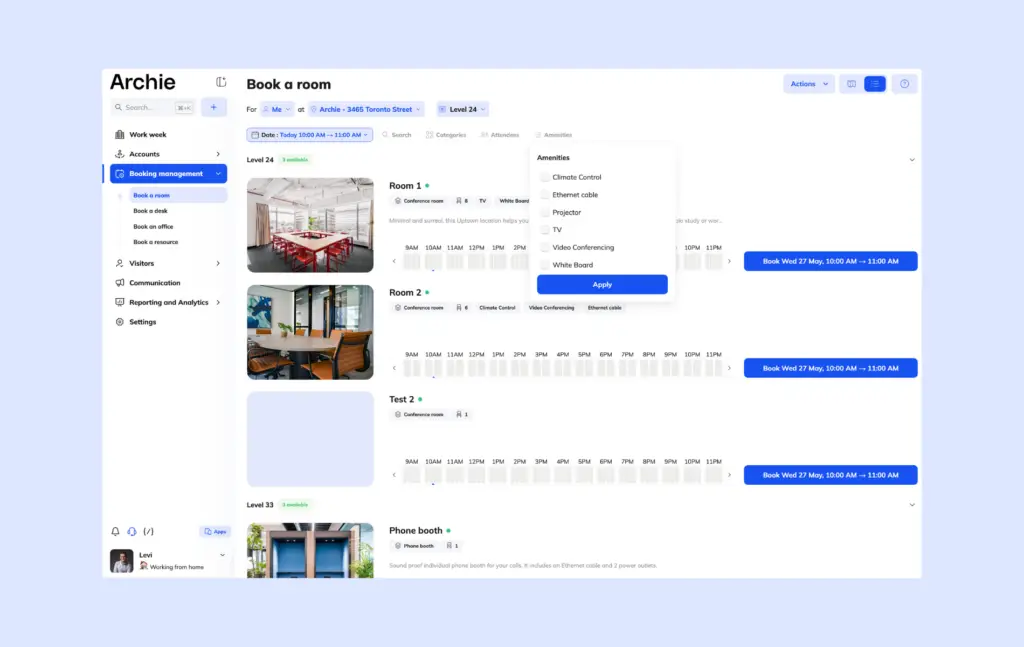
AV equipment is one of the biggest examples. Employees may need TVs or large displays, projectors, video conferencing systems, microphones, speakers, or presentation tools. If the software clearly shows which rooms include that equipment, employees can avoid wasting time moving between spaces or troubleshooting setup issues right before meetings start.
Whiteboards are another surprisingly important detail. Some teams rely heavily on brainstorming sessions, workshops, planning meetings, or collaborative discussions that work much better in rooms with physical whiteboards or digital collaboration tools.
Good meeting room booking software should also support operational requests connected to office reservations. For example, employees may need catering for workshops or client meetings, IT support before presentations, additional chairs, a different room layout, or special equipment. When these requests are attached directly to the room booking, workplace and IT teams can prepare ahead of time instead of reacting to last-minute messages minutes before the meeting starts.
Room capacity visibility is equally important. Employees should immediately know whether a room comfortably fits two people, six people, a larger team meeting, a workshop, or a presentation. Without clear capacity information, employees often end up overcrowding smaller spaces or unnecessarily reserving large conference rooms for tiny meetings.
Analytics and workplace insights
A lot of companies start looking at meeting room booking software because they want an easier way to reserve spaces. But in my experience, workplace teams often care just as much about the analytics side:
- Meeting room utilization analytics
- Occupancy versus reservation tracking
- No-show and ghost booking reports
- Peak usage days and times
- Underused room reports
- Overbooked room reports
- Room capacity planning
- Booking trends by team, floor, location, or room type
- Reports on meeting length and booking patterns
- Exportable reports for workplace, facilities, or leadership teams
Without analytics, companies are mostly making workplace decisions based on assumptions. They think certain rooms are heavily used, assume employees prefer certain spaces, or believe they have the right room mix across the office. But once they start looking at real booking and occupancy data, the picture is often very different.
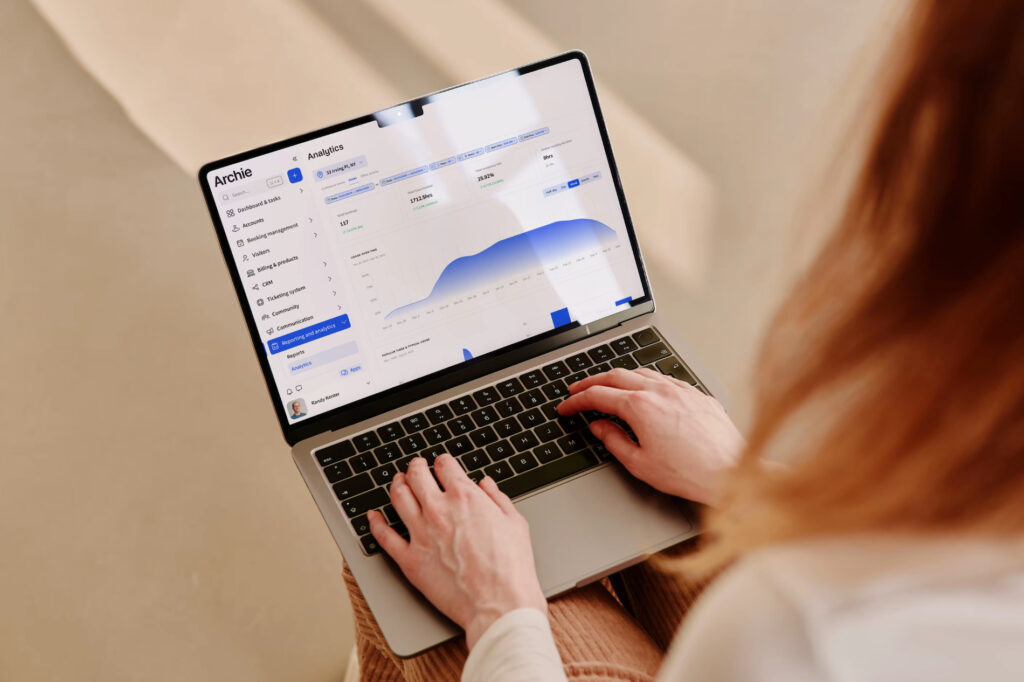
One of the most important features to look for is room occupancy and utilization reports. For example, a workplace team may discover that small focus rooms are booked all day long while large conference rooms sit mostly unused. That kind of insight becomes extremely valuable when planning office layouts, future expansions, or even simple room changes.
Speaking of, capacity planning is another area where analytics becomes incredibly useful.
A lot of offices were designed years ago around older workplace habits. But hybrid work has changed how employees use meeting spaces. Some companies now discover they have too many large boardrooms, not enough small collaboration rooms, limited quiet spaces for video calls, or demand spikes on certain office days like Tuesdays and Wednesdays.
Peak usage trends are especially helpful for long-term workplace planning. For example, companies can identify the busiest meeting days, the busiest times of day, which teams use meeting spaces most often, seasonal booking patterns, and underused office areas.
That information can support office redesign projects, real estate decisions, hybrid work policy planning, expansion discussions, and workplace budgeting.
Room booking mobile apps
- iPhone and Android support
- Mobile room booking in just a few taps
- Real-time room availability on mobile
- QR code check-ins
- Mobile office maps and floor plans
- Booking reminders and push notifications
- Mobile booking edits, cancellations, and extensions
- Access to meeting details from the app
- A consistent experience across desktop and mobile
Employees often book rooms while they’re already walking through the office looking for a space. If the mobile app is slow, confusing, or missing important features, people notice the friction immediately.
Good meeting room booking software should support both iPhone and Android devices without creating a completely different experience between platforms. Employees should be able to quickly find available rooms, reserve spaces in a few taps, check meeting details, cancel bookings, view office maps, locate teammates, and manage recurring reservations.
Booking on the go becomes especially useful for spontaneous meetings. For example, someone may finish a call early, realize they suddenly need a quiet room for another meeting, and book the nearest available space directly from their phone within seconds.
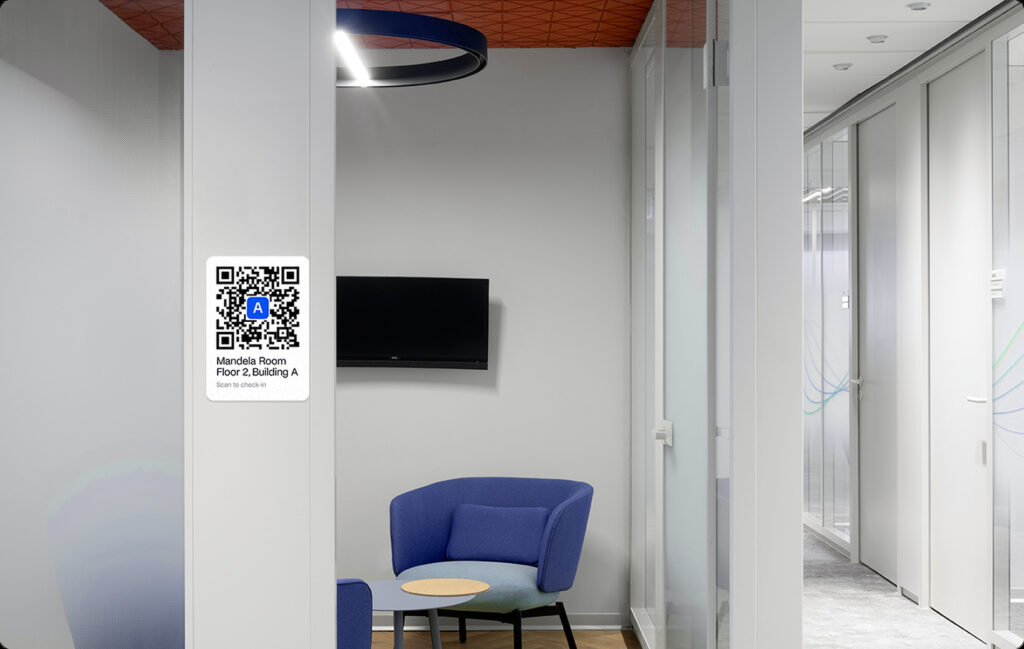
QR code check-ins are another feature that works especially well on mobile. Instead of manually confirming room usage through complicated workflows, employees can simply scan a QR code outside the room to check in. This helps companies reduce ghost bookings and improve occupancy accuracy without adding extra admin work for employees.
Notifications also make a big difference in day-to-day usability. Mobile apps can remind employees when meetings are about to start, when bookings are ending, when rooms become available, or if reservations are canceled or changed.
Room booking integrations
The reality is that room booking does not happen in isolation. Employees already spend most of their day inside calendars, chat tools, video meeting platforms, and identity systems. If the booking software does not connect naturally with those tools, people usually end up bypassing the system altogether:
- Outlook room booking integration
- Microsoft 365 meeting room booking integration
- Google Calendar and Google Workspace integration
- Microsoft Teams room booking integration
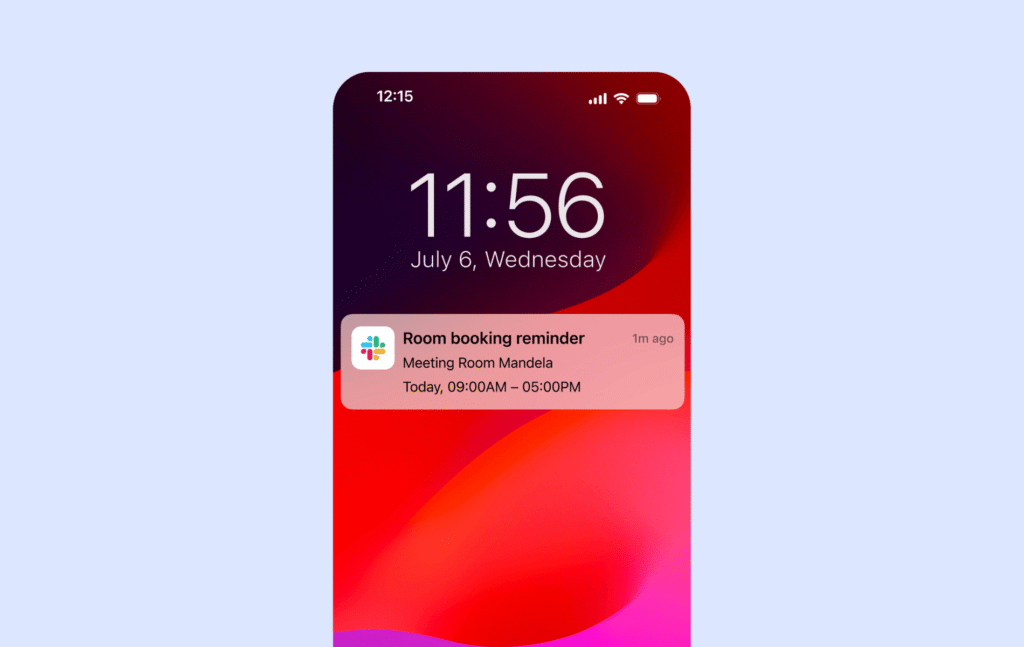
- Slack room booking notifications and reminders
- Automatic Zoom or Teams meeting links
- Real-time calendar syncing
- Single sign-on (SSO) support
- SCIM user provisioning
- Okta and Microsoft Entra ID integrations
- Zapier, webhooks, and API support for custom workflows
Calendar integrations
Calendar integrations are probably the most essential feature to look for.
Most employees already organize their work inside Outlook, Google Calendar, or Microsoft 365. A good room booking system should allow employees to reserve meeting spaces directly from those environments without needing to switch between multiple apps.
For example, employees should be able to:
- See room availability inside their calendar
- Add meeting rooms directly to invitations
- Automatically sync reservations
- Avoid double bookings
- Update bookings from either platform
Outlook and Microsoft 365 integrations are especially important in enterprise environments where meetings are heavily calendar-driven.
Google Calendar and Google Workspace integrations are equally important for companies using Google-based tools. Employees should have the same smooth booking experience regardless of which ecosystem the company uses.
Collaboration integrations
A lot of meetings are now planned directly inside Microsoft Teams, Slack, or Zoom, especially in hybrid environments where employees constantly switch between in-person and virtual collaboration.
Strong Teams integrations can allow employees to:
- Reserve rooms directly from Teams
- Automatically attach meeting spaces to calendar invites
- Add video meeting links
- Coordinate hybrid meetings more easily
Then, Slack integrations are useful for things like:
- Room booking notifications
- Reminders before meetings
- Alerts when rooms become available
- Quick booking workflows directly from chat
Identity and security integrations
Identity management becomes especially important in larger organizations. Meeting room booking software often connects directly with employee directories and workplace access systems, so strong security integrations can save IT teams a huge amount of manual work.
Automation, APIs, and custom workflows
Some companies also need deeper automation capabilities beyond standard integrations. That’s where APIs, webhooks, and tools like Zapier become useful.
These integrations can help companies build custom workflows around meeting spaces, such as sending booking data into analytics platforms or triggering workplace automations.
Basically, the best platforms feel connected to the rest of the workplace ecosystem instead of operating as a standalone scheduling tool.
Hybrid workplace support
A standalone meeting room booking system might help employees reserve spaces, but hybrid workplace management software usually does much more than that:
- Combined desk booking and meeting room booking
- Hybrid work scheduling
- “Who’s in” workplace visibility
- Team attendance tracking
- Booking meeting rooms near teammates
- Interactive floor plans with desk and room visibility
- Neighborhood-based seating
- Coordinated in-office days for teams
Employees are no longer coming into the office on the same schedule every day. Some people work most of the week remotely, others follow hybrid schedules, and teams often coordinate specific in-office days for collaboration. Because of that, room booking now connects closely with desk booking, workplace visibility, and employee scheduling.
In my experience, the best workplace platforms treat desks, meeting rooms, and employee schedules as part of the same overall workflow instead of completely separate systems.
For example, an employee may:
- Reserve a desk for Tuesday
- See which teammates are coming onsite
- Find a nearby meeting room
- Schedule collaborative sessions for the same day
That creates a much smoother workplace experience compared to using disconnected tools for desks, rooms, and team coordination.
Seeing who is on-site is another feature employees tend to rely on heavily once it becomes available. If employees can visually see where coworkers are sitting and reserve nearby rooms directly from the same workplace platform, collaboration becomes much easier and more natural throughout the day.
That said, a feature list only tells part of the story. What matters more is how these features work in real office situations: when employees are trying to find a free room, when meetings get moved online, when rooms sit empty, or when workplace teams need better data.
How meeting room booking works with Archie
A lot of room booking systems technically let you reserve a space, but the experience can still feel clunky once your team starts using them every day. And when that happens, people often stop using the system properly.
Not with Archie Rooms, though.
The booking flow is intentionally simple, but you still get plenty of controls, visibility, and automation behind the scenes. Employees can quickly find and book the right room, while workplace teams can manage rules, availability, check-ins, and analytics without micromanaging every booking.
For example, an employee can:
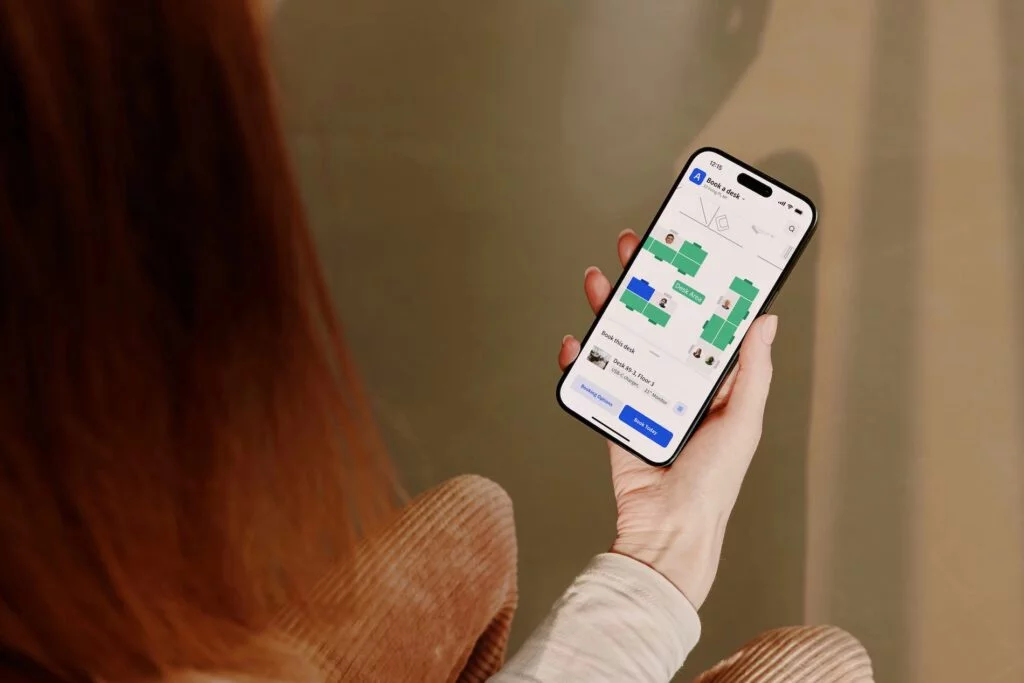
- Open the Archie mobile app
- See which coworkers are in the office
- Locate nearby meeting rooms
- Filter spaces by size, capacity, or equipment
- Book a room directly from the office map
- Check in from their phone or room display
- Extend, edit, or cancel the booking if plans change
At the same time, Archie can help automate the parts that usually create admin work. No-show meetings can automatically release rooms, booking buffers can prevent rushed transitions, recurring meetings can follow your office rules, and room approvals can be enabled for executive, boardroom, or client-facing spaces.
Compared with hardware-led platforms like Joan, Archie takes a more software-first approach. Joan’s e-paper displays are well known and visually polished, but hardware costs, setup requirements, and per-device pricing can add up as you scale. Archie gives teams a straightforward management interface, real-time room and occupancy data, flexible booking options, and broad integrations with calendars and collaboration tools without locking the experience around one hardware setup.
Compared with lighter tools like Officely, which focus heavily on a simple Slack-native experience, Archie brings more workplace management features out of the box. You get interactive floor plans, multiple ways to book and check in, amenity-based filtering, booking rules, approvals, buffers, auto-release, and no-show protection.
And compared with heavier enterprise platforms like Robin or OfficeSpace, Archie sits in a more practical middle ground. You still get strong room booking features, admin controls, analytics, integrations, and hybrid workplace support, but without making the system feel overly complex for employees or admins.
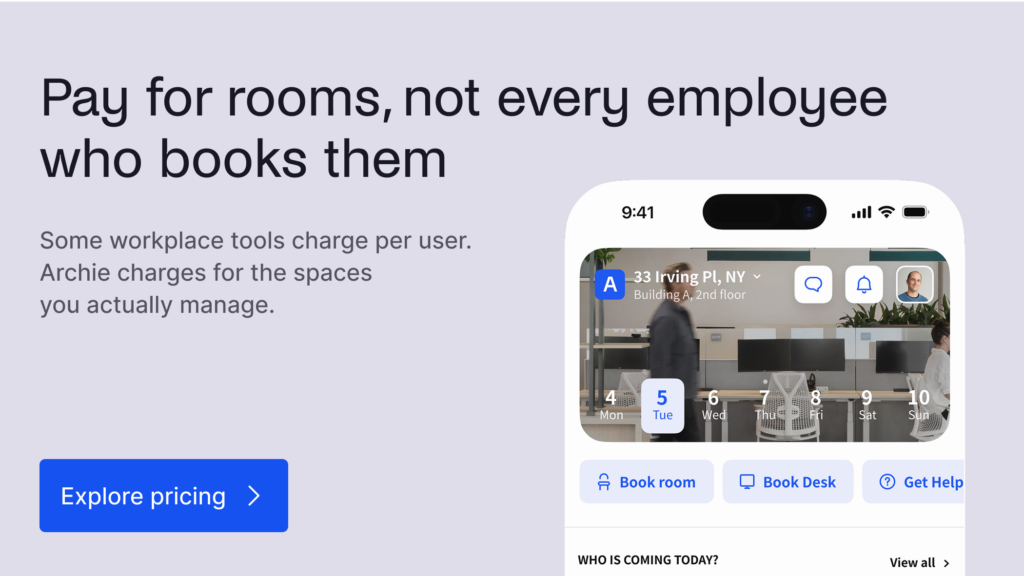
Pricing is another part of that difference. Archie uses per-resource pricing, which can be easier to predict than per-user pricing, especially for companies with more employees than desks or rooms. Instead of paying more every time headcount grows, teams can price the platform around the actual workplace resources they need to manage.
In my experience, this is what makes Archie stand out most: it combines room scheduling, desk booking, mobile access, floor plans, workplace visibility, automation, analytics, and predictable per-resource pricing in one connected platform. So instead of just helping employees reserve rooms, it helps the whole workplace run more smoothly.