




















- What you’ll learn
- What Visitly offers, including its main features, device support, and pricing
- Why some businesses start looking for Visitly alternatives as their needs grow
- How Archie, Envoy, SwipedOn, Eptura Visitor, and Greetly compare to Visitly
- Which visitor management platform may be the best fit based on your budget, team size, and workplace needs
Choosing a visitor management system is usually something teams do once, set up, and then move on from. But over time, things change. Your team gets bigger, you open new locations, or you start noticing that the system you picked no longer fits the way your workplace runs today. If you’re looking at Visitly alternatives, there’s a good chance your current setup is starting to feel limiting.
That’s very common. A tool that worked well for a smaller team may not scale as easily as your business grows. Pricing that seemed reasonable at first can get expensive when you add more employees, visitors, or locations. And a setup that only works on iPads may become frustrating if some of your sites rely on Android devices instead.
At the same time, the global visitor management software market is growing quickly. According to Future Market Insights, it is projected to grow from $1.86 billion in 2025 to nearly $7 billion by 2035. That growth means more Visitly alternatives to choose from, more features to compare, and more reasons to take a fresh look at your current setup.
In this guide, I’ll look at five Visitly alternatives and compare them based on features, pricing, integrations, and real user feedback from sites like G2 and Capterra. We’ll cover Archie, Envoy, SwipedOn, Eptura Visitor, and Greetly, and explain which one may be the best fit depending on your workplace needs.
What is Visitly? A visitor management system overview
Visitly is a cloud-based visitor management system focused on front-desk check-ins and workplace security. The platform runs primarily on iPads and helps businesses manage guest registration, notify hosts when visitors arrive, and maintain a digital visitor log. It’s commonly used by small and mid-sized companies in sectors like technology, healthcare, manufacturing, and nonprofits.
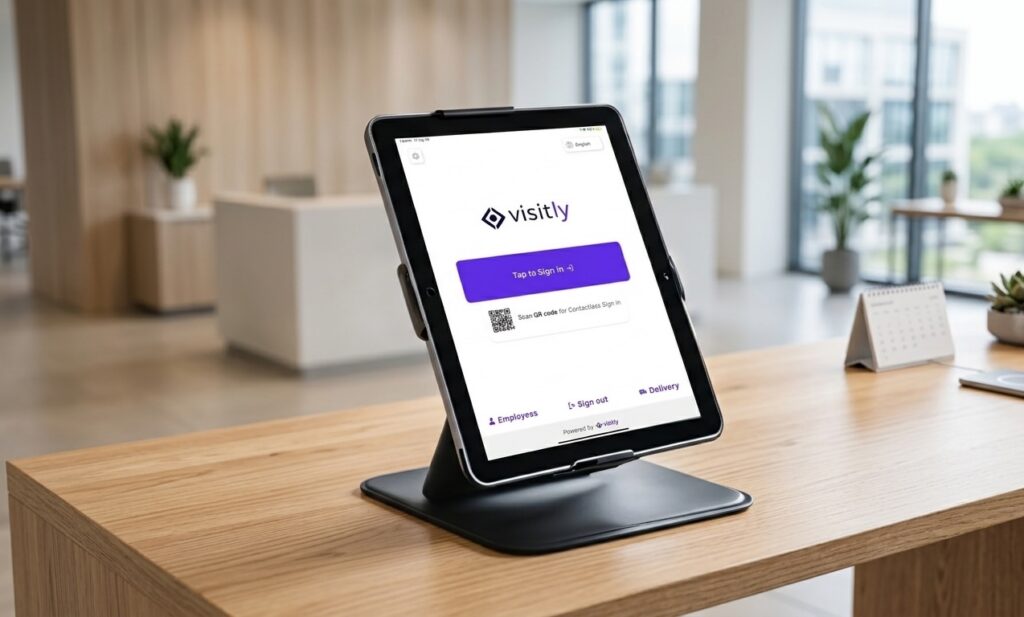
Key features: Custom sign-in flows for different visitor types, visitor pre-registration, real-time host notifications, badge printing, photo capture, ID scanning, and facial recognition for faster check-ins. The platform also includes visitor watchlists, emergency evacuation lists, and digital visitor logs. Integrations include Google Workspace, Active Directory, Cisco Webex, and Slack on higher-tier plans.
Device support: Visitly’s check-in kiosk is designed specifically for iPads running iOS 16 or later. This means the visitor sign-in experience typically runs on a dedicated tablet at reception. While this approach works well for many offices, it also means you’re limited to Apple hardware. There’s currently no Android kiosk option, which can matter if your company uses mixed device environments or prefers more flexible hardware choices.
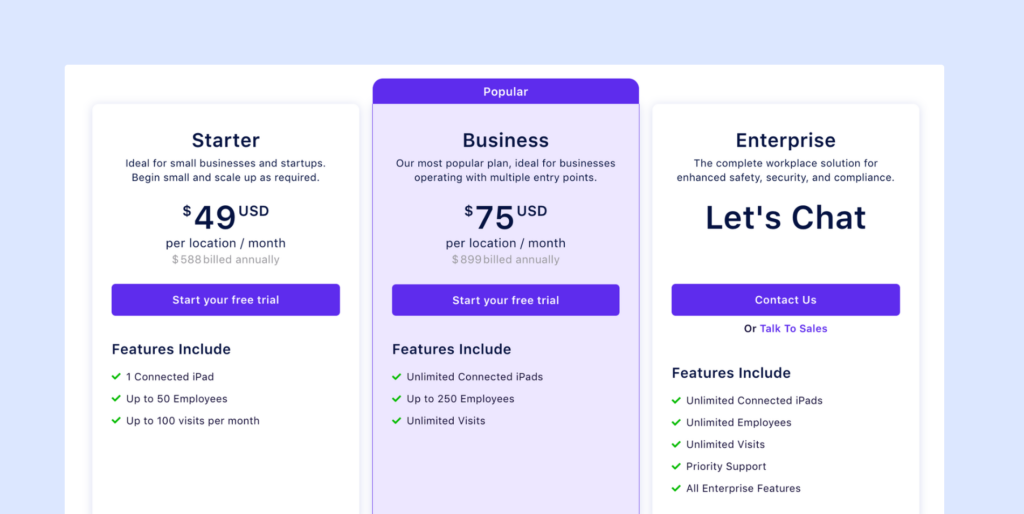
Pricing: Visitly uses per-location pricing, with three main plans and a few optional add-ons. At first glance, the pricing looks fairly simple, but the limits around employees, visits, and hardware can affect the real cost depending on how your office operates:
- The Starter plan costs $49 per location per month when billed annually and includes 1 connected iPad, up to 50 employees, and 100 visits per month.
- The Business plan costs $75 per location per month when billed annually and removes most limits, allowing unlimited iPads, up to 250 employees, and unlimited visits.
- The Enterprise plan uses custom pricing and includes unlimited employees and visits, priority support, and advanced compliance features.
Visitly also offers an SMS add-on for $19 per month or $200 per year, available in the US, Canada, UK, Australia, and New Zealand. For companies that need hardware, there’s also a $1,300 hardware bundle that includes an iPad, label printer, stand, and accessories.
Best for: Small and mid-sized organizations that want a straightforward iPad-based visitor check-in system with security features like watchlists, ID scanning, and badge printing. It works well for offices with a single reception point or companies that prefer a dedicated iPad kiosk for visitor registration.
Why are people looking for Visitly alternatives?
Based on user feedback and feature comparisons, there are a few common reasons why businesses start looking at Visitly alternatives:
- It only works on iPad. Visitly requires an iPad for its kiosk setup, with no Android or web kiosk option. For teams that want more flexibility with hardware, that can be a drawback, especially across multiple locations.
- Costs can add up as you grow. Visitly’s pricing is fairly easy to understand, which is a plus. But the lower plans come with limits on employees and monthly visits, and pricing is charged per location. That can get expensive if your company is growing or managing several offices.
- Some users mention performance issues. A few users say the dashboard can feel slow at times, and that the iPad app may occasionally freeze. In busy reception areas, even small delays can make the check-in experience feel less smooth for visitors and staff.
- Some integrations are locked behind higher plans. Visitly includes some useful integrations, but not all of them are available on lower tiers. For example, SMS notifications cost extra, and Slack and Microsoft Teams integrations require the Enterprise plan. Compared with some alternatives, the integration options can feel a bit limited.
- It only focuses on visitor management. Visitly is built specifically for visitor check-ins. That works well if that is all you need. But if you also want desk booking, meeting room scheduling, or broader workplace management tools, you will need separate software.
5 best Visitly alternatives for 2026
Here are five visitor management software solutions that address common Visitly limitations, each with unique strengths depending on your workplace needs.
#1 Archie: Best Visitly alternative overall
Archie is a cloud-based workplace management platform that includes visitor management, desk booking, and room scheduling in one system. While Visitly is mainly focused on visitor check-ins, Archie gives teams a broader set of tools that can work together or on their own. That makes it a strong option for growing offices that want one platform instead of several separate tools.
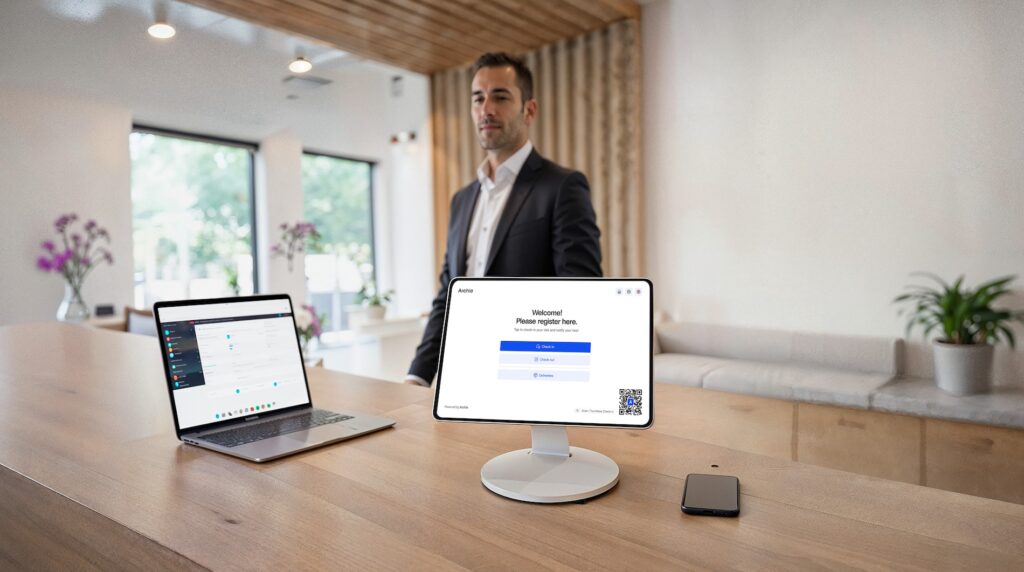
Key features: Archie includes custom visitor flows by visitor type, pre-registration with QR codes, automated host notifications by email, SMS, Slack, or Teams, badge printing, photo capture, NDA e-signatures, visitor wayfinding, emergency evacuation tracking, a real-time visitor log, custom forms and screening questions, recurring visits, WiFi sharing, and access control integrations with tools like Kisi and Brivo.
Device support: One of Archie’s biggest advantages over Visitly is device flexibility. The kiosk app works on both iPad and Android tablets, so you are not limited to Apple hardware. That gives teams more freedom when choosing devices for reception areas and check-in points.
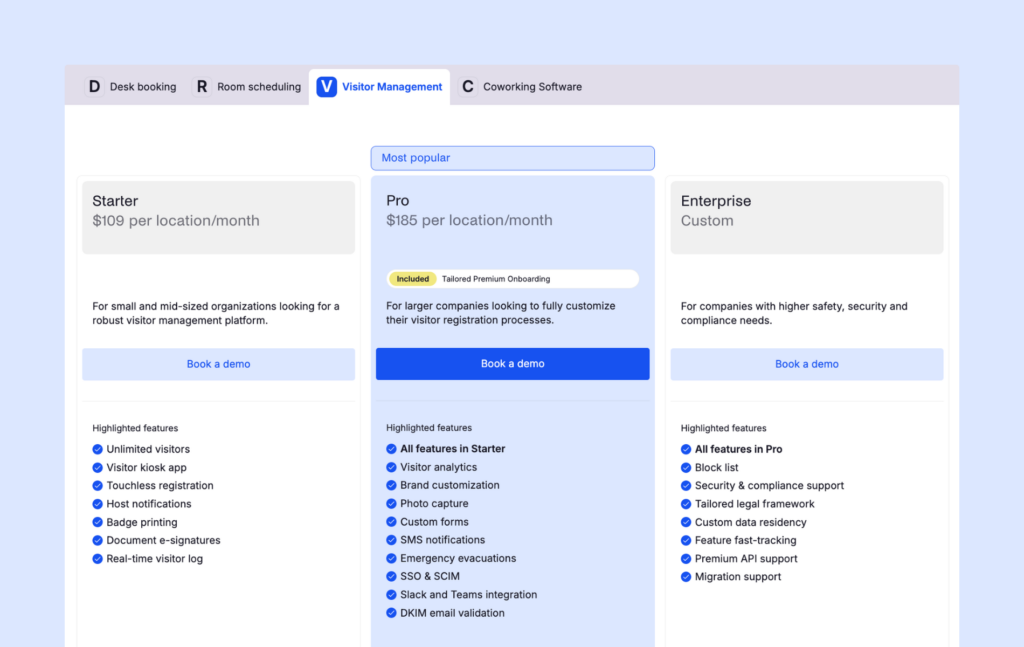
Pricing: Archie’s visitor management starts at $109 per office per month on the Starter plan. This includes unlimited visitors, the kiosk app, badge printing, e-signatures, and a real-time visitor log. The Pro plan starts at $185 per office per month and adds analytics, custom branding, photo capture, SMS notifications, evacuation tracking, SSO, SCIM, and Slack or Teams integrations.
Pros: Archie brings visitors, desks, and meeting rooms into one platform, which can save teams from juggling multiple tools. It works on both iPad and Android, includes 30+ native integrations, offers an open API, and is known for being easy to use. It also has strong customer support and avoids many of the extra add-on costs that show up with some other platforms.
Cons: Archie does not offer native facial recognition, which Visitly does.
Best for: Mid-sized businesses and growing offices that want more than just a visitor check-in app. Archie is a great fit for teams that want visitor management, desk booking, and room scheduling in one place, without dealing with multiple vendors or a complicated setup.
#2 Envoy Visitors: Best for large enterprises with complex integrations
Envoy Visitors is a well-known visitor management platform built for companies that want strong security, polished check-ins, and lots of integrations. It is especially popular with larger organizations that already use tools like Slack, Google Workspace, Microsoft Teams, Okta, and access control systems, since Envoy connects with a wide range of workplace and security tools out of the box.
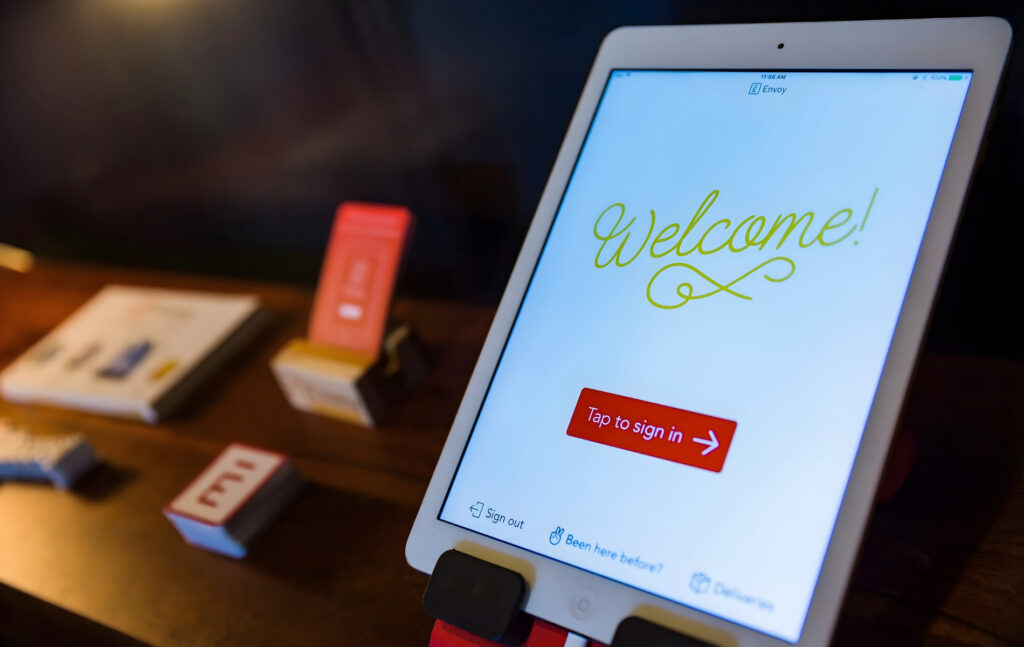
Key features: Envoy includes visitor pre-registration, host notifications, badge printing, legal document signing, contactless check-in options, visitor photos, ID scanning, and blocklists or watchlists on higher plans. It also supports advanced workplace features like guest Wi-Fi and access control integrations for companies with stricter security needs.
Device support: Envoy’s main kiosk experience is built around the iPad. It does offer other sign-in options like QR code check-in and virtual front desk flows, but the front-desk kiosk setup is still closely tied to Apple’s iPad app. That can be fine for many offices, but it is less flexible for teams that want Android tablet support.
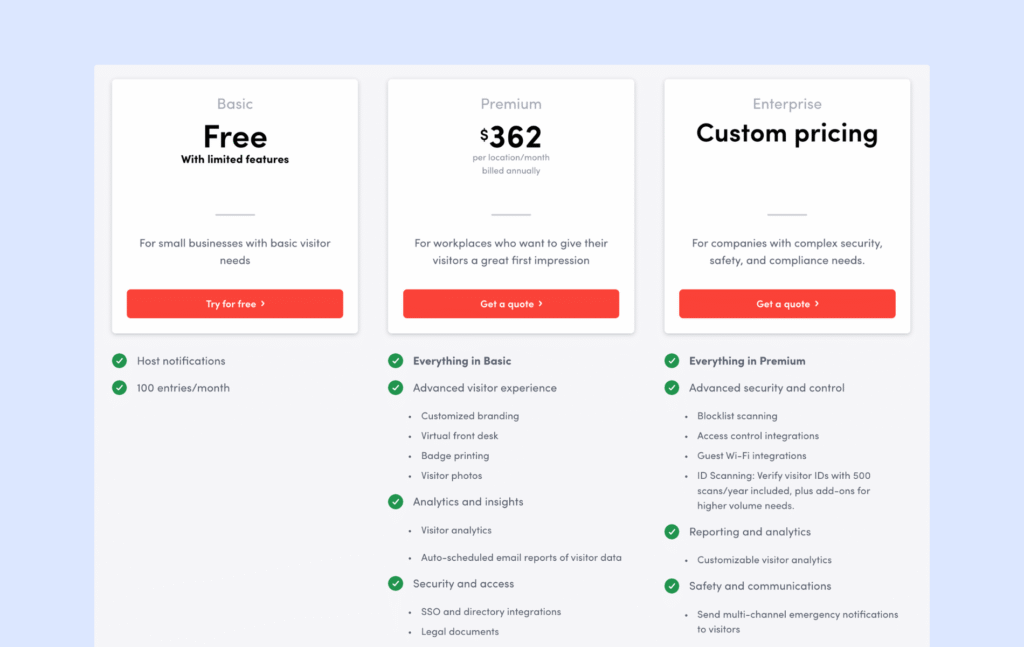
Pricing: Envoy offers a free plan with basic visitor management features. Premium runs around $362 per location per month. In practice, many teams find the paid plans expensive once they need more advanced visitor features or broader workplace tools.
Pros: Envoy stands out for its broad integration ecosystem, polished user experience, and enterprise-ready feature set. It is a strong fit for companies that want visitor management as part of a larger workplace platform, especially if they also care about analytics, compliance, and connected workflows across multiple offices.
Cons: Envoy can get expensive, especially for smaller teams. Some advanced capabilities, such as guest Wi-Fi and access control integrations, are reserved for custom Enterprise plans. The iPad-based kiosk setup may also feel limiting for companies that want more hardware flexibility. User reviews are generally positive, but pricing often comes up as a drawback. For a detailed comparison, see our Envoy software review.
Best for: Larger companies and enterprises that already use a mature workplace tech stack and want a visitor system that connects deeply with it. Envoy makes the most sense for teams with more complex visitor workflows, stronger security requirements, and the budget to pay for a premium platform.
#3 SwipedOn: Best for small businesses
SwipedOn has built its reputation around simplicity and fast setup. If you want a visitor management system that is easy to roll out and easy for front desk teams to learn, it is still a strong option. Many companies choose SwipedOn because it handles the basics well without adding too much complexity.
That said, SwipedOn is no longer just a standalone product. In 2024, Sign In Solutions acquired SmartSpace Software, which brought SwipedOn into the same portfolio as Sign In App. That matters because SwipedOn’s long-term direction is now tied to a broader platform strategy, with products across the portfolio gradually moving closer together in features, support, and pricing.
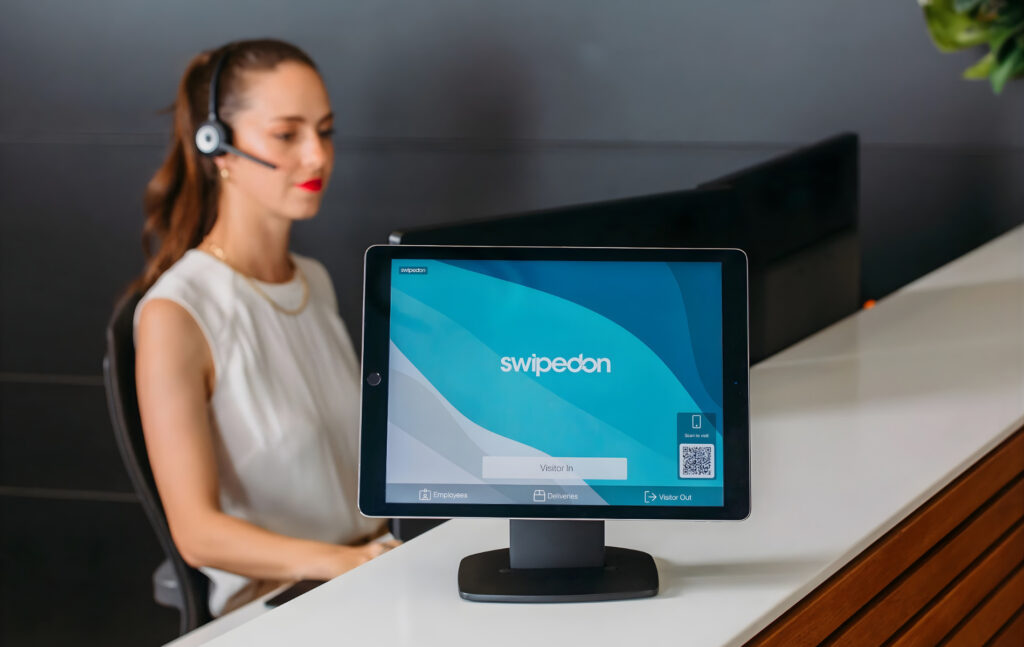
Key features: SwipedOn includes contactless visitor registration, instant host notifications, badge printing, custom visitor categories, digital agreements, employee sign-in, emergency evacuation mode, multi-location management, and optional desk and resource booking. Higher tiers add features like pre-visit registration, ID scanning, time and attendance, and SSO/SCIM.
Device support: SwipedOn works on both iPad and Android tablets, which gives teams more flexibility than iPad-only tools like Visitly. That can be especially helpful for companies managing different locations with different hardware preferences.
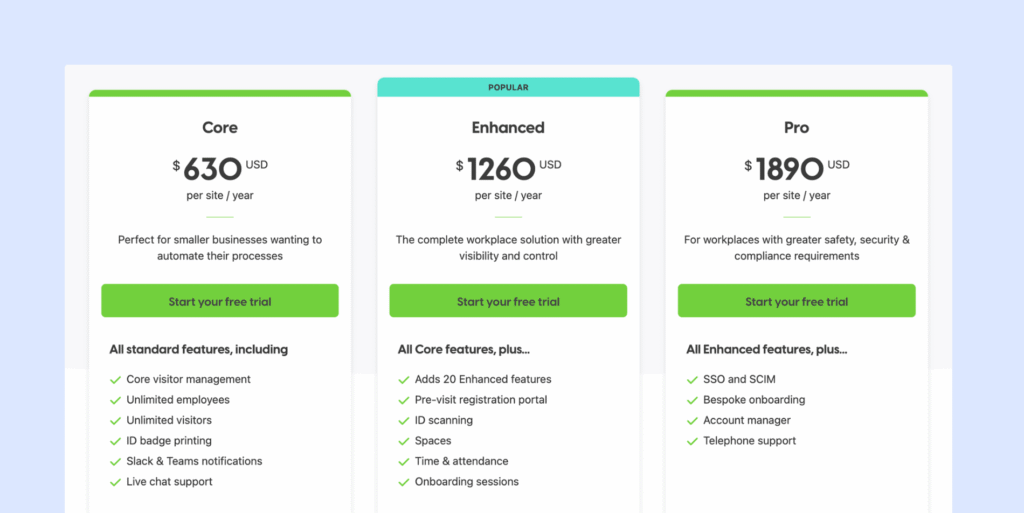
Pricing: SwipedOn’s pricing changed in 2026. Instead of the older lower-cost monthly structure, it now follows the same pricing model as Sign In App, with three shared annual plans: Core ($630 per site/year), Enhanced ($1,260 per site/year), and Pro ($1,890 per site/year). That means SwipedOn is no longer as clearly the budget outlier it used to be.
Pros: SwipedOn is known for being very easy to set up and use. The interface is simple, and customer support receives strong reviews. It is a good choice for teams that want a visitor management system that works right away without a complicated setup.
Cons: Some important features, such as visitor pre-registration, are paid add-ons. Costs can also grow across multiple offices when add-ons start stacking up. A few users also say that reporting and analytics feel fairly basic compared with more advanced visitor management platforms. For more details, check out our SwipedOn software review.
In 2025, SwipedOn merged with Sign In App, creating a larger combined platform. The goal of the merger is to speed up feature development and strengthen support for customers around the world.
Best for: Small businesses and offices with simple visitor management needs, especially teams with fewer than 100 employees that want an easy-to-use system without advanced security or complex integrations.
#4 Eptura Visitor: Best for multi-location enterprises
Formerly known as Proxyclick, Eptura Visitor is built for organizations that need strong security, detailed visitor controls, and audit-ready compliance. It is designed for larger companies with more complex requirements, especially in industries like healthcare, finance, and other regulated environments. Eptura officially positions the product around security, compliance, and integration with the wider workplace ecosystem.

Key features: Eptura Visitor includes advanced analytics, multi-location management, custom visitor journeys, QR code check-in, digital logbooks, badge printing, guest Wi-Fi options, watchlist screening, approval workflows, identity verification, and API or webhook support. It also supports compliance-focused workflows and is marketed around stronger security and workplace control.
Device support: Eptura Visitor’s kiosk experience is built around a customizable iPad lobby app, so companies using it for front-desk check-in should expect an Apple-based setup. That works well for many enterprise lobbies, but it is less flexible for teams that want Android tablet options.
Pricing: Eptura Visitor does not publish public pricing on its site, so you need to contact sales for a quote. That makes it harder to compare directly with tools like Visitly or Archie. Eptura’s terms also note that subscription fees are generally paid annually in advance, which suggests a more enterprise-style buying process.
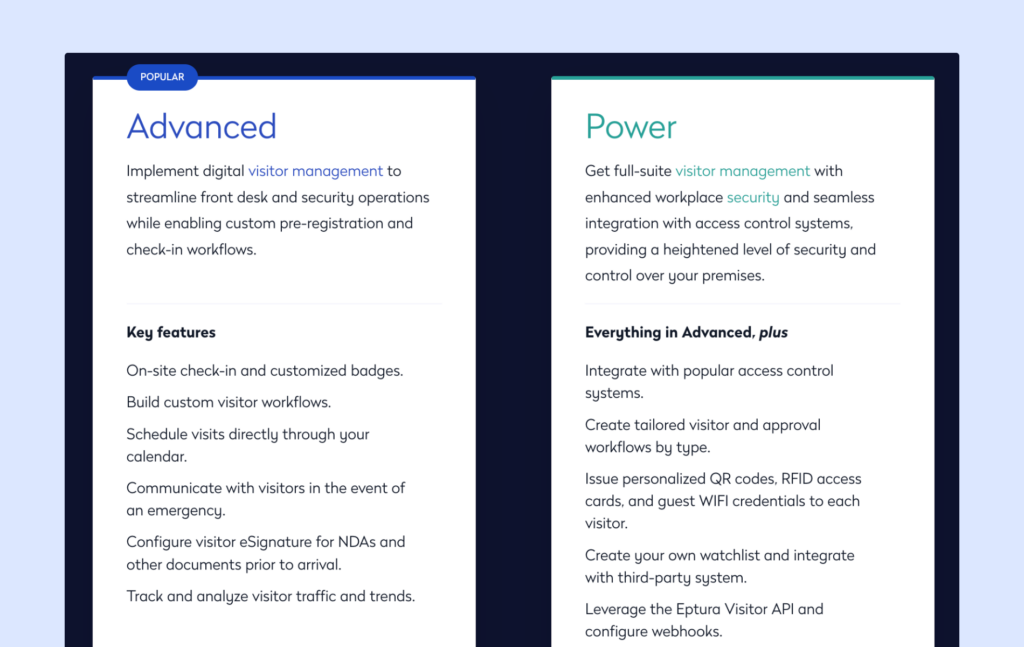
Pros: Eptura Visitor is a strong fit for companies that care a lot about compliance, security, and customization. It supports detailed visitor workflows, scales across multiple locations, and offers strong integration options for larger workplace and security ecosystems. Eptura also says it powers 50% of the Fortune 500, which gives you a sense of the type of organizations it targets.
Cons: The biggest downside is cost transparency. Since there is no public pricing, it is harder to know what the full investment will look like before speaking with sales. The setup can also be more involved than with simpler visitor tools, so for small businesses, it may feel heavier and more complex than necessary. The iPad-based kiosk setup may also be limiting for teams that want more device flexibility. For the alternatives with similar compliance features, see our guide on Eptura Visitor competitors.
Best for: Large enterprises with strict security, privacy, or compliance requirements across multiple offices. Eptura Visitor makes the most sense for organizations that need detailed approval flows, stronger audit trails, and a visitor platform that fits into a broader enterprise workplace stack.
#5 Greetly: Best for small and mid-sized teams
Greetly focuses heavily on customization and visitor experience. The platform is designed to help businesses create a branded front-desk check-in that feels polished and welcoming. If first impressions matter to your organization, Greetly gives you a lot of control over how the visitor registration process looks and feels.
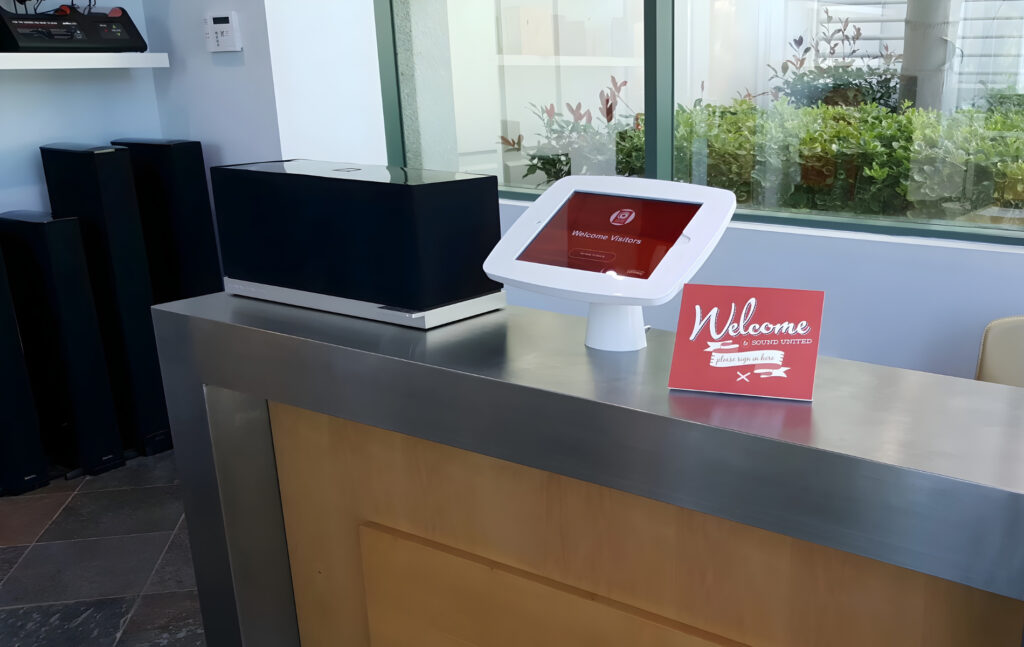
Key features: Greetly includes touchless visitor registration through QR codes and mobile check-in, customizable sign-in flows, digital NDA or document signing, visitor photo capture, badge printing, and automated host notifications through email, SMS, Slack, or Teams.
Device support: Greetly is mainly designed for tablet-based check-in kiosks, most commonly using iPads at reception. Visitors can also check in using their phones through QR codes, which supports contactless sign-in and helps reduce lines at the front desk.
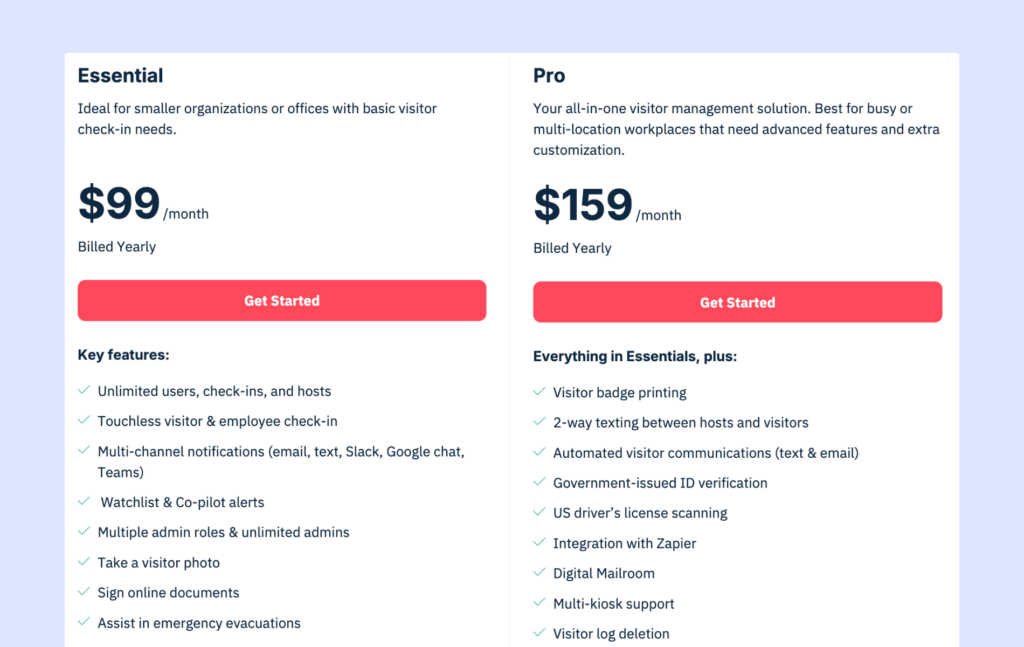
Pricing: Greetly offers two main plans with straightforward pricing. The Essential plan costs $99 per month when billed annually, while the Pro plan costs $159 per month when billed annually. Both plans include unlimited users, visitor registrations, and notifications, which makes pricing predictable for many teams.
Pros: Greetly stands out for its strong branding options and flexible visitor check-in experience. Companies can customize the kiosk interface, create personalized workflows, and deliver a polished front-desk experience. Pricing is also fairly transparent, and onboarding support is generally well rated by customers.
Cons: It isn’t built for heavy-duty enterprise security. It doesn’t go as far as some of Greetly’s competitors when it comes to integrations with turnstiles, background checks, or advanced compliance needs. Another limitation is hardware: the kiosk app runs only on iPads, which may not suit every office. Its integration ecosystem is also smaller than some larger platforms.
Best for: Businesses that want a highly branded front-desk experience with modern, touchless check-ins. It works well for companies that care about visitor experience and customization but do not need a full workplace management platform.
Visitly alternatives comparison table
Here’s a side-by-side comparison to help you quickly evaluate which Visitly alternative is the best fit for your facility:
Tool | Starting price | Devices | Key differentiator | G2 rating |
|---|---|---|---|---|
Visitly | $49/location/mo | iPad only | Built-in facial recognition | 4.4/5 |
Archie | $109/location/mo | iPad + Android | VMS + desk & room booking | 4.9/5 |
Envoy | ~$362/location/mo | iPad | Deep integrations | 4.7/5 |
SwipedOn | $630/site/year | iPad | Fast setup | 4.8/5 |
Eptura Visitor | Custom quote | iPad | GDPR, HIPAA, ISO compliance | 4.6/5 |
Greetly | $99/mo | iPad | Branding & customization | 4.8/5 |
How to choose the right Visitly alternative
The best Visitly alternative depends on what your business actually needs. Some teams want a simple sign-in tool. Others need stronger security, better branding, or a platform that does more than visitor management.
Here’s a simple way to narrow it down:
Choose Archie if you want one platform for visitors, desks, and meeting rooms. It’s a strong fit for companies that want everything connected instead of managing several separate tools.
Choose Envoy if you’re a larger enterprise with more complex integration and security needs. It makes the most sense for organizations that already use a broader workplace or security stack and have the budget for a more advanced platform.
Choose SwipedOn if your top priority is simplicity. It’s a good choice for small businesses that want something easy to set up, easy to learn, and focused on the basics. One thing to keep in mind is that SwipedOn is now part of a larger platform alongside Sign In App and The Receptionist. Pricing and positioning are starting to align across these tools, so it is less of a “budget-only” option than it used to be. If you are choosing it today, it is worth thinking about how it fits your needs now and how comfortable you are with it evolving as part of a broader system over time.
Choose Eptura Visitor if compliance and security matter most. It’s better suited to organizations with stricter requirements around audits, approvals, and regulated environments.
Choose Greetly if you care most about branding and visitor experience. It gives you more control over how the check-in process looks and feels, which can be a big plus for front desks where first impressions matter.
Before you decide, it’s worth trying a few options for yourself. Free trials can help you see what the actual visitor experience, admin setup, and day-to-day workflow look like in practice.
As you compare tools, focus on the things that will matter most for your business:
- visitor volume
- number of locations
- integrations
- access control needs
- budget
💡 For more help comparing costs, see our guide on visitor management system pricing.
Bottom line
Visitly is a solid visitor management tool, but it will not be the right fit for every business. As teams grow, open more locations, or need more flexibility, many start looking at other options.
The best alternative depends on what matters most to you. Some businesses need support for more than one device type. Others want better integrations, stronger security tools, or a platform that also includes desk booking and room scheduling.
Archie stands out if you want a more complete workplace platform. It combines visitor management, desk booking, and room scheduling in one place, works on both iPad and Android, and includes Slack and Teams integrations in the Pro plan. It is also gaining strong recognition in the market. In 2026, Archie was featured in G2’s Best Office Management Software Products list, ranked #1 on Capterra’s 2026 Visitor Management Shortlist, and received a SoftwareReviews Emotional Footprint Award, all based largely on verified reviews and user feedback.
Want to see if it’s the right fit? Try Archie for free.
Visitly alternatives FAQs
The top five Visitly alternatives are Archie (best overall for growing workplaces with unique strengths in combining visitor management with desk booking), Envoy Visitors (best for enterprise integrations and security), SwipedOn (best for small businesses and fast setup), Eptura Visitor (best for high security sites), and Greetly (best for branding and touchless solutions).
Visitly starts at $49 per location per month (100 visits). Comparatively, Archie starts at $109 per office with unlimited visitors, SwipedOn costs around $55 per location, Envoy Visitors offers a free plan up to $329+ per location, Greetly starts at $99 per month, and Eptura Visitor uses custom pricing.
No, Visitly requires an iPad running iOS 16 or later. There’s no Android or web kiosk support for the registration process. Visitly alternatives like Archie and SwipedOn support both iPad and Android mobile devices.
- Key sources